Steps in this chapter (28)
Hotel front office runs a hotel, guest house, serviced apartments or a group of hotels: rooms and rates, reservations and groups, check-in and check-out, the guest's folio (their running bill) with charges from the restaurant and bar, companies' and travel agents' accounts, housekeeping and maintenance, and the night audit that charges each night and posts the day to the books with the service charge, VAT and the state's consumption tax.
It is a paid add-on, available on any plan. Everything it posts is an ordinary journal, receipt, refund, invoice or bill, so the ledger, the bank, aged receivables, the VAT return and the other reports see it all.
In the illustration Savannah Harvest opens Kudenda Gardens Hotel in Kaduna, run by a fourth company in its subscription, Savannah Harvest Hospitality Ltd. Chukwudi Okeke (administrator) sets the hotel up on Tuesday 1 December 2026. Zainab Bello (front desk) books and checks guests in and out, Ibrahim Danladi (hotel manager) runs the night audit and the money, Ruth Audu (housekeeper) keeps the rooms, and Peter Okafor (cashier) charges the pool bar's bills to rooms, to Monday 7 December.
How the hotel front office works
| Topic | What happens |
|---|---|
| Where | Business → Hotel, with tabs for the Front desk, Reservations, Groups, Folios, Housekeeping, Maintenance, the Night audit, Agents' commission, Set-up and Settings. Reports → Hotel: occupancy, the forecast, guest lists, the guest ledger, the city ledger, revenue by department, taxes and levies, the night audit report, agents' commission, cancellations and no-shows, housekeeping and guest history. |
| Add-on | Hotel front office is a paid add-on on any plan, added by the subscription owner on troveuniverse.com. Without it the area and its reports are hidden. One company can run several hotels; each has its own rooms, rates, business date and night audit, and its postings carry a Hotel tracking option so its profit and loss can be run on its own. |
| Who | A new area, Hotel front office, in each role. View: see the hotel, change rooms' housekeeping status and report faults. Prepare (the front desk): book, check in and out, post charges, take money, move charges between a stay's folios. Approve (a supervisor): rates and discounts by hand, overbooking, upgrades, corrections, refunds, no-shows, waiving fees, the city ledger, the night audit and agents' commission. Full: the set-up. New ready-made roles: Hotel manager (Approve), Front desk (Prepare) and Housekeeper (View); bookkeepers can view the hotel. |
| The hotel's day | Each hotel has a business date. Arrivals are checked in and charges posted on it; the night audit closes it: it charges each in-house room for the night, posts the day's charges to the books in one journal, records the day's figures and moves the hotel to the next day. It can run by itself each night from a set hour. |
| Folios | A folio is a guest's running bill. Charges (room nights, meals, laundry, the bar) are added with the service charge, VAT and levies the hotel charges; money taken is a receipt in Banking. Before arrival money is a deposit (Guest advance deposits, a liability); at check-in it moves to the guest ledger (an asset: what guests owe). A company or a group can have a folio of its own; when the guest leaves, what the company owes goes to its account as an invoice — the city ledger. |
| Taxes | Rates are quoted before or including the taxes. The service charge is a percentage of the charge, with VAT on it; VAT is at each charge's code; a levy (such as a state consumption tax) is on the charge and service, and a second levy on the charge. Each is posted to its own account. A company not registered for VAT charges none. |
| Rates | Each room type has a rack rate; rate plans set their own prices or a percentage off, meals included (posted as food income, not room revenue), a minimum stay, a company or agent they are for, cancellation terms and a fee per stay. Seasons raise or lower rates for their dates. |
| Checks | The month-end checklist checks that each hotel's night audit has run to the month end. Book health flags an audit behind, charges not posted, guests kept on past their departure, folios left owing after the guest left, rooms still blocked after their repair date, and the guest ledger account out of step with the folios. |
33.2 Set up the hotel
Why
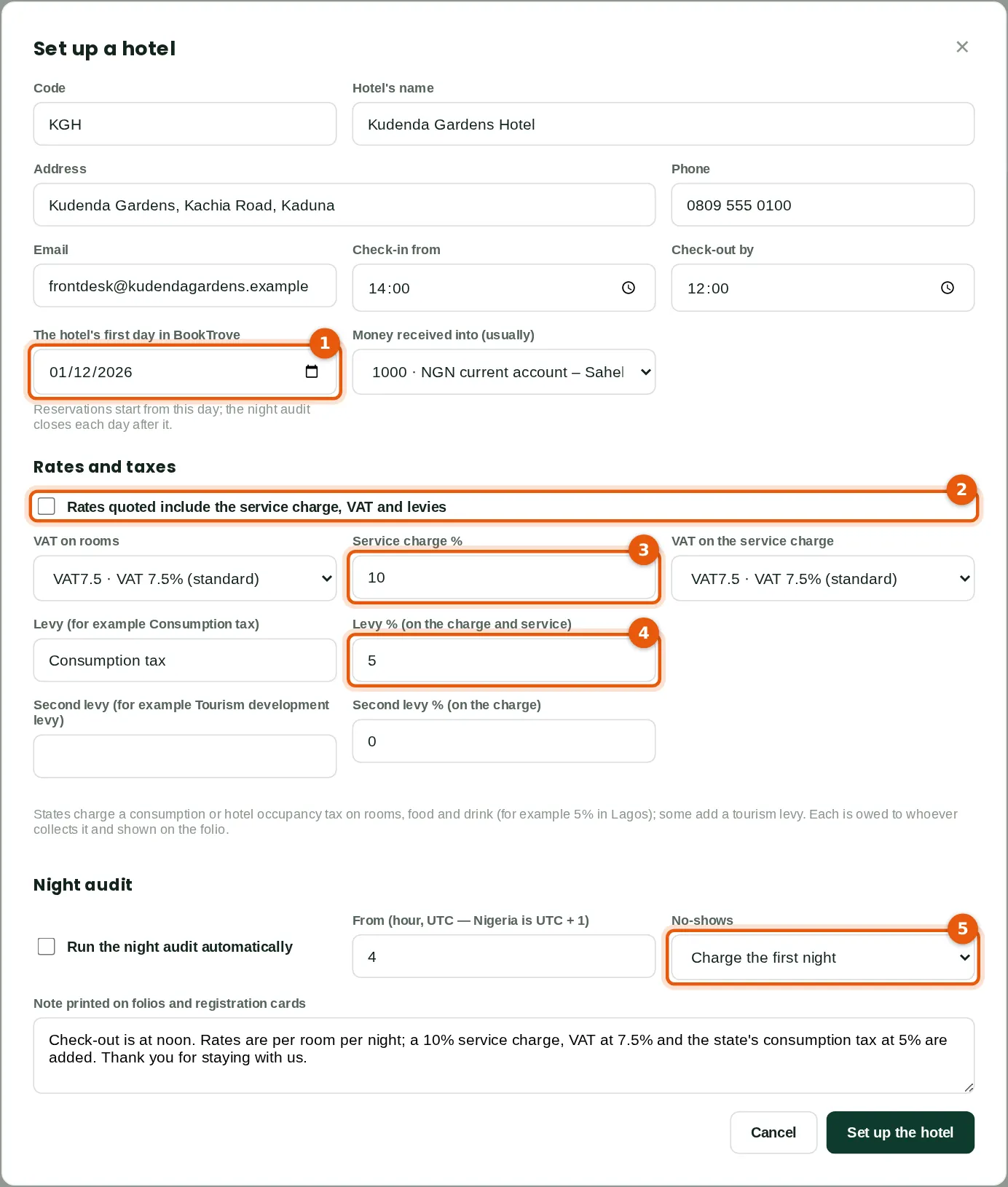
Chukwudi sets up Kudenda Gardens Hotel (KGH) with its first day in BookTrove, 1 December 2026 (1): reservations start from it, and each night's audit closes a day. Its rates are quoted before the taxes (2): a 10% service charge with VAT on it (3), VAT at 7.5% on rooms, and the state's consumption tax at 5% (4) on the charge and the service charge. A guest who does not arrive is charged the first night (5). The note at the foot is printed on folios and registration cards. Money is usually received into the Sahel Commercial Bank account.
Who
Owner or administrator (Hotel front office at Full level). Chukwudi Okeke.
What to do
- Open Hotel and click Set up your hotel (Set-up → Another hotel for a second one). Type the code, name and contact details, the first day (1), how rates are quoted (2), the taxes (3, 4), the night audit and no-show settings (5), and click Set up the hotel.
33.3 A rate plan
Why
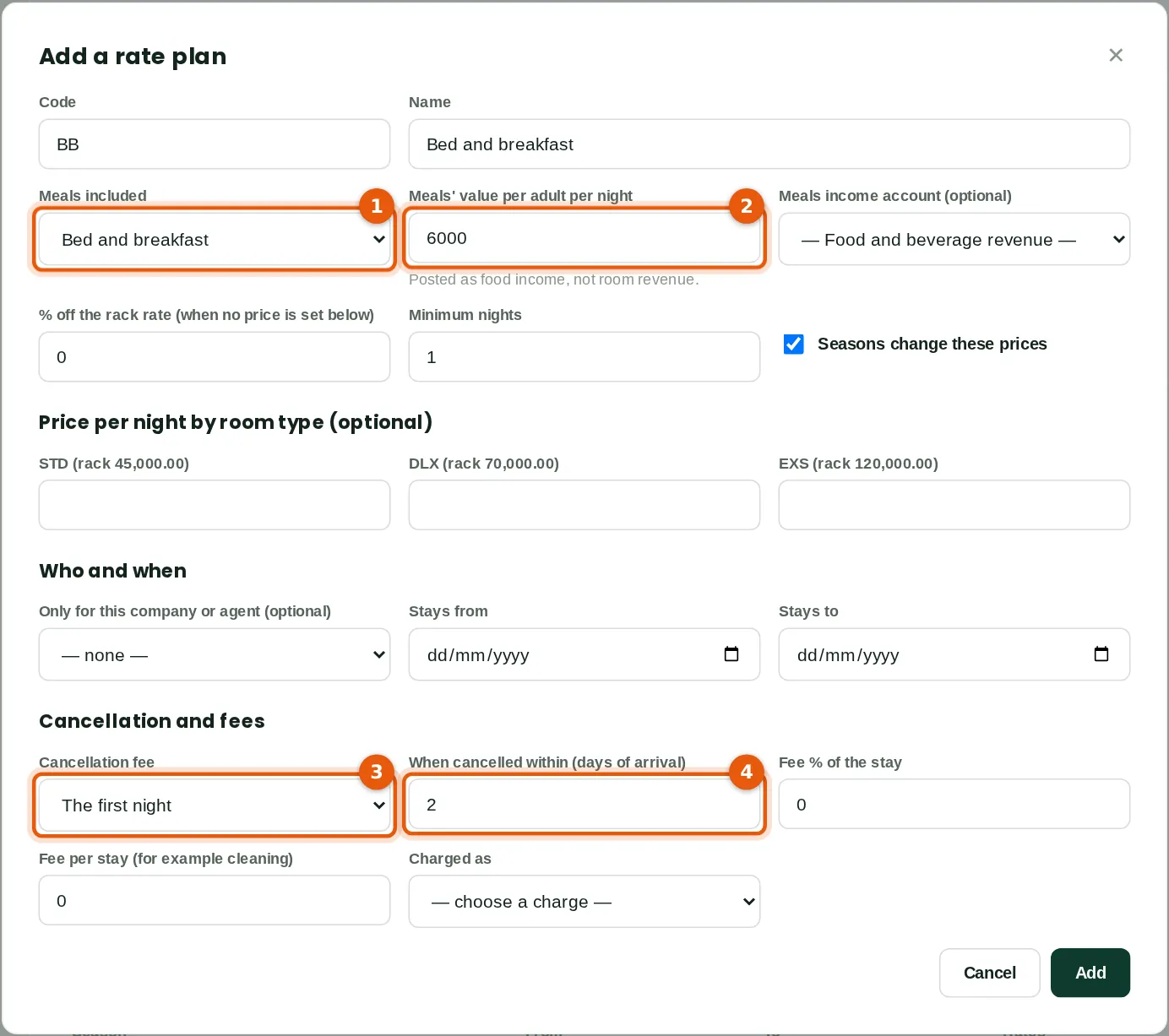
Bed and breakfast (BB) includes breakfast (1) worth ₦6,000 per adult a night (2): that part of each night is posted as food income, not room revenue. Cancelled within 2 days of arrival (4) it costs the first night (3). Prices can be set per room type, or as a percentage off the rack rate; seasons change them unless switched off. Chukwudi also added the Arewa Telecoms corporate rate (₦40,000 Standard, ₦62,000 Deluxe, breakfast included), only for Arewa Telecoms' bookings.
Who
Owner or administrator.
What to do
- Open Set-up and click Add a rate plan. Type the code and name, the meals (1, 2), any prices, the company or agent it is for, the cancellation terms (3, 4) and any fee per stay, and click Add.
33.4 Rooms, rates and charges
Why
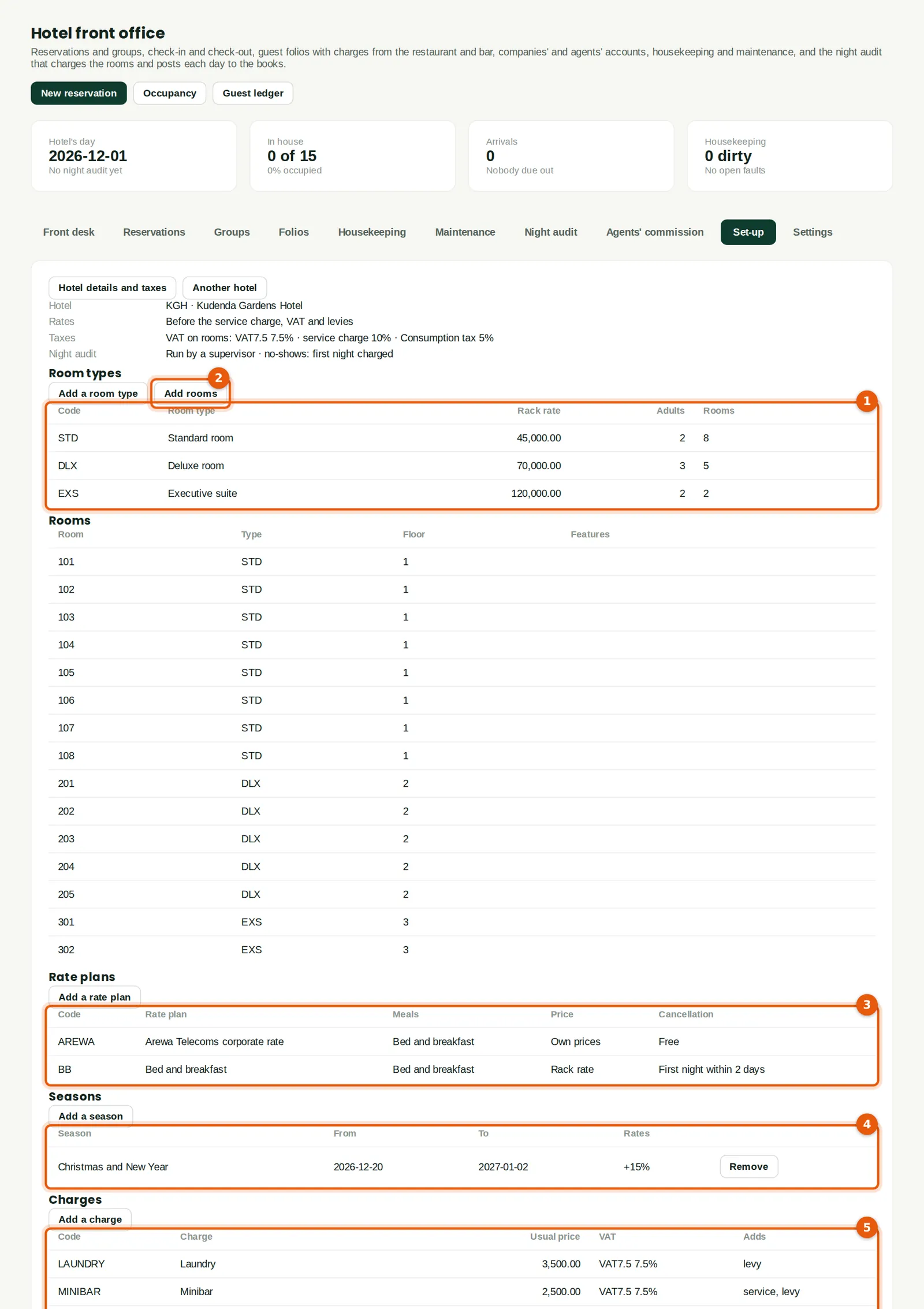
The room types (1): Standard rooms at ₦45,000 a night, Deluxe rooms at ₦70,000 and Executive suites at ₦120,000, with the guests each takes. Add rooms (2) adds rooms in bulk: 101-108 for the Standard rooms, 201-205 and 301, 302 — 15 rooms. Then the rate plans (3) and the seasons (4): Christmas and New Year, rates up 15% from 20 December to 2 January. The charges guests are billed for (5): laundry ₦3,500, minibar ₦2,500 (with the service charge) and airport pick-up ₦15,000 (no levy), each with its VAT code.
Who
Owner or administrator.
What to do
- Open Set-up. Click Add a room type, Add rooms, Add a rate plan, Add a season or Add a charge; click a row to change it.
33.5 The hotel's accounts
Why
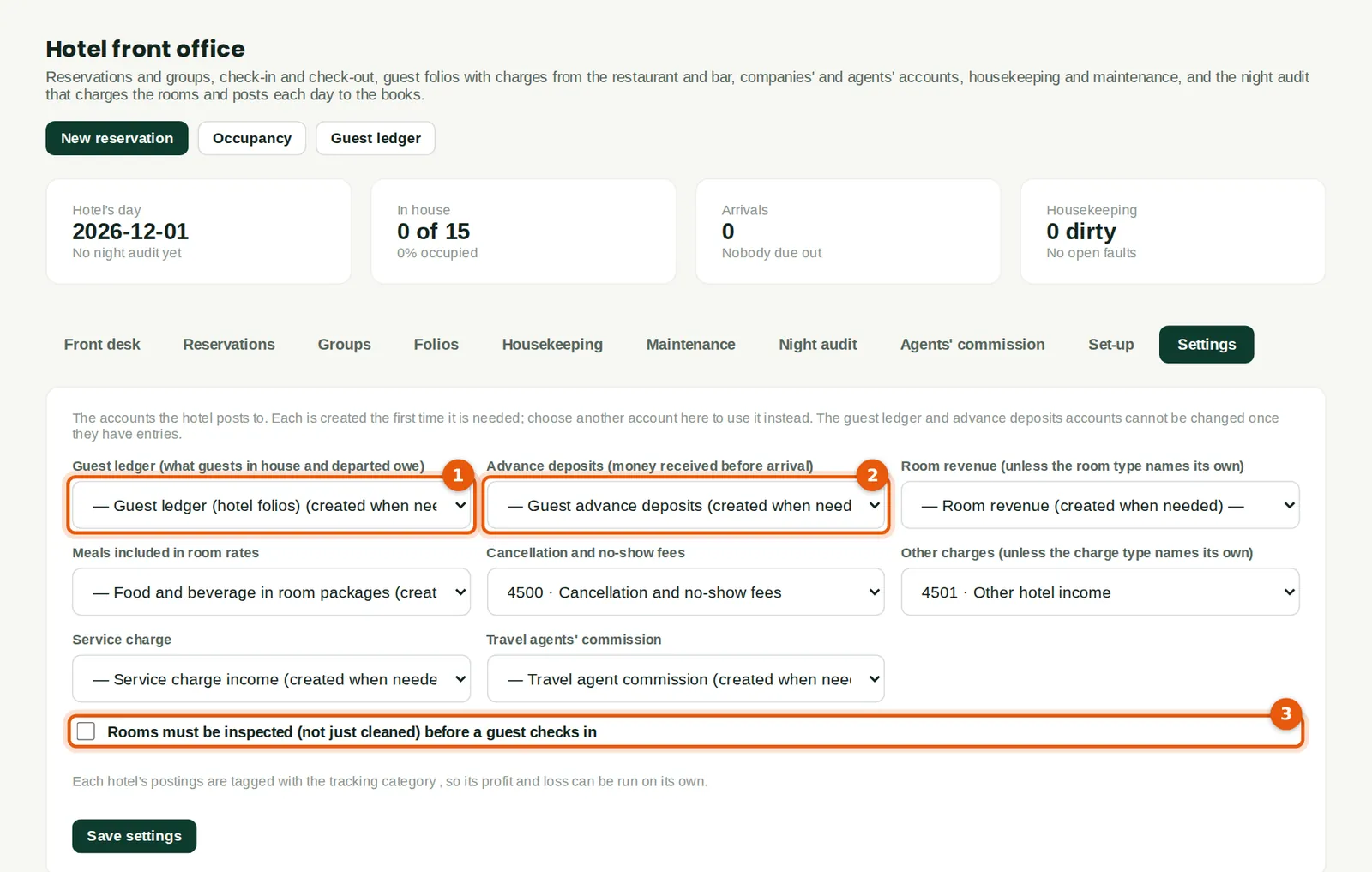
The accounts the hotel posts to are created the first time each is needed: the Guest ledger (1130), Guest advance deposits (2450), Room revenue, Food and beverage in room packages, Other hotel income, Cancellation and no-show fees, Service charge income and Travel agent commission. Another account of the right type can be chosen instead (1, 2); the guest ledger and deposits accounts are kept by the folios and cannot be posted to by hand or changed once used. Rooms can be required to be inspected, not just cleaned, before a guest checks in (3).
Who
Owner or administrator.
What to do
- Open Settings. Choose any account of your own, tick whether rooms must be inspected (3), and click Save settings.
33.6 A reservation
Why
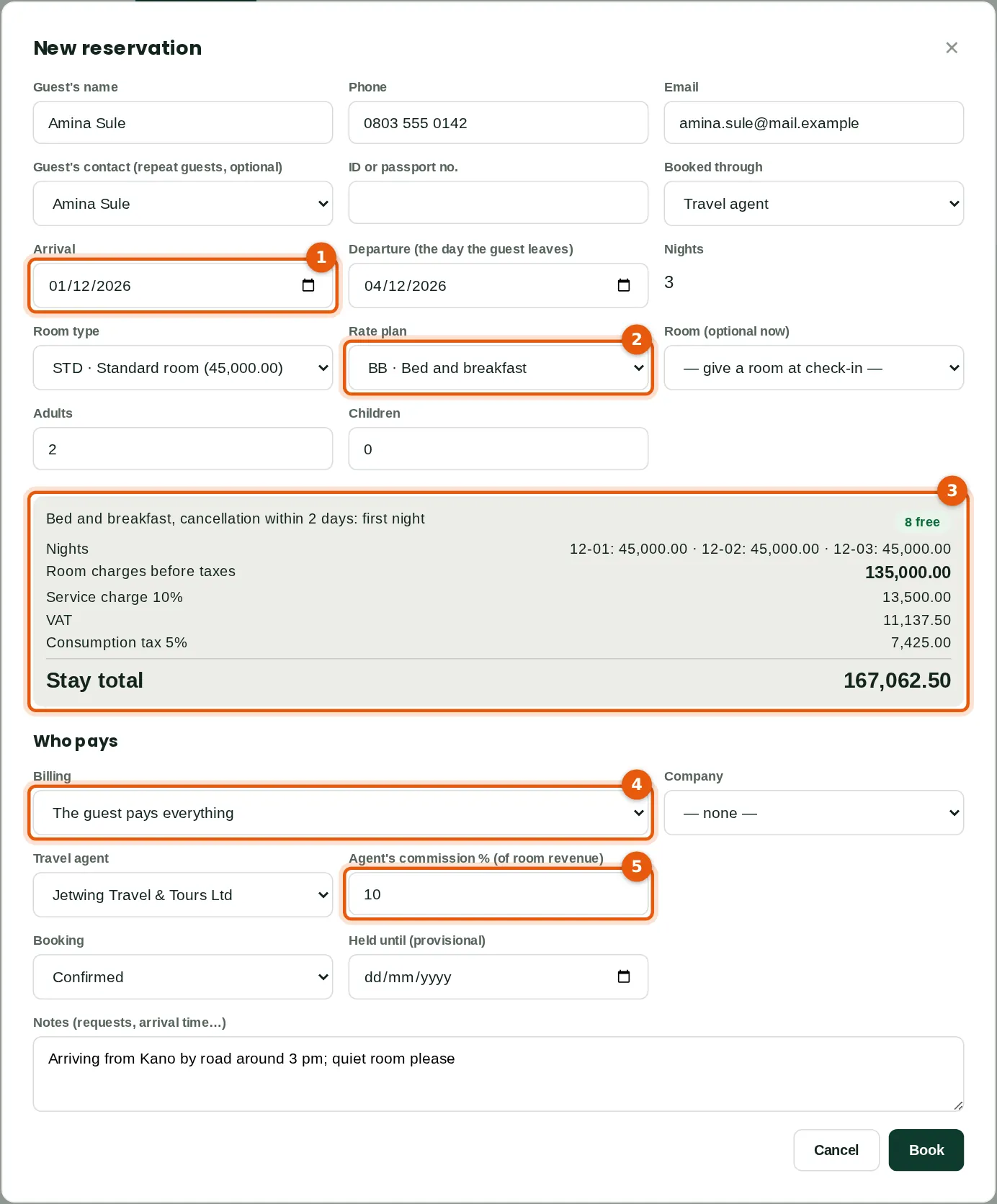
Amina Sule is booked by Jetwing Travel & Tours for three nights from 1 December (1) in a Standard room on bed and breakfast (2), for two adults. The price is worked out as the form is filled (3): 3 nights at ₦45,000, ₦135,000; service charge ₦13,500; VAT ₦11,137.50; consumption tax ₦7,425; ₦167,062.50 in all, with 8 Standard rooms free. The guest pays everything (4); Jetwing's commission is 10% of the room revenue (5). A booking can be provisional, held until an option date. A rate by hand, a discount or an overbooking needs a supervisor.
Who
Front desk (Hotel front office at Prepare level). Zainab Bello.
What to do
- Click New reservation. Type the guest's name and contact, the dates (1), the room type and rate plan (2) and the guests, check the price (3), choose who pays (4) and any agent (5), and click Book.
33.7 A deposit
Why
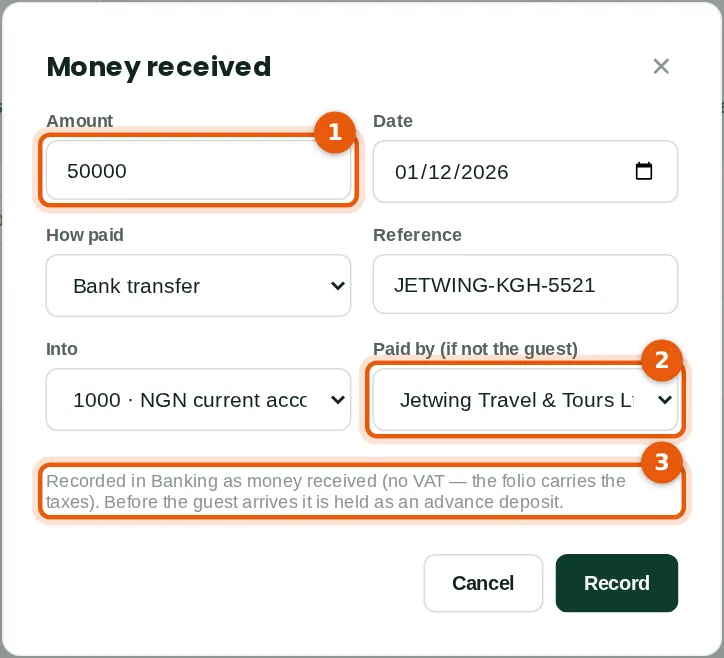
Jetwing transferred a deposit of ₦50,000 (1), paid by the agent (2). Before the guest arrives it is held as Guest advance deposits (3), a liability: receipt RCV-00001. At check-in it moves to the guest ledger. A deposit can be paid back from the folio (a supervisor).
Who
Front desk.
What to do
- Open the reservation's folio and click Take a deposit. Type the amount (1), the date, how it was paid and the reference, choose the bank account and who paid (2), and click Record.
33.8 Rooms free
Why
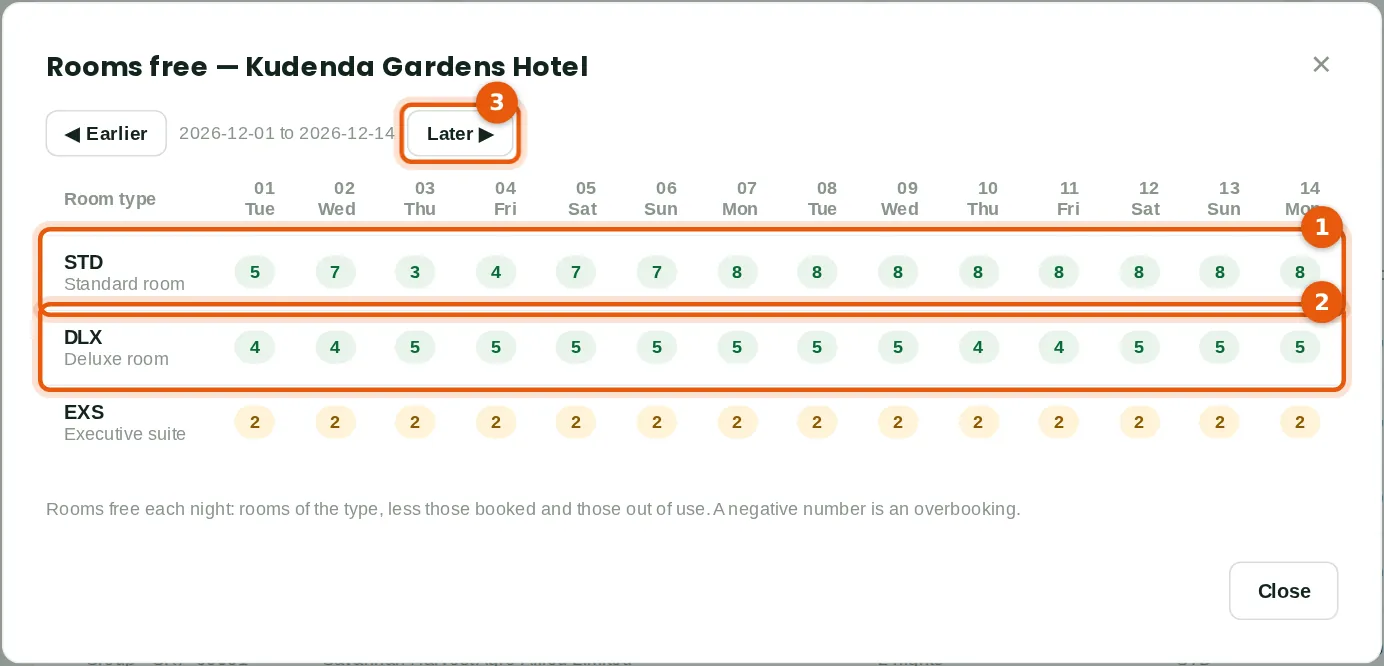
Rooms free each night by room type (1, 2): the rooms of the type, less those booked and those out of use. Zainab also booked Engr. Kunle Adeyemi of Arewa Telecoms for two nights in a Deluxe room at the corporate rate, the company paying the room; Ngozi Okeke and Yakubu Garba for one night; Blessing Eze provisionally for 10 to 12 December; Femi Adebayo on bed and breakfast for 5 to 7 December with a ₦30,000 deposit; and Savannah Harvest's distributors' meeting, GRP-00001, four Standard rooms for 3 to 5 December. Earlier and Later (3) move by two weeks.
Who
Everyone with Hotel front office.
What to do
- Open Reservations and click Availability.
33.9 Check-in
Why
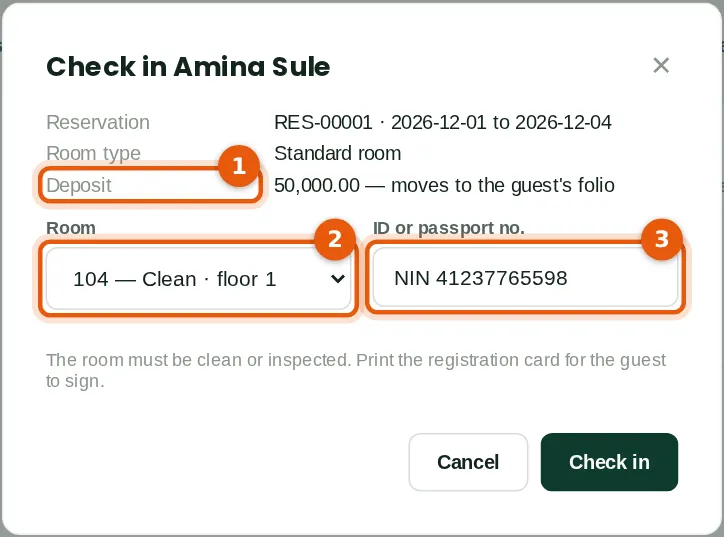
Amina arrives at 3 pm. Her deposit (1) moves to her folio. Zainab gives her room 104 (2) — only rooms of the type that are clean and free are offered — and types her ID (3). A room of another type (an upgrade) needs a supervisor, and only if one of that type is free. The registration card opens to print and sign. Kunle went to room 201 and Ngozi to room 102.
Who
Front desk.
What to do
- Open the Front desk and click Check in beside the arrival. Choose the room (2), type the ID (3) and click Check in.
33.10 The registration card
Why
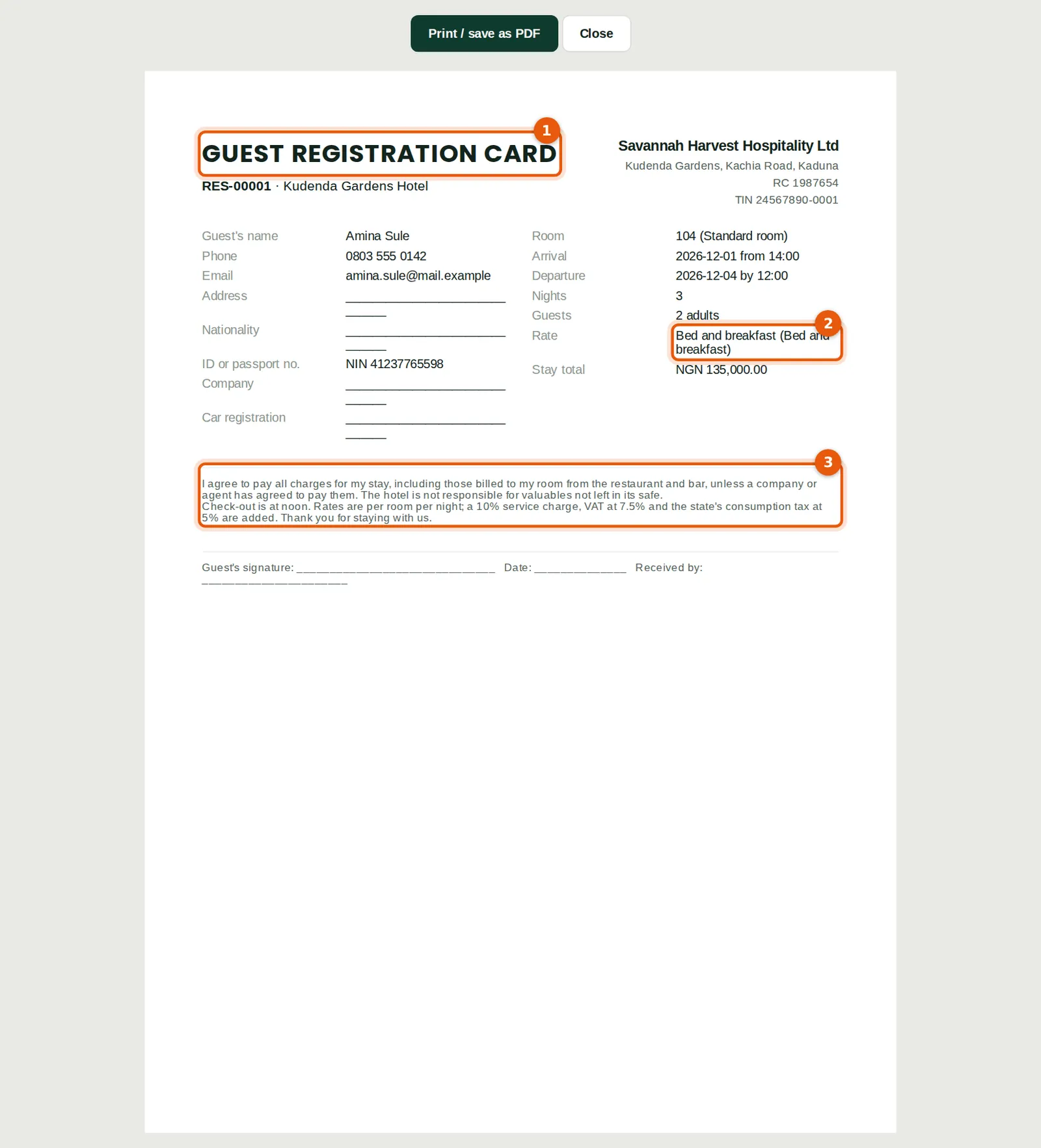
The card (1) has the hotel's details, the guest's details to complete, the room and dates, the rate plan (2) and the terms the guest signs (3), including paying for charges billed to the room. Print it again from the reservation.
Who
Front desk.
What to do
- The card opens at check-in. Open a reservation and click Registration card to print it again.
33.11 The front desk
Why
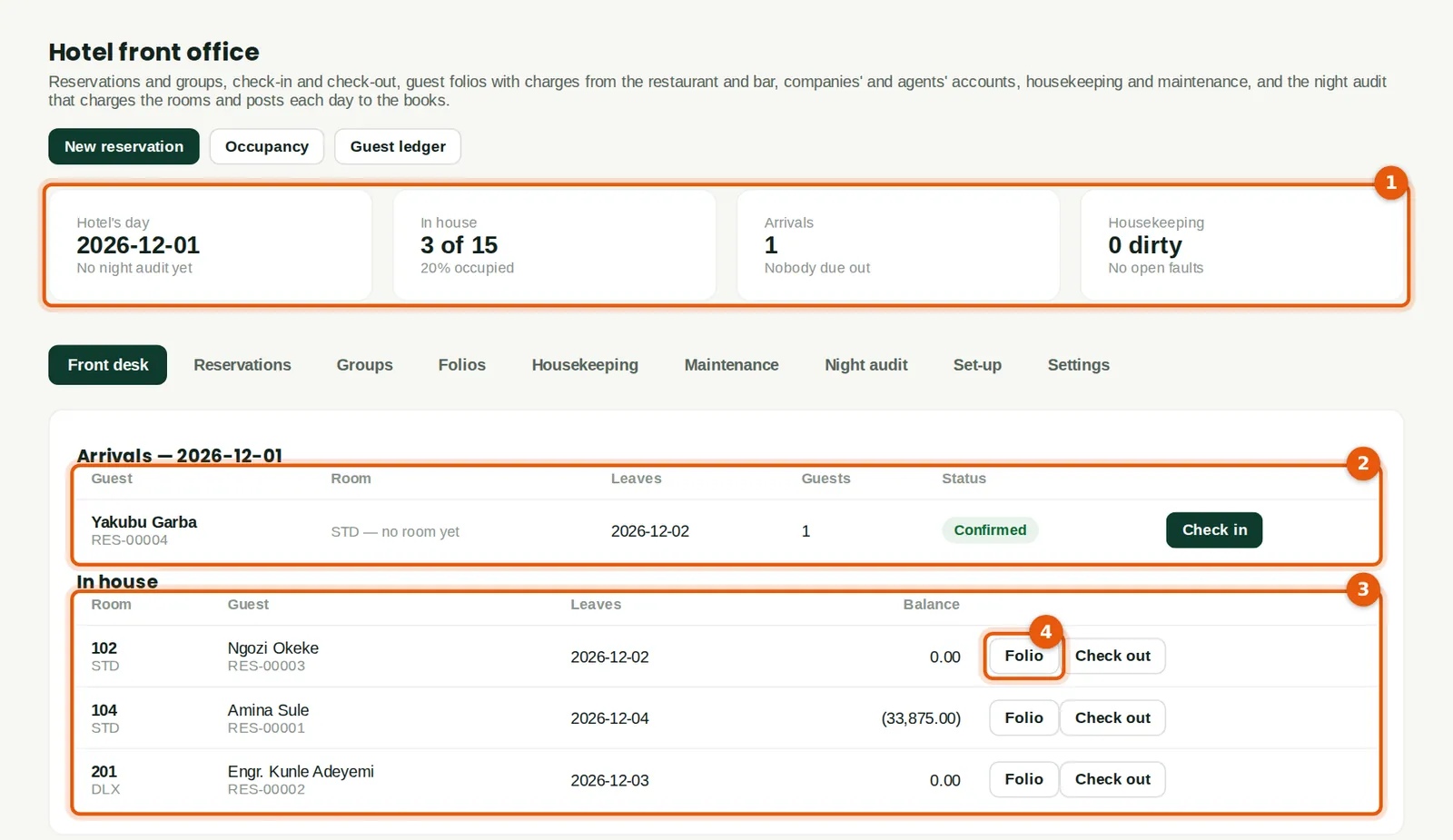
The cards (1) show the hotel's day, the guests in house and occupancy, the arrivals still to come and the rooms to clean. Arrivals (2): Yakubu Garba has not come. In house (3): each room's guest, departure and balance; Folio (4) opens the bill. Amina's airport pick-up (₦16,125 with VAT) was posted to her folio when she arrived.
Who
Everyone with Hotel front office.
What to do
- Open the Front desk. Click a row to open the reservation; Check in, Folio and Check out are beside each guest.
33.12 A bill charged to a room
Why
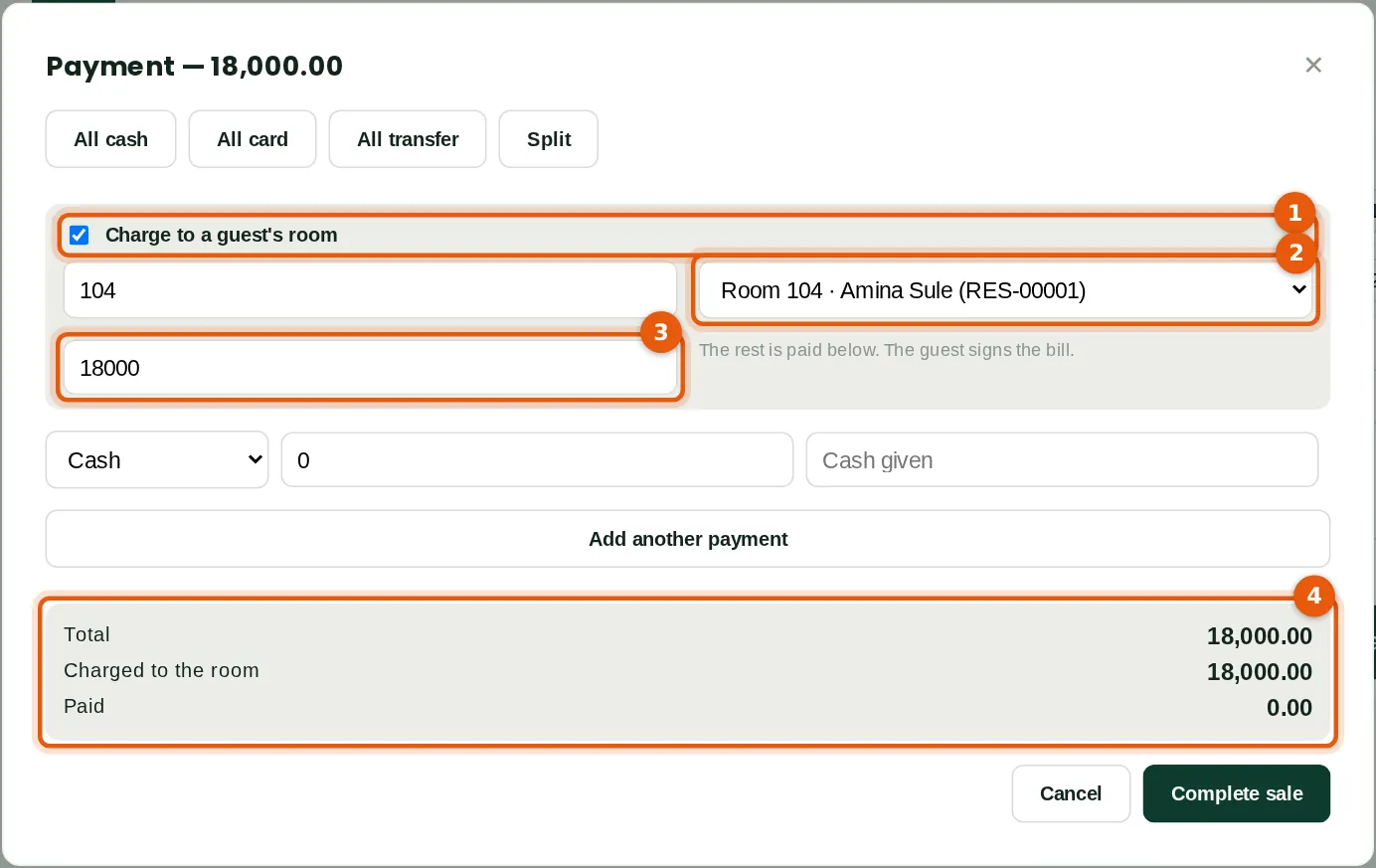
The Pool bar till belongs to the hotel (Point of sale → Tills → Charges bills to rooms at). Amina has grilled fish and chips and two chapman, ₦18,000. Peter ticks Charge to a guest's room (1), finds room 104 (2) and charges all of it (3); part could be paid in cash and part charged. The summary (4) shows what goes to the room. Only guests in house can be charged, and only with the till online.
Who
Cashier at a till that belongs to the hotel. Peter Okafor.
What to do
- Click Pay. Tick Charge to a guest's room (1), type the room number or name and choose the guest (2), type the amount to charge (3), take any rest as usual and click Complete sale.
33.13 The signed bill
Why
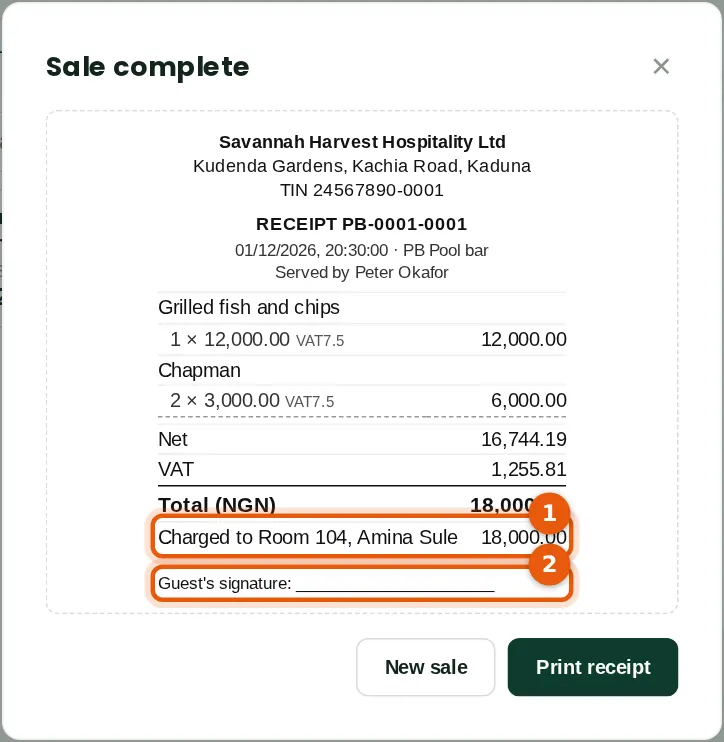
The receipt shows the amount charged to the room and the guest (1), with a line for the guest's signature (2). The charge is on Amina's folio at once; it reaches the books when the bar's session is closed (Dr Guest ledger instead of cash). Voiding the sale takes it off the folio.
Who
Cashier.
What to do
- Print the receipt and have the guest sign it.
33.14 A charge on a folio
Why
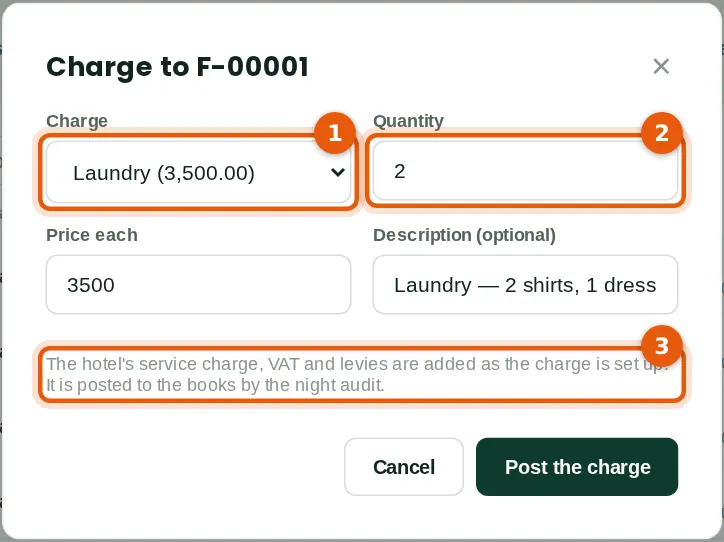
Two shirts and a dress from the laundry: the charge (1), the quantity (2) and the description. Laundry carries VAT and the consumption tax but no service charge: ₦7,000 + ₦525 + ₦350 = ₦7,875. Charges are posted to the books by the night audit (3). A charge not yet posted can be voided (a fee by a supervisor); one posted is corrected by a supervisor.
Who
Front desk.
What to do
- Open the folio and click Post a charge. Choose the charge (1), type the quantity (2), any other price and the description, and click Post the charge.
33.15 The night audit
Why
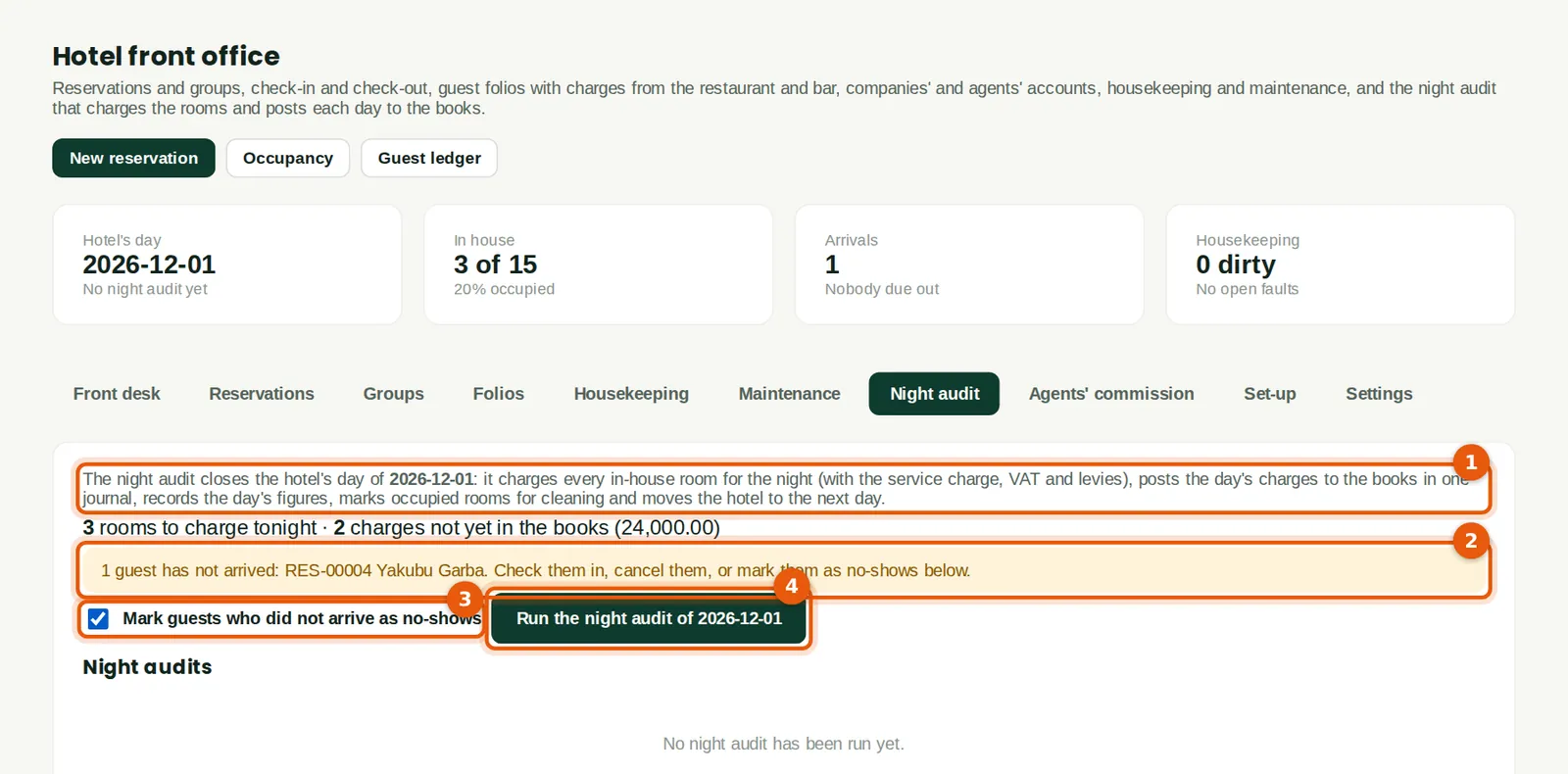
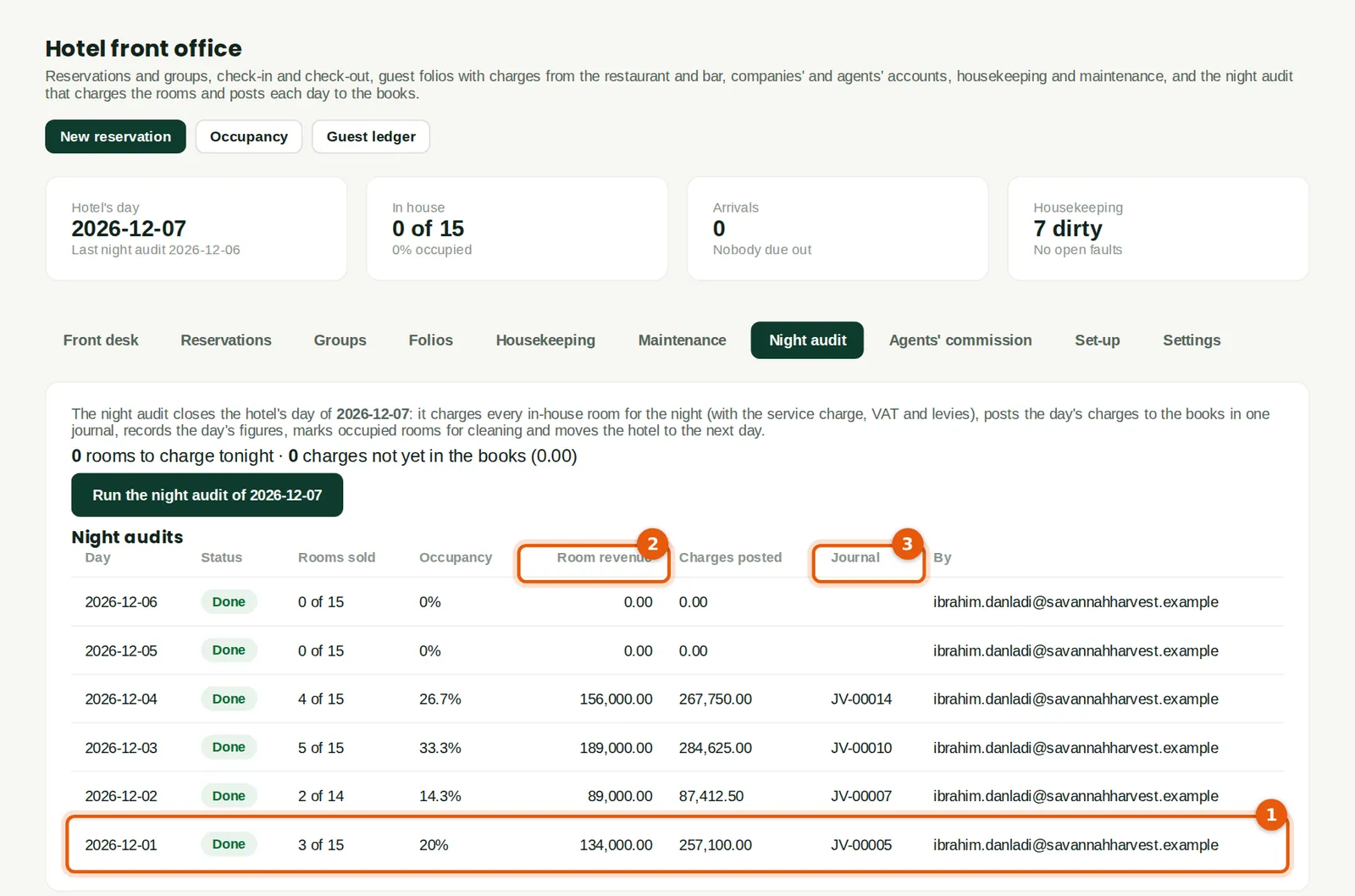
The audit closes the hotel's day of 1 December (1). Yakubu Garba has not arrived (2): Ibrahim ticks Mark guests who did not arrive as no-shows (3) — he is charged the first night, ₦45,000 — and runs it (4). It charged rooms 104, 201 and 102 for the night, posted the day's charges in one journal, JV-00005, ₦257,100 (Dr Guest ledger; Cr room revenue, food in packages, other income, fees, service charge, VAT output and consumption tax payable), recorded the day's figures and moved the hotel to 2 December. Guests due out can be kept for another night the same way.
Who
Hotel manager (Approve level). Ibrahim Danladi.
What to do
- Open Night audit. Deal with the arrivals and departures listed, or tick the boxes (3), and click Run the night audit (4). A hotel can run it automatically each night (Set-up → Hotel details).
33.16 Housekeeping on a phone
Why
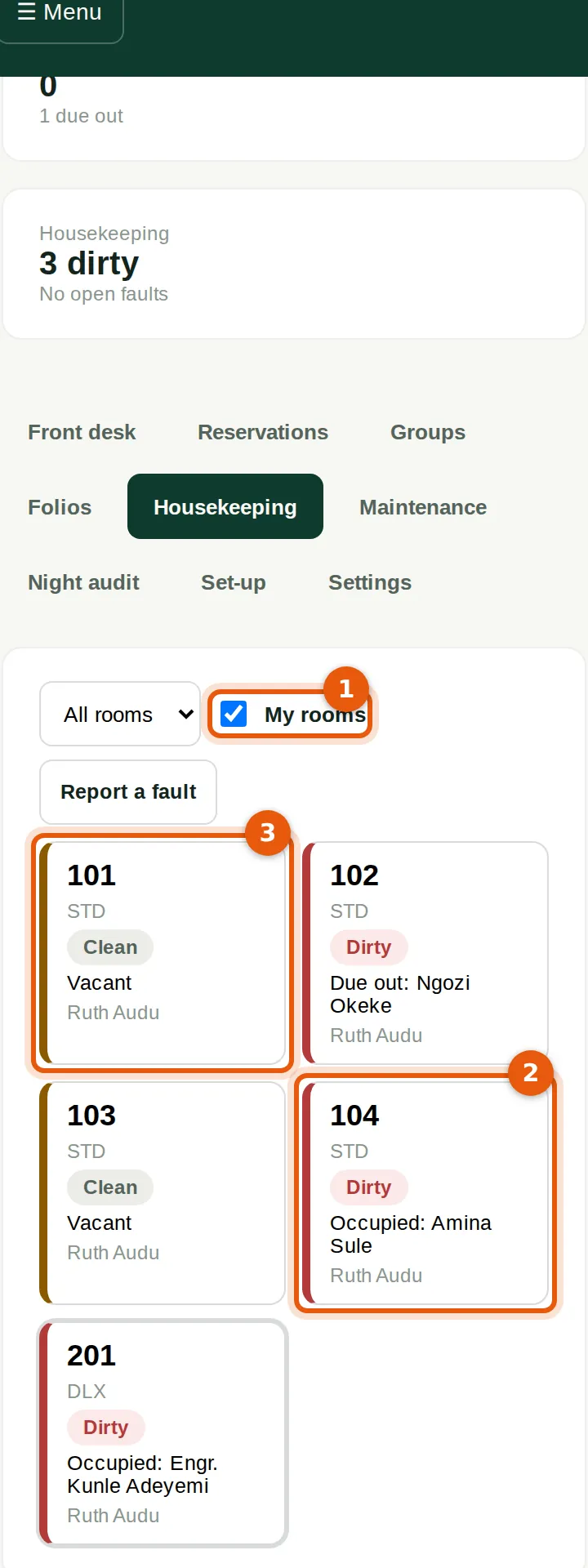
Zainab gave Ruth five rooms; My rooms (1) shows them. Each card shows the room's status — dirty, clean or inspected — and who is in it: room 104 (2) is occupied and dirty after the night audit, room 101 (3) vacant. Ibrahim reviewed Yakubu's no-show the same morning: the booking had no card guarantee, so he took the charge back as a correction.
Who
Housekeeper (View level). Ruth Audu.
What to do
- Open Hotel on the phone: housekeepers start on Housekeeping. Tick My rooms (1) and tap a room.
33.17 A room's status
Why
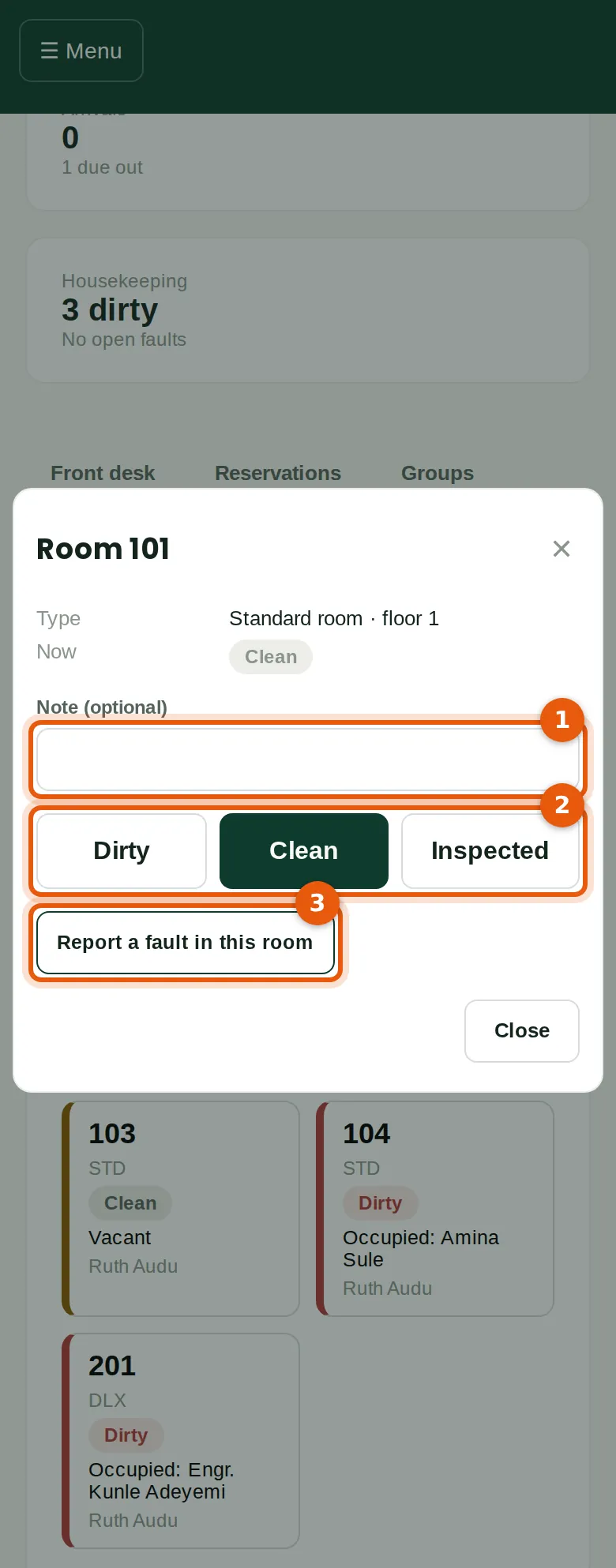
Ruth adds a note if she wishes (1) and taps Clean (2) when the room is done. Inspected needs the front desk or a supervisor. Report a fault in this room (3) sends a fault to maintenance.
Who
Housekeeper.
What to do
- Tap the room, then Dirty, Clean or Inspected (2).
33.18 A room out of order
Why
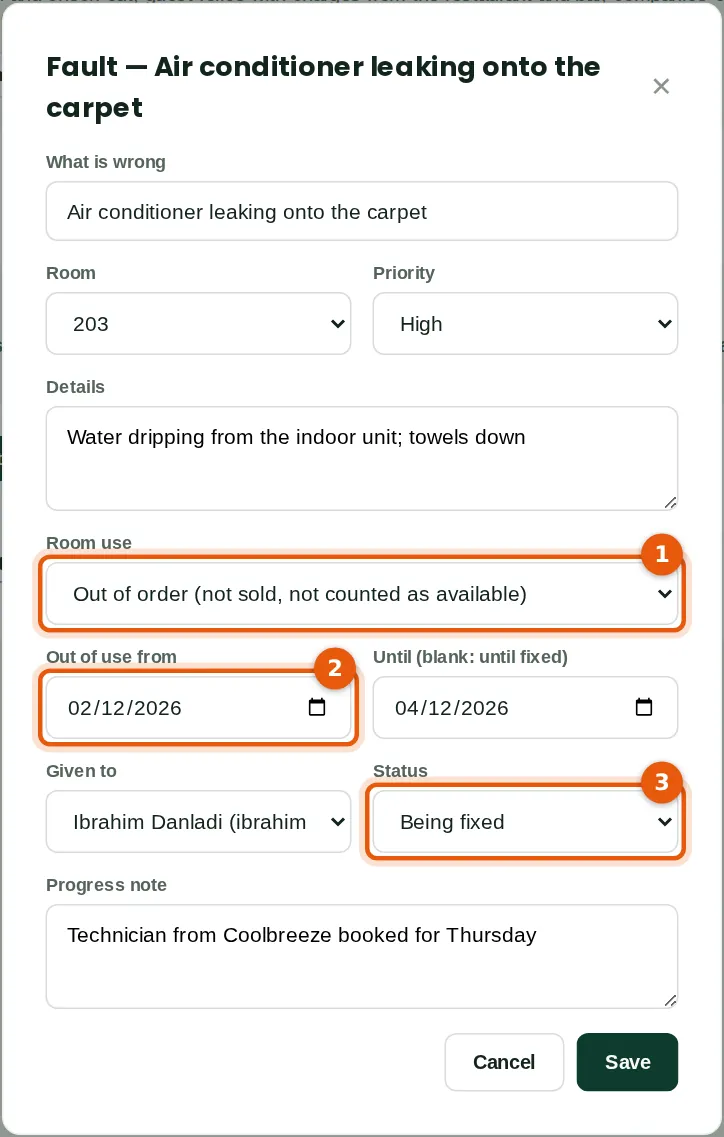
Ruth reported a leaking air conditioner in room 203. Ibrahim takes the room out of order (1) from 2 to 4 December (2) and marks the fault as being fixed (3). An out-of-order room is not sold and not counted as available; out of service means not sold but still counted. A room given to a stay cannot be taken out of use. The technician fixed it on 3 December and Ibrahim marked it done.
Who
Hotel manager (taking a room out of use needs the front desk or a supervisor).
What to do
- Open Maintenance and click the fault. Choose the room's use (1) and dates (2), who has it and the status (3), and click Save.
33.19 Check-out with a company account
Why
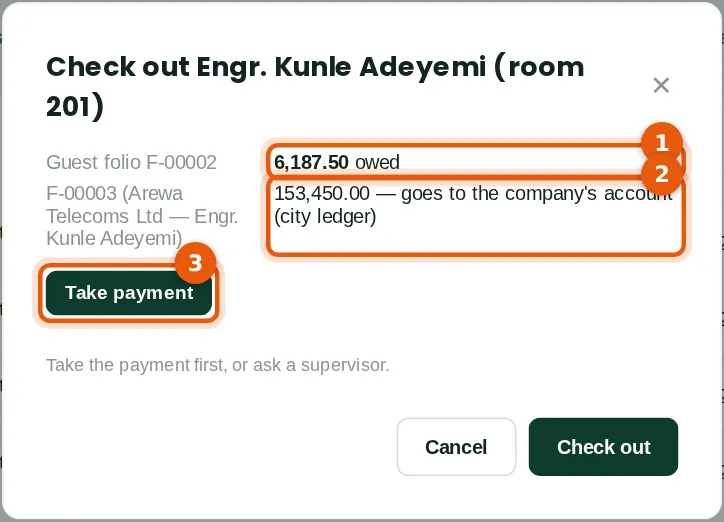
Kunle leaves after two nights. His own folio owes ₦6,187.50 (1) for the minibar; Arewa Telecoms' folio, the two nights at the corporate rate with breakfast, ₦153,450 (2), goes to the company's account as an invoice, INV-00001 (no VAT on the invoice: the folio is the tax invoice). Zainab takes his payment (3) in cash and checks him out; both folios close and room 201 is marked for cleaning. A guest who cannot pay can have their bill sent to an account, or leave owing, by a supervisor. The group arrived the same afternoon.
Who
Front desk.
What to do
- Click Check out beside the guest. Take payment (3) if anything is owed, then click Check out; the folio prints.
33.20 A group
Why
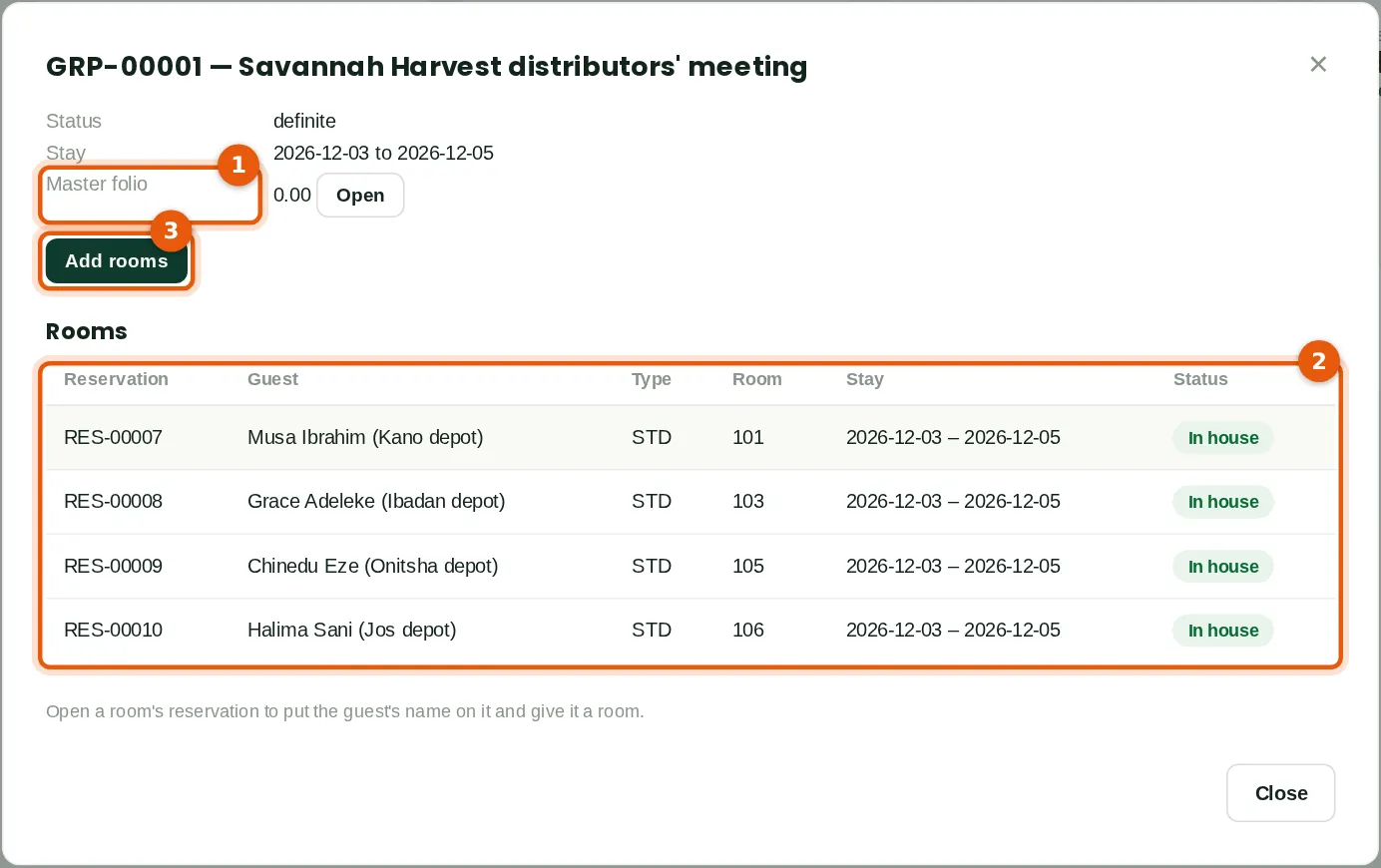
The distributors' meeting holds four Standard rooms on bed and breakfast for 3 to 5 December. The room charges go to the group's master folio (1), paid by Savannah Harvest Agro-Allied Limited; the guests pay their own extras. Zainab typed each guest's name from the rooming list and checked them in to rooms 101, 103, 105 and 106 (2). Add rooms (3) adds more; a tentative group's rooms are provisional until it is made definite. When the group left on 5 December Ibrahim sent the master folio, ₦445,500, to Savannah Harvest's account (INV-00002).
Who
Front desk.
What to do
- Open Groups and click New group, then Add rooms (3). Open each room's reservation to name the guest and check them in.
33.21 The guest's folio
Why
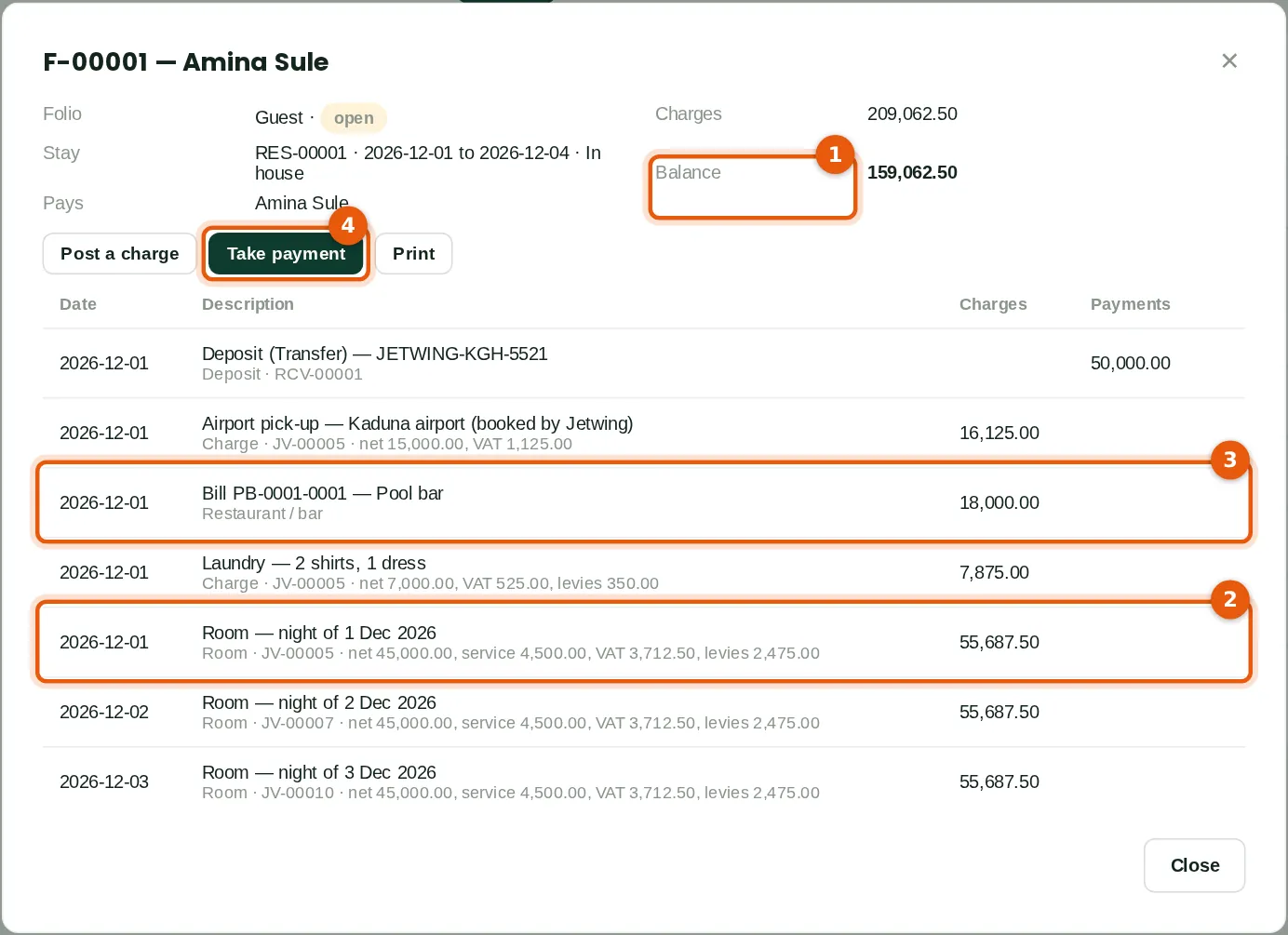
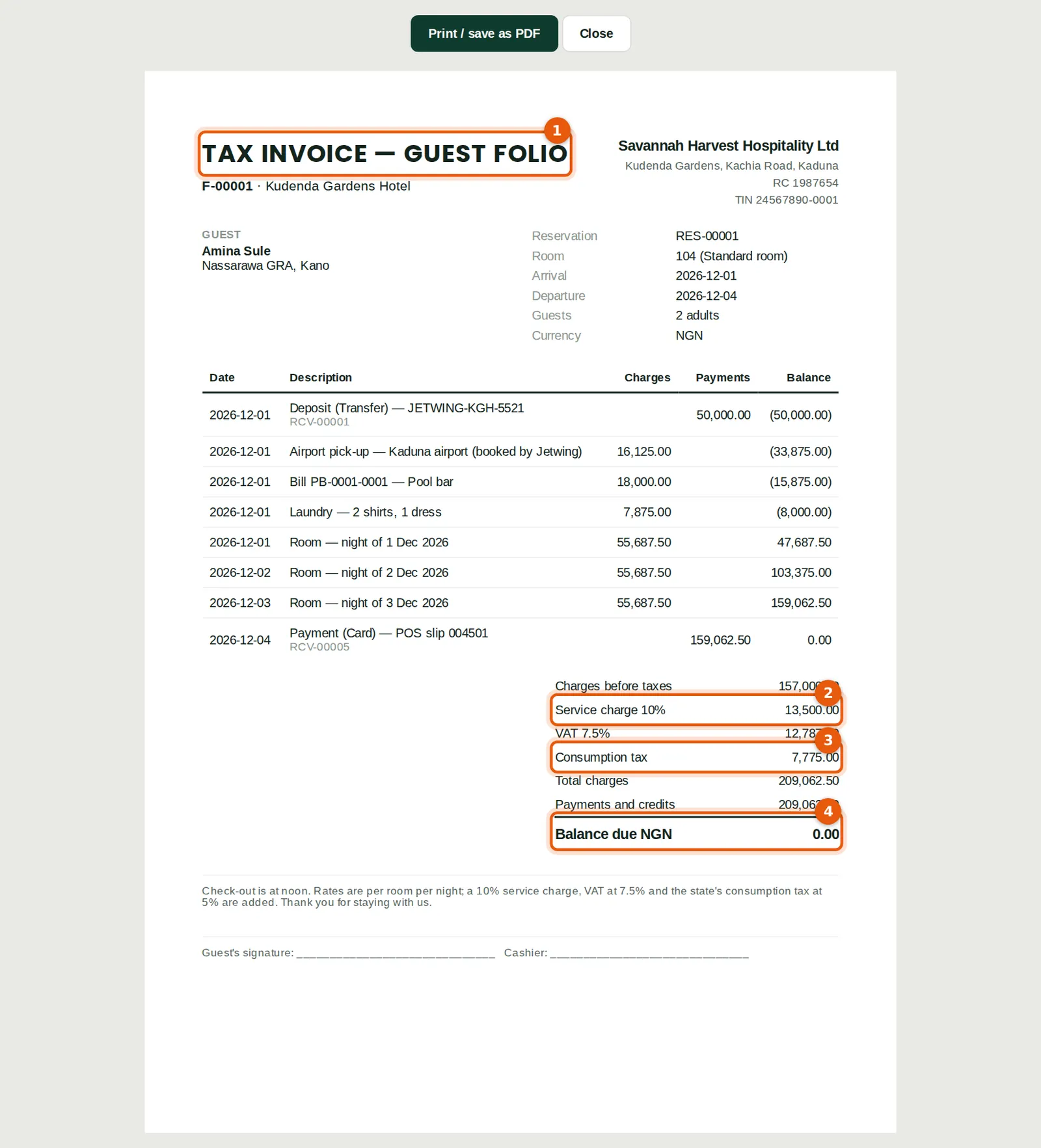
On 4 December Amina's folio owes ₦159,062.50 (1): three nights at ₦55,687.50 each (2) — ₦45,000 with service charge, VAT and consumption tax — the airport pick-up, the laundry and the pool bar bill (3), less her ₦50,000 deposit. Each line shows its journal or receipt. Zainab takes payment by card (4) and checks her out. Transfer balance and Move (a charge) move amounts between the folios of a stay or group; anywhere else needs a supervisor.
Who
Front desk.
What to do
- Open the folio from the Front desk or Folios. Click Take payment (4), then check the guest out.
33.22 The folio as a tax invoice
Why
The printed folio (1) is the guest's tax invoice: each charge and payment with the running balance, the charges before taxes (₦157,000), the service charge (2) ₦13,500, VAT at 7.5% ₦12,787.50, the consumption tax (3) ₦7,775, and the balance (4), nil after payment. It carries the company's logo, details and the note from the set-up.
Who
Front desk.
What to do
- Open a folio and click Print; it opens at check-out.
33.23 A cancellation with a fee
Why
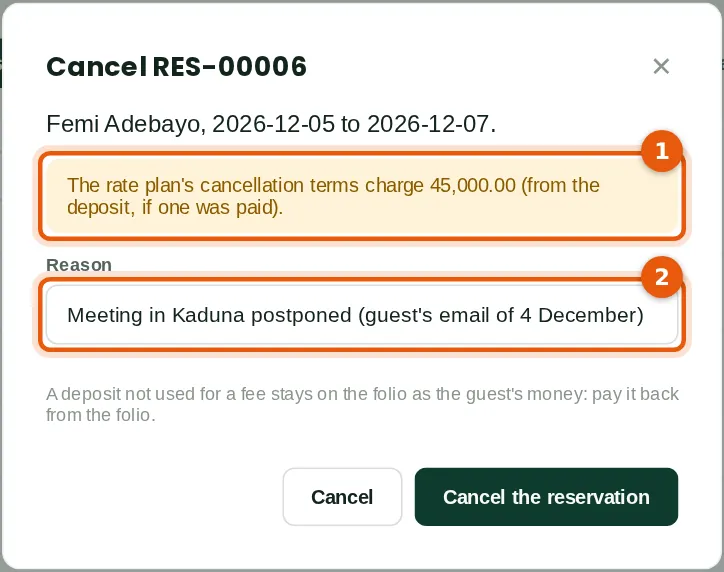
Femi Adebayo's meeting was postponed and he cancels the day before arrival, inside the two days' notice for bed and breakfast: the first night, ₦45,000, is charged (1), taken first from his ₦30,000 deposit; he paid the ₦15,000 left by card and the folio was closed. The reason (2) is kept. Reinstating a cancelled stay does not charge the fee again.
Who
Front desk (waiving the fee needs a supervisor).
What to do
- Open the reservation and click Cancel. Type the reason (2) and click Cancel the reservation.
33.24 The night audits
Why
Each audit (1) shows the rooms sold of those available, occupancy, room revenue (2), the charges posted and the journal (3). On 2 December room 203 was out of order (14 rooms available); on 3 December the group arrived (5 rooms sold). After the group left there were no guests on 5 and 6 December. Click an audit for its report.
Who
Hotel manager.
What to do
- Open Night audit. Click a day for the night audit report.
33.25 Agents' commission
Why
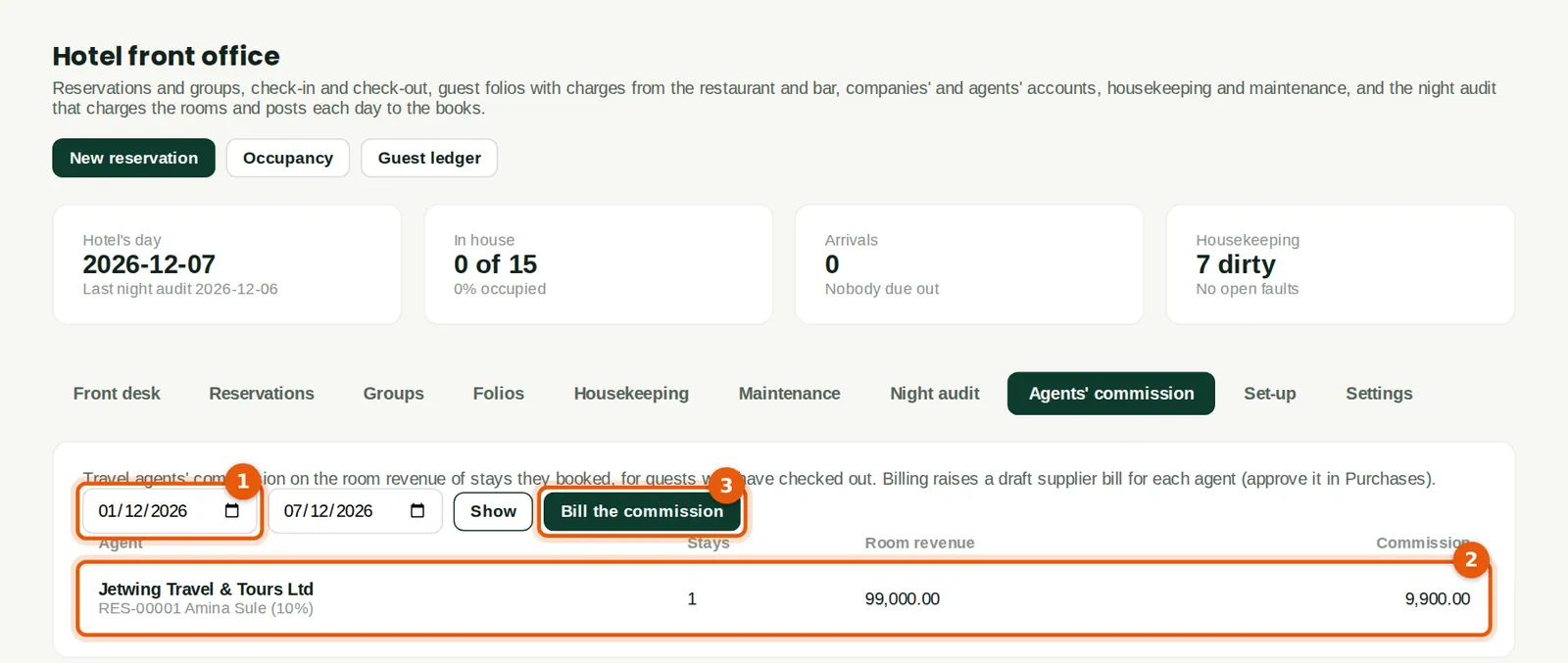
Commission on stays that checked out in the dates chosen (1). Jetwing booked Amina's stay (2): 10% of the room revenue, ₦99,000 (the ₦135,000 of nights less the ₦36,000 of breakfasts), ₦9,900. Bill the commission (3) raises a draft bill to the agent for Purchases to check and post; the stays are not billed again.
Who
Hotel manager.
What to do
- Open Agents' commission, choose the dates (1), click Show and then Bill the commission (3).
33.26 Occupancy, ADR and RevPAR
Why
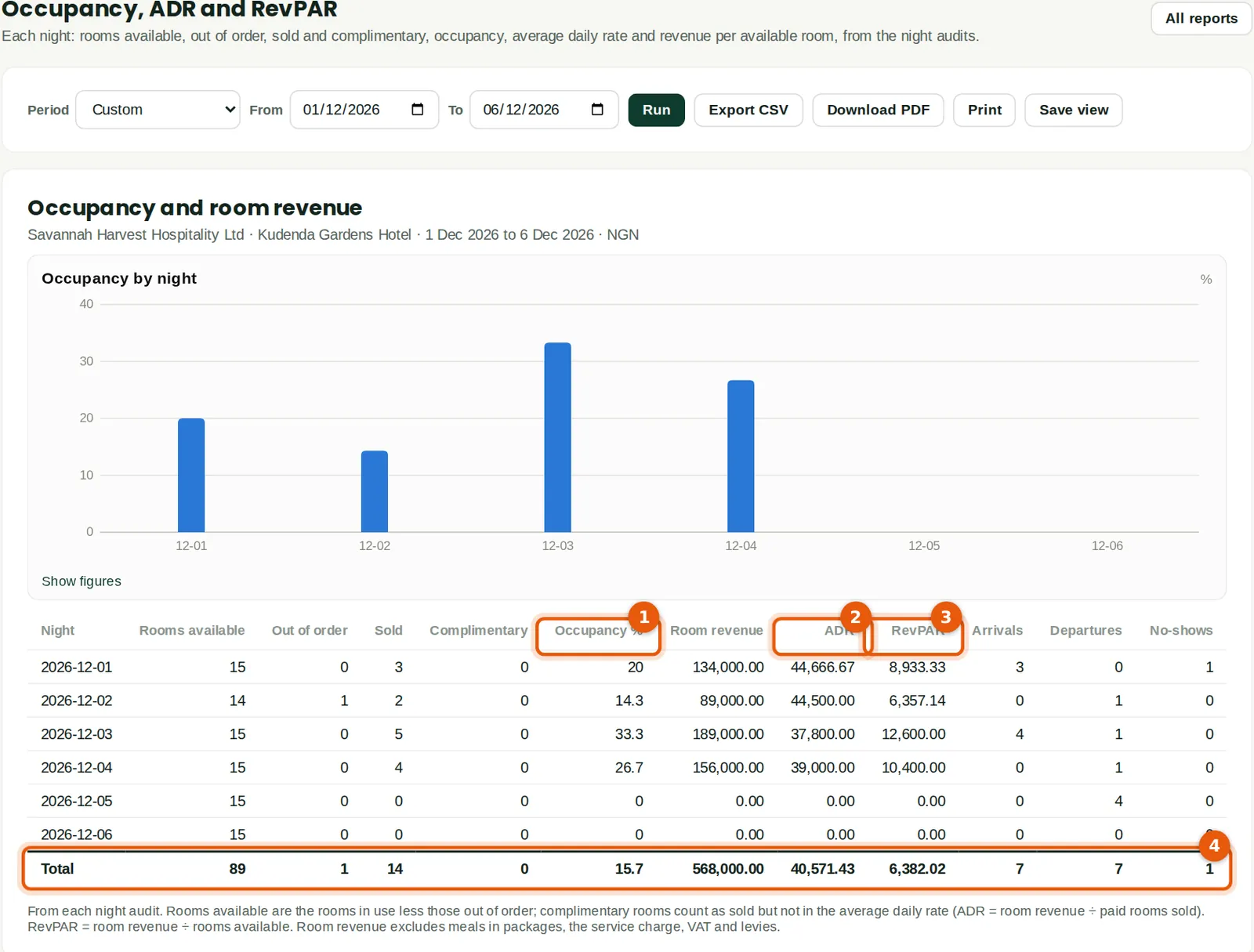
From the night audits: rooms available, sold and occupancy (1) each night, room revenue, the average daily rate (2) — room revenue ÷ paid rooms sold — and revenue per available room (3). For the six nights (4): 14 rooms sold of 89, 15.7%; room revenue ₦568,000 (meals in packages, the service charge and taxes excluded); ADR ₦40,571.43; RevPAR ₦6,382.02. The forecast shows the nights on the books ahead.
Who
Hotel manager, reports users.
What to do
- Open Reports → Hotel → Occupancy, ADR and RevPAR, choose the hotel (with more than one) and the period, and click Run.
33.27 Revenue by department
Why
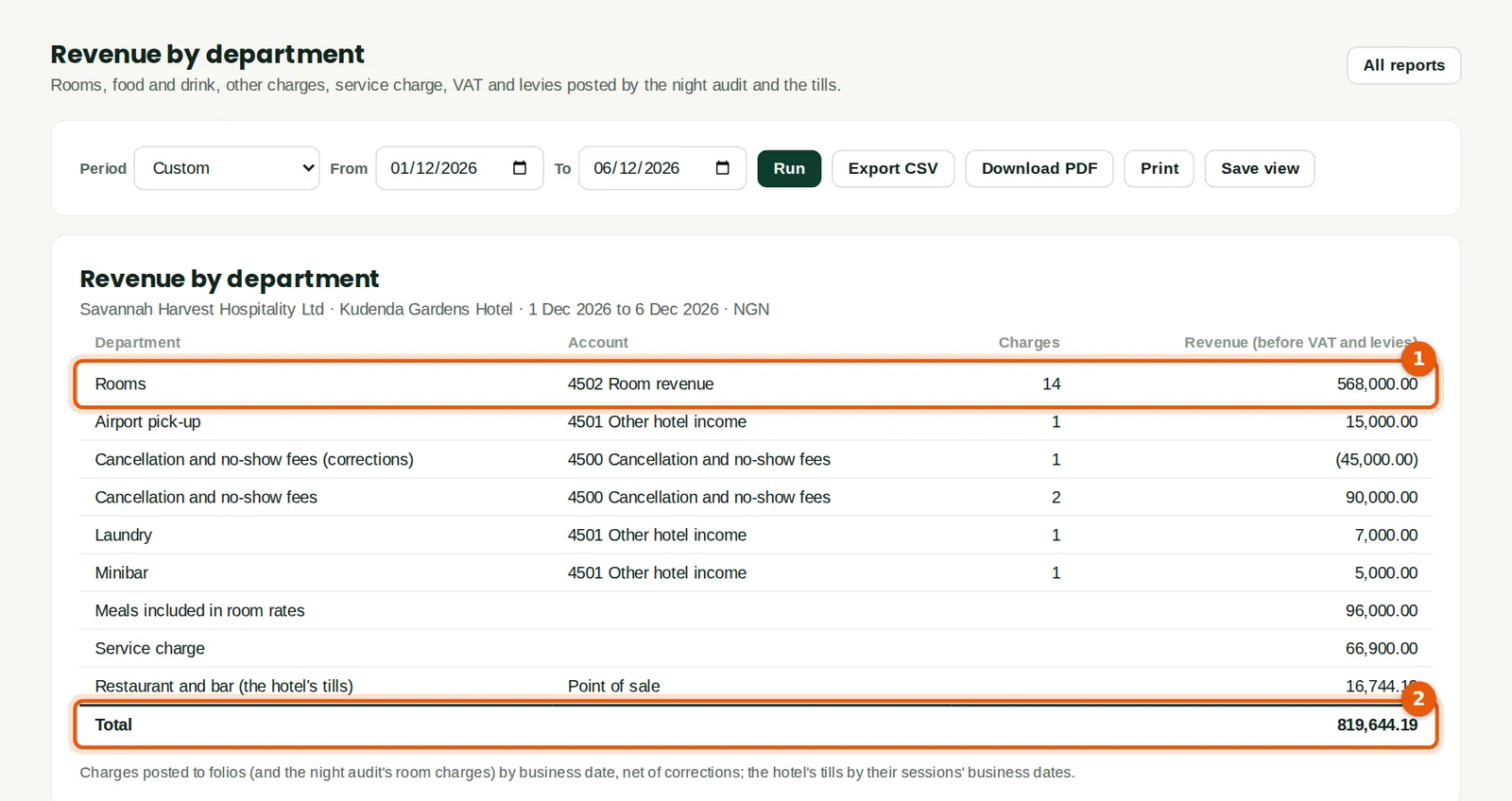
What was charged by department (1): rooms ₦568,000, breakfasts in packages ₦96,000, airport pick-ups, laundry and the minibar, cancellation and no-show fees (₦90,000, less the ₦45,000 waived), the service charge ₦66,900, and the pool bar's sales; the total (2).
Who
Hotel manager, reports users.
What to do
- Open Reports → Hotel → Revenue by department, choose the period and click Run.
33.28 Hotel taxes and levies
Why
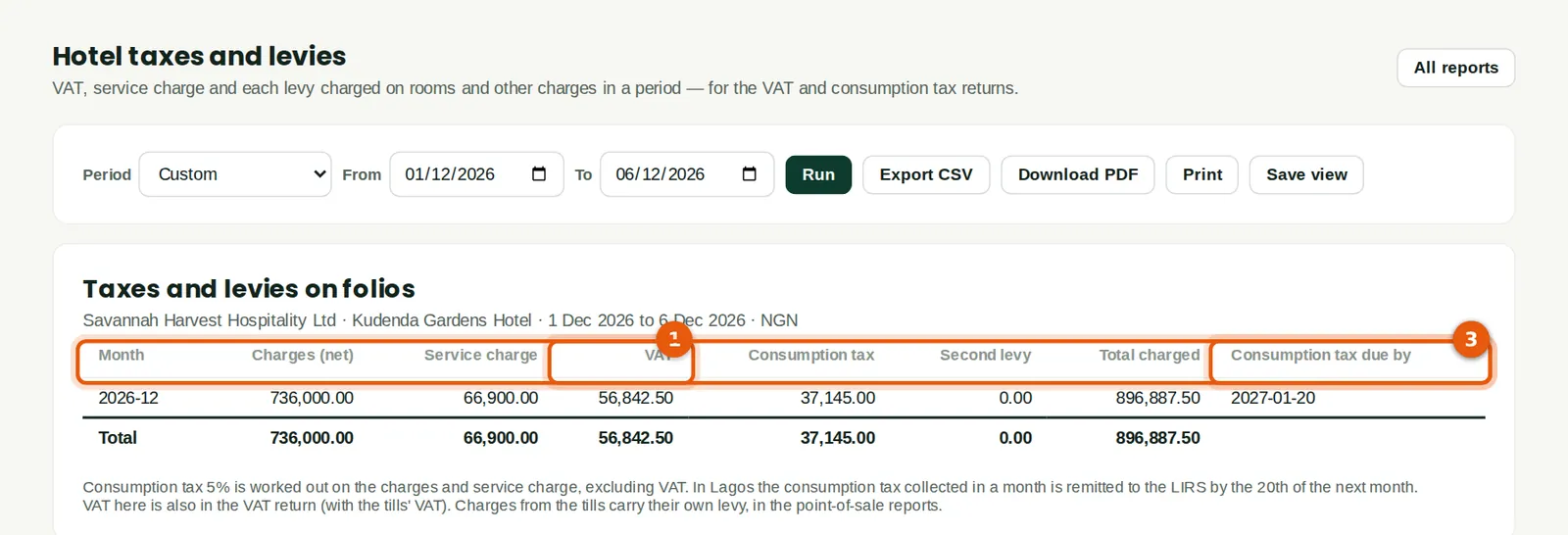
The VAT (1) and the consumption tax (2) charged on rooms and other charges, by month, with the totals (3): ₦56,842.50 VAT and ₦37,145 consumption tax on ₦736,000 of charges and ₦66,900 of service charge. The VAT is also in the VAT return; the consumption tax is owed to the state from Consumption tax payable.
Who
Hotel manager, accountant.
What to do
- Open Reports → Hotel → Hotel taxes and levies, choose the period and click Run.
33.29 The guest ledger
Why
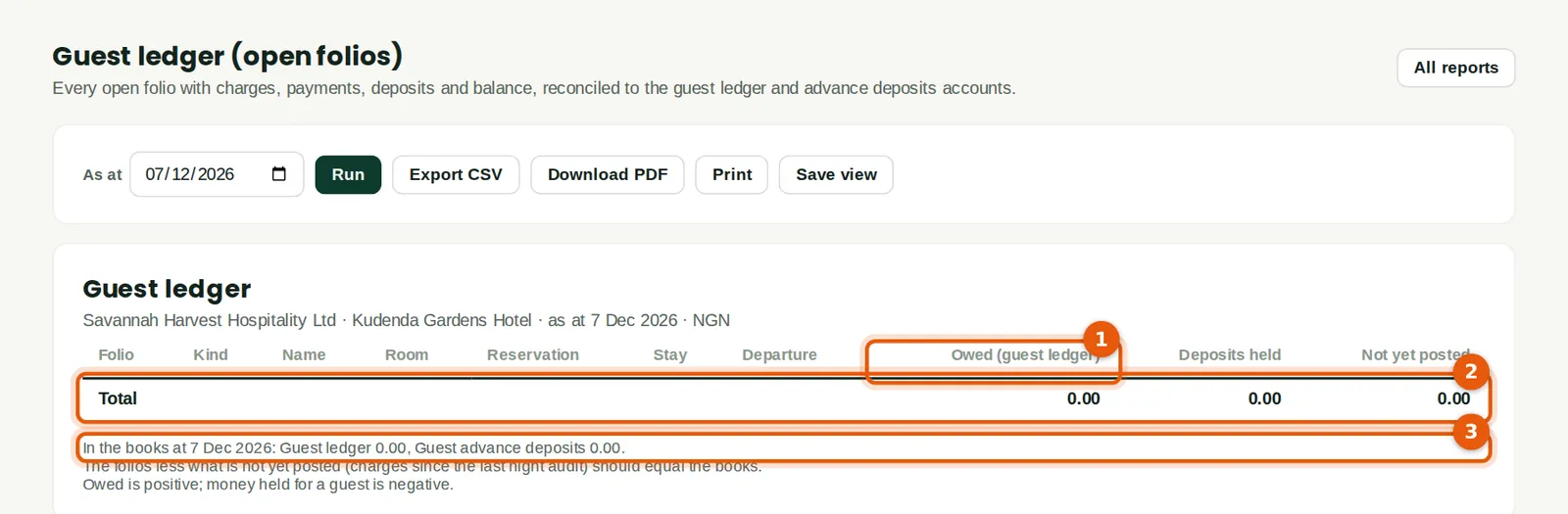
Every open folio with what it owes (1), deposits held and what is not yet posted, with the total (2). The note (3) gives the guest ledger and deposits accounts in the books: they agree with the folios. On 7 December every folio is settled: nil. The city ledger report shows the ₦598,950 owed by Arewa Telecoms and Savannah Harvest Agro-Allied for stays.
Who
Hotel manager, accountant.
What to do
- Open Reports → Hotel → Guest ledger, choose the date and click Run.