Steps in this chapter (2)
How PayTrove is billed — prepaid admin seats and monthly-counted active employees, monthly or yearly — and where to manage it.
PayTrove is bought and billed through your company's account on troveuniverse.com. You choose monthly or yearly billing; yearly billing costs less than twelve monthly payments. Current prices, and the yearly saving, are on troveuniverse.com/pricing.html.
PayTrove is billed on two measures: admin seats, bought in advance for each billing period, and active employees, counted each month and billed in arrears. You manage both on your account page, troveuniverse.com/account.html. PayTrove checks the subscription and tells you when a limit is reached.
| Measure | What counts | How it is billed |
|---|---|---|
| Admin seats | Every staff login in the company — Admin, Preparer and Viewer. | Bought in advance for your billing period (a month or a year). The seats bought are the limit: adding a staff login, or changing a self-service login to a staff role, is refused when all seats are in use. Buy more at any time with Add admin users on troveuniverse.com/account.html; a purchase part-way through a period is charged only for the rest of that period, and the new limit applies once its invoice is paid. Reductions take effect from the next renewal. |
| Active employees | Employee records that are not marked inactive and whose leaving date has not passed — salaried, take-home and daily-rated alike. | Counted each month and billed in arrears, for the month just ended. On yearly billing they are billed on a separate invoice each month. |
| Employee self-service | Employee logins. | Free: they do not use a seat. |
| Companies | One company per PayTrove subscription. | An accountant's practice view uses the logins they hold in each client's own subscription. |
| Billing | How it works |
|---|---|
| Monthly | Seats are billed each month in advance; active employees for the month just ended are added to the invoice. |
| Yearly | Seats are billed for twelve months in advance at a lower yearly price (see troveuniverse.com/pricing.html); a renewal invoice is raised shortly before the year ends. Active employees are still counted and billed monthly. |
| Switching | Change between monthly and yearly from your next renewal on the account page. You can also switch from monthly to yearly straight away: the yearly invoice then carries a credit for the unused days of the current month. |
| Subscription status | What happens in PayTrove |
|---|---|
| Active or trial | Full access. |
| Grace (payment overdue) | Full access, with a banner asking you to pay on troveuniverse.com. |
| Suspended | Read-only: you can view and download, sign out, and manage your own password, two-factor and contact details. |
| Ended | Sign-in (by password or from troveuniverse.com) is refused with the portal's message. |
PayTrove reports the seats and active employees in use to TroveUniverse after every change and at sign-in. Casual workers count as active employees while their record is active, whether or not they worked that month: mark them inactive between engagements if you will not use them for a while. To buy seats, change billing or pay an invoice, choose Manage your subscription on troveuniverse.com on any PayTrove banner, or go to troveuniverse.com/account.html.
15.1 When all your admin seats are in use
Why
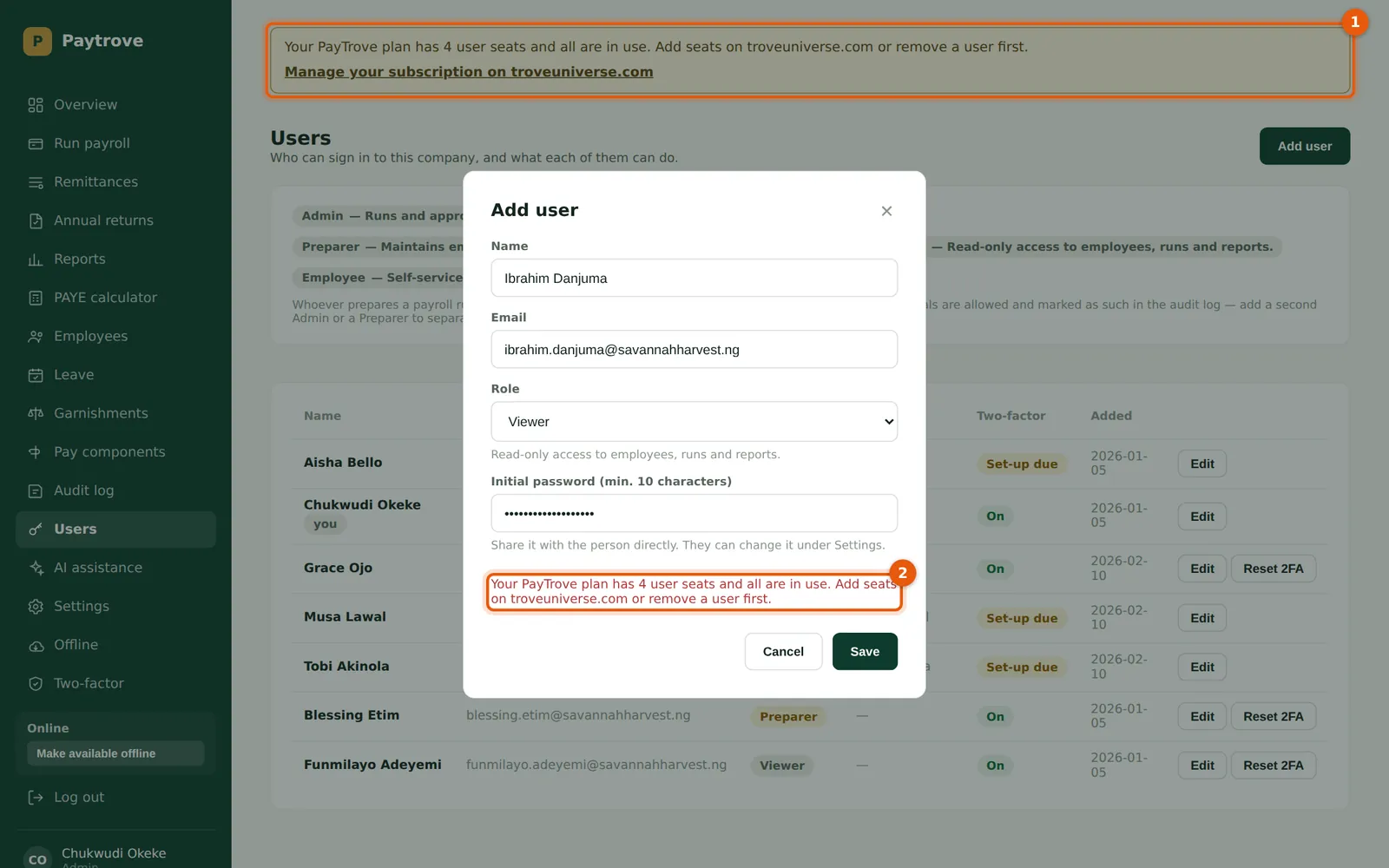
An admin seat is any login that is not employee self-service: every Admin, Preparer and Viewer. Seats are prepaid, so the seats you have bought are the limit. Savannah Harvest bought four seats in January (Chukwudi, Aisha, Blessing and Funmilayo). On 2 March Chukwudi tries to give Ibrahim Danjuma, the factory manager, a Viewer login. PayTrove refuses and says why.
Who
Admin.
What to do
- Read the banner (1) and the message on the form (2).
- Either remove a login you no longer need, or buy more seats: choose Manage your subscription on troveuniverse.com (or go to troveuniverse.com/account.html) and choose Add admin users on the PayTrove card.
- Seats bought part-way through a billing period are charged only for the rest of that period, on an invoice for the purchase. The new limit applies once that invoice is paid. Aisha Bello, who holds the TroveUniverse account, buys two more seats.
15.2 After buying more seats
Why
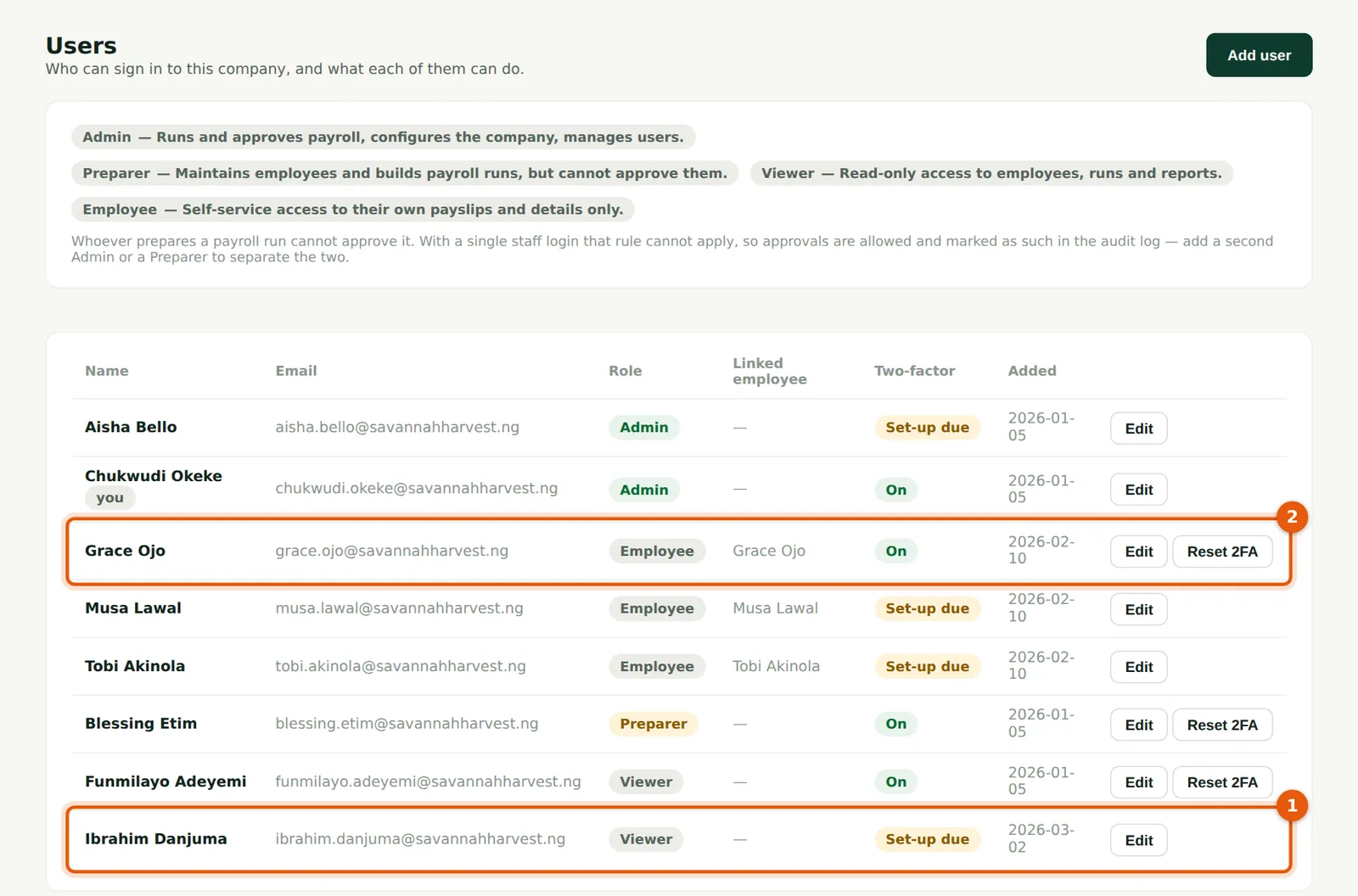
Once the invoice is paid, the new limit reaches PayTrove within about a minute. Ibrahim Danjuma (1) is added as a Viewer; later Nkechi Okafor of Okafor Bello & Co takes the sixth seat. Employees on self-service, such as Grace Ojo (2), do not use a seat. To reduce seats, lower the number on the account page; the change takes effect from the next renewal.
Who
Admin.
What to do
- Add the login again. If a banner says all seats are in use, that is for information: you can keep working.