Steps in this chapter (14)
The home country: Nigeria or International. What an international firm sees, clients and engagements in other countries, and clients in Nigeria that keep the Nigerian rules.
Each firm has a home country: Nigeria or International. Every firm starts as Nigerian, with the FRC, CAMA 2020 and ICAN features for the whole firm. A firm outside Nigeria chooses International. It then works with neutral ISA and IFRS defaults, and the Nigeria-only firm features are hidden until it has a client in Nigeria.
The home country is a firm setting. The rules for each engagement still come from its own jurisdiction: Nigeria, Barbados or Other. An international firm can audit a client in Nigeria, and that engagement follows the Nigerian rules in full.
In the illustration Harmattan Partners, Chartered Accountants, of Accra, Ghana, starts using AuditTrove on 5 October 2026. Efua Hammond, the managing partner and owner, sets the firm to International. Michael Tetteh, audit partner, takes on Volta Ceramics Limited of Tema for the year ended 30 June 2026, with Sena Agbeko as audit manager. The firm then accepts a client in Nigeria, Onitsha Cold Chain Limited. The firm, the companies, the people and the numbers are fictional, like the rest of the illustration.
Use cases
- Use case — A firm in Ghana, the Caribbean or elsewhere starts using AuditTrove. The owner sets the home country to International and chooses the firm's currency (steps 23.1–23.4), and the quality lead checks the rotation rules (step 23.5).
- Use case — An international firm audits a company in Nigeria. Add the client with the country Nigeria. Its engagements follow the FRC rules, CAMA 2020 and the Nigerian letters, and the firm's Nigerian features come back (steps 23.13–23.14).
- Use case — A client moves out of Nigeria. A partner changes the client's country on the client's page. Then the engagement's jurisdiction can change (step 23.13).
- Use case — A regulator or professional body outside Nigeria inspects the firm. Build the inspection pack with the scope for other countries (step 23.12).
23.1 Choose the home country
Why
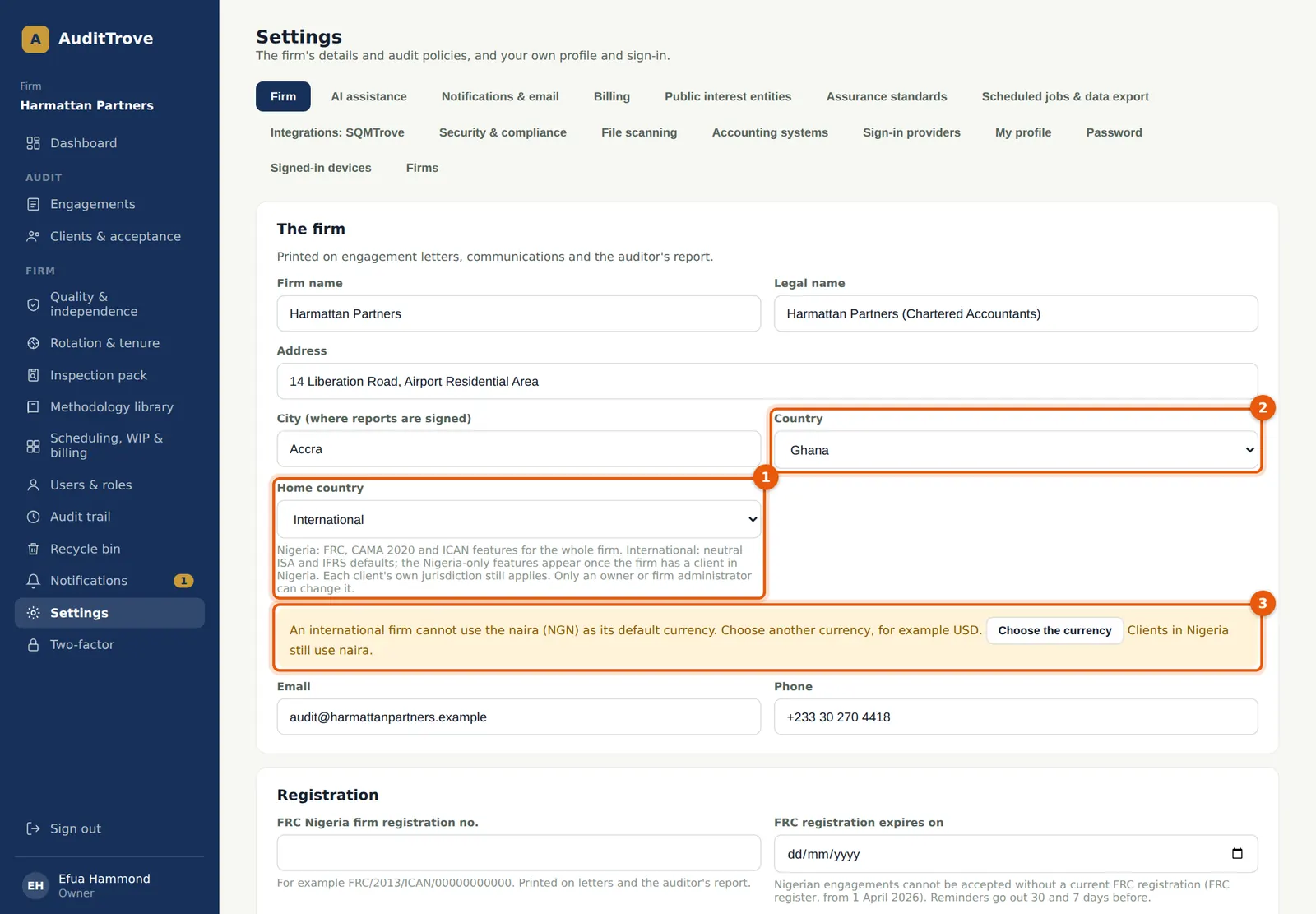
Home country (1) has two choices. Nigeria gives the FRC, CAMA 2020 and ICAN features to the whole firm; it is the setting every firm starts with. International gives neutral ISA and IFRS defaults, and hides the Nigeria-only firm features until the firm has a client in Nigeria. Country (2) is the firm's own address country. It is printed on the letters and sets the minimum retention period. It is a separate setting: a firm in Ghana can still be Nigerian, and a firm in Nigeria can be International. An international firm cannot use the naira as its default currency. If the currency is still NGN when you choose International, a warning (3) appears at once.
Who
Owner or firm administrator only.
What to do
- Open Settings and stay on the Firm tab. Check the firm's name, address, city and Country (2).
- Choose International in Home country (1).
- If the warning (3) appears, choose Choose the currency. It takes you to the Default currency field (next step).
23.2 Choose a currency other than the naira
Why
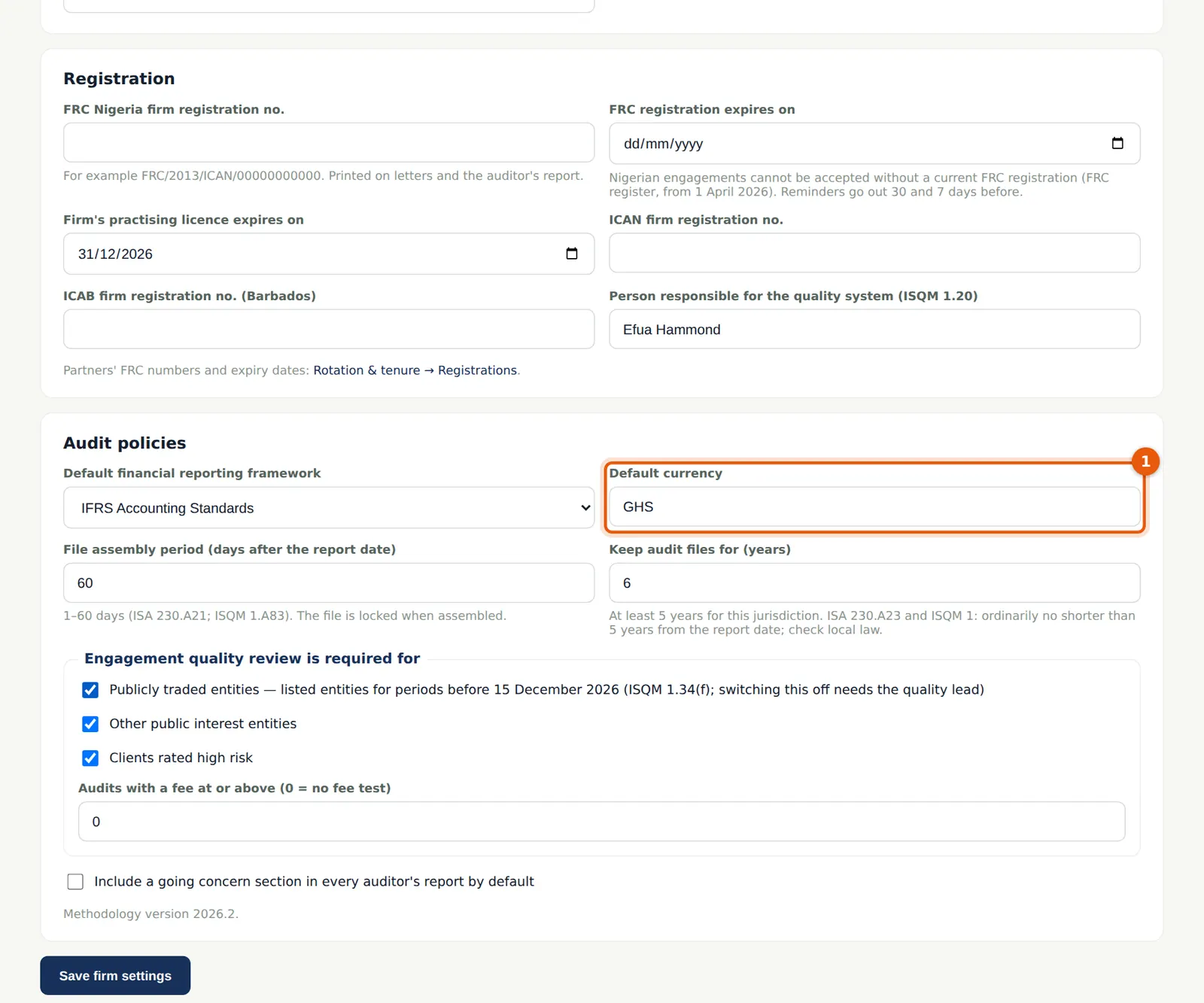
The default currency (1) is proposed for every new engagement. Clients in Nigeria still use the naira, and clients in Barbados the Barbados dollar. The warning disappears once another currency is entered. If the firm is saved as International with NGN, the change is refused with the message "Choose the firm's default currency. An international firm has no naira default." Nothing is saved.
Who
Owner or firm administrator.
What to do
- Enter the firm's currency in Default currency (1). Harmattan Partners uses GHS.
- Choose Save firm settings at the foot of the page.
23.3 Confirm the change
Why
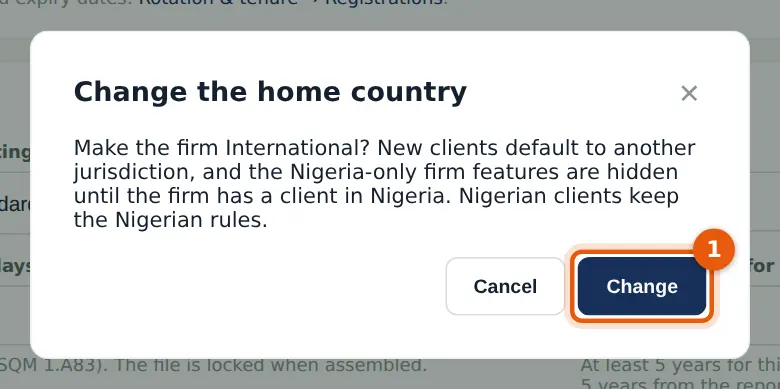
The change affects every user, so AuditTrove asks first. Each change is written to the audit trail as its own entry, with who made it, the home country before and after, and the rotation rules before and after. After the change the page reloads, so the menus follow the new home country.
Who
Owner or firm administrator.
What to do
- Read the message and choose Change (1), or Cancel to keep the firm as it is.
23.4 What an international firm sees
Why
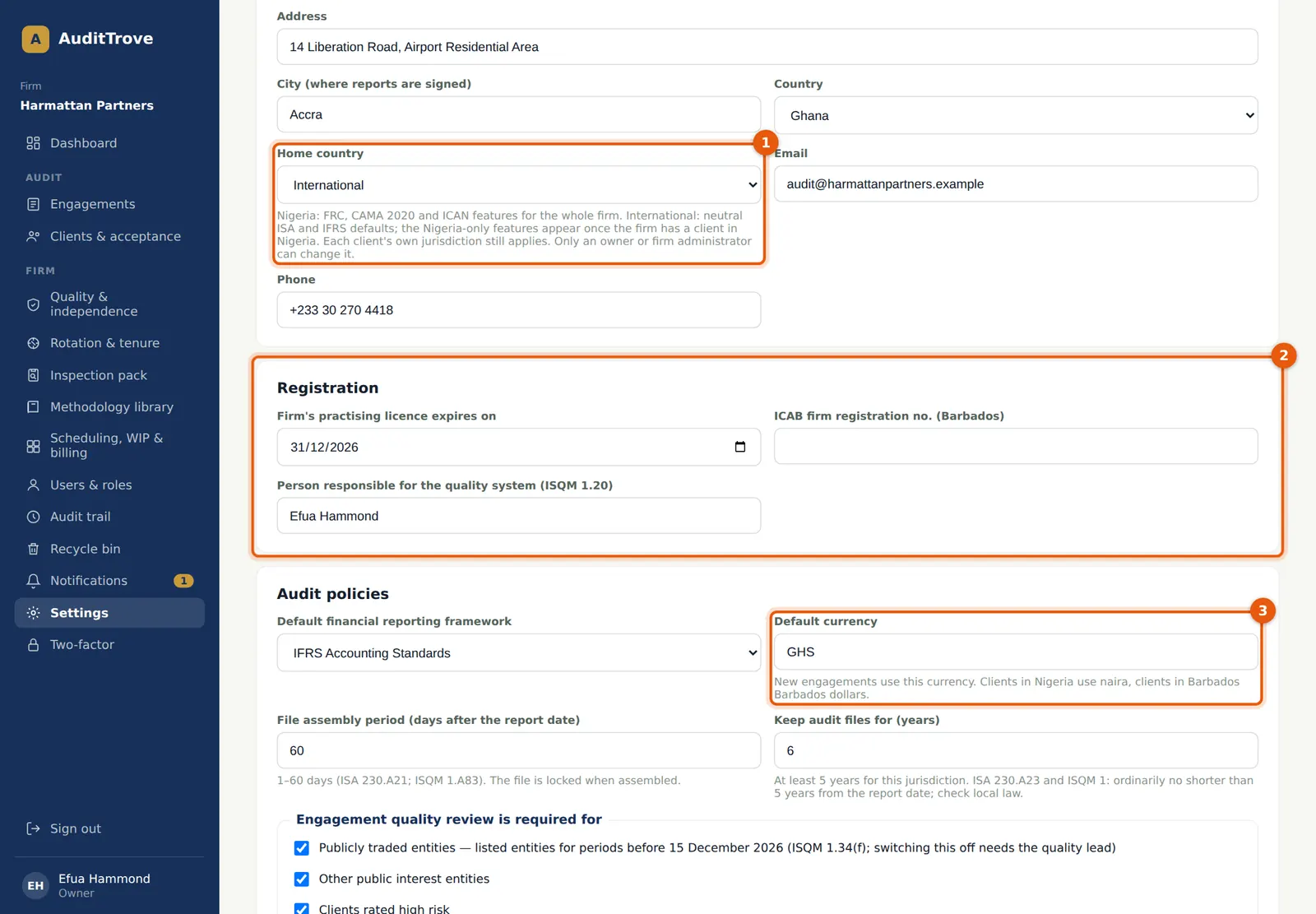
Until the firm has a client in Nigeria, the Nigeria-only firm features are hidden in the pages and refused by the server: the FRC firm number, its expiry date and the ICAN number (2); partners' FRC numbers under Settings → My profile; the Registrations tab (the FRC register) in Rotation & tenure; the FRC filing pack of each engagement; the FRC and ICAN inspection scopes; the FRC registration reminders; and the Nigerian PIE thresholds under Settings → Public interest entities. The practising licence, the ICAB number, the professional body and membership numbers, and practising licence reminders still work. The currency (3) now says what new engagements use.
Who
Owner or firm administrator.
What to do
- Record the practising licence expiry and the person responsible for the quality system (2).
- Each partner records their professional body and membership number under Settings → My profile → My registration. It is printed with their name on the auditor's report.
23.5 The rotation rules after the change
Why
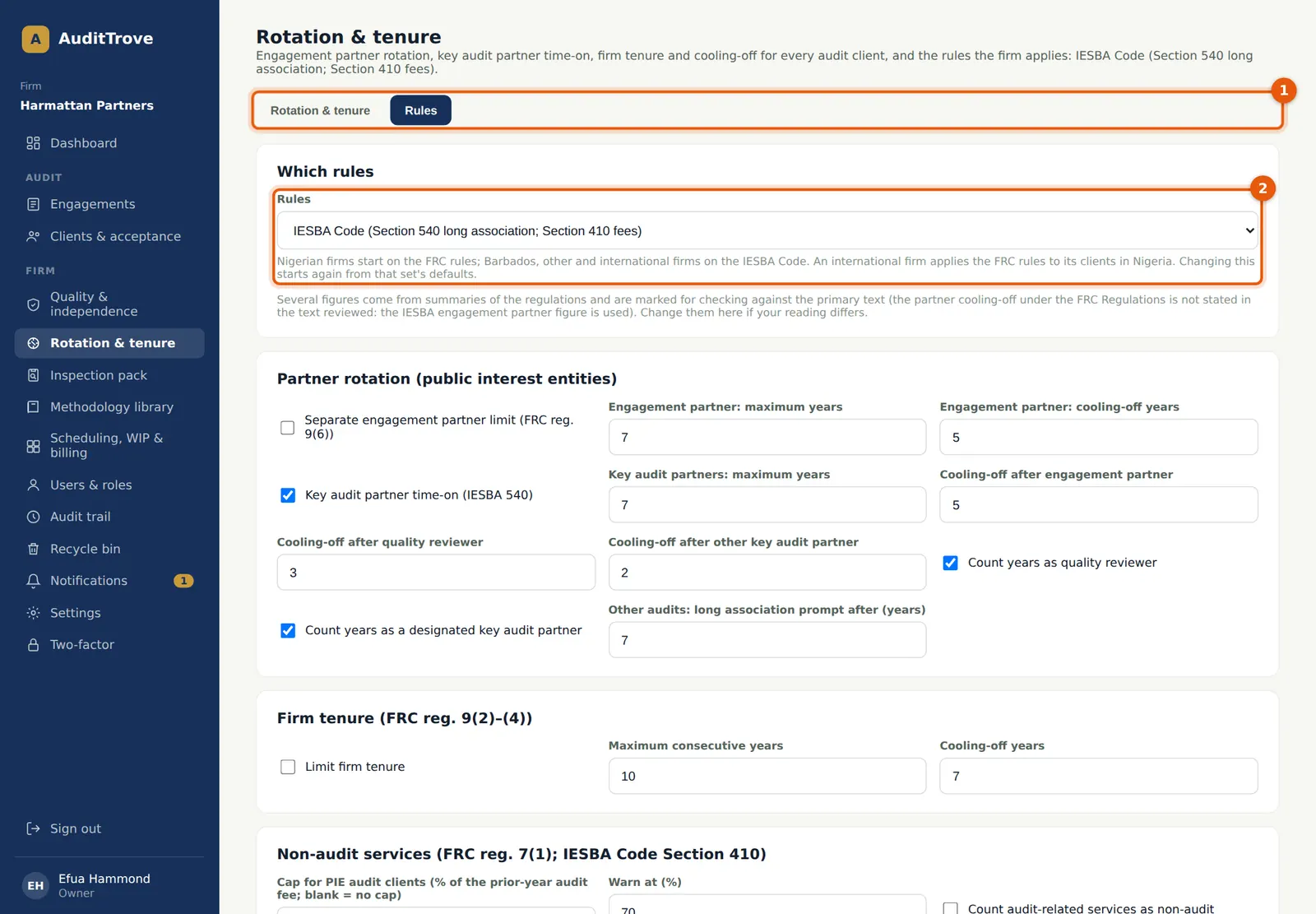
Changing the home country does not change the rotation rules. The rules in force before the change are kept and stored, and the audit trail entry records them. A firm set up as International starts on the IESBA Code. Harmattan Partners was already on the IESBA Code (2), because its own country is Ghana. The page header names the rules in force. A firm that was on the FRC rules stays on them until the quality lead changes them. Rotation & tenure stays available, because the IESBA Code has its own limits; only the Registrations tab (1) is hidden. A client in Nigeria is always measured under the FRC rules.
Who
Quality lead (the owner or firm administrator can read them).
What to do
- Open Rotation & tenure → Rules and check the rules (2).
- If the firm moved from Nigeria and wants the IESBA Code, choose it and save. Changing the rules starts again from that set's defaults.
23.6 Add a client outside Nigeria
Why
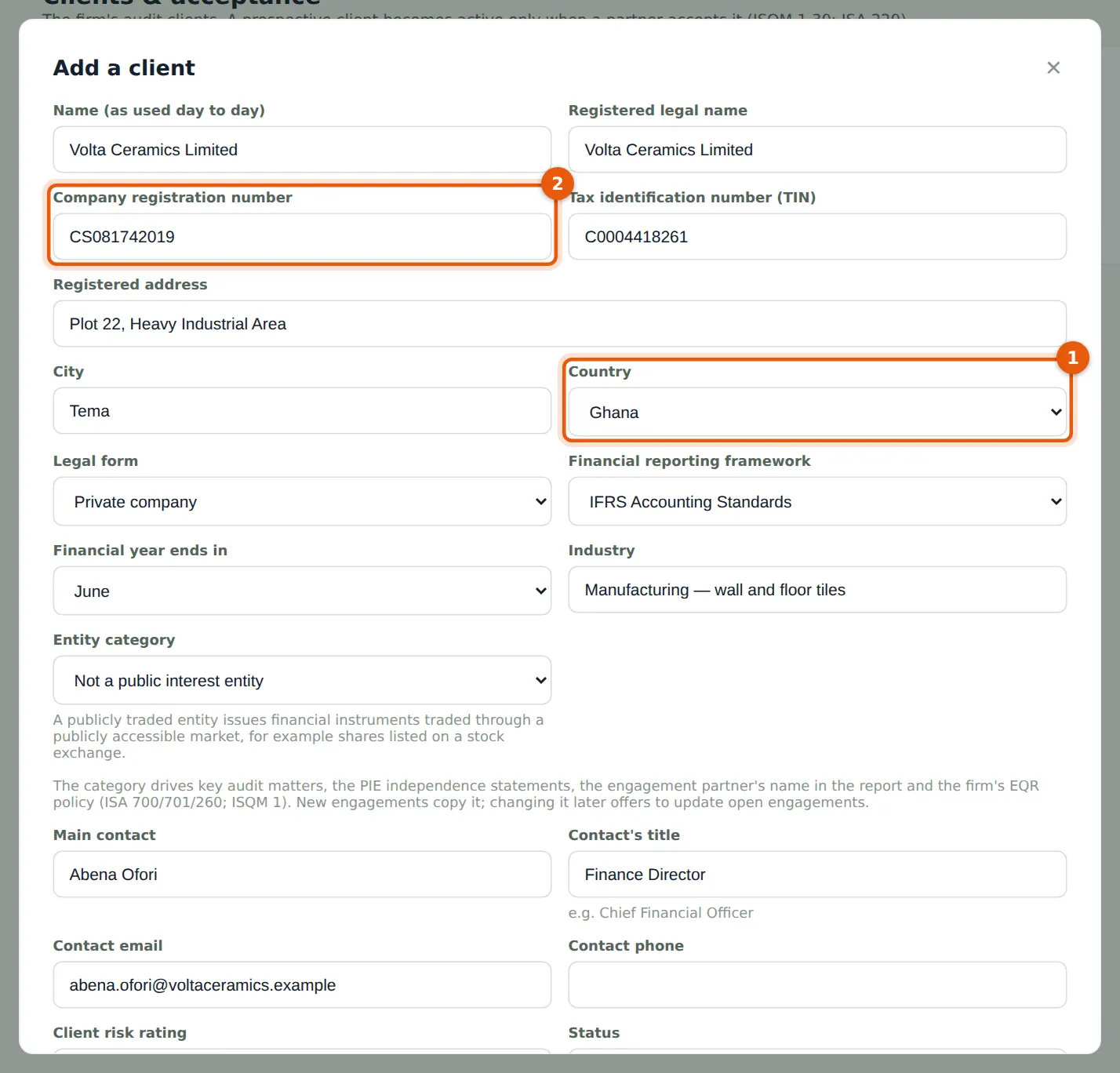
In an international firm a new client's country (1) is proposed from the firm's own country, unless that is Nigeria or Barbados. Then it is Other country. The client's country decides the jurisdiction of its engagements: Nigeria, Barbados, or Other for every other country. The Company registration number (2) is the number in the client's own registry; a Nigerian firm sees the label "Registration number (RC / company no.)".
Who
Partner or manager. Only a partner can accept the client.
What to do
- Open Clients & acceptance and choose Add a client.
- Enter the name, the registration number (2), the TIN, the address and the city. Check the country (1): Ghana for Volta Ceramics.
- Choose the legal form, the framework, the year-end month and the entity category, then the contact, and choose Add client.
23.7 Create its engagement
Why
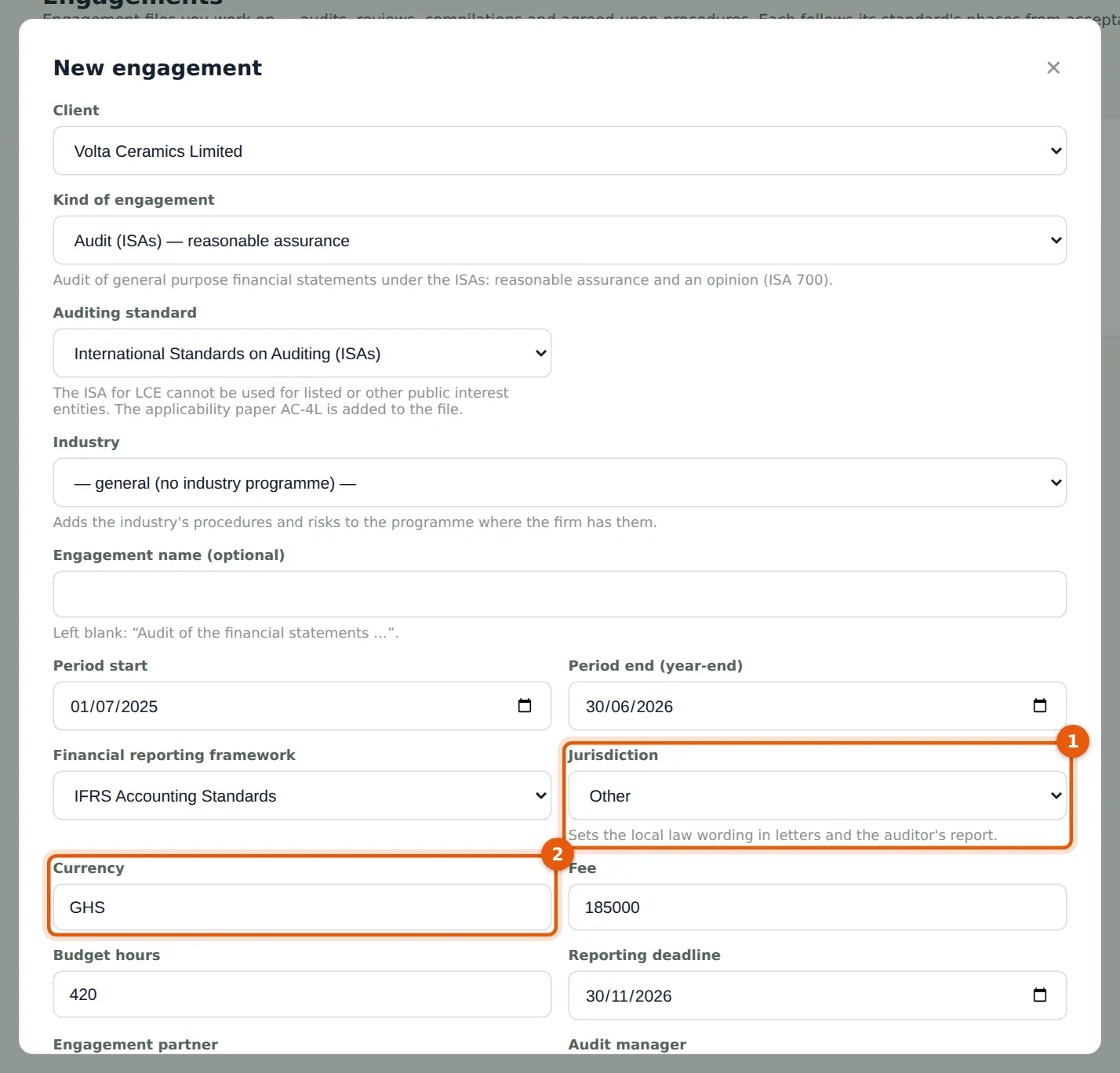
The jurisdiction (1) follows the client's country: Other for a client in Ghana. It sets the wording of the letters and the auditor's report. The currency (2) is the firm's default currency; a client in Nigeria gets NGN and a client in Barbados BBD. An Other engagement of an international firm uses the IESBA Code for rotation and has no FRC registration check.
Who
Partner (or a manager with engagement rights).
What to do
- Open Engagements and choose New engagement, or New engagement on the client's page.
- Choose the client, the kind and the period. Check the jurisdiction (1) and the currency (2).
- Choose the engagement partner and the manager, and choose Create engagement. Then continue as in chapter 6.
23.8 The annual report without the Nigerian pages
Why
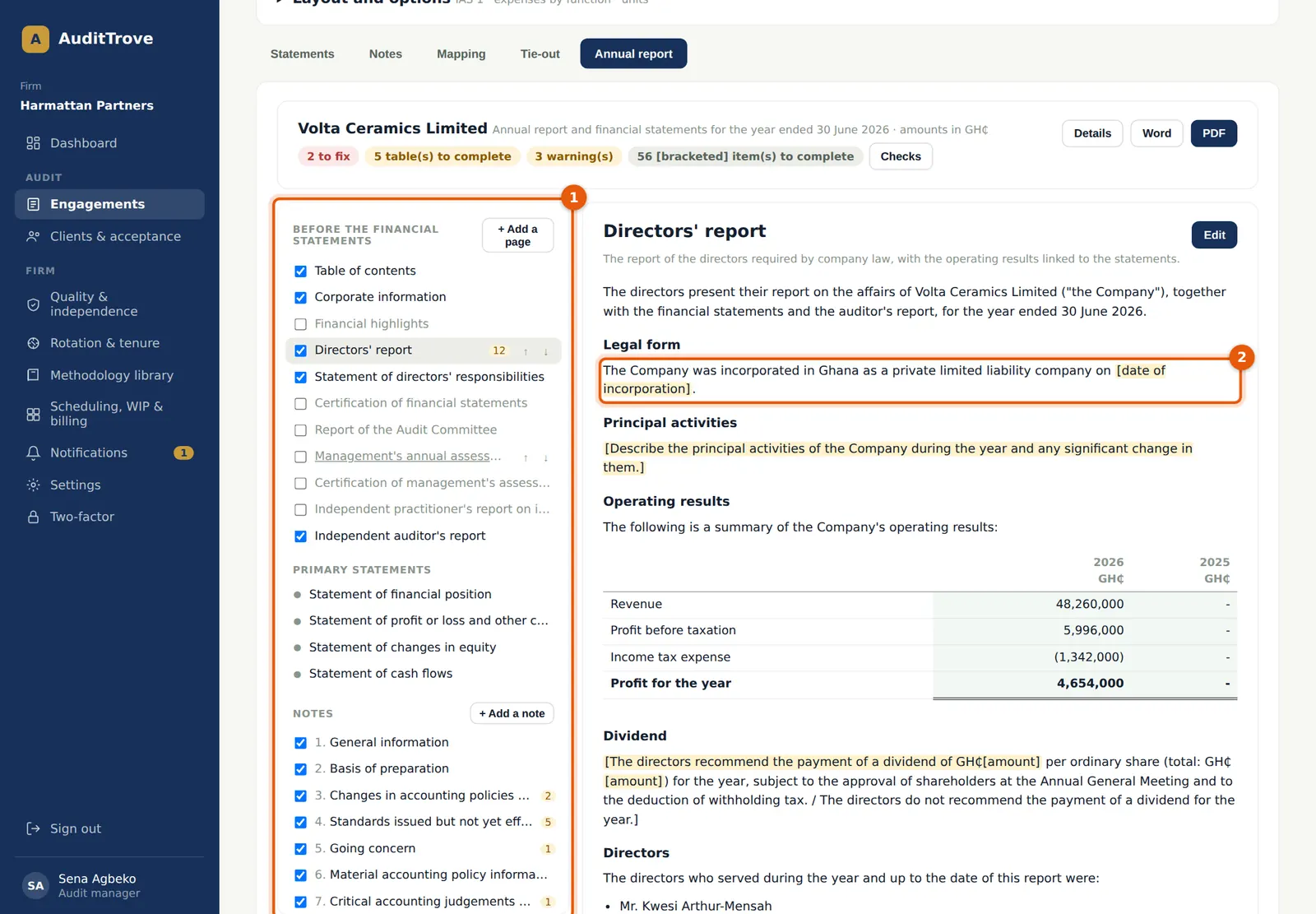
For an Other engagement of an international firm the Nigerian pages are off (1): the CAMA 2020 section 405 certification, the report of the audit committee, the Nigerian ICFR pages, the statement of value added, the five-year summary and the CAMA notes. The remaining Nigerian wording is replaced on pages and notes not yet edited: "incorporated in Ghana" (2) takes the client's country, a listed company is "listed on [name of the stock exchange]", and the share capital and tax notes name no Nigerian law. A page the team has already edited keeps the team's wording. Industry programmes use neutral wording too, without CBN, NDIC, NAICOM or other Nigerian bodies.
Who
The engagement team.
What to do
- Open the engagement's Financial statements → Annual report (chapter 22).
- Switch a page on in the navigator (1) only if the client's own law asks for it, and complete the [bracketed] guidance.
23.9 Report details: the labels follow the jurisdiction
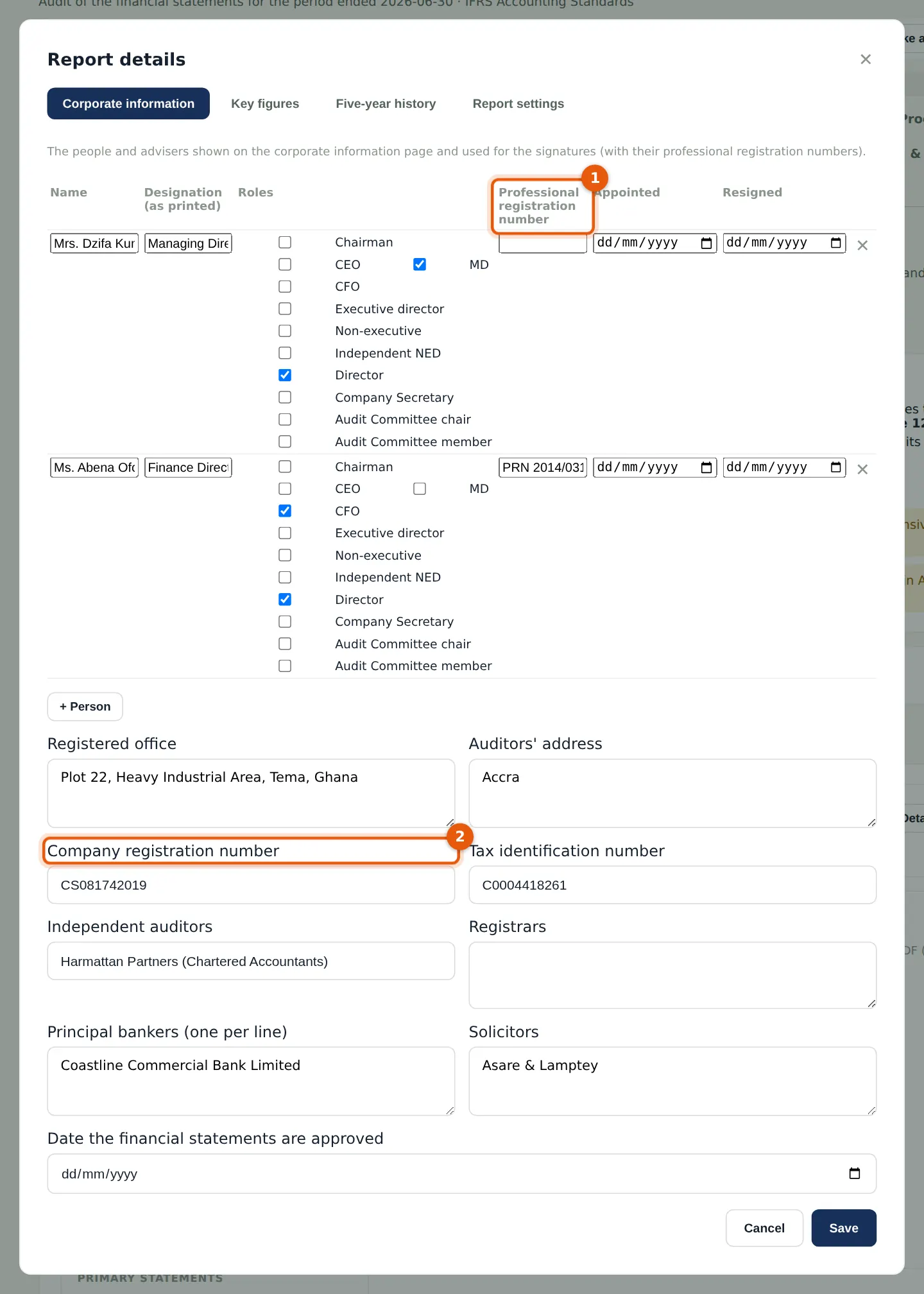
Why
The labels for the registration numbers follow the engagement's jurisdiction. They change in the Details form, in the people table (1), in the hints, the signature hint and the list of placeholders. A blank number shows as [Company registration number] in the report until it is entered.
Who
Senior or manager, from the client's statutory books.
What to do
- Choose Details on the Annual report tab.
- Enter each person's professional registration number (1) where they have one, and the company registration number (2). Choose Save.
| Jurisdiction | Company's number (2) | People's number (1) | Printed |
|---|---|---|---|
| Nigeria | Registration (RC) number | FRC number | RC 1234567 |
| Barbados | Company number | ICAB registration number | As entered |
| Other | Company registration number | Professional registration number | As entered |
23.10 The corporate information page
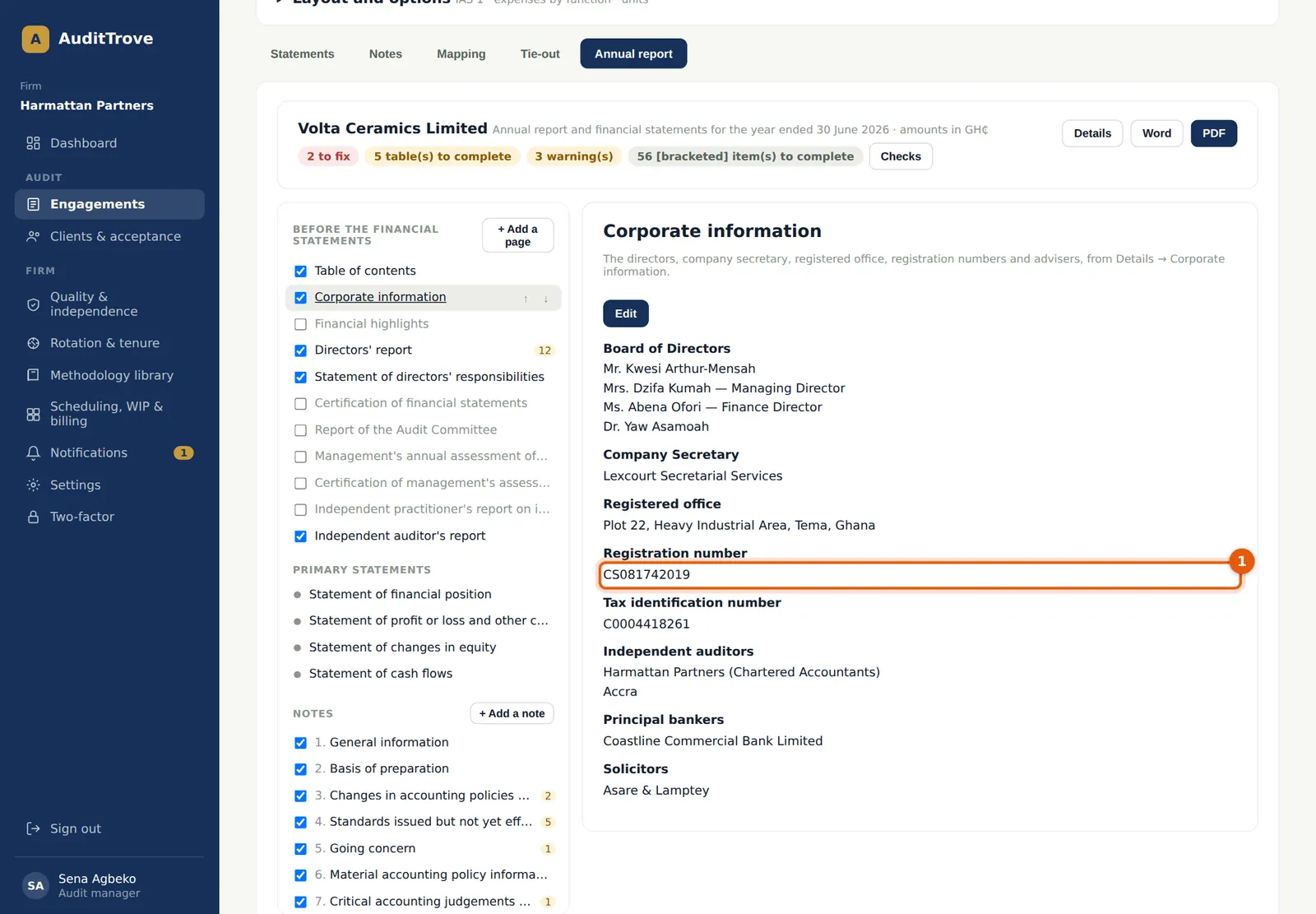
Why
Outside Nigeria the registration number (1) is printed exactly as entered, without the "RC" prefix, on the corporate information page, in the PDF and in the Word file. Nigerian engagements still print "RC 1234567". The same applies to a Nigerian firm's Other engagements.
Who
Anyone on the team.
What to do
- Choose Corporate information in the navigator to check the page.
23.11 The letters and the auditor's report
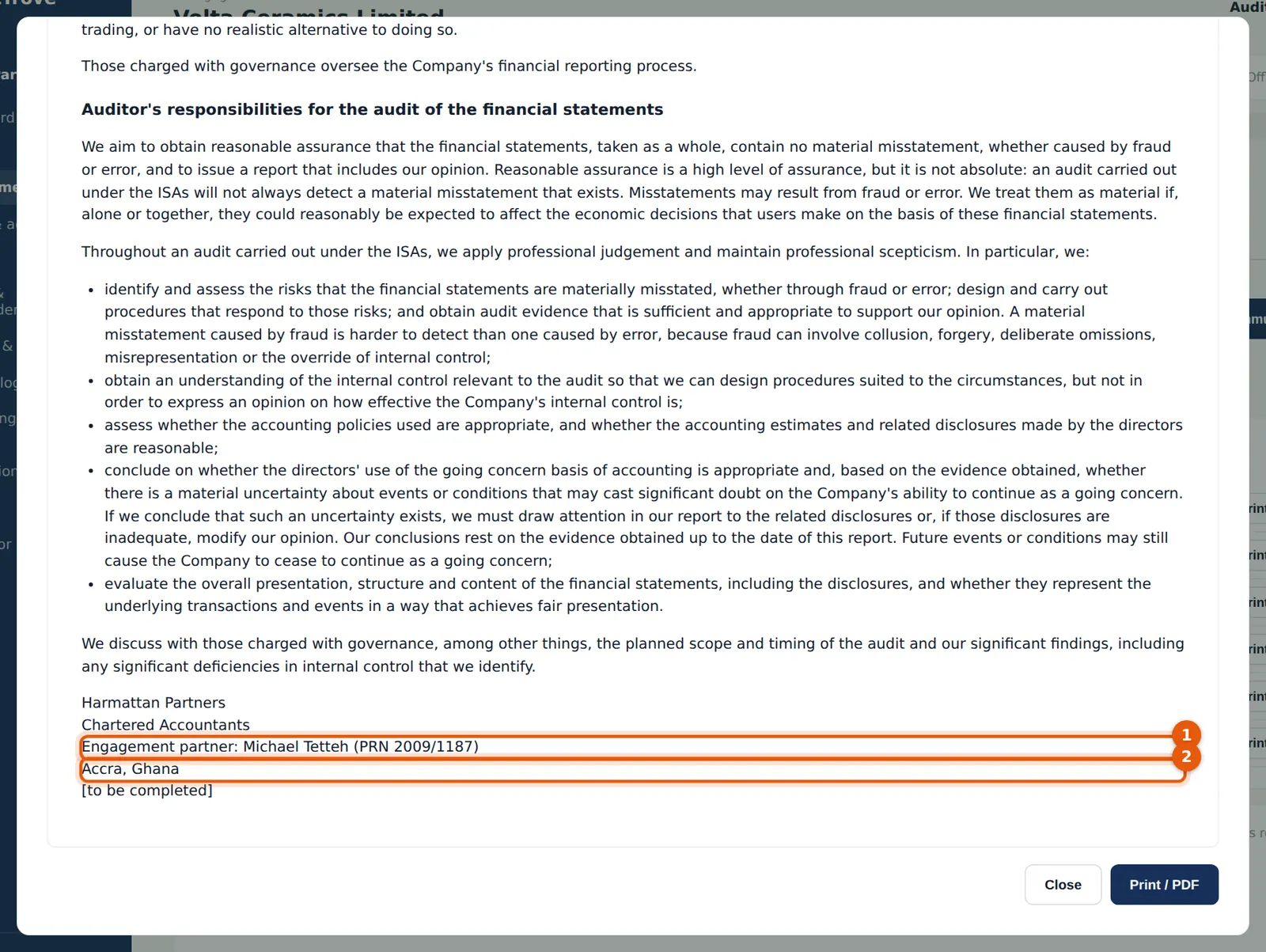
Why
On an Other engagement of an international firm, the letters and the auditor's report print no FRC or ICAN number. The engagement partner's membership or professional number from My profile → My registration (1) is printed instead. The firm's country is printed by name (2), for example "Accra, Ghana". A Barbados engagement prints the ICAB numbers, and a Nigerian engagement the FRC numbers, as before. The wording of each letter already follows the jurisdiction.
Who
Manager prepares; the engagement partner signs.
What to do
- Open Completion & report → Letters & communications.
- Choose Preview beside a letter, check the firm and partner details, and choose Print / PDF.
23.12 The inspection pack for other countries
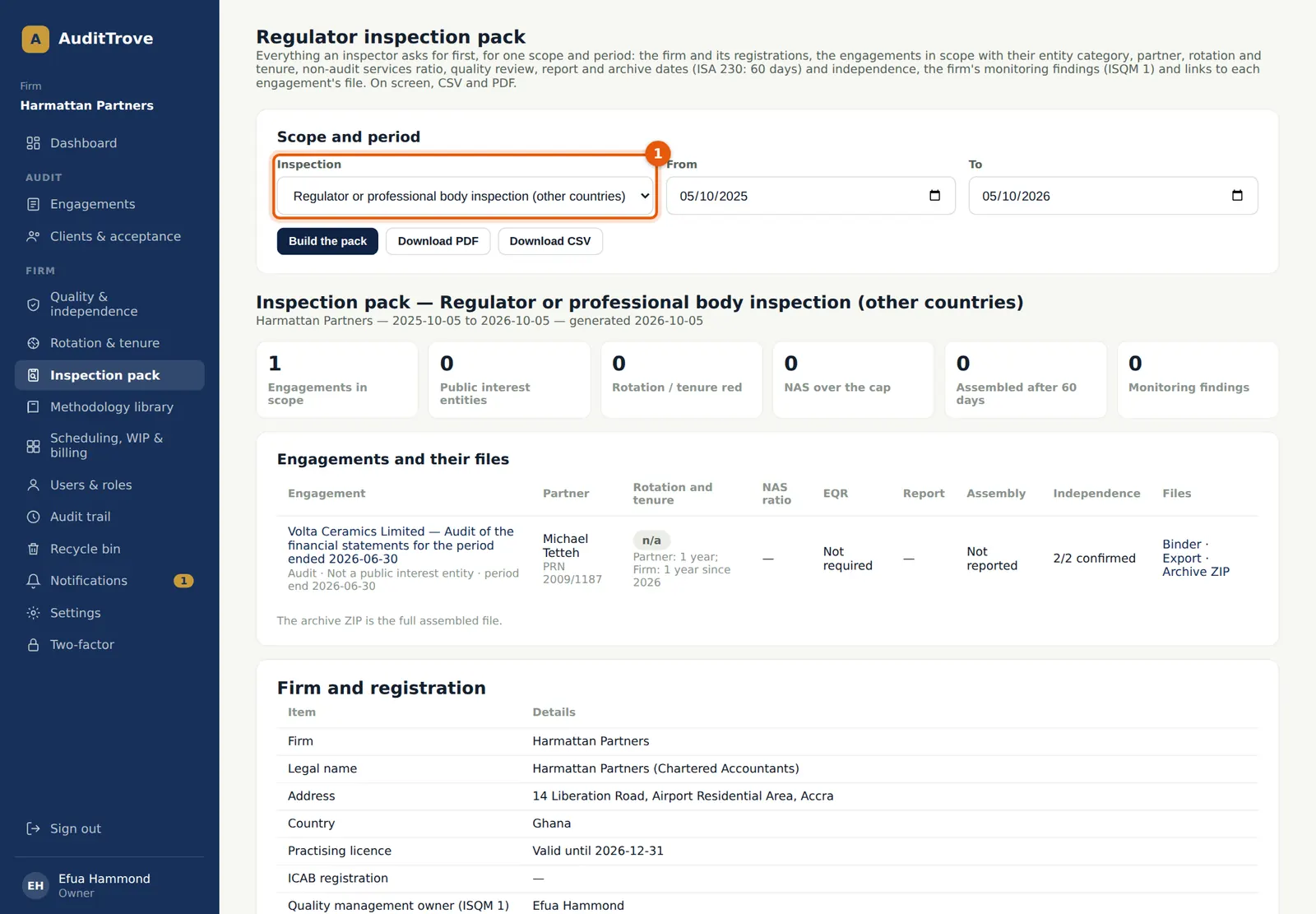
Why
An international firm has an inspection scope for other countries (1). It covers the firm's Other engagements and shows no FRC or ICAN rows or columns. The firm's country is shown by name. The ICAB scope stays for Barbados work. The FRC and ICAN scopes are offered only once the firm has a client in Nigeria.
Who
Quality lead.
What to do
- Open Inspection pack and choose Regulator or professional body inspection (other countries) (1).
- Set the period and choose Build the pack, then Download PDF or Download CSV for the inspectors.
23.13 A client in Nigeria keeps the Nigerian rules
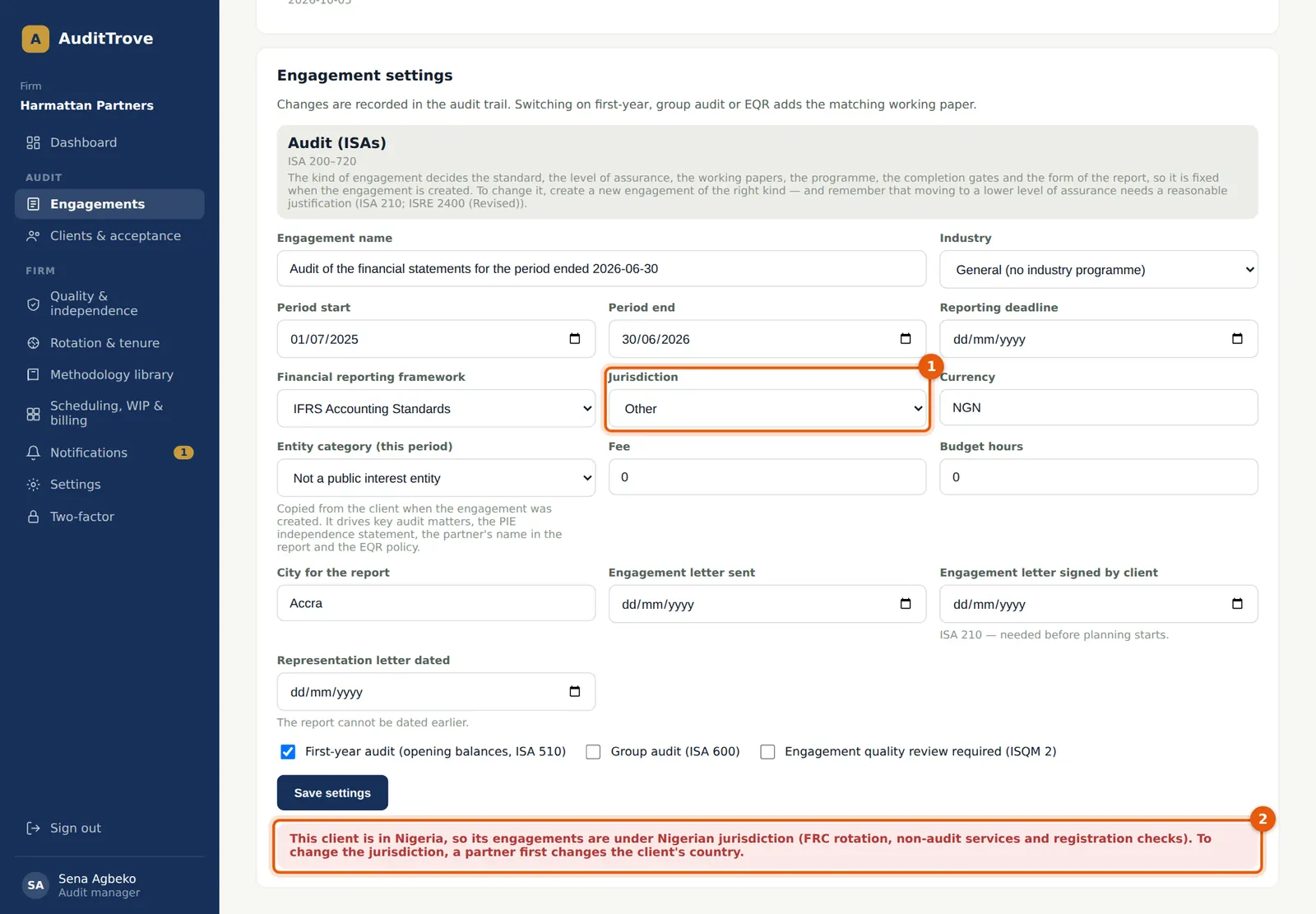
Why
An engagement is Nigerian when its jurisdiction is Nigeria or its client is in Nigeria. It then follows the Nigerian rules in full: the FRC rotation and firm tenure rules, the 80% cap on non-audit services for public interest entities, the FRC registration check on acceptance, the CAMA 2020 annual report pages and the Nigerian letters with the FRC numbers. So the jurisdiction of a Nigerian client's engagement cannot be changed to Other or Barbados (1); the change is refused with a message (2). A new engagement of a Nigerian client cannot be created under another jurisdiction either. If the client really has moved, a partner first changes the client's country. Moving a client into or out of Nigeria needs a partner, and it is noted in the audit trail.
Who
Partner or manager tries; only a partner can change the client's country.
What to do
- Leave the jurisdiction as Nigeria for a client in Nigeria.
- If the client has moved, ask a partner to change the client's country on the client's page (Edit → Country). Then change the engagement's jurisdiction under Engagement settings.
23.14 The Nigerian features come back
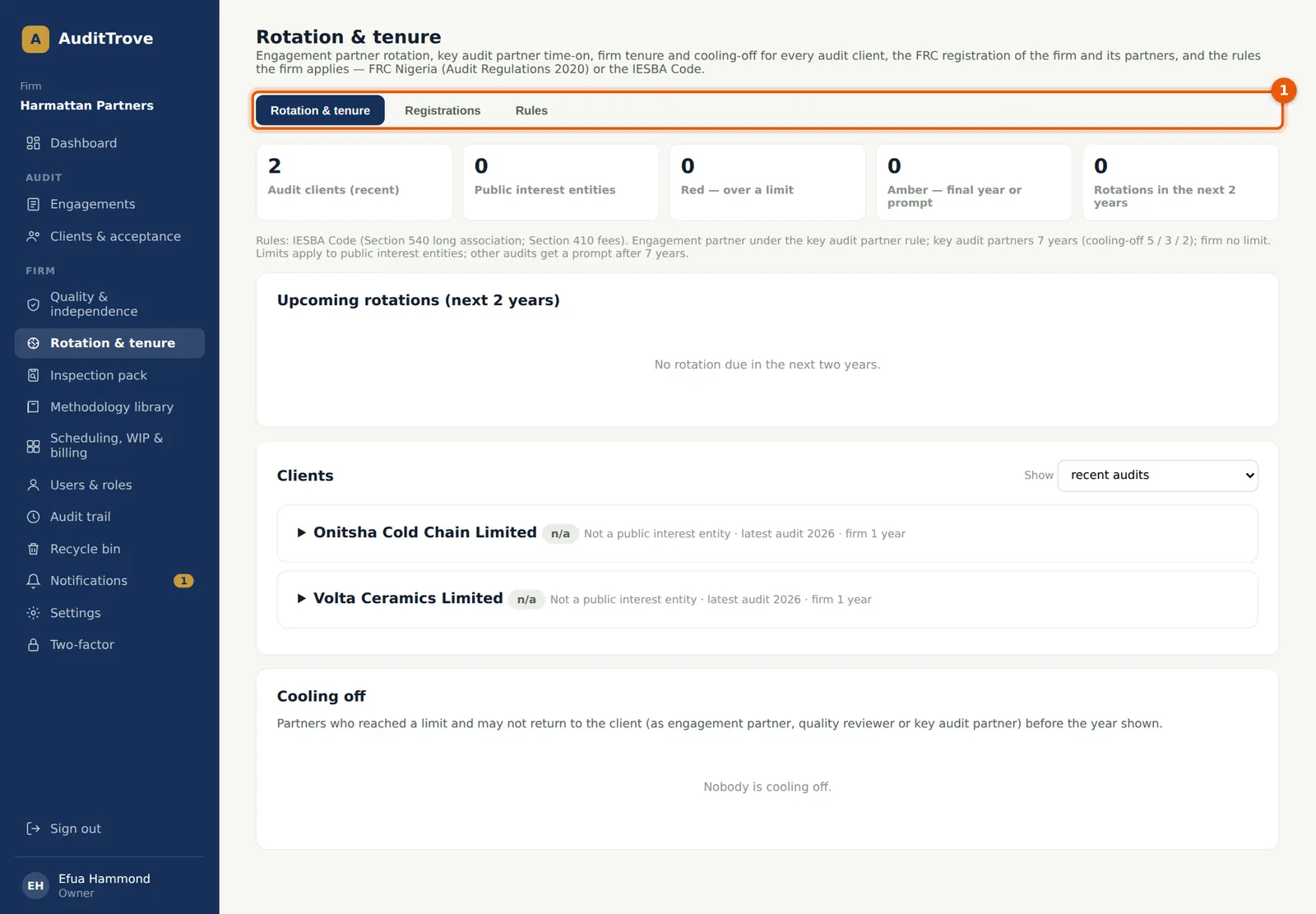
Why
As soon as the firm has a client in Nigeria (records in the recycle bin do not count), the Nigerian firm features are available again: the Registrations tab (1), the FRC and ICAN numbers in Settings, partners' FRC numbers in My profile, the FRC filing pack, the FRC and ICAN inspection scopes and the reminders. The partner on the Nigerian engagement needs a current FRC registration before the engagement can be accepted. The firm stays International: its other clients keep their own jurisdiction.
Who
Owner, firm administrator or quality lead.
What to do
- Open Rotation & tenure → Registrations and record the firm's FRC registration and the partners' FRC numbers and expiry dates (step 2.13).
- Accept and run the Nigerian engagement as in chapters 5 to 14.