Steps in this chapter (10)
BookTrove draws up the annual financial statements straight from the ledger: the statement of financial position, profit or loss and other comprehensive income, changes in equity and cash flows, with comparatives, notes and the pages of a Nigerian annual report — table of contents, corporate information, financial highlights, directors' report, statement of directors' responsibilities, the CAMA 2020 section 405 certification, the audit committee report, the reports on internal control over financial reporting, a page for the auditor's report, the statement of value added and the five-year summary. Every page and note can be switched on or off, edited, reordered or reset, and tables can link their numbers to the statements, the trial balance or other notes.
For a parent company, BookTrove can feed the group consolidation into the report, so the consolidated and separate statements appear side by side: Group this year and last year, then Company this year and last year. In the illustration Chukwudi Okeke, the finance manager, prepares a first draft of the 2026 statements on 30 April 2026 — the figures to date — after the annual general meeting approved the final dividend for 2025.
For a company outside Nigeria (International), the Nigerian pages are left out, the wording is neutral and the registration labels follow the country (chapter 26).
25.1 Open the annual financial statements
Why
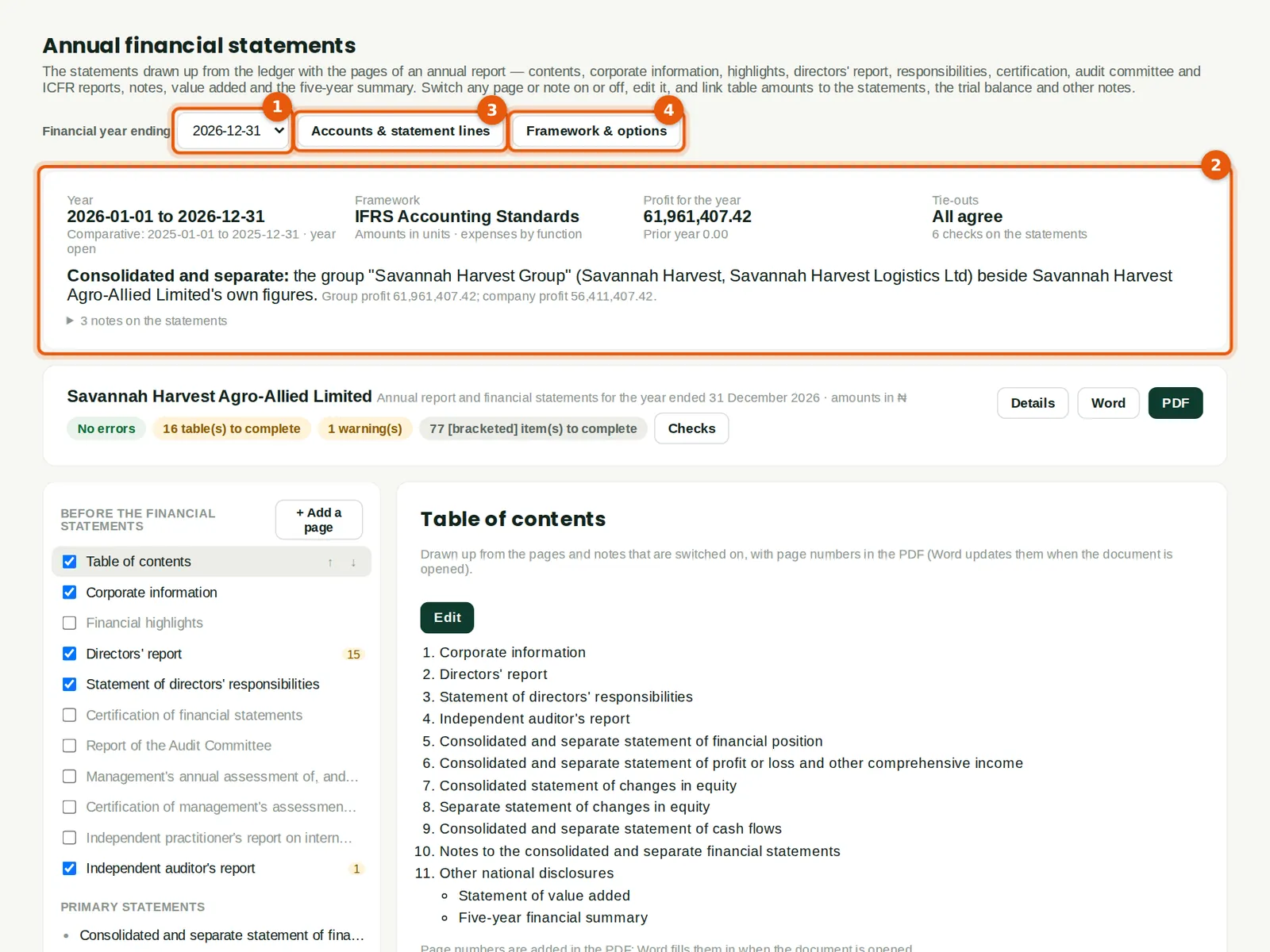
Choose the financial year (1). The summary (2) shows the period, the framework, the profit for the year and whether the statements tie out — the statement of financial position balances, and profit agrees between the income statement and the statement of changes in equity. For Savannah Harvest it also says the statements are consolidated and separate: the group Savannah Harvest Group (the company and its haulage subsidiary) beside the company's own figures, with each profit. Accounts & statement lines (3) and Framework & options (4) set up how the statements are drawn up.
Who
Anyone with reports or accounting access can read it; changing it needs accounting at level 3 (accountant, administrator or owner).
What to do
- Choose the year (1). The current year shows the figures to date and is marked as a draft until the year is closed.
- Read the summary (2): any account not yet on a statement line, and any tie-out that does not agree, is listed here.
25.2 Accounts and statement lines
Why
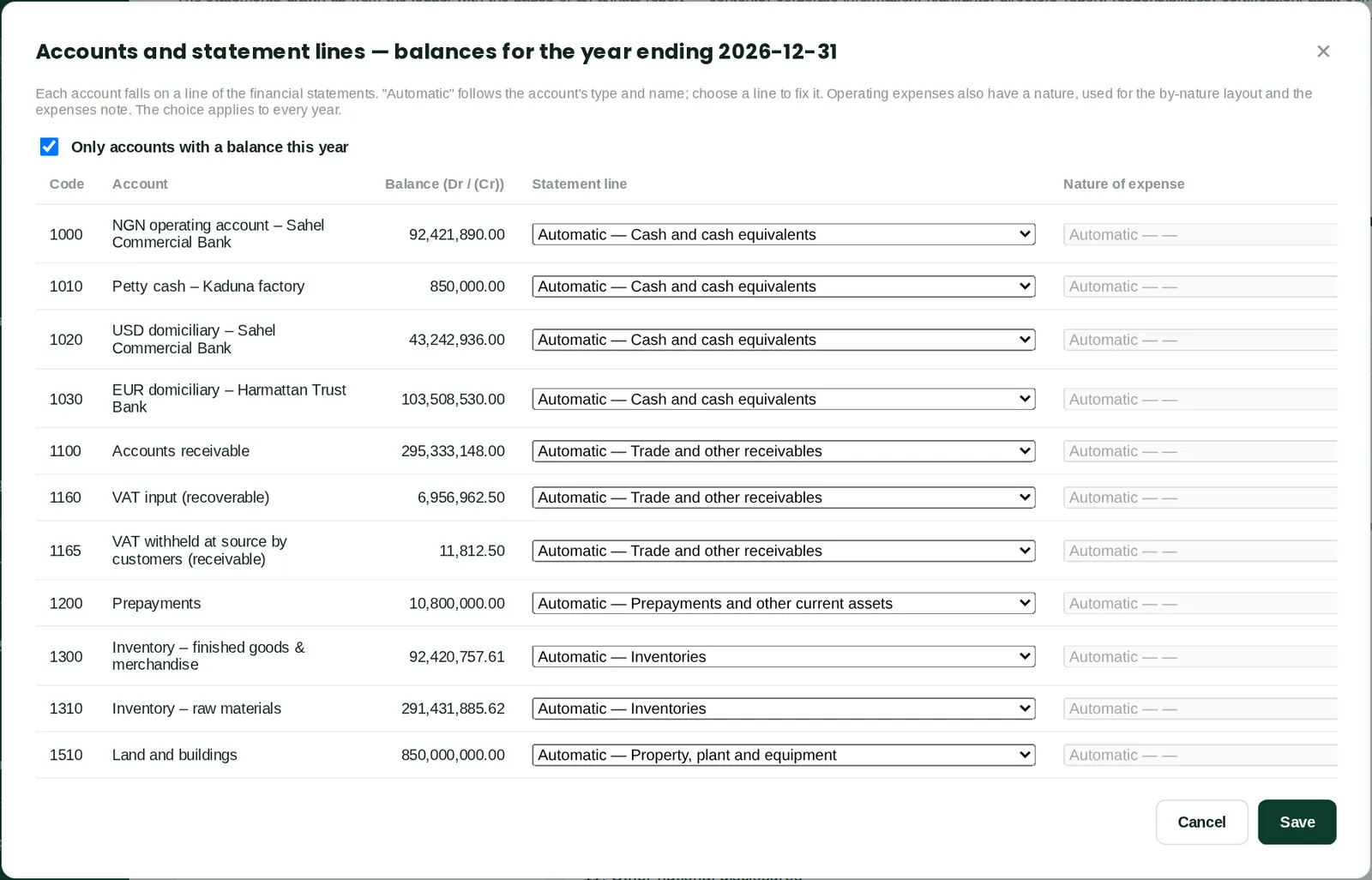
Each account falls on a line of the statements automatically, from its type and name — cash and cash equivalents, trade and other receivables, inventories, property, plant and equipment and so on. Choose a line to change it; operating expenses also have a nature (employee benefits, depreciation, raw materials…) used when expenses are shown by nature. The choice applies to every year.
Who
An accountant.
What to do
- Tick Only accounts with a balance this year to shorten the list.
- Change the statement line or the nature of expense where the automatic choice is wrong, and click Save.
25.3 Framework, options, group and journals in equity
Why
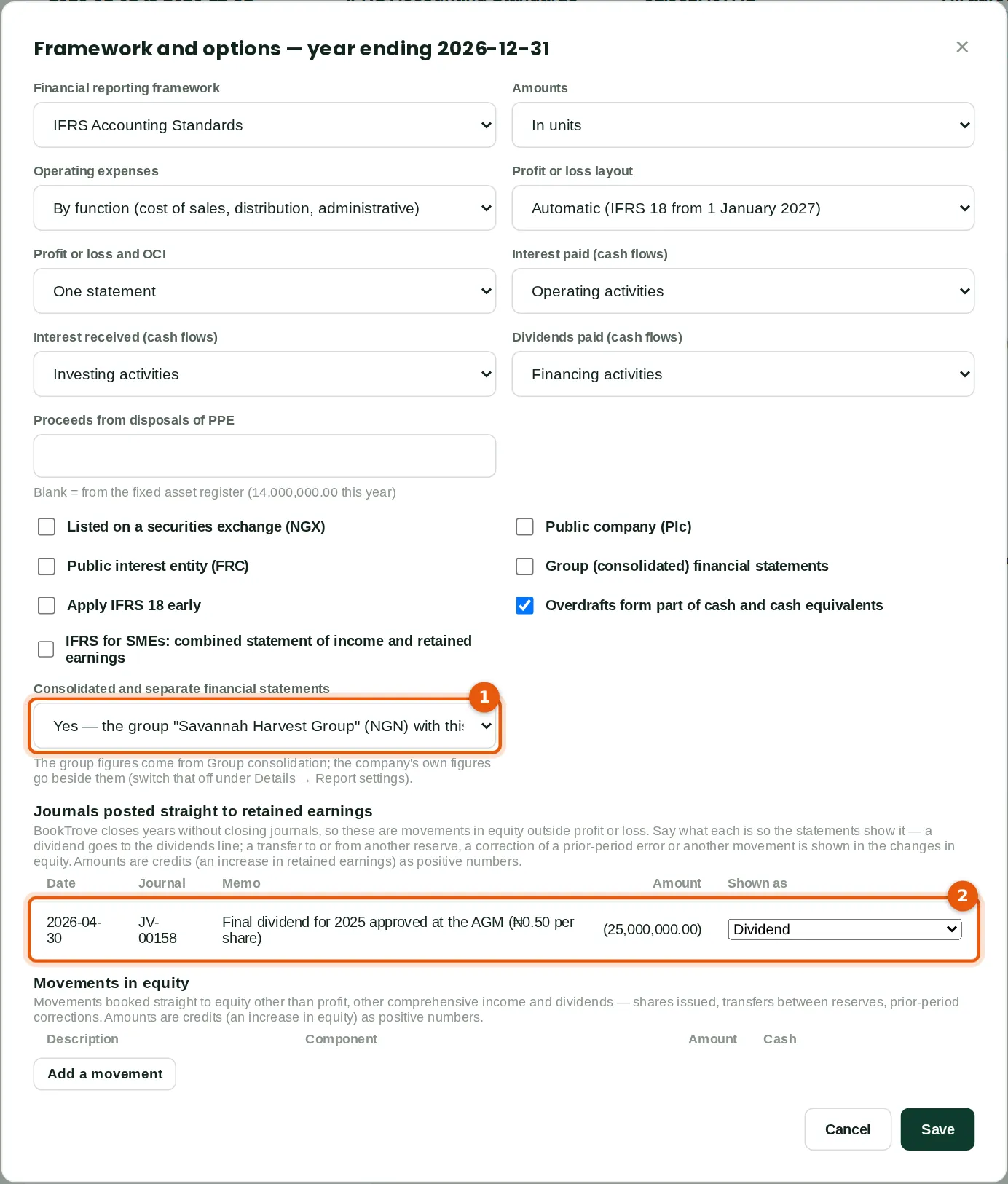
The options set the framework (IFRS Accounting Standards or IFRS for SMEs), units or thousands, expenses by function or by nature, the layout (IAS 1, or IFRS 18 from 1 January 2027 or earlier), where interest and dividends go in the cash flow statement, and whether the company is listed, a public company or a public interest entity. Consolidated and separate financial statements (1) picks a group from Group consolidation whose parent is this company: Savannah Harvest Group. Journals posted straight to retained earnings (2) lists every journal of the year that debits or credits retained earnings directly. BookTrove suggests what each is — here the final dividend for 2025, approved at the AGM and debited straight to retained earnings, is recognised as a dividend from its wording. A transfer between reserves, a correction of a prior-period error or another movement in equity can be chosen instead; a journal left unexplained is counted in the summary.
Who
An accountant.
What to do
- Choose the framework and options.
- Choose the group (1) to show consolidated and separate statements; leave it on No for the company's own statements.
- Check what each journal in (2) is shown as, and click Save.
25.4 The consolidated and separate statement of financial position
Why
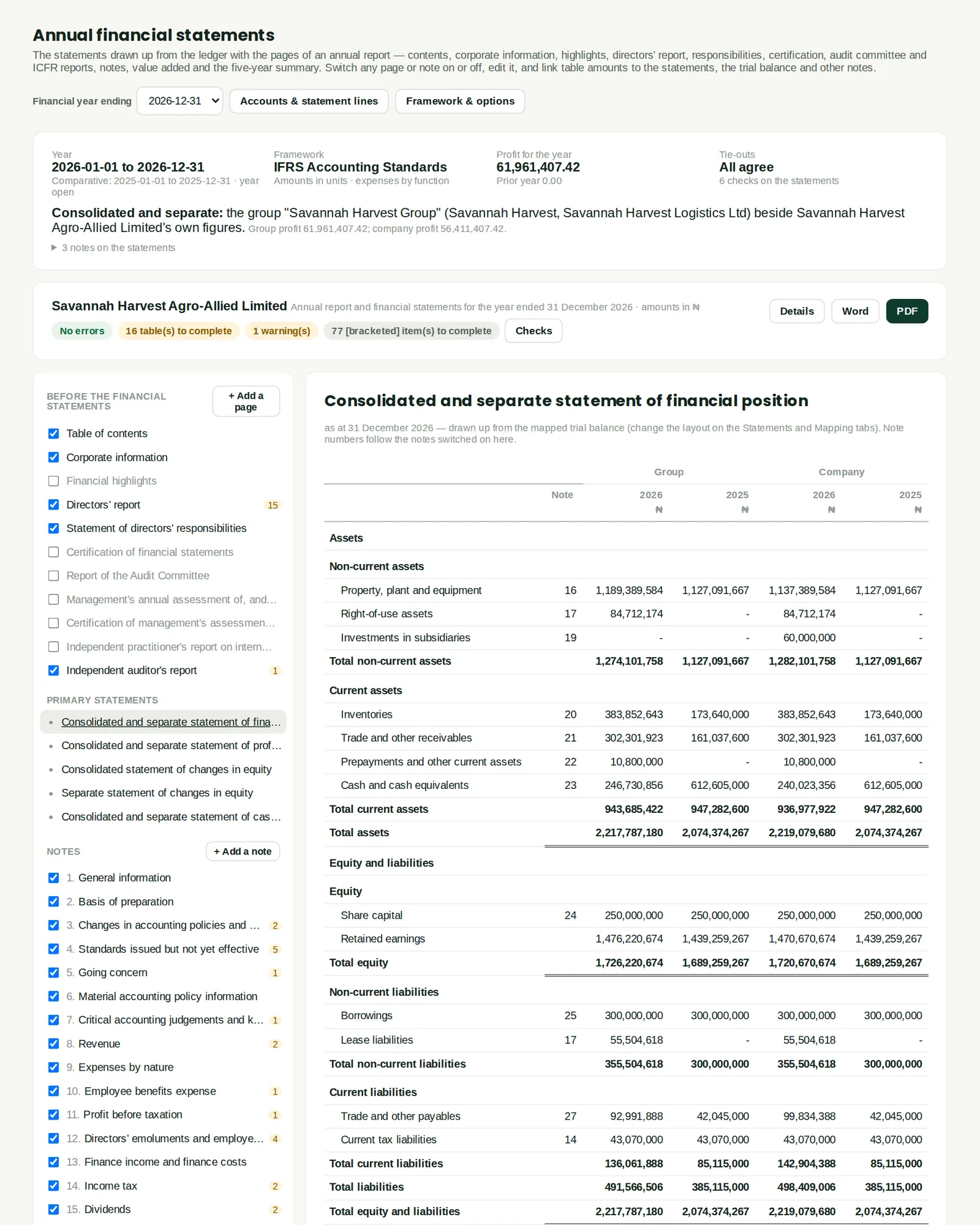
With a group chosen, every statement has four amount columns under the headings Group and Company: this year and last year for each. The group's figures come from the consolidation (the haulage subsidiary's trucks, receivables and cash are added, the investment in the subsidiary and intercompany balances are eliminated); the company's are its own ledger. Titles read "Consolidated and separate statement of …". The company's own statement of changes in equity follows the consolidated one. The same columns appear in the notes drawn from the trial balance and in tables with a column per year.
Who
Anyone who can read the report.
What to do
- Click a statement in the navigator on the left to show it.
- To show the company's figures without the group, choose No in the options; to show the group without the company columns, untick them under Details → Report settings.
25.5 The statement of changes in equity
Why
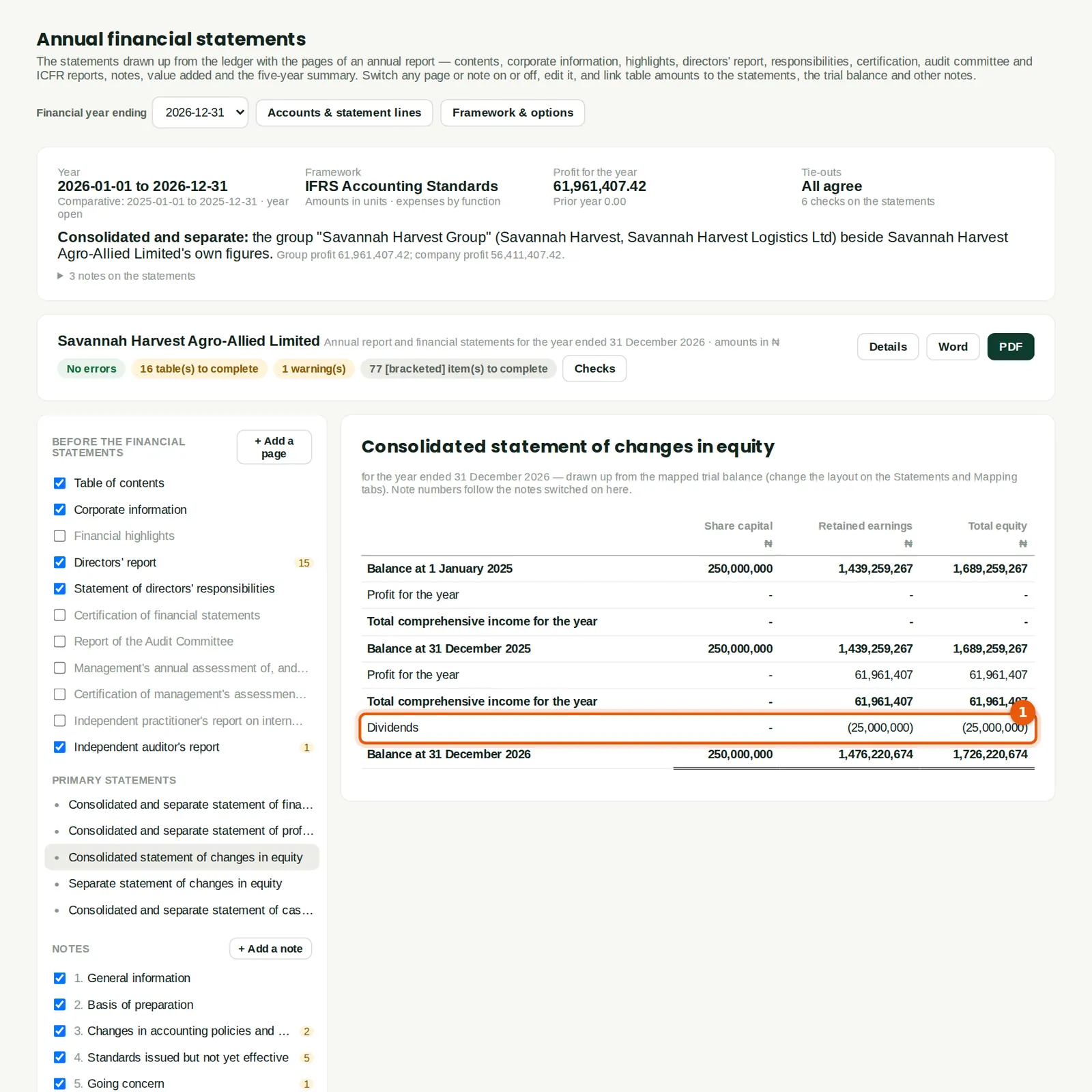
Profit for the year, other comprehensive income, dividends (1) and other movements in equity each have their own line. The ₦25,000,000 final dividend for 2025 appears as Dividends because it was recognised as one in the options; without that, a journal straight to retained earnings would be an unexplained difference. Balances at the start and end of each year agree to the statement of financial position.
Who
Anyone who can read the report.
25.6 Pages before the statements
Why
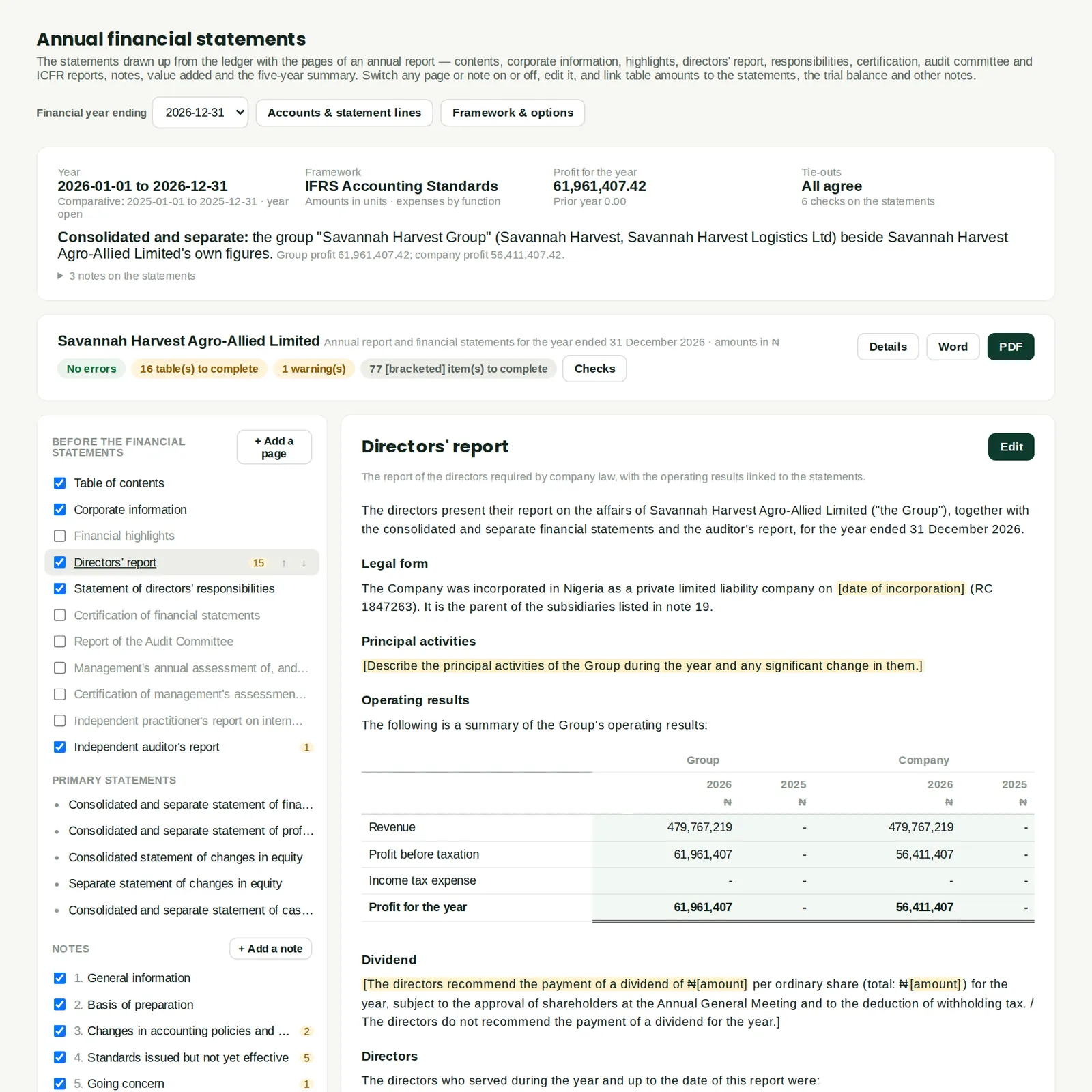
The standard wording is filled in from the company's details and the figures: the principal activities, the results table (group and company), dividends, directors and their interests, and so on. Text in [square brackets] is guidance still to complete — for example the date of incorporation or the principal activities — and is counted in the checks until replaced. Pages that apply to listed companies or public interest entities (the audit committee report, the ICFR reports) are switched on by the options.
Who
An accountant, for the directors.
What to do
- Tick or untick a page in the navigator to include it; use the arrows to move it.
- Click Edit to change the wording (step 25.7).
25.7 Edit a page: placeholders and linked amounts
Why
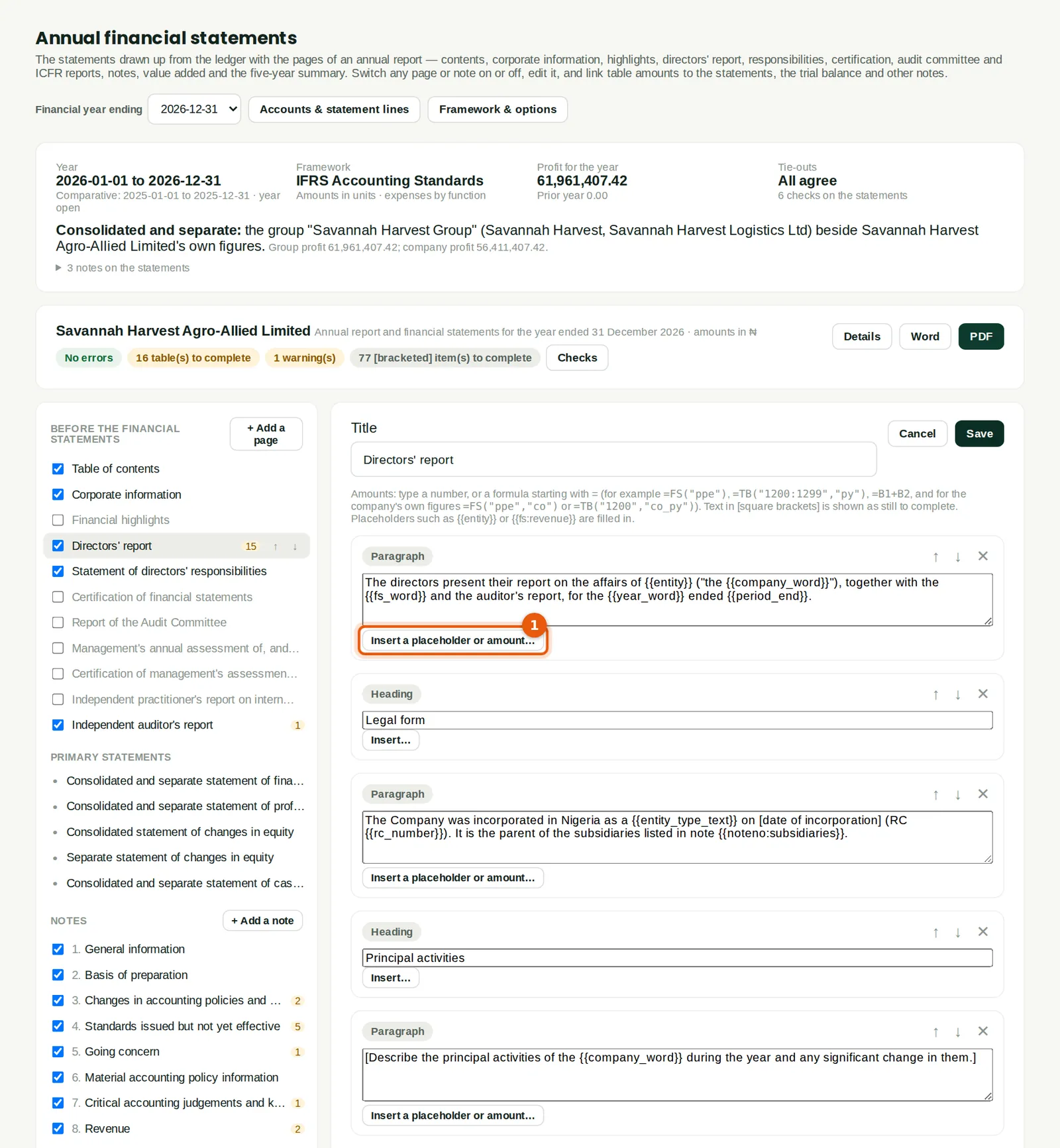
A page is a list of blocks: headings, paragraphs, lists, tables, signature blocks and page breaks. Text can hold placeholders that are filled in when the report is shown: {{entity}}, {{year}}, {{period_end}}, {{fs:revenue}} (a line of the statements), {{fs:revenue:py}} (last year), {{fs:revenue:co}} (the company's figure beside the group's), {{tb:4000}} (an account), {{noteno:ppe}} (the number of a note) and more. Insert a placeholder or amount… (1) lists them so nothing has to be typed from memory.
Who
An accountant.
What to do
- Click in a paragraph, then Insert a placeholder or amount… (1), choose one and click Insert.
- Replace the [bracketed] guidance with the company's own words.
- Click Save. Reset to the standard content undoes all changes to the page.
25.8 Notes and linked tables
Why
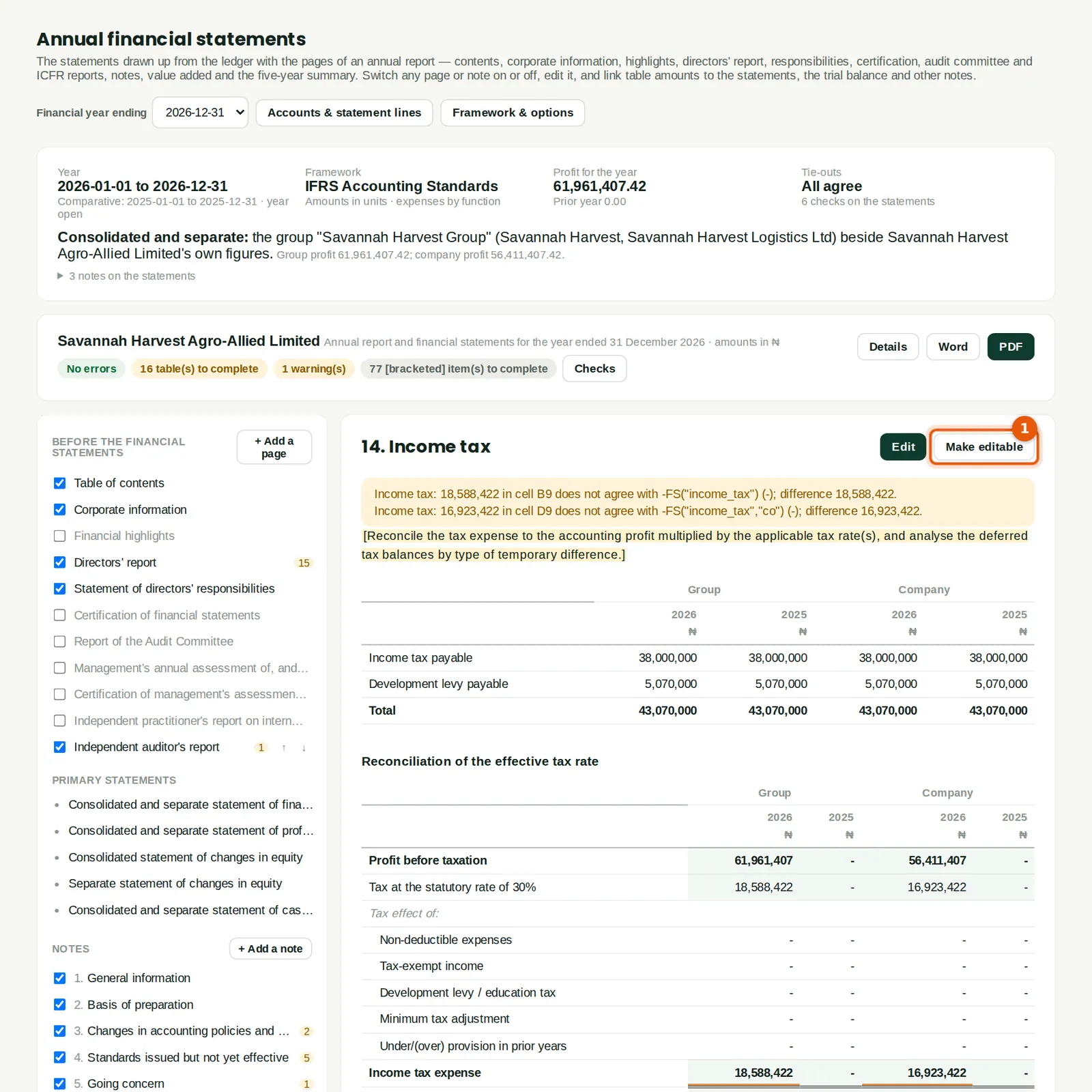
Notes drawn from the trial balance show the accounts on each line; library notes add the other disclosures IFRS and Nigerian law ask for — segments, earnings per share, dividends, related parties, financial risk, fair value, directors' emoluments, minimum tax and more — each with a table to complete. Make editable (1) turns a note's trial-balance table into cells that stay linked: each amount is a formula such as TB("2500") or TB("2500","co"), with a check against the statement line, so the note can be reworded or split without losing the link. In a table, cells take numbers, text or formulas: FS("revenue"), FS("revenue","py"), TB("1200:1299"), TBCR("4000"), CF(…), NOTE(…), REF("name"), DATA("shares_weighted"), arithmetic, SUM, IF and ROUND. Blank subtotal and total rows add up by themselves; Add Company columns repeats a table's amount columns for the company.
Who
An accountant.
What to do
- Click Make editable (1) on a note from the trial balance, or Edit on a library note.
- Type a formula starting with = in a cell, or pick one with Insert…; give a cell a check to compare it with a linked figure.
25.9 Report details
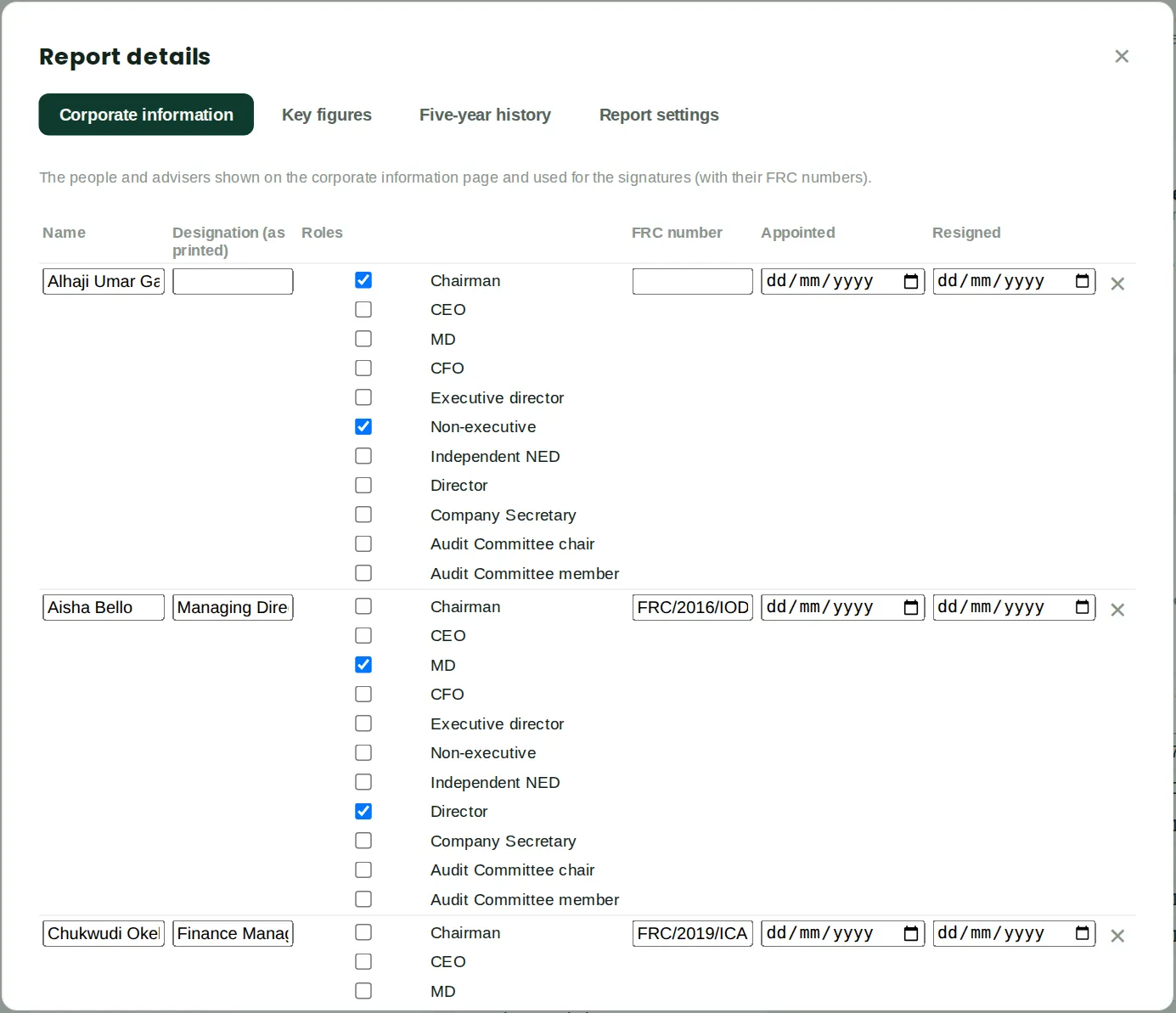
Why
Details holds what is not in the ledger: the directors, secretary and officers with their roles and FRC numbers (used on the corporate information page and for the signatures), the registered office, RC number, TIN, auditors, bankers and solicitors; Key figures such as shares in issue, the proposed dividend per share, the tax rate and the number of employees; the Five-year history (filled from the ledger of earlier years); and Report settings such as the signature on the statement of financial position and the company columns.
Who
An accountant, with the company secretary.
What to do
- Fill in each tab and click Save.
25.10 Checks, and the PDF and Word files
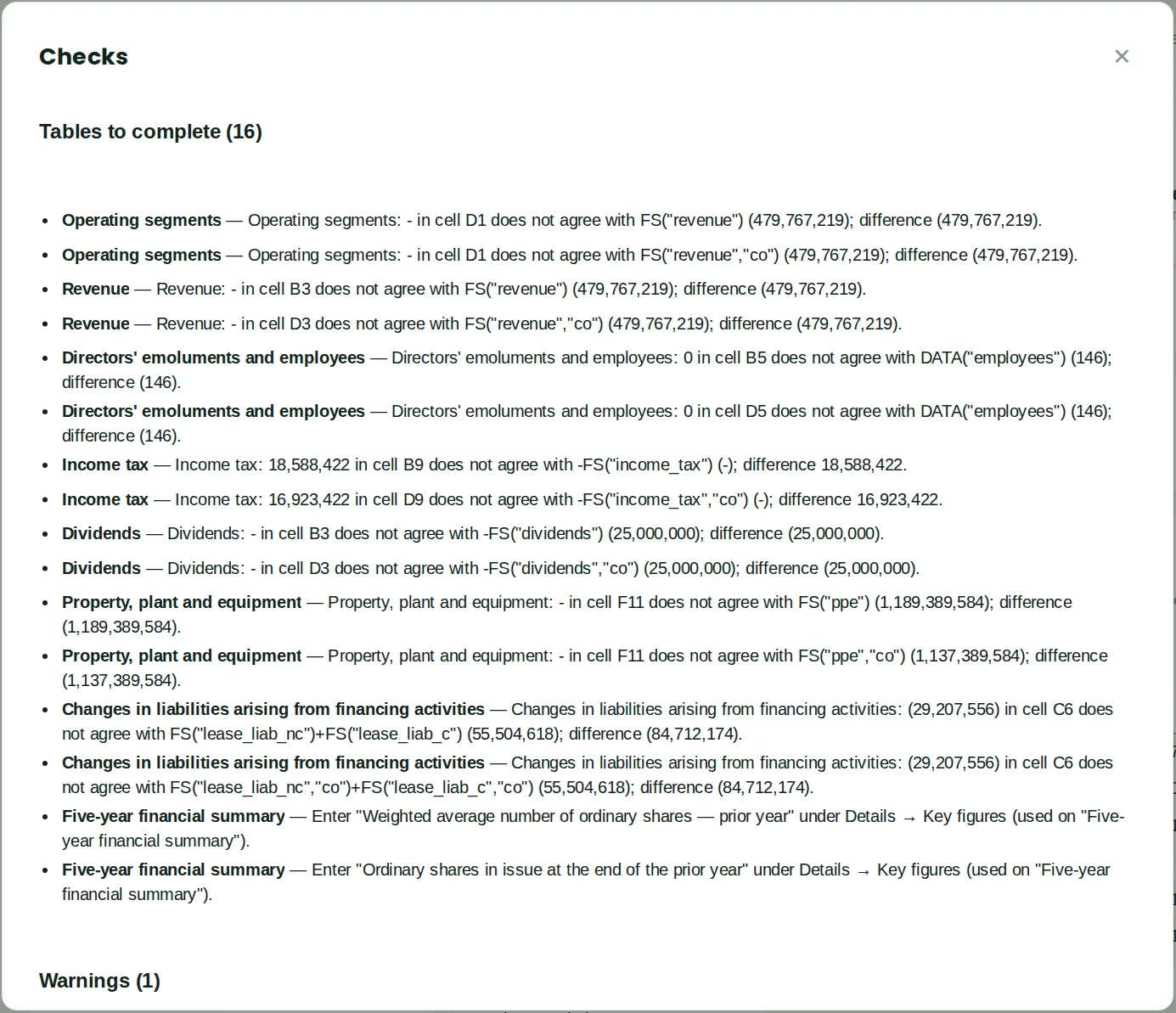
Why
Checks lists errors (a formula that fails, a tie-out that does not agree), tables still to complete — a template table whose check does not yet agree with the statements — missing key figures, warnings, and [bracketed] guidance left in. Here the draft of 30 April still has template tables to complete, which is expected so early in the year.
Who
An accountant, before sending the report to the auditors or the board.
What to do
- Work through the list until it is clear.
- Click PDF for the report with a table of contents, page numbers and bookmarks, or Word for an editable copy. Until the year is closed the PDF is marked as a draft.