Steps in this chapter (9)
Add employees one by one or from a spreadsheet — salaried, take-home and daily-rated casual workers — with everything needed to pay and file for them.
Each employee record holds what PayTrove needs to pay the person and to file for them: pay, state of residence (for PAYE), Tax ID, pension details, NHF election, rent declaration and bank account.
Savannah Harvest starts 2026 with 34 employees: 8 at the Lagos head office, 14 at the Kaduna factory (including four daily-rated casual workers) and 12 at the nine buying centres in Lokoja, Ogbomoso, Lafia, Dutse, Kachia, Akure, Minna, Ilorin and Kano. Blessing Etim adds one employee through the form and imports the rest from a spreadsheet on 6 January.
Employees are paid in one of three ways: a monthly salary (most staff), an agreed take-home amount (the driver), or a daily rate for casual workers, who are paid for the days they actually work each month. The factory's four casual workers earn ₦8,500 a day.
5.1 Add an employee: person and employment
Why
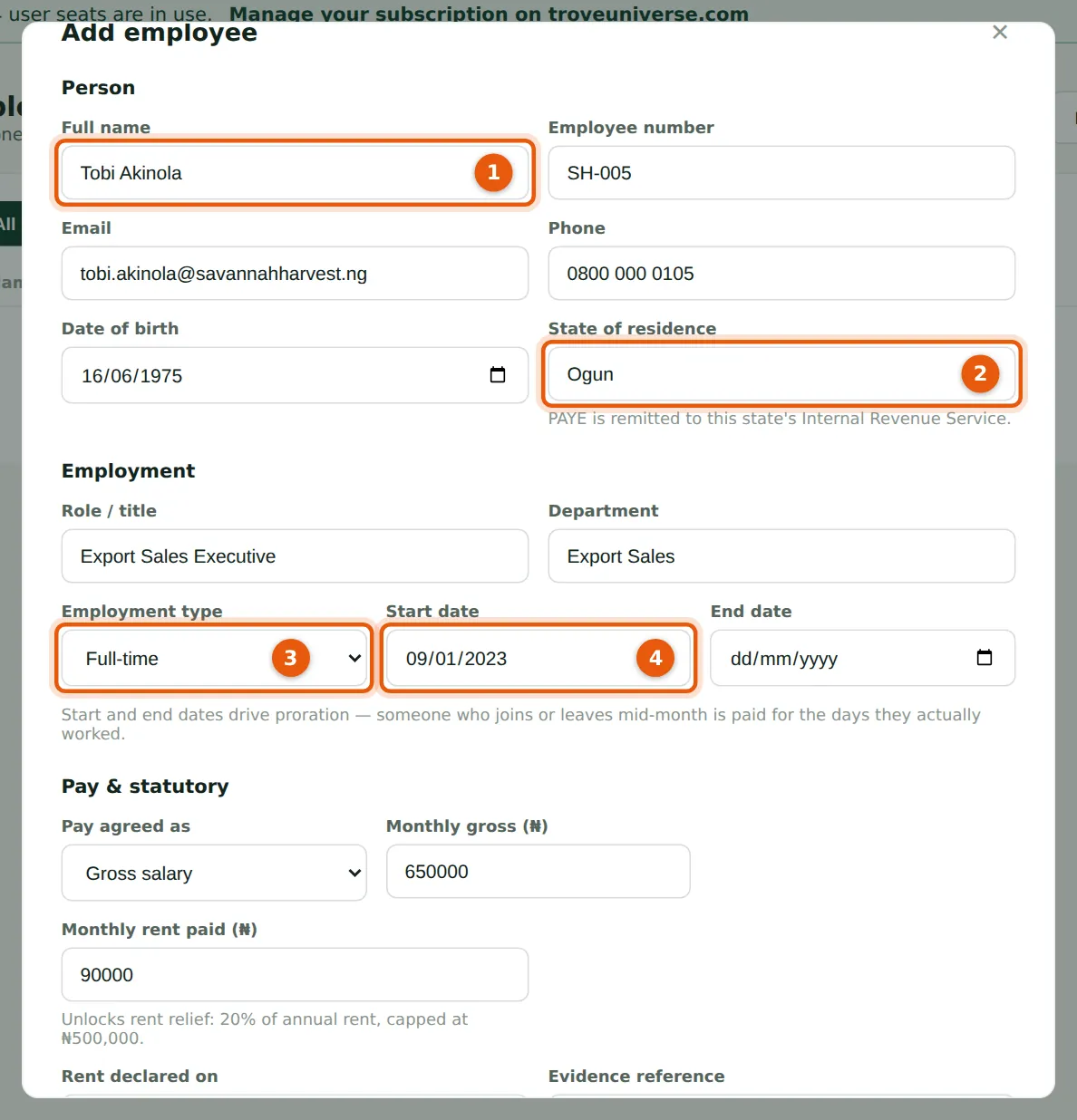
PAYE is remitted to the Internal Revenue Service of the state where the employee lives, not where they work. Tobi Akinola works in Victoria Island but lives in Mowe, so his PAYE goes to Ogun State. Start and end dates drive proration: someone who joins or leaves mid-month is paid for the days they actually work.
Who
Preparer or Admin.
What to do
- Open Employees and choose Add employee.
- Enter the full name (1), employee number, email, phone and date of birth.
- Enter the state of residence (2).
- Enter the role, department and employment type (3), and the start date (4). Leave the end date blank.
5.2 Pay and statutory details
Why
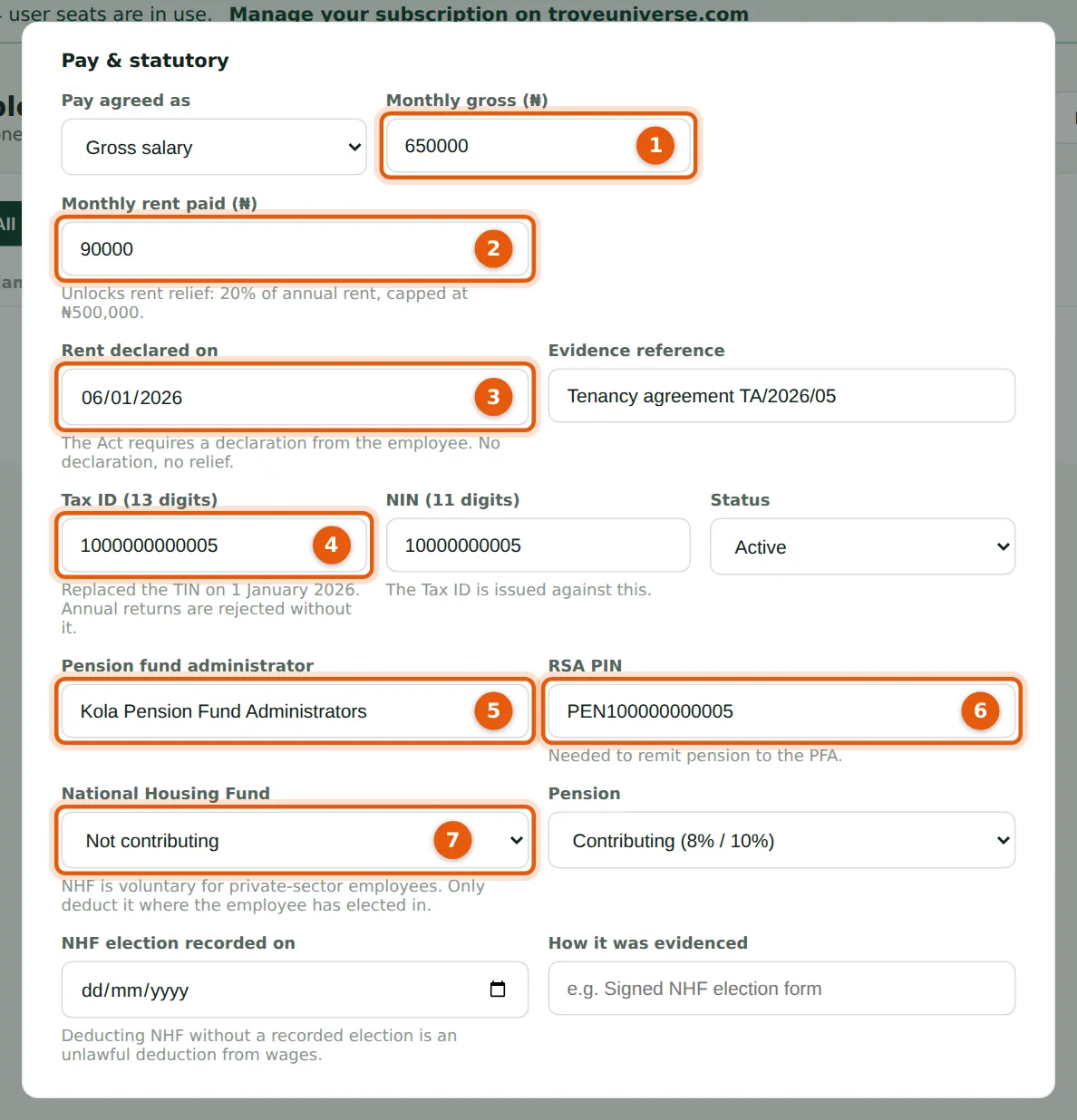
Rent relief (20% of annual rent, capped at ₦500,000) is given only when the employee has declared their rent; the date and evidence reference record that declaration. The 13-digit Tax ID replaced the TIN on 1 January 2026, and annual returns are rejected without it. NHF is voluntary for private-sector employees and is deducted only if the employee has opted in and the election date is recorded.
Who
Preparer or Admin.
What to do
- Choose whether pay is agreed as a gross salary or as a take-home (net) amount, and enter the monthly gross (1). For a net-agreed contract, PayTrove works out each month the gross that gives exactly the agreed take-home; the company carries the tax.
- If the employee pays rent, enter the monthly rent (2), the date they declared it (3) and the evidence reference.
- Enter the Tax ID (4) and NIN.
- Enter the pension fund administrator (5) and RSA PIN (6) (PEN followed by 12 digits).
- Choose the NHF election (7). If they opted in, record the date and how it was evidenced (for example a signed NHF election form).
5.3 Health insurance and bank account, then save
Why
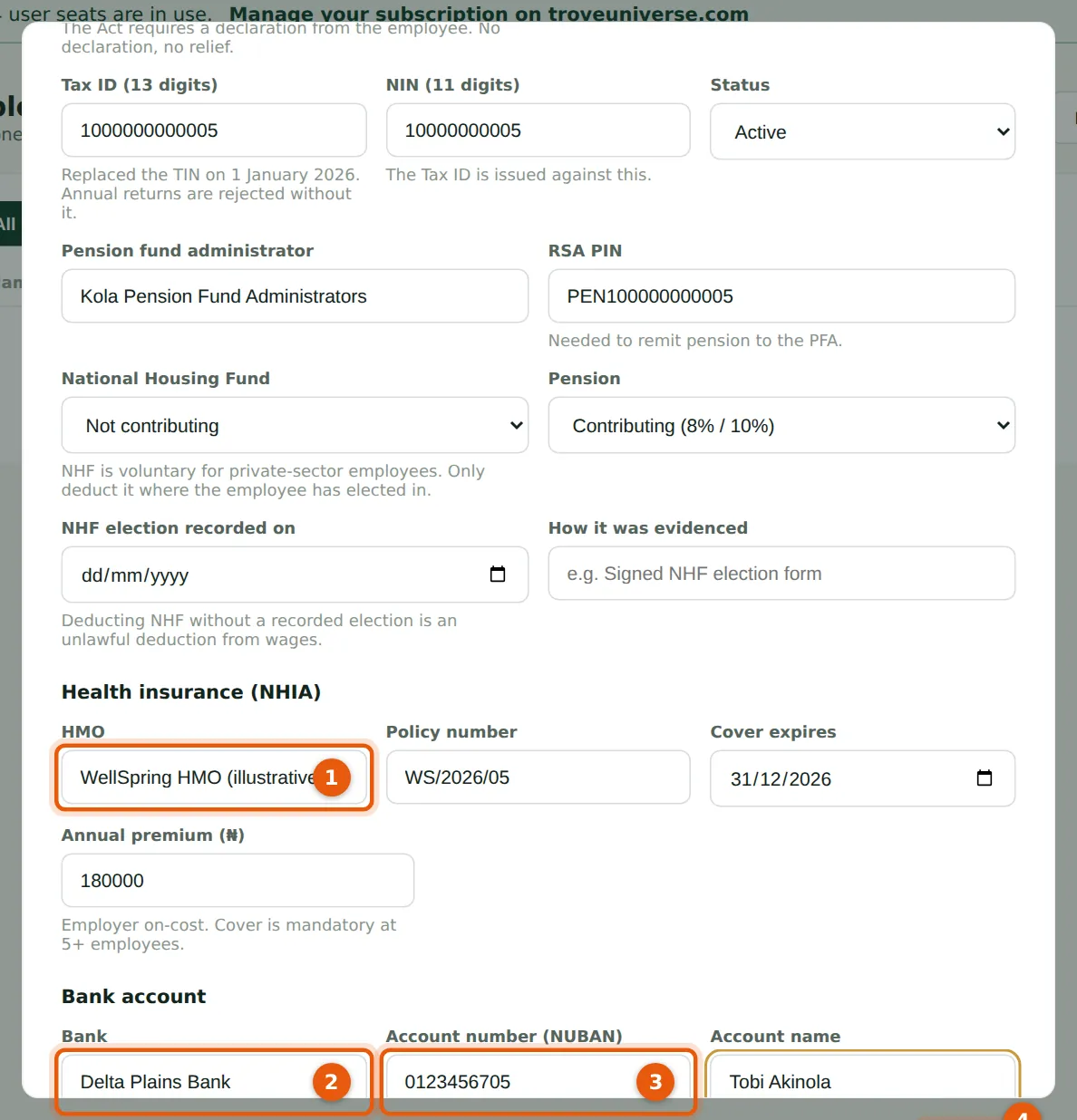
The HMO premium is an employer on-cost that appears in the cost-to-employ report. The bank account must be a 10-digit NUBAN; without it the person cannot be paid through the bank file.
Who
Preparer or Admin.
What to do
- Enter the HMO, policy number, expiry and annual premium (1).
- Enter the bank (2), account number (3) and account name.
- Choose Save (4). The employee appears in the list.
5.4 Pay agreed as take-home (net)
Why
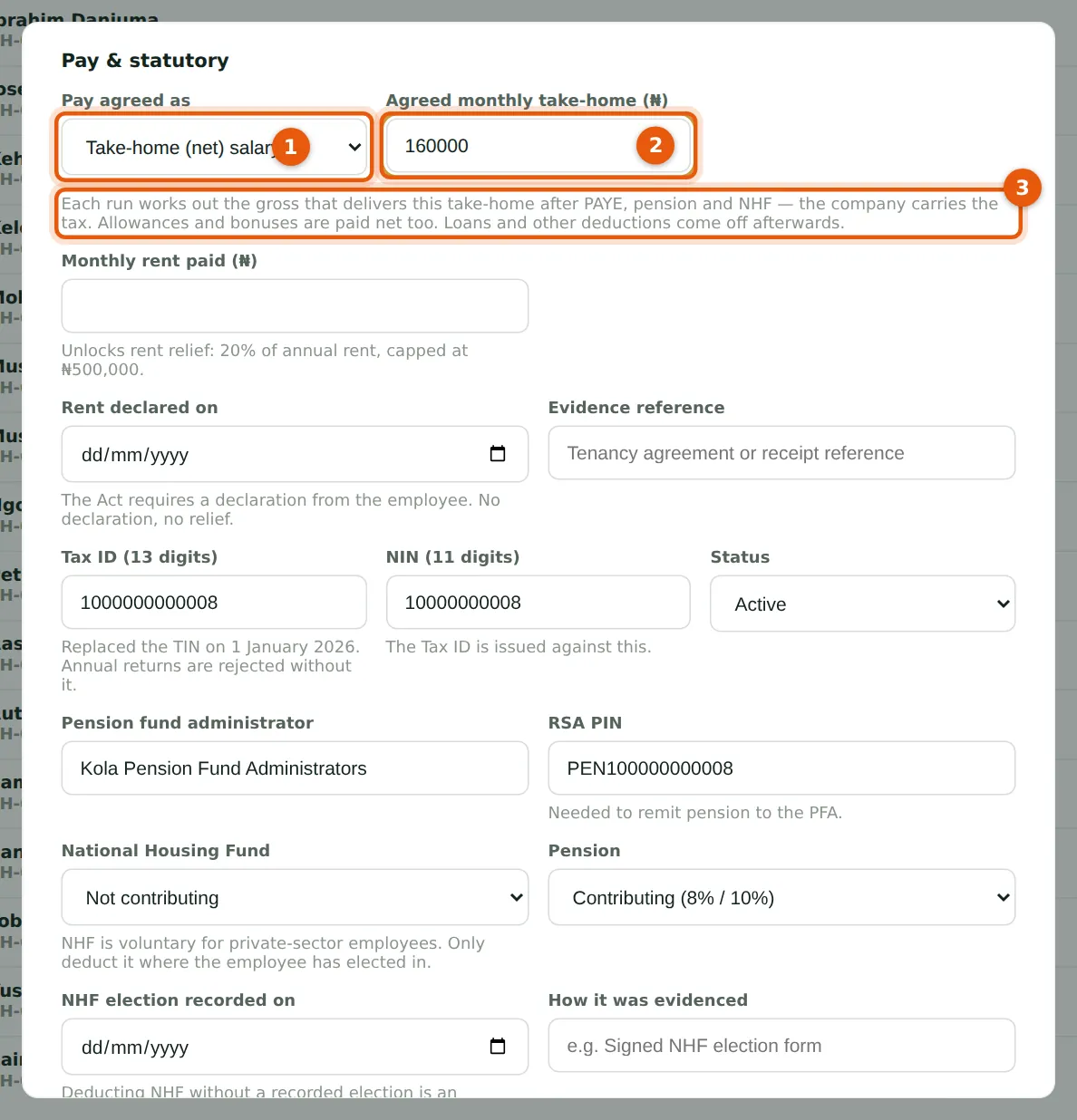
Some contracts promise a take-home figure. Samuel Ogunleye, the driver, is paid ₦160,000 net. With Take-home (net) salary chosen (1) and the agreed amount entered (2), every run works out the gross that gives exactly that net after PAYE, pension and NHF on the cumulative basis, and the company carries the tax. The note (3) explains this. Allowances and bonuses are paid on top.
Who
Preparer or Admin.
What to do
- Open the employee, choose Take-home (net) salary in Pay agreed as (1).
- Enter the agreed monthly take-home (2) and choose Save. The monthly gross shown in the list becomes an estimate; each run solves it exactly.
5.5 A daily-rated casual worker
Why
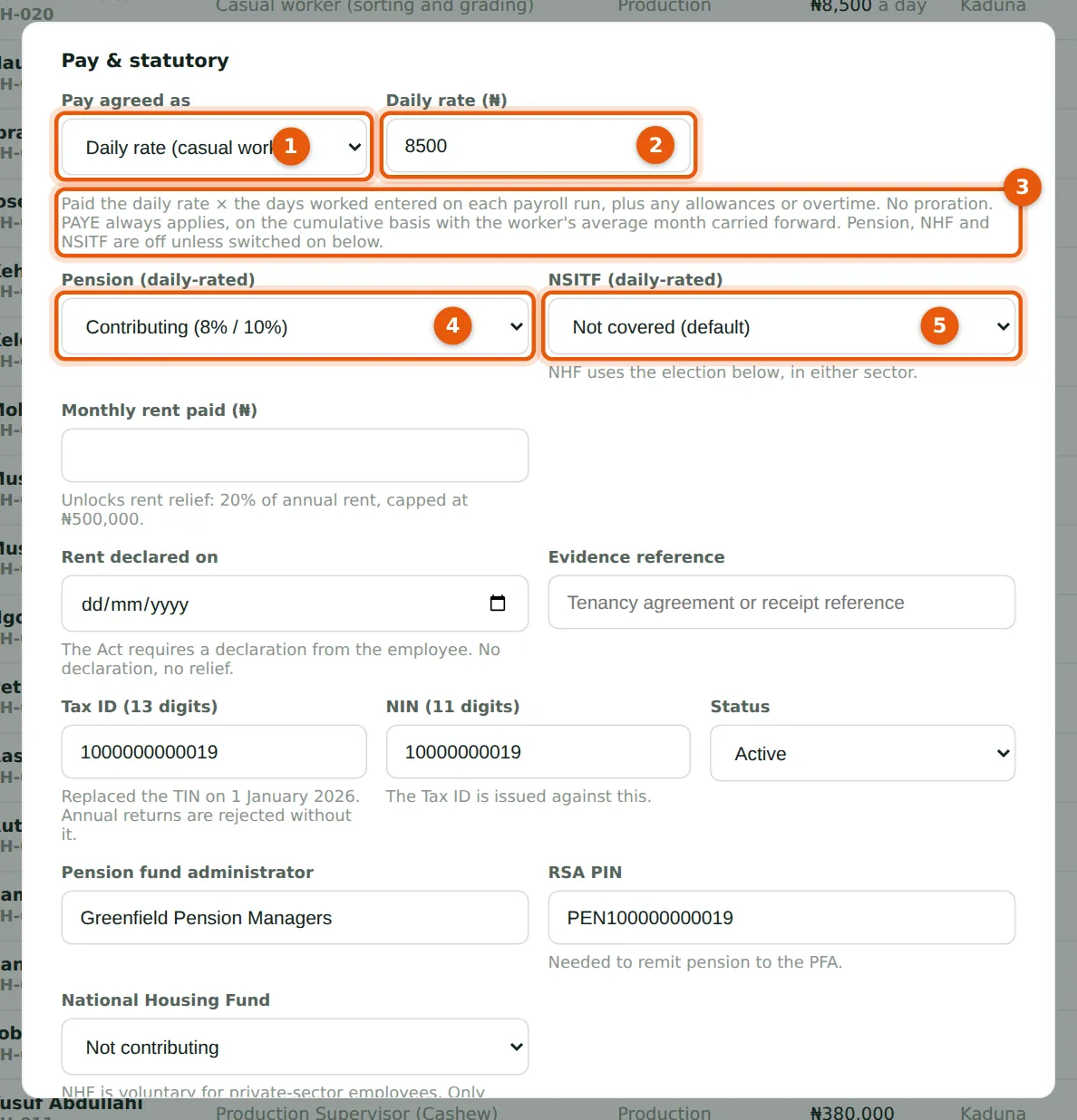
Casual workers at the factory are engaged by the day. With Daily rate (casual worker) chosen (1) and the rate entered (2), the worker is paid the daily rate × the days worked that you enter on each month's draft run, plus any allowances or overtime. There is no proration: the days are the pay. The note (3) sums up the rules. PAYE always applies, worked out on the same cumulative Nigeria Tax Act 2025 method as everyone else. Pension, NHF and NSITF are off unless you switch them on for the worker: Musa Tanko has opted into the contributory pension scheme (4), so 8% is deducted and the company pays 10% on the basic, housing and transport share of his daily pay; NSITF stays off (5). NHF needs the worker's own recorded election, as for salaried staff.
Who
Preparer or Admin.
What to do
- Open the employee and choose Daily rate (casual worker) in Pay agreed as (1).
- Enter the daily rate (2). The monthly gross shown in the employee list becomes an estimate (rate × 260 ÷ 12) for lists and reports only.
- Choose whether to deduct pension (4) and pay NSITF (5) for this worker. If pension is on, the worker needs a PFA and an RSA PIN.
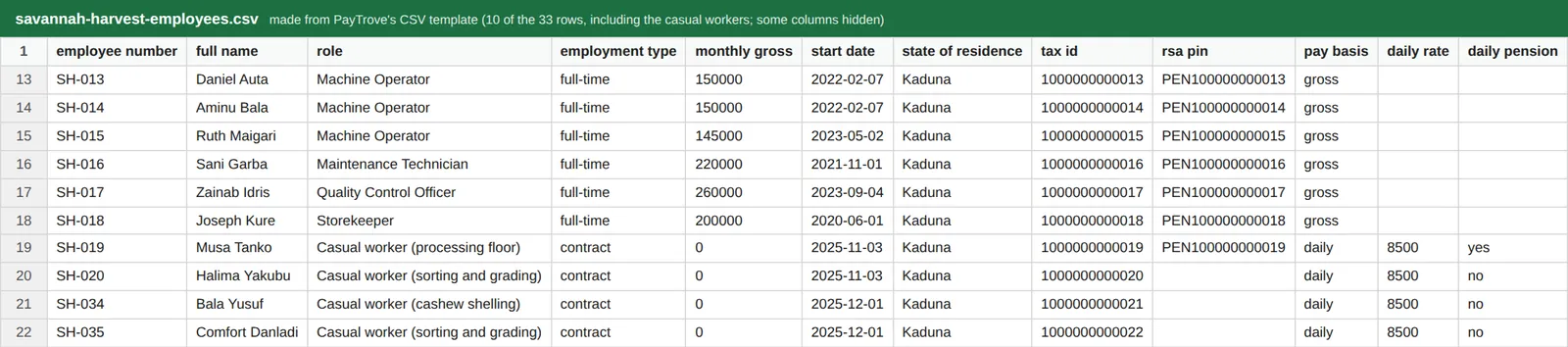
- Choose Save. Casual workers can also be imported: the CSV template has pay basis, daily rate, daily pension and daily nsitf columns.
5.6 Import many employees from a spreadsheet
Why
Choose CSV template on the Employees page to download a file with the right column headings: employee number, full name, email, phone, role, department, employment type, monthly gross, monthly rent, start and end date, date of birth, state of residence, Tax ID, NIN, PFA, RSA PIN, NHF opt-in and consent date, rent declaration and evidence, bank, account number and name, status, pay basis (gross, net or daily), agreed net, and for casual workers the daily rate, daily pension and daily NSITF. Fill one row per employee and save it as CSV. The rows shown include the four casual workers, with pay basis daily and a daily rate of 8500.
Who
Preparer or Admin.
What to do
- Choose CSV template, fill it in and save it as a .csv file.
- Choose Import and pick the file. PayTrove says how many rows it will import and lists any columns it does not recognise; confirm to import.
- An import is all or nothing: if one row is rejected (for example a missing name), nothing is imported and the message lists the rows to fix. Up to 500 rows can be imported at a time.
- Health insurance details are not in the template; add them on each record afterwards.
5.7 Check the employee list before the first run
Why
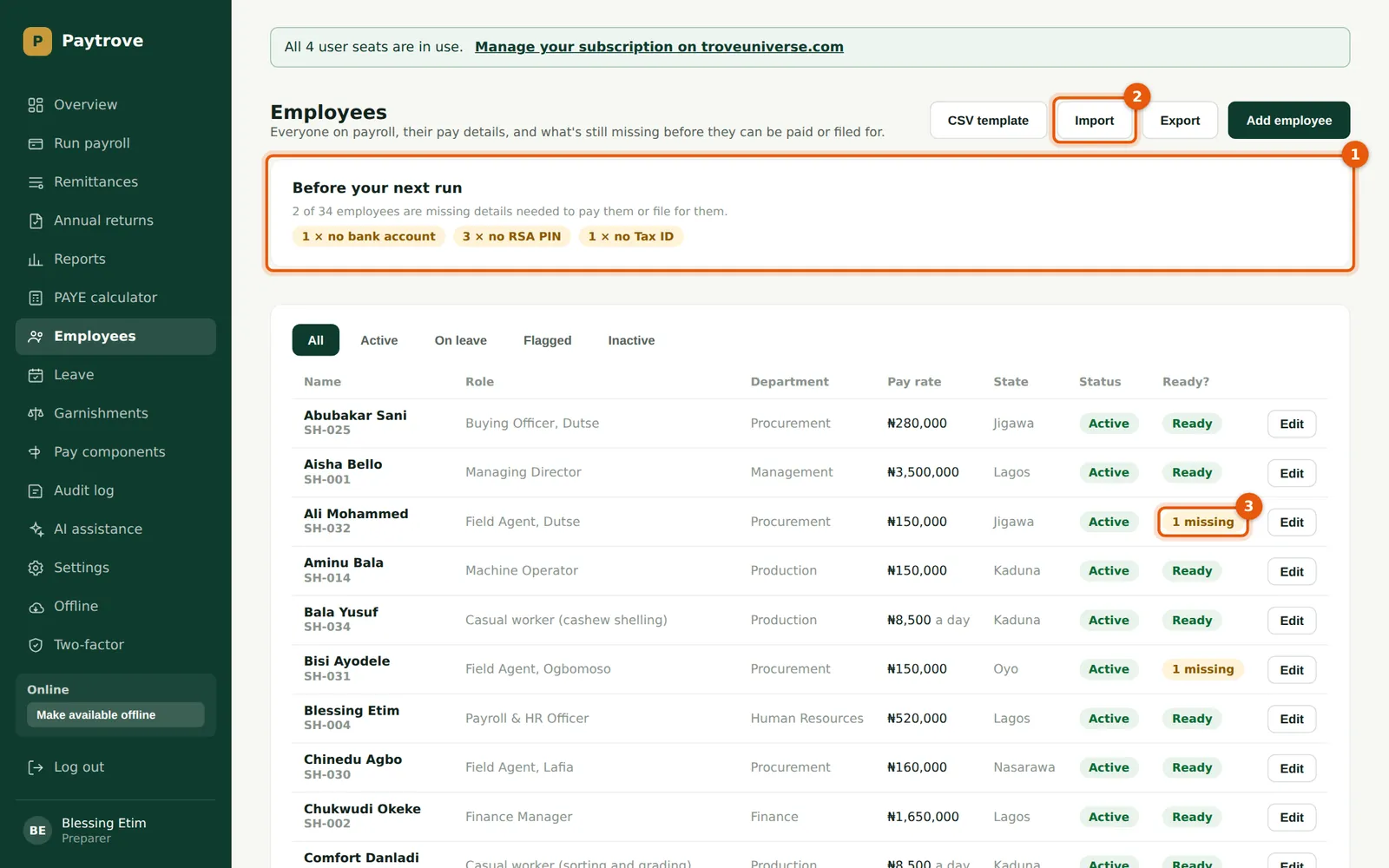
The 'Before your next run' card (1) counts people missing details that would stop them being paid or filed for: bank account, state of residence, RSA PIN, Tax ID, and NHF or rent relief switched on without the paperwork. Savannah Harvest's import was missing Ali Mohammed's account number and Bisi Ayodele's Tax ID.
Who
Preparer or Admin.
What to do
- Read the card (1). The Import button (2) is beside it.
- In the list, 'Ready' means complete; 'n missing' (3) shows how many details are missing — point at it to see which.
- Choose Edit to complete a record. Use the tabs to show active, on leave, flagged or inactive employees, and Export to download the list.
5.8 Add allowances and deductions to an employee
Why
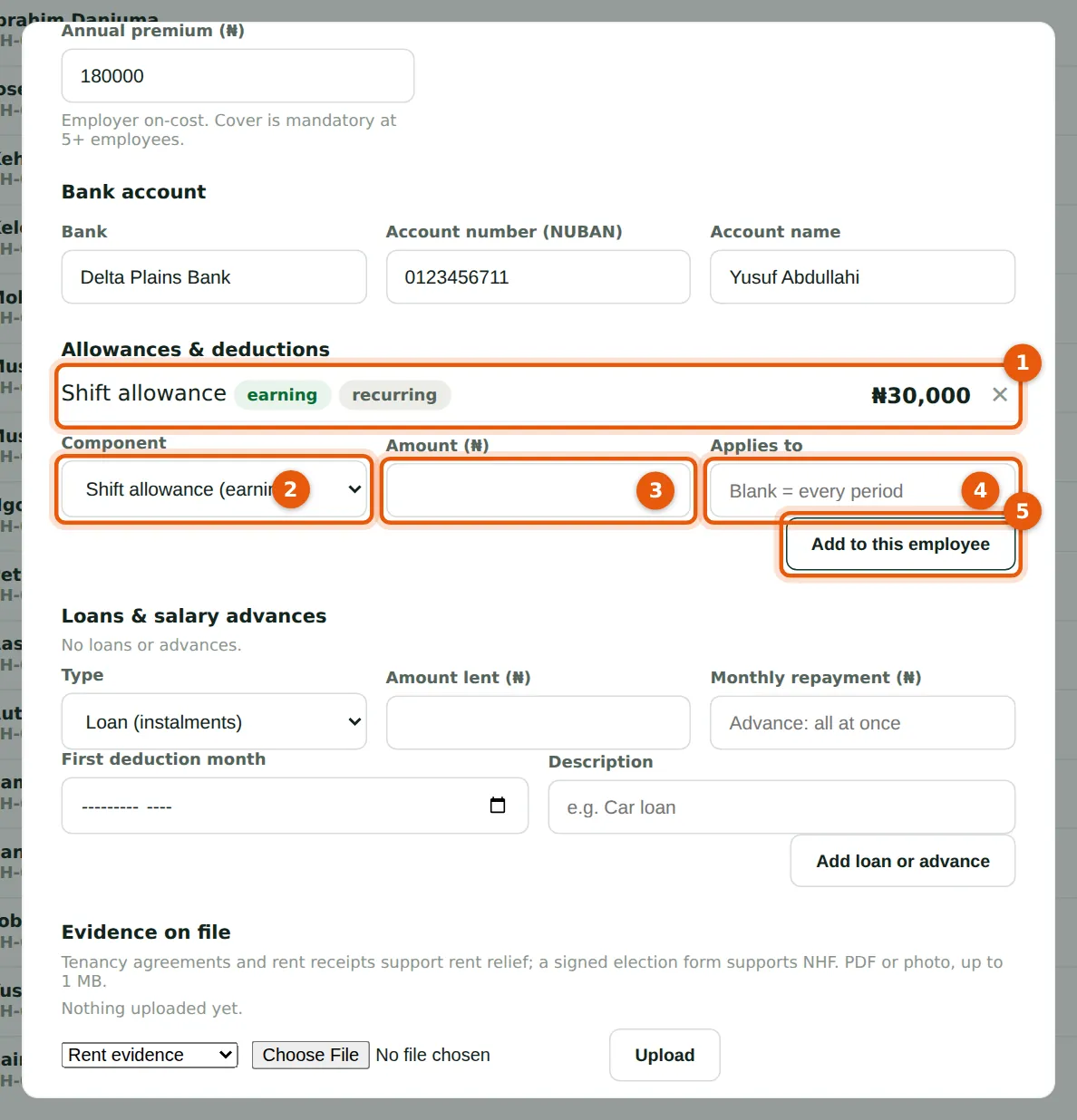
Components are assigned on the employee record, with the person's own amount. Leave 'Applies to' blank for every month, or type a period name (for example 'February 2026') for a one-off that is paid only in the run with exactly that name.
Who
Preparer or Admin.
What to do
- Open the employee with Edit and scroll to Allowances & deductions. The list (1) shows what is assigned.
- Choose the component (2) and enter the amount (3). Yusuf Abdullahi, cashew production supervisor, receives a ₦30,000 shift allowance.
- Leave Applies to (4) blank for every period, then choose Add to this employee (5).
- Remove an item with ✕. The change applies from the next run you create.
5.9 Keep evidence on the employee's file
Why
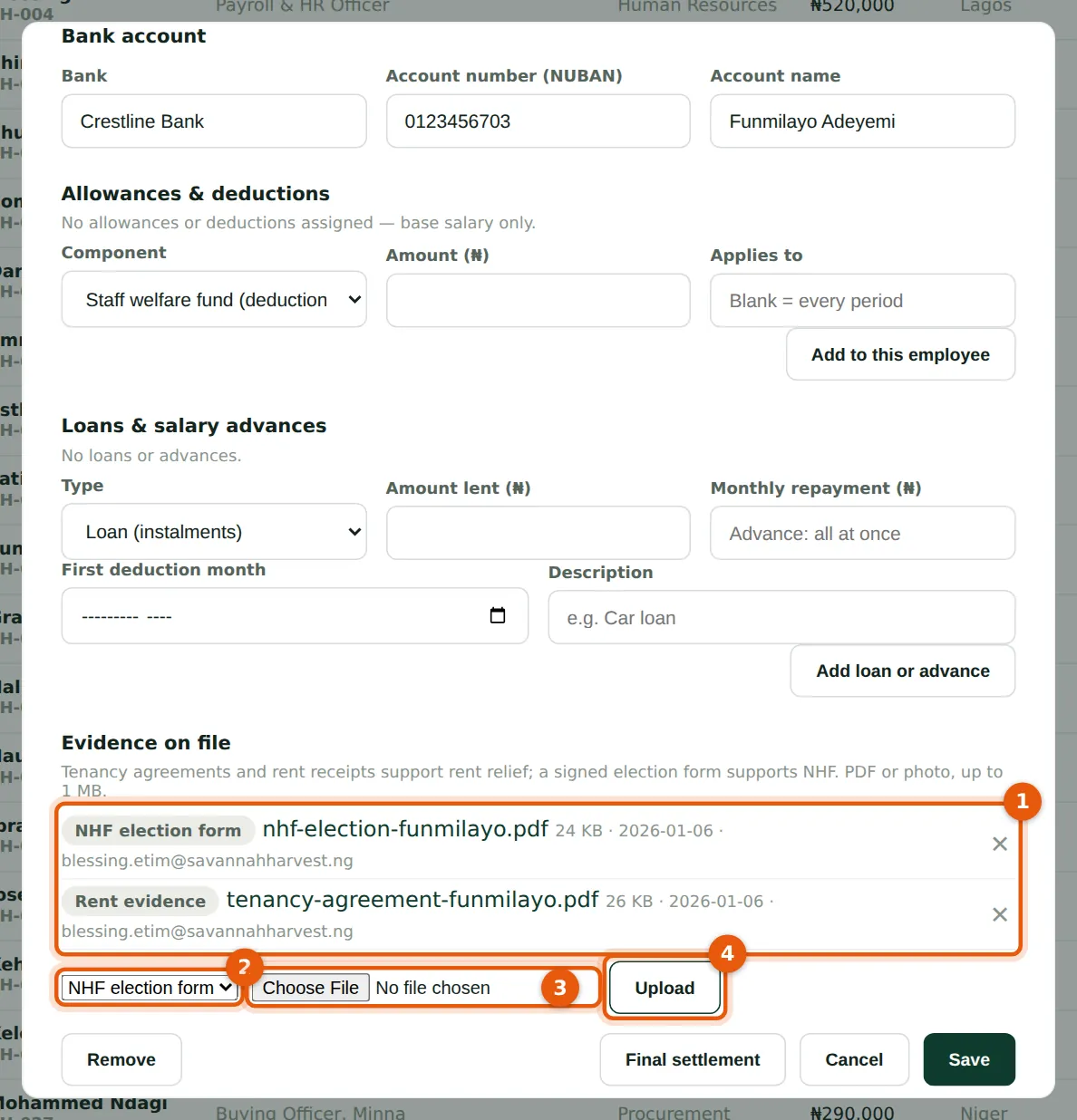
Rent relief needs a declaration with documentary evidence, and NHF needs the employee's written election. Keep the documents with the record: PDF, PNG, JPEG or WebP files, checked by their content and fingerprinted. Files are always downloaded rather than opened in the browser, for safety.
Who
Preparer or Admin.
What to do
- Open the employee and scroll to Evidence on file. The list (1) shows each file with its purpose, size, date and who uploaded it; choose the file name to download and view it.
- Choose the purpose (2) — Rent evidence, NHF election form or Other — and the file (3), then Upload (4).
- Remove a file with ✕. If AI assistance is switched on, a Summarise button appears beside each file.