Steps in this chapter (15)
Prepare, check and approve the January payroll, enter casual workers' days, and produce payslips, the bank file, the register and the journal.
A payroll run moves through three states: draft, approved and (if a mistake is found later) reversed. A draft can be discarded or approved. Approving it locks the figures, counts them toward year-to-date tax, opens the remittance obligations and makes payslips available to employees. An approved run can only be undone by reversing it with a reason.
The preparer and the approver must be different people. At Savannah Harvest, Blessing Etim prepares the run on 26 January and Chukwudi Okeke approves it on 27 January, for payment on 28 January.
6.1 Create the run
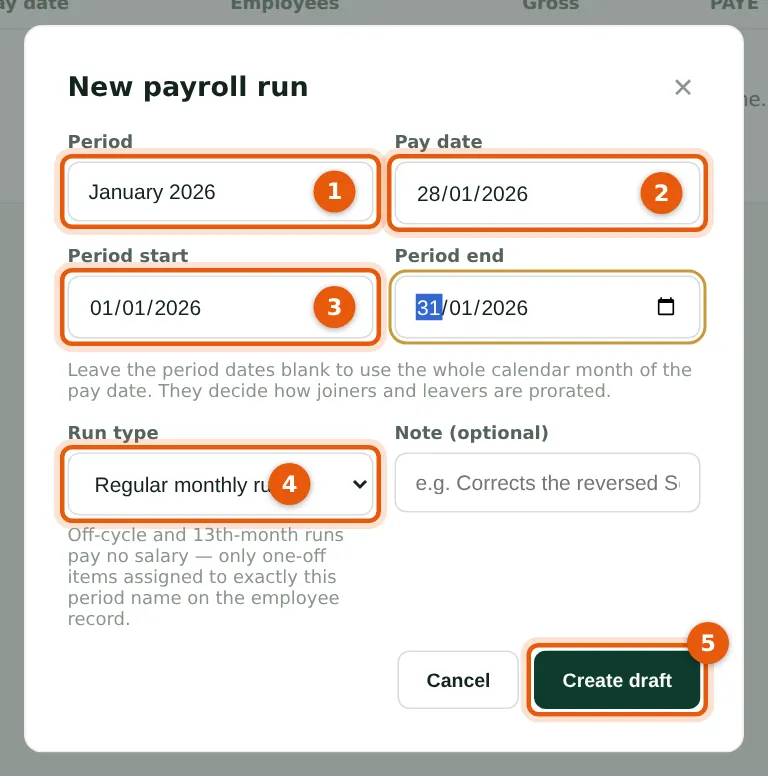
Why
The period dates decide how joiners and leavers are prorated. Leave them blank to use the whole calendar month of the pay date. A regular run pays salaries; an off-cycle or 13th-month run pays only the one-off items assigned to exactly that period name.
Who
Preparer (or Admin).
What to do
- Open Run payroll and choose New payroll run.
- Enter the period name (1) — 'January 2026' — and the pay date (2), 28 January 2026.
- Enter the period start and end (3), or leave them blank.
- Choose the run type (4): Regular monthly run. Off-cycle / supplementary and 13th-month runs pay only one-off items assigned to exactly that period name; PayTrove itself creates an off-cycle run for a leaver's final settlement (chapter 10). Bonus and 13th-month runs are covered in chapter 11. Add a note if useful.
- Choose Create draft (5). PayTrove calculates everyone's pay and opens the draft.
6.2 Read the checks on the draft
Why
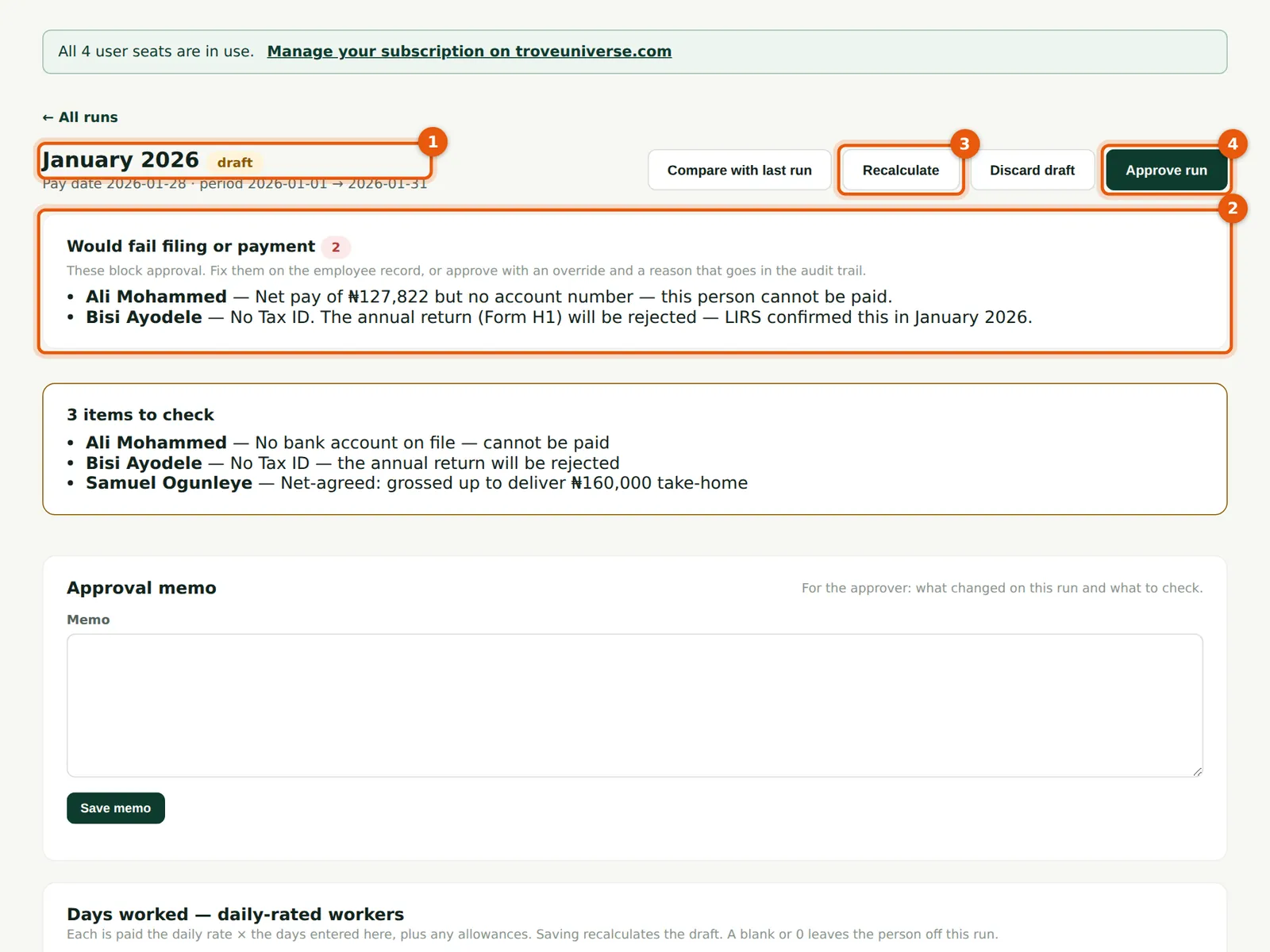
PayTrove checks every draft for anything a bank or tax office would reject. Items under 'Would fail filing or payment' (2) block approval: here, Ali Mohammed has no account number and Bisi Ayodele has no Tax ID. 'Worth checking' items (for example a big change in pay) do not block approval.
Who
Preparer.
What to do
- Check the run name and status (1).
- Read the checks (2). Fix each problem on the employee record; the draft picks up the corrected details the next time it is opened (step 6.4).
- Recalculate (3) rebuilds the figures from the records as they are now — use it after changing pay, components or days. Discard draft deletes the draft altogether.
- Do not choose Approve run (4): a Preparer cannot approve. An Admin can approve over a blocking check only by typing a reason, which goes into the audit log.
- The table above lists every check PayTrove makes. The 'items to check' card repeats the notes saved with each person's line.
| Check | Blocks approval? | Why |
|---|---|---|
| No Tax ID | Yes | The annual return (Form H1) would be rejected. |
| No state of residence | Yes | PAYE cannot be filed anywhere. |
| Pension deducted but no RSA PIN | Yes | The PCRS remittance would bounce. |
| Net pay but no account number | Yes | The person cannot be paid. |
| Account number is not a 10-digit NUBAN | Yes | The bank would reject the payment. |
| NHF deducted without a recorded election | Yes | An unlawful deduction from wages in the private sector. |
| Net pay is negative | Yes | Should never happen; the run is stopped. |
| RSA PIN not in PEN + 12 digits format | No (warning) | PCRS will reject it. |
| No pension fund administrator | No (warning) | The PCRS schedule needs one. |
| Deductions exceeded available pay | No (warning) | The balance was not taken: an order set to carry arrears takes it next month, and a loan balance stays owed. |
| PAYE over-payment refunded | No (warning) | Cumulative PAYE gave money back this period. |
| Gross pay but nothing to take home | No (warning) | Check deductions. |
| Marked exempt on income above the minimum wage | No (warning) | Check the figures. |
| Gross pay up or down 30% or more on the last regular run | No (warning) | Not flagged when caused by proration; not used for casual workers. |
| New on this run / on the previous run but not this one | No (warning) | Compared with the last regular run; casual workers are never flagged. |
| Daily rate changed since the last run | No (warning) | Casual workers only. |
| No NHIA certificate, or certificate expired | No (warning) | Health cover is mandatory at 5+ employees. |
| No group life cover, or cover below 3 × annual emoluments | No (warning) | Required at 3+ employees. |
6.3 Enter the days worked by casual workers
Why
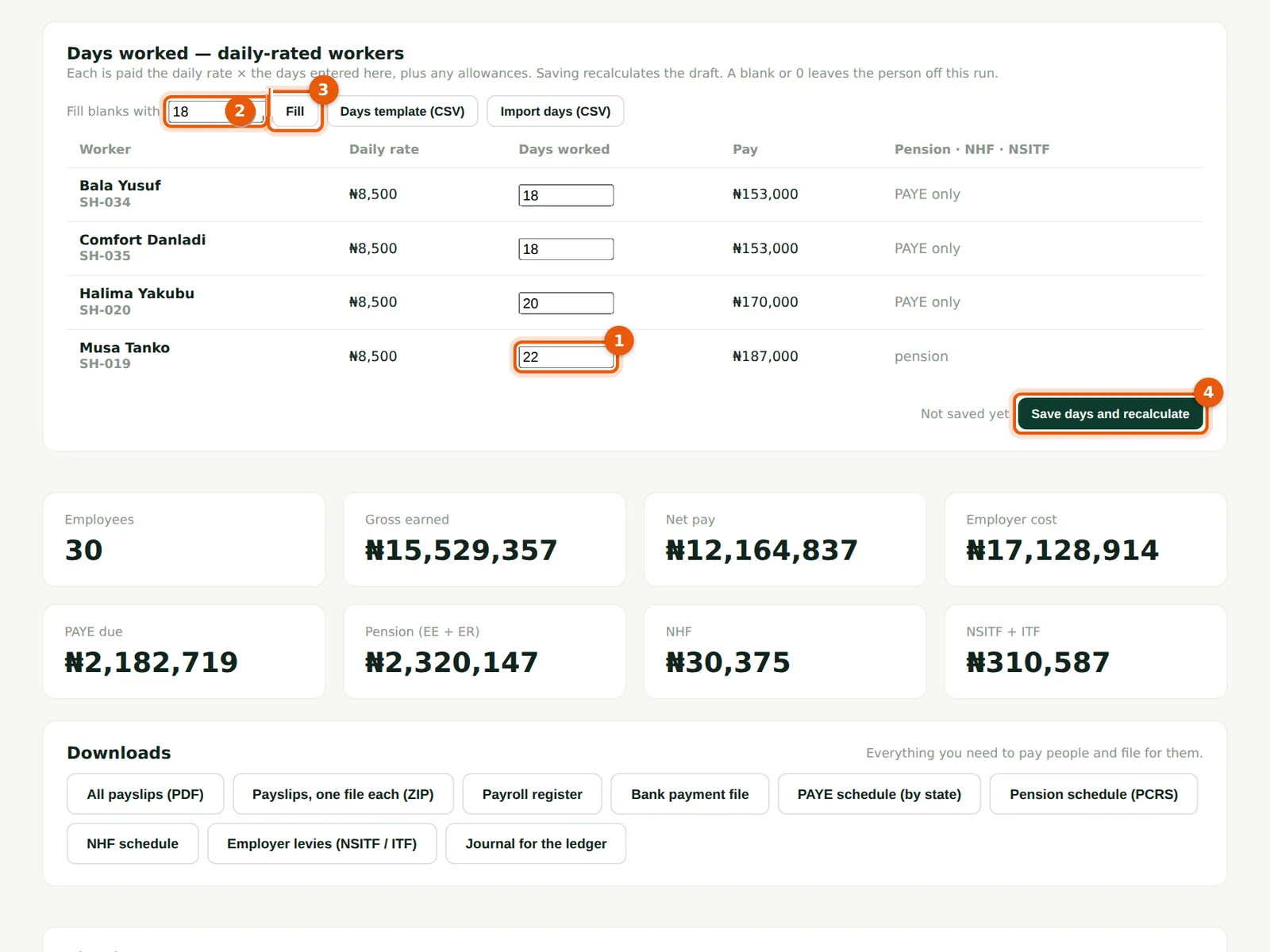
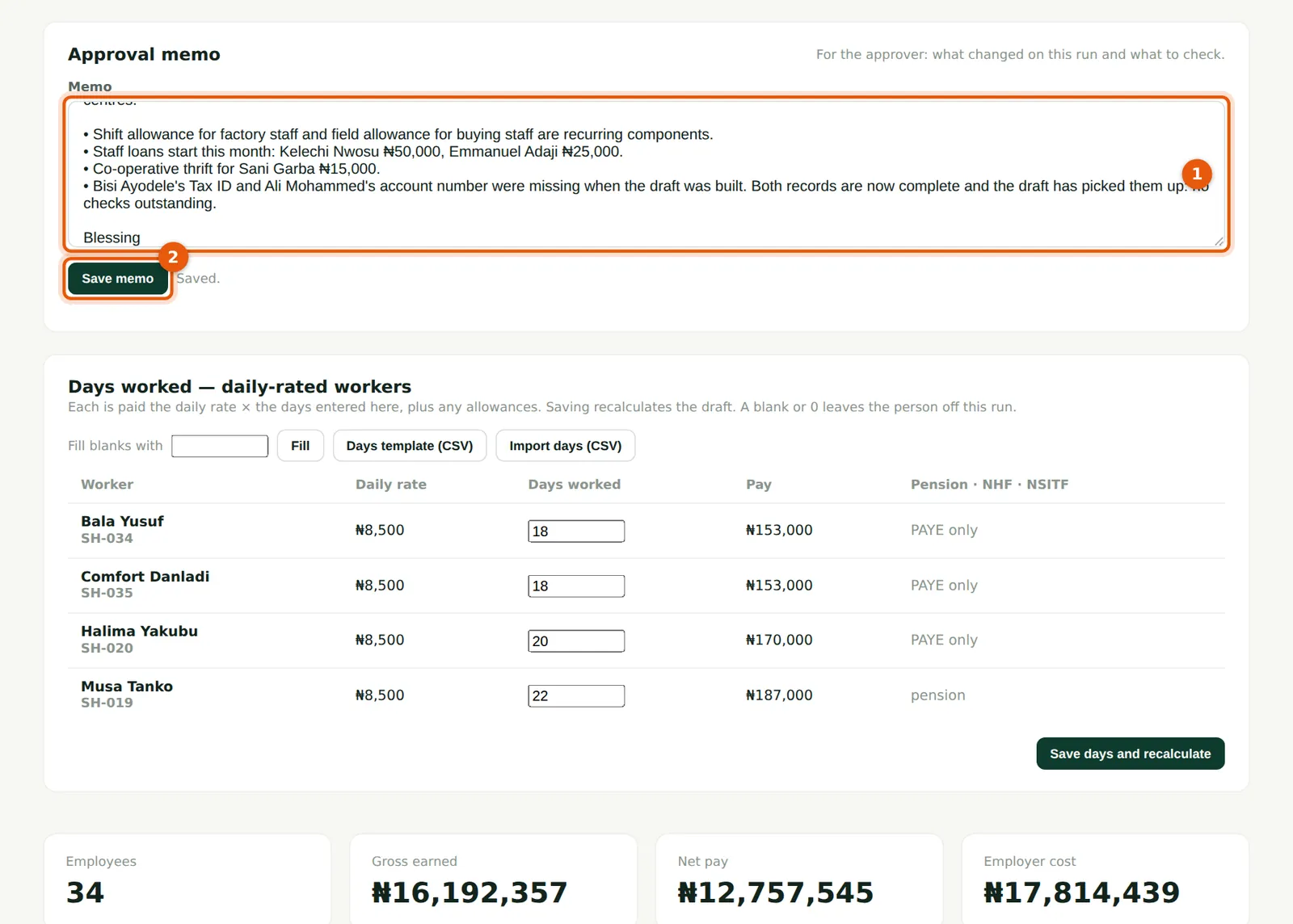
Daily-rated workers are paid only for days entered on the month's draft run. The card lists each casual worker with their daily rate, a days box, the pay it gives and the statutory items that apply (PAYE only, or pension too). Blessing types Musa Tanko's 22 days (1) and Halima Yakubu's 20, then uses Fill blanks with 18 (2, 3) for the other two. Days can be halves (for example 16.5). A blank or 0 leaves the worker off this run.
Who
Preparer (or Admin).
What to do
- Type each worker's days (1), or type a number in Fill blanks with (2) and choose Fill (3) to fill every empty box.
- Check the pay shown on each row.
- Choose Save days and recalculate (4). The draft is recalculated with the days; the line items, totals and checks update.
- For many workers, use Days template (CSV) and Import days (CSV) instead (step 9.3).
6.4 The draft picks up corrected records
Why
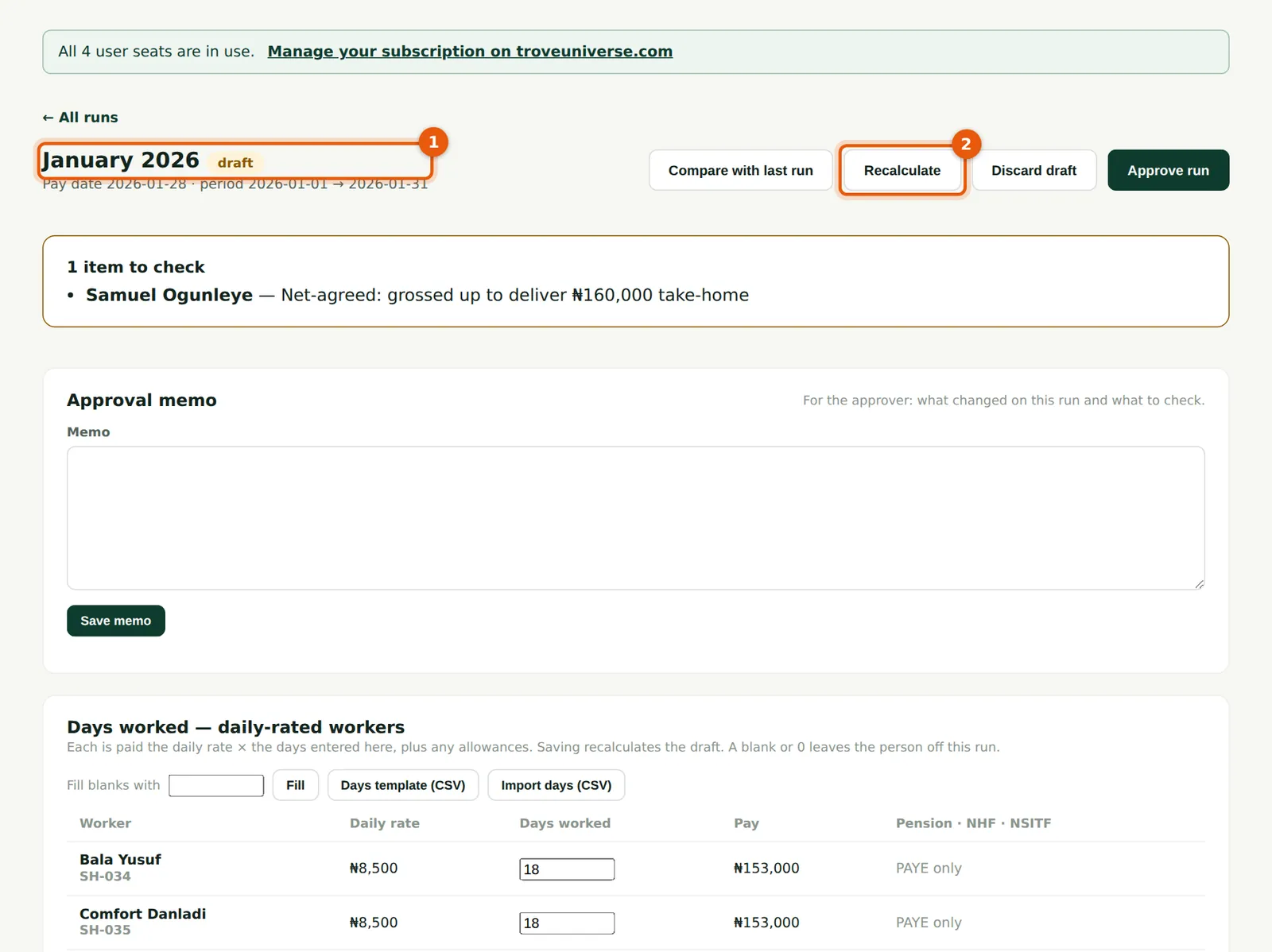
Blessing adds Bisi Ayodele's Tax ID and Ali Mohammed's account number on their records. When the draft is opened again (1), PayTrove copies the corrected details into it — names, bank details, state, Tax ID, PFA and RSA PIN — and runs the checks again, so both errors have gone. The same refresh happens just before approval. If a change affects pay (a new salary, an allowance, days worked), choose Recalculate (2); if pay has changed and nobody recalculated, the approver is shown the differences and asked to recalculate. The totals (3) now include the casual workers.
Who
Preparer.
What to do
- After fixing records, reopen the draft and check that the checks have cleared.
- Choose Recalculate (2) whenever pay, components or days have changed since the draft was built.
6.5 Write the approval memo
Why
The memo tells the approver what changed and what to look at. It is saved with the run and shown to the approver. If your company has set up AI assistance, an AI button can draft the memo from the run's figures; you still check and save it yourself.
Who
Preparer.
What to do
- Type the memo (1): headcount, new allowances and deductions, anything unusual.
- Choose Save memo (2).
6.6 Review the totals
Why
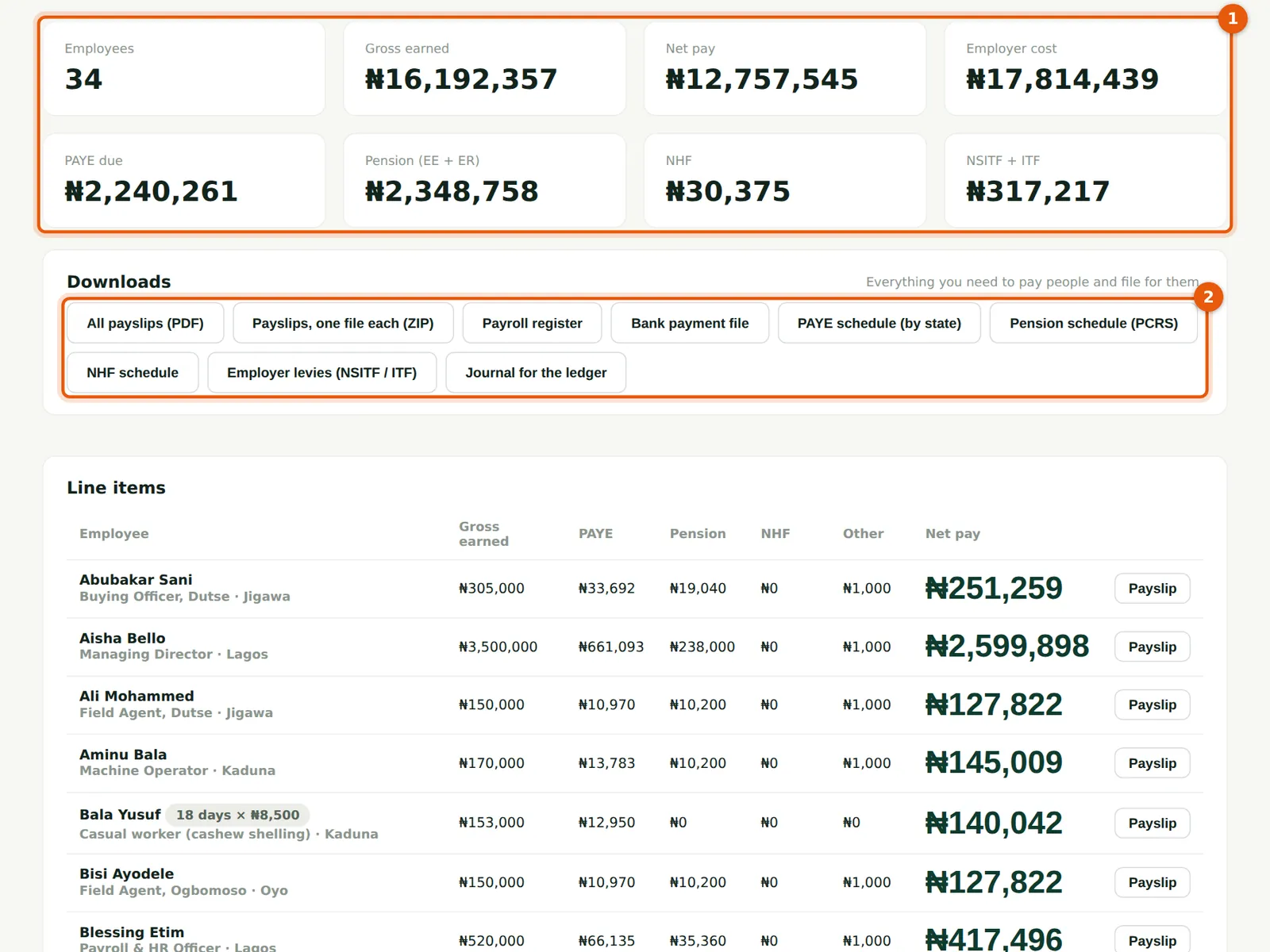
For January 2026, 34 employees earned ₦16,192,357 gross, including the four casual workers' daily pay. Net pay is ₦12,757,545 and the total cost to the company is ₦17,814,439, including employer pension, NSITF and ITF. PAYE is ₦2,240,261.
Who
Preparer; then the approver.
What to do
- Check the tiles (1): employees, gross, net pay, employer cost, PAYE due, pension (employee + employer), NHF, and NSITF + ITF.
- The downloads (2) — payslips, register, bank file and schedules — are available on the draft for checking, but pay and file only from an approved run.
6.7 How PAYE was worked out: a worked example
Why
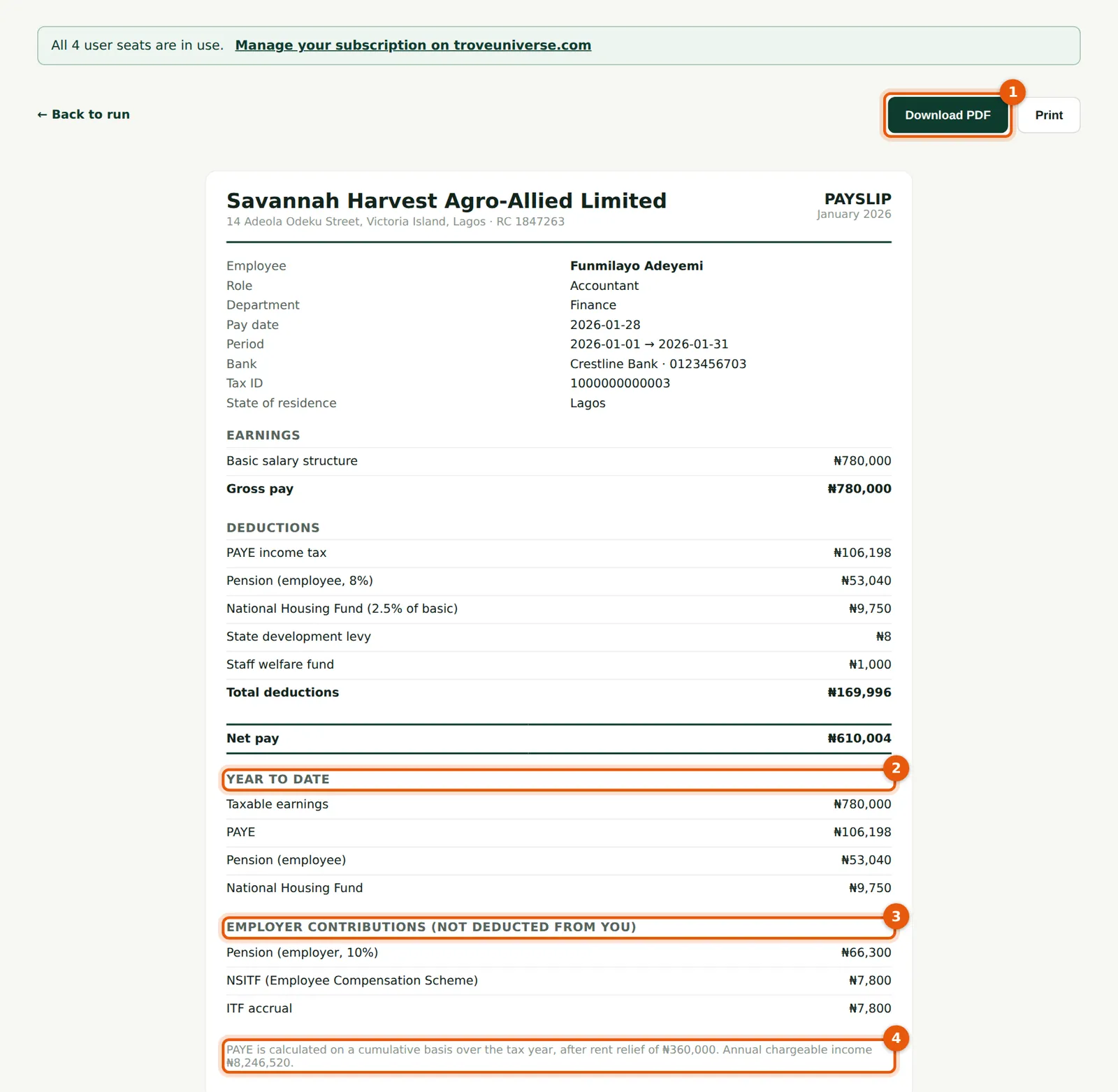
PAYE is worked out cumulatively over the tax year. PayTrove projects the employee's income for the whole year (what they have earned so far plus their recurring pay for the months still to come), deducts the reliefs, taxes the result through the Nigeria Tax Act 2025 bands, and charges the share that belongs to the months worked so far, less any PAYE already deducted. The worked example below follows the figures on this payslip.
Who
Anyone checking a payslip.
What to do
- Open a payslip with Payslip on the run's line items.
- Download PDF (1) saves the payslip as a PDF file.
- Year to date (2) shows taxable earnings, PAYE, pension and NHF for the year so far.
- Employer contributions (3) are paid by the company and not deducted from the employee.
- The note at the bottom (4) shows the rent relief given and the annual chargeable income used.
Worked example: Funmilayo Adeyemi, January 2026 (₦)
| PAYE under the Nigeria Tax Act 2025 | ₦ |
|---|---|
| Monthly gross (Basic 50% ₦390,000; Housing 20% ₦156,000; Transport 15% ₦117,000; other 15% ₦117,000) | 780,000.00 |
| Projected income for 2026: ₦780,000 × 12 months (January is month 1 of 12) | 9,360,000.00 |
| Less pension, employee 8% of Basic + Housing + Transport (₦663,000) = ₦53,040 a month × 12 | (636,480.00) |
| Less NHF, 2.5% of Basic (₦390,000) = ₦9,750 a month × 12 (Funmilayo has opted in) | (117,000.00) |
| Less rent relief: 20% of annual rent of ₦1,800,000 (cap ₦500,000) | (360,000.00) |
| Annual chargeable income — as on the payslip | 8,246,520.00 |
| Tax: first ₦800,000 at 0% | 0.00 |
| Tax: next ₦2,200,000 at 15% | 330,000.00 |
| Tax: next ₦5,246,520 at 18% | 944,373.60 |
| Annual PAYE | 1,274,373.60 |
| January's share: 1 of 12 months, less PAYE already deducted (nil) | 106,197.80 |
| From gross to net | ₦ |
|---|---|
| Gross pay | 780,000.00 |
| PAYE | (106,197.80) |
| Pension, employee 8% | (53,040.00) |
| NHF 2.5% of basic | (9,750.00) |
| State development levy (₦100 a year ÷ 12) | (8.33) |
| Staff welfare fund | (1,000.00) |
| Net pay (payslip: ₦610,004) | 610,003.87 |
The company also pays 10% employer pension (₦66,300.00), NSITF 1% (₦7,800.00) and ITF 1% (₦7,800.00), so Funmilayo costs ₦861,900.00 a month. The Consolidated Relief Allowance no longer exists under the 2025 Act; pension, NHF and rent relief are the reliefs PayTrove applies. In February PayTrove repeats the calculation with January's actual figures, so the monthly PAYE stays the same unless something changes.
6.8 Approve the run
Why
Approval is the control that releases payment. PayTrove refuses approval by the person who prepared the run, and refuses a draft that no longer matches the employee records unless it is recalculated first: if pay figures changed after the draft was built, the approver is shown the differences and asked to recalculate and approve with the current figures.
Who
Admin other than the preparer.
What to do
- Open the draft from Run payroll, read the memo and checks, and choose Approve run. Confirm the message.
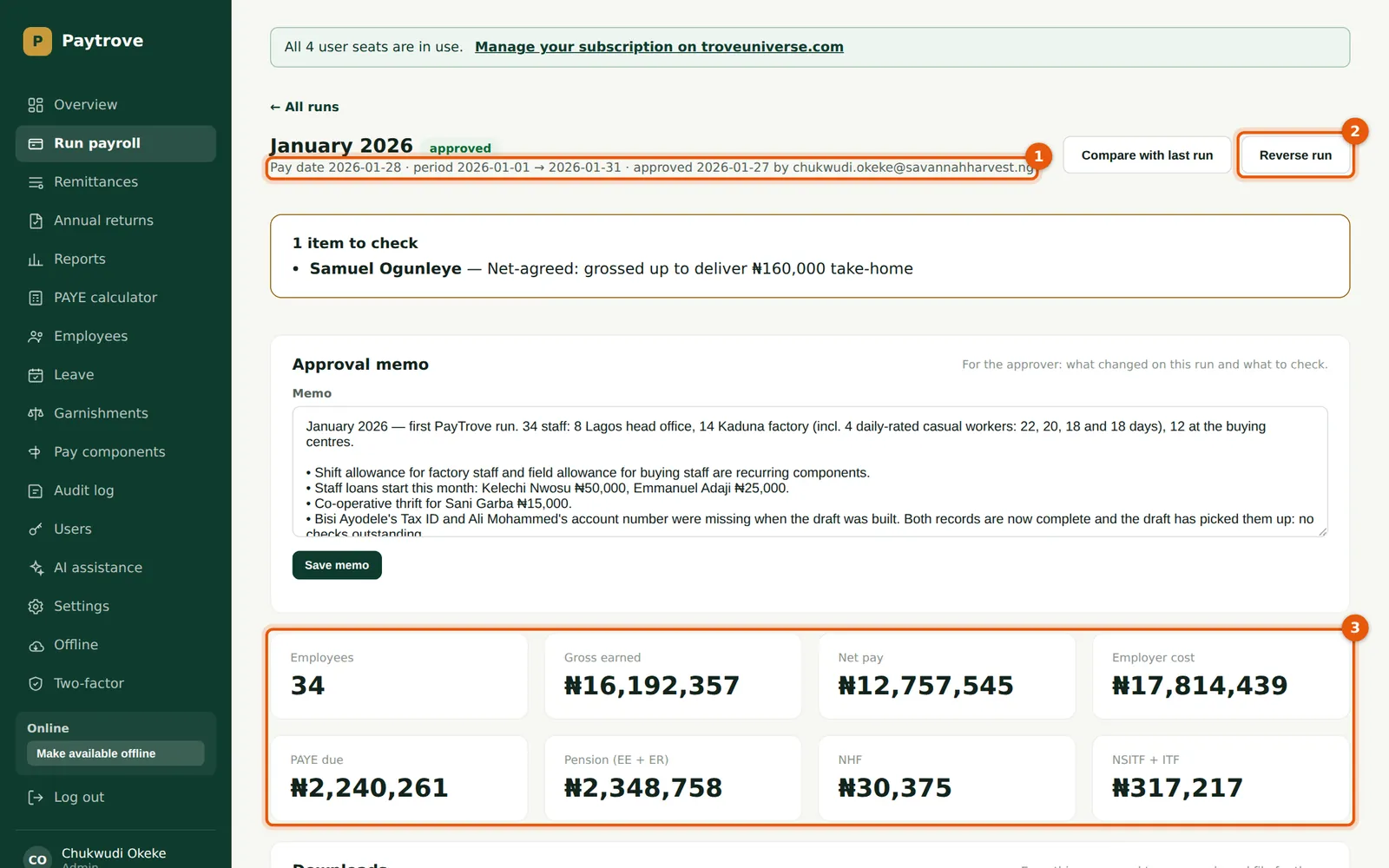
- The run shows as approved, with the date and approver (1).
- If a mistake is found after approval, choose Reverse run (2) and give a reason. The figures stay on file for the audit trail but stop counting toward tax and remittances; then create a corrected run.
- The totals (3) are now final.
6.9 The line items
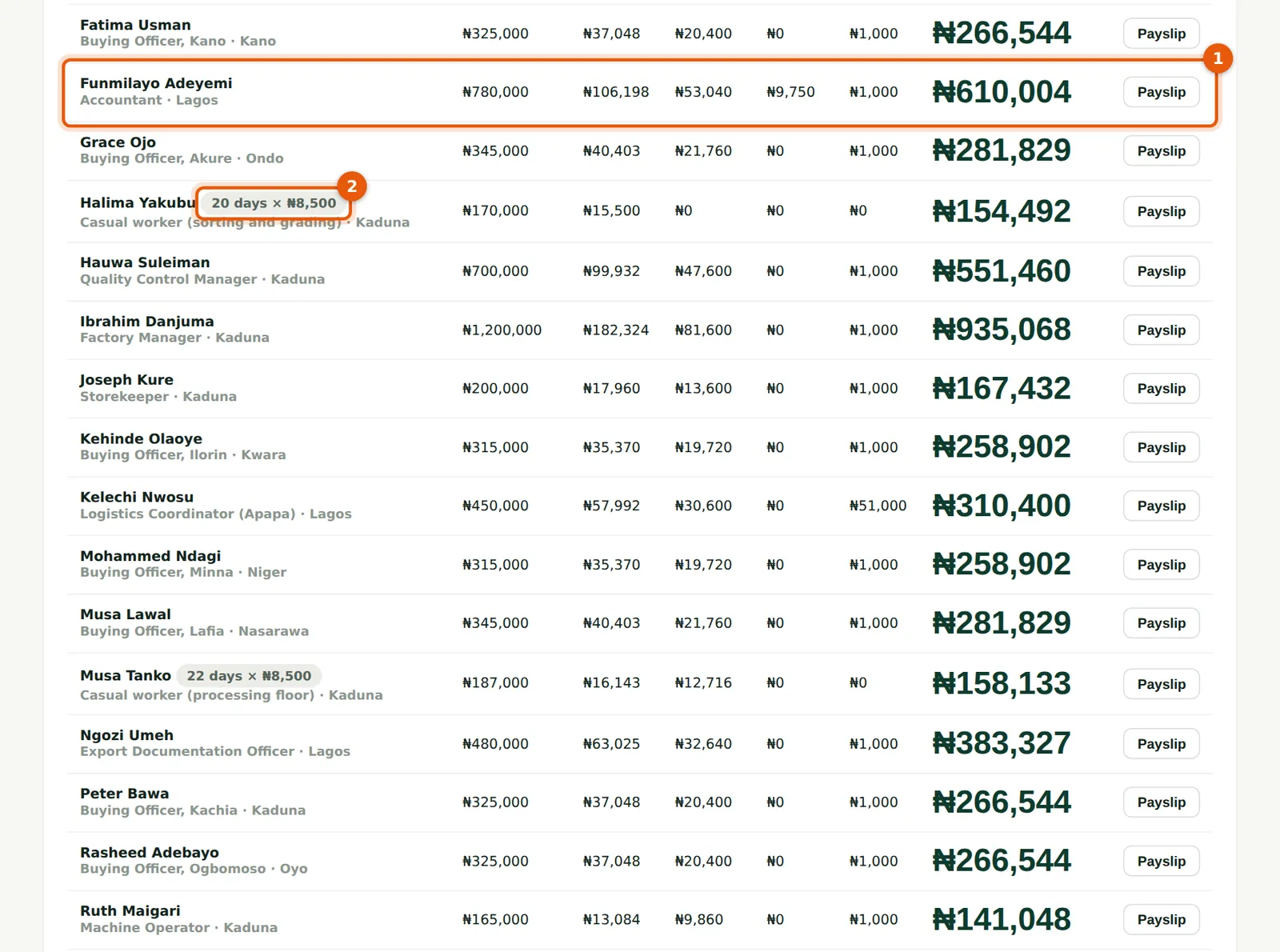
Why
Each row shows gross earned, PAYE, employee pension, NHF, other deductions and net pay. Casual workers carry a days pill (2), for example '20 days × ₦8,500'.
Who
Anyone with access to runs.
What to do
- Find the employee (1) and choose Payslip to see the detail.
- Look for the pills: days × rate for a casual worker, 'n/31 days' for someone prorated, 'tax exempt' for someone at or below the national minimum wage, and 'refund' where cumulative PAYE gives money back.
6.10 Casual workers on the run
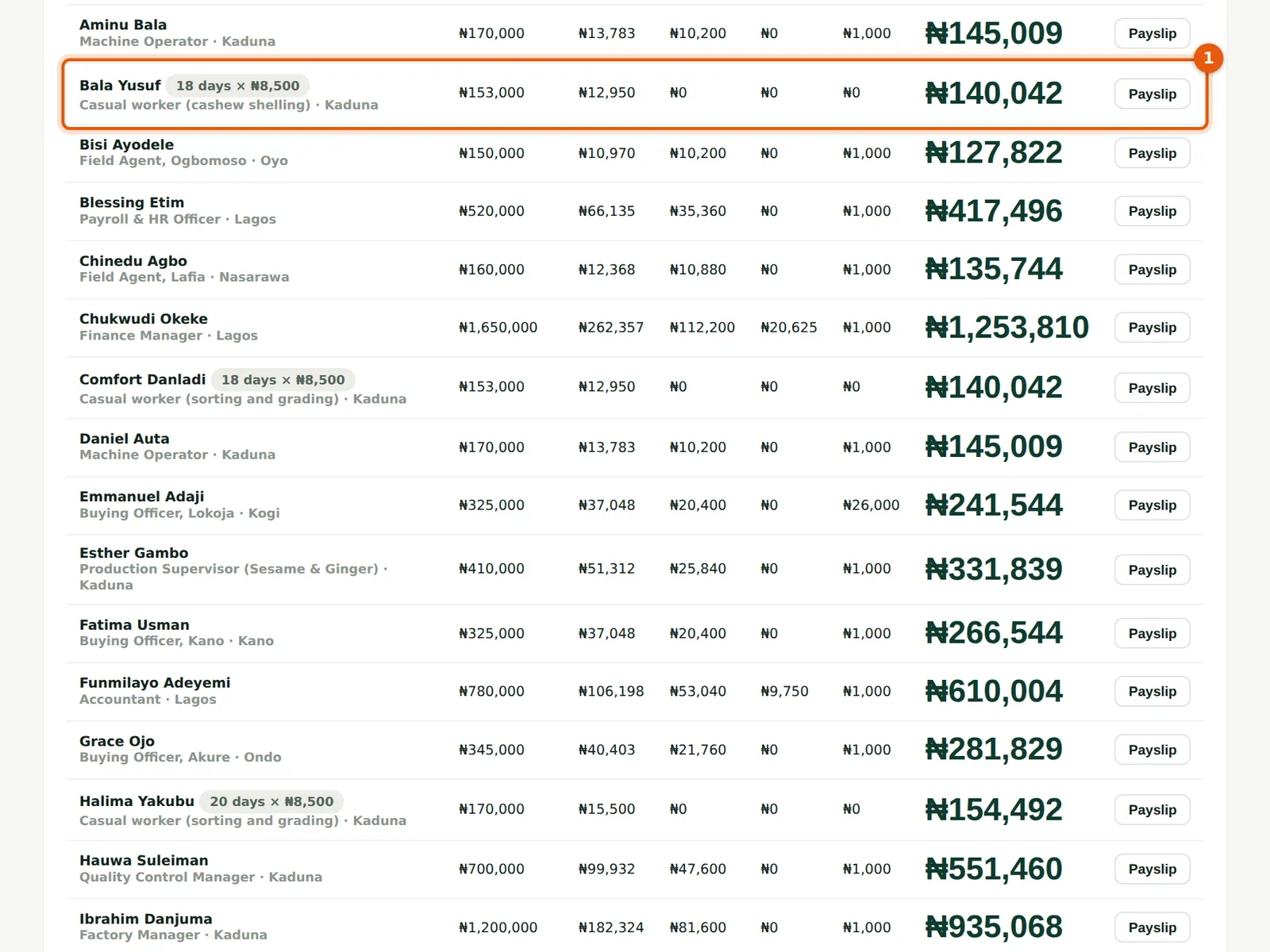
Why
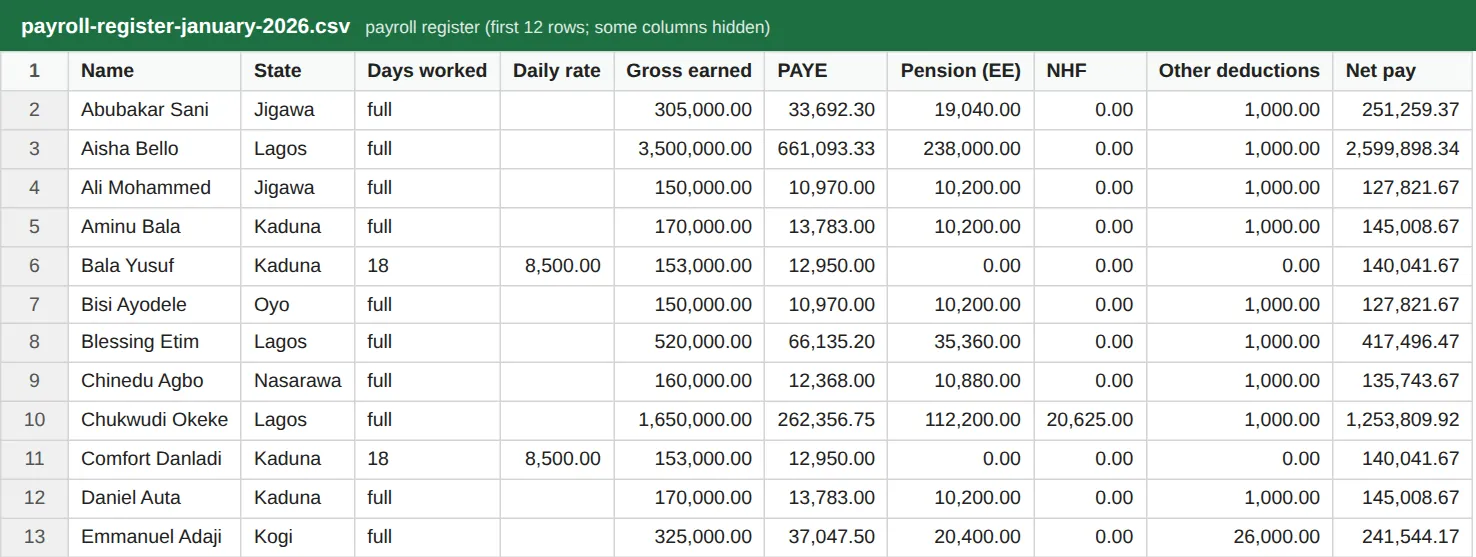
A casual worker's row (1) shows the days and rate, the gross (days × rate), PAYE and, where they have opted in, pension. Bala Yusuf worked 18 days: ₦153,000 gross, ₦12,950 PAYE and no pension.
Who
Anyone with access to runs.
What to do
- Check each casual worker's days against the attendance sheet before approving.
6.11 A casual worker's payslip, and how their PAYE is worked out
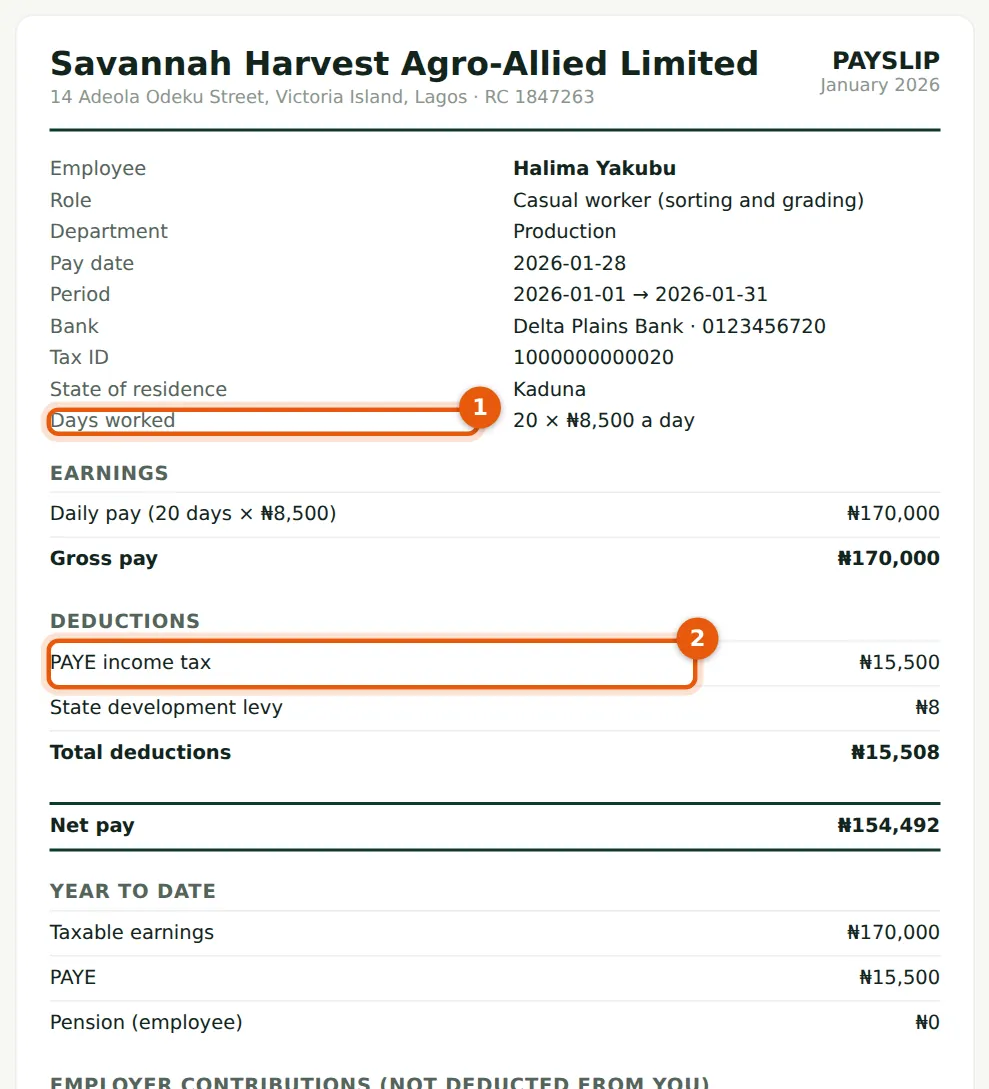
Why
The payslip shows the days worked and rate (1) and the daily pay line. PAYE always applies to casual workers (2), on the same cumulative method as salaried staff, but the months still to come are projected at the worker's average paid month so far this year rather than this month's pay. A long month is not treated as if every month were like it, and a short month does not stop tax; the difference corrects itself each month, and by December each worker has paid exactly the tax on their actual pay. Pension, NHF and NSITF are not deducted for Halima, who has not opted in. The worked example below follows the figures on this payslip.
Who
Anyone checking a payslip.
What to do
- Open the payslip from the run's line items. Casual workers with self-service see the same payslip.
Worked example: Halima Yakubu, casual worker at ₦8,500 a day (₦)
| January 2026 | ₦ |
|---|---|
| Daily pay: 20 days × ₦8,500 | 170,000.00 |
| Average paid month so far this year (January only) | 170,000.00 |
| Projected year: ₦170,000 this month + 11 months × ₦170,000 | 2,040,000.00 |
| Less reliefs: none (no pension, NHF or rent relief) | 0.00 |
| Annual chargeable income | 2,040,000.00 |
| Tax on the year: 0% × 800,000 + 15% × 1,240,000 | 186,000.00 |
| January PAYE: 1/12 of the year's tax | 15,500.00 |
| Net pay: ₦170,000 − ₦15,500.00 PAYE − ₦8.33 development levy | 154,491.67 |
| February 2026 | ₦ |
|---|---|
| Daily pay: 19 days × ₦8,500 | 161,500.00 |
| Average paid month: (₦170,000 + ₦161,500) ÷ 2 | 165,750.00 |
| Projected year: ₦331,500 paid so far + 10 months × ₦165,750 | 1,989,000.00 |
| Tax on the year: 0% × 800,000 + 15% × 1,189,000 | 178,350.00 |
| Tax due to date: 2/12 of ₦178,350.00 | 29,725.00 |
| February PAYE: less ₦15,500.00 deducted in January | 14,225.00 |
Musa Tanko has opted into pension, so 8% of the basic, housing and transport share of his daily pay is deducted (₦12,716.00 in January for 22 days) and counts as a relief in his PAYE; the company adds 10% (₦15,895.00). No NSITF is charged for any of the four, because none is switched on; ITF, which Savannah Harvest pays, applies at 1% of their pay.
6.12 Payslips as PDF files
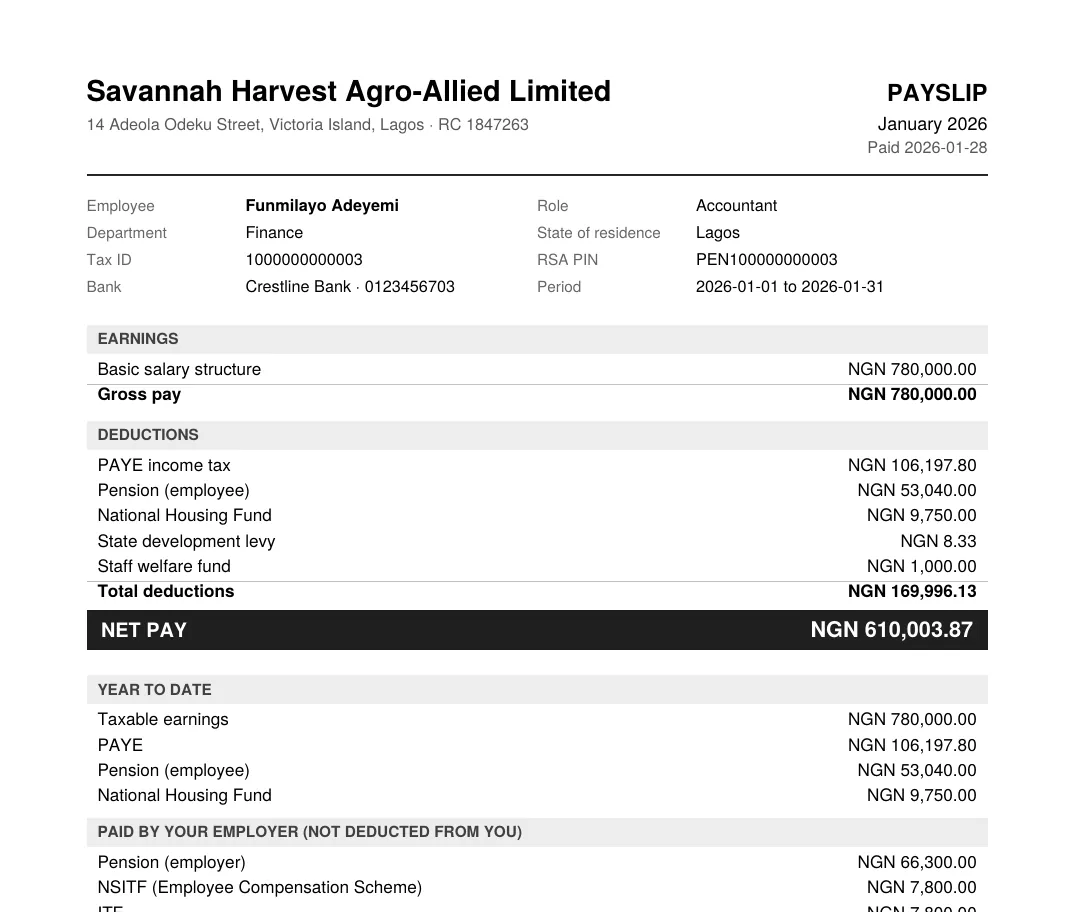
Why
PDFs are produced in your browser; nothing is sent elsewhere. PayTrove does not email payslips: employees with self-service see and download their own (chapter 12), or you can send the PDFs yourself.
Who
Preparer or Admin.
What to do
- On the run, choose All payslips (PDF) for one file with every payslip, or Payslips, one file each (ZIP).
- Or open one payslip and choose Download PDF.
6.13 The bank payment file
Why
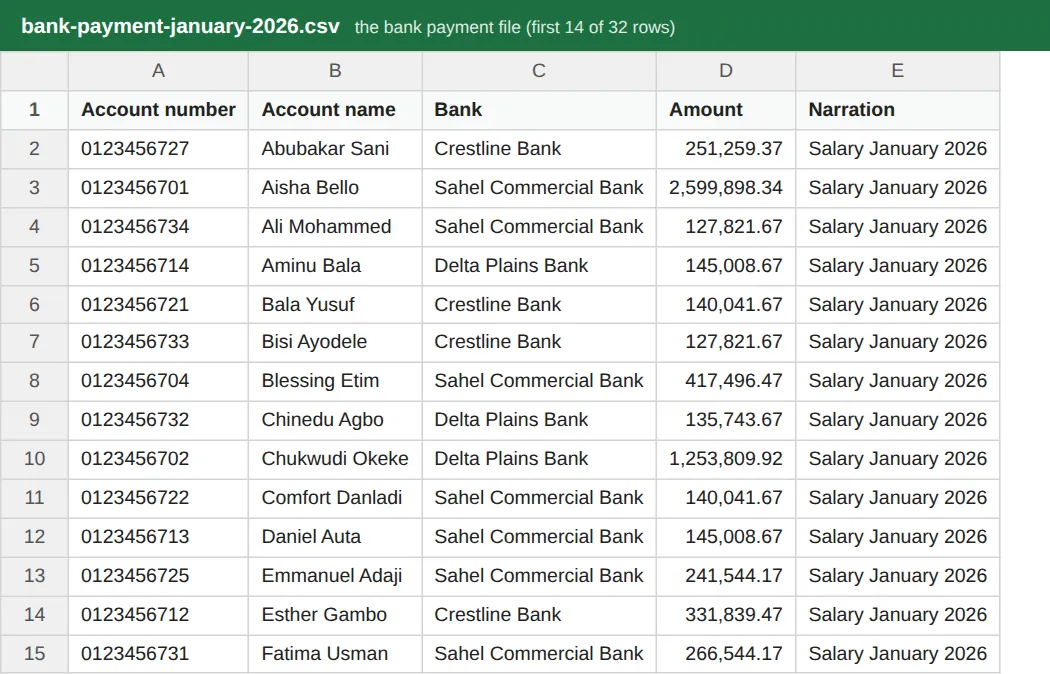
The bank file lists each employee's account number, account name, bank, net pay and a narration, casual workers included (Bala Yusuf and Comfort Danladi are near the top). PayTrove does not send money: you upload or key the file into your bank's bulk-payment service. If anyone has no account number, PayTrove lists them and leaves them out.
Who
Admin or the finance officer who pays salaries.
What to do
- On the approved run choose Bank payment file.
- Check the total against the run's net pay (₦12,757,545) before uploading.
- If your bank uses its own template, copy the columns across.
6.14 The payroll register
Why
The register is the full record of the run: days worked and daily rate (for casual workers), gross, Basic, Housing and Transport, taxable gross, PAYE, employee and employer pension, NHF, other deductions, net pay, NSITF, ITF, employer cost and year-to-date figures for each person.
Who
Preparer, Admin, Viewer.
What to do
- On the run choose Payroll register and file it with the month's payroll papers.
6.15 The journal for your ledger
Why
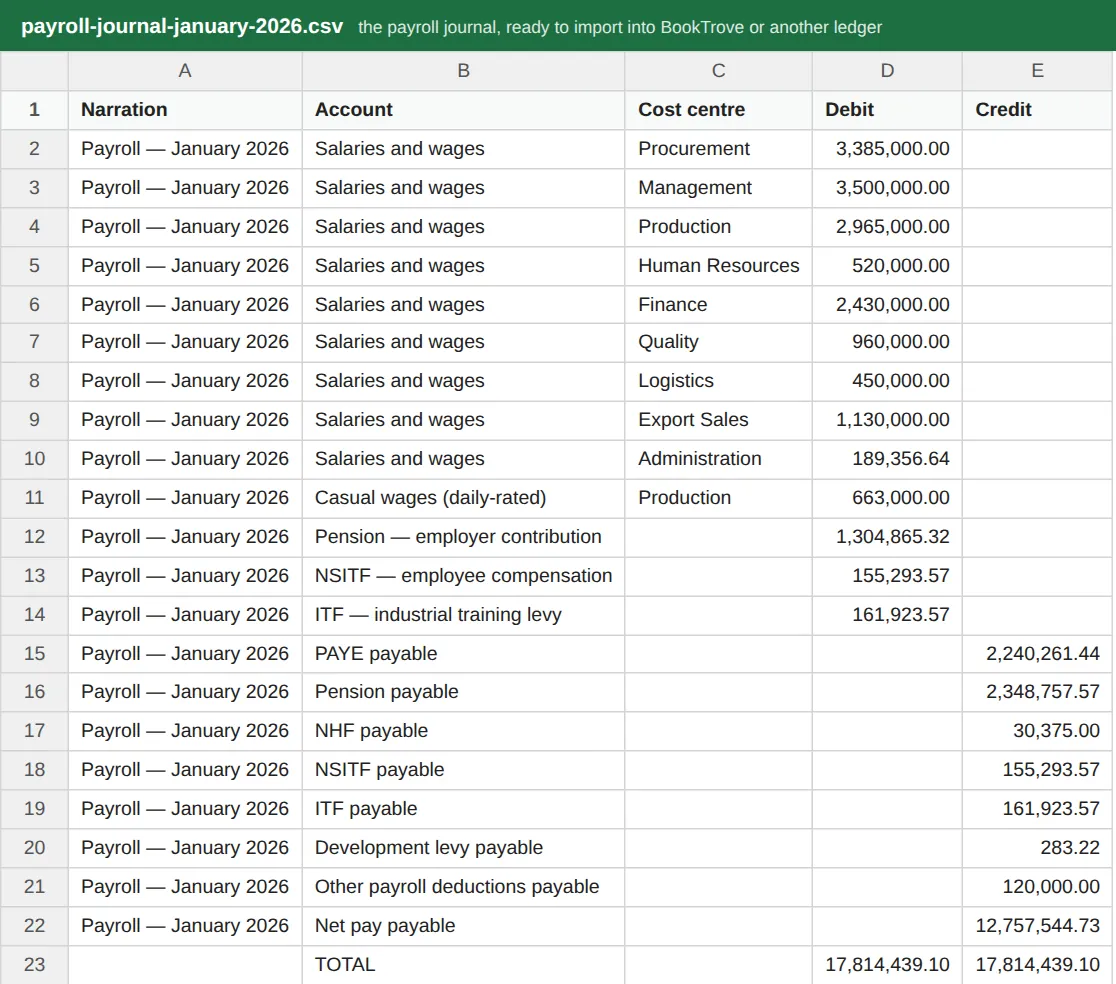
The journal posts the payroll to your accounts: salaries by department (cost centre), casual wages (daily-rated) as their own expense account, and employer on-costs as expenses; PAYE, pension, NHF, NSITF, ITF, the development levy, other deductions and net pay as liabilities until they are paid. It always balances; PayTrove will not produce an unbalanced journal. Import it into BookTrove or any other ledger — PayTrove produces the file and does not post it itself.
Who
Accountant.
What to do
- On the approved run choose Journal for the ledger.
- Import the file as a journal in BookTrove (or your ledger), mapping each account name to your chart of accounts the first time.