Steps in this chapter (8)
Pay over PAYE to each state IRS, pension, NHF, NSITF and ITF from the schedules, and record every payment with its receipt.
Payroll collects money on behalf of several authorities, and the company stays legally liable for it until it is paid over. When a run is approved, PayTrove opens an obligation for each authority: PAYE for each state IRS, pension, NHF, NSITF, ITF and the development levy. Each obligation is closed only by recording the payment and the government receipt.
Due dates are worked out from the pay date (table below). PayTrove produces the schedules; you pay through your bank and the authorities' own portals.
| Obligation | Paid to | Due | For January 2026 (paid 28 Jan) |
|---|---|---|---|
| PAYE | Internal Revenue Service of each employee's state of residence | 10th of the following month | 10 February 2026 |
| Pension (employee + employer) | Employee's PFA, through a PenCom-approved PSSP (PCRS) | Within 7 working days of paying salaries (PayTrove shows 9 calendar days) | 6 February 2026 |
| NHF | Federal Mortgage Bank of Nigeria | Within a month of the deduction (PayTrove shows the 10th) | 10 February 2026 |
| NSITF | NSITF — Employee Compensation Scheme | Monthly (PayTrove shows the 16th of the following month) | 16 February 2026 |
| ITF | Industrial Training Fund | 1 April of the following year (accrued monthly) | 1 April 2027 |
| Development levy | State IRS, with the annual return | 31 January of the following year | 31 January 2027 |
7.1 The remittance ledger after approval
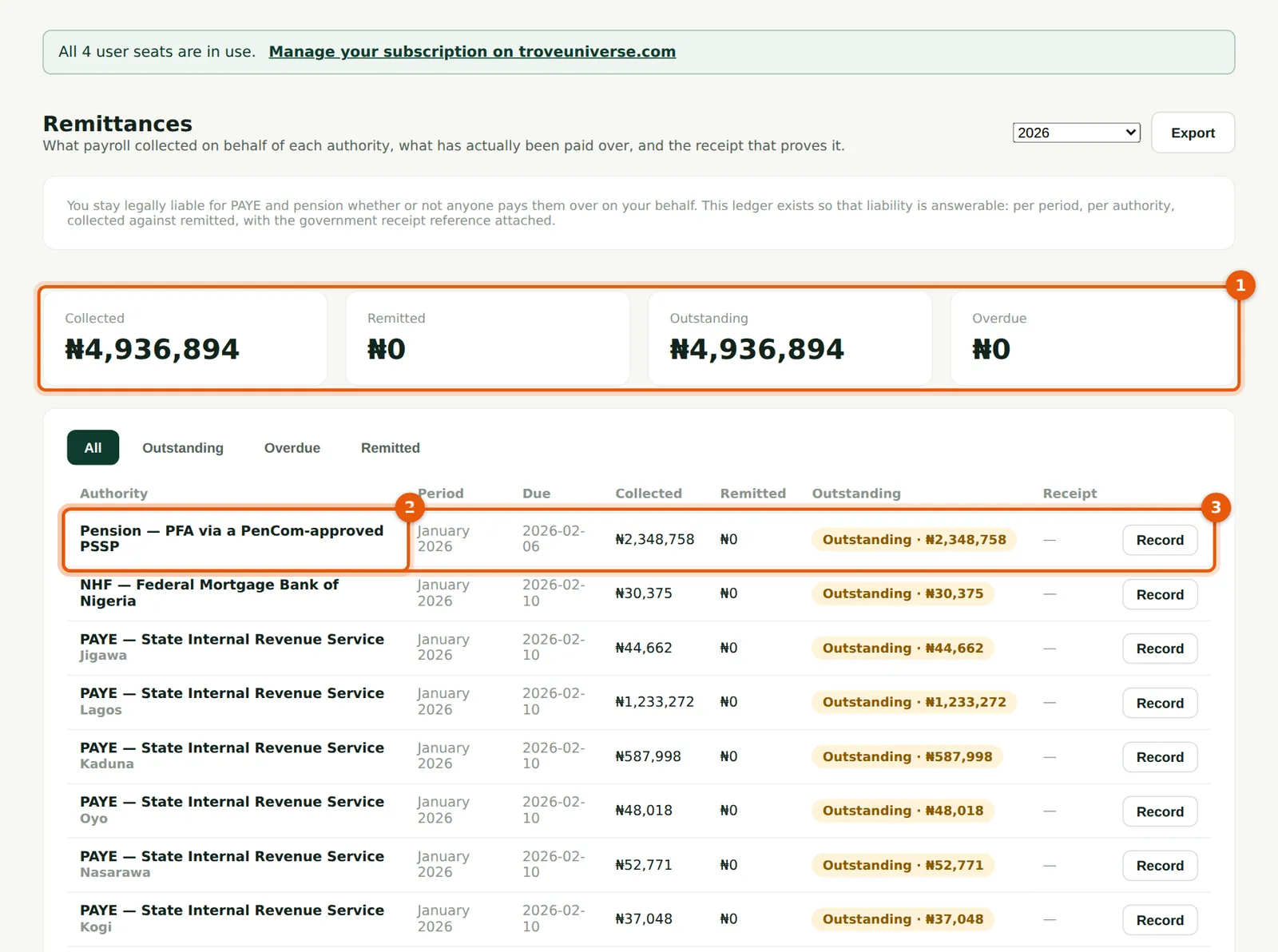
Why
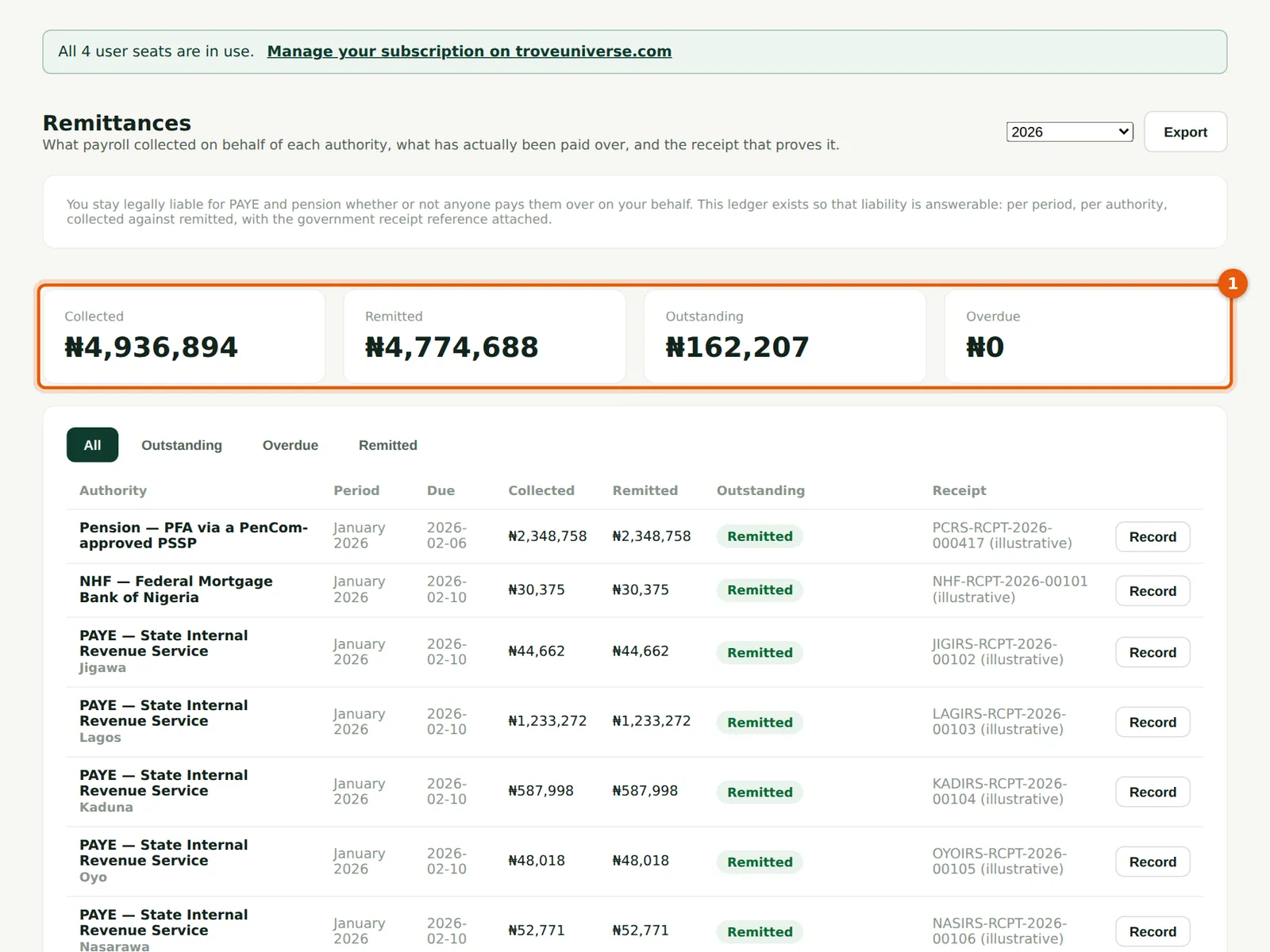
January's approved run opened one PAYE line for each of the eleven states Savannah Harvest's staff live in, one line for pension (both halves), NHF, NSITF and ITF. ₦4,936,894 was collected in total.
Who
Admin or finance officer.
What to do
- Check the totals (1): collected, remitted, outstanding and overdue.
- Pension (2) is due first: within about 7 working days of the pay date (PayTrove uses 9 calendar days, 6 February here).
- Choose Record (3) on a line when it has been paid.
7.2 The PAYE schedule by state
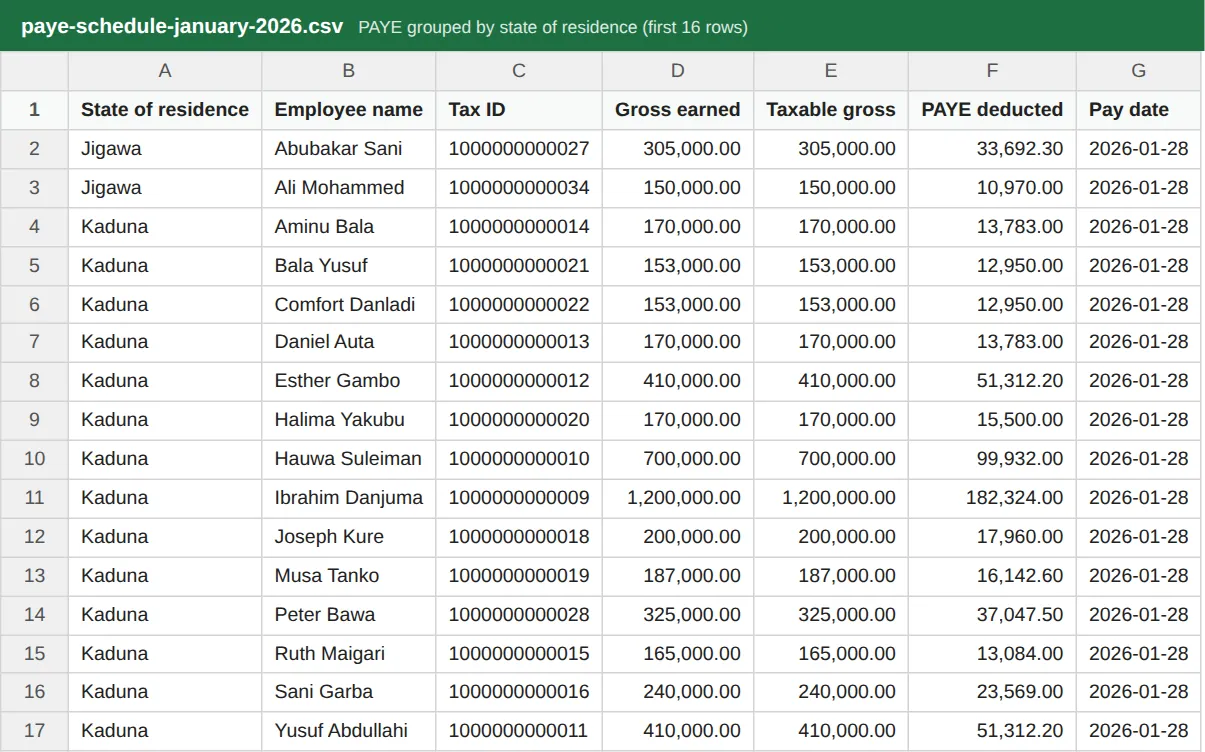
Why
Each state is filed with separately; there is no national PAYE filing. The schedule lists, for each state, every employee with their Tax ID, gross, taxable gross and PAYE deducted. Use it for each state IRS's filing portal.
Who
Admin or finance officer.
What to do
- On the approved run choose PAYE schedule (by state).
- Filter the file by state and file each state's part with that state's IRS by the 10th of the following month.
7.3 The pension schedule for PCRS
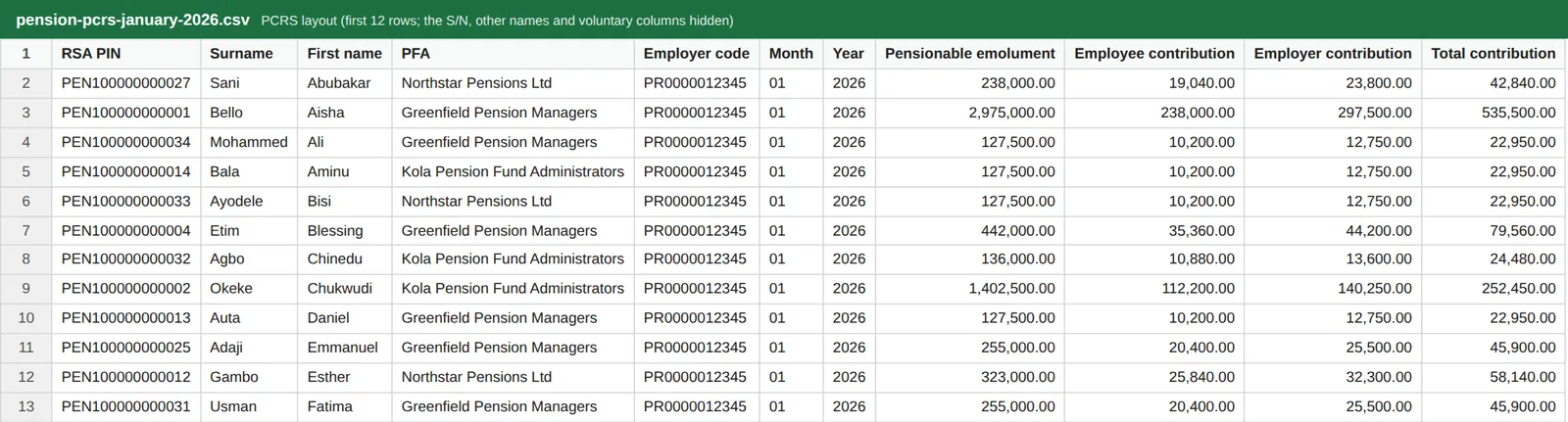
Why
The schedule has the fields PCRS asks for: RSA PIN, surname, first name, PFA, employer PenCom code, month and year, pensionable emolument, and the employee and employer contributions. PayTrove checks every PIN is PEN followed by 12 digits before building the file. Pension is one obligation in the ledger; the schedule tells your PSSP how to split it across each employee's PFA.
Who
Admin or finance officer.
What to do
- On the approved run choose Pension schedule (PCRS).
- Upload it through your PenCom-approved PSSP, mapping the columns to the PSSP's template the first time.
- NHF schedule and Employer levies (NSITF / ITF) are downloaded the same way.
7.4 The NHF schedule

Why
Only employees who have opted in (with their election date recorded) appear: here Chukwudi Okeke and Funmilayo Adeyemi. The schedule gives basic salary and the 2.5% deduction for the Federal Mortgage Bank of Nigeria.
Who
Admin or finance officer.
What to do
- On the approved run choose NHF schedule and remit through the Federal Mortgage Bank's channel.
7.5 The employer levies: NSITF and ITF

Why
NSITF (Employee Compensation Scheme) is 1% of the month's regular payroll, paid monthly. ITF is 1% of annual payroll; PayTrove accrues it each month so the annual figure is ready by 1 April of the following year. Both are paid by the employer.
Who
Admin or finance officer.
What to do
- On the approved run choose Employer levies (NSITF / ITF).
7.6 Record a remittance
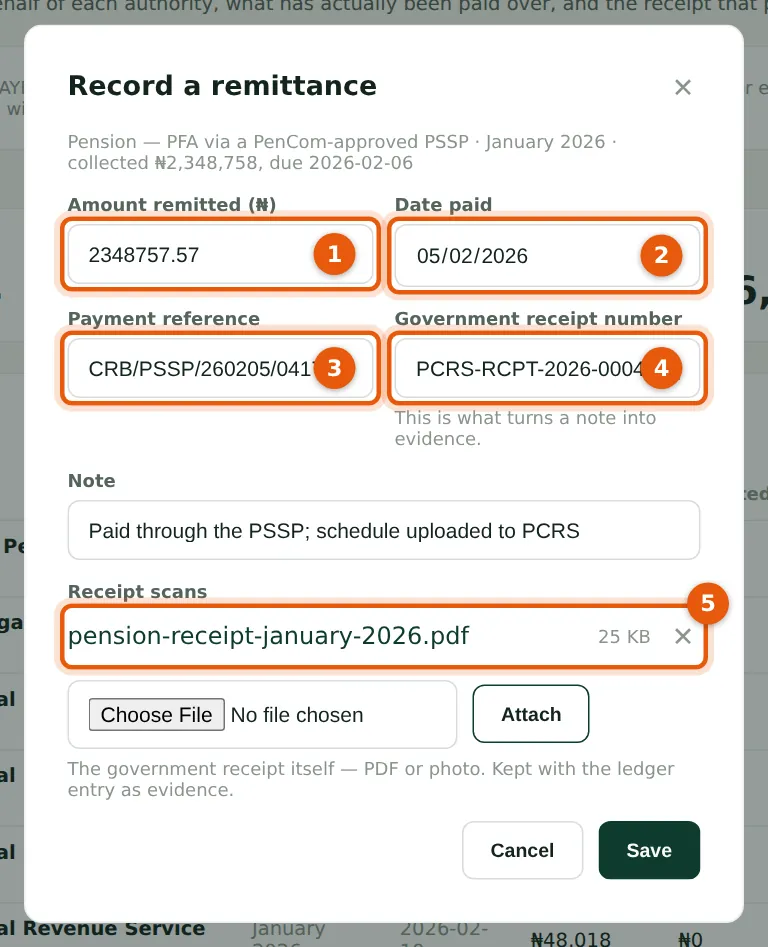
Why
The government receipt number is what turns a note into evidence. Attaching the receipt itself (PDF or photo) keeps it with the ledger line.
Who
Admin or finance officer.
What to do
- Enter the amount remitted (1) — it is filled in with the amount collected — and the date paid (2).
- Enter the payment reference from your bank (3) and the government receipt number (4).
- Choose the receipt file and Attach: it appears under Receipt scans (5). Add a note if useful and choose Save. A part payment leaves the line part-paid.
7.7 The ledger after paying
Why
After pension on 5 February and PAYE, NHF and NSITF on 9 February, only ITF (2) remains. ITF is 1% of annual payroll, accrued monthly by PayTrove, and due by 1 April of the following year.
Who
Admin or finance officer.
What to do
- Check the totals (1). Use the Overdue tab to see anything past its due date.
- Choose Export for a CSV of the ledger, for example for your auditors.
7.8 Overdue remittances
Why
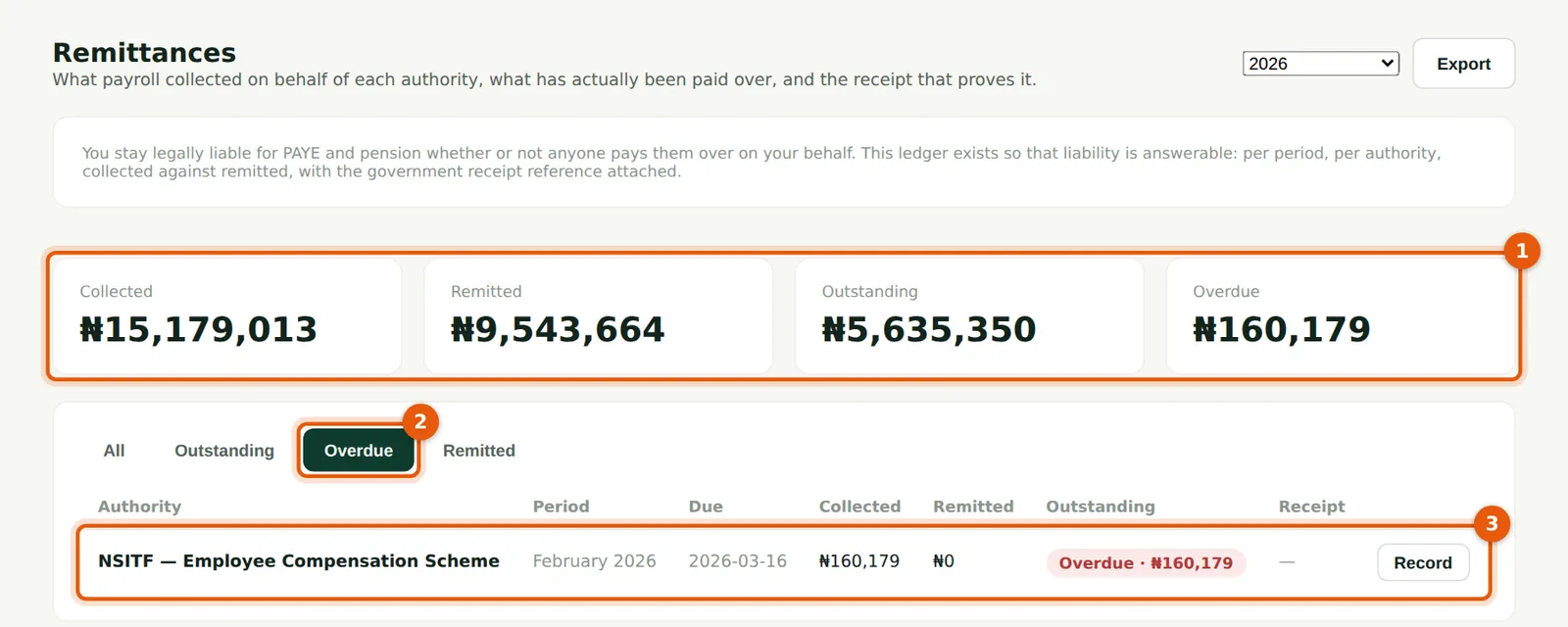
February's NSITF was due on 16 March and was not paid, so on 31 March it shows as overdue in the totals (1) and on the Overdue tab (2) (3). The Overview also lists it. Late payment can attract penalties, so clear overdue lines first. The ledger also carries a development levy line for the state levy deducted each month, filed with the annual return.
Who
Admin or finance officer.
What to do
- Open the Overdue tab (2) regularly.
- Pay the amount and choose Record on the line (3) with the receipt, as in step 7.6. Savannah Harvest paid it the same day.