Steps in this chapter (5)
Pay a group of staff weekly or fortnightly on their own schedule, with PAYE still worked out cumulatively over the year.
Monthly pay needs no set-up. For staff paid weekly or fortnightly, an Admin adds a pay schedule in Settings: a name, weekly or fortnightly, and the first day of any one period. Each employee on a schedule has a fixed pay per week (or per fortnight); their monthly figure in lists and reports is an estimate (× 52 or 26 ÷ 12). Each schedule has its own regular runs; a monthly run leaves schedule staff out. Daily-rated casual workers and take-home (net) agreements stay monthly.
PAYE stays cumulative, counted in the schedule's periods: the weeks paid so far, plus the weeks left to 31 December (or to the leaving date). Pension, NHF, NSITF and ITF are worked on the period's pay; the development levy is accrued at a 52nd (or 26th) a period; a loan instalment is taken each period; and a fixed monthly court-order amount is converted to the period (× 12 ÷ periods a year).
In the illustration, Savannah Harvest engages three factory hands at the Kaduna factory for the cashew season from Monday 2 March 2026, at ₦50,000 a week, paid every Friday.
13.1 Add a pay schedule
Why
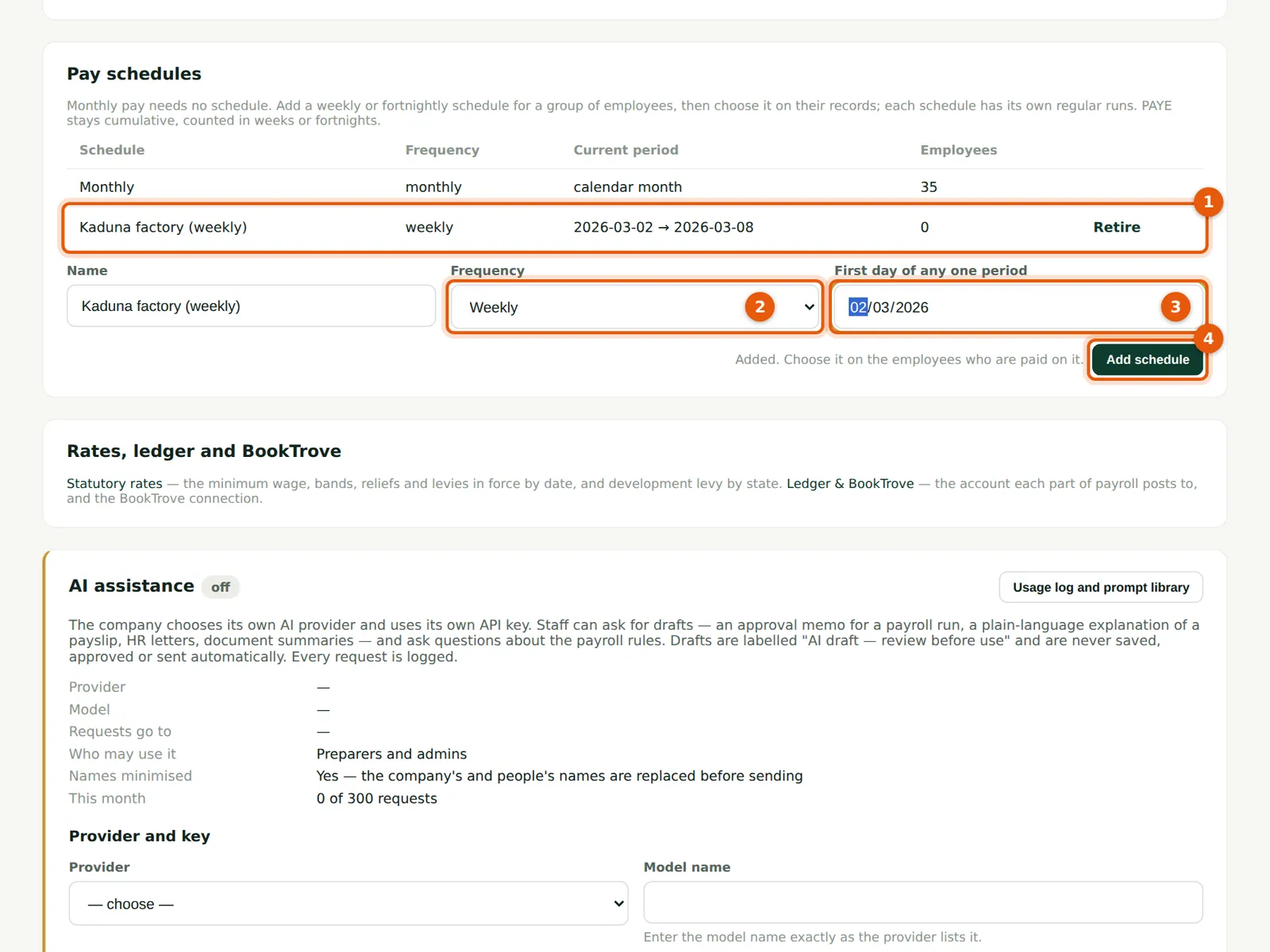
On 2 March Chukwudi adds the schedule Kaduna factory (weekly), with weeks starting on Monday 2 March 2026. The list shows each schedule, its frequency, the current period and how many employees are on it (1). A schedule with employees on it cannot be retired.
Who
Admin.
What to do
- Open Settings and scroll to Pay schedules.
- Enter the name, choose Weekly or Fortnightly (2) and the first day of any one period (3).
- Choose Add schedule (4). Then choose the schedule on the employees paid on it.
13.2 Put an employee on the schedule
Why
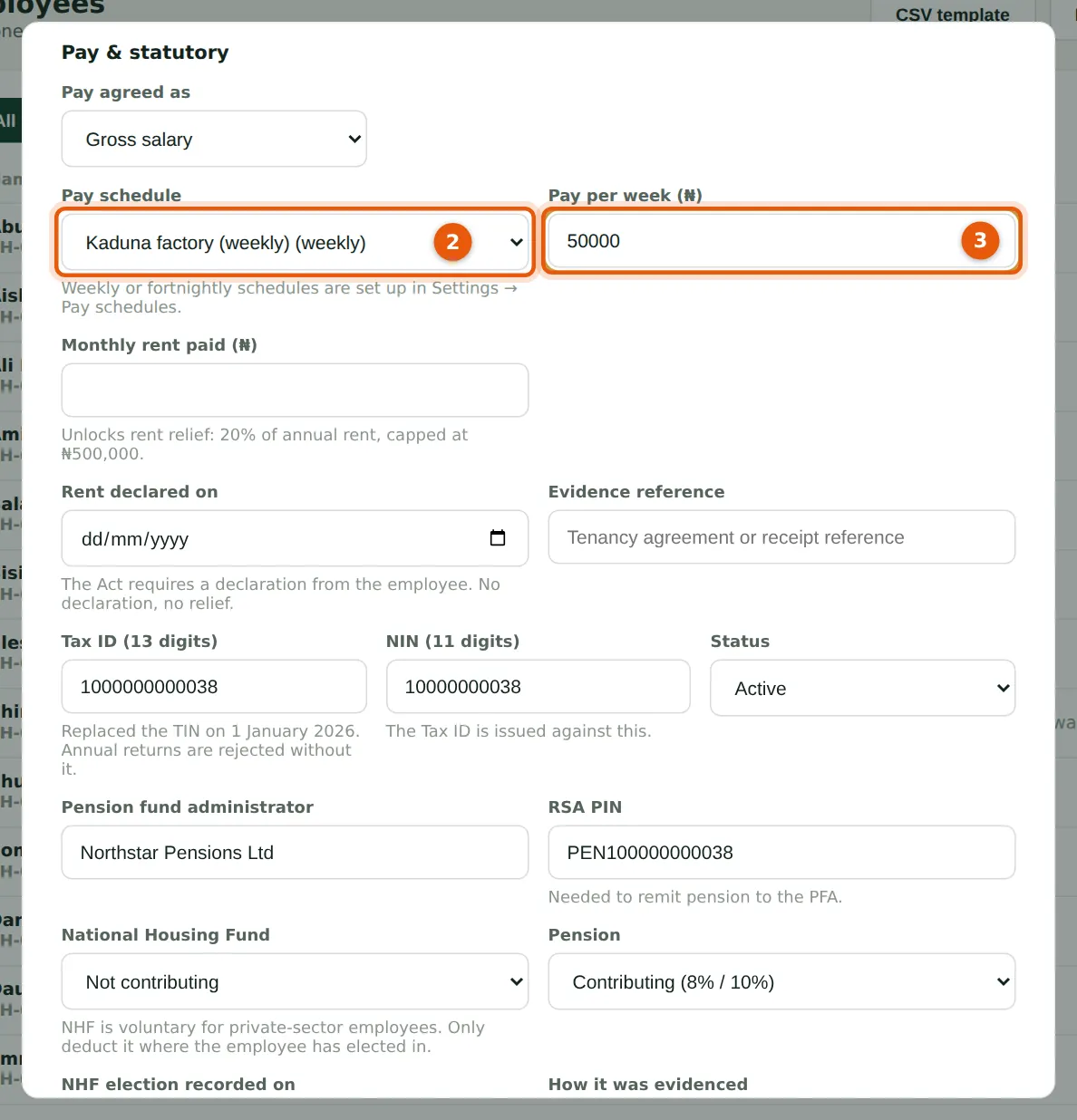
Blessing adds Ladi Kaura through the form, and the other two hands, Dauda Gimba and Hadiza Lere, the same way (the CSV template also has pay schedule and pay per period columns). A schedule employee must have a pay per period; PayTrove refuses the record without it.
Who
Preparer or Admin.
What to do
- Enter the employee as usual, with the employment type Contract.
- Choose the pay schedule (2). The monthly gross box is replaced by Pay per week (3): enter ₦50,000.
- Enter the pension, Tax ID and bank details as for anyone else, and choose Save.
13.3 Create a weekly run
Why
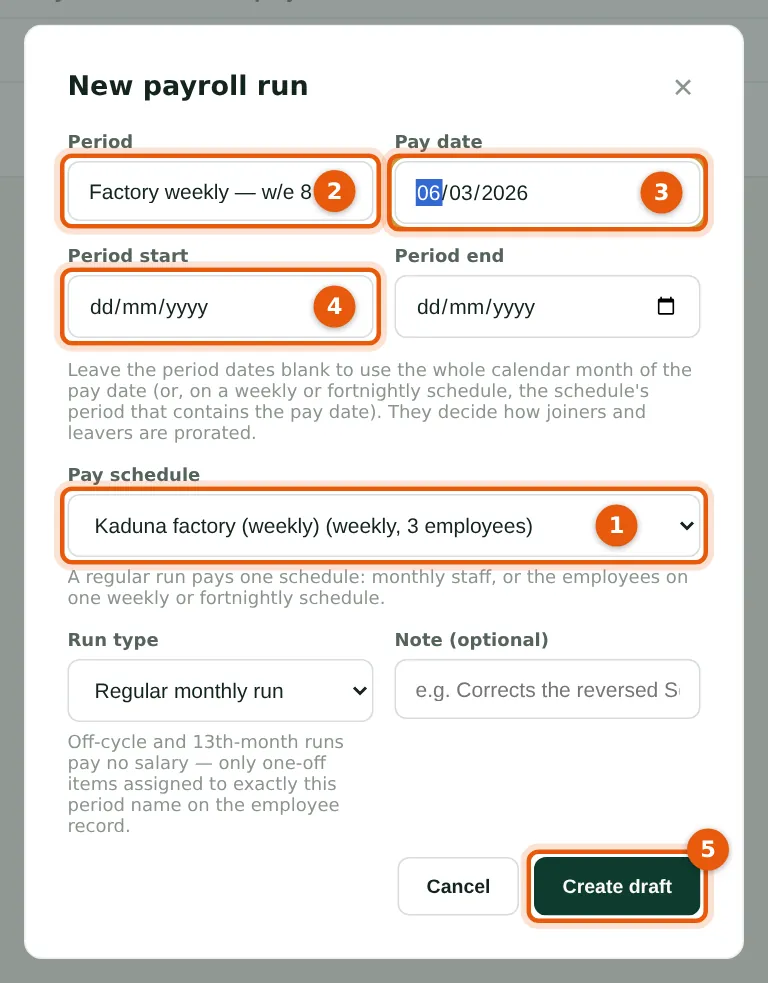
A regular run belongs to one schedule. Choose the schedule (1); the list shows how many employees are on it. Give the run a name (2) and the pay date (3); leave the period dates (4) blank and PayTrove uses the schedule's week that contains the pay date — for Friday 6 March, Monday 2 to Sunday 8 March. A second regular run for the same schedule and week is refused.
Who
Preparer.
What to do
- Choose New payroll run and pick the pay schedule (1).
- Enter the name (2) and pay date (3). Leave the period dates (4) blank.
- Choose Create draft (5).
13.4 The weekly run
Why
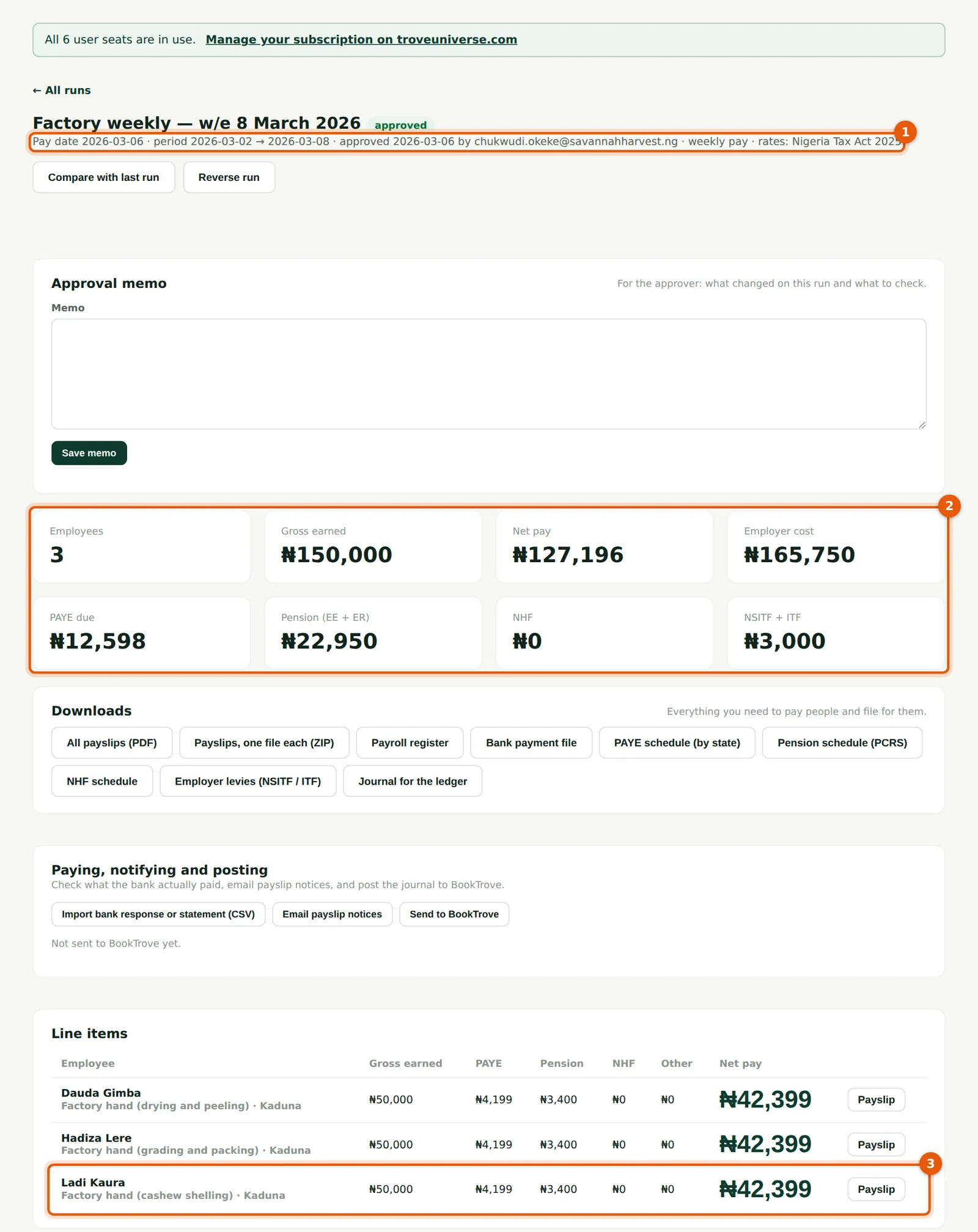
The line under the title (1) shows the period and weekly pay. For the three hands the run pays ₦150,000.00 gross and ₦127,196.34 net (2). Each line (3) shows PAYE of ₦4,199.30: Ladi's year is counted in weeks — this week and the 42 weeks left to 31 December, 43 in all at ₦50,000 — less her pension, which gives ₦2,003,800 chargeable; the tax on that is ₦180,570.00, and each week takes 1/43 of it. Chukwudi approves each weekly run; Blessing prepares the next three on 13, 20 and 27 March the same way. The weekly runs open their own remittance obligations (PAYE to Kaduna, pension and so on) with their own due dates.
Who
Preparer, then Admin.
What to do
- Check the lines and approve as for a monthly run.
- On a weekly or fortnightly draft the Days worked card may still list the monthly casual workers: leave it alone, and enter their days on the monthly run.
13.5 The weekly payslip
Why
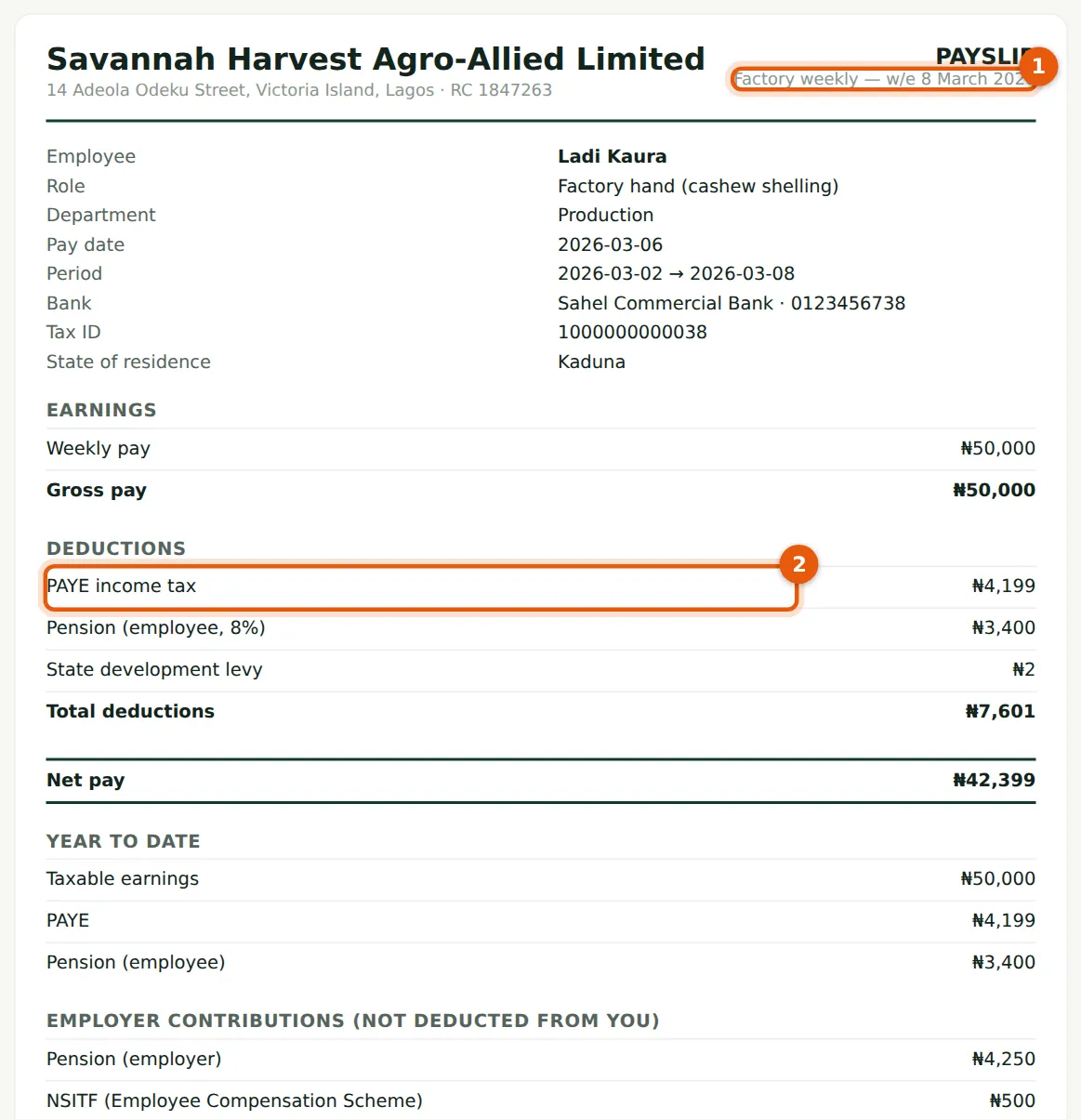
The payslip names the week (1) and shows the weekly pay, PAYE (2), pension and the development levy for the week, with the year to date. Employees with self-service see weekly payslips in My payslips.
Who
Anyone checking a payslip.
What to do
- Download the week's payslips from the run as for any other run.