Steps in this chapter (13)
Most entries come from documents — invoices, bills, payments, stock and production — so manual journals are few. At each month end the accountant posts the payroll, accruals and prepayments, runs depreciation and the currency revaluation, works through the month-end checklist and closes the month with a lock date.
Funmilayo Adeyemi closes January 2026 at Savannah Harvest between 4 and 6 February.
10.1 Post the payroll from PayTrove
Why
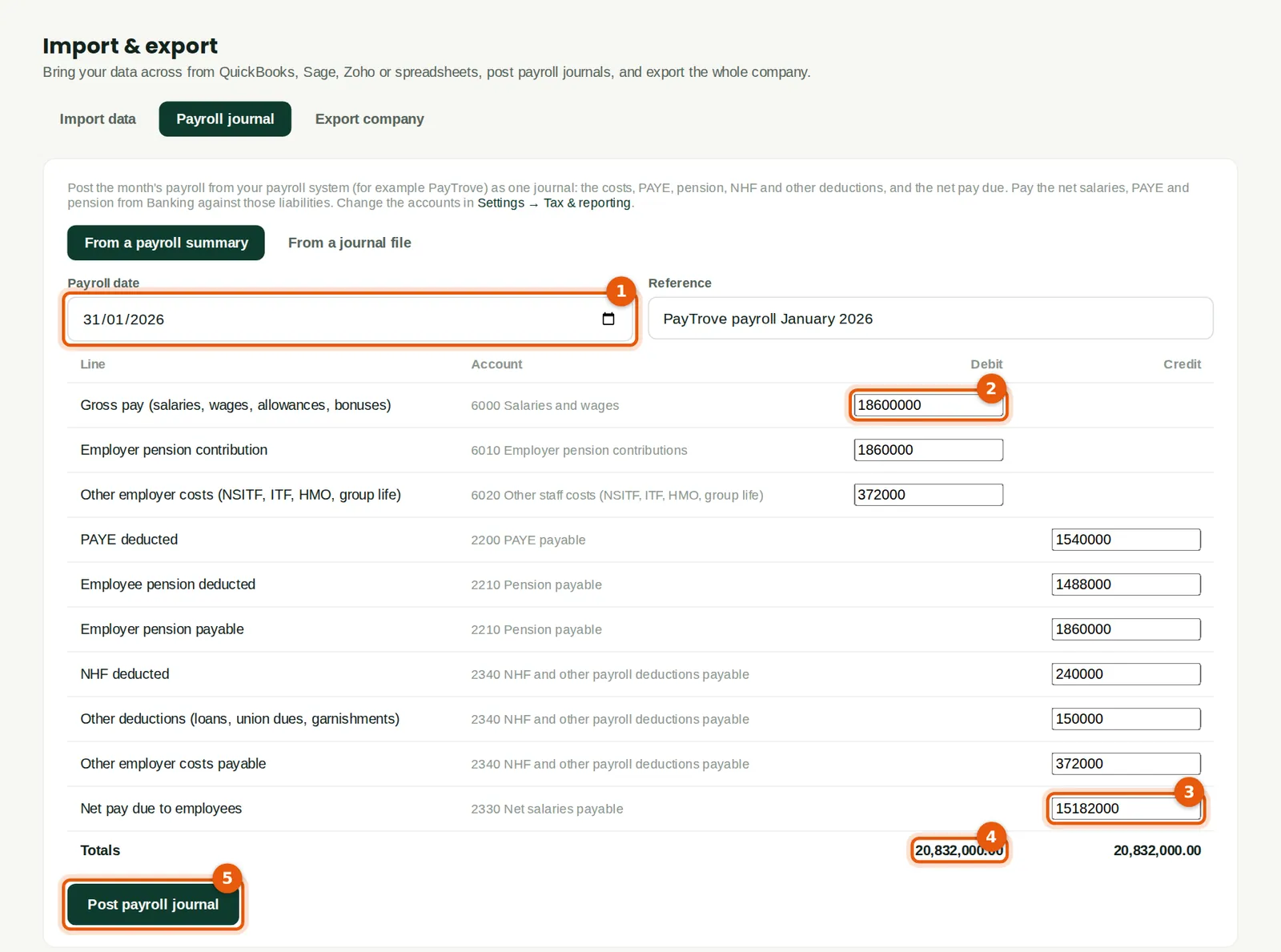
Payroll is run in PayTrove (or another payroll system). BookTrove takes the month's summary as one journal: gross pay and the employer's costs as expenses, and PAYE, pension, NHF, other deductions and the net pay as liabilities. The net pay is then cleared by the salary payment from the bank (chapter 8); PAYE and pension by their remittances.
Who
Accountant (accounting Approve level).
What to do
- Open Import & export → Payroll journal and choose From a payroll summary. Enter the payroll date (1) and a reference.
- Type the figures from the payroll summary: gross pay (2) ₦18,600,000 down to net pay (3) ₦15,182,000.
- Check that the totals agree (4): ₦20,832,000 each. Click Post payroll journal (5).
- To post a detailed journal exported by the payroll system, choose From a journal file instead.
10.2 An accrual that reverses itself
Why
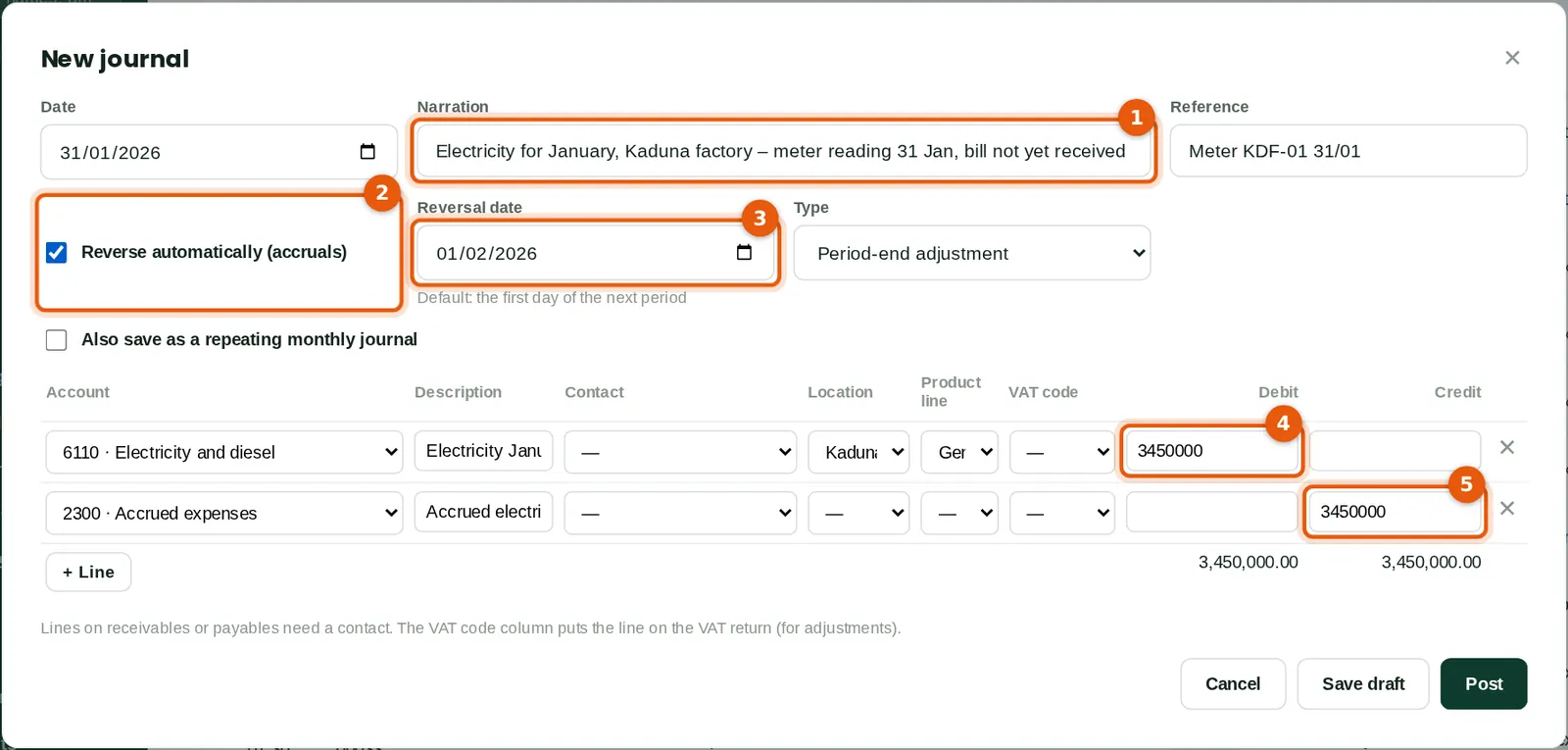
The factory's January electricity bill arrives in February, so the cost is accrued at 31 January from the meter reading (1). Ticking Reverse automatically (2) posts the opposite entry on 1 February (3), so that when the bill is entered in February only the difference affects February. Tag the expense with its location and product line; mark the journal as a period-end adjustment.
Who
Accountant (prepares and posts); a bookkeeper's journal goes to an approver.
What to do
- Click New journal. Enter the date, narration (1) and reference.
- Tick Reverse automatically (2); the reversal date (3) defaults to the first day of the next month.
- Add the lines: debit the expense (4), credit Accrued expenses (5). The totals must agree.
- Click Post. Tick Also save as a repeating monthly journal for an entry that recurs every month.
10.3 The journal list
Why
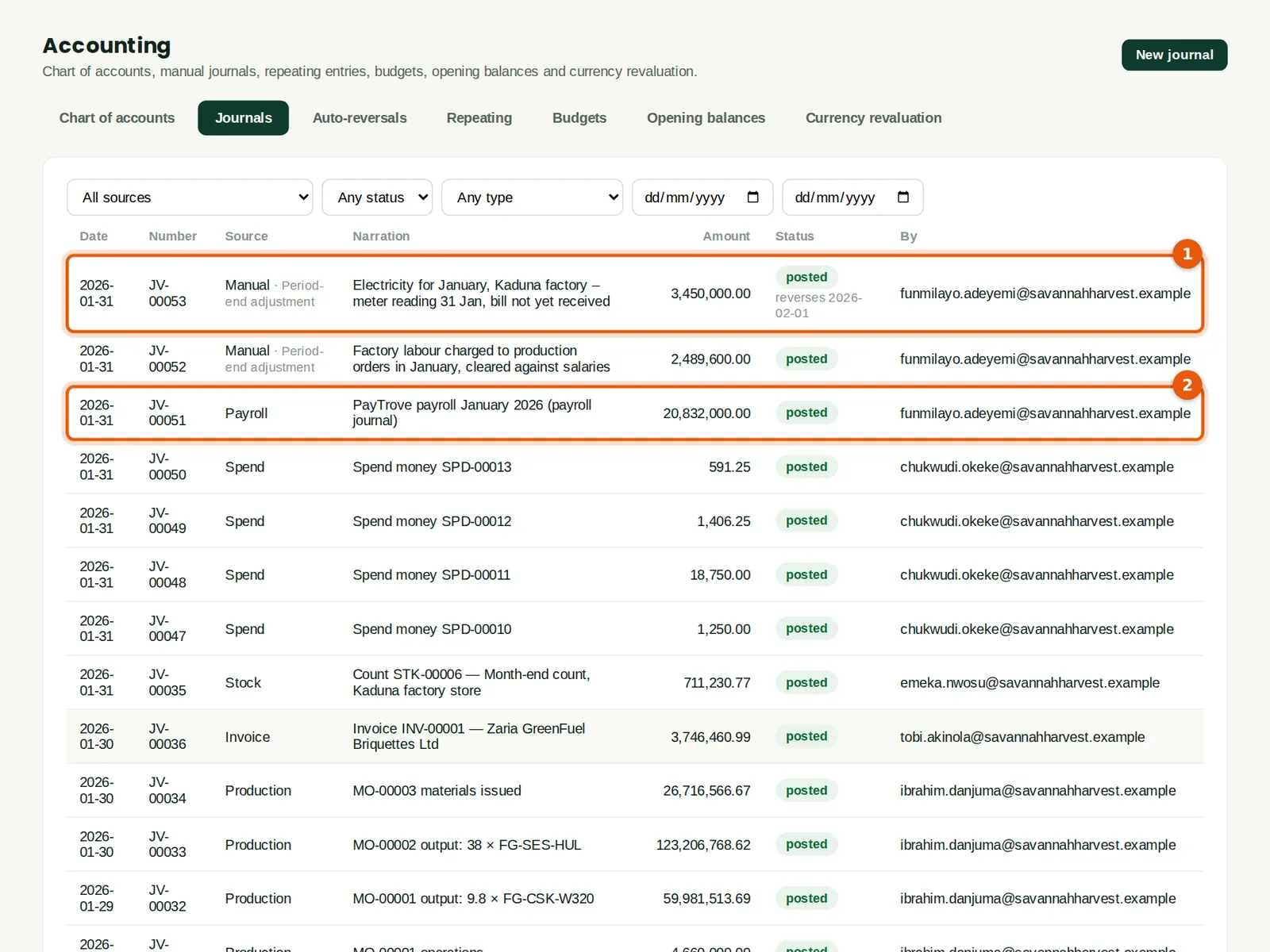
Every posted journal is listed with its source — manual, payroll, invoice, bill, payment, depreciation and so on. The accrual shows the date it reverses (1); the payroll journal (2) its source. Posted journals cannot be edited: they are reversed or reclassified, so the audit trail is complete.
Who
Accountant or auditor.
What to do
- Click a journal to view its lines, attach support, reverse it or reclassify lines to another account.
- Auto-reversals lists what is scheduled and any reversal that could not post because its date is locked.
10.4 Spread a prepayment
Why
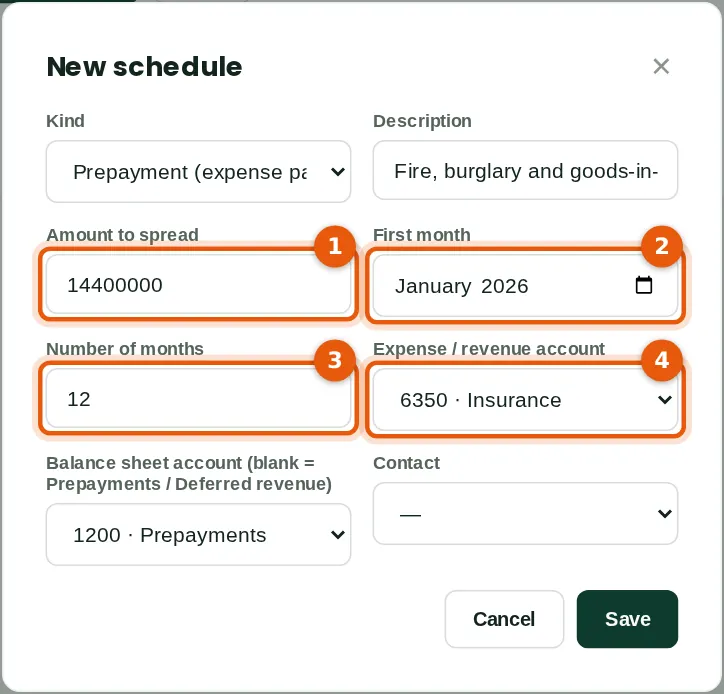
The company's insurance for 2026, ₦14,400,000, was paid on 5 January into Prepayments. A schedule releases it to the Insurance expense account over 12 months (1)–(4): ₦1,200,000 a month. The same works for income received in advance (deferred revenue).
Who
Accountant.
What to do
- Click New schedule. Choose Prepayment, describe it, enter the amount (1), the first month (2) and the number of months (3), and the expense account (4).
- At each month end click Run to a month end (the month-end process can do it for you).
10.5 Revalue foreign-currency balances
Why
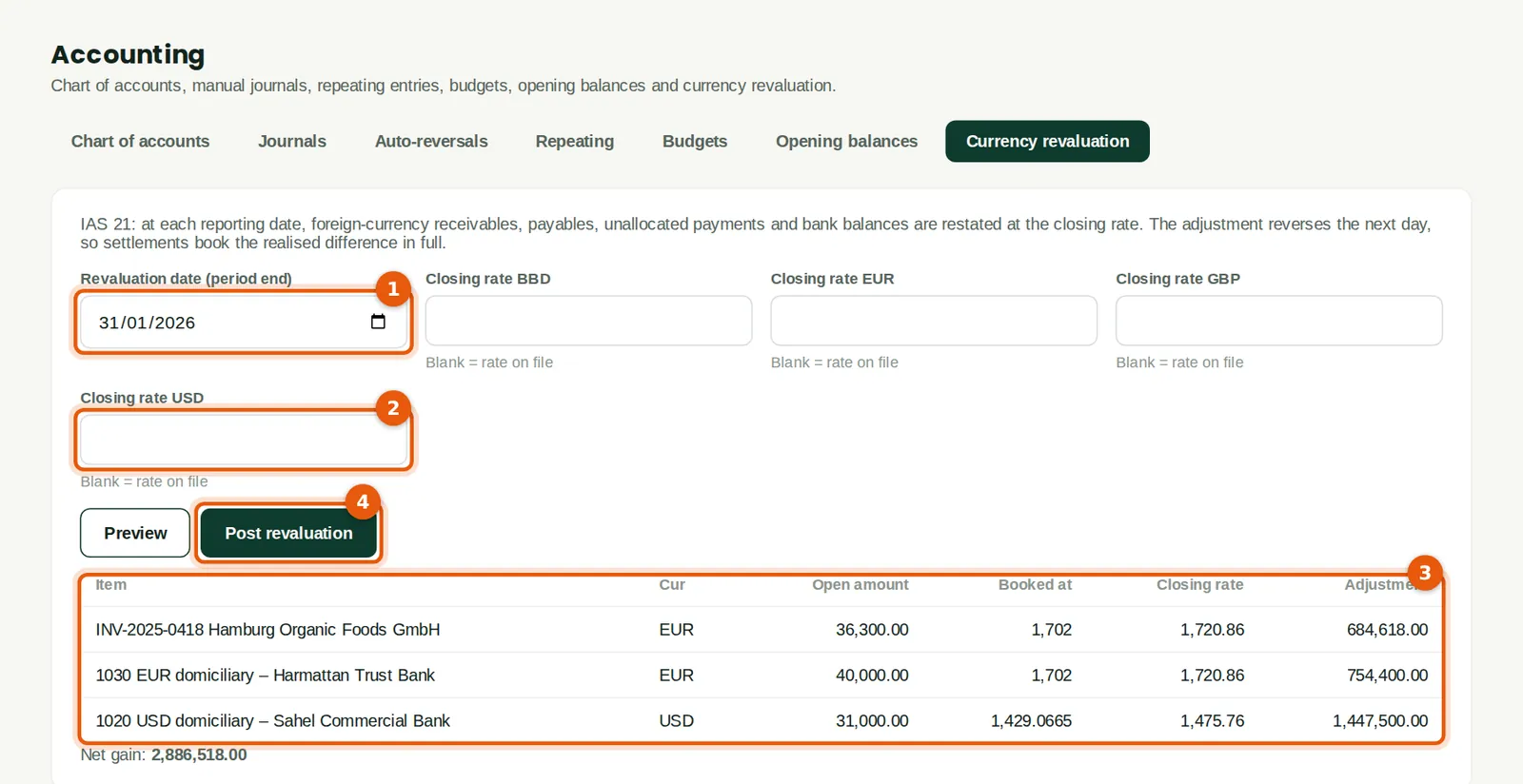
IAS 21 requires foreign-currency receivables, payables, unallocated payments and bank balances to be restated at the closing rate at each reporting date. BookTrove lists each item with the rate it is booked at and the closing rate, and posts the unrealised gain or loss. The adjustment reverses the next day, so a later receipt books the realised difference in full.
Who
Accountant.
What to do
- Open Currency revaluation and enter the period-end date (1). Leave the closing rates blank to use the rates on file (2), or type the rate to use.
- Click Preview and check the items (3), then click Post revaluation (4).
10.6 The month-end checklist
Why
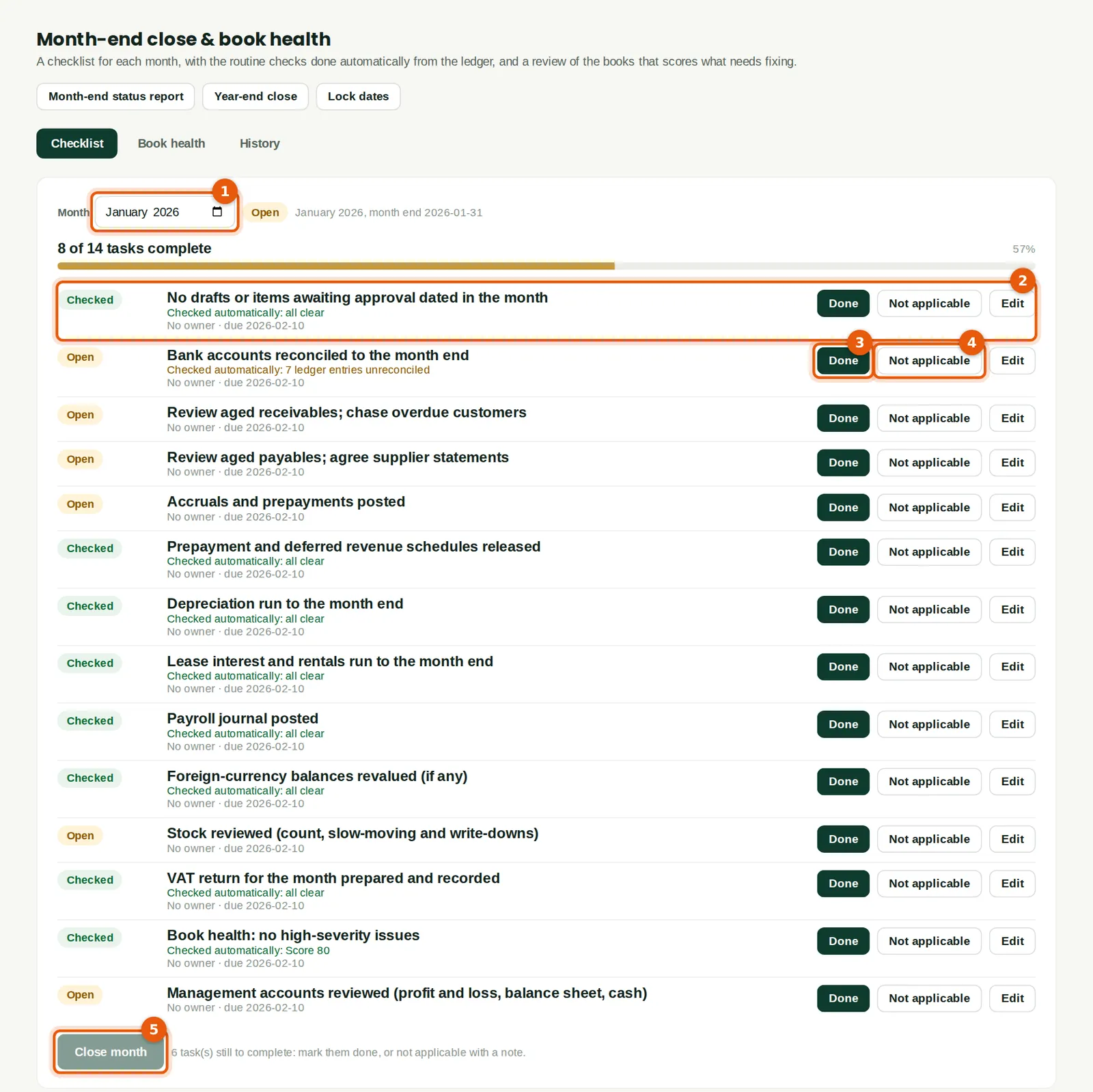
Each month has a checklist (1). Tasks that BookTrove can check itself — drafts, bank reconciliations, depreciation, leases, prepayments, payroll, revaluation, VAT, book health — show Checked when the ledger is right (2). The others are marked Done (3) by the person who did them, or Not applicable (4) with a reason.
Who
Accountant; tasks can be given owners and due dates.
What to do
- Choose the month (1). Work down the list: mark each task Done or Not applicable, or use Edit to give it an owner and a due date.
- When every task is complete, Close month (5) becomes available.
10.7 Book health
Why
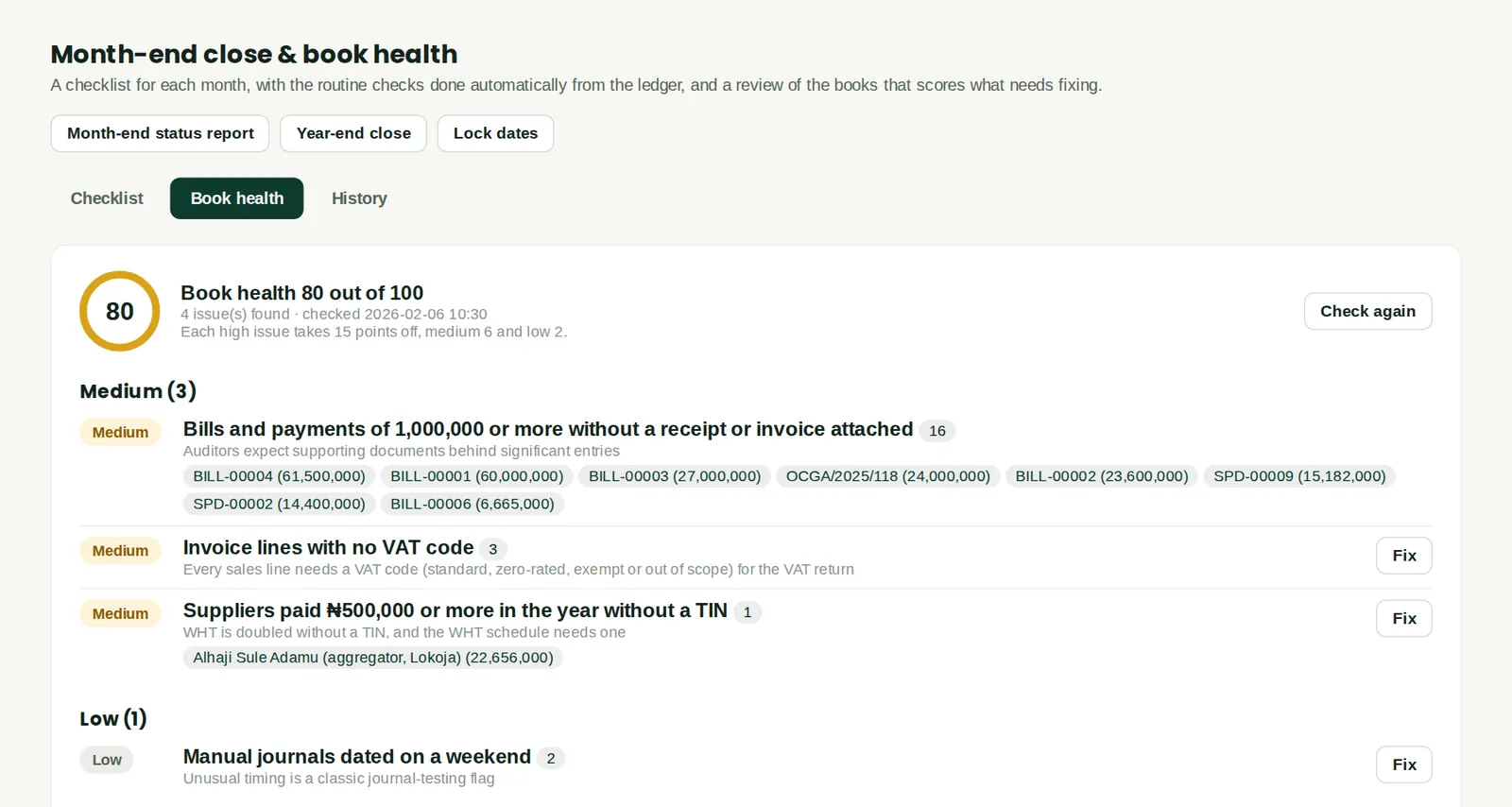
Book health scores the books out of 100 and lists what to fix, most serious first: for example suspense balances, unreconciled bank lines, sub-ledgers that do not agree with the control accounts, large bills without an attached invoice, sales lines without a VAT code, and payments to suppliers without a TIN. Clear the high-severity issues before closing.
Who
Accountant.
What to do
- Click Fix next to an issue to open the records concerned, then Check again.
10.8 Close the month
Why
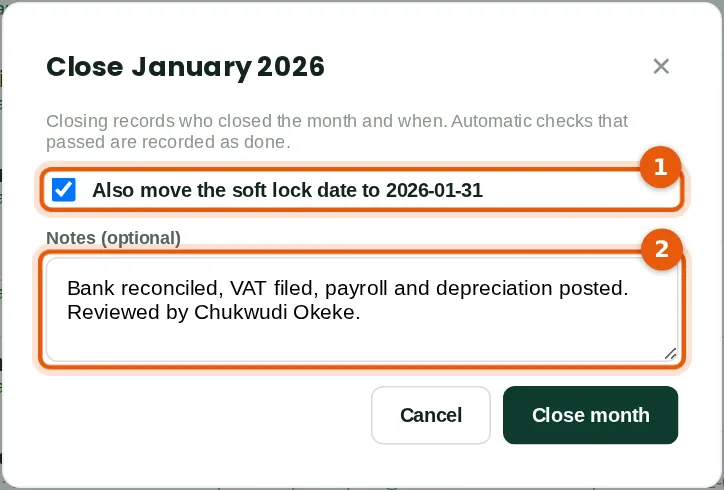
Closing records who closed the month and when. Ticking the box (1) moves the soft lock date to the month end, so only owners, administrators and accountants can still post into January.
Who
Accountant (Approve level).
What to do
- Click Close month, keep the lock box ticked, add a note (2) and click Close month.
10.9 Lock dates
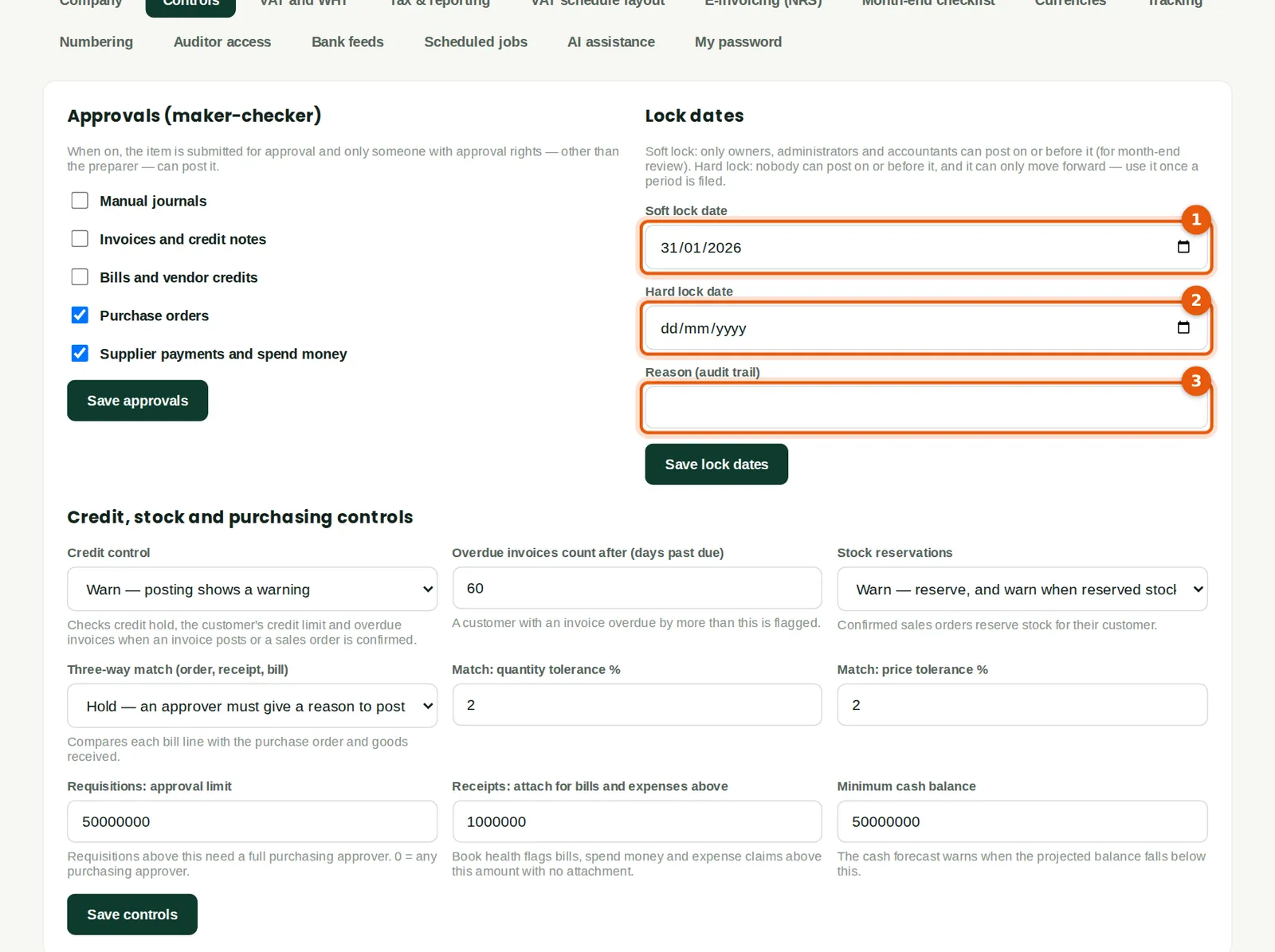
Why
Soft lock (1): only owners, administrators and accountants can post on or before it — used for month-end review. Hard lock (2): nobody can post on or before it and it can only move forward — used once VAT returns are filed or the accounts are signed. Each change needs a reason (3) for the audit trail.
Who
Owner, administrator or accountant.
What to do
- Enter the dates and the reason and click Save lock dates.
10.10 Year-end close
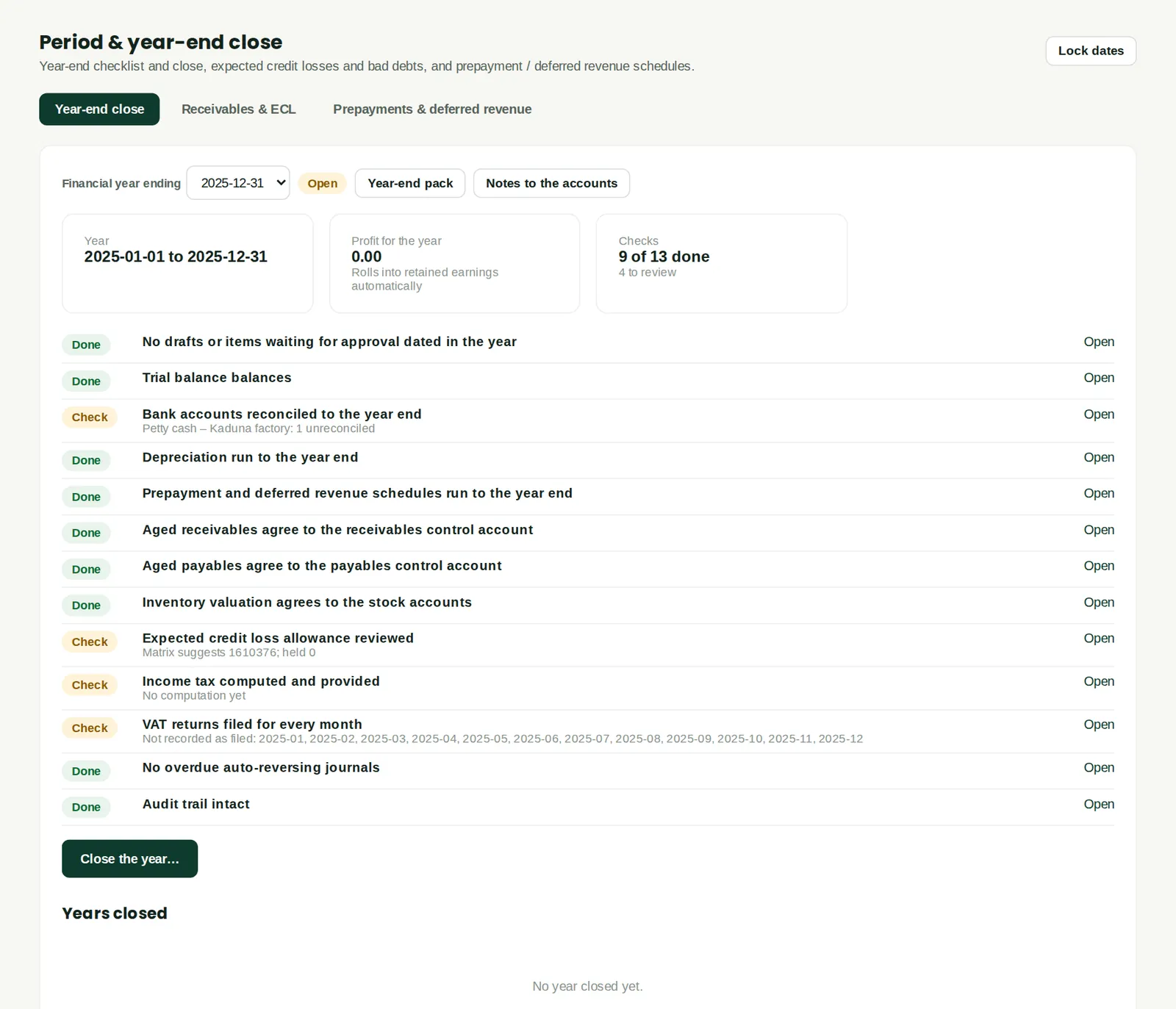
Why
At the year end, the checklist confirms the trial balance balances, banks are reconciled, depreciation and schedules are run, the sub-ledgers agree with the control accounts, stock agrees with the stock accounts, the expected credit loss allowance is reviewed, income tax is computed and provided, every VAT return is filed and the audit trail is intact. Closing the year records the profit and moves the lock date to the year end. Retained earnings roll forward automatically — no closing journal is needed. The year-end pack and notes to the accounts are printed from here.
Who
Accountant, then owner or administrator.
What to do
- Choose the financial year and work through the checks. Click Open next to a check to see the detail.
- When the blocking items are cleared, click Close the year… and choose a soft or hard lock.
10.11 Receivables and expected credit losses
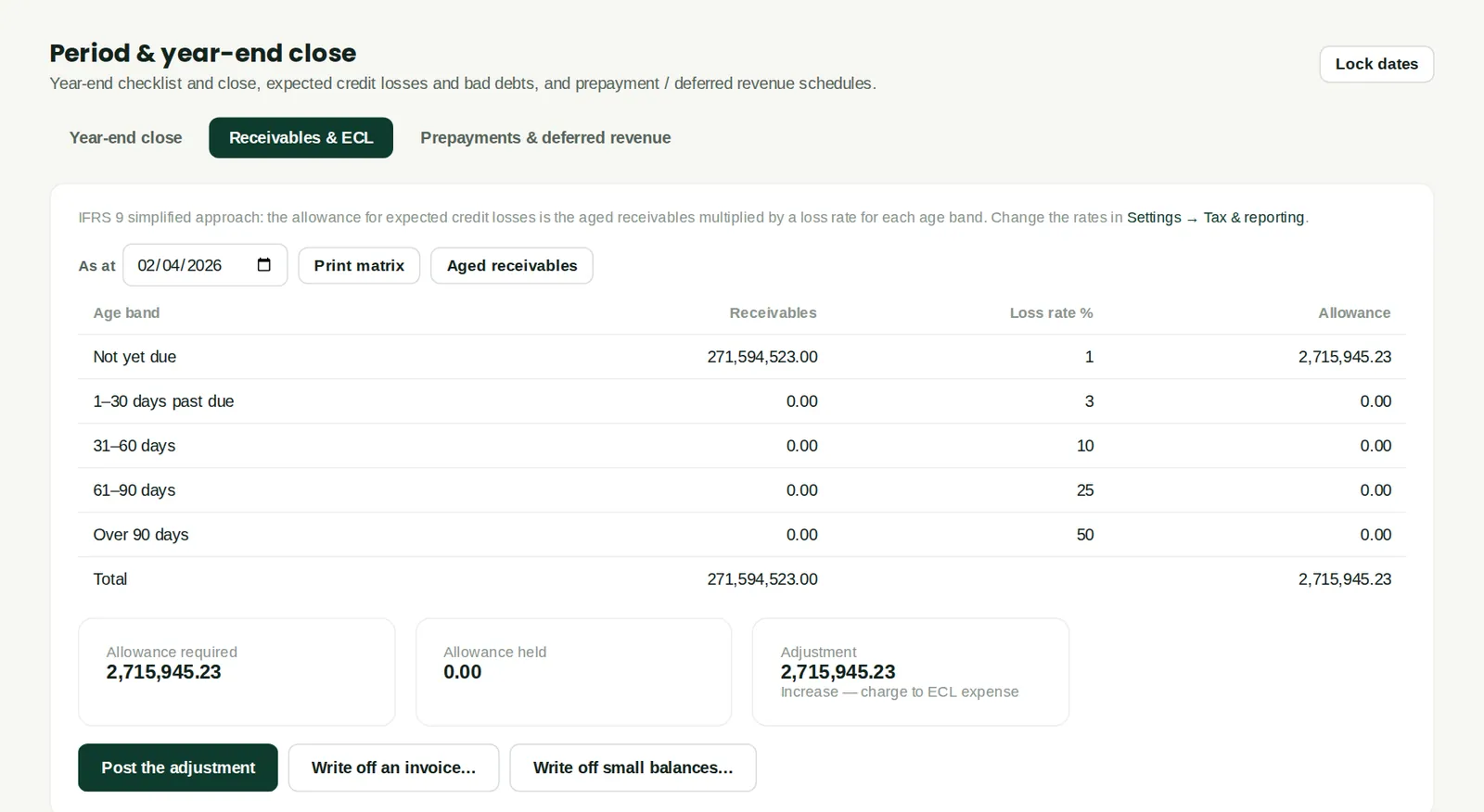
Why
IFRS 9's simplified approach: receivables are grouped by age and multiplied by the loss rates set in Settings → Tax & reporting, and the allowance is compared with what is held. Post the adjustment, or write off an invoice that will not be paid (a credit note applied to it, so the aging and ledger agree).
Who
Accountant.
What to do
- Choose the date, review the matrix and click Post the adjustment.
- Use Write off an invoice… or Write off small balances… for bad debts.
10.12 Prepayment and deferred revenue schedules
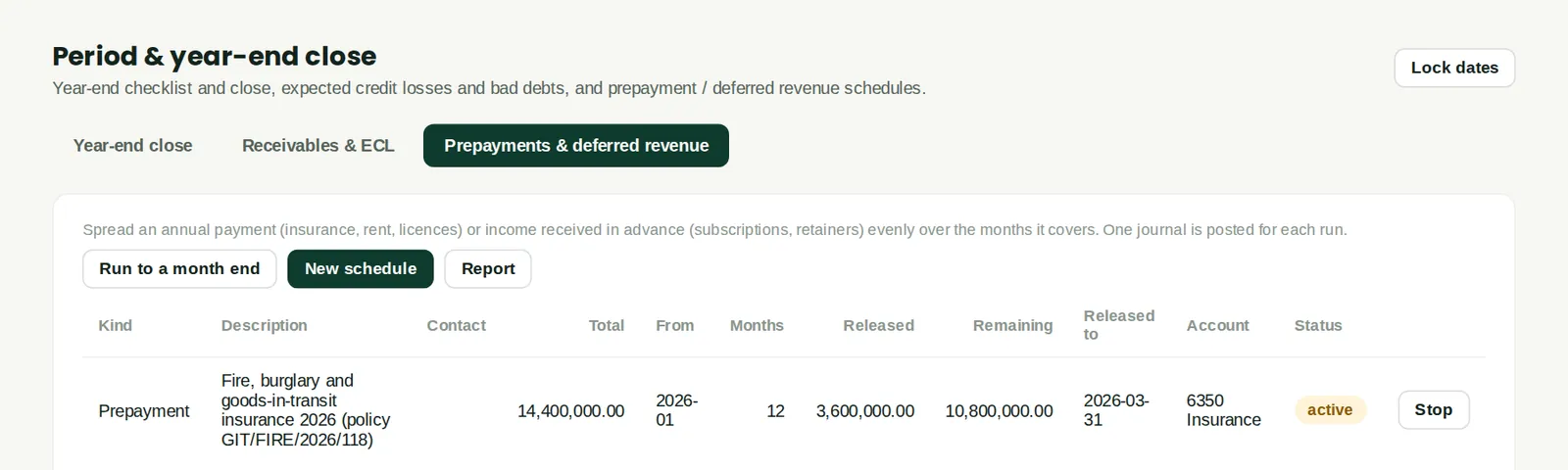
Why
Every schedule with its total, months, amount released so far and what remains. The insurance prepayment set up in January has released three months (₦3,600,000) by 31 March. Run to a month end releases what is due; Report opens the schedules report.
Who
Accountant.
What to do
- Click New schedule for another, or Stop to end one early.
10.13 Month-end history
Why
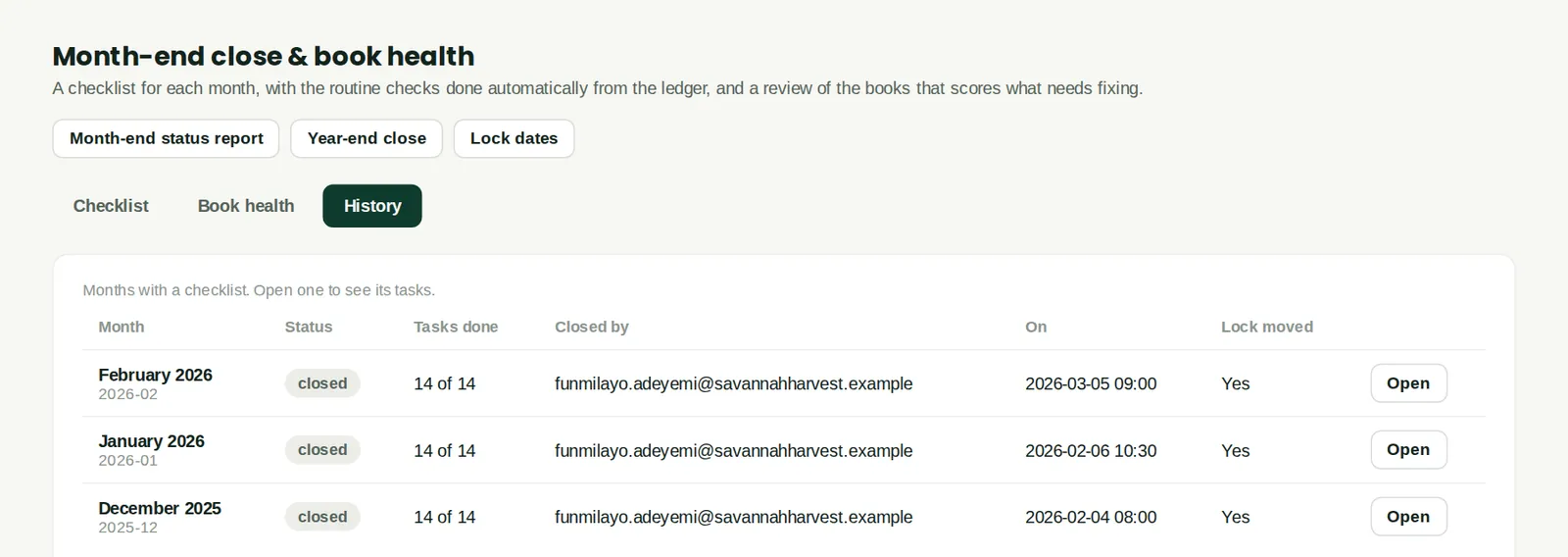
Each month's checklist result, who closed it and when, and whether the lock date moved. December 2025, January and February 2026 are closed and locked.
Who
Accountant, owners, auditors.
What to do
- Click Open to see a month's checklist as it was closed.