Steps in this chapter (12)
Projects collect the time people spend and the costs incurred on a job, so that the work can be billed to the customer and its profit measured. A project can be billed on time and materials, at a fixed price in progress stages, or not billed at all (internal work).
In April 2026 Savannah Harvest agreed to dry, split and pack the 2026 ginger crop of Coastal Agro Exports Ltd, a Lagos exporter. Supervision time is charged at agreed hourly rates and the fumigation and inspection of Coastal's ginger is recharged at cost. The job is set up as project GIN-2026.
16.1 Let the buying officers record time
Why
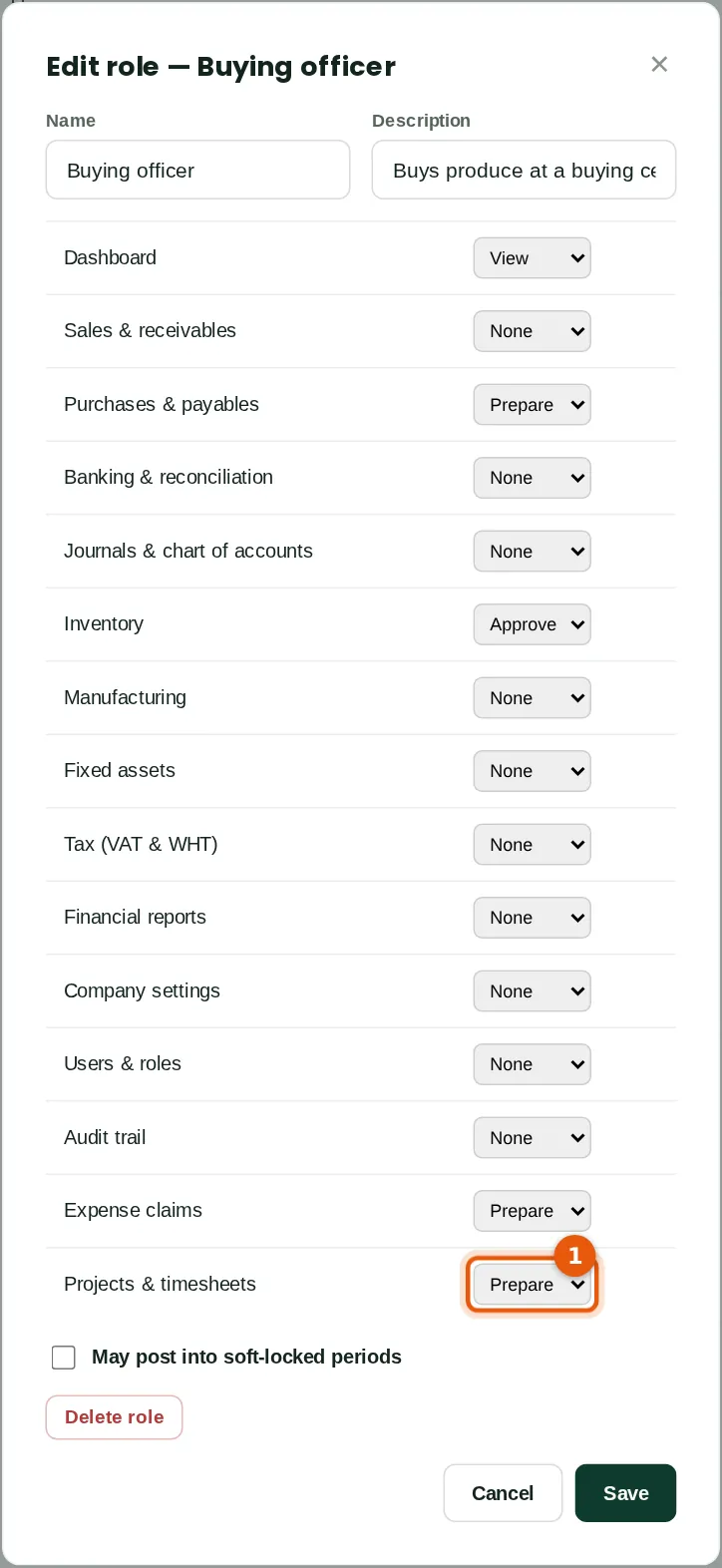
Time is recorded by people whose role gives Projects & timesheets at least Prepare. Approving time and seeing charge-out values needs Approve; changing rates needs Full. The built-in Employee role already allows time sheets. Chukwudi added Prepare to the custom Buying officer role, because Hauwa Sani and Musa Lawal supervise the work at the buying centres.
Who
An owner or administrator.
What to do
- Open Users & roles → Roles and permissions and click the role.
- Set Projects & timesheets (1) to Prepare and click Save. People with the role are signed out and get the new access when they sign in again.
16.2 Create the project
Why
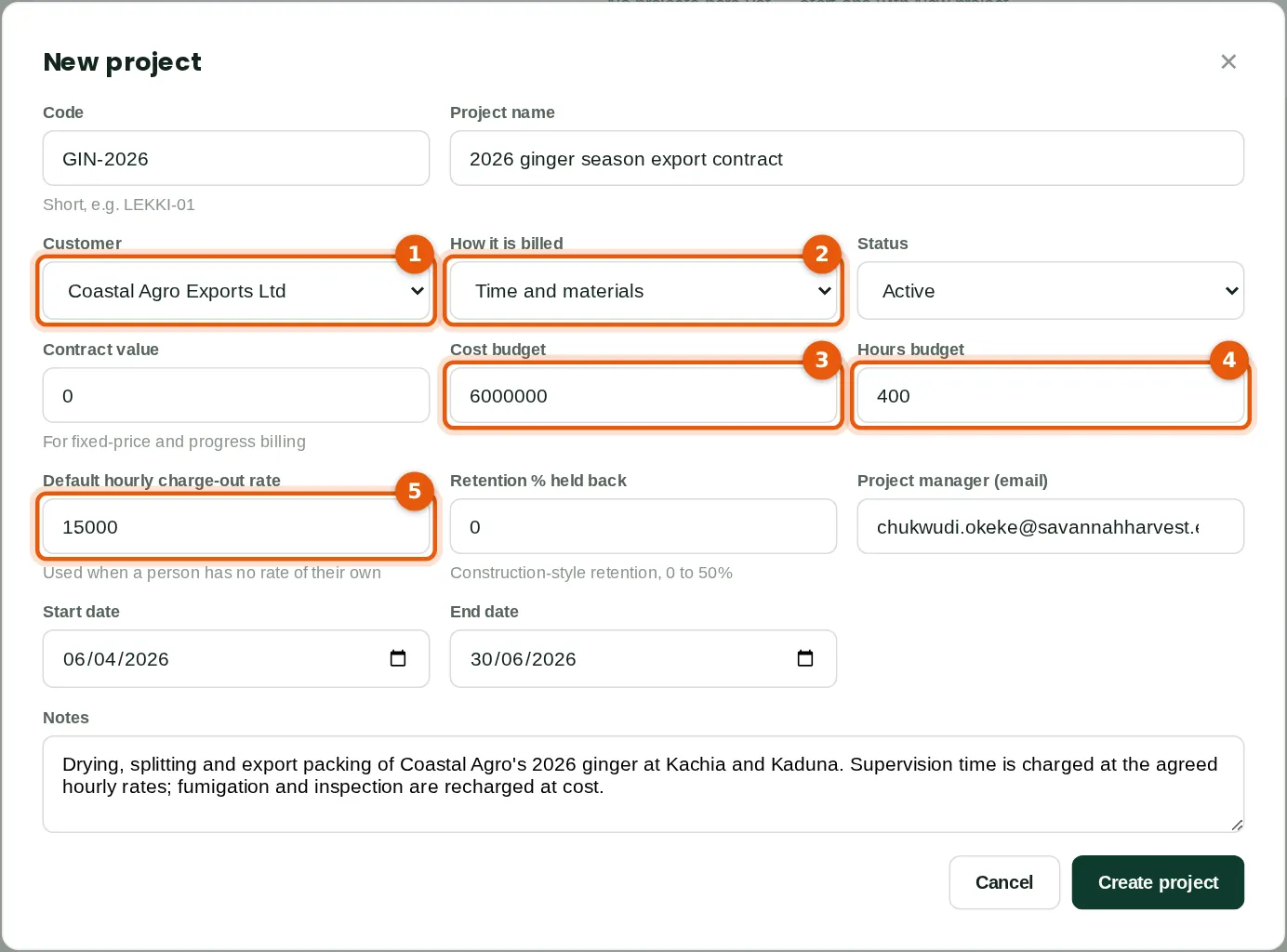
The project holds the customer, how the work is billed, the budget and the default charge-out rate. Time and materials bills approved hours at each person's rate plus rechargeable costs; fixed price bills stages of the contract value; not billable is for internal work. A retention percentage can be held back from progress bills, as in construction contracts.
Who
A finance manager or project manager (Projects & timesheets: Approve).
What to do
- Click New project. Type a short code (GIN-2026) and the project name.
- Choose the customer (1) and how it is billed (2): Time and materials.
- Type the cost budget (3) of ₦6,000,000 and the hours budget (4) of 400 hours, so BookTrove can show how much of each is used.
- Type the default hourly charge-out rate (5), ₦15,000, used for anyone without a rate of their own. Add the manager, dates and notes, then click Create project.
16.3 Charge-out and cost rates
Why
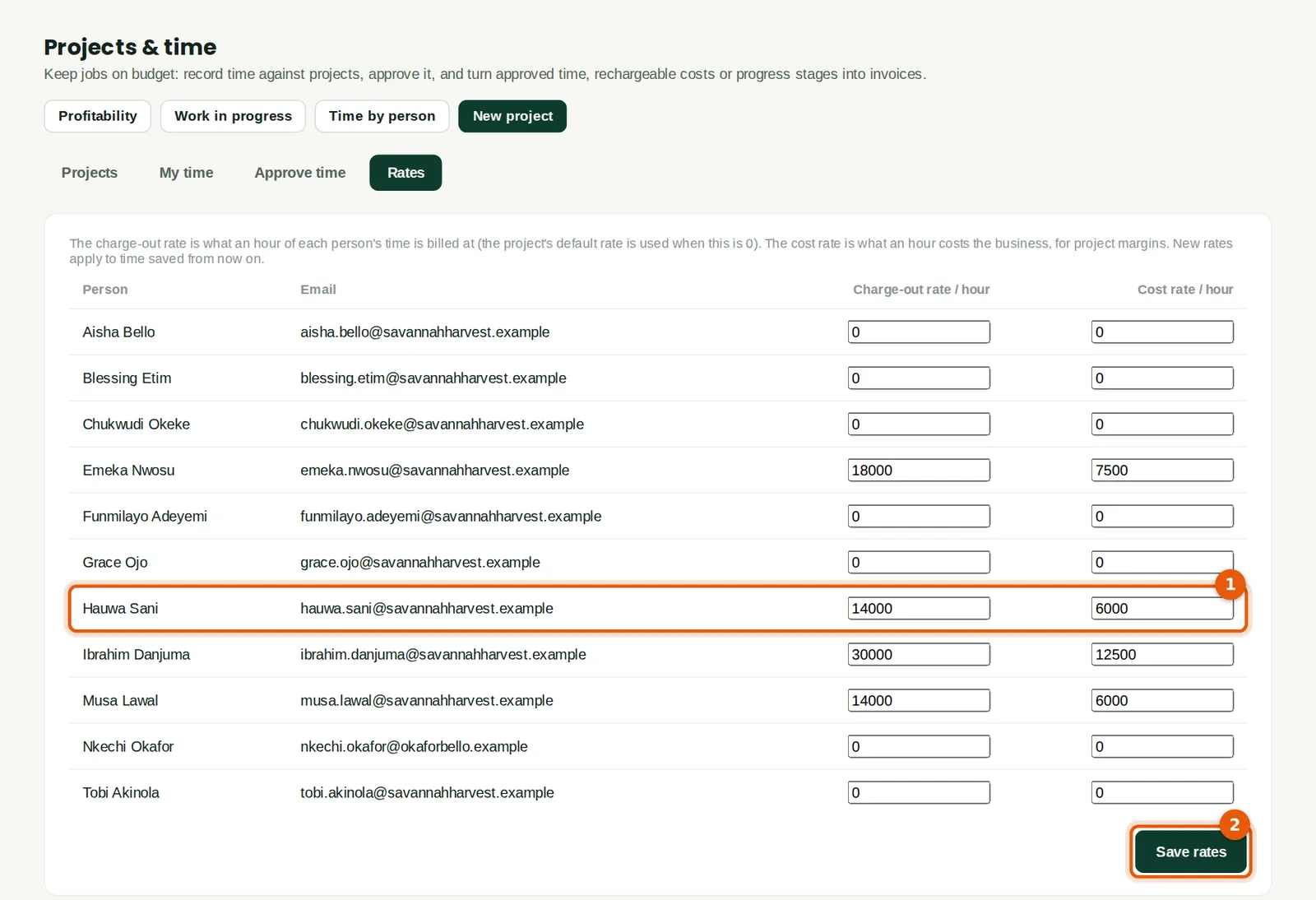
Each person can have a charge-out rate (what the customer pays per hour) and a cost rate (what an hour costs the company). The cost rate gives the labour cost in project reports; it is management information only, because salaries are already in the books through payroll. Hauwa Sani's rates are ₦14,000 and ₦6,000 an hour (1).
Who
An owner or administrator (Projects & timesheets: Full).
What to do
- Open the Rates tab, type the rates for each person and click Save rates (2).
16.4 Record a week's time
Why
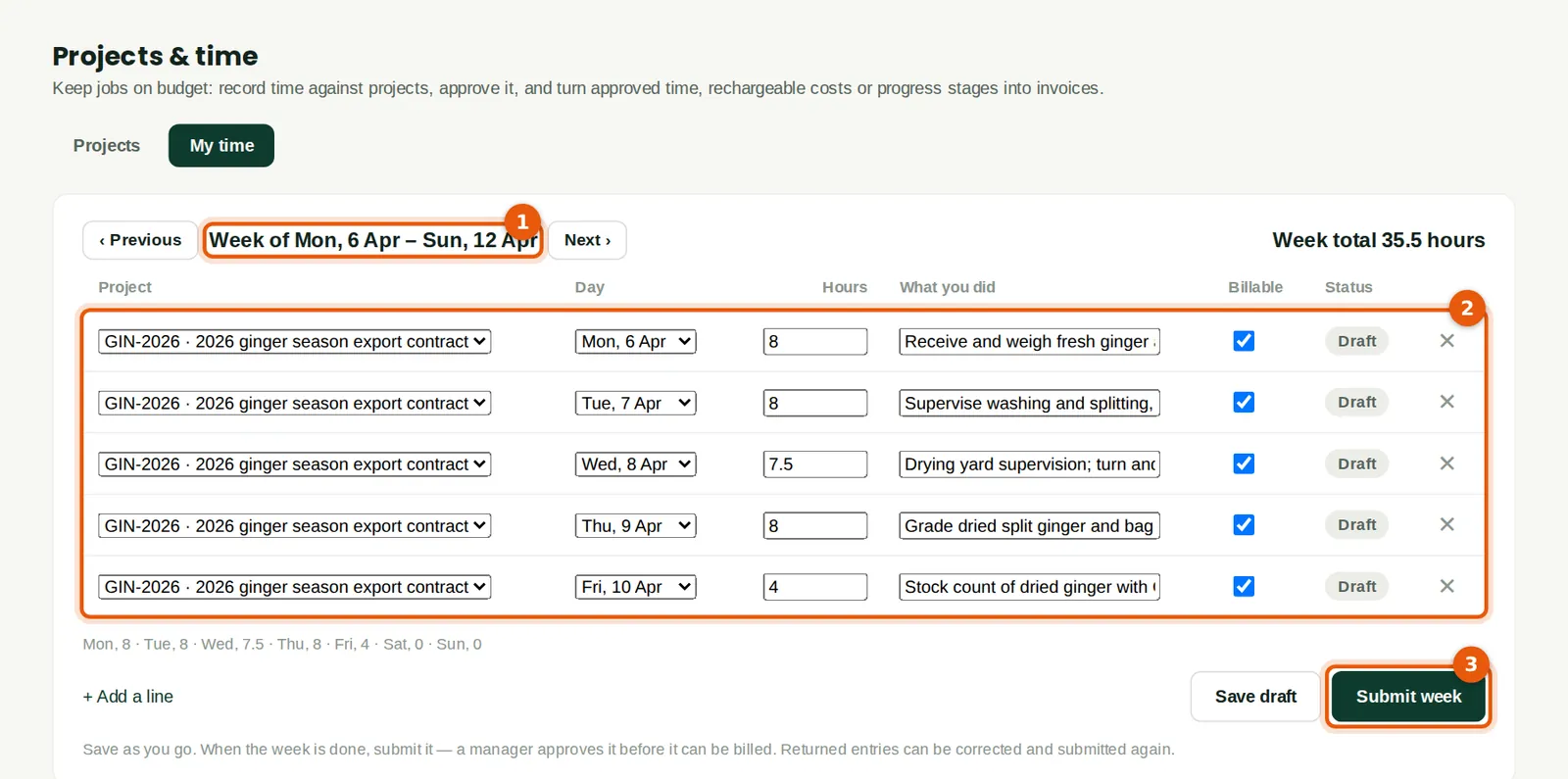
Time is recorded a week at a time. Each line has the project, the day, the hours, what was done and whether it is billable. Lines can be saved as drafts during the week. Hauwa recorded 35.5 hours between 6 and 10 April.
Who
Anyone who works on projects.
What to do
- Open My time. Use Previous and Next to choose the week (1).
- Click + Add a line for each piece of work and fill in the lines (2). Click Save draft as you go.
- At the end of the week click Submit week (3). Submitted time cannot be changed unless the manager returns it.
16.5 Approve the time
Why
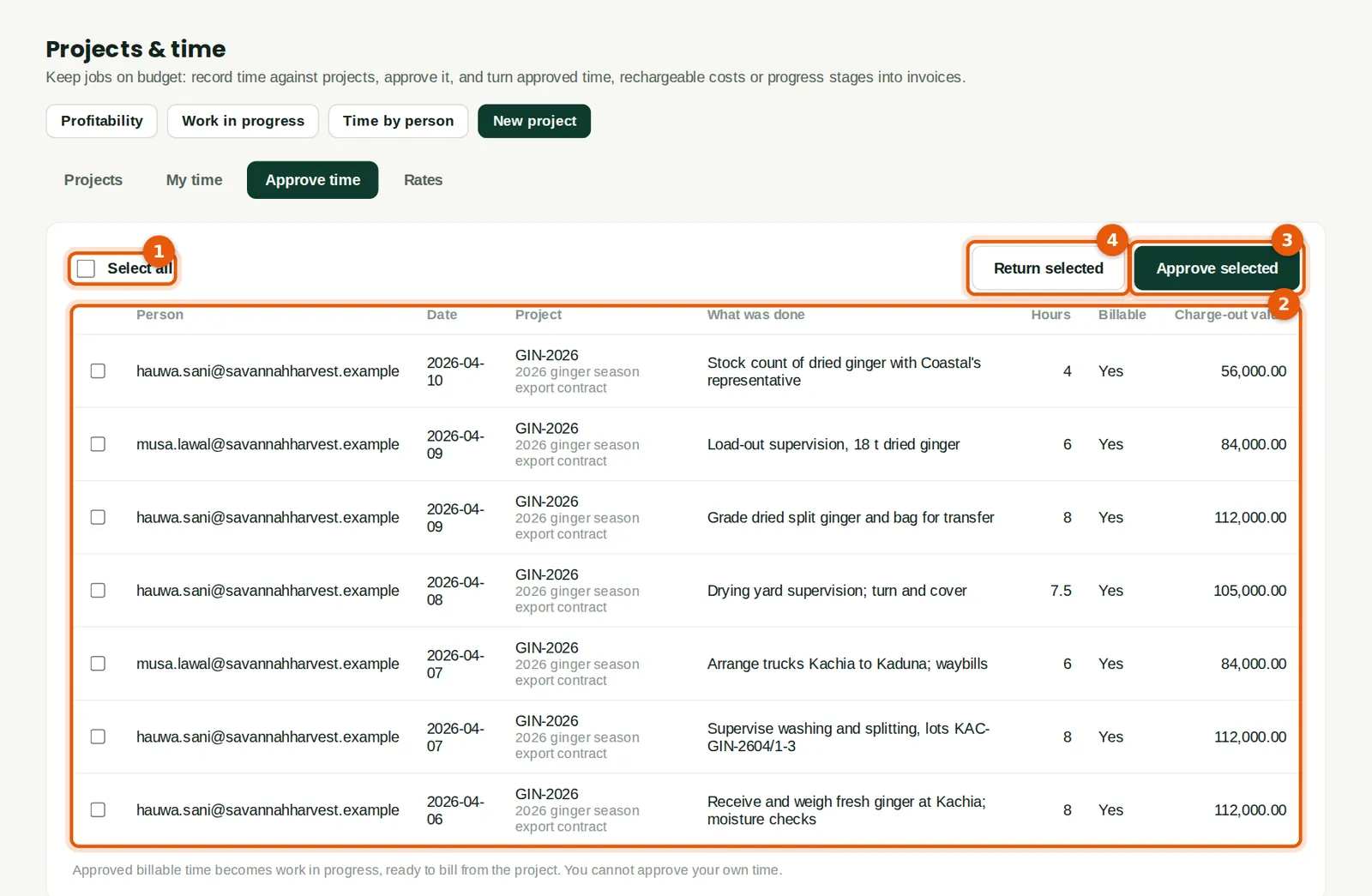
Only approved time can be billed. The list shows each submitted entry with its charge-out value.
Who
A project manager or finance manager (Projects & timesheets: Approve). Nobody can approve their own time.
What to do
- Tick the entries, or Select all (1), after checking the list (2).
- Click Approve selected (3), or Return selected (4) with a reason so the person can correct and resubmit.
16.6 A cost recharged to the customer
Why
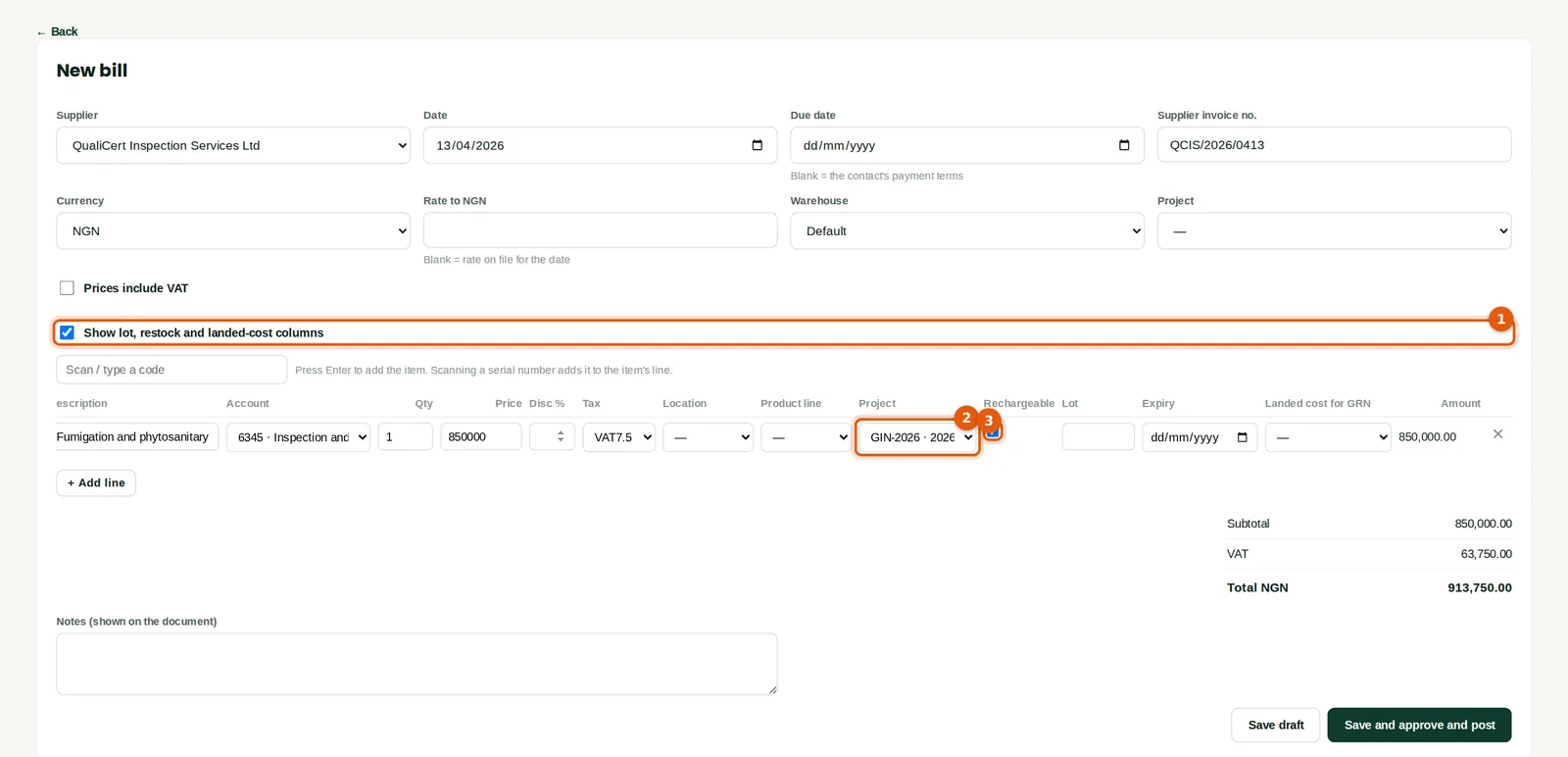
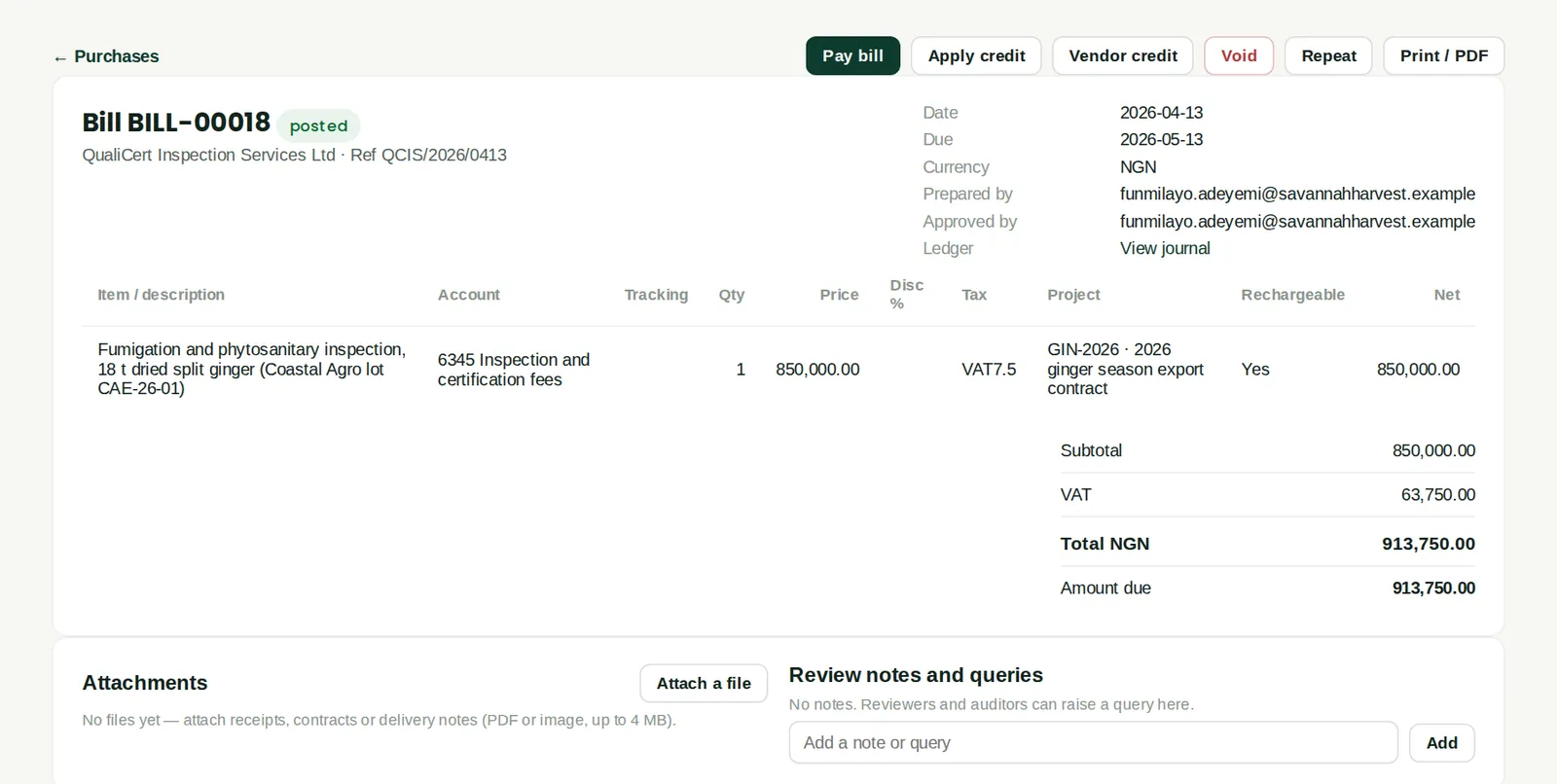
Any bill, spend money or expense line can be coded to a project. Tick Rechargeable to bill it on to the customer. QualiCert charged ₦850,000 plus VAT for fumigating and inspecting Coastal's 18 tonnes of dried ginger.
Who
Accountant or bookkeeper.
What to do
- On the bill, tick Show lot, restock and landed-cost columns (1).
- Choose the project (2) and tick Rechargeable (3). Save and post the bill as usual.
16.7 The posted bill
Why
The posted bill shows the project and that the line is rechargeable. It appears in the project's costs straight away and in its unbilled work until it is invoiced.
16.8 The projects list
Why
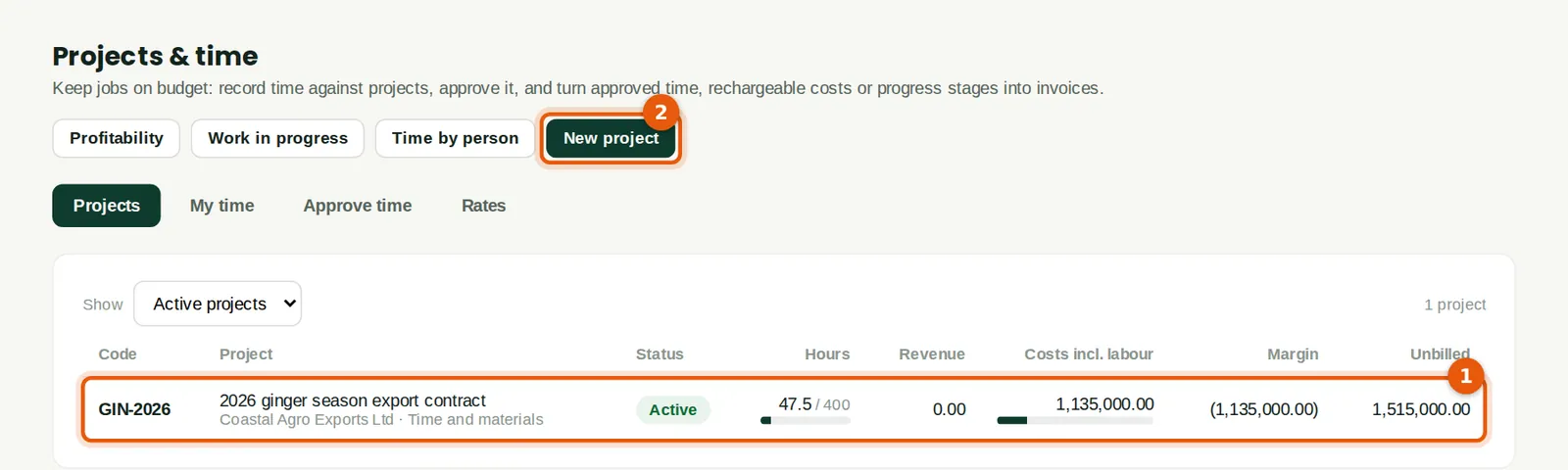
Each project (1) with its status, hours used against the budget, revenue, costs including labour, margin and unbilled work. The bars turn amber above 85% of budget and red above 100%. On 17 April, GIN-2026 had 47.5 hours and ₦1,515,000 of unbilled work.
Who
Anyone with access to projects; the money columns need Approve or report access.
What to do
- Click a project to open it. New project (2) starts another.
16.9 Inside a project
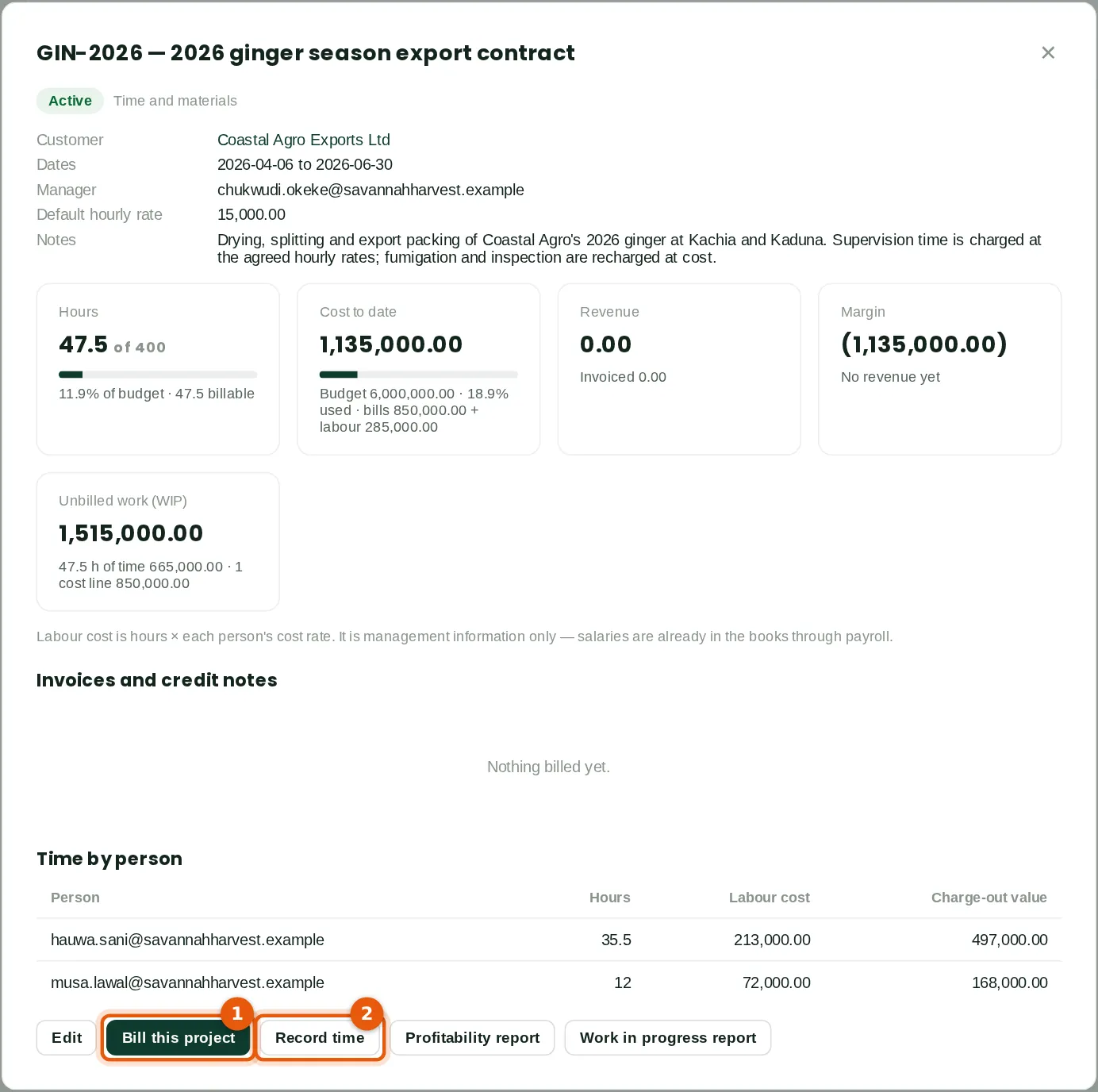
Why
The project shows hours against budget, cost to date (bills of ₦850,000 plus labour of ₦285,000), revenue, margin and unbilled work, then the invoices and the time by person. Labour cost is hours × each person's cost rate.
Who
Project manager, finance manager.
What to do
- Click Bill this project (1) to invoice it, or Record time (2) to go to the week grid. The Profitability and Work in progress buttons open the reports.
16.10 Bill the project
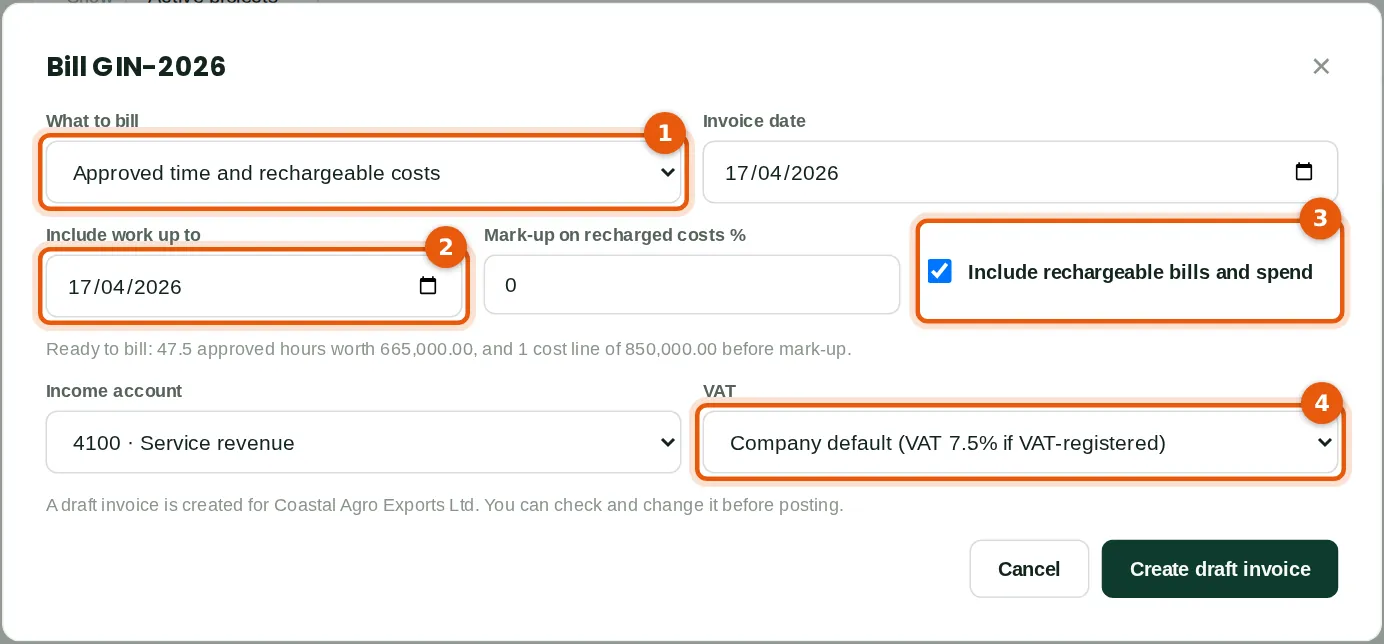
Why
BookTrove gathers the approved billable time and rechargeable costs up to a date and creates a draft invoice. For fixed-price work choose A progress stage of the contract (a percentage or amount) and, at the end, Release retention held back. The dialog says what is ready to bill: 47.5 hours worth ₦665,000 and one cost line of ₦850,000.
Who
Finance manager or accountant.
What to do
- Choose what to bill (1) and the invoice date.
- Set Include work up to (2). Tick Include rechargeable bills and spend (3) and add a mark-up if the contract allows one.
- Choose the income account and the VAT (4) — here VAT at 7.5%, as the service is to a Nigerian company. Click Create draft invoice.
16.11 The project invoice
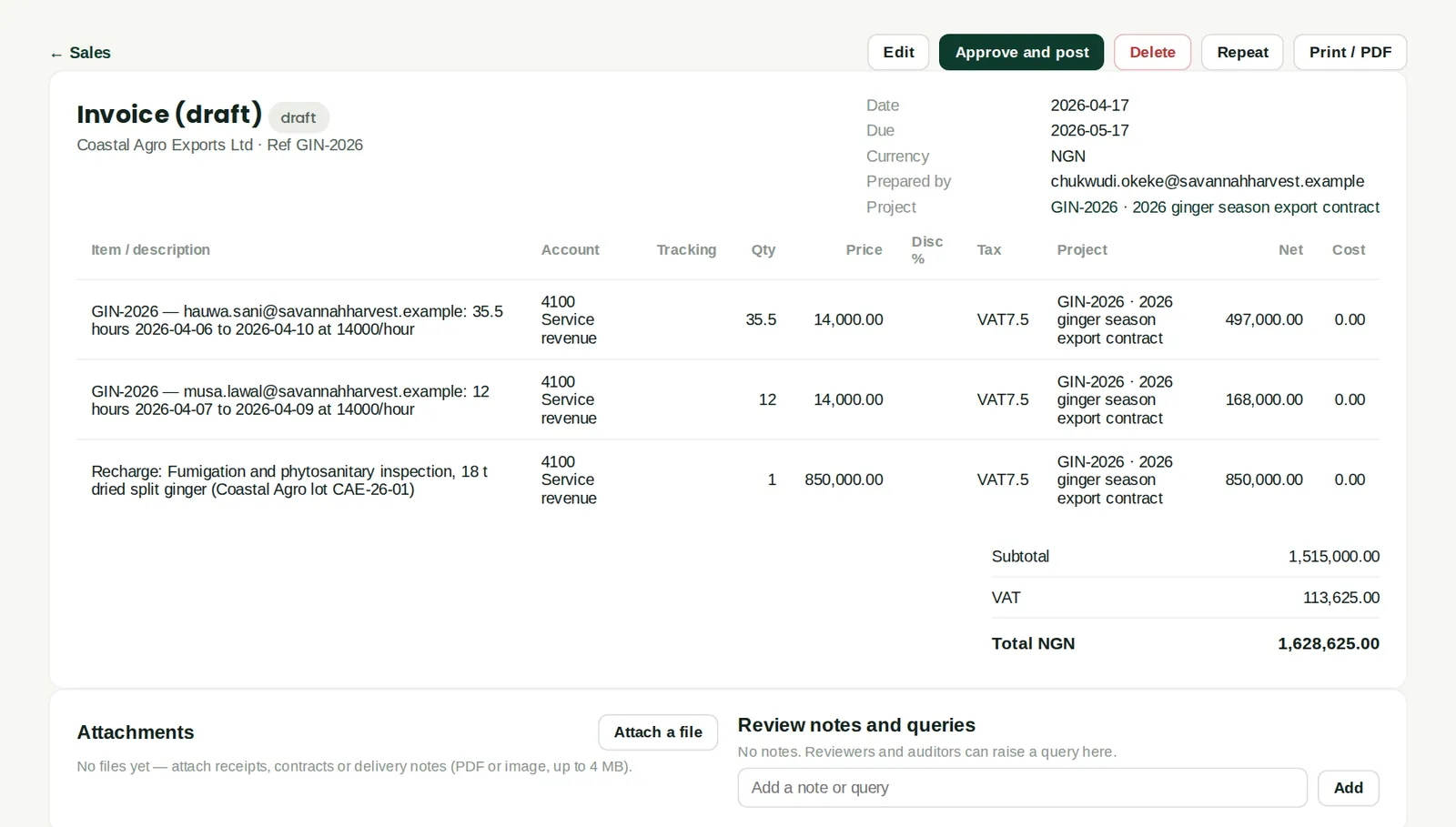
Why
The invoice has one line per person's time (hours × rate) and one per recharged cost, all tagged with the project: ₦1,515,000 plus VAT of ₦113,625, total ₦1,628,625. Check it and approve and post it like any invoice. The time and costs are then marked as billed and cannot be billed twice.
Who
Sales or accountant.
What to do
- Check the lines, then click Approve and post.
16.12 Project profitability
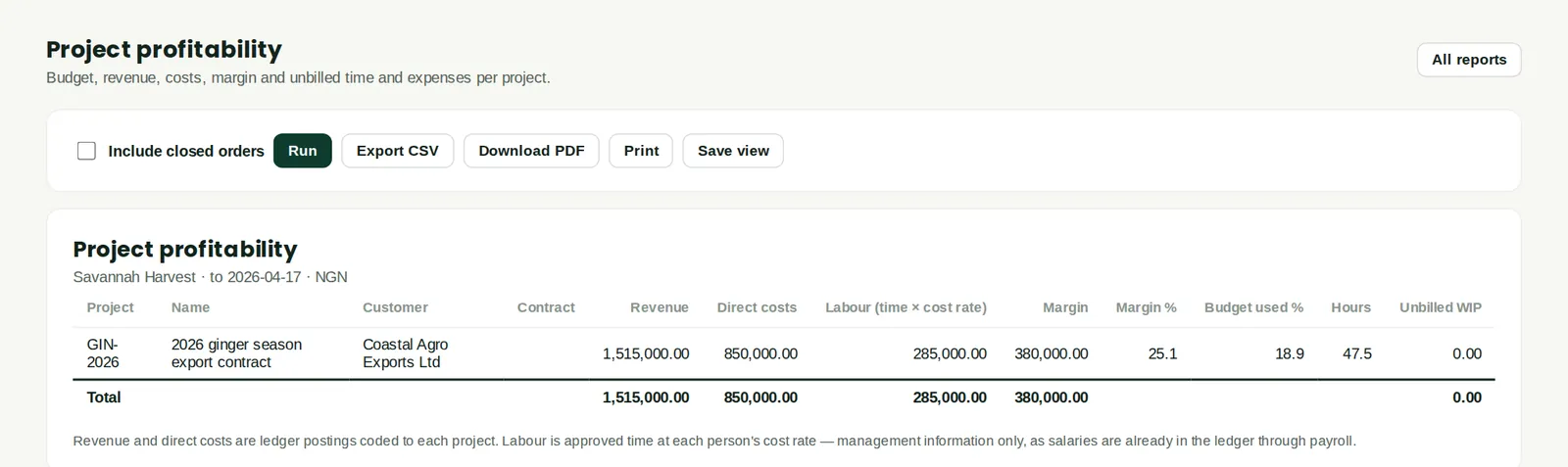
Why
Revenue, direct costs, labour at cost rates, margin, budget used and hours for each project. After billing, GIN-2026 shows revenue of ₦1,515,000, direct costs of ₦850,000, labour of ₦285,000 and a margin of ₦380,000 (25.1%). Project work in progress (unbilled) and Time by person and project are the other project reports (chapter 19).
Who
Owners, finance manager.
What to do
- Open Reports → Project profitability and click Run.