Steps in this chapter (16)
Before the first transaction, the owner or administrator records the company's details, the way the business is organised, the chart of accounts, currencies and tax settings, and the balances brought forward from the old system.
In the illustration, Chukwudi Okeke, the finance manager, sets up Savannah Harvest on 5 January 2026, and Funmilayo Adeyemi, the accountant, posts the opening balances at 31 December 2025 on 8 January.
2.1 Company details
Why
The legal name, RC number, TIN and address are printed on invoices, remittance advice and WHT deduction notices, and sent to the Nigeria Revenue Service (NRS) with e-invoices. The functional currency and the financial year drive every report.
Who
Owner or administrator.
What to do
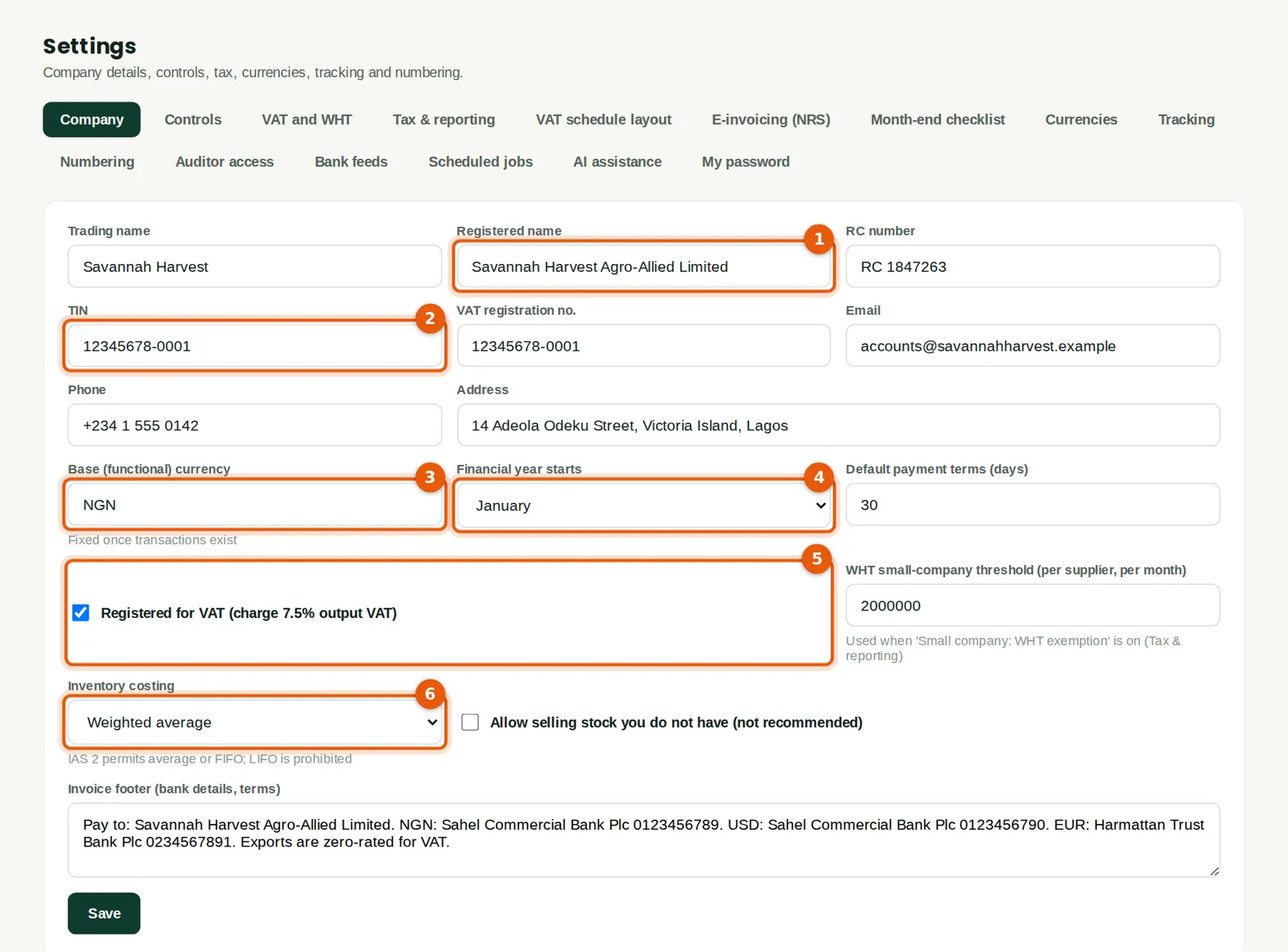
- Open Settings. On the Company tab, enter the trading name and the registered name (1), the RC number, the TIN (2) and the VAT registration number.
- Check the functional currency (3). Savannah Harvest keeps its books in naira (NGN). It cannot be changed once transactions exist.
- Choose the month the financial year starts (4) — January for a 31 December year end.
- Tick Registered for VAT (5) if the company charges VAT.
- Choose the inventory costing method (6): weighted average or FIFO (IAS 2 does not allow LIFO). It is fixed once stock has moved.
- Type the bank details and standard terms in the invoice footer, then click Save.
2.2 Tracking categories: locations and product lines
Why
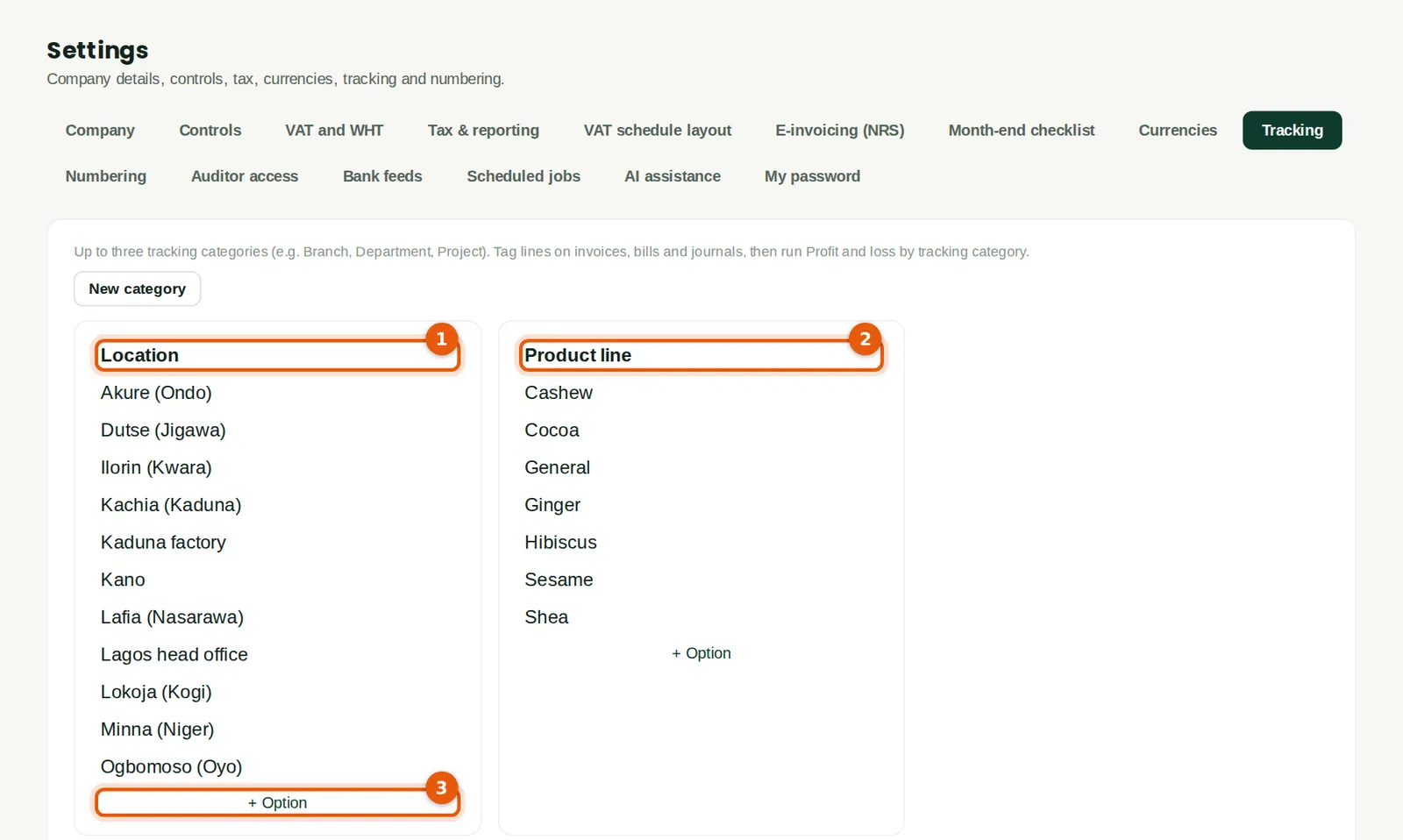
Tracking categories tag lines on invoices, bills and journals so that reports can be run by branch, department or product. BookTrove allows up to three. Savannah Harvest uses Location (head office, factory and the nine buying centres) and Product line (cashew, sesame, ginger, cocoa, shea, hibiscus).
Who
Administrator or accountant.
What to do
- Open Settings → Tracking and click New category. Name it, for example Location.
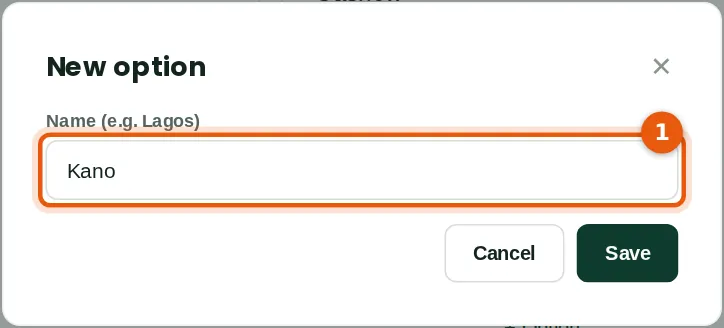
- Click + Option under the category and type the name (1), for example Kano. Repeat for each option.
2.3 The tracking categories
Why
Once set up, each category appears as a column on documents and journals, and Profit and loss by tracking category shows one column per option.
Who
Administrator or accountant.
What to do
- Check the options of each category (1) (2). Add more at any time with + Option (3).
2.4 Warehouses and buying centres
Why
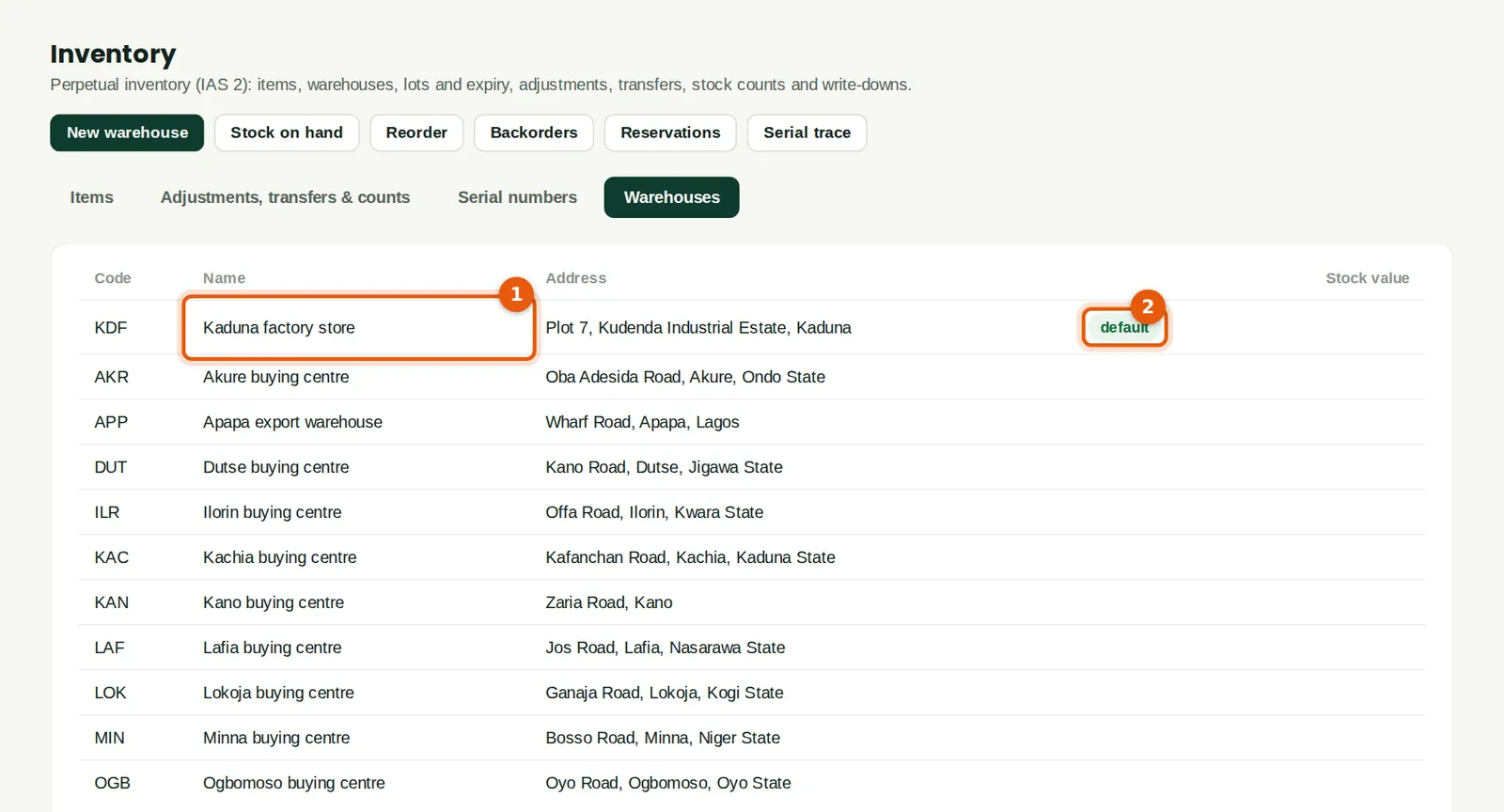
Each place that holds stock is a warehouse: the factory store, the export warehouse at Apapa and each buying centre. Stock is received, moved and counted by warehouse, so the stock report shows what is where.
Who
Administrator or inventory manager with full access.
What to do
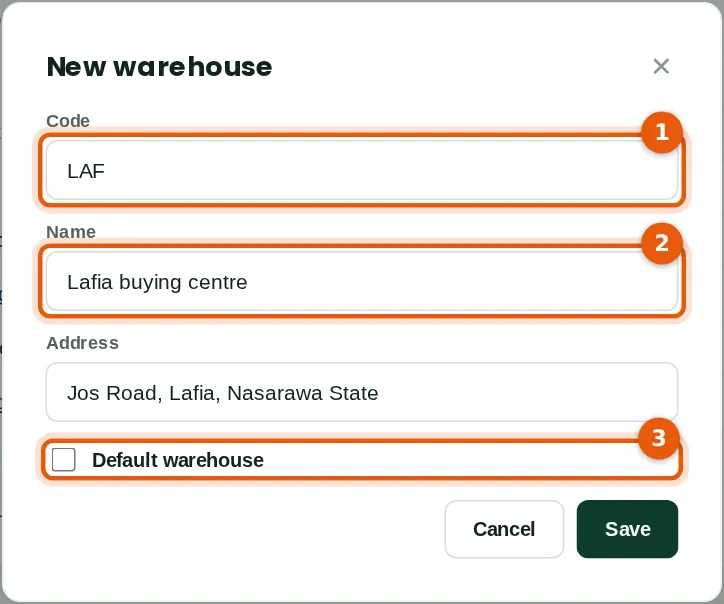
- Open Inventory → Warehouses and click New warehouse.
- Enter a short code (1) and the name (2), and the address.
- Tick Default warehouse (3) only for the place most documents use. Savannah Harvest's default is the Kaduna factory store.
2.5 The warehouse list
Why
The list shows each warehouse and, once stock moves, its stock value.
Who
Anyone with inventory access.
What to do
- Check the default warehouse (1) (2). Click a warehouse to change it or switch it off.
2.6 Bank accounts in the chart of accounts
Why
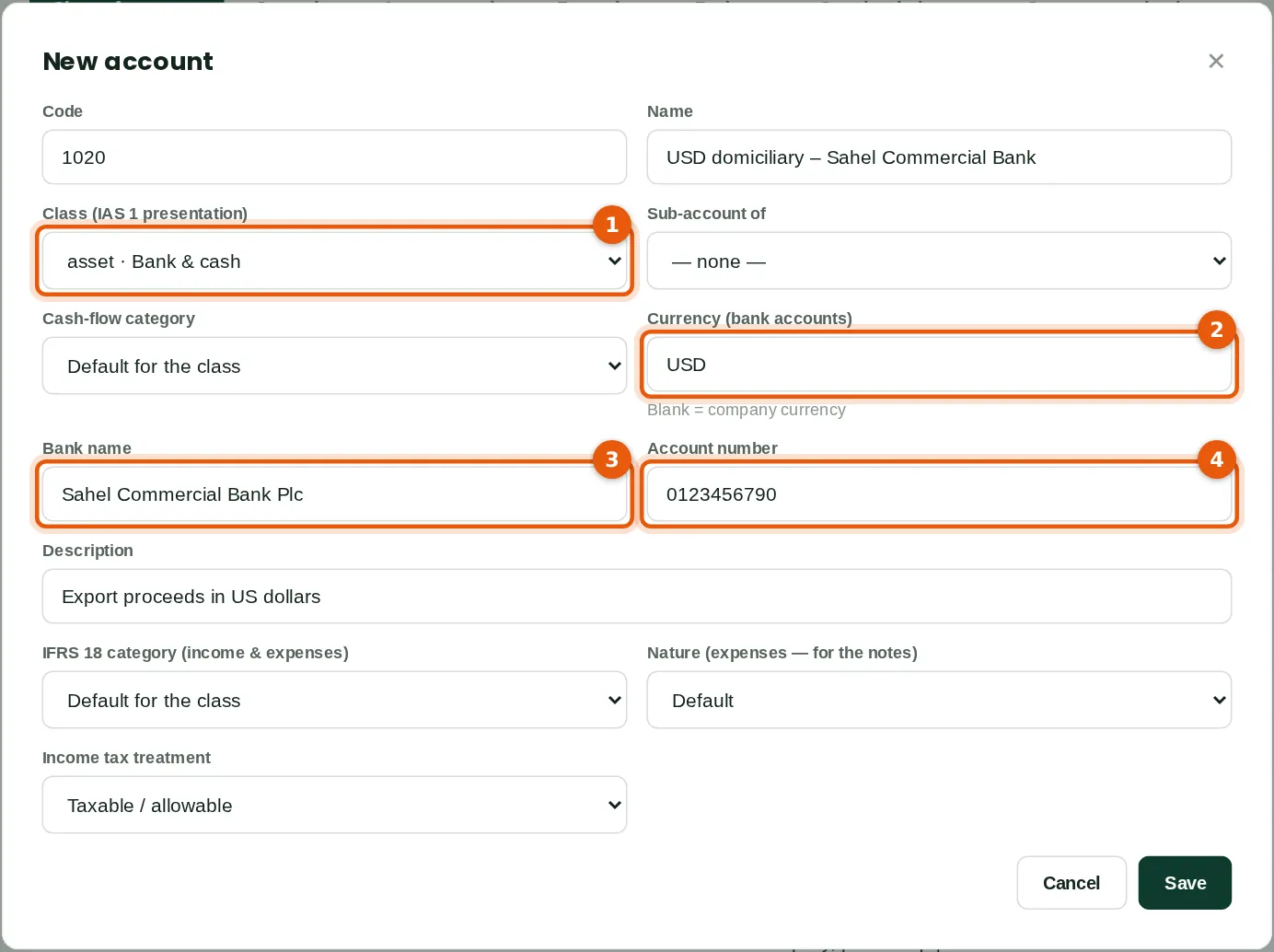
BookTrove starts with a Nigerian chart of accounts classified for IAS 1. Each bank account is an account of the class Bank & cash; a foreign-currency account has its currency set, so BookTrove keeps both the dollar balance and its naira value.
Who
Administrator or accountant.
What to do
- Open Chart & journals → Chart of accounts and click New account.
- Enter the code and name, and choose the class Bank & cash (1).
- For a domiciliary account, type the currency (2) — USD or EUR. Leave it blank for a naira account.
- Enter the bank's name (3) and the account number (4), then Save.
2.7 The chart of accounts
Why
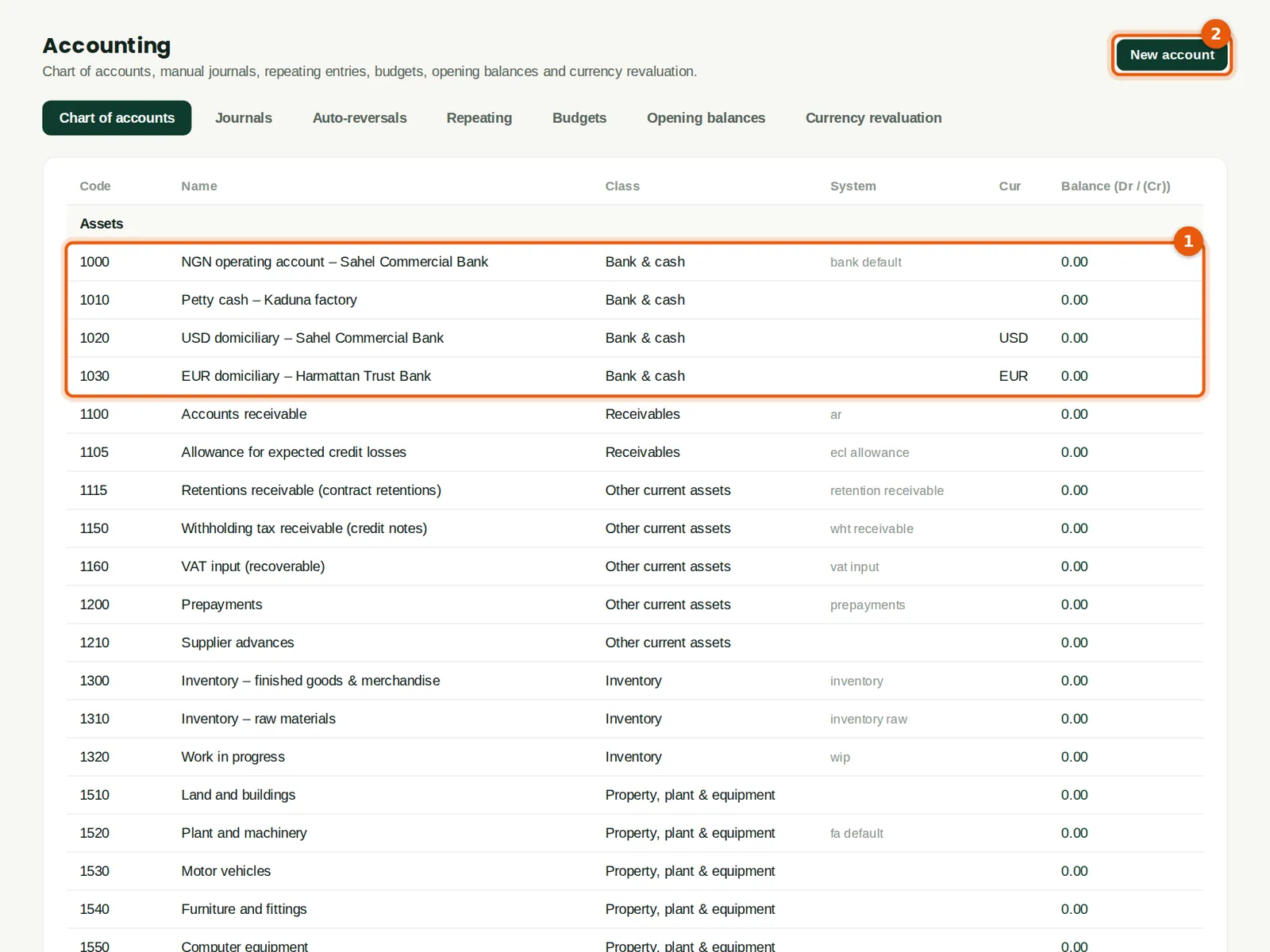
Savannah Harvest renamed the default bank account, added the USD and EUR domiciliary accounts, renamed 4000 to Export sales and added accounts for local by-product sales, export charges, inspection fees and haulage. System accounts (receivables, payables, VAT, stock and others) are used by automatic postings and cannot be deleted.
Who
Administrator or accountant.
What to do
- Check the bank and cash accounts (1): the naira operating account, petty cash and the two domiciliary accounts.
- Click an account to rename it or change its class; click New account (2) to add one. Click a balance to open the general ledger for that account.
2.8 Currencies and CBN exchange rates
Why
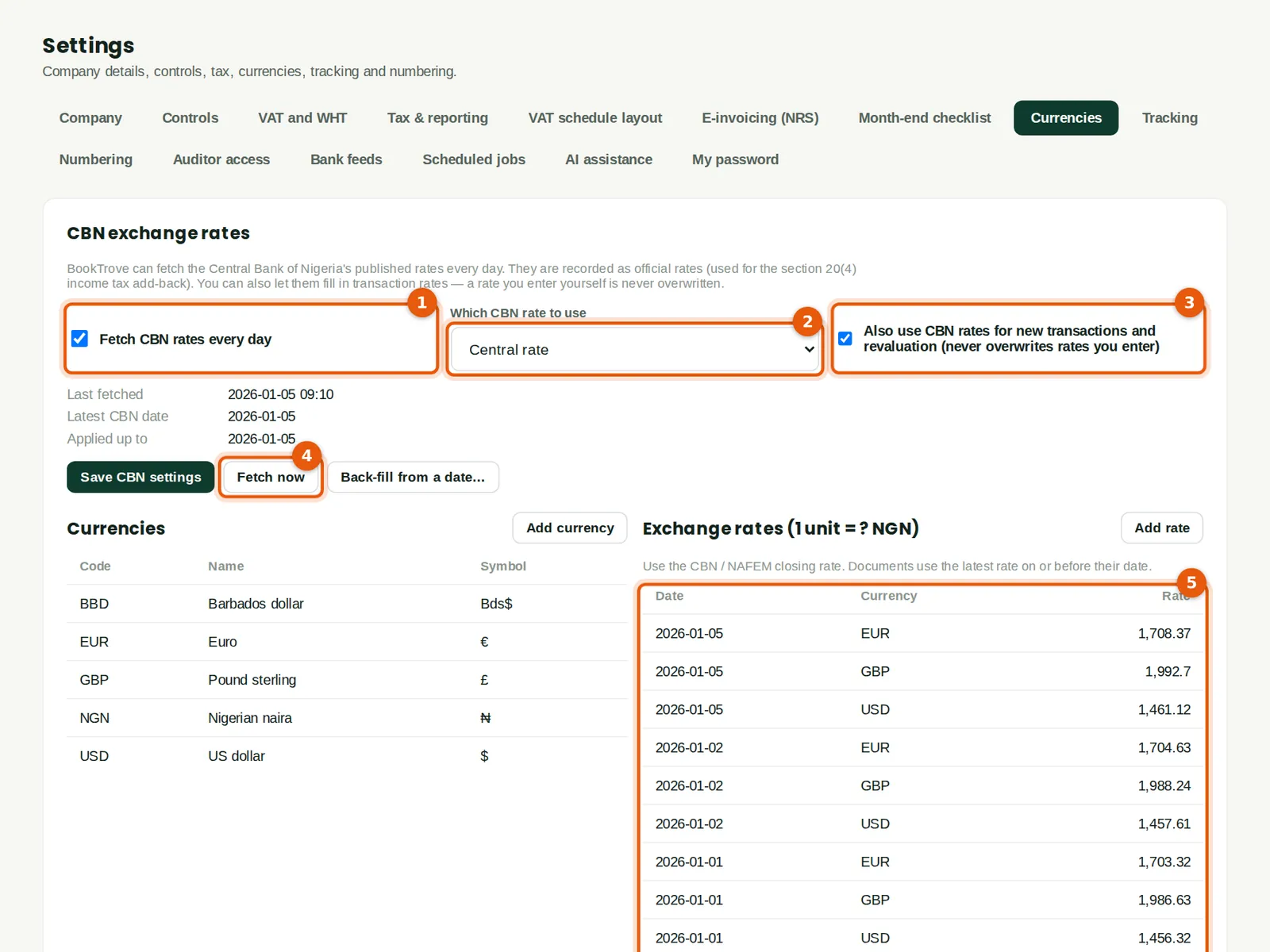
BookTrove can fetch the Central Bank of Nigeria's published rates every day. They are recorded as official rates for the income tax rule on foreign-currency expenses (section 20(4)), and can also fill in the transaction rates used on invoices, receipts and revaluation. A rate you type yourself is never overwritten. The rates in this manual are illustrative.
Who
Administrator (the transaction-rate option needs full settings access).
What to do
- Keep Fetch CBN rates every day ticked (1) and choose which rate to use (2) — Savannah Harvest uses the central rate.
- Tick Also use CBN rates for new transactions and revaluation (3) and click Save CBN settings.
- Click Fetch now (4) to load the rates straight away. The exchange rates list (5) fills in.
- To use a different rate (for example your bank's rate), click Add rate and type it; documents use the latest rate on or before their date.
2.9 VAT codes and withholding tax rates
Why
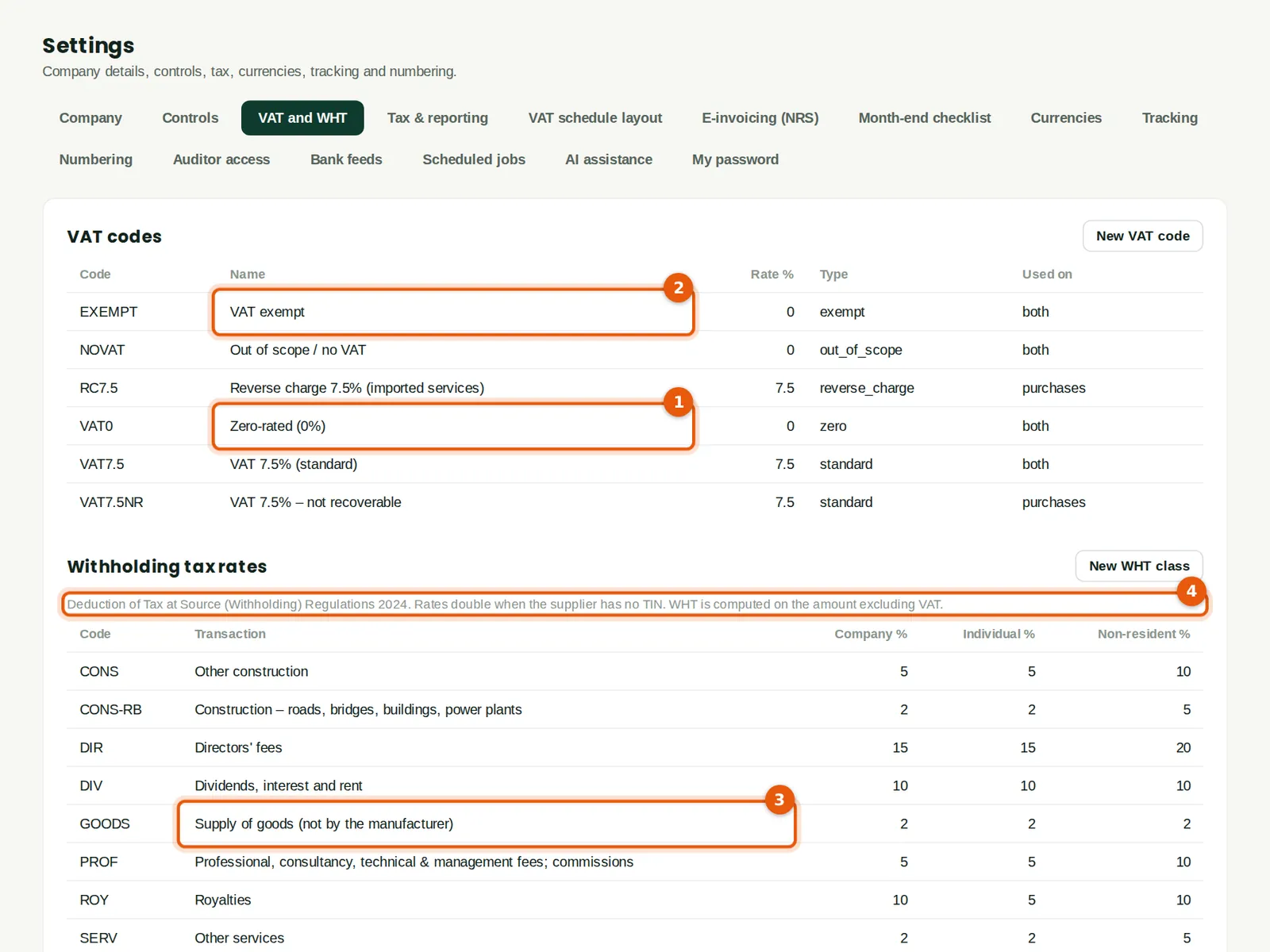
BookTrove comes with the VAT codes and WHT classes a Nigerian company needs. Exports are zero-rated (1); raw agricultural produce bought from farmers is VAT exempt (2). WHT on payments to suppliers follows the Deduction of Tax at Source (Withholding) Regulations 2024: for example 2% on goods bought from someone other than the manufacturer (3). The rate doubles when the supplier has no TIN, and WHT is worked out on the amount before VAT (4).
Who
Administrator or anyone with full tax access.
What to do
- Review the VAT codes and the WHT classes. Click a row to change it, or add your own with New VAT code or New WHT class.
- Check current rates with your tax adviser before relying on them.
2.10 Tax and reporting settings
Why
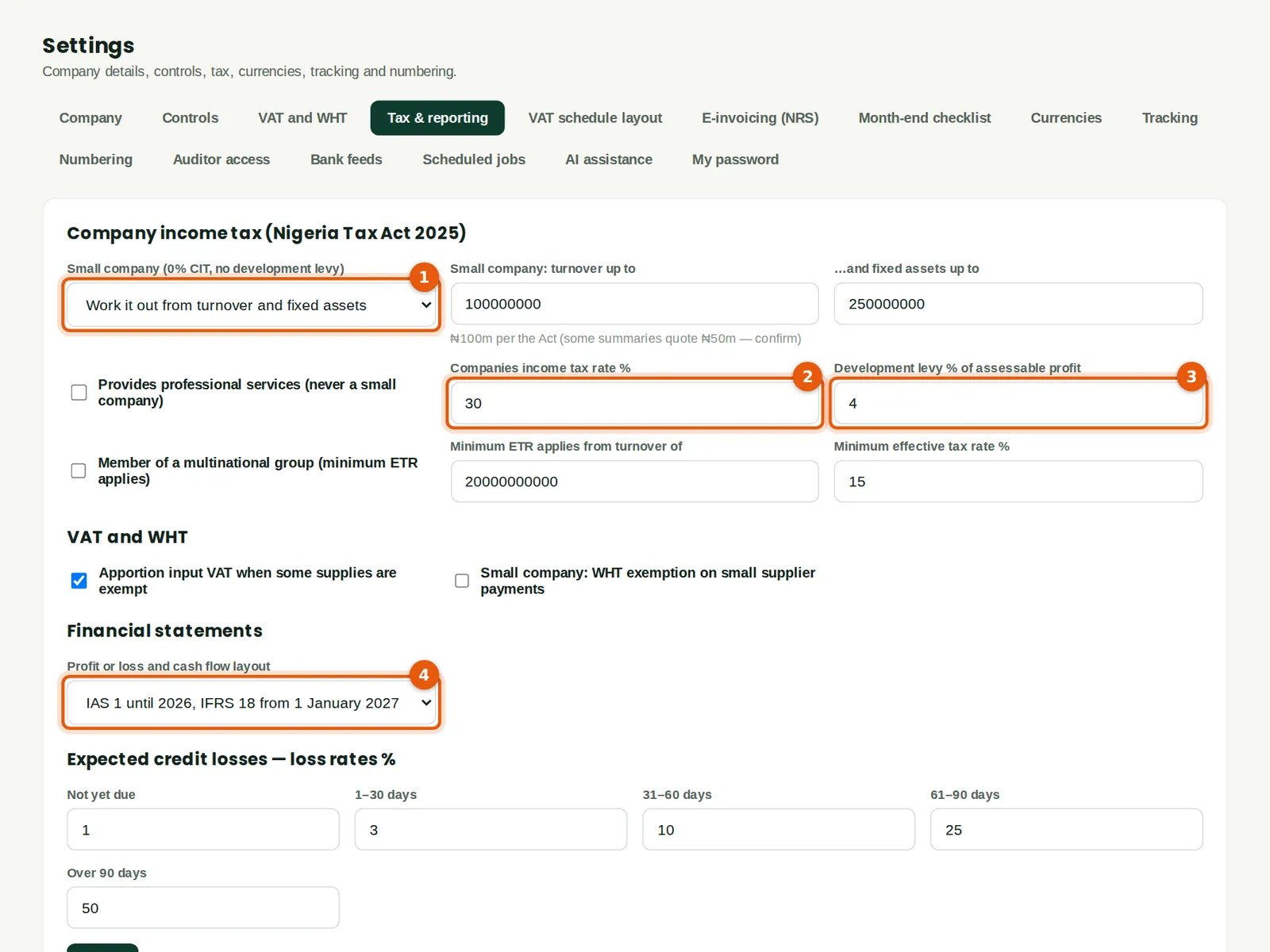
These settings drive the companies income tax computation under the Nigeria Tax Act 2025 and the layout of the financial statements.
Who
Administrator or accountant.
What to do
- Small company (1): leave Work it out from turnover and fixed assets, or choose Yes or No.
- Check the companies income tax rate (2) and the development levy rate (3).
- Choose the profit or loss layout (4): IAS 1 until 2026 and IFRS 18 from 1 January 2027, or a fixed choice.
- Set the expected credit loss rates used by the receivables review (chapter 10) and save.
2.11 Controls: approvals, credit and purchasing
Why
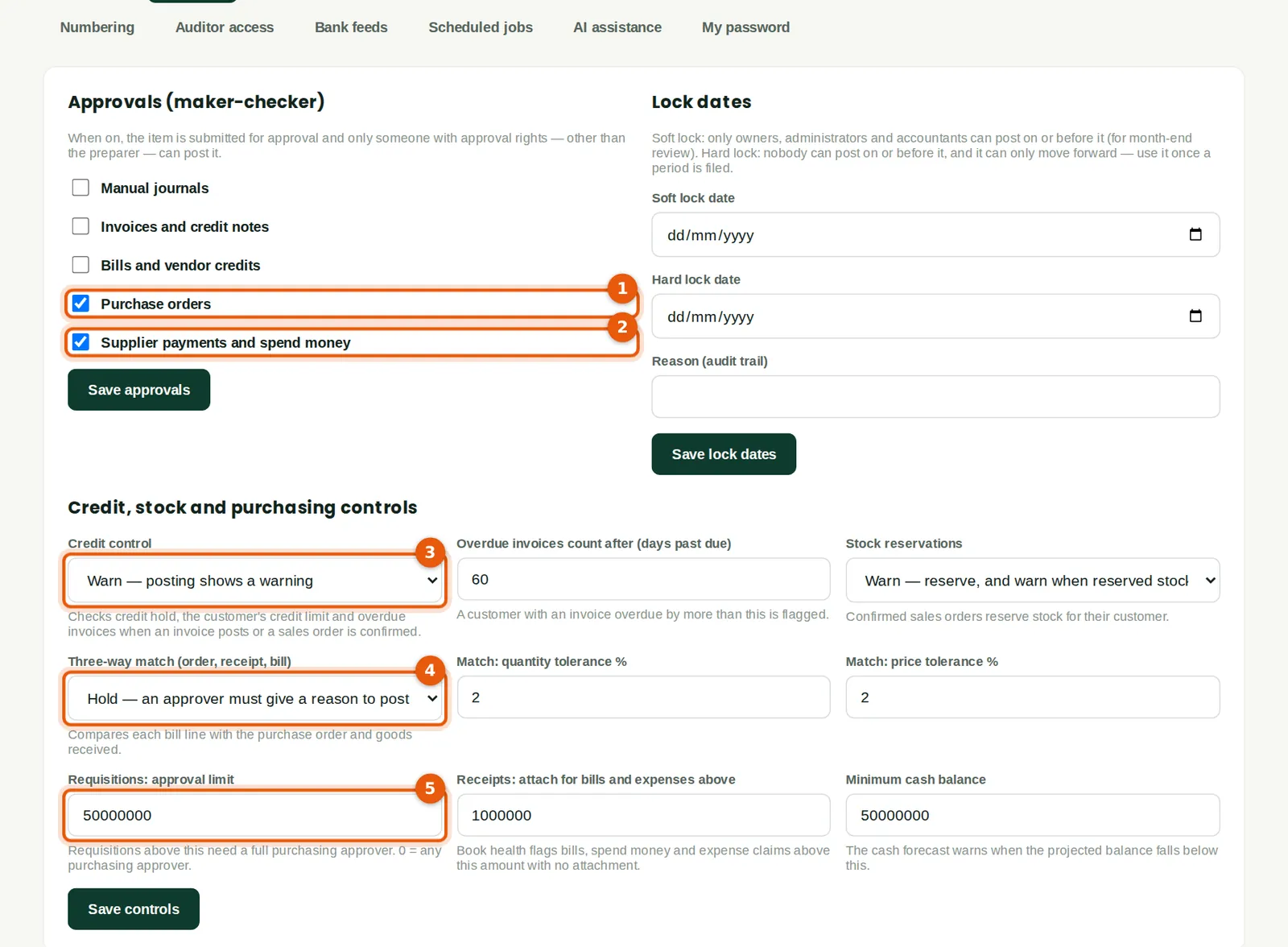
Controls decide what needs a second person. Savannah Harvest requires approval of purchase orders (1) and of supplier payments and spend-money entries (2): the person who prepares them cannot approve them. Credit control (3) warns when a customer is over its limit or overdue. The three-way match (4) holds a supplier bill that does not agree with its order and goods received. Requisitions above ₦50m (5) need a full purchasing approver.
Who
Owner or administrator.
What to do
- Tick the documents that need approval and click Save approvals.
- Choose the credit control, reservation and three-way match settings and tolerances, the requisition approval limit, the receipt-attachment threshold and the minimum cash balance, then click Save controls.
- Lock dates are set here too — see chapter 10.
2.12 Opening balances
Why
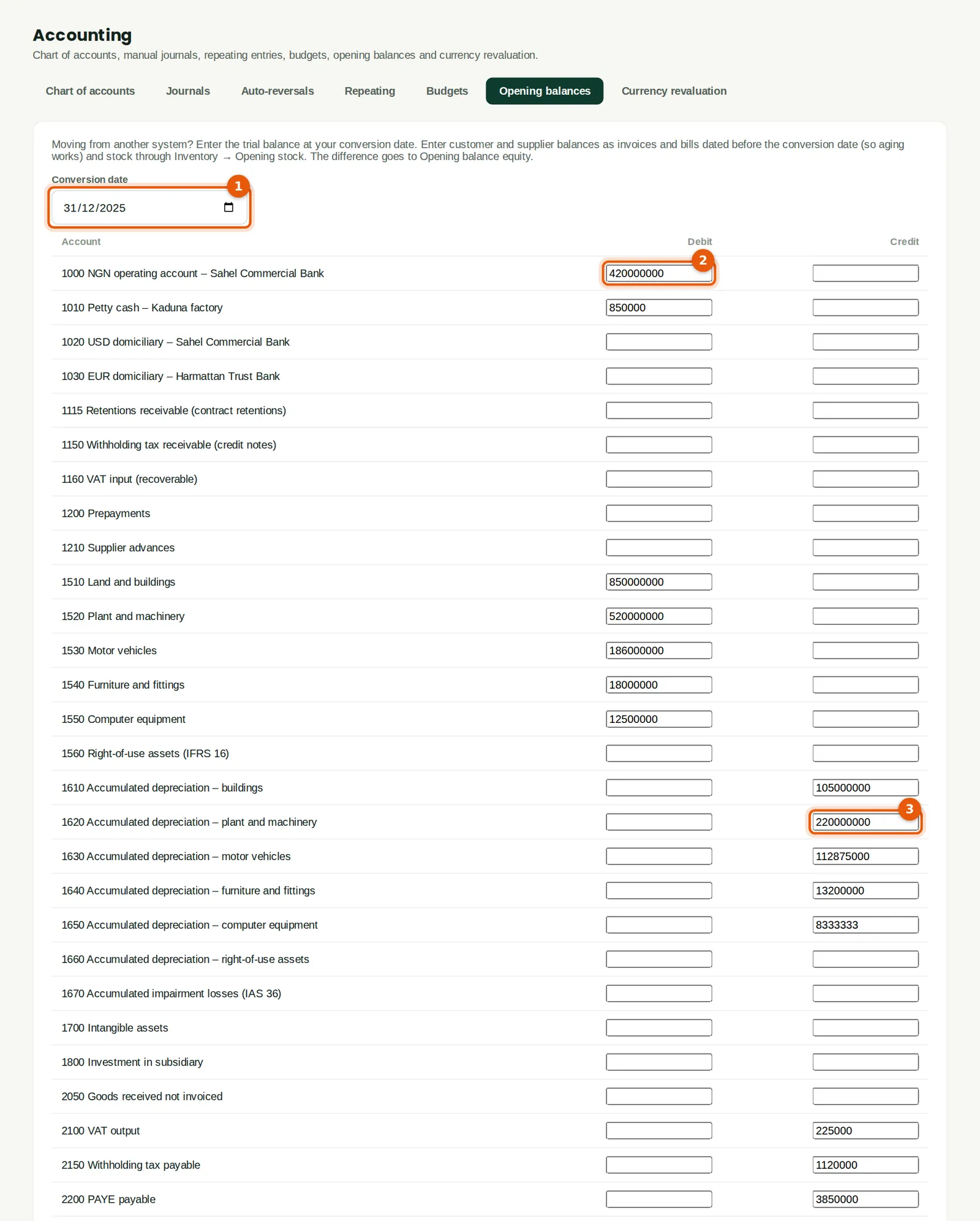
When moving from another system, enter the trial balance at the conversion date: bank and cash, fixed assets and accumulated depreciation, liabilities and equity. Customers' and suppliers' balances are entered as unpaid invoices and bills (so aging works from day one) and stock through an opening stock document. Any difference goes to Opening balance equity, which is zero once everything is in.
Who
Accountant (full accounting access).
What to do
- Open Chart & journals → Opening balances and enter the conversion date (1) — the day before BookTrove takes over.
- Type each balance in the Debit or Credit column, for example the naira bank balance (2) and accumulated depreciation (3).
- Click Post opening balances.
2.13 Unpaid invoices and bills at the conversion date
Why
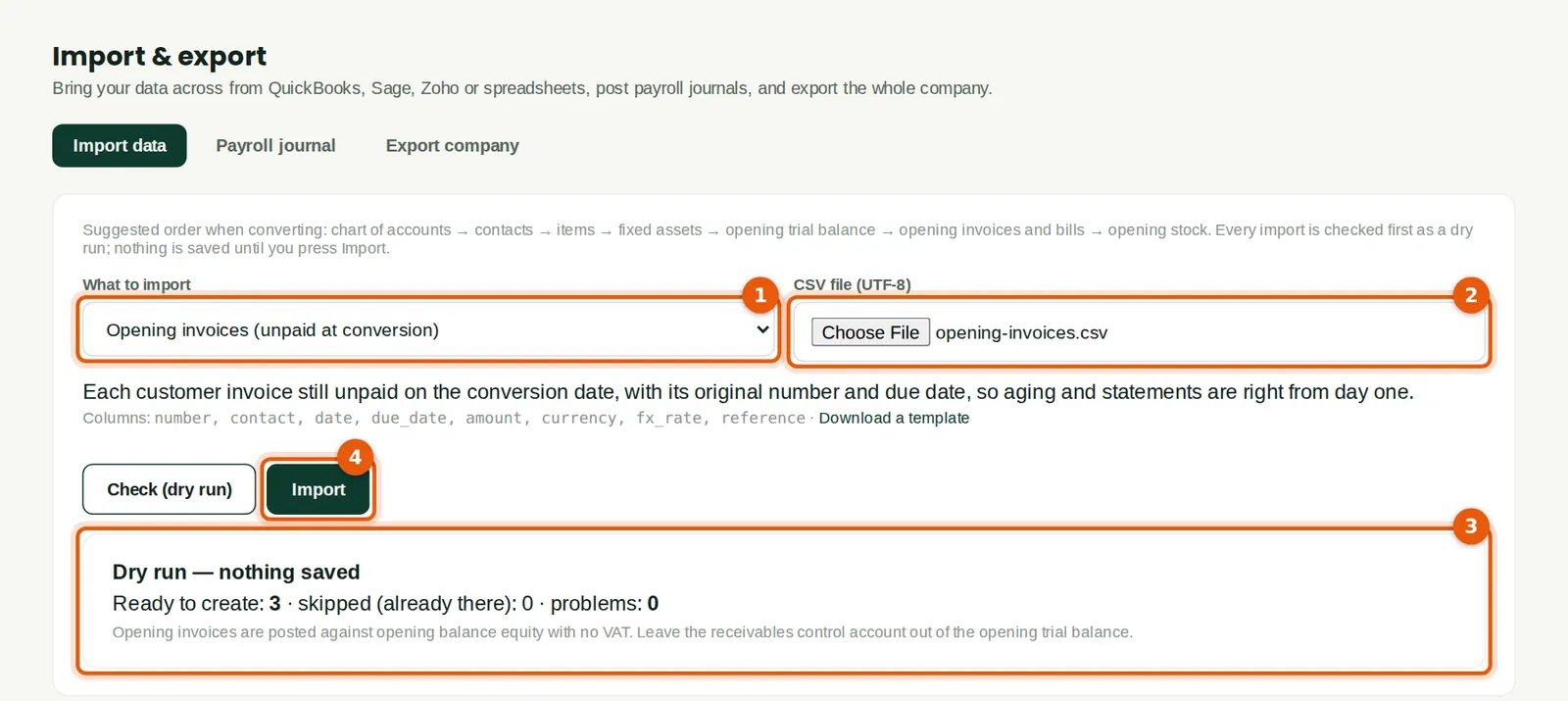
Each customer invoice still unpaid at the conversion date is imported with its original number, date, due date, currency and rate, so statements, aging and later receipts are right. Savannah Harvest had three: USD 66,000 from Mumbai Spice Importers, EUR 36,300 from Hamburg Organic Foods and ₦3,225,000 from Zaria GreenFuel Briquettes. Opening bills are imported the same way.
Who
Accountant (full accounting access).
What to do
- Open Import & export, choose Opening invoices (1) and choose the CSV file (2). Download a template first if you need one.
- Click Check (dry run). The result (3) shows how many rows are ready and lists any problems; nothing is saved yet.
- Click Import (4) and confirm.
2.14 Opening balances of the domiciliary accounts
Why
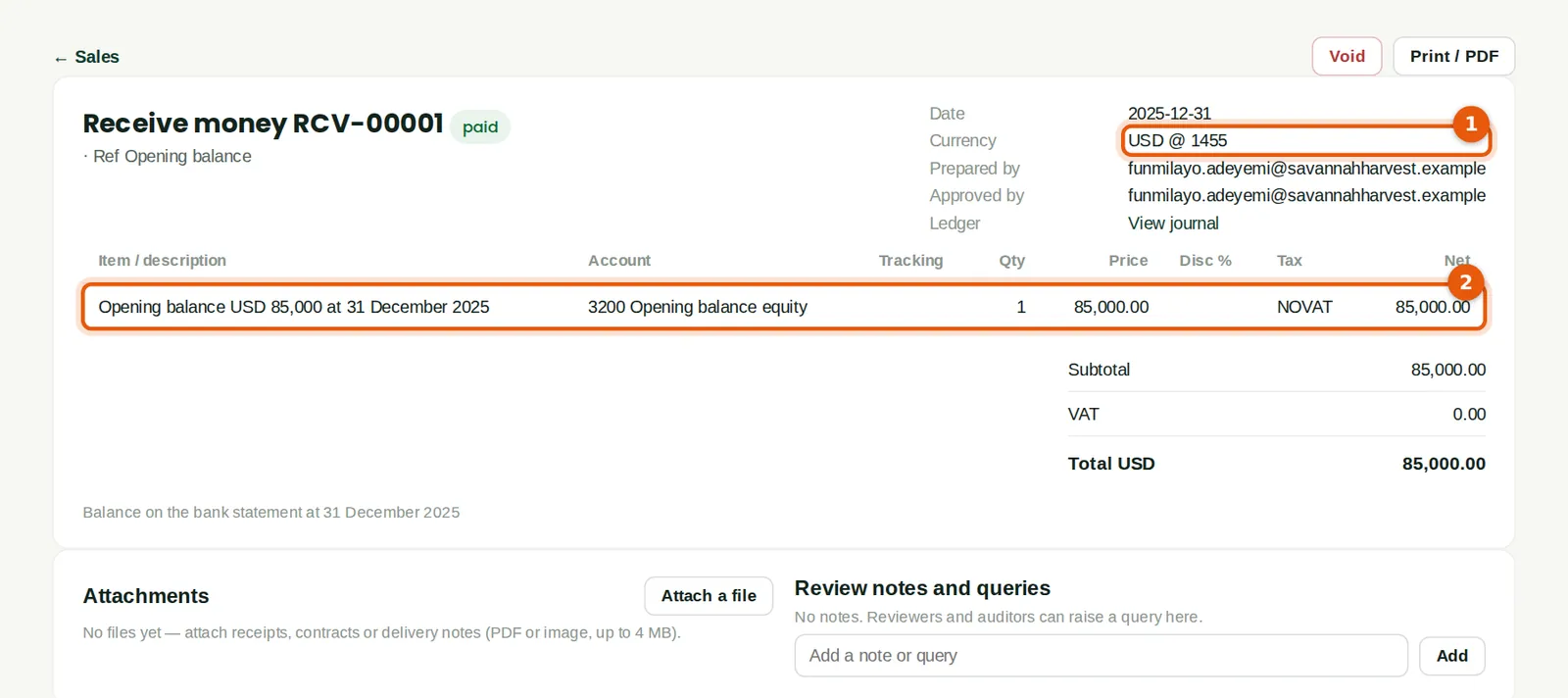
The opening balances screen records naira amounts only. So that a domiciliary account keeps its currency balance (needed for revaluation), record its opening balance as a Receive money entry in the account's currency, dated the conversion date and coded to 3200 Opening balance equity. Savannah Harvest had USD 85,000 and EUR 40,000.
Who
Accountant.
What to do
- Open Banking → Receive money. Choose the domiciliary account, the currency and the rate at the conversion date (1).
- Code the line to 3200 Opening balance equity (2), with the currency amount, and post.
2.15 Opening stock
Why
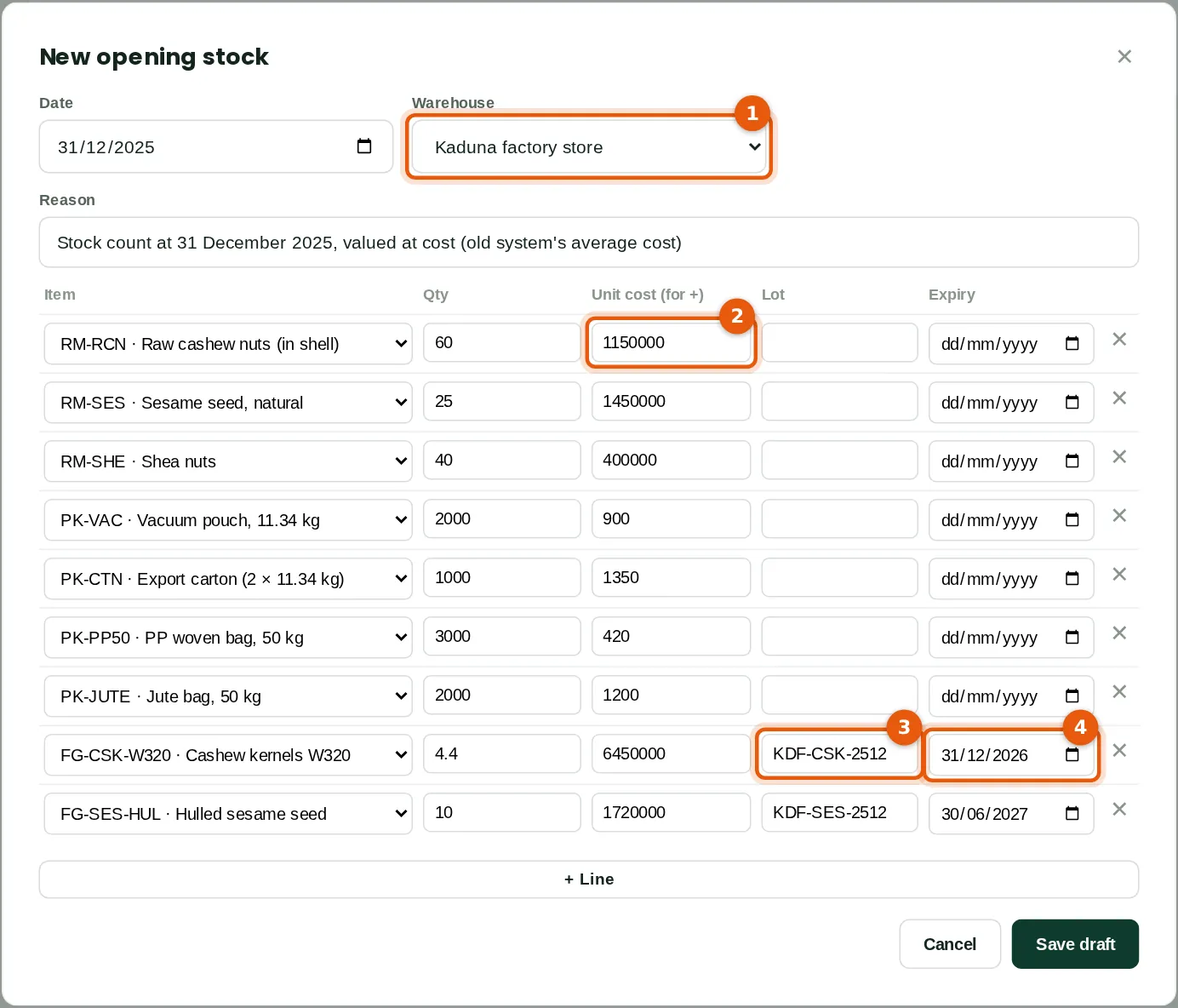
Stock at the conversion date goes in at cost with an opening stock document, by warehouse. Lot-tracked items need their lot numbers and expiry dates.
Who
Inventory manager or accountant.
What to do
- Open Inventory → Adjustments, transfers & counts and click Opening stock. Enter the date and choose the warehouse (1).
- Add a line per item with the quantity and the unit cost (2). For finished goods tracked by lot, enter the lot number (3) and the expiry date (4).
- Click Save draft, check the document and click Save and post.
2.16 Check the opening trial balance
Why
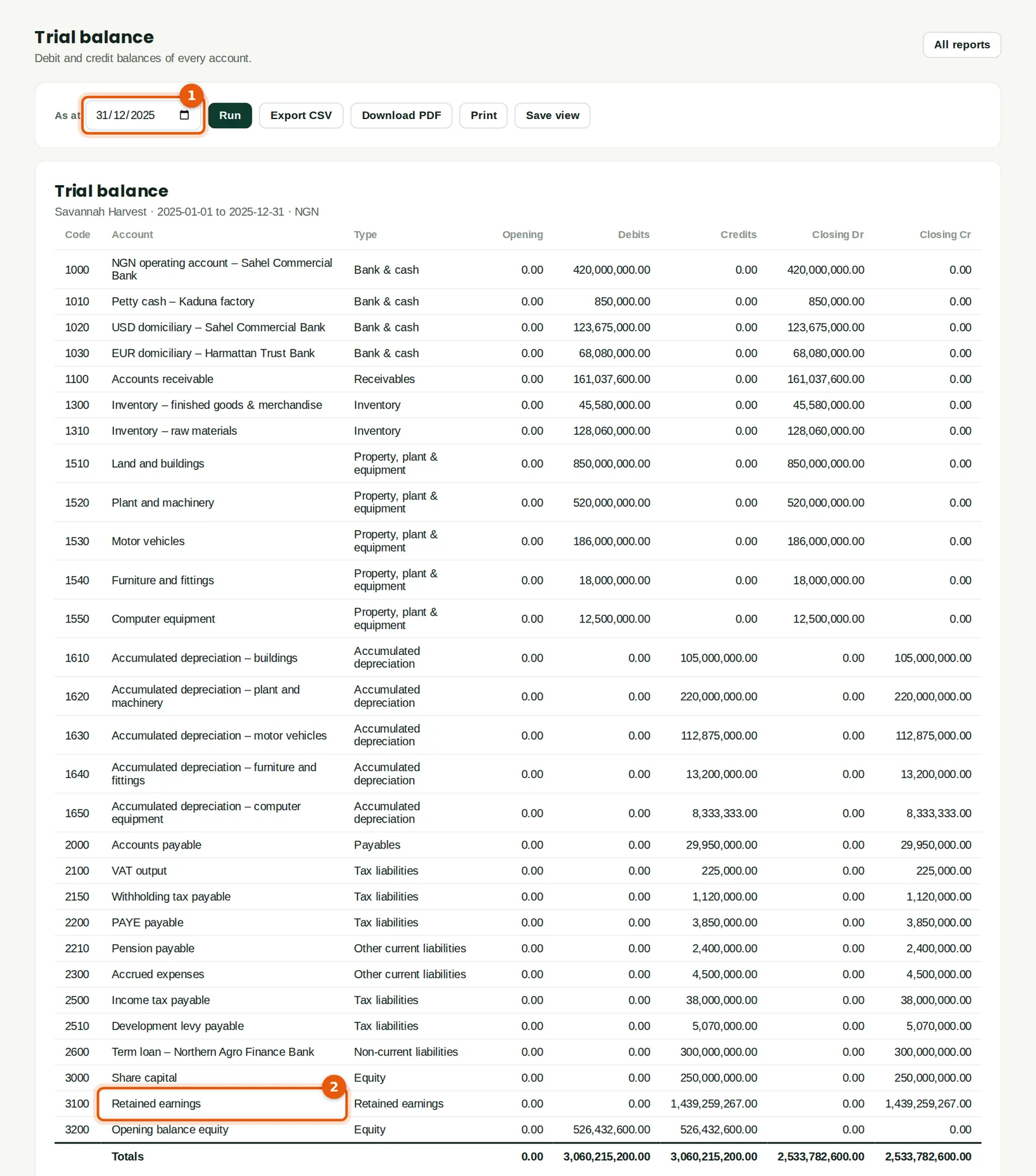
Once everything is in, the trial balance at the conversion date should agree with the old system and Opening balance equity (3200) should be zero. Savannah Harvest entered retained earnings of ₦1,439,259,267 (2) so that it is.
Who
Accountant.
What to do
- Run the trial balance as at the conversion date (1).
- Compare it with the closing trial balance of the old system, line by line.