Steps in this chapter (11)
Record the local definition of a public interest entity and how each client's shares are traded, see which rules apply by period start, keep the FRC register of the firm and its partners, and complete anti-money-laundering due diligence before accepting a client.
The IAASB's narrow-scope amendments replace “listed entity” with “publicly traded entity” in ISQM 1, ISQM 2, the ISAs and ISRE 2400, aligned with the IESBA Code's revised public interest entity definitions. They apply to periods beginning on or after 15 December 2026. SQMTrove applies the old or the new rules by the engagement's period start: a 2026 audit follows the listed-entity rules and a 2027 audit the publicly traded entity rules. An entity that is a public interest entity under local law — in Nigeria the FRC Act 2011 and FRC rules — is treated as one.
The FRC has enforced its register of firms and individuals since 1 April 2026. SQMTrove keeps the firm's and each partner's and reviewer's registration (Resources → Registrations) and checks them when an acceptance or continuance is approved and when an engagement quality reviewer is appointed. Each jurisdiction's check is off, a warning or a block (Settings → Rules); it starts as a warning so that nothing is blocked before the registrations are recorded.
Accountants in practice are designated non-financial businesses under Nigeria's Money Laundering (Prevention and Prohibition) Act 2022. SQMTrove records customer due diligence for each client — identity, beneficial owners, politically exposed persons, sanctions, adverse media and the risk rating — and checks it when a new client is accepted. A confirmed sanctions match always stops the acceptance.
In the illustration, Ifeoma Chukwu records the FRC's definition on 25 September 2026. On 28 September Emeka Obi marks the listed clients, records the registrations and switches the Nigerian check to Block; Folake Adeyemi completes the due diligence on a new prospective client, Northbridge Cassava Mills Limited, whose shareholders include a former state commissioner; Emeka approves the high-risk acceptance with a fresh code from his phone.
24.1 Settings → Rules: public interest entities and registrations
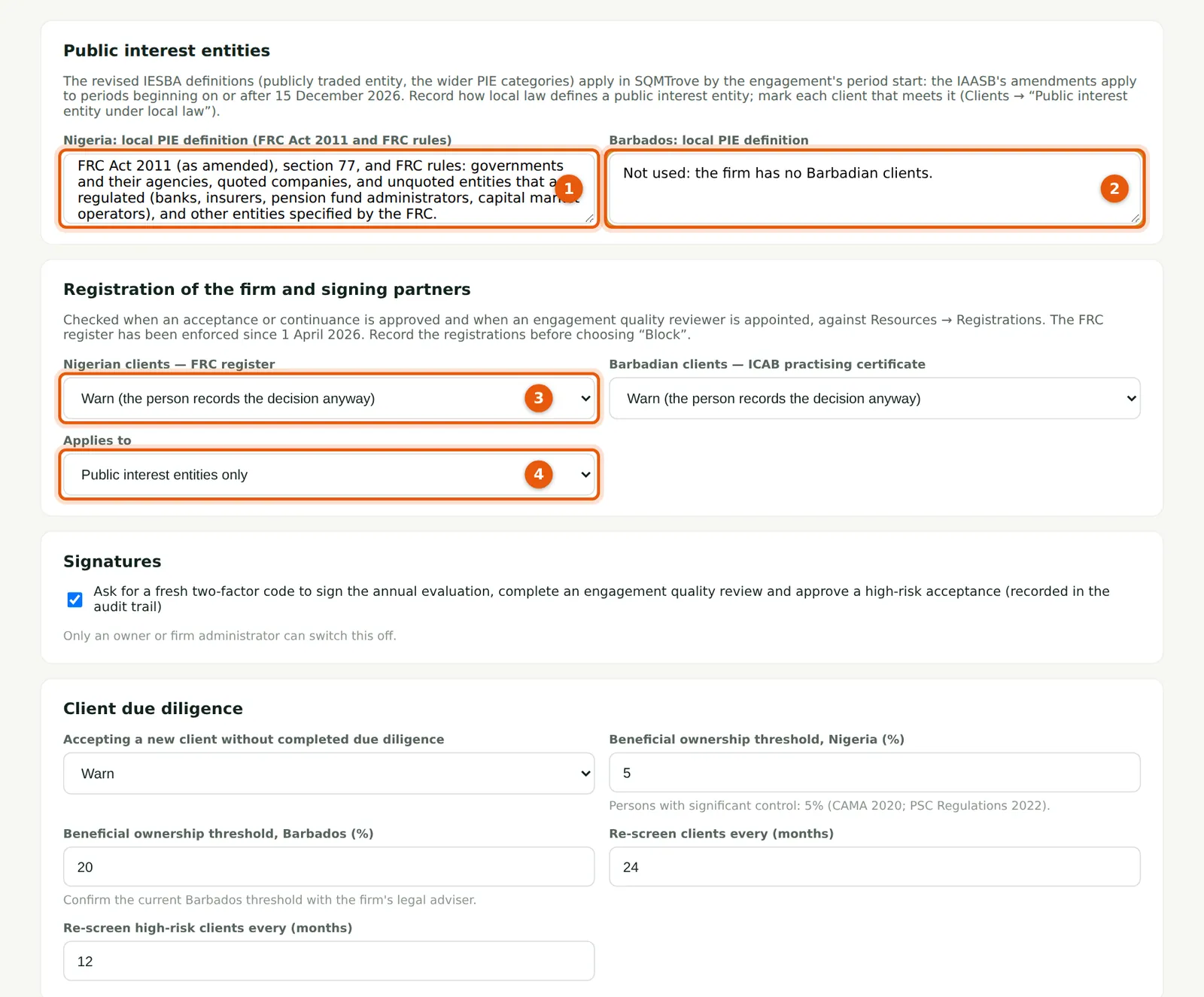
Why
Record how local law defines a public interest entity for Nigeria (1) and Barbados (2). Below, choose what happens when the firm or a signing partner has no current registration: for Nigerian clients, the FRC register (3), and for Barbadian clients, the ICAB practising certificate; and whether the check applies to public interest entities only or to every engagement (4). Record the registrations (step 24.5) before choosing Block.
Who
Owner, firm administrator or quality lead.
What to do
- Open Settings → Rules.
- Paste the local definitions (1, 2), choose Not checked, Warn or Block for each jurisdiction (3) and the scope (4).
24.2 Signatures, due diligence and the culture survey
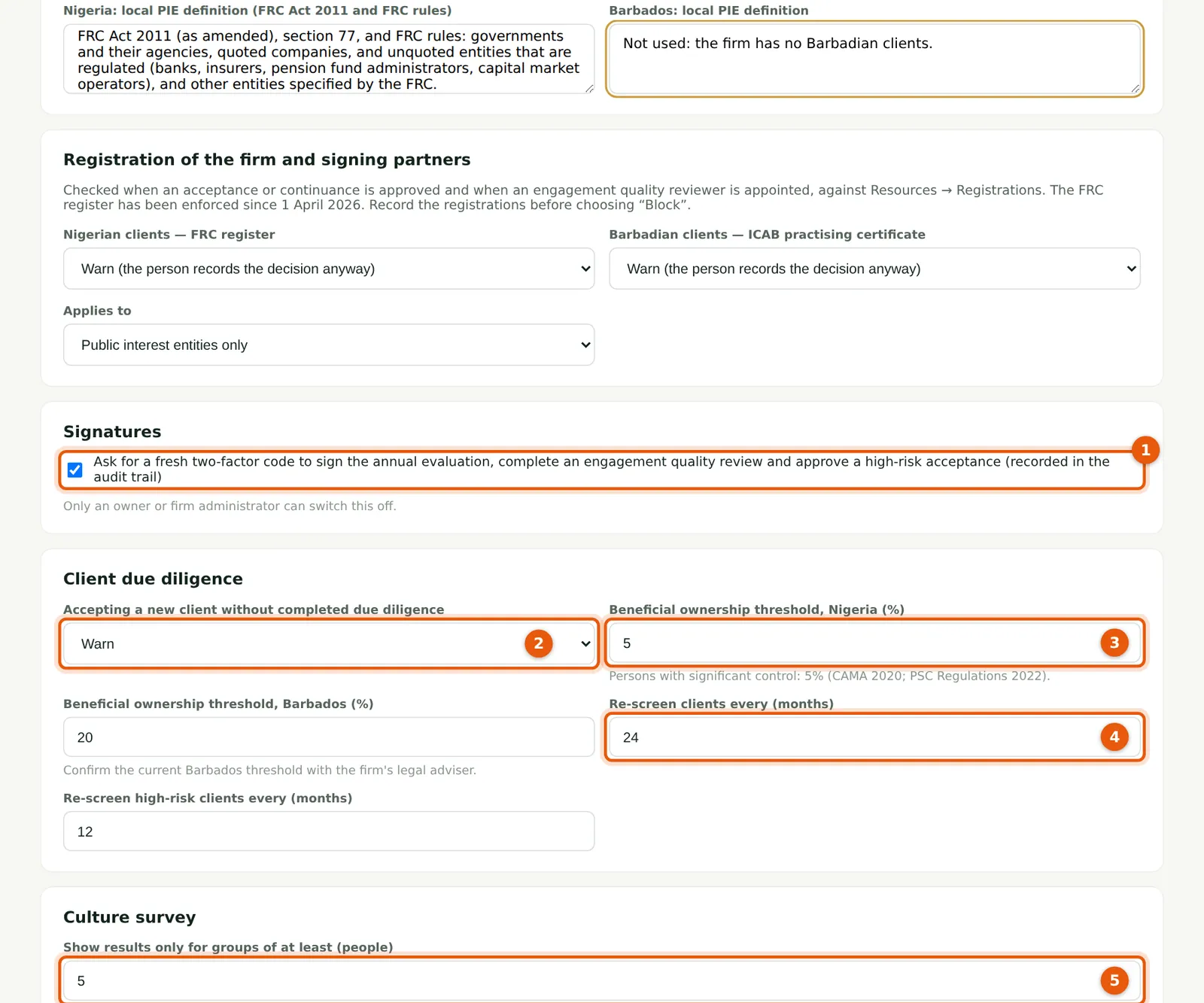
Why
Signatures (1): a fresh code from the authenticator app is asked to sign the annual evaluation, complete or record an engagement quality review and approve a high-risk acceptance. It is on for every firm; only an owner or firm administrator can switch it off. Due diligence (2): what happens when a new client is accepted without completed due diligence. The beneficial ownership threshold (3) is 5% for Nigeria (CAMA 2020 and the PSC Regulations 2022); the Barbados threshold starts at 20% — confirm it with the firm's adviser. Re-screening periods (4) and the culture survey's smallest group (5) are here too.
Who
Owner, firm administrator or quality lead.
What to do
- Set the options and choose Save rules at the bottom of the page.
24.3 How a client's shares are traded, and local PIE status
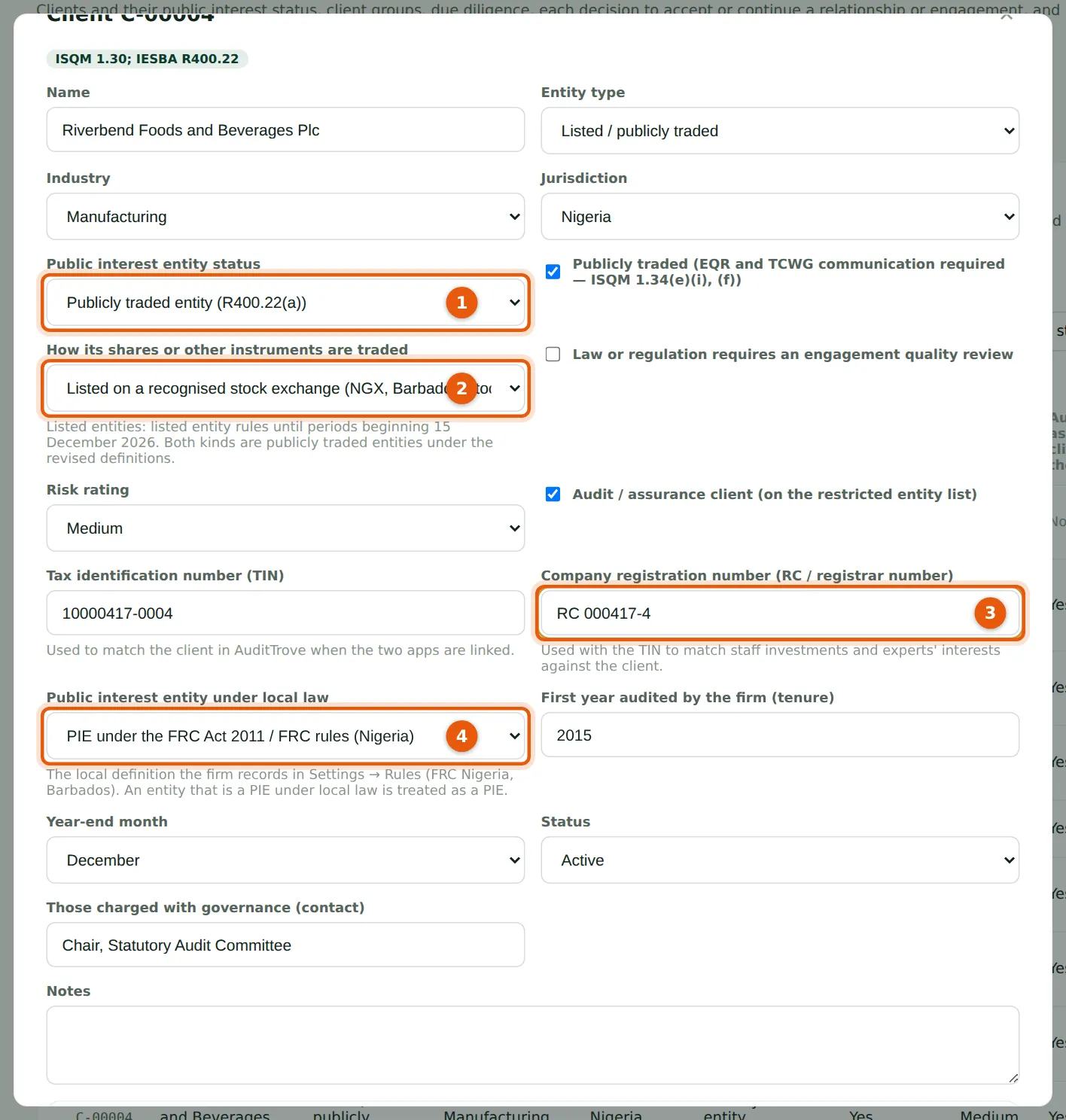
Why
Next to the public interest entity status (1), record how the shares are traded (2) — listed on a recognised exchange, or traded on another publicly accessible market such as an over-the-counter platform; both are publicly traded entities under the revised definitions — the RC number (3), which the independence checks use with the TIN, and whether the client is a public interest entity under local law (4).
Who
Engagement partners; quality lead.
What to do
- Open the client, set How its shares are traded (2), the RC number (3) and the local PIE status (4), and choose Save.
24.4 Which rules apply: the period start
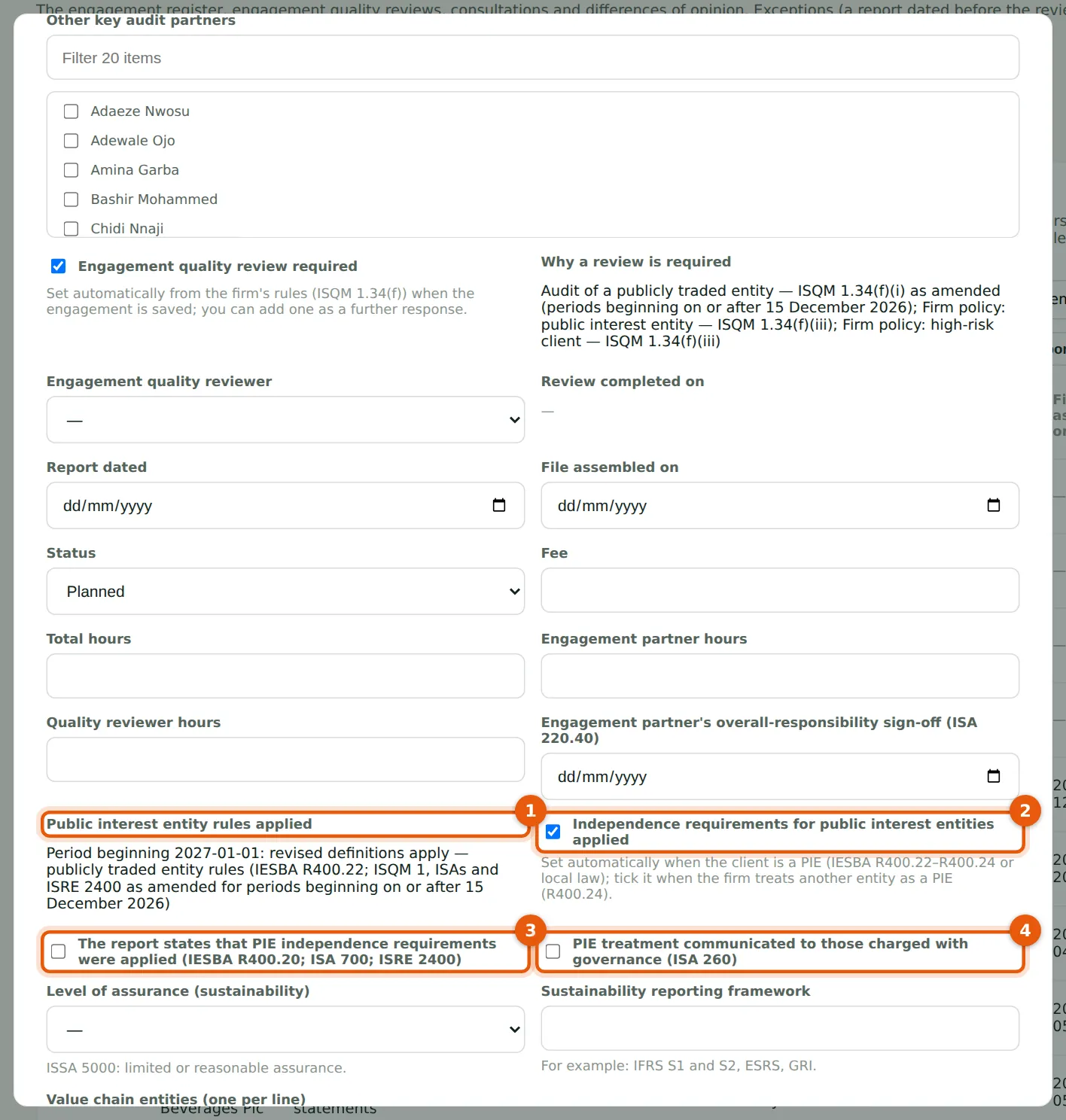
Why
The period start, entered higher up the form, decides the rules: SQMTrove records them in Public interest entity rules applied (1). The bank's 2027 audit begins on 1 January 2027, so the revised definitions apply. The PIE requirements are applied automatically (2) when the client is a public interest entity; tick it when the firm treats another entity as one (IESBA R400.24). Tick (3) when the report states that the PIE independence requirements were applied, and (4) when this was communicated to those charged with governance (ISA 260). SQMTrove warns when either is missing after the report date.
Who
Engagement partner; manager.
What to do
- Enter the period start — left empty, SQMTrove uses the day after the previous period end — and save; read the rules applied (1).
- After the report, tick (3) and (4).
24.5 Record a registration
Why
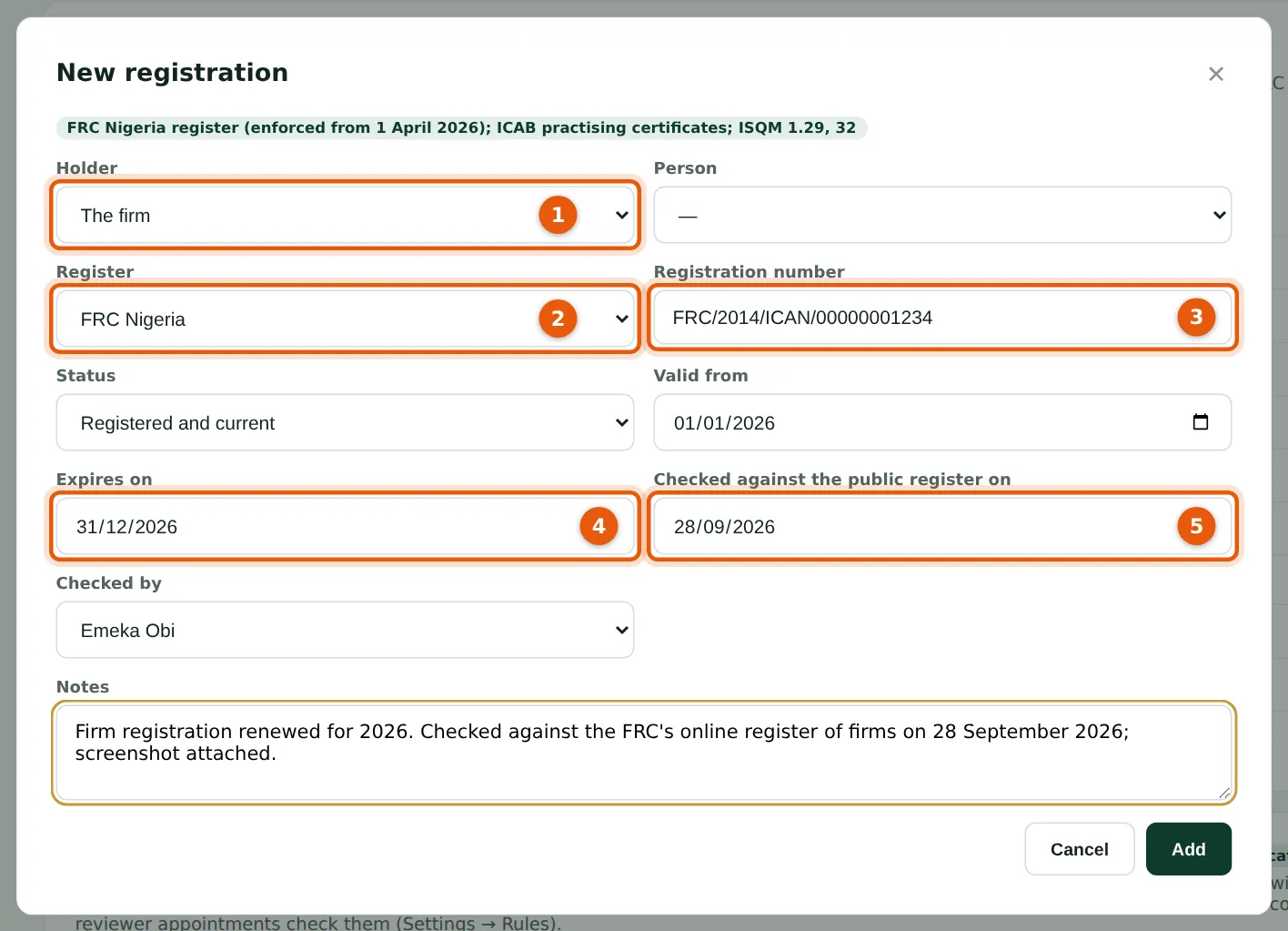
Record the holder (1) — the firm or a person — the register (2): FRC Nigeria, ICAB practising certificate, ICAN practising licence, ANAN or ACCA; the number (3), status, validity and expiry (4), and the date you checked it against the public register (5). Attach a screenshot of the public register or the certificate as evidence. The scheduled jobs remind you 60, 30 and 7 days before expiry.
Who
Quality lead.
What to do
- Open Resources → Registrations and choose New registration.
- Fill in (1) to (5), save, then open the record again and attach the evidence.
24.6 The registration status of the firm and its people
Why
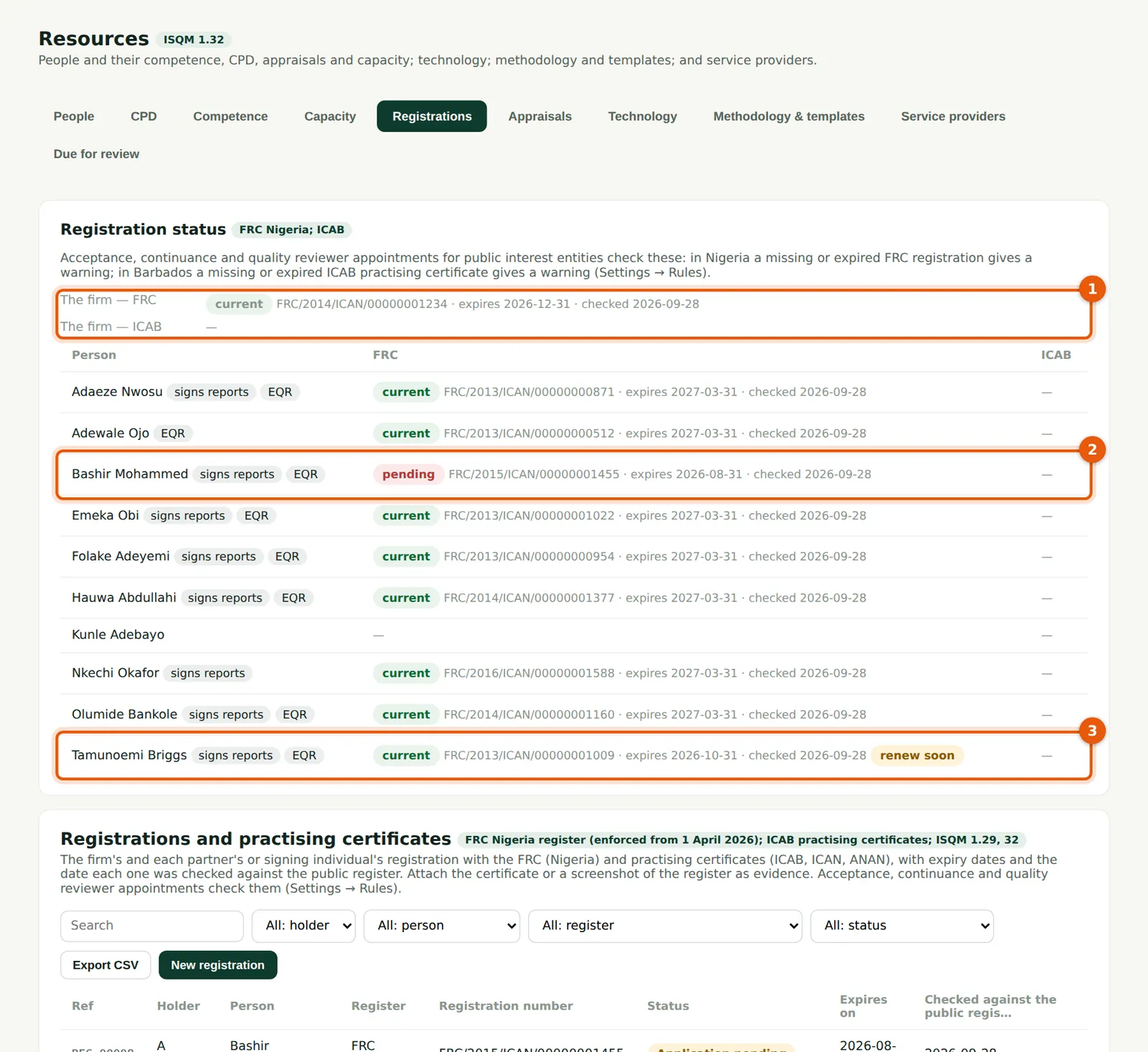
The firm's FRC and ICAB status (1), then every partner, director and reviewer with their FRC and ICAB registrations. Bashir Mohammed's renewal is still pending (2); Tamunoemi Briggs's registration is current but due for renewal soon (3). With the Nigerian check on Block, neither could be appointed as a reviewer or sign an accepted engagement until the register is current.
Who
Quality lead; ethics partner.
What to do
- Follow up every row that is not current; record the new expiry date when a renewal is confirmed.
24.7 The screening service: not configured
Why
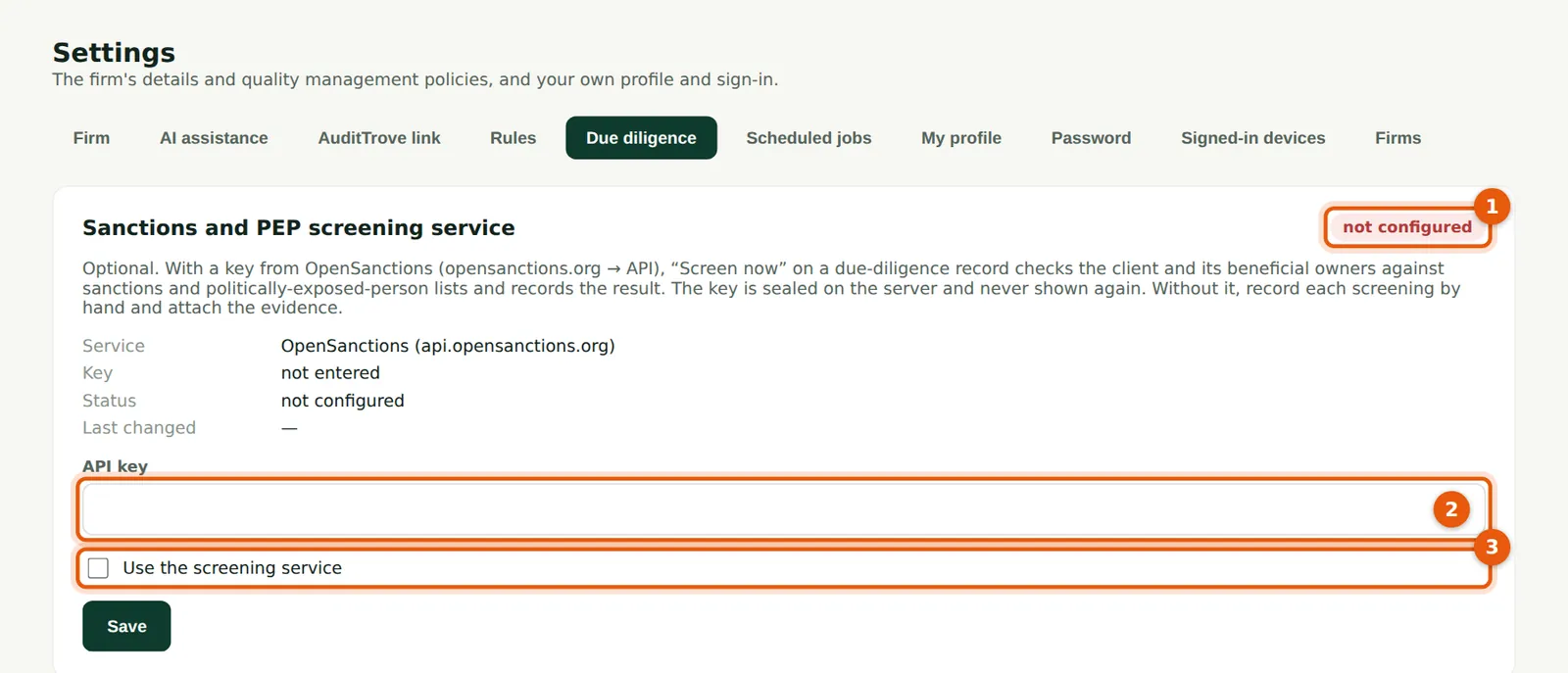
SQMTrove can screen a client and its beneficial owners against sanctions and politically exposed person lists through the OpenSanctions service, with the firm's own key. It is not configured (1) until an owner or firm administrator enters the key (2) and ticks Use the screening service (3). Without it, record each screening by hand and attach the evidence, as Okafor Bello & Co does. To set it up: create an account at opensanctions.org, obtain an API key from the account's API page, paste it here, tick (3) and save. The key is sealed on the server and never shown again.
Who
Owner or firm administrator.
What to do
- Leave it off unless the firm has its own key. To switch it on, paste the key (2), tick (3) and choose Save.
24.8 Record the beneficial owners
Why
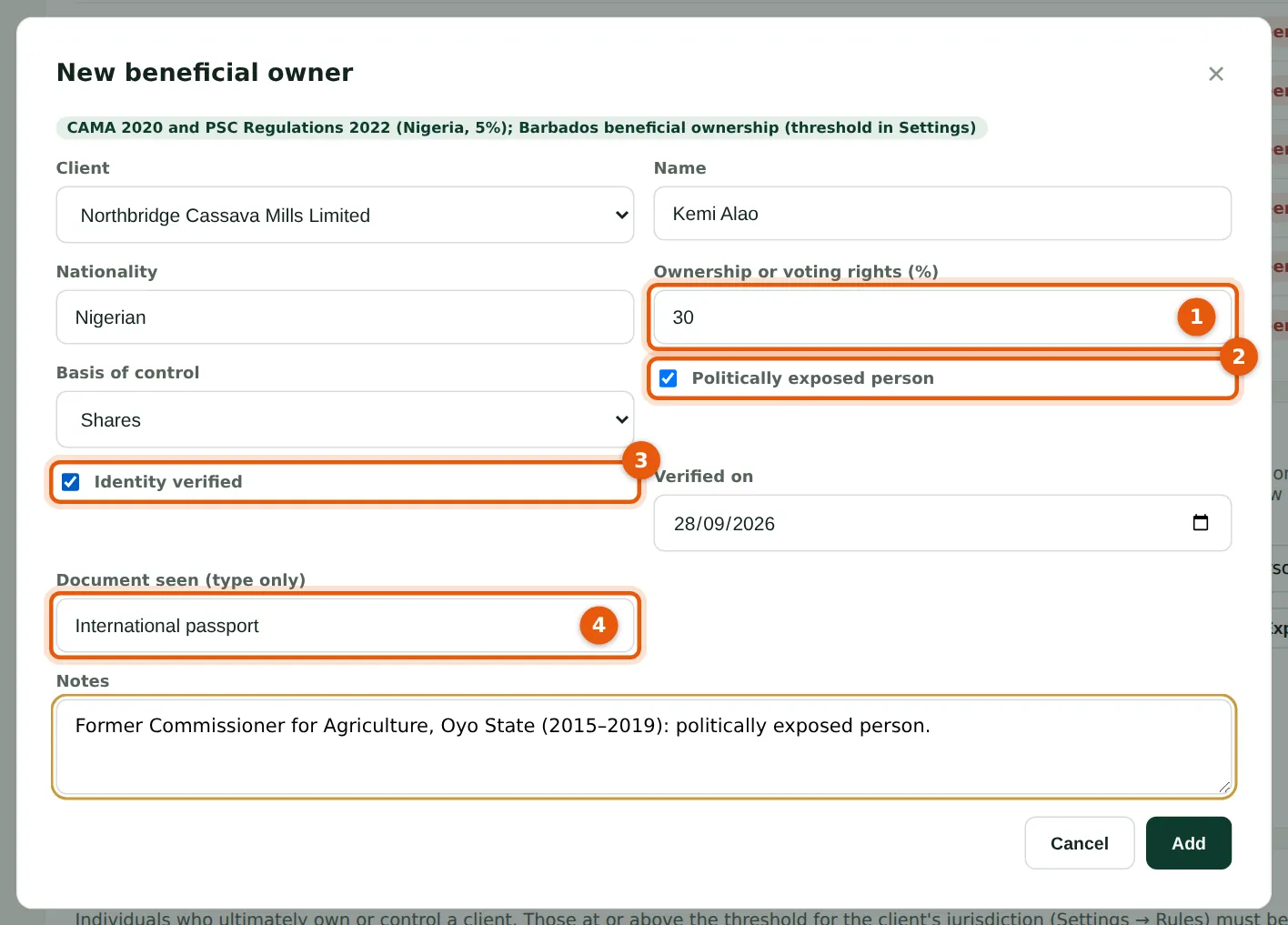
Record each individual who ultimately owns or controls the client, with the ownership or voting rights (1) and the basis of control. Tick politically exposed person (2) where it applies — here a former state commissioner — and Identity verified (3) with the type of document seen (4); no document numbers are kept. Owners at or above the threshold must be verified before acceptance.
Who
Engagement partner; manager.
What to do
- Choose New beneficial owner for each owner; fill in (1) to (4) and save.
24.9 Record the due diligence screening
Why
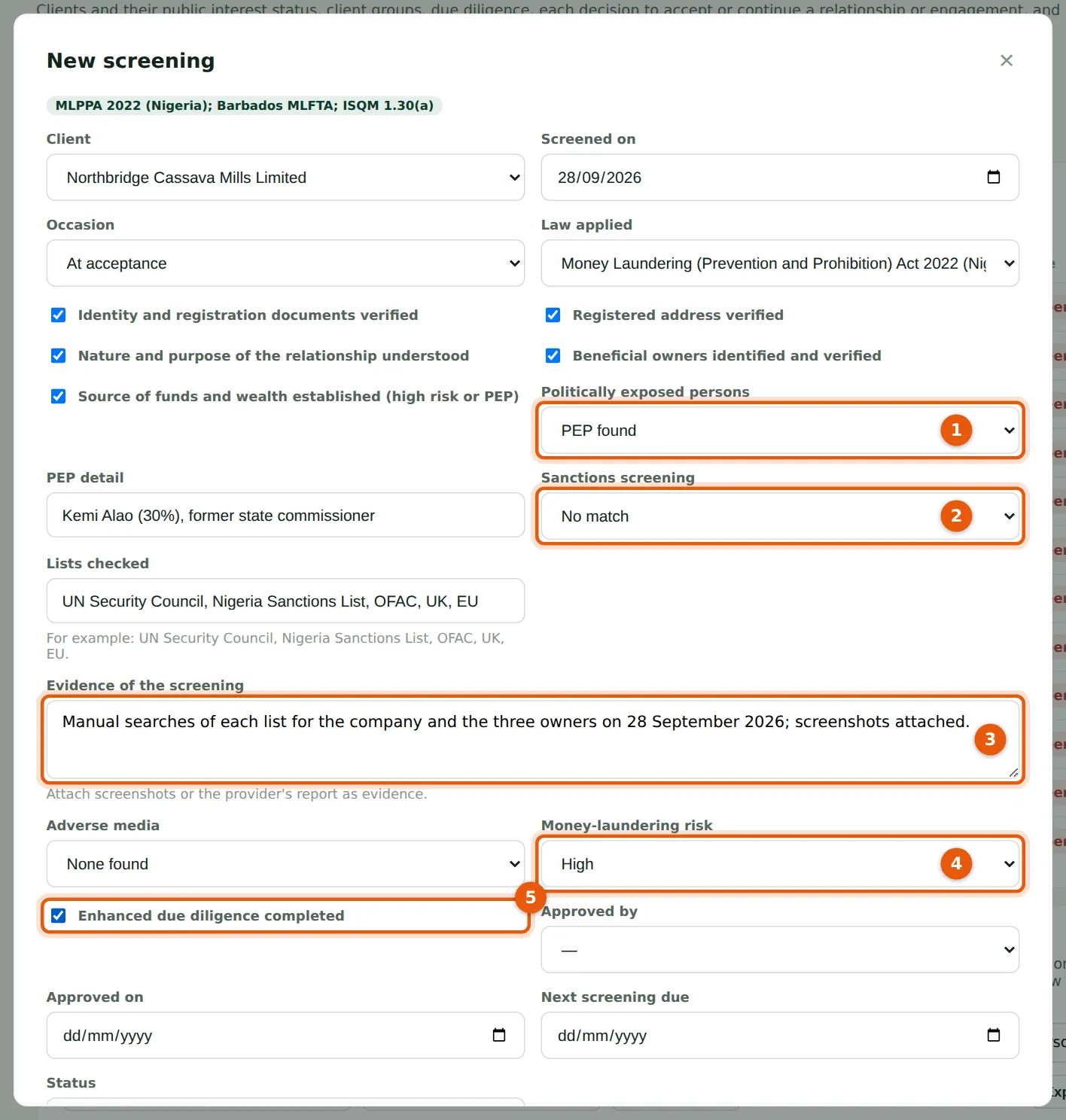
The screening records identity and address checks, the nature of the relationship, beneficial owners, the PEP result (1), sanctions screening (2) with the lists checked and the evidence (3), adverse media and the money-laundering risk (4). A high risk or a PEP needs enhanced due diligence and the source of funds (5). It can be marked Complete only when every item is done; a high-risk screening is approved by a partner or the quality lead. The next screening date follows the re-screening period.
Who
Engagement partner or manager; a partner or the quality lead approves high risk.
What to do
- Choose New screening; fill in each check, attach the evidence and save as In progress.
- The approver sets Complete once everything is done.
24.10 Due diligence: screenings due and the registers
Why
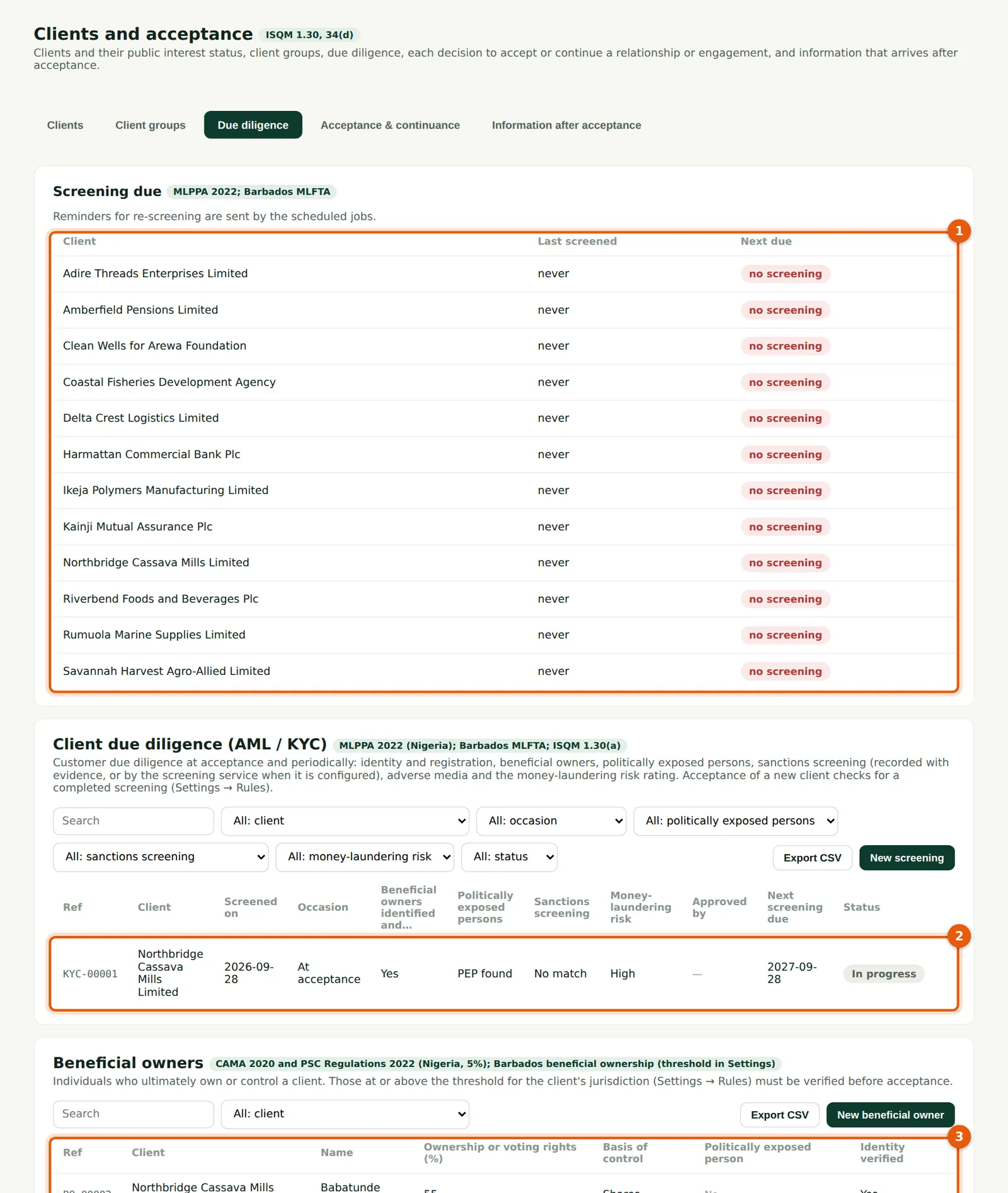
Screening due (1) lists every active client with no screening, or one due within 30 days. Below are the screenings (2) and the beneficial owners (3). The scheduled jobs remind the partners when re-screening falls due.
Who
Engagement partners; quality lead.
What to do
- Work through the clients in Screening due (1) at the start of each month.
24.11 Approve a high-risk acceptance with a fresh code
Why
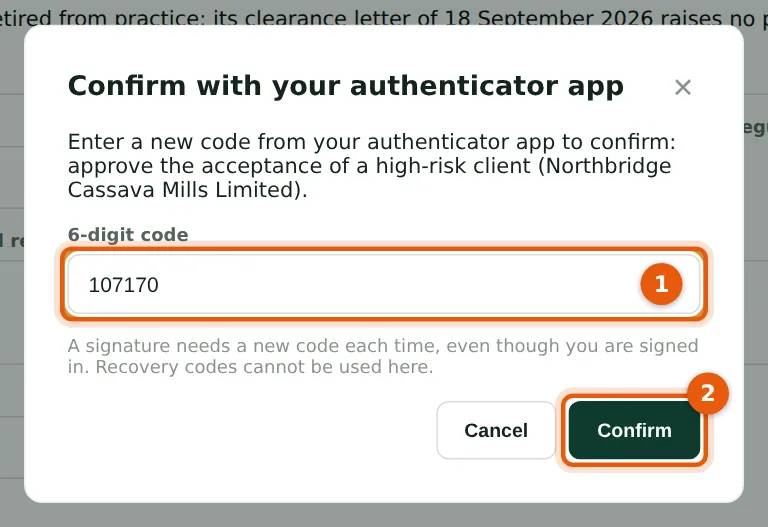
When the acceptance is saved, SQMTrove checks the due diligence, the registrations and the restricted list, then — because the client is high risk — asks for a new code from the approver's authenticator app (1), even though they are signed in. A code can be used only once and recovery codes are not accepted. The same prompt appears to sign the annual evaluation and to complete or record an engagement quality review. Each confirmation, or refused code, is recorded in the audit trail.
Who
The independent partner or quality lead who approves.
What to do
- Record the acceptance decision as usual (step 8.4) and choose Save.
- Type the six-digit code shown in your app (1) and choose Confirm (2).