Steps in this chapter (14)
Keep each person's financial interests and relationships on a personal register that SQMTrove checks against the audit clients and their related entities, ask for pre-clearance before investing, and record client groups.
The IESBA Code (Part 4A, Sections 510 to 524) restricts financial interests, loans, business, family and employment relationships with audit clients — and, for a public interest entity, with every related entity of the client (R400.20). An annual declaration alone does not show what each person holds. Since September 2026 everyone who must be independent keeps a personal independence register in SQMTrove (Ethics → My independence register), and every entry is checked against the restricted list: the audit and assurance clients, their related entities worked out from the client groups, the value chain entities of sustainability assurance clients and the firm's other restricted entities.
An exact match of the name, TIN or RC number is a conflict; a name that only contains a restricted name is a possible match. Either alerts the ethics partner, who records the resolution. Nobody resolves an entry on their own register or decides their own pre-clearance request. SQMTrove checks every entry again each day, so an entry recorded before a client or group link was added is caught later.
In the illustration, release 22 arrives on Friday 25 September 2026. Olumide Bankole records that Harmattan Holdings Plc, a company listed on the Nigerian Exchange, controls Harmattan Commercial Bank Plc. The same afternoon Ngozi Okonkwo, audit manager in financial services, records 2,500 shares she bought in Harmattan Holdings Plc on 14 September, and the check finds the conflict. Ibrahim Musa checks a company before investing and asks for pre-clearance. Hauwa Abdullahi, the ethics partner, resolves Ngozi's entry and approves Ibrahim's request on Monday 28 September.
23.1 Record a client's group
Why
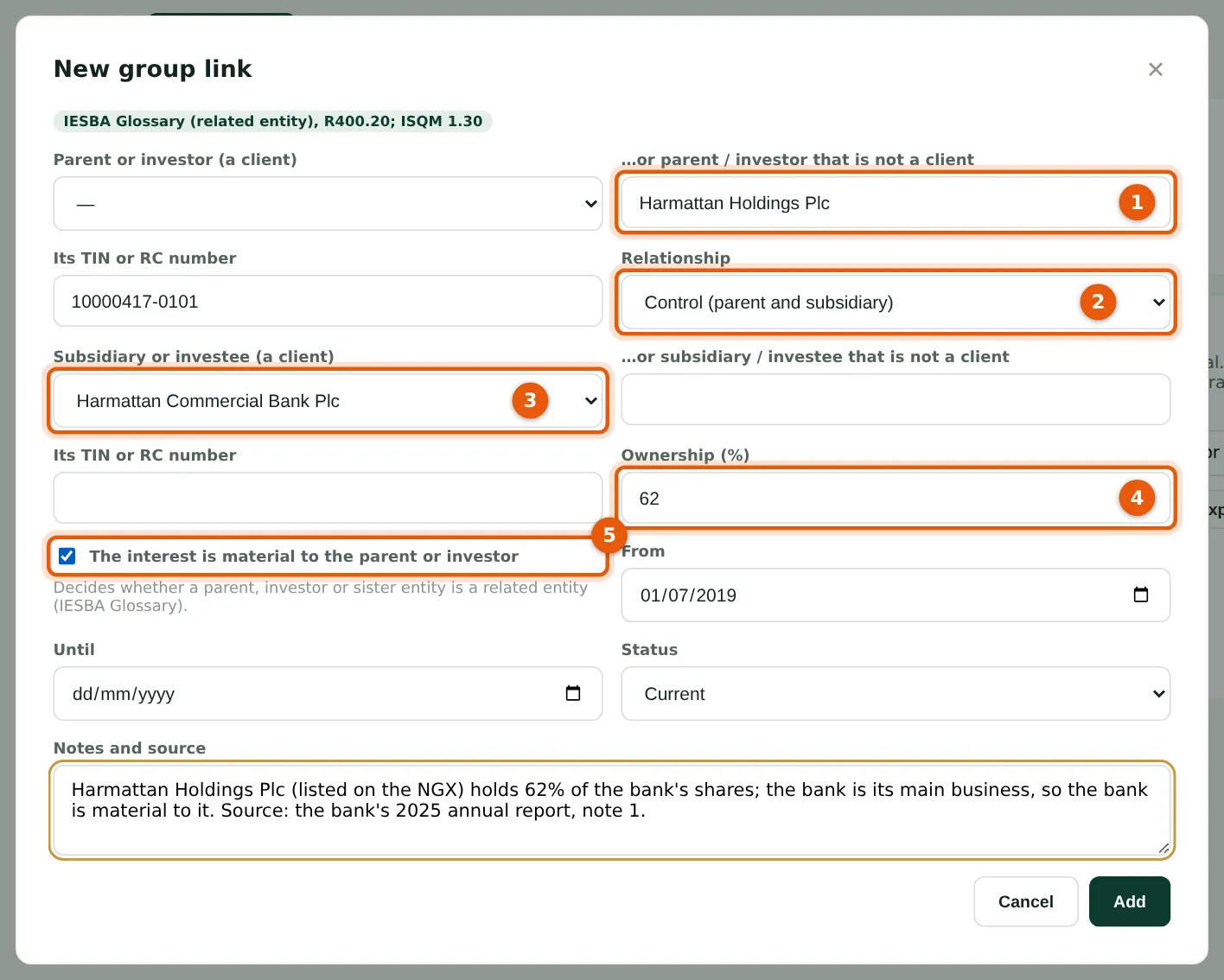
A group link says who is above (1) and who is below (3): each side is a client or, as here, an entity that is not a client, with its TIN. Choose the relationship (2) — control, joint control, significant influence or another affiliate — and the ownership (4). Tick that the interest is material to the parent or investor (5) when it is: the IESBA definition of a related entity depends on it. Control with less than 50% needs an explanation in the notes, and a circular group (a subsidiary controlling its parent) is refused.
Who
Engagement partners; quality lead.
What to do
- Open Clients & acceptance → Client groups and choose New group link.
- Enter the parent or investor (1), the relationship (2), the subsidiary or investee (3), the ownership (4) and whether it is material (5); record the source in the notes and choose Save.
23.2 The group tree and the related entities
Why
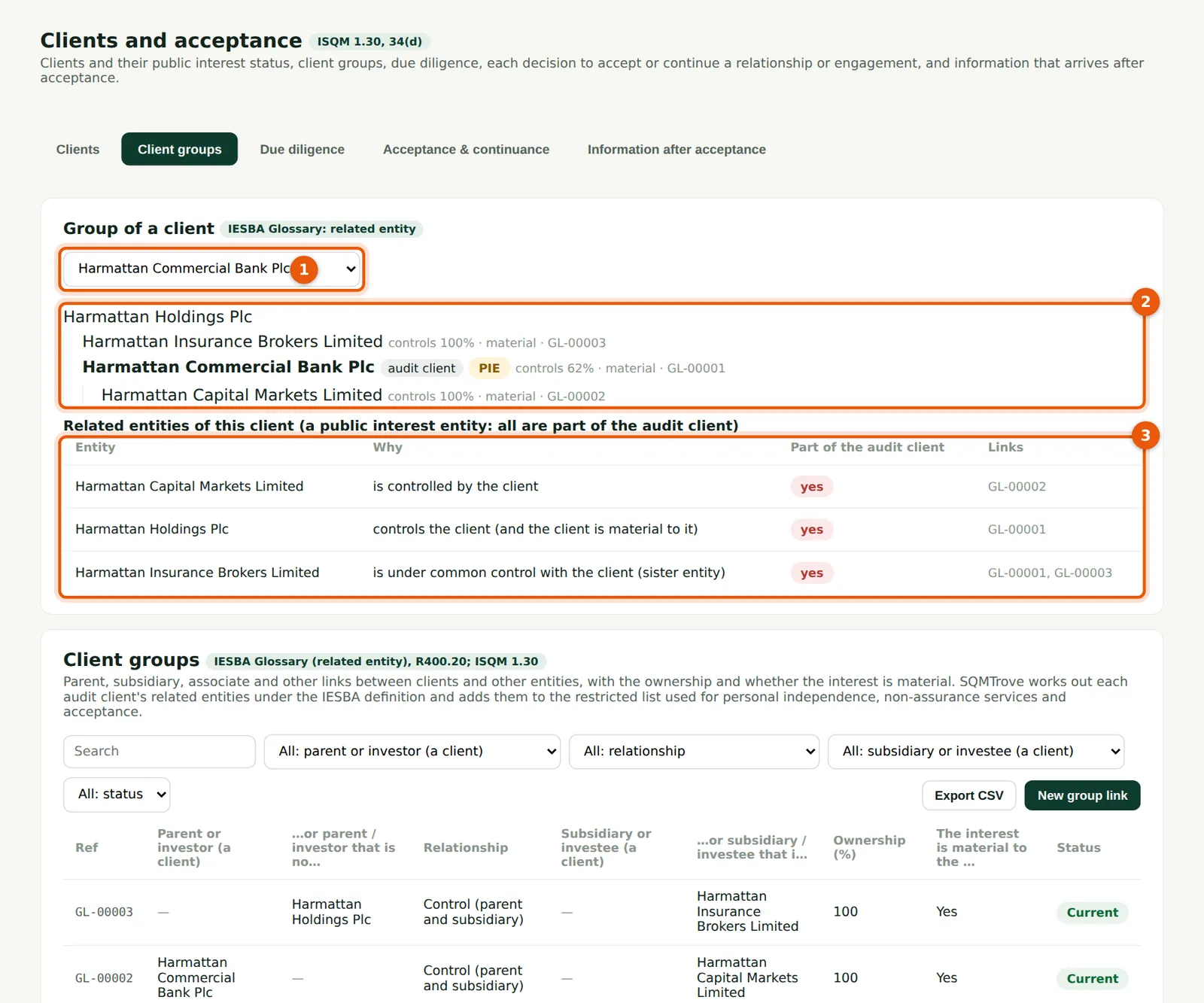
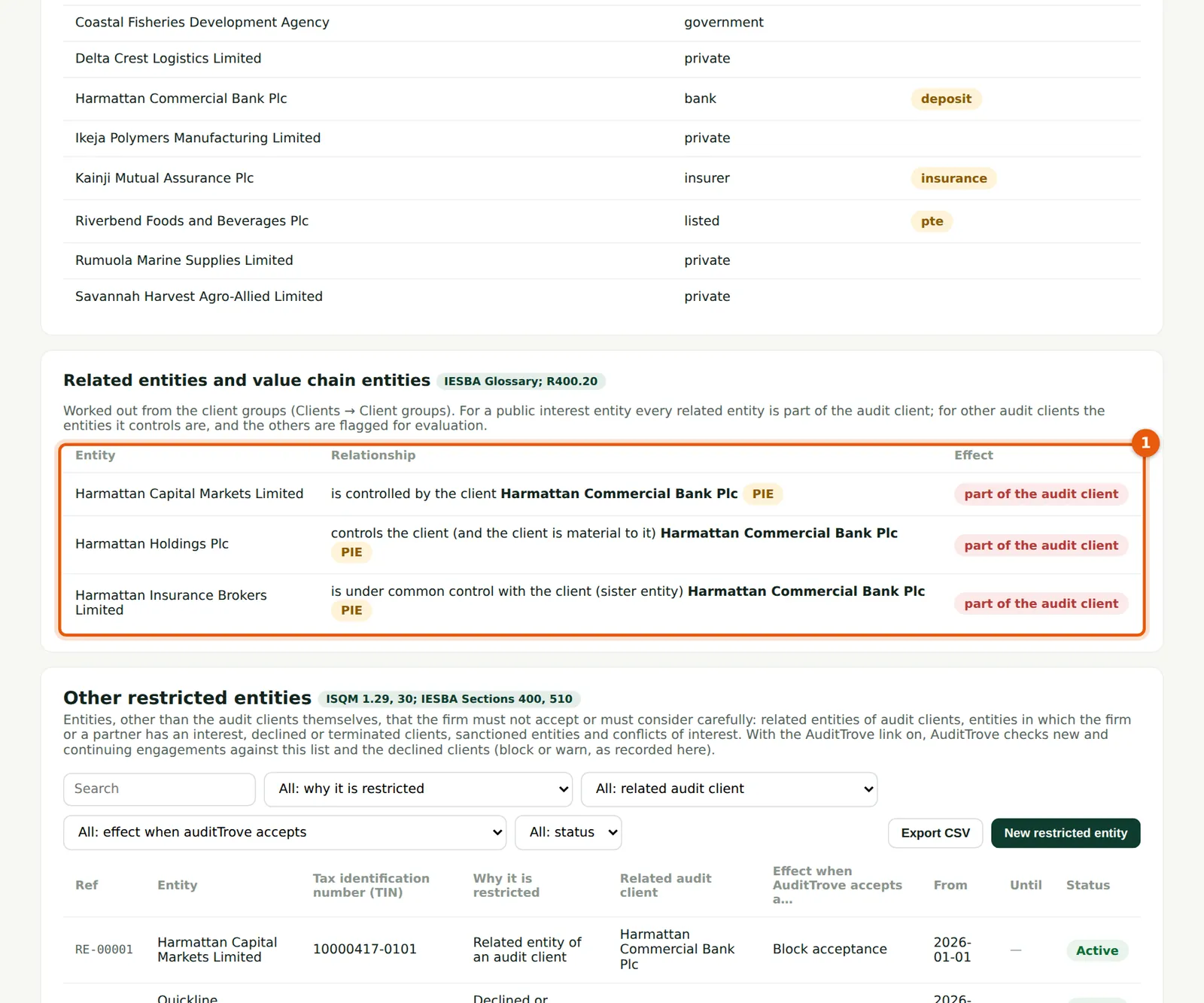
Choose a client (1) to see its group as a tree (2) and its related entities (3), with the reason each one is related and the links used. The bank is a public interest entity, so every related entity — the holding company, its stockbroking subsidiary and its sister insurance broker — is part of the audit client (IESBA R400.20). For other audit clients only the entities they control are; the others are shown as “evaluate”.
Who
Engagement partners; ethics partner; quality lead.
What to do
- Choose the client (1).
- Read the tree (2) and the related entities (3); record any missing parent, subsidiary or associate below the tree.
23.3 Record an interest or relationship on your register
Why
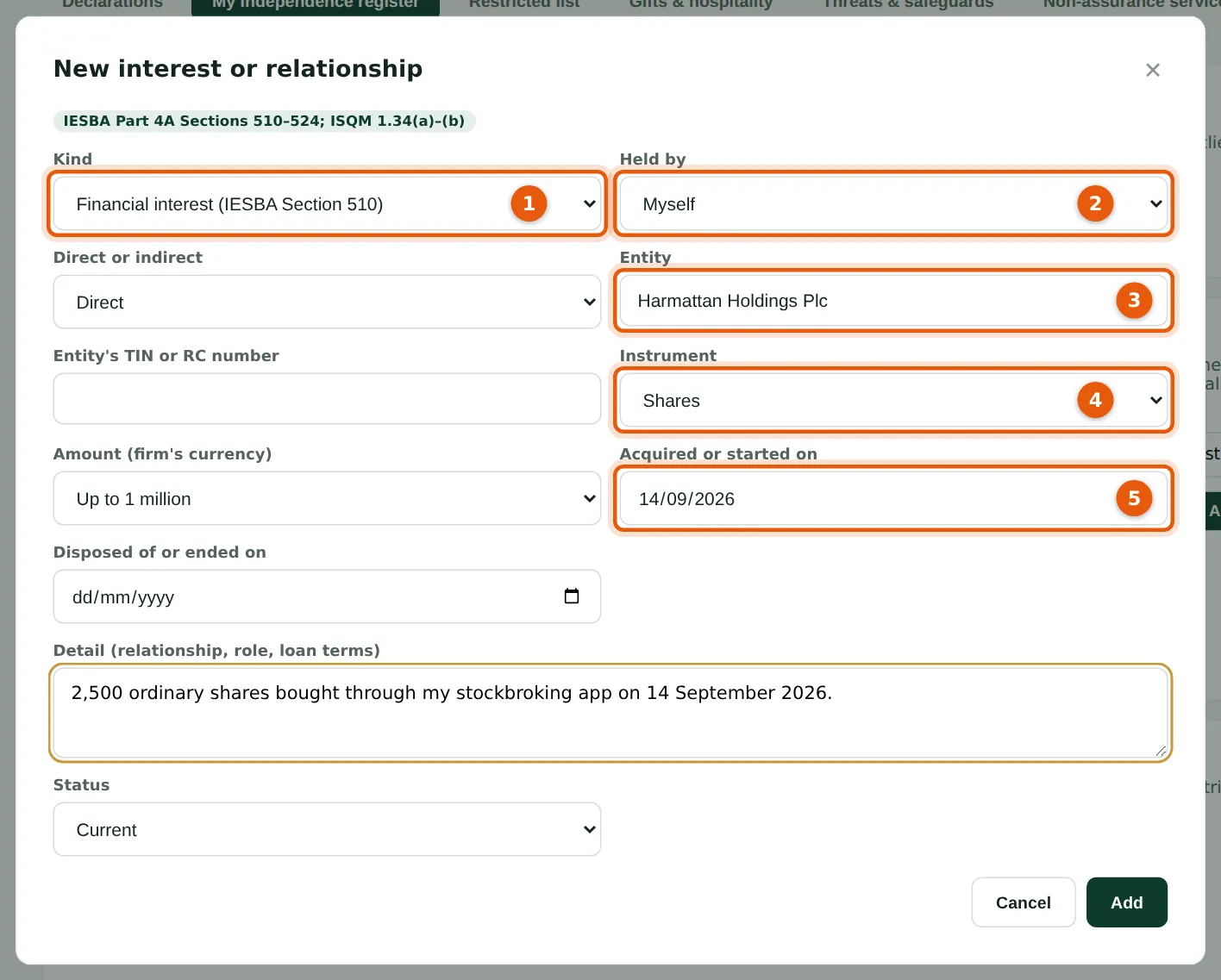
Everyone keeps their own register: financial interests (IESBA Section 510), loans and guarantees (511), business relationships (520), family and personal relationships with a client (521), recent service or employment (522, 524) and directorships or other roles (523). Choose the kind (1), who holds it (2) — yourself, immediate or close family, or an entity or trust you control — the entity (3), the instrument (4) and the date acquired (5). Amounts are recorded in bands, not exact figures.
Who
Everyone who must be independent.
What to do
- Open Ethics → My independence register and choose Add an interest or relationship.
- Choose the kind (1) and holder (2), enter the entity (3) with its TIN or RC number if you know it, the instrument (4), the amount band and the date (5), and choose Save.
23.4 The check finds a conflict
Why
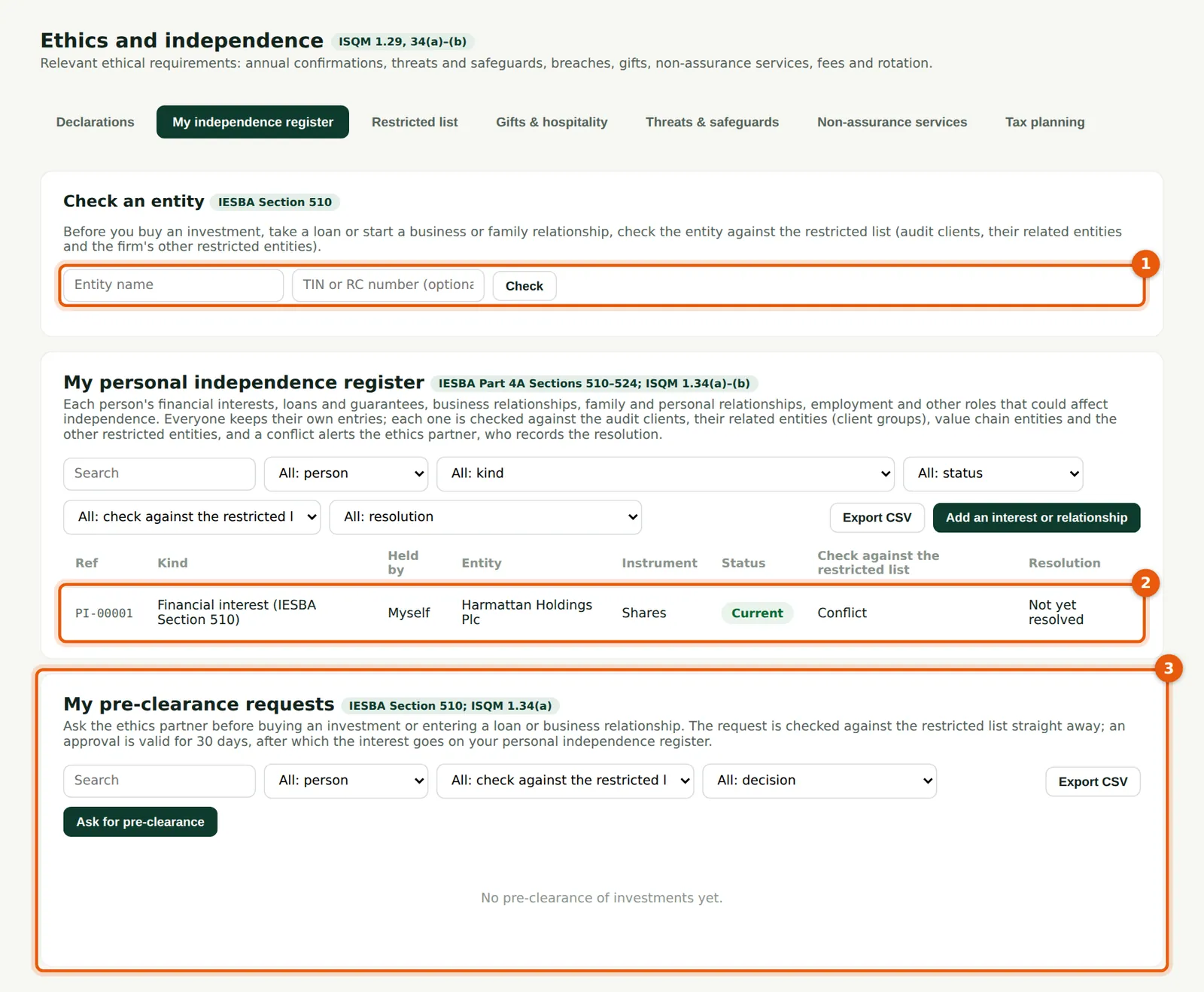
SQMTrove checks the entry as it is saved. Harmattan Holdings Plc controls a public interest entity audit client, so the entry shows Conflict (2); when it was saved, a message said that the ethics partner had been told. Check an entity (1) lets you check a company before you buy; your pre-clearance requests are below (3).
Who
Everyone who must be independent.
What to do
- Read the result in the Check column (2). Do not buy more or sell before the ethics partner contacts you, unless they say so.
- Keep your register current: when you sell, open the entry and record the date disposed of and the status Ended.
23.5 Check an entity before you invest

Why
Type the company's name (1) — and its TIN or RC number if you have it — and choose Check (2). The result (3) says whether it is on the restricted list, a possible match, or not found. A company that is not on the list can still need pre-clearance under the firm's policy.
Who
Everyone.
What to do
- Enter the name (1) and choose Check (2).
- Read the result (3). If you still want to invest, ask for pre-clearance (step 23.6).
23.6 Ask for pre-clearance
Why
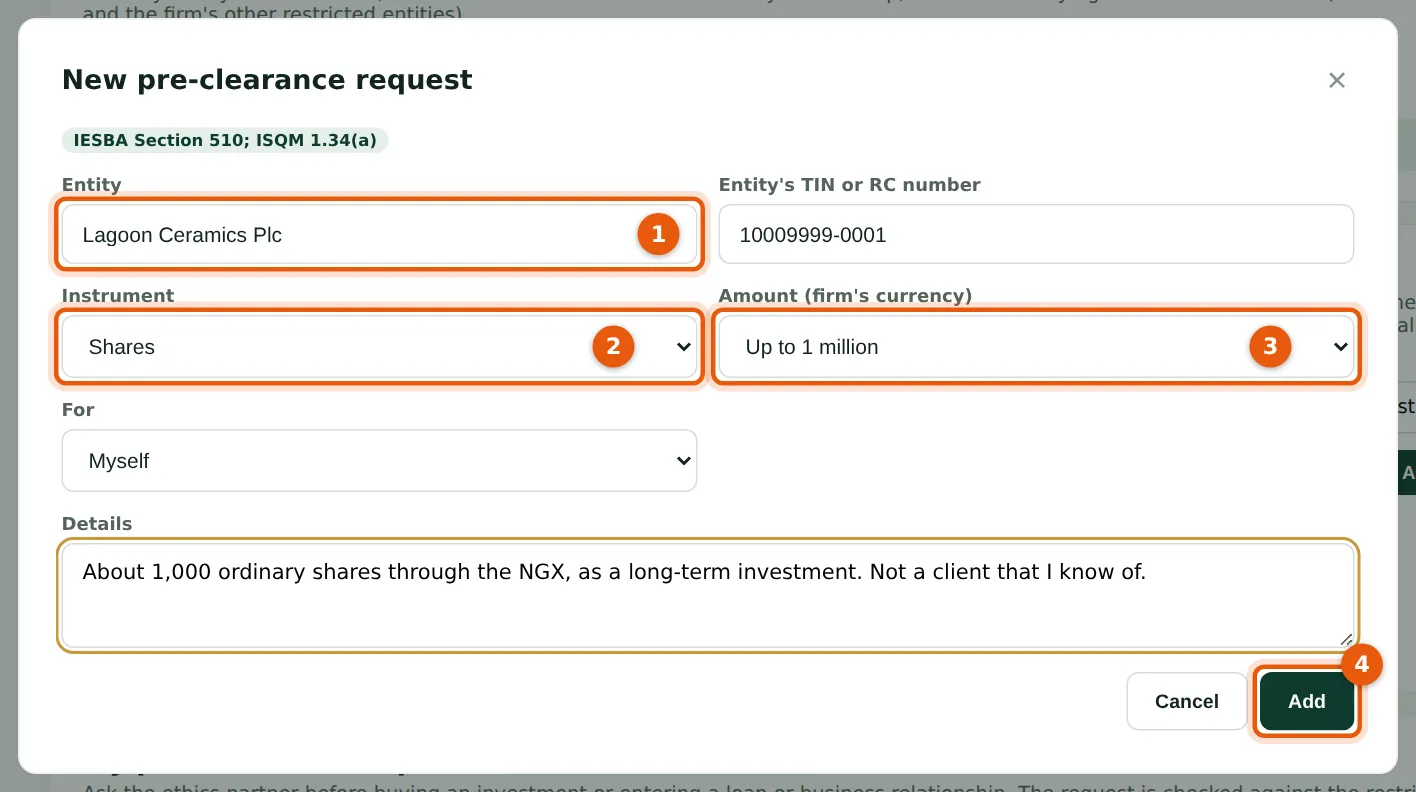
The request names the entity (1), the instrument (2) and the amount band (3). It is checked against the restricted list at once, and the ethics partner is notified. An approval is valid for 30 days; after buying, record the interest on your register. A request that waits more than two days is chased by the scheduled jobs (chapter 26).
Who
Everyone.
What to do
- Choose Ask for pre-clearance, fill in the entity (1), instrument (2), amount (3) and details, and choose Save (4).
- Wait for the decision (a notification comes to you) before buying.
23.7 Open an ad hoc or joiner declaration
Why
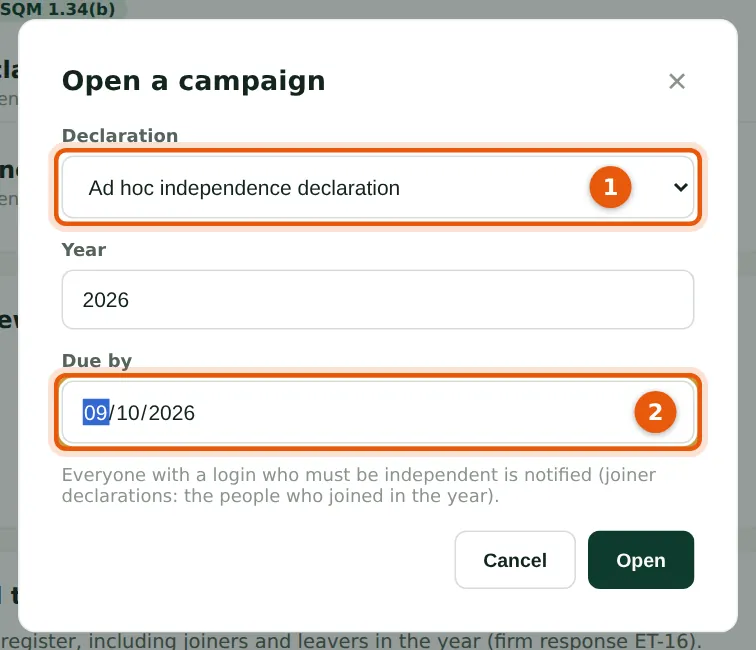
Besides the annual confirmation and the fit-and-proper declaration, there are two new kinds (1): a joiner declaration for people who joined in the year, and an ad hoc declaration — for example when the register is introduced, or before a new engagement. Both ask the independence statements, including the new one about the personal register. Set the due date (2); the scheduled jobs remind people 7 days and 1 day before, on the day and weekly after.
Who
Ethics partner.
What to do
- Choose Open a campaign, choose the kind (1), the year and the due date (2), and choose Open.
23.8 The register statement in the declaration
Why
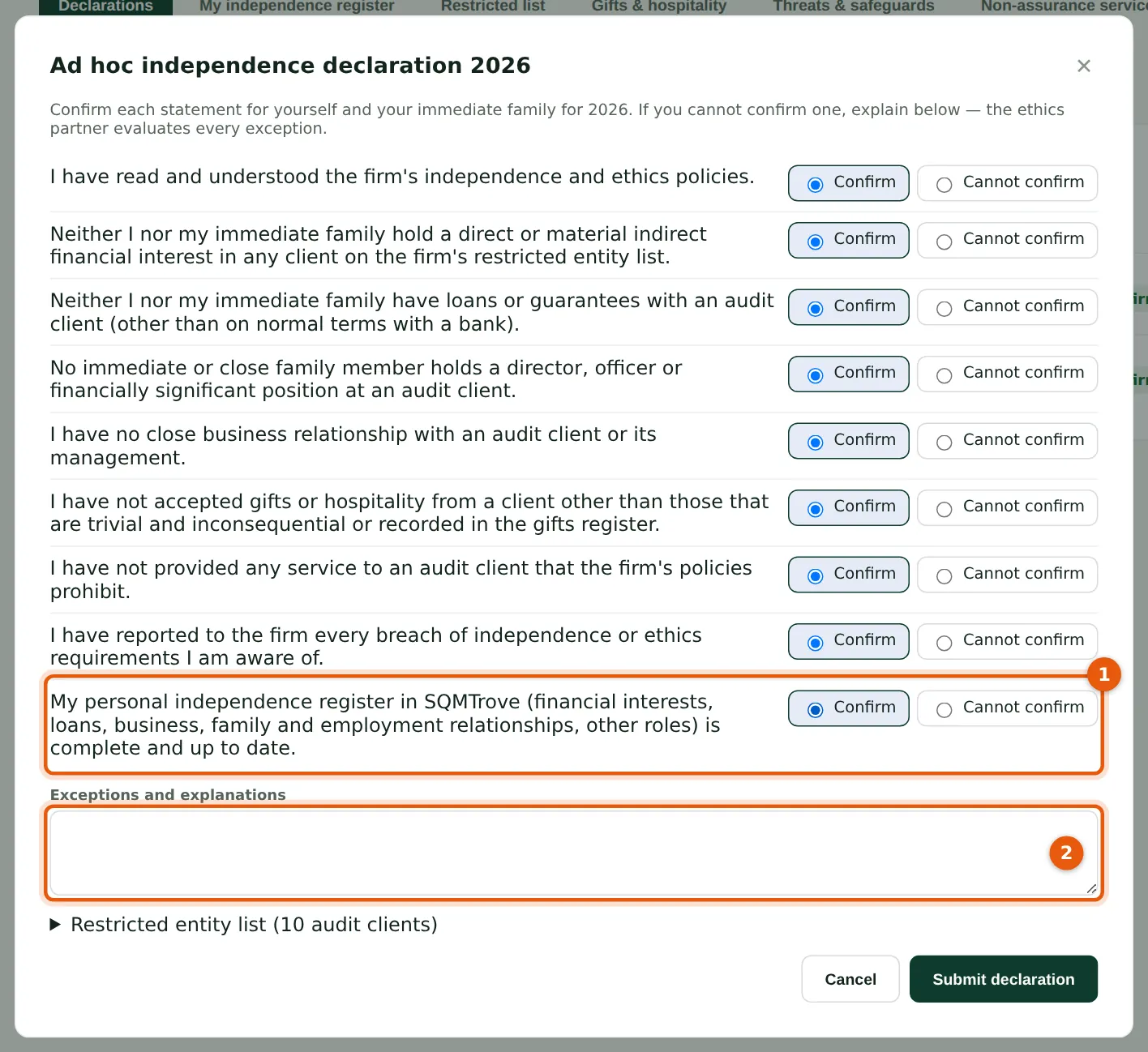
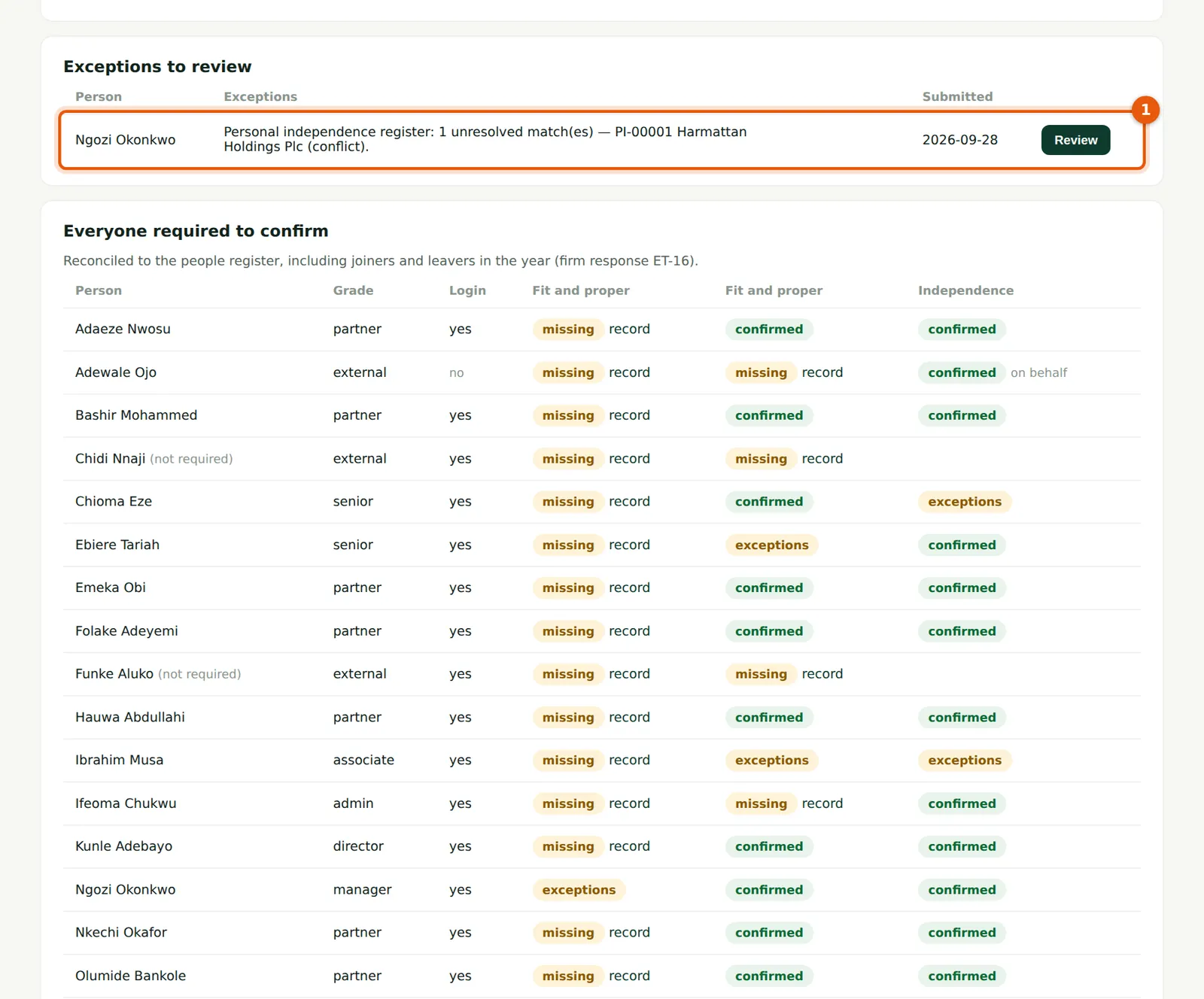
The independence declarations now include “My personal independence register in SQMTrove … is complete and up to date” (1). A copy of the person's register is kept with each declaration. If an entry on the register still has an unresolved conflict or possible match, SQMTrove adds it to the exceptions (2) automatically, so the declaration goes to the ethics partner for review even when every statement is confirmed.
Who
Everyone who must be independent.
What to do
- Confirm each statement or explain in the exceptions (2), and choose Submit declaration.
23.9 The ethics partner's view: independence registers
Why
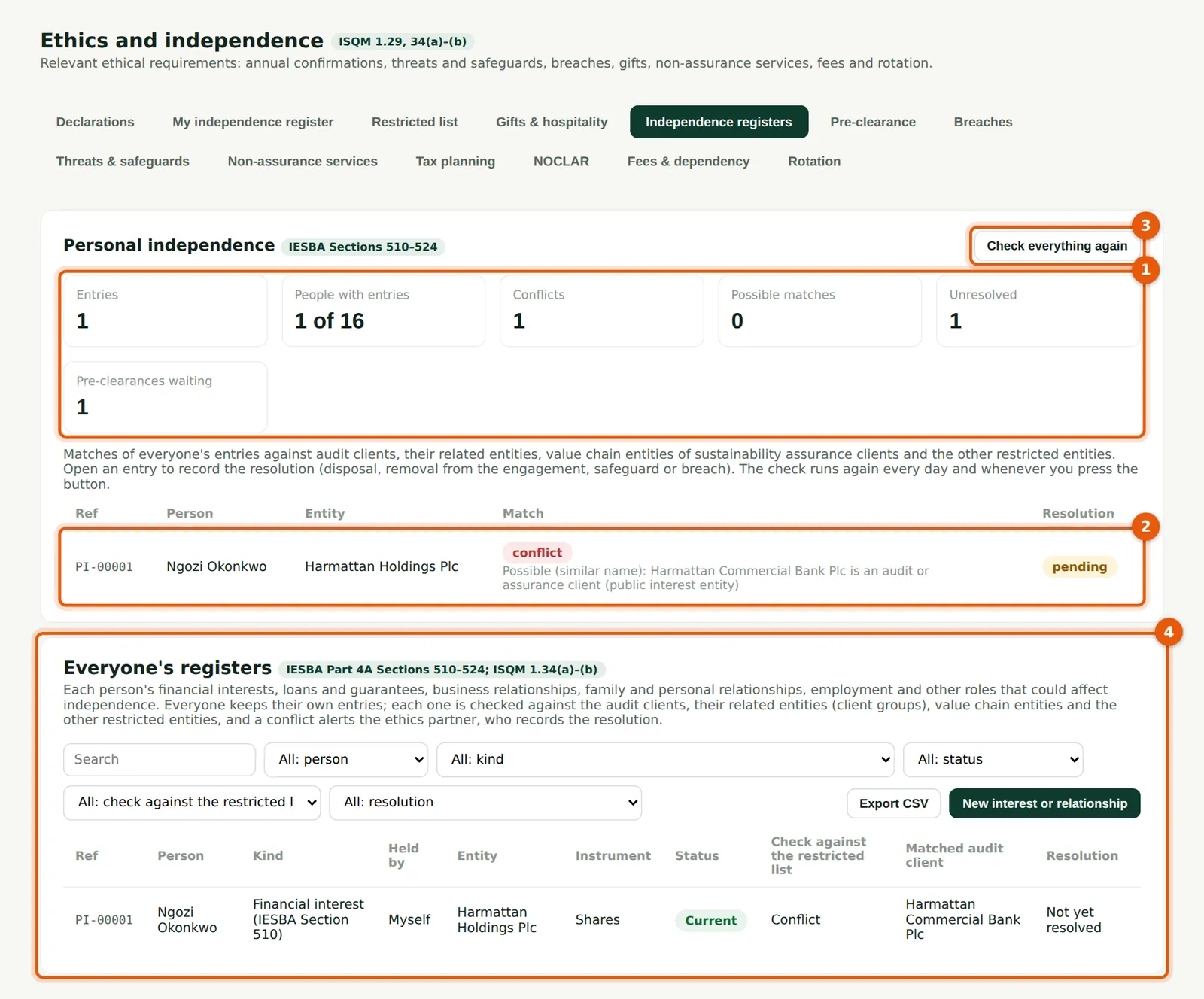
The counts (1) show entries, people with entries, conflicts, possible matches, unresolved items and pre-clearance requests waiting. The table lists every match with the reason (2). Check everything again (3) re-runs the check for every entry at once — useful after adding clients or group links (it also runs every day). Everyone's registers (4) are below, with filters.
Who
Ethics partner; quality lead.
What to do
- Open Ethics → Independence registers.
- Open a match (2) to record the resolution (step 23.10).
23.10 Record the resolution
Why
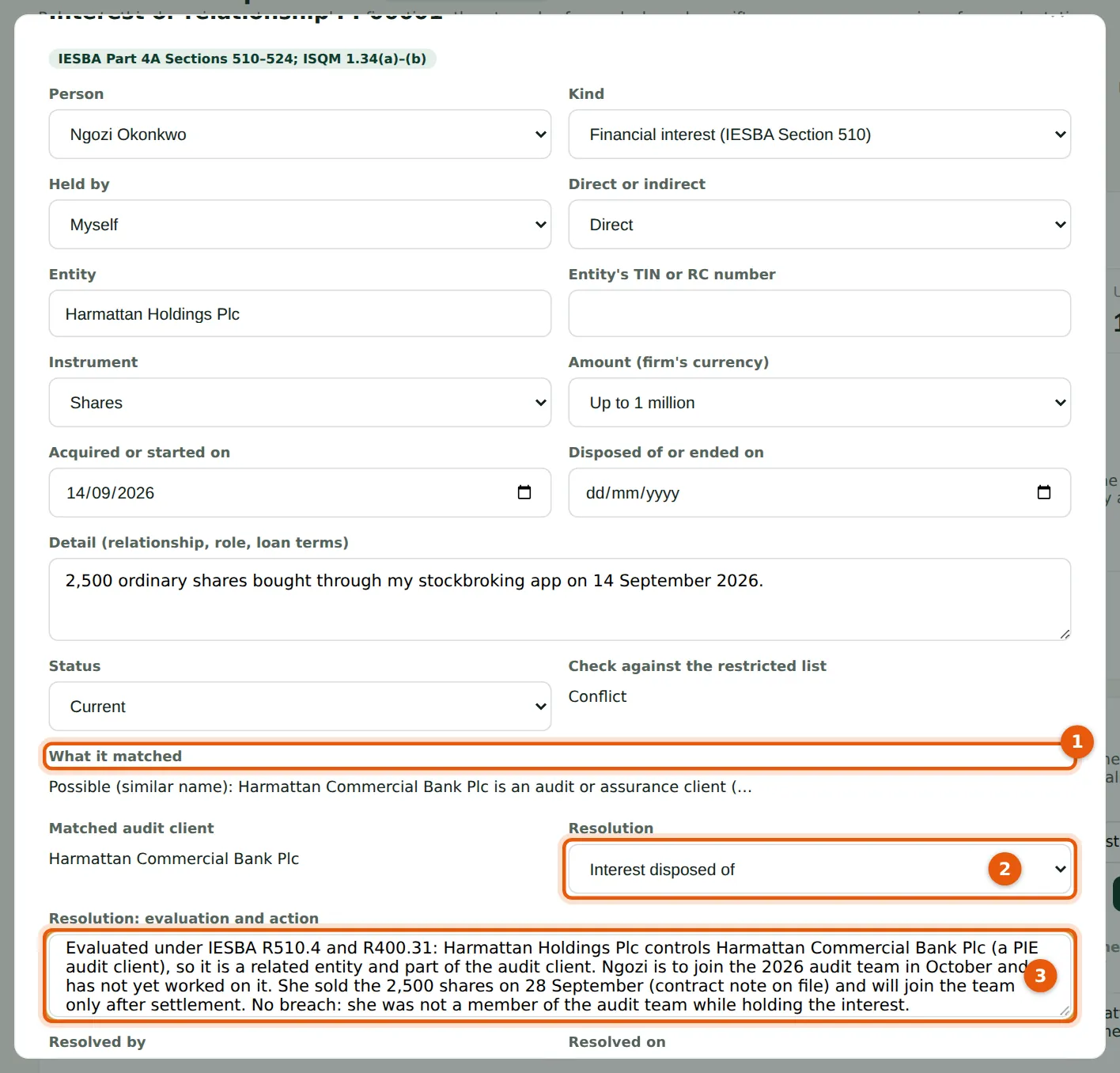
What it matched (1) explains the reason: Harmattan Holdings Plc controls the bank, a public interest entity audit client (IESBA R400.20). Choose the resolution (2): not a conflict (explained), interest disposed of (the entry is ended), person removed from the engagement, safeguard applied, or recorded as a breach — which opens a breach record and so a monitoring finding. The evaluation and action (3) is required. The person who holds the interest cannot resolve it.
Who
Ethics partner (or the quality lead for the ethics partner's own entries).
What to do
- Read what it matched (1); discuss with the person.
- Choose the resolution (2), record the evaluation and the action taken (3), and choose Save.
23.11 Decide a pre-clearance request
Why
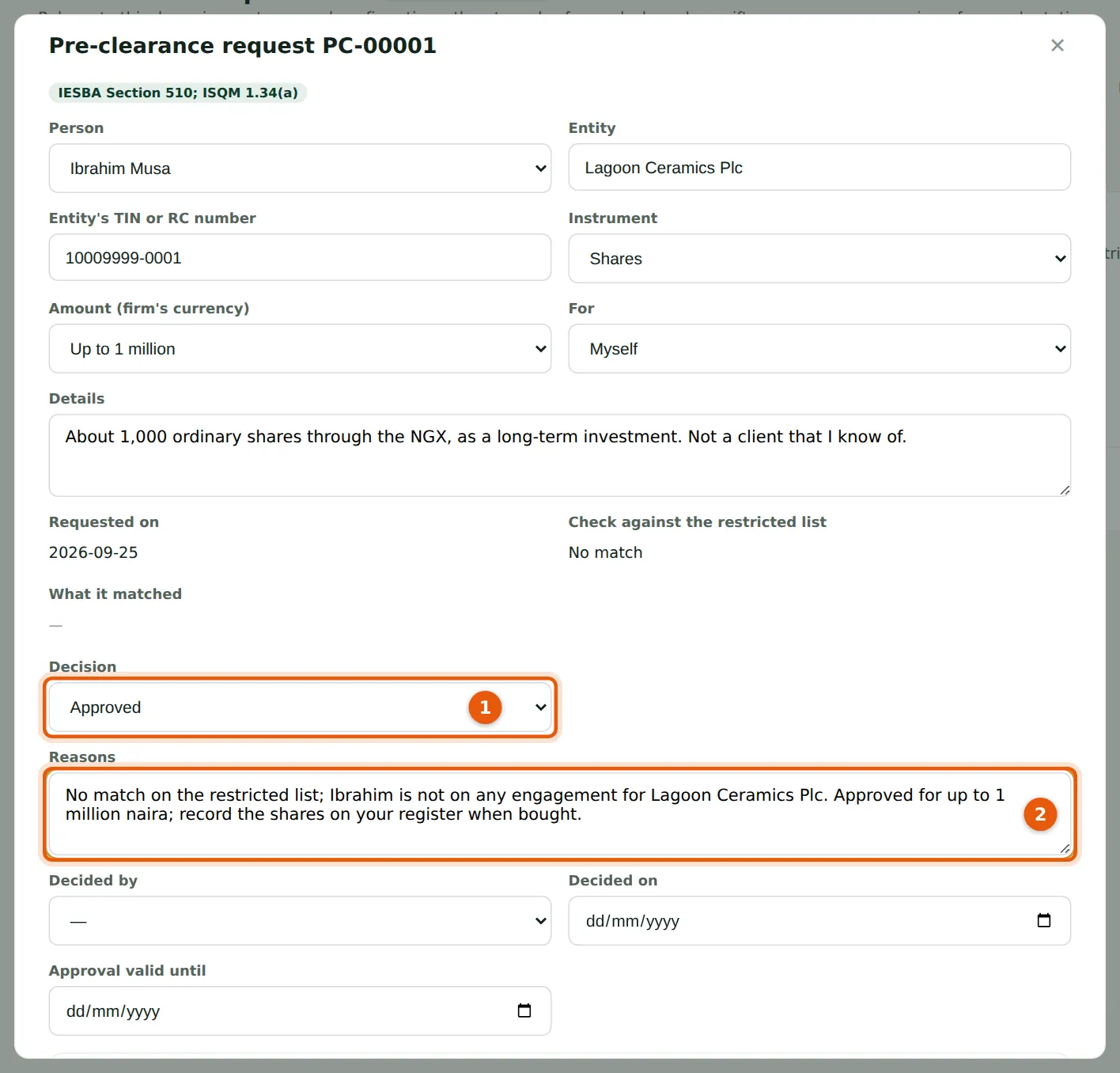
The result of the check against the restricted list is shown on the request — here No match. A request for an entity on the restricted list cannot be approved; a possible match can be approved only with reasons. Choose the decision (1) and record the reasons (2). Decided by and Decided on are filled in when you save. An approval is valid for 30 days, and the person is notified.
Who
Ethics partner.
What to do
- Open Ethics → Pre-clearance and choose the request.
- Choose Approved or Refused (1), record the reasons (2) and choose Save.
23.12 The pre-clearance register
Why
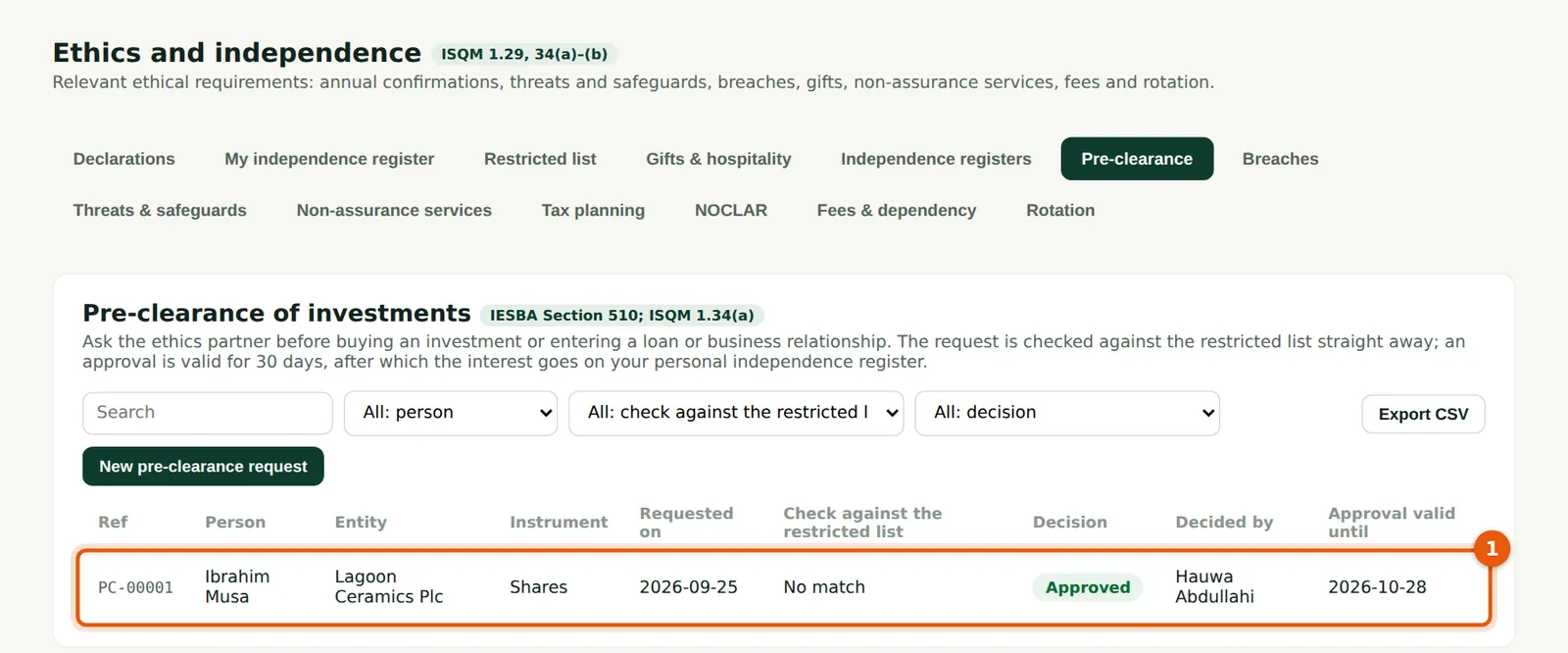
Every request with its check result, decision, who decided and the date the approval ends (1). Requests waiting come first.
Who
Ethics partner.
What to do
- Review the list weekly; the scheduled jobs remind you of requests waiting more than two days.
23.13 Related entities on the restricted list
Why
Below the audit clients, the related entities worked out from the client groups (1) show which client each one belongs to and whether it is part of the audit client or to be evaluated. The same list is used for the personal registers, the non-assurance services check (a related entity of a public interest entity audit client gets the PIE prohibitions), acceptance warnings and external experts.
Who
Everyone (read); ethics partner.
What to do
- Look up a company here before any investment, or use Check an entity (step 23.5).
23.14 A declaration with an automatic exception
Why
Ngozi's ad hoc declaration was submitted before her entry was resolved, so it arrived with the automatic exception (1). The ethics partner reviews it in the usual way (step 7.4).
Who
Ethics partner.
What to do
- Choose Review, record the outcome and the note, and save.