Steps in this chapter (5)
Let SQMTrove send reminders and chasers every hour, import AuditTrove's updates without anyone opening the app, and make AuditTrove wait for the engagement quality review completed in SQMTrove.
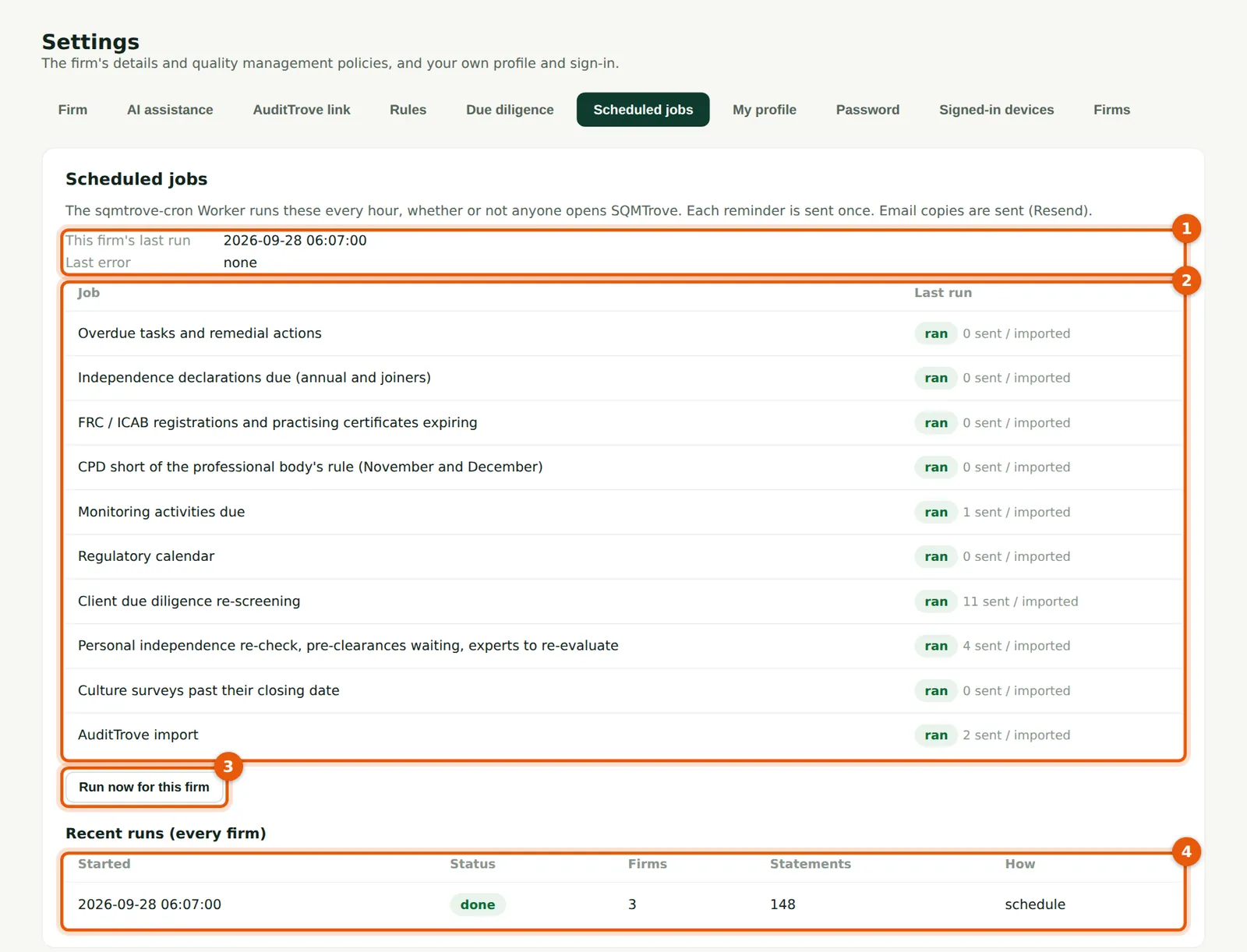
Before September 2026, reminders and the AuditTrove import ran only when someone opened SQMTrove. A scheduled job now runs every hour on TroveUniverse's servers: overdue tasks and remedial actions, declarations due and joiners, registrations and practising certificates expiring, CPD shortfalls in November and December, monitoring activities due, the regulatory calendar, due-diligence re-screening, the daily independence re-check, pre-clearance requests waiting more than two days, unresolved conflicts (on Mondays), experts to re-evaluate, culture surveys past their closing date and the AuditTrove import. Each reminder is sent once; email copies go out when email is set up.
With the AuditTrove link on, SQMTrove's record of the engagement quality review is what AuditTrove reads: AuditTrove will not let the audit report be dated or signed until the review required in SQMTrove is completed there. If AuditTrove reports a report date before the review was completed, SQMTrove raises the automatic finding and alerts the reviewer, the engagement partner and the monitoring lead once.
In the illustration, AuditTrove sends the Riverbend Foods 2026 audit on Saturday 26 September; the scheduled run at 07:07 on Monday 28 September imports it, chases Hauwa Abdullahi about Ibrahim Musa's pre-clearance request, reminds the partners that no client has a due diligence screening yet, and Emeka Obi appoints the reviewer later that morning.
26.1 Settings → Scheduled jobs
Why
This firm's last run (1), each job with what it did in that run (2), Run now for this firm (3), and the recent scheduled runs (4). Times on this page are in UTC, one hour behind Lagos. If email is not configured, the page says so and reminders appear in SQMTrove only. If the last run says “not yet”, the scheduled job has not been deployed: the owner's set-up steps are in the note below.
Who
Owner, firm administrator, quality lead.
What to do
- Open Settings → Scheduled jobs after the first hour to check the jobs ran.
- Use Run now (3) to send due reminders at once.
26.2 Reminders and chasers in SQMTrove
Why
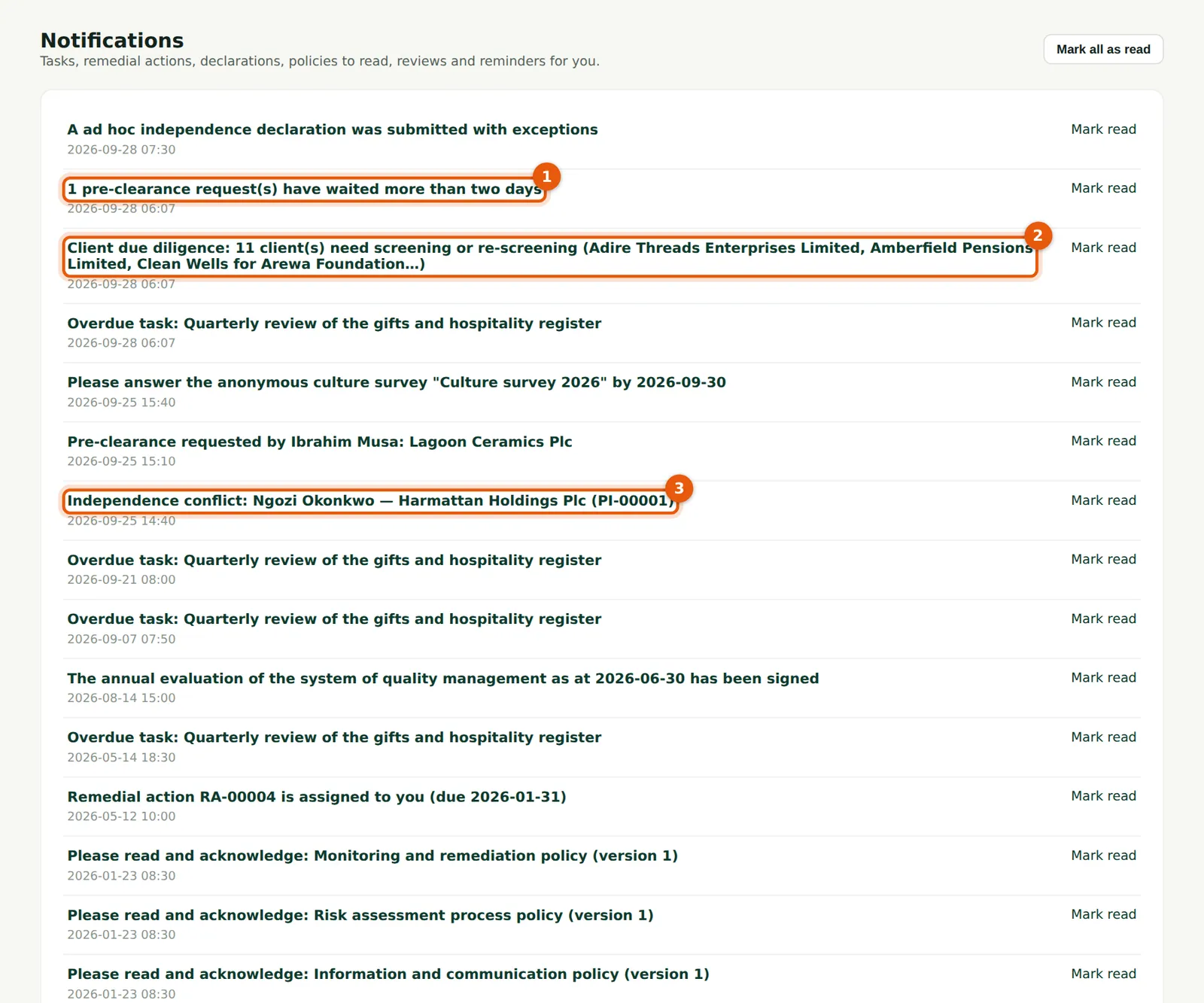
The scheduled jobs' reminders arrive as notifications, each with a link to the item: here the pre-clearance request waiting since Friday (1) and the clients with no due diligence screening yet (2). The alert about Ngozi Okonkwo's conflict (3) arrived on Friday, when she saved the entry. Times are shown in UTC.
Who
Everyone.
What to do
- Choose a notification to open the item; mark notifications read when dealt with.
26.3 The email copy
Why
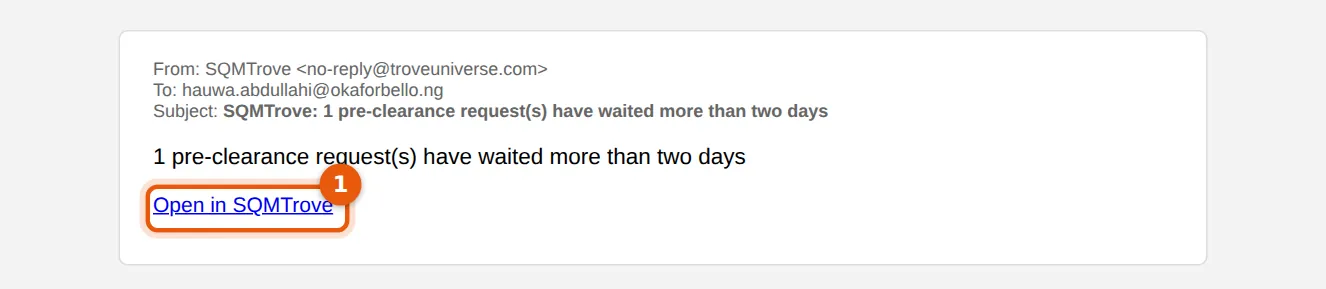
When the firm's email is set up, the same reminder goes by email, with a button (1) that opens the item in SQMTrove after sign-in.
Who
Everyone.
What to do
- Choose the button (1) and sign in with your password and code.
26.4 An appointment refused: registration not current
Why
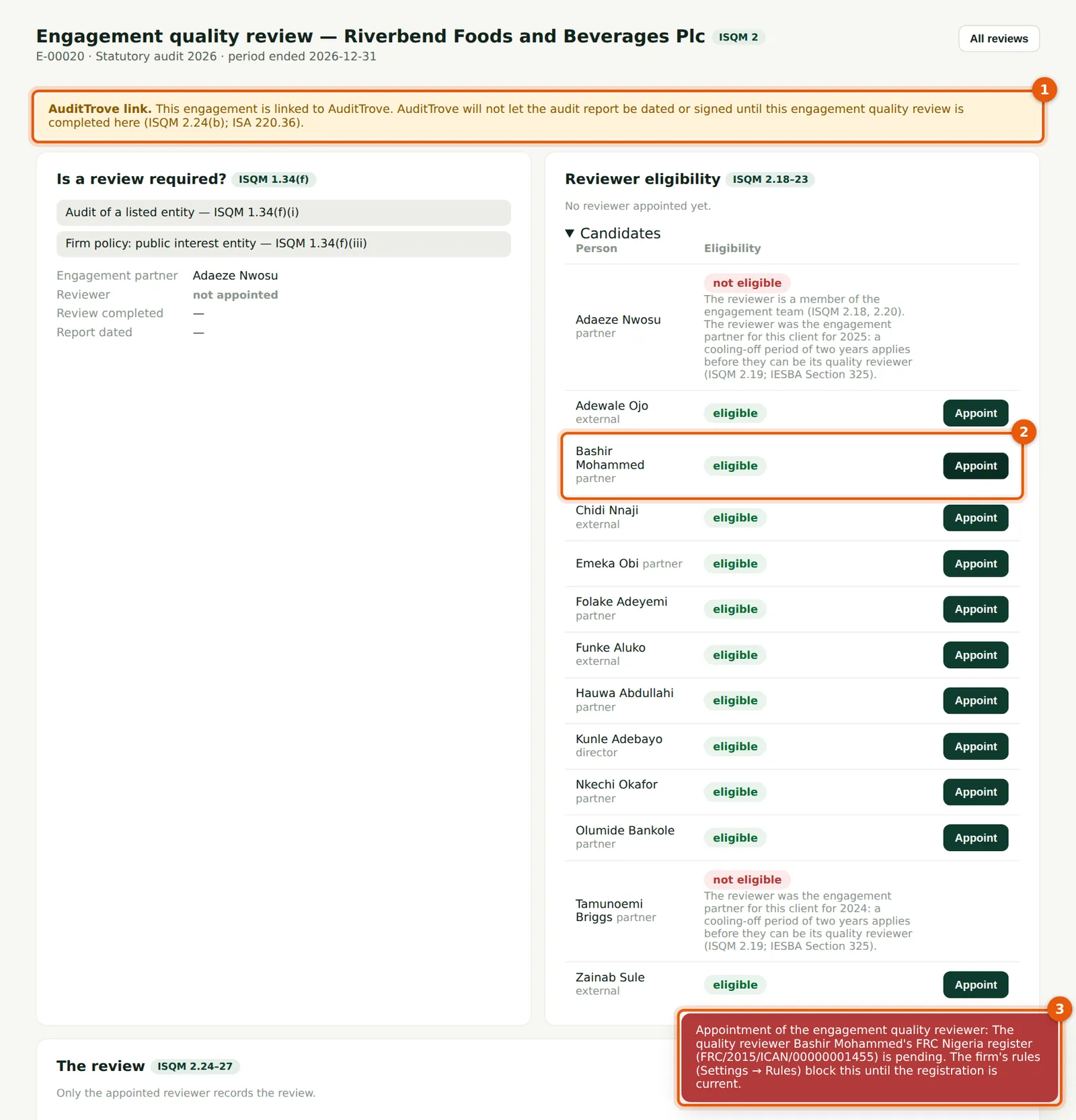
The banner (1) shows the engagement came from AuditTrove and that AuditTrove waits for the review. Emeka tries to appoint Bashir Mohammed (2): with the Nigerian check on Block, the appointment is refused because his FRC registration is pending renewal (3). The firm, the engagement partner and the reviewer must all be on the FRC register.
Who
Quality lead (the appointer, ISQM 2.17).
What to do
- Appoint an eligible reviewer whose registration is current, or record the renewed registration first (step 24.5).
26.5 The review AuditTrove waits for
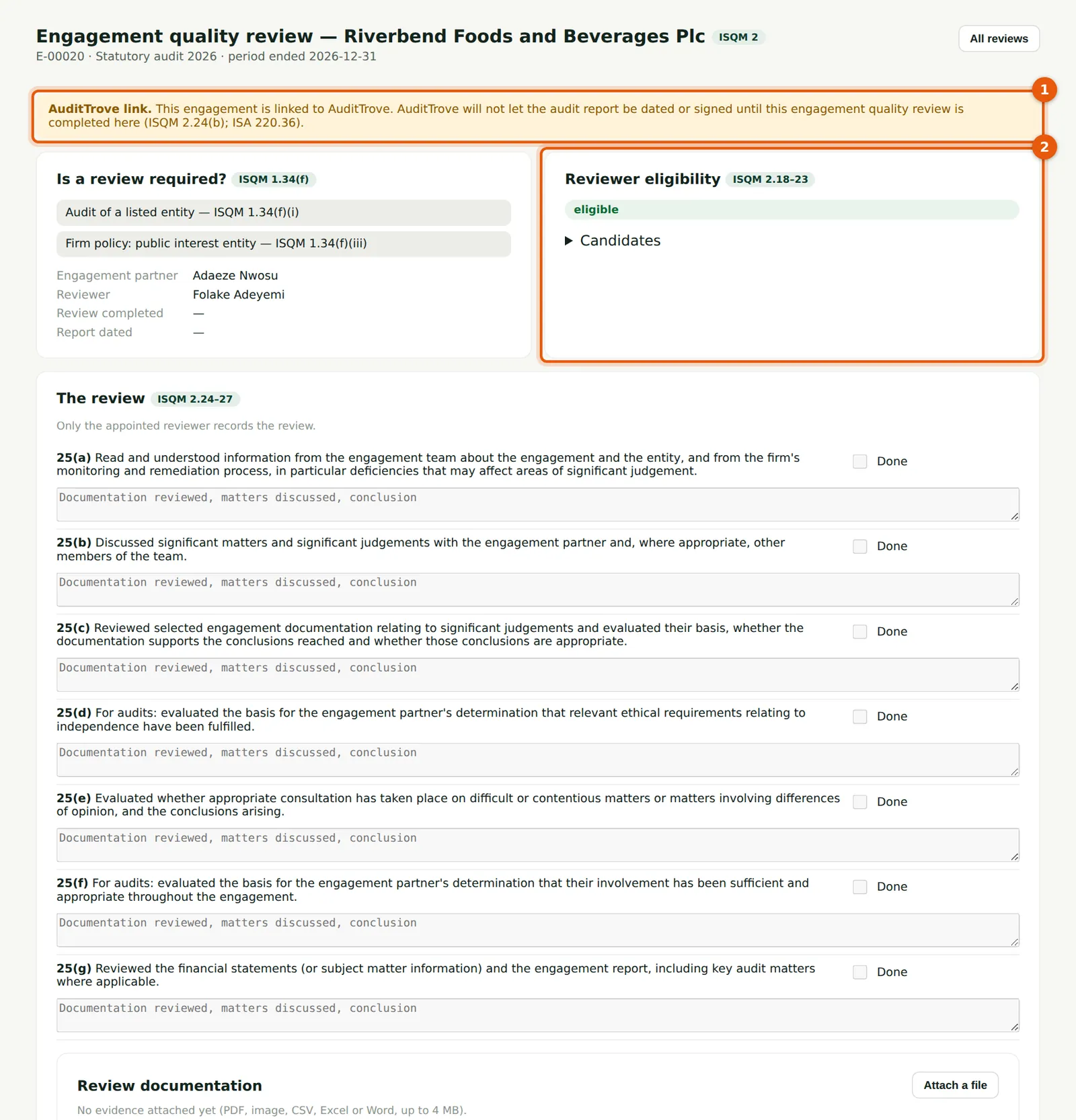
Why
The banner (1) says that AuditTrove will not let the audit report be dated or signed until this review is completed here (ISQM 2.24(b); ISA 220). The reviewer's eligibility (2) is shown as usual. When the reviewer completes the review — with a fresh code from their app (step 24.11) — AuditTrove allows a report date on or after the completion date.
Who
Appointer; reviewer; engagement partner.
What to do
- Plan the review so that it is completed before the report date agreed in AuditTrove.