Steps in this chapter (24)
From 1 January 2027 companies reporting under the IFRS for SMEs Accounting Standard recognise revenue under the revised Section 23, which follows the same five steps as IFRS 15: identify the contract; identify the promises in it (the performance obligations); determine the price; allocate the price to the promises; recognise revenue when, or as, each promise is satisfied. For most sales nothing changes: goods are delivered when they are invoiced. A contract that bundles several things, runs over months, is billed ahead of or behind the work, or has a bonus or penalty needs more, and that is what revenue contracts are for.
A revenue contract holds the promises, their stand-alone selling prices and how each is satisfied. Invoices billed under it go to the contract liability instead of revenue, and a recognition run at each month end posts the revenue earned, promise by promise, and sets each contract's contract asset or contract liability.
In the illustration Savannah Harvest agrees on 1 July 2026 to process, store and document Coastal Agro Exports' second-half ginger crop for ₦27m, with a ₦1m bonus if the 120 tonnes are done by 30 September. Tobi Akinola (sales manager) records the contract and bills it; Funmilayo Adeyemi (accountant) activates it and recognises the revenue at each month end. In August Savannah Harvest also starts developing a private-label ginger tea for Abuja Fresh Mart, measured by its costs.
How revenue contracts work
| Topic | What happens |
|---|---|
| Where | Business → Revenue contracts: the contracts, Recognise revenue to…, and the Recognition runs tab. Reports → Receivables & sales: Revenue contracts (the register) and Revenue disclosures. |
| Plans | The middle and top BookTrove plans. |
| Who | Sales at Prepare level records contracts, bills them and records progress; Sales at Approve level activates contracts, records changes and marks promises satisfied; Sales at Full level cancels a contract. Accounting at Approve level runs recognition, and at Full level undoes the latest run. |
| The contract | Section 23 applies once all five criteria are met: approved and committed, rights identifiable, payment terms identifiable, commercial substance, collection probable. A draft is not accounted for. An activated contract is billed and included in recognition runs. |
| The price | The fixed price plus the variable consideration included: the part of a bonus, penalty, rebate or discount that is highly probable not to reverse, estimated as an expected value or the most likely amount. Amounts exclude VAT. Contracts are kept in the company's own currency. |
| Allocation | The price is shared between the promises in proportion to their stand-alone selling prices, in whole kobo. One promise may take the residual (the price less the others' stand-alone prices), and variable consideration may be allocated to the one promise it relates to. Stand-alone selling prices are fixed when the contract starts. |
| When revenue is recognised | At a point in time when control passes (delivery, acceptance). Over time when the customer receives and uses the benefit as the work is done, when the work creates or improves an asset the customer controls, or when the asset has no other use to the company and the customer must pay for work done to date. |
| Measuring progress | Straight-line over a service period (by days). Units or milestones delivered against the total (output). Costs incurred on the promise's project against the estimated total cost, optionally with approved time at cost (input). A percentage complete you enter with a note of how it was assessed. |
| Billing | Invoices and credit notes billed under a contract credit (or debit) the contract liability account, 2410, instead of revenue; VAT and receivables are as usual. A credit note against a contract invoice always follows its contract. |
| Recognition runs | To a date, usually the month end, and never later than today: for each promise, the revenue earned to the date less what was already recognised (a cumulative catch-up), Dr contract liability, Cr revenue. Then each contract's contract asset (1120) is set to the revenue recognised beyond the amounts billed. One journal per run. Runs go forward only; only the latest can be undone, and only while its contracts are unchanged. |
| Changes | A change in estimate, or a modification accounted for as part of the contract, is caught up in the next run. A modification accounted for prospectively keeps the revenue already earned and re-prices what is left. A modification that adds distinct goods or services at their stand-alone selling prices is a new contract. |
| Not covered | Costs of obtaining or fulfilling a contract are not capitalised here (use a prepayment schedule, chapter 10). A significant financing component, non-cash consideration and provisions for onerous contracts are recorded with journals. The first contracts can be taken over part-way, with the revenue and billing before the takeover date (Section 23's transition relief lets a company keep its old policy for contracts already in progress). |
28.2 The revenue contracts page
Why
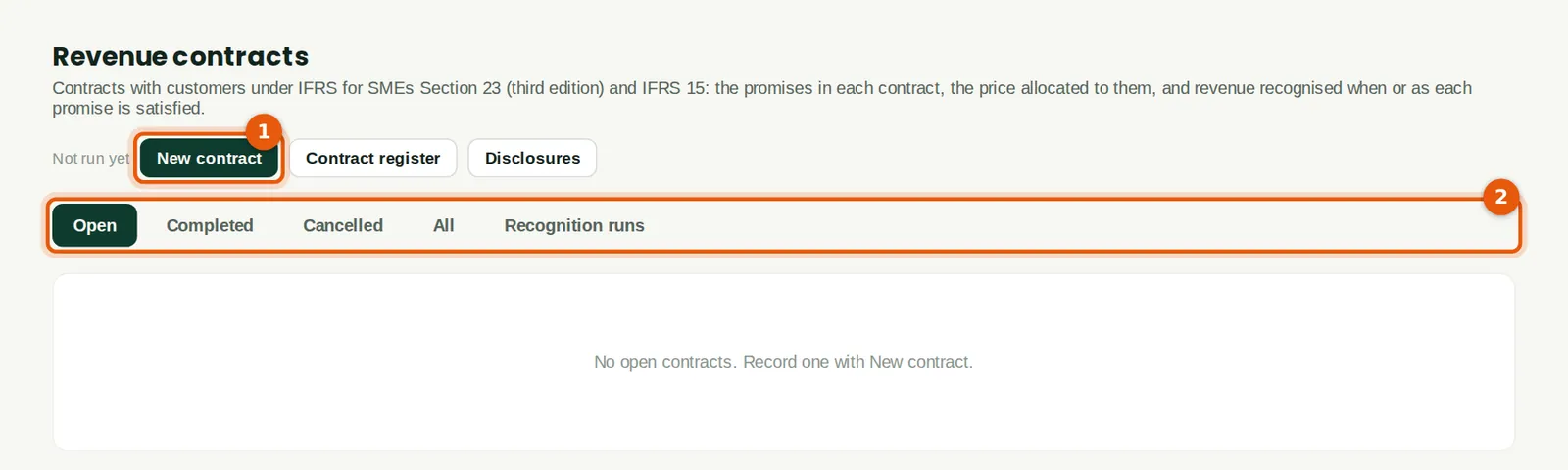
The page lists the contracts, open ones first. New contract (1) records one; the tabs (2) show completed and cancelled contracts and the recognition runs. Recognise revenue to… appears for people who can run recognition.
Who
Sales, Accounting or Reports at View level.
What to do
- Open Business → Revenue contracts.
28.3 Record the contract and its criteria
Why
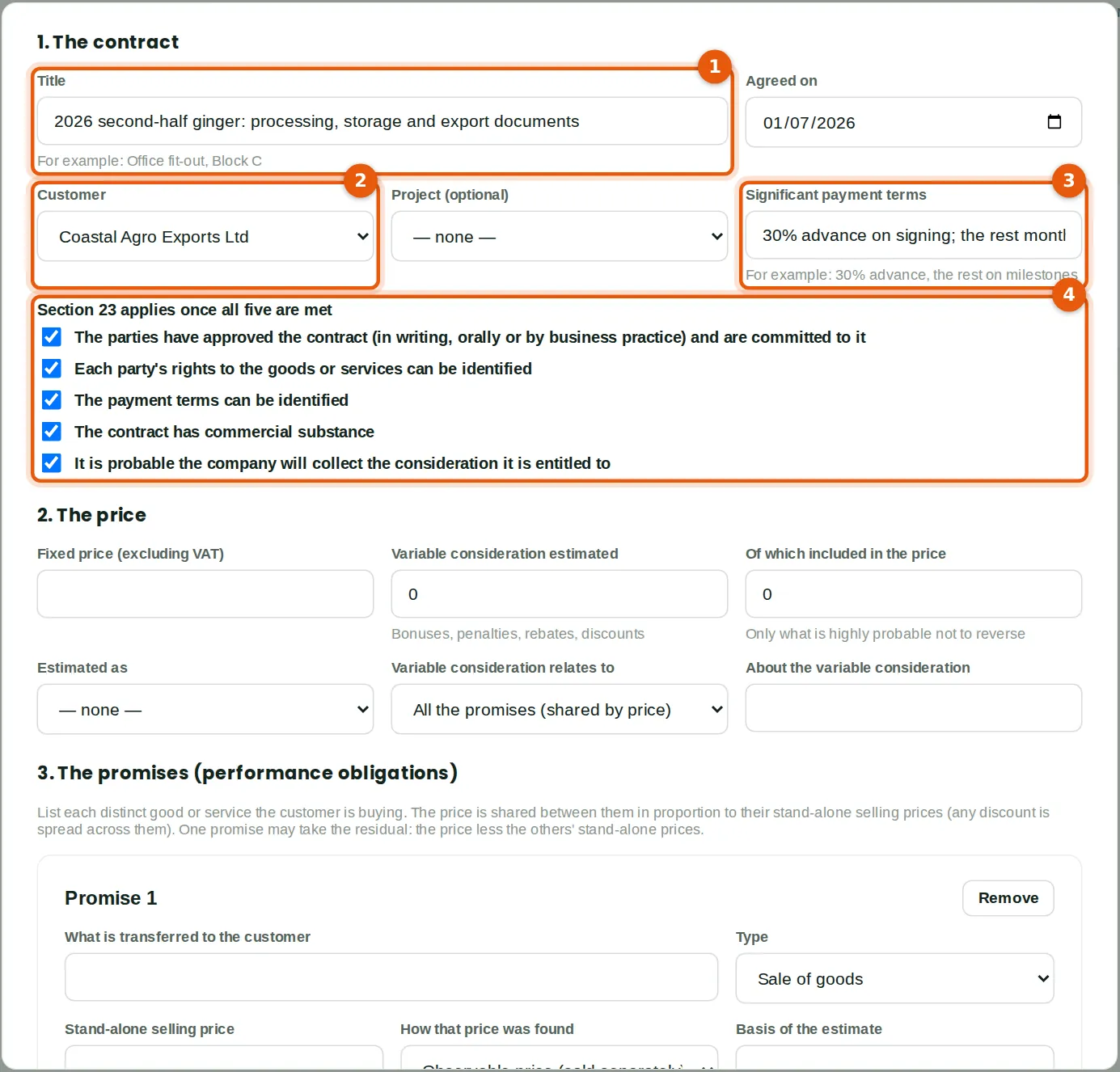
Tobi records Coastal Agro's second-half contract, agreed on 1 July (1), for the customer (2). The significant payment terms (3) are disclosed in the financial statements. The five criteria (4) are the test in Section 23: until all five are met, the contract is not accounted for and anything the customer pays is a liability. The signed contract is in the sales file, so Tobi ticks all five.
Who
Sales at Prepare level (Tobi Akinola, sales manager).
What to do
- Click New contract. Type the title and the date it was agreed, and choose the customer (1, 2).
- Optionally choose a project (needed for the costs measure). Type the significant payment terms (3).
- Tick each criterion that is met (4).
28.4 The price, with variable consideration
Why
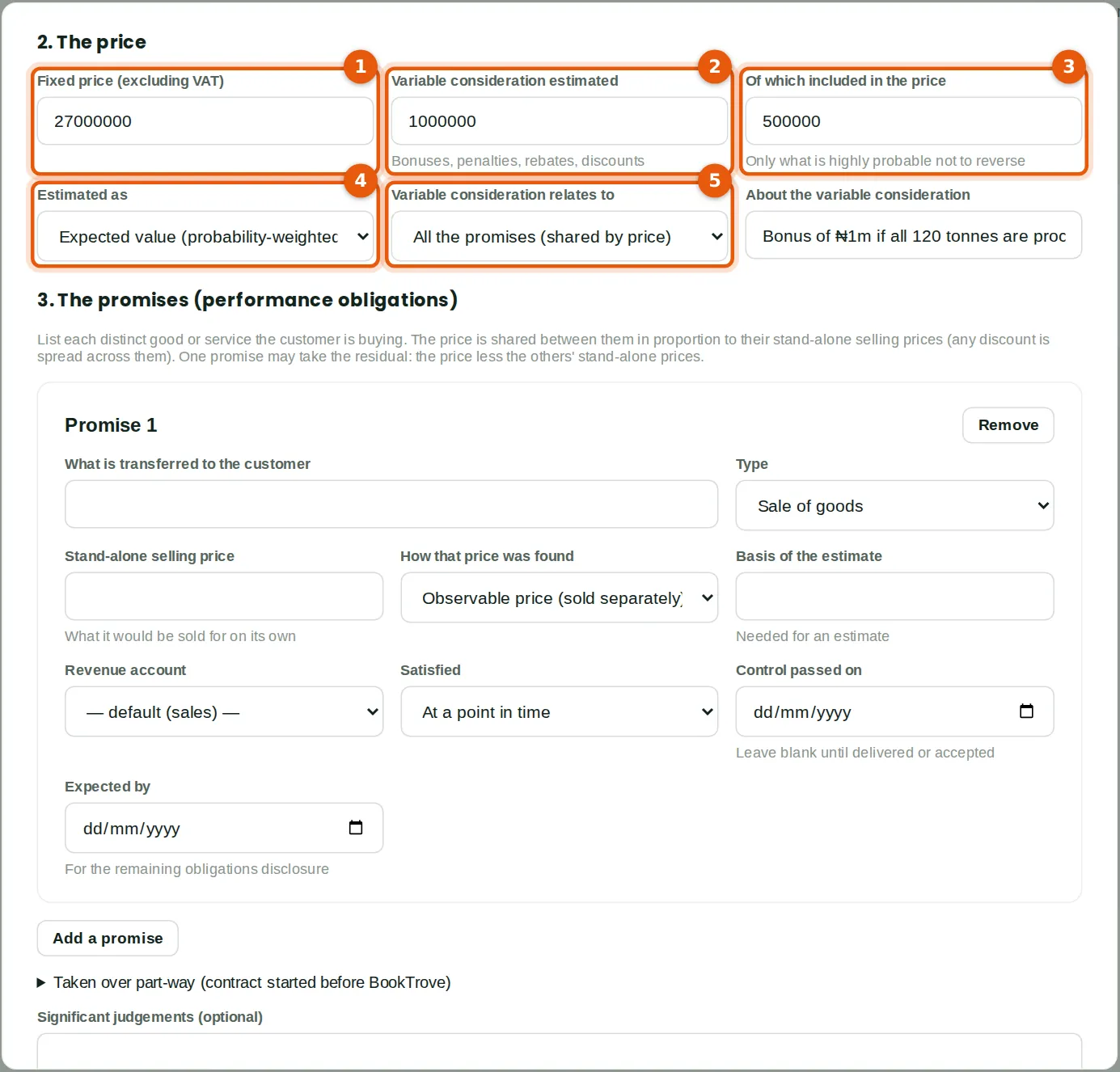
The fixed price (1) is ₦27,000,000, excluding VAT. The bonus of ₦1,000,000 (2) is variable consideration. At signing Tobi judges a 50% chance of finishing by 30 September, so he includes ₦500,000 (3), the expected value (4). Only the part that is highly probable not to reverse may be included; the rest is left out until the outcome is clearer. The bonus relates to the whole contract, so it is shared by price (5).
Who
Sales at Prepare level.
What to do
- Type the fixed price (1).
- If the price can change, type the estimate (2), the amount included (3), how it was estimated (4) and a note of the reasons.
- Leave Variable consideration relates to at All the promises (5), or choose the one promise it belongs to.
28.5 The promises: how each is satisfied
Why
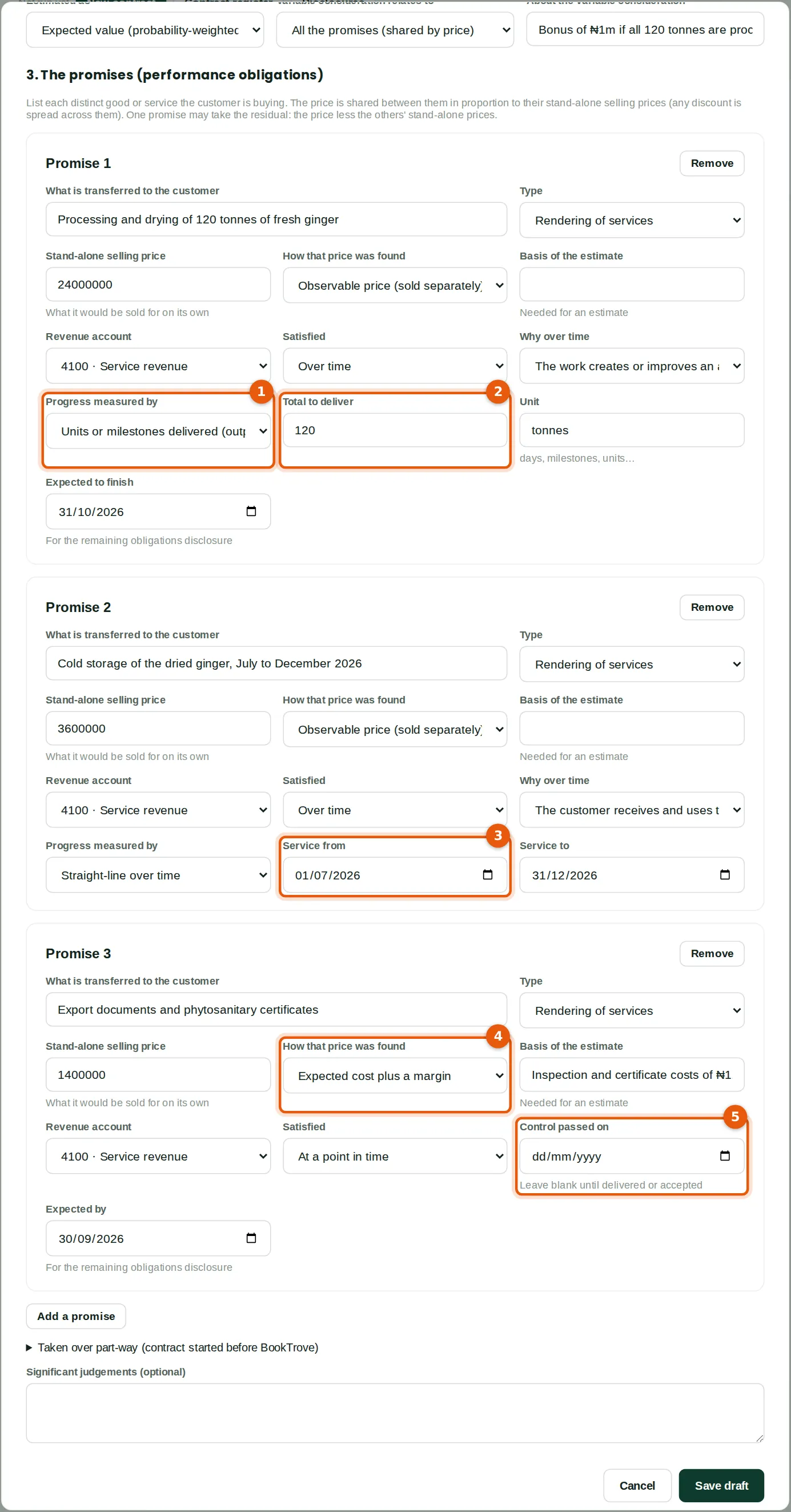
The contract has three promises. Processing the ginger is satisfied over time, because the work improves ginger the customer owns; progress is measured by tonnes processed (1) out of 120 (2). Cold storage is satisfied over time as the customer uses it, straight-line from 1 July to 31 December (3). The export documents are satisfied at a point in time, when they are issued; Savannah Harvest does not sell them separately, so the stand-alone price is its cost plus a margin (4). The date control passed (5) is filled in later. Each promise has its stand-alone selling price (₦24m, ₦3.6m and ₦1.4m) and a revenue account, here 4100 Service revenue.
Who
Sales at Prepare level.
What to do
- For each promise, describe it, choose its type and type its stand-alone selling price.
- Choose Satisfied: at a point in time, or over time with the reason and the measure of progress (1) and its details (2, 3).
- For an estimated stand-alone price, choose how it was found (4) and note the basis.
- Click Add a promise for the next one. Click Save draft.
28.6 The draft and the price allocated
Why
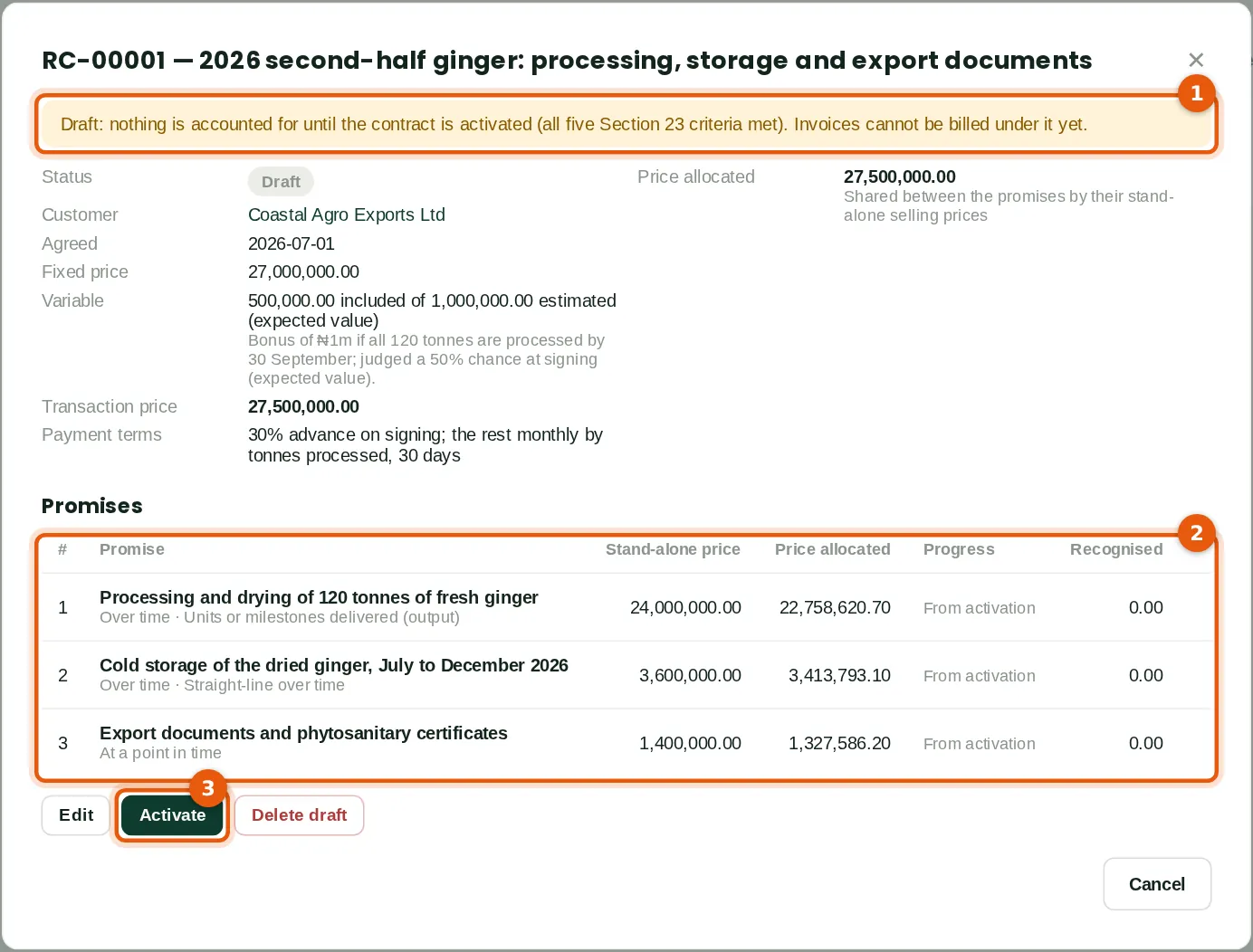
A draft (1) is not accounted for. The table (2) shows the price shared between the promises by their stand-alone selling prices: the stand-alone prices add up to ₦29m and the price is ₦27.5m (₦27m plus the ₦500,000 of bonus included), so the ₦1.5m discount is spread across all three. Processing gets ₦22,758,620.70, storage ₦3,413,793.10 and the documents ₦1,327,586.20, ₦27,500,000 in all. Activate (3) is for someone with Sales approve.
Who
Sales at Prepare level.
What to do
- Check the allocation. Edit the draft if anything is wrong.
28.7 Activate the contract
Why
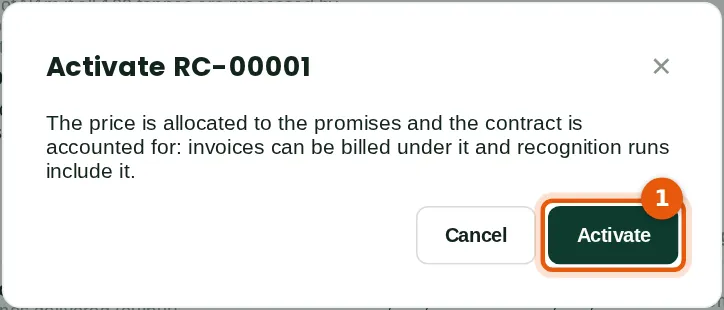
Activating checks that the five criteria are confirmed and fixes the allocation. From then on invoices can be billed under the contract and recognition runs include it. Funmilayo reviews the stand-alone prices against the price list and the cost estimate before she activates.
Who
Sales at Approve level (Funmilayo Adeyemi, accountant).
What to do
- Open the contract and click Activate, then Activate (1).
28.8 Bill under the contract
Why
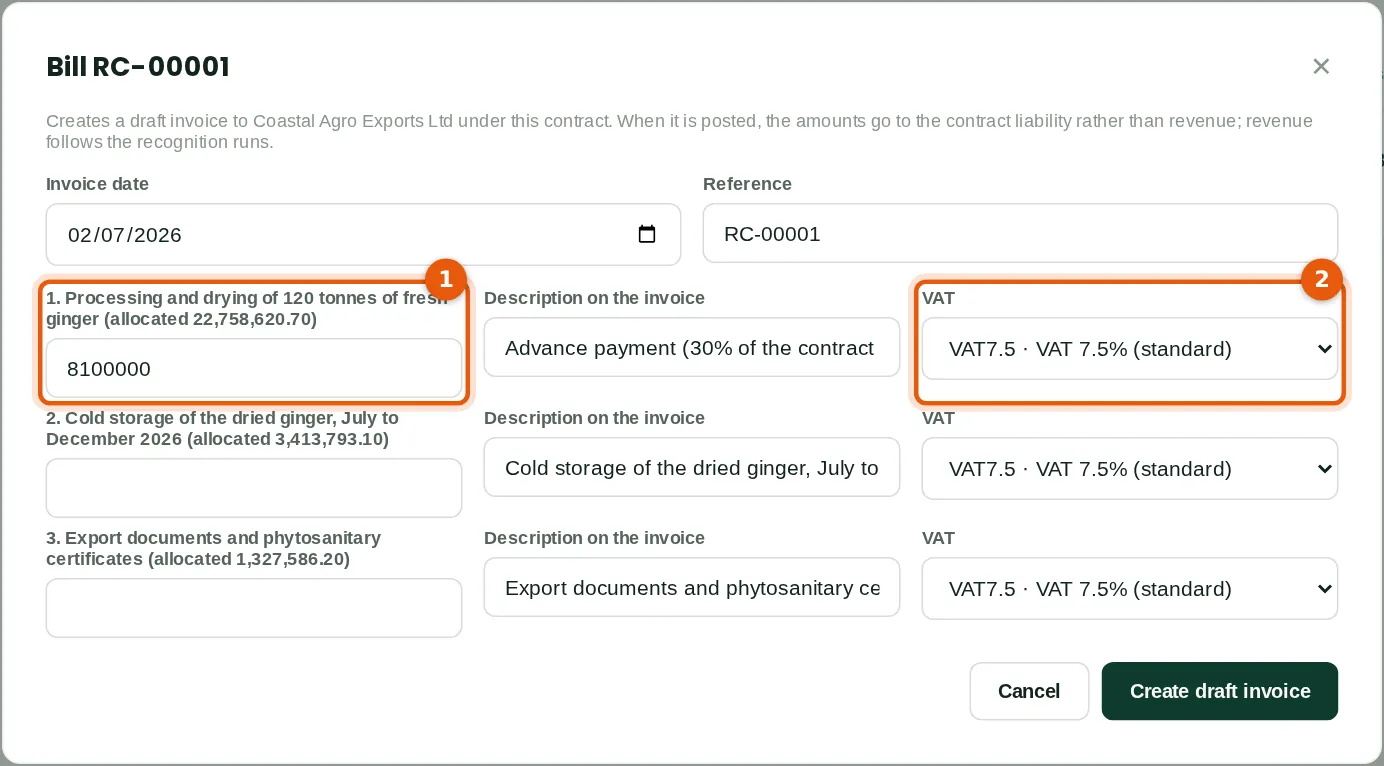
The advance of 30% of the fixed price, ₦8,100,000 (1), is due on signing. Tobi puts it against the processing promise with VAT at 7.5% (2). Bill creates a draft invoice to the customer under the contract.
Who
Sales at Prepare level.
What to do
- Open the contract and click Bill (draft invoice).
- Type the amounts to bill, the descriptions and the VAT (1, 2). Click Create draft invoice.
28.9 The invoice and its revenue contract
Why
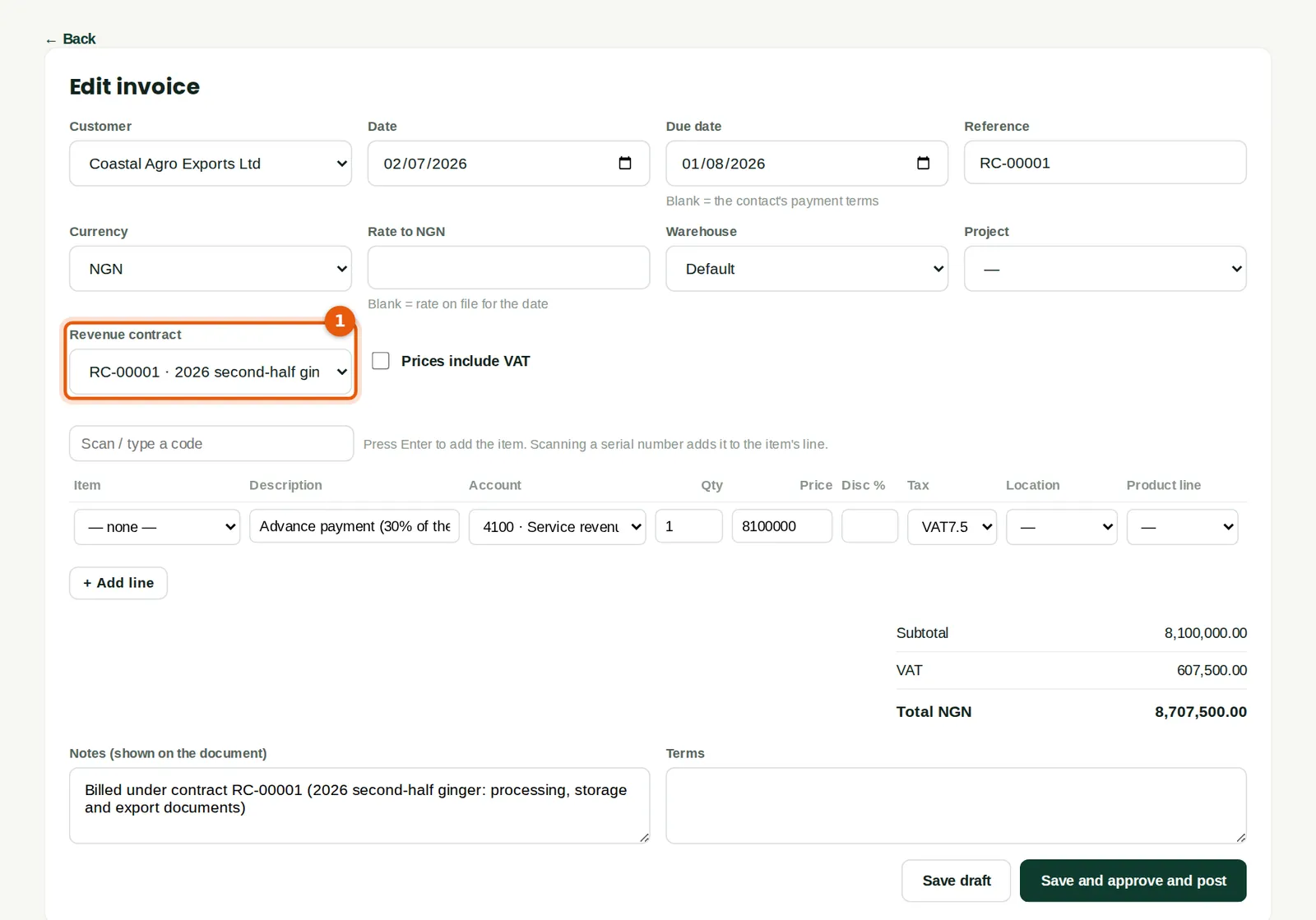
The invoice shows the contract (1). Any invoice or credit note to the customer can be put under one of its active contracts here, for example a progress invoice raised from a project. The line's account (4100) is used only if the invoice is not under a contract.
Who
Sales at Prepare level.
What to do
- Check the invoice and post it, as any invoice (chapter 7).
28.10 The posted invoice
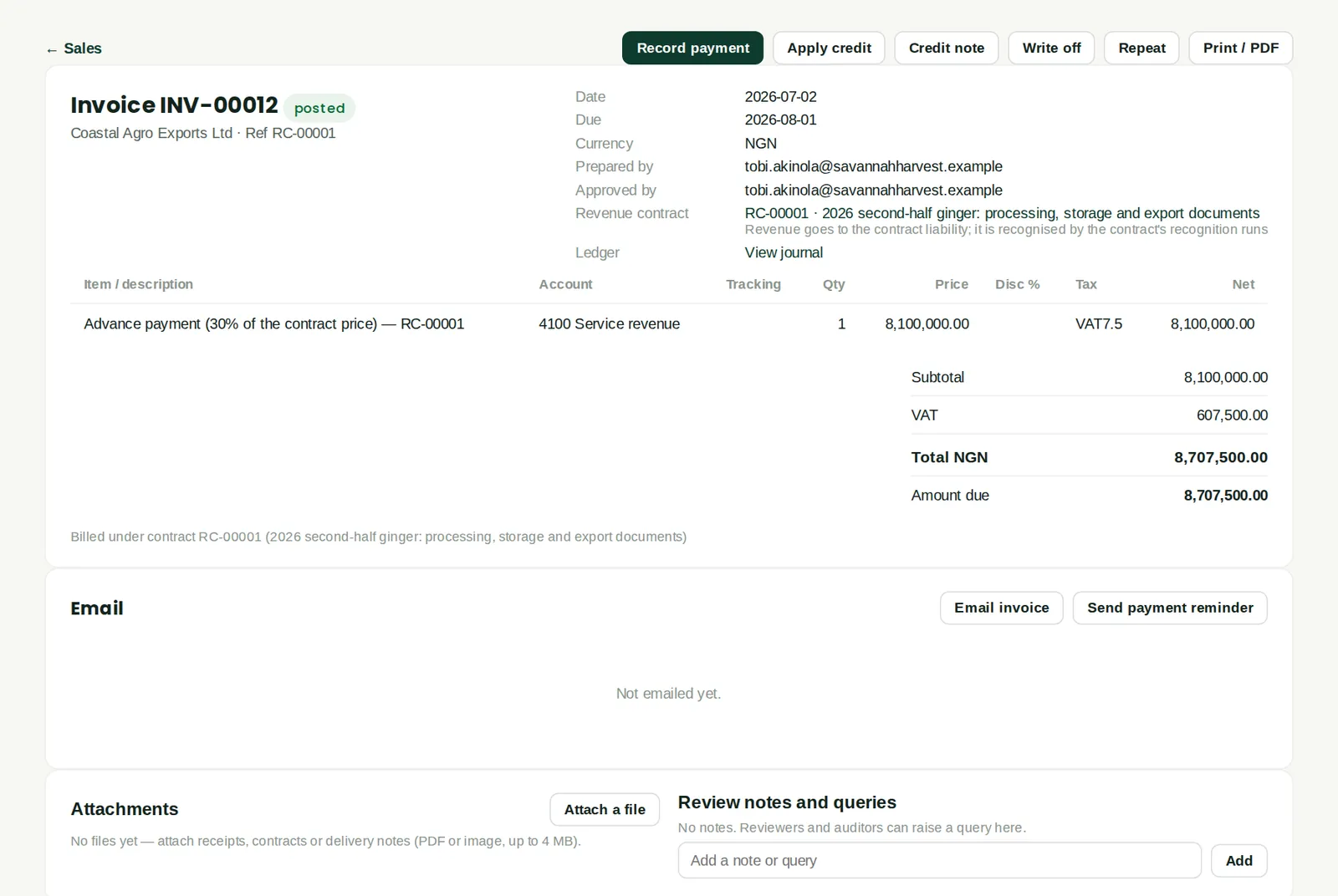
Why
Posted under the contract (1), the ₦8,100,000 is credited to 2410 Deferred revenue (contract liabilities), not to revenue; the VAT and the receivable are as usual. Revenue follows the recognition runs.
Who
Anyone who can see sales.
What to do
- Click the contract to open it.
28.11 Record progress
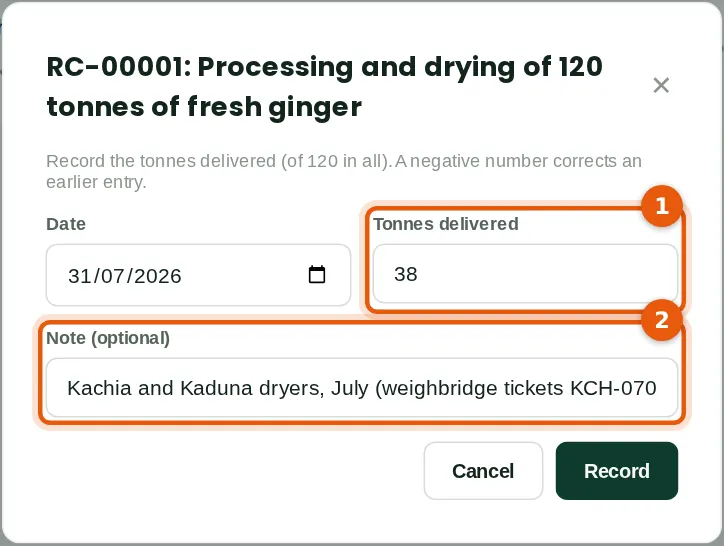
Why
For a promise measured by units or milestones, record what was delivered (1) with a note (2), here 38 tonnes processed in July from the weighbridge tickets. A negative number corrects an earlier entry. For a percentage-complete promise, record the percentage at the date and how it was assessed.
Who
Sales at Prepare level, or Projects at Prepare level.
What to do
- Open the contract and click Record progress on the promise. Type the date, the quantity and a note. Click Record.
28.12 Recognise revenue to the month end
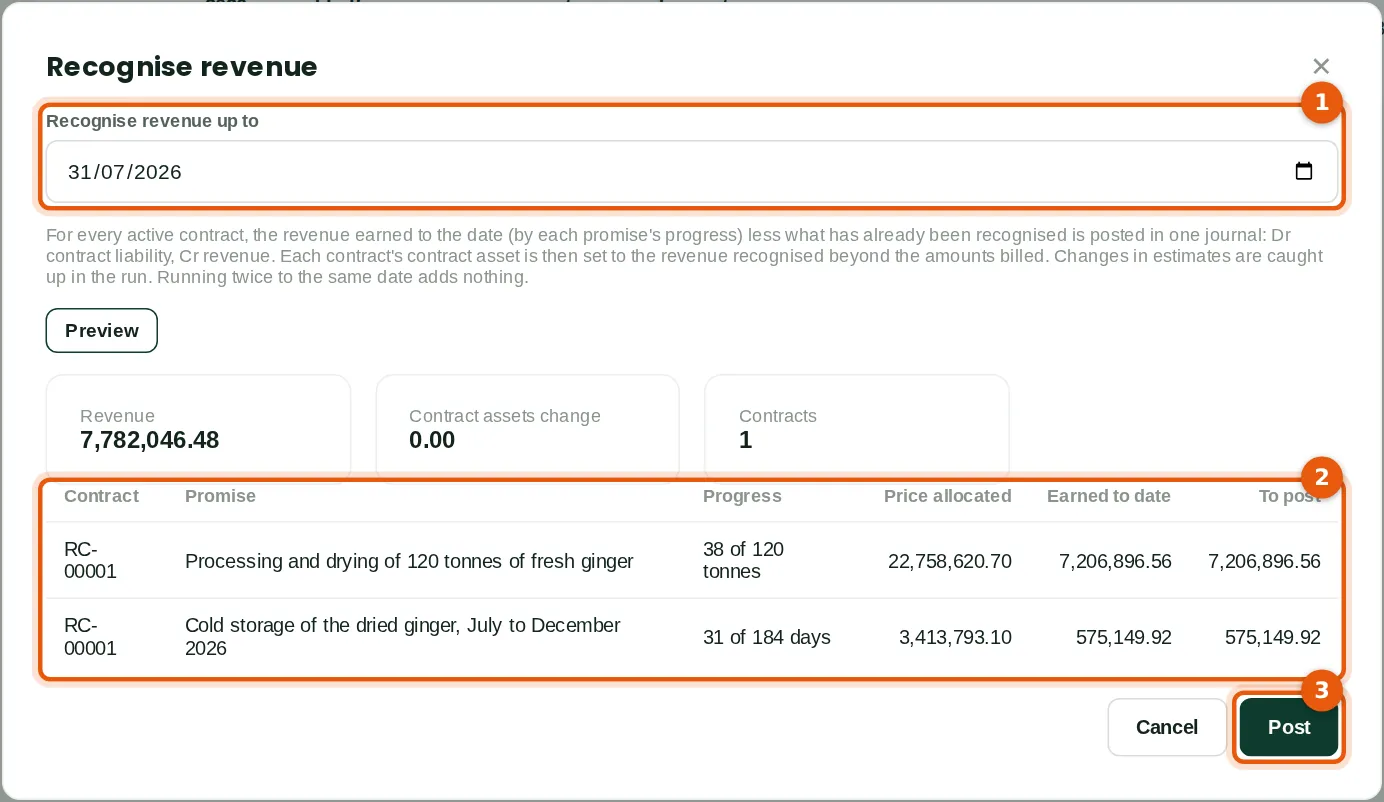
Why
Funmilayo recognises revenue to 31 July (1). The preview (2) shows each promise: 38 of 120 tonnes is 31.7% of ₦22,758,620.70, ₦7,206,896.56; storage for 31 of 184 days is ₦575,149.92. The documents are not yet issued. Nothing is billed beyond the ₦8,100,000, so there is no contract asset. Post (3) posts one journal.
Who
Accounting at Approve level (Funmilayo Adeyemi).
What to do
- Click Recognise revenue to…, choose the date (1) and click Preview.
- Check the lines (2). Click Post (3).
28.13 The contract after the run
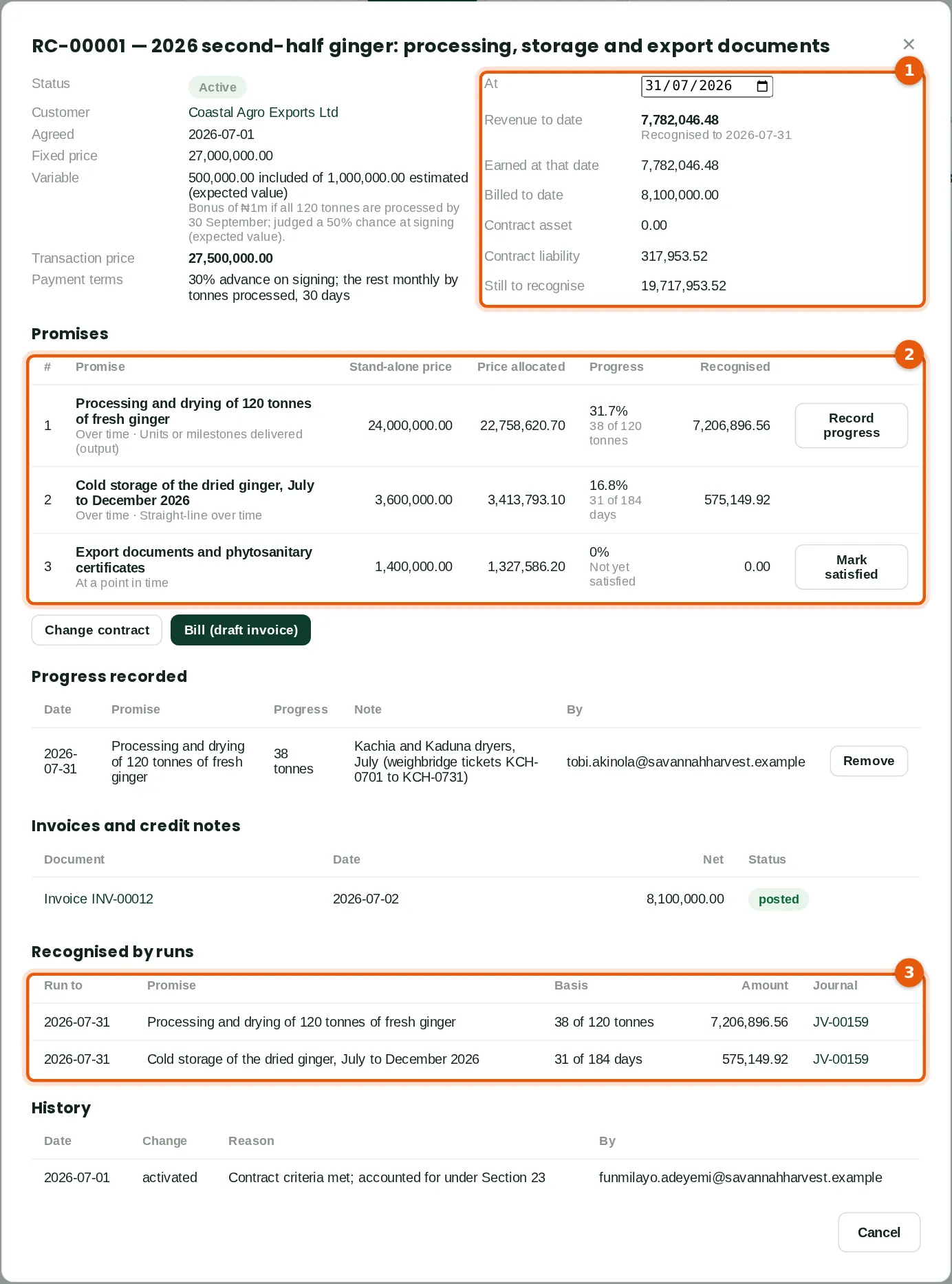
Why
The position at a date (1): revenue to date ₦7,782,046.48, billed ₦8,100,000, so a contract liability of ₦317,953.52, the advance not yet earned. Each promise (2) shows its progress and the revenue recognised. Recognised by runs (3) lists what each run posted, with its journal. Change the date (1) to see the position at another date.
Who
Anyone who can see the contract.
What to do
- Open the contract. Change the date at the top to look at another date.
28.14 The run's journal
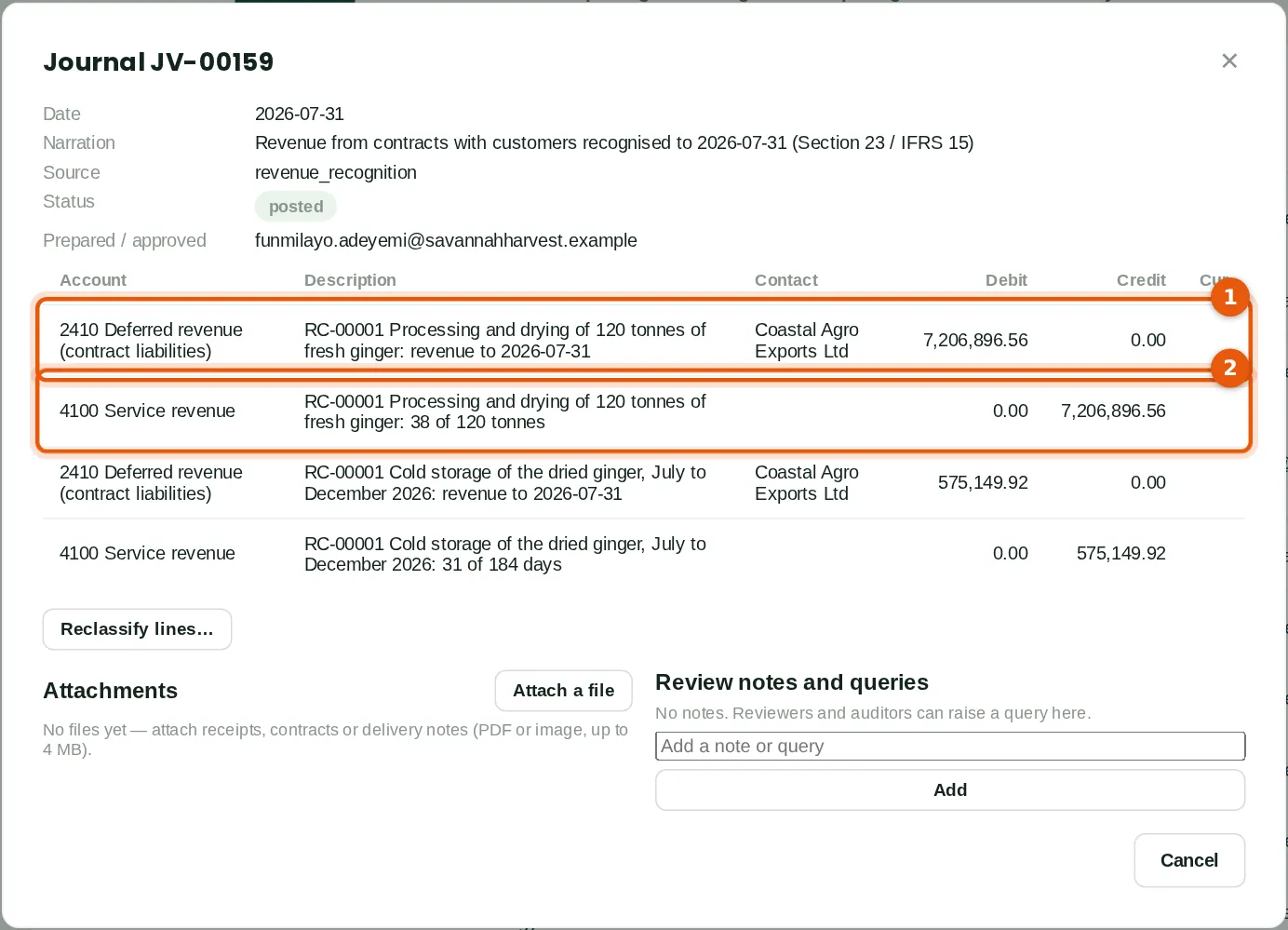
Why
The run debits the contract liability (1) and credits the promise's revenue account (2), line by line. A contract asset, when there is one, is set in the same journal. The lines belong to the contract, so they cannot be reclassified to another account; correct the contract or its invoices instead.
Who
Accounting at View level.
What to do
- Click the journal number in the contract's runs, or on the Recognition runs tab.
28.15 Progress measured by costs
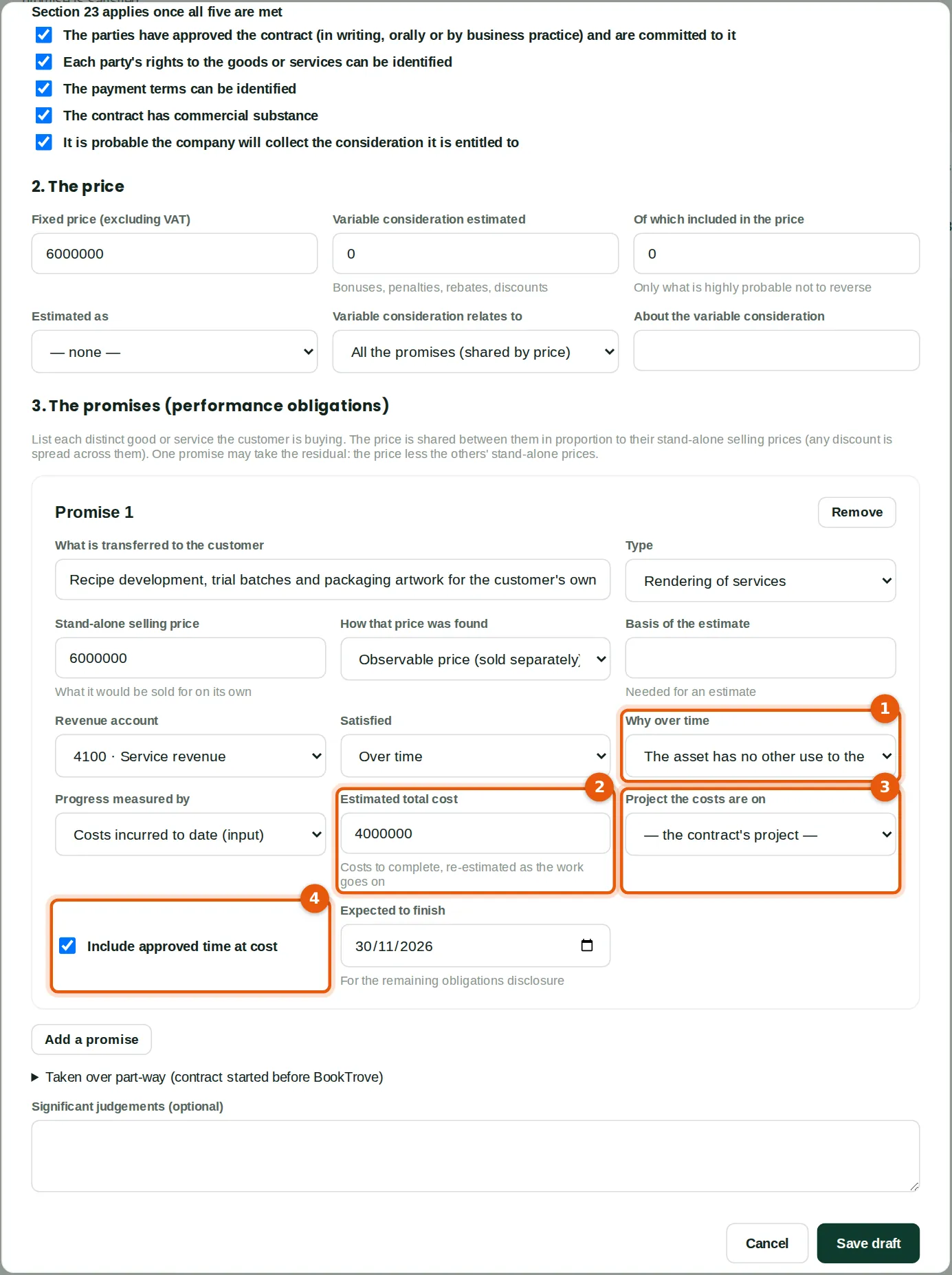
Why
Abuja Fresh Mart commissions a private-label ginger tea: recipes, trial batches and packaging artwork for ₦6,000,000. The work has no other use to Savannah Harvest and the customer must pay for work done (1), so it is satisfied over time. Progress is the costs posted to project AFM-TEA against the estimated total of ₦4,000,000 (2); the project is the contract's (3). Approved time on the project at cost is included (4). Each project measures one promise only. When the estimate rises, record a change in estimate: the next run catches up.
Who
Sales at Prepare level.
What to do
- Choose Over time, the reason (1) and Costs incurred to date.
- Type the estimated total cost (2) and choose the project (3). Leave Include approved time at cost ticked (4) if staff time is part of the costs.
28.16 A promise satisfied at a point in time
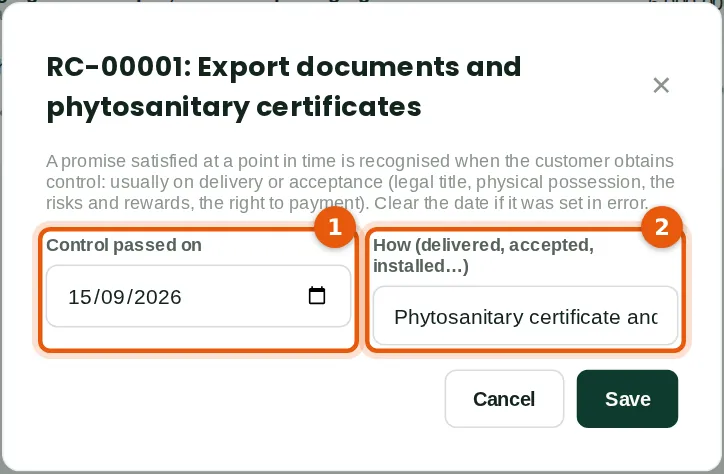
Why
The container sailed on 15 September with the certificates, so the export documents promise is satisfied: control passed on that date (1). Tobi notes how (2). The date cannot be in the future. The next run recognises the promise's price.
Who
Sales at Approve level.
What to do
- Open the contract and click Mark satisfied on the promise. Type the date and how control passed. Click Save.
28.17 Change an estimate: the bonus
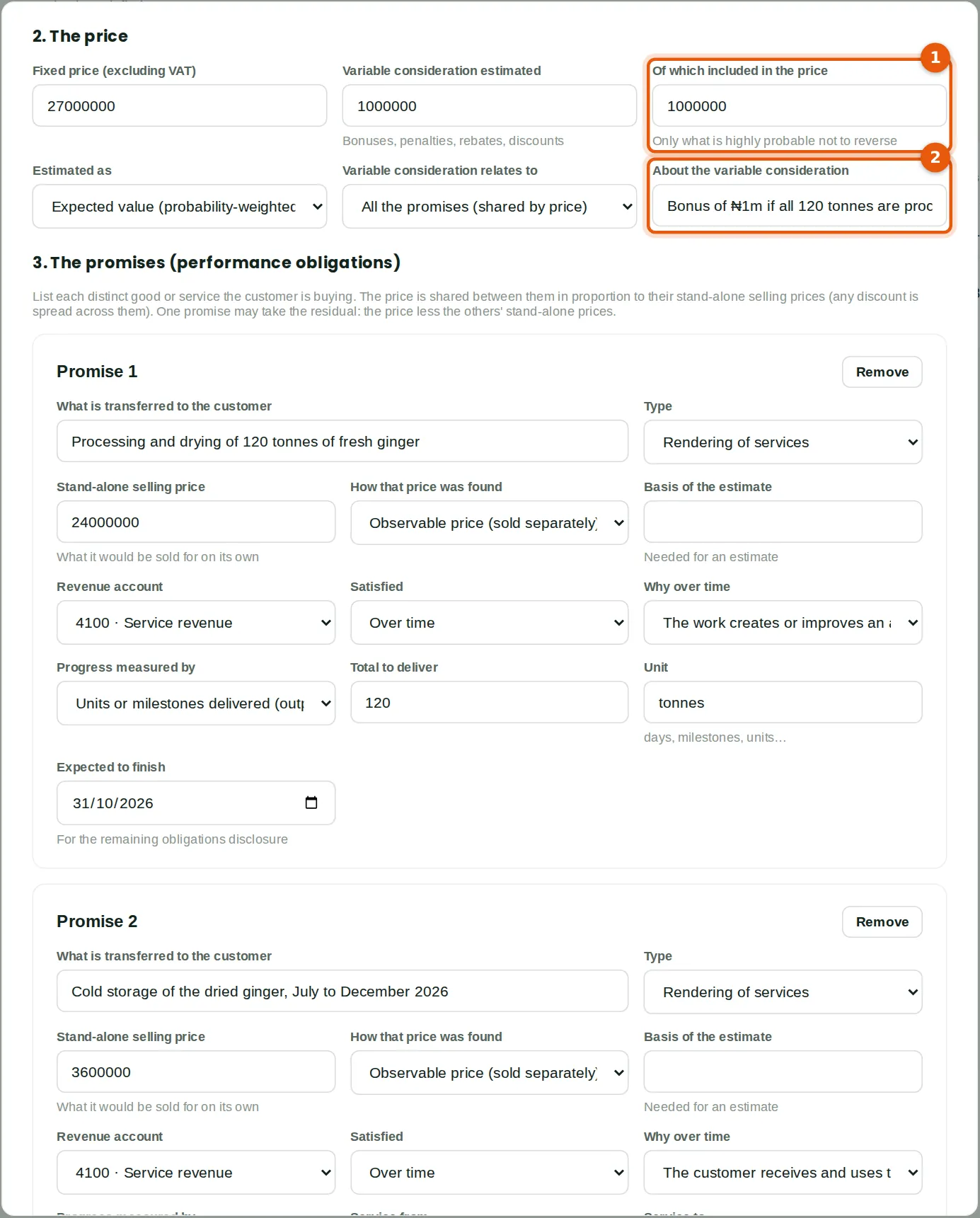
Why
By 25 September 110 of the 120 tonnes are done, so the ₦1m bonus is now highly probable and Funmilayo includes all of it (1), with the reason in the note (2). The price becomes ₦28,000,000. It is allocated on the stand-alone selling prices fixed at the start.
Who
Sales at Approve level (Funmilayo Adeyemi).
What to do
- Open the contract and click Change contract. Change the figures.
28.18 Record the kind of change
Why
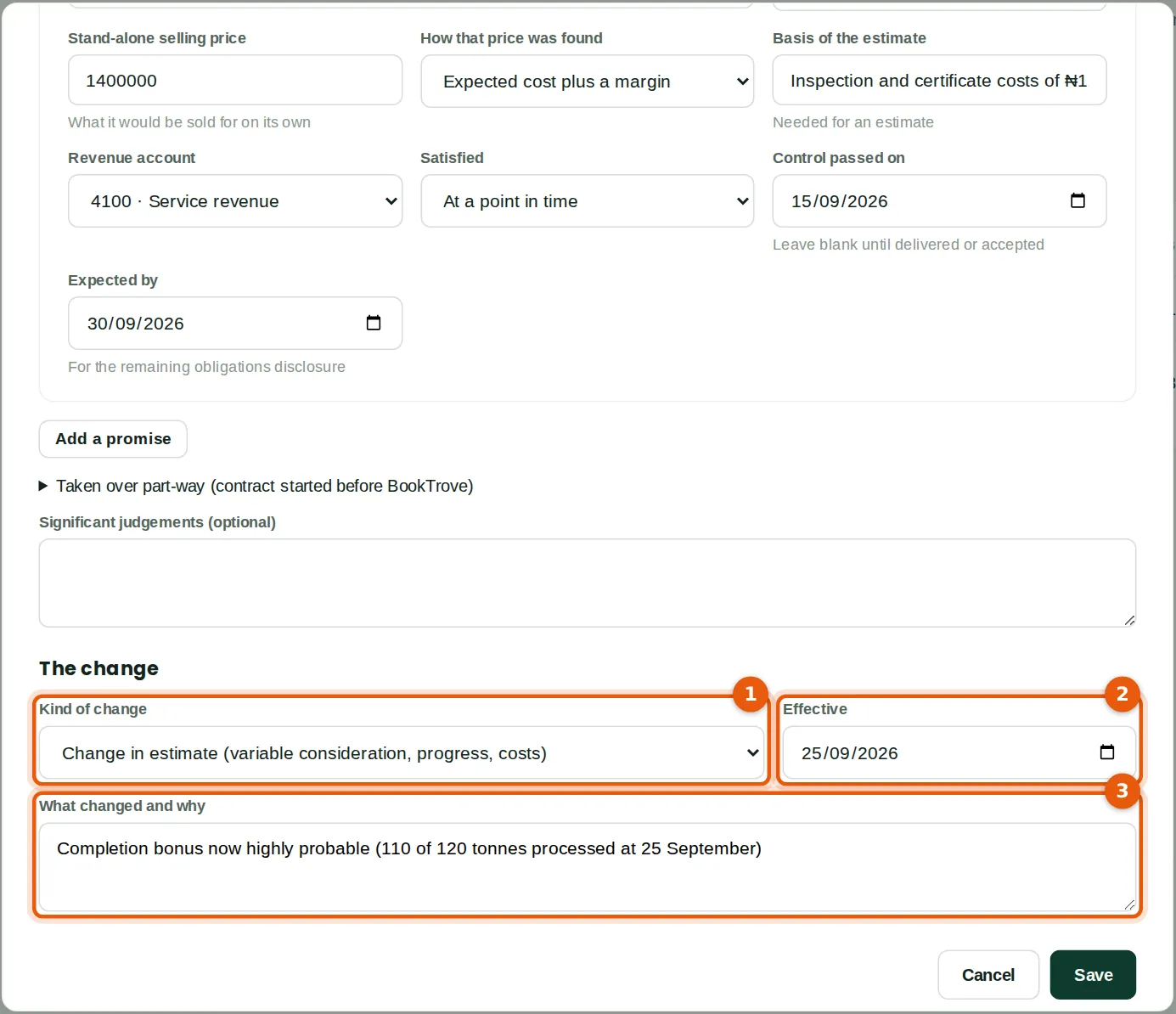
Every change to an active contract is recorded with its kind (1), the date it takes effect (2) and why (3), with the contract before and after; the history is on the contract. A change in estimate, a modification accounted for as part of the contract, or a correction is caught up in the next run. A prospective modification keeps the revenue already earned: satisfied promises keep their price and the rest of the price is spread over what is left.
Who
Sales at Approve level.
What to do
- Choose the kind of change (1) and the date (2), and say what changed (3). Click Save.
28.19 The September run: a catch-up and contract assets
Why
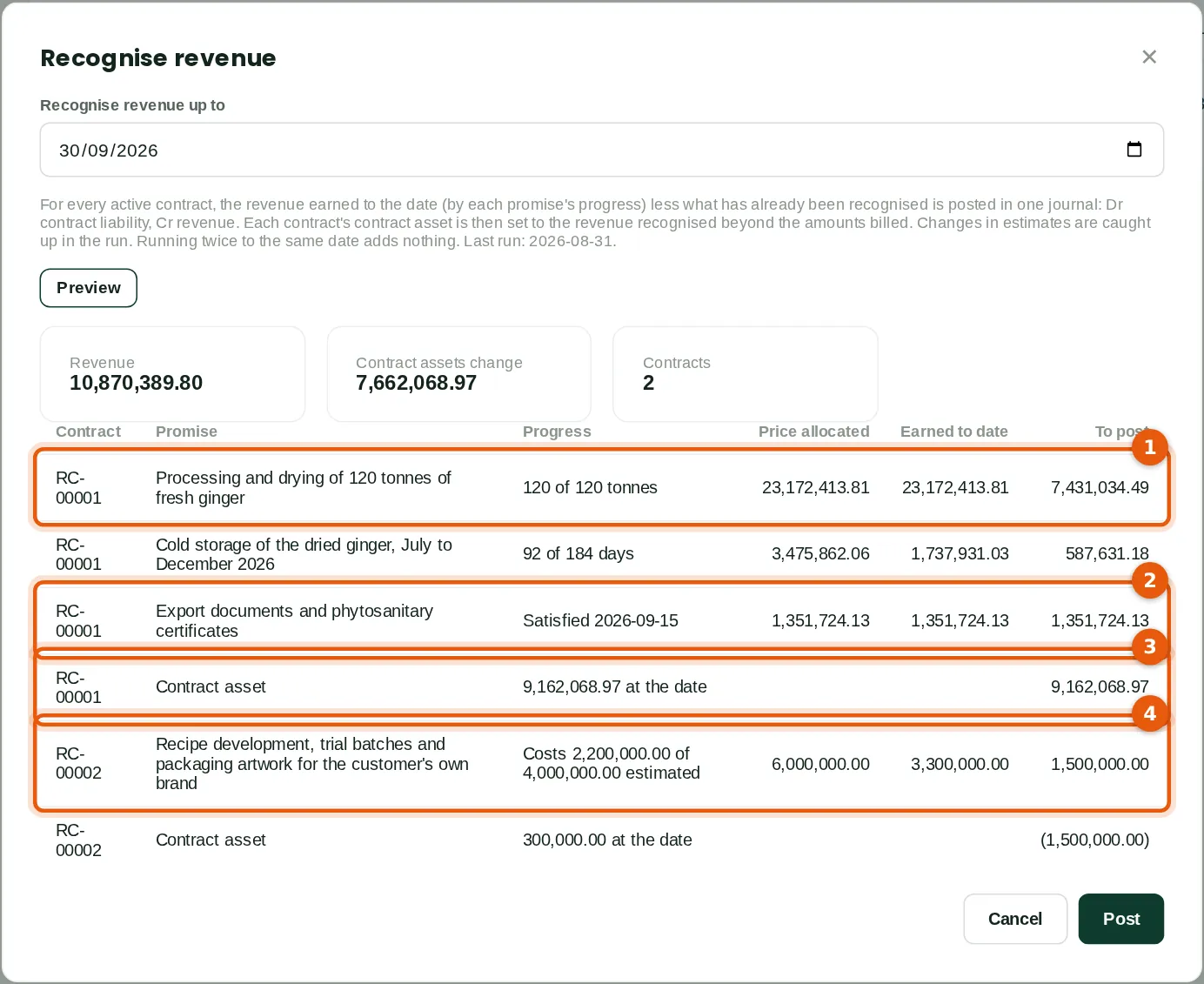
All 120 tonnes are done, so processing is recognised in full at its new allocation, ₦23,172,413.81, including the catch-up for the bonus (1). The documents are recognised (2). Coastal Agro has been billed ₦17,100,000 against ₦26,262,068.97 earned, so the contract asset is set to ₦9,162,068.97 (3). The tea: costs of ₦2,200,000 of ₦4,000,000 is 55% of ₦6m, ₦3,300,000 to date (4); it was half billed in September, so its contract asset falls to ₦300,000.
Who
Accounting at Approve level.
What to do
- Preview, check and post, as in step 28.12.
28.20 The contract at 30 September
Why
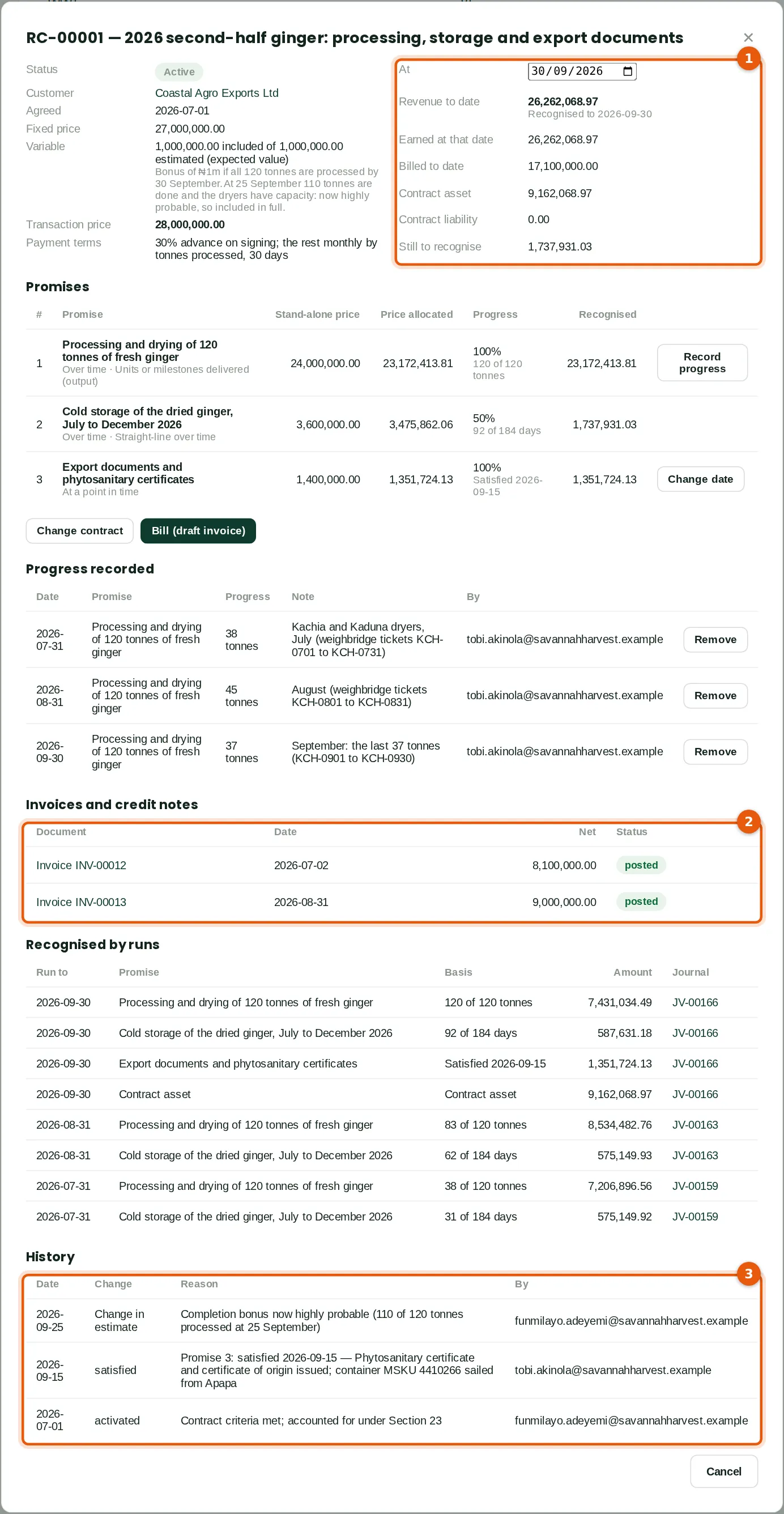
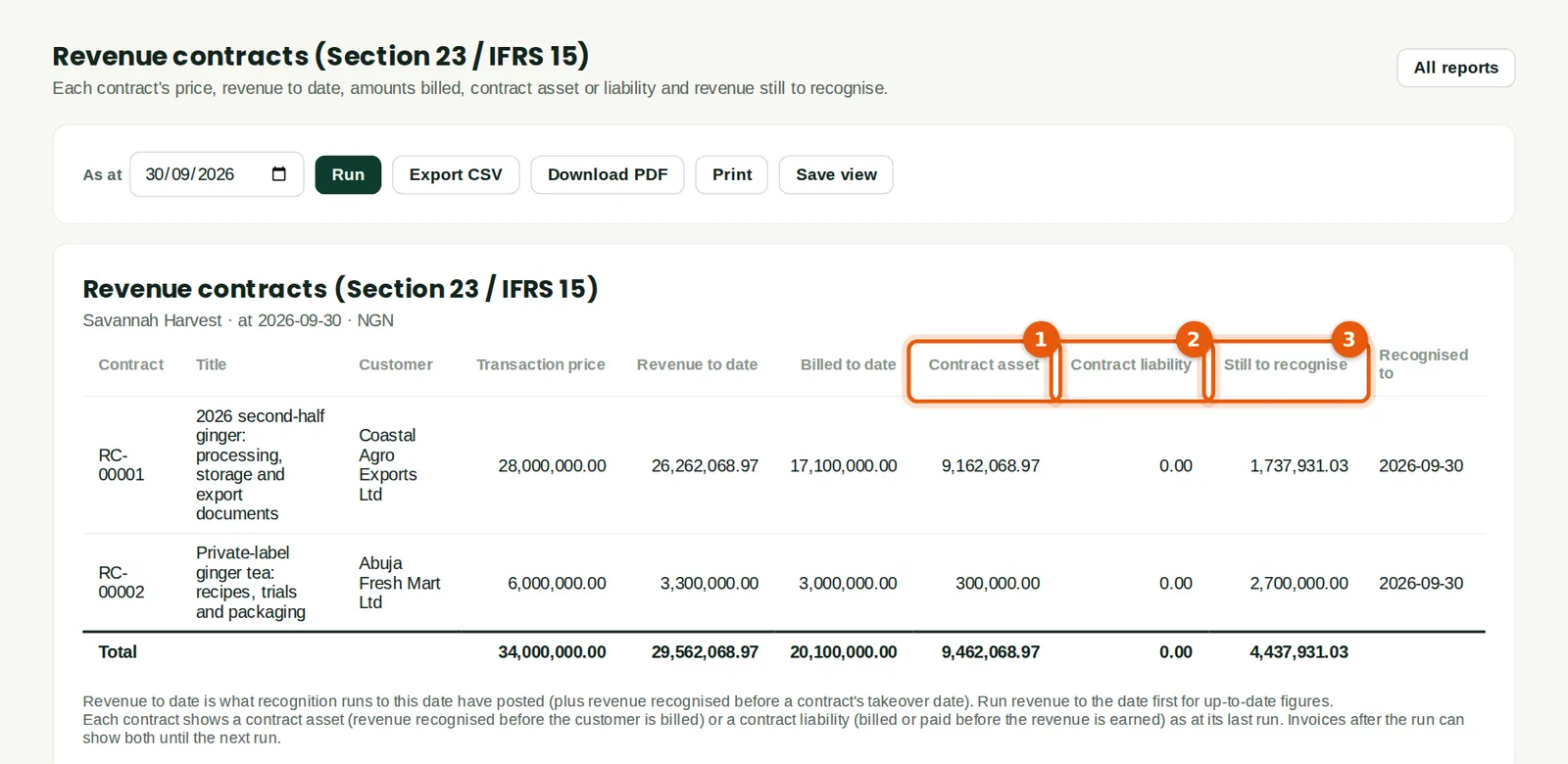
Revenue to date ₦26,262,068.97, billed ₦17,100,000: a contract asset of ₦9,162,068.97 and no contract liability (1). Storage still has ₦1,737,931.03 to recognise. The invoices billed under the contract are listed (2), and the history (3) shows the change in estimate. The contract completes when every promise is satisfied and fully recognised and the billing matches the price.
Who
Anyone who can see the contract.
What to do
- Bill the balance when it falls due; the next run reduces the contract asset by the amount billed.
28.21 The contracts at a glance
Why
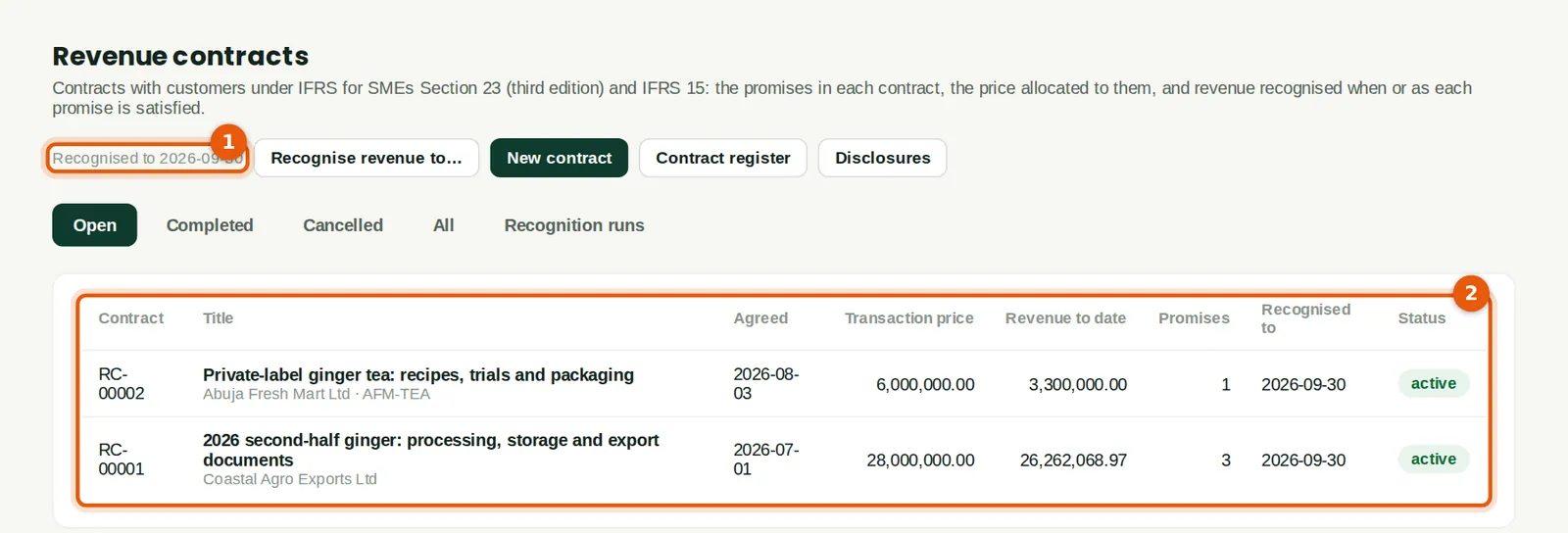
The date revenue was last recognised to (1), and each contract's price and revenue to date (2).
Who
Sales, Accounting or Reports at View level.
What to do
- Click a contract to open it.
28.22 The recognition runs
Why
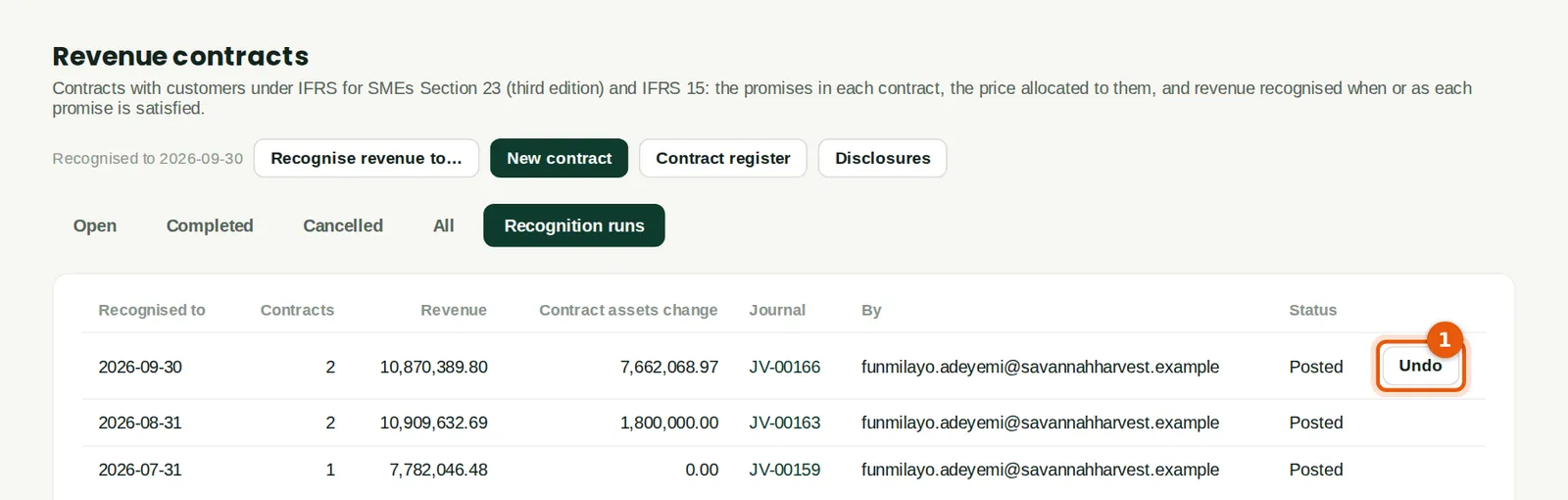
Each run, with its journal. The latest run can be undone (1): its journal is reversed on its date and the contracts go back to where they were. That is possible only while its contracts are unchanged; after a change, record a further change instead.
Who
Accounting at View level; Full level to undo.
What to do
- Click Undo on the latest run, give the reason and confirm.
28.23 The contract register
Why
Each contract's price, revenue to date, amounts billed, contract asset (1) or contract liability (2), and revenue still to recognise (3), at a date. The totals agree with accounts 1120 and 2410 for the contracts.
Who
Sales, Accounting or Reports at View level.
What to do
- Reports → Receivables & sales → Revenue contracts. Choose the date and click Run.
28.24 The figures for the revenue note
Why
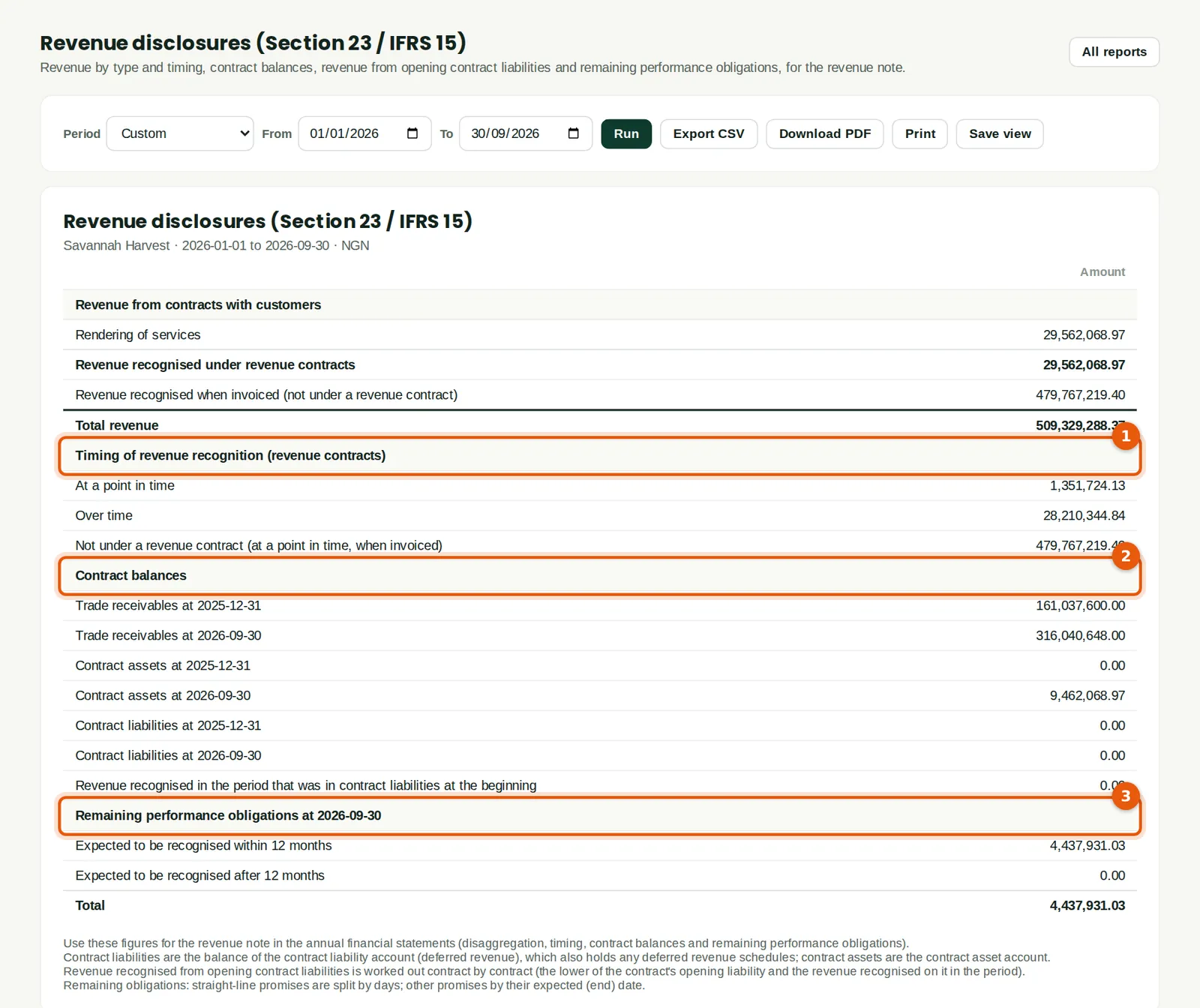
The disclosures Section 23 asks for, for a period: revenue by type of good or service and by timing (1), with revenue not under contracts shown as recognised at a point in time when invoiced; the contract balances (2) at the start and end, and the revenue recognised from contract liabilities at the start; and the remaining performance obligations (3), within and after 12 months. Type the figures into the revenue note of the annual financial statements (chapter 25).
Who
Accounting or Reports at View level.
What to do
- Reports → Receivables & sales → Revenue disclosures. Choose the period and click Run.
28.25 The month-end checklist
Why
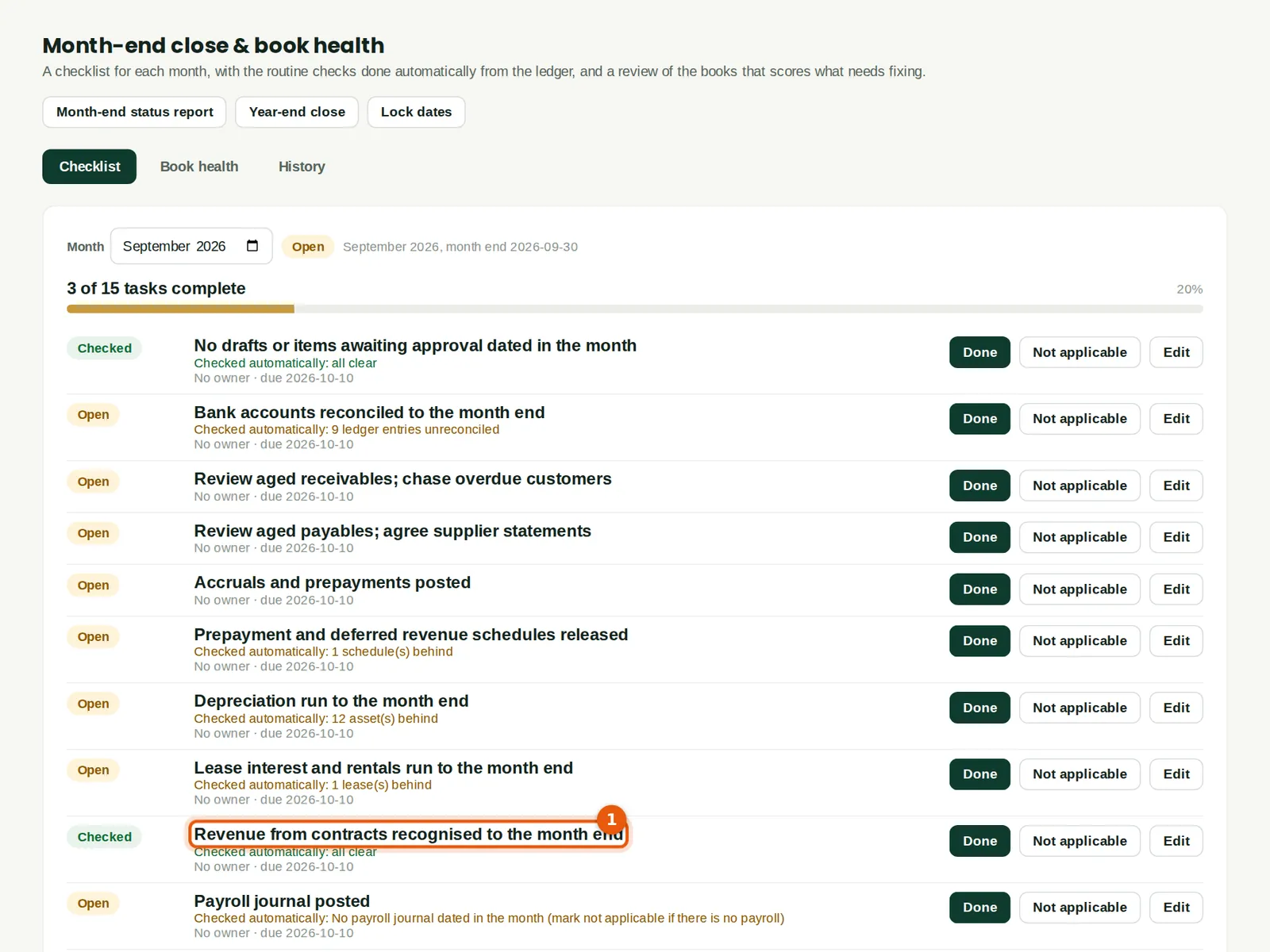
The checklist checks that revenue has been recognised to the month end for every active contract, and for any completed contract billed or credited since its last run (1).
Who
Accounting.
What to do
- Recognise revenue to the month end before closing the month (chapter 10).