Steps in this chapter (21)
From 1 January 2026 the Nigeria Tax Act 2025 and the Nigeria Tax Administration Act 2025 changed several rules that touch everyday bookkeeping: what counts as a Tax ID, the IRN on large taxpayers' e-invoices, zero-rated and exempt supplies, and VAT withheld at source. BookTrove's September 2026 release handles each of them. Where a rule is open to more than one reading, BookTrove takes the careful reading and makes it a setting you can change.
In the illustration Chukwudi sets the new rules on 6 March 2026. Funmilayo records the Lokoja aggregator's NIN and posts a packaging bill that arrived without its IRN; Tobi makes the first zero-rated sale of basic food items to a supermarket chain; and on 2 April Funmilayo pays the NRS the VAT withheld from suppliers in March.
19.1 The new tax settings
Why
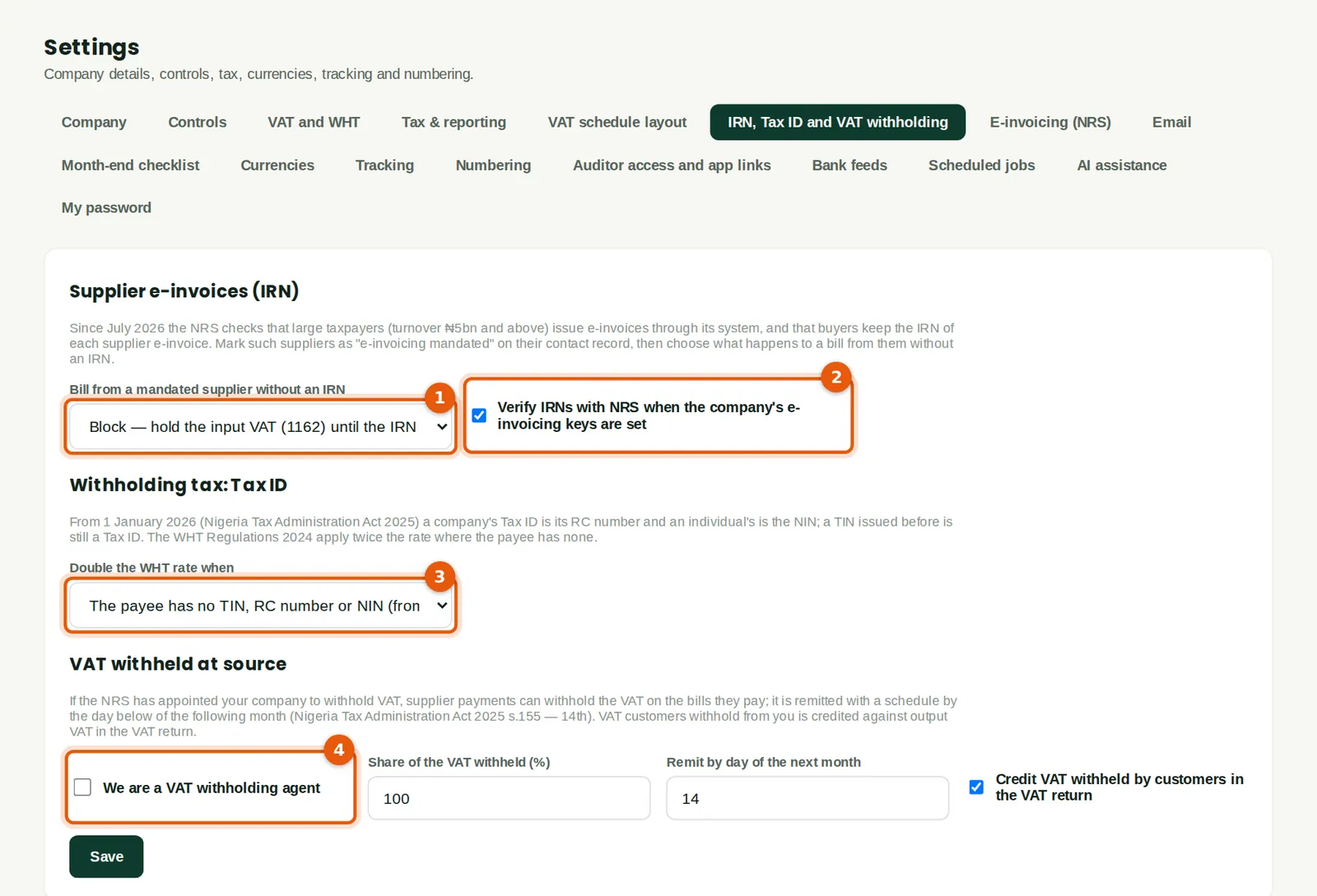
One tab holds the new rules. A bill from a supplier that must e-invoice through the NRS but has no IRN can be let through with a warning, held or not checked at all (1). IRNs can be verified with the NRS once the company's own e-invoicing keys are entered (2). WHT is doubled only when the payee has no Tax ID at all — no TIN, RC number or NIN — which is the reading since 1 January 2026; the stricter choice doubles whenever there is no TIN (3). The VAT withholding part (4) is only for companies the NRS has appointed as agents (step 19.18). Savannah Harvest chose Block for missing IRNs.
Who
An owner, an administrator or someone with tax approval.
What to do
- Choose what happens to a bill without an IRN (1): Warn (the default) claims the VAT and lists the bill as at risk; Block holds the VAT in account 1162 until the IRN is added; Off checks nothing.
- Leave Verify IRNs with NRS (2) ticked. It runs only once the NRS keys are entered (chapter 18).
- Choose when WHT doubles (3) and click Save.
19.2 An individual's NIN as the Tax ID
Why
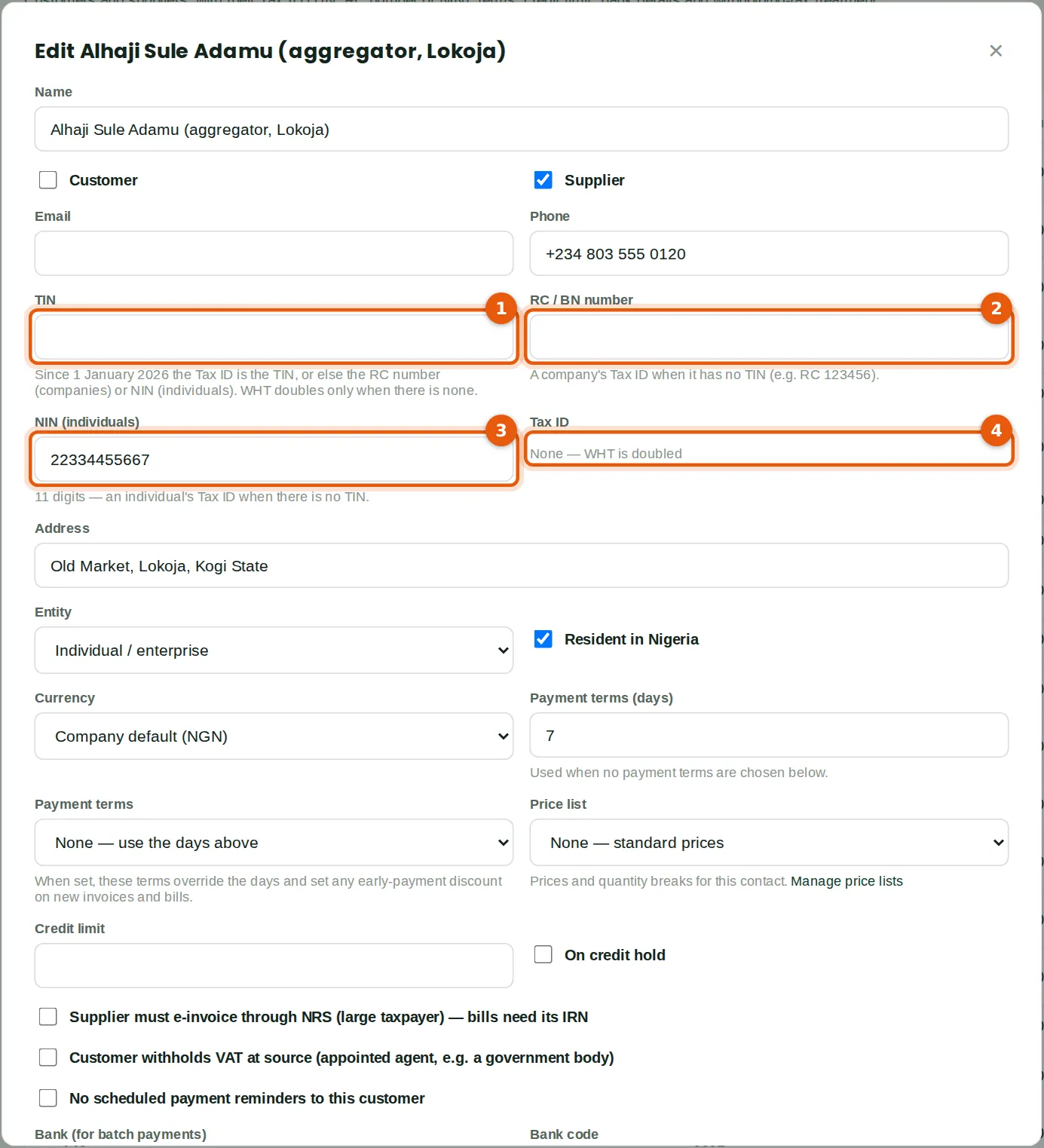
Since 1 January 2026 an individual's Tax ID is the NIN and a company's is its RC number; a TIN issued earlier still counts. Alhaji Sule Adamu, the Lokoja aggregator, has no TIN (1) and, as a sole trader, no RC number (2), so in January his WHT was doubled (step 5.18). On 6 March he gave his NIN (3). The Tax ID box (4) shows what BookTrove uses; it is worked out again when the contact is saved. An ID in the wrong format still saves, with a warning.
Who
Purchasing, accountant or bookkeeper.
What to do
- Open the contact and type the 11-digit NIN (3) — or, for a company, the RC number (2).
- Click Save. The message confirms the Tax ID and its type, for example NIN.
19.3 Tax IDs in the contact list
Why
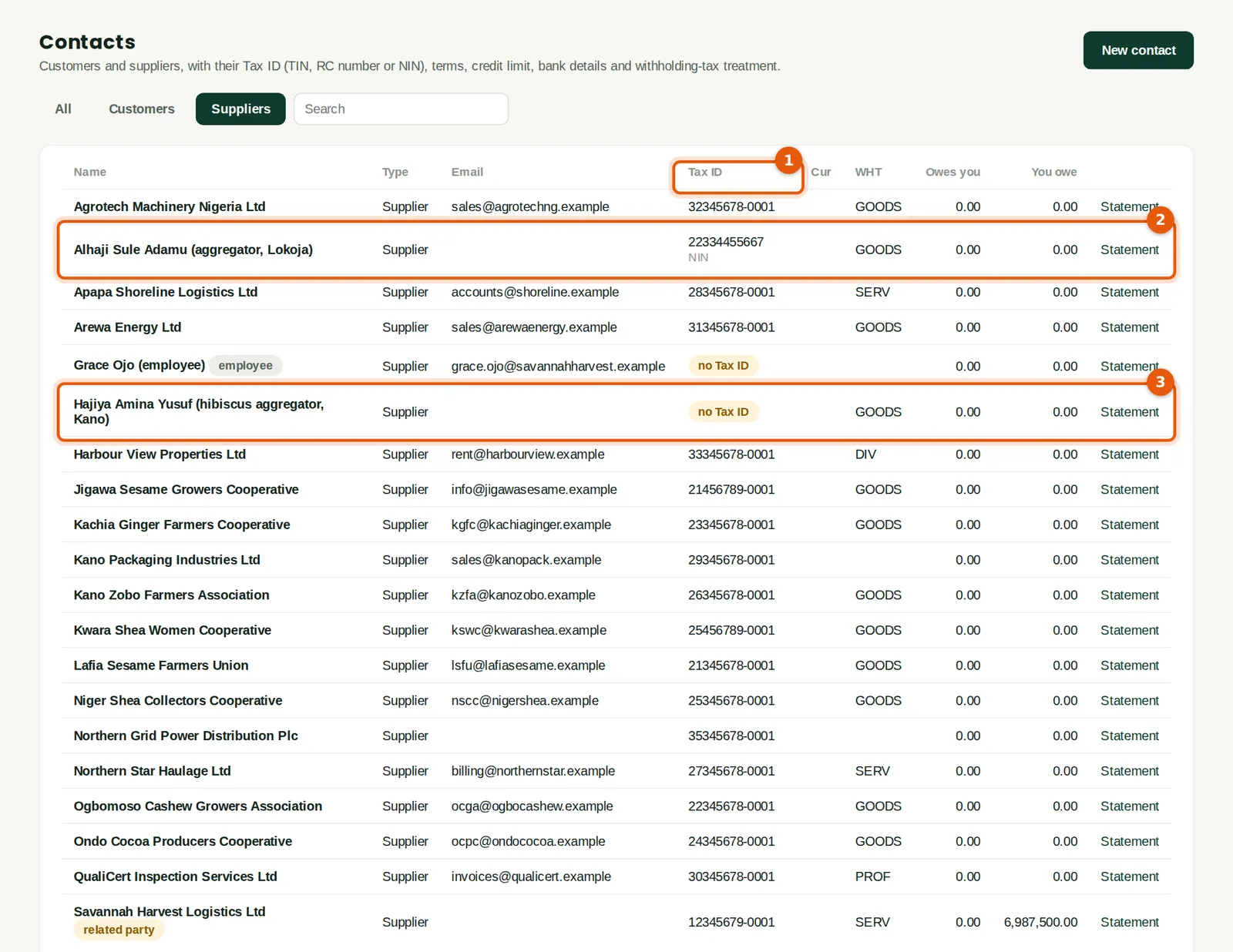
The Tax ID column (1) shows the TIN, or the RC number or NIN with its type beside it. The aggregator now shows his NIN (2). Hajiya Amina Yusuf, a hibiscus aggregator added the same day, has not yet given hers, so she is marked no Tax ID (3) and WHT on payments to her would be doubled. The Control exceptions report and Book health list suppliers without a Tax ID.
Who
Anyone with sales or purchases access.
What to do
- Search by name, TIN, RC number or NIN.
19.4 WHT at the normal rate
Why
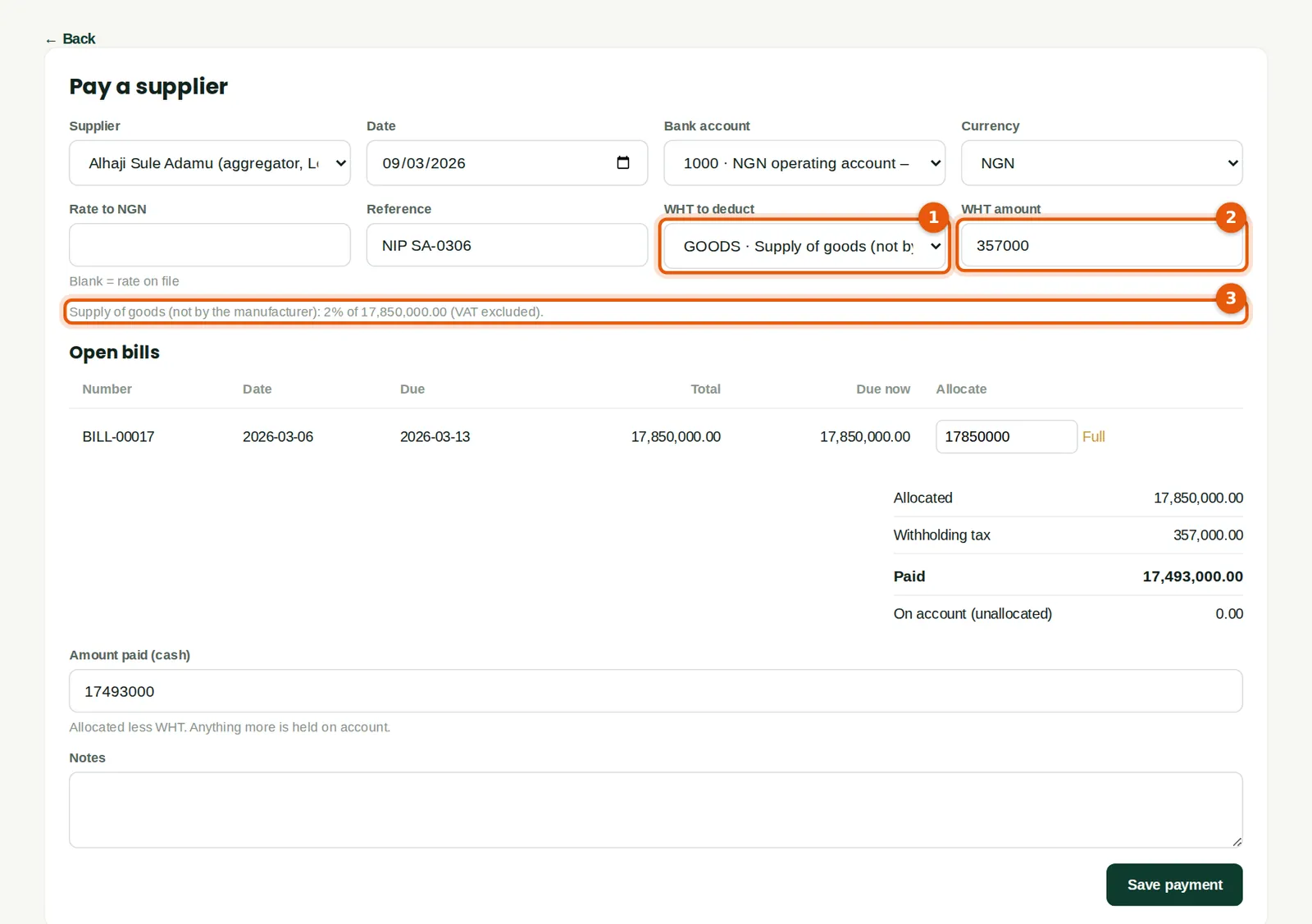
The aggregator's second lot — 15 tonnes of raw cashew for ₦17,850,000 — is paid on 9 March. With his NIN on file, the WHT class (1) gives 2% (2), not the 4% deducted in January. The note under the fields (3) shows how it was worked out: Supply of goods (not by the manufacturer): 2% of 17,850,000.00 (VAT excluded).
Who
Accountant.
What to do
- Check the WHT amount (2) and the note (3), then click Save.
19.5 A supplier that must e-invoice through the NRS
Why
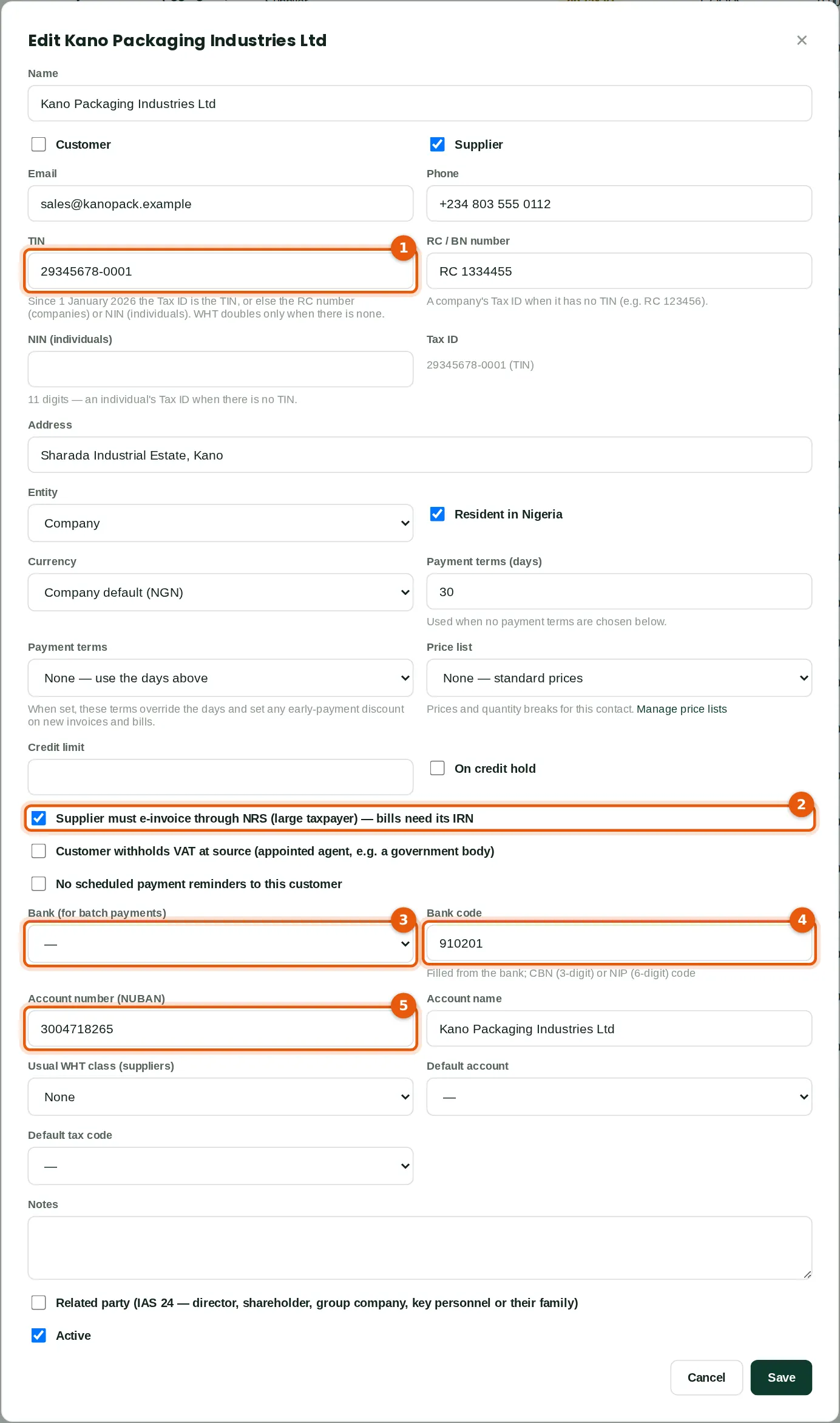
Large taxpayers (turnover of ₦5 billion or more) must issue their invoices through the NRS e-invoicing system, which gives each invoice an IRN, and the NRS checks that buyers keep the IRN to support their input VAT. Kano Packaging is a large taxpayer. Its TIN (1) is on file; Chukwudi ticks Supplier must e-invoice through NRS (2). The same record holds the bank details used for batch payments (chapter 21): the bank (3), its code (4) and the 10-digit account number (5).
Who
Purchasing or accountant.
What to do
- Tick Supplier must e-invoice through NRS (2) for each large-taxpayer supplier.
- Choose the supplier's bank (3); its code fills in (4). For a bank that is not in the list, leave the bank at — and type the six-digit NIP code (4). The banks in the illustration are invented, so their codes were typed.
- Type the account number (5) and the account name, then click Save.
19.6 The IRN fields on a bill
Why
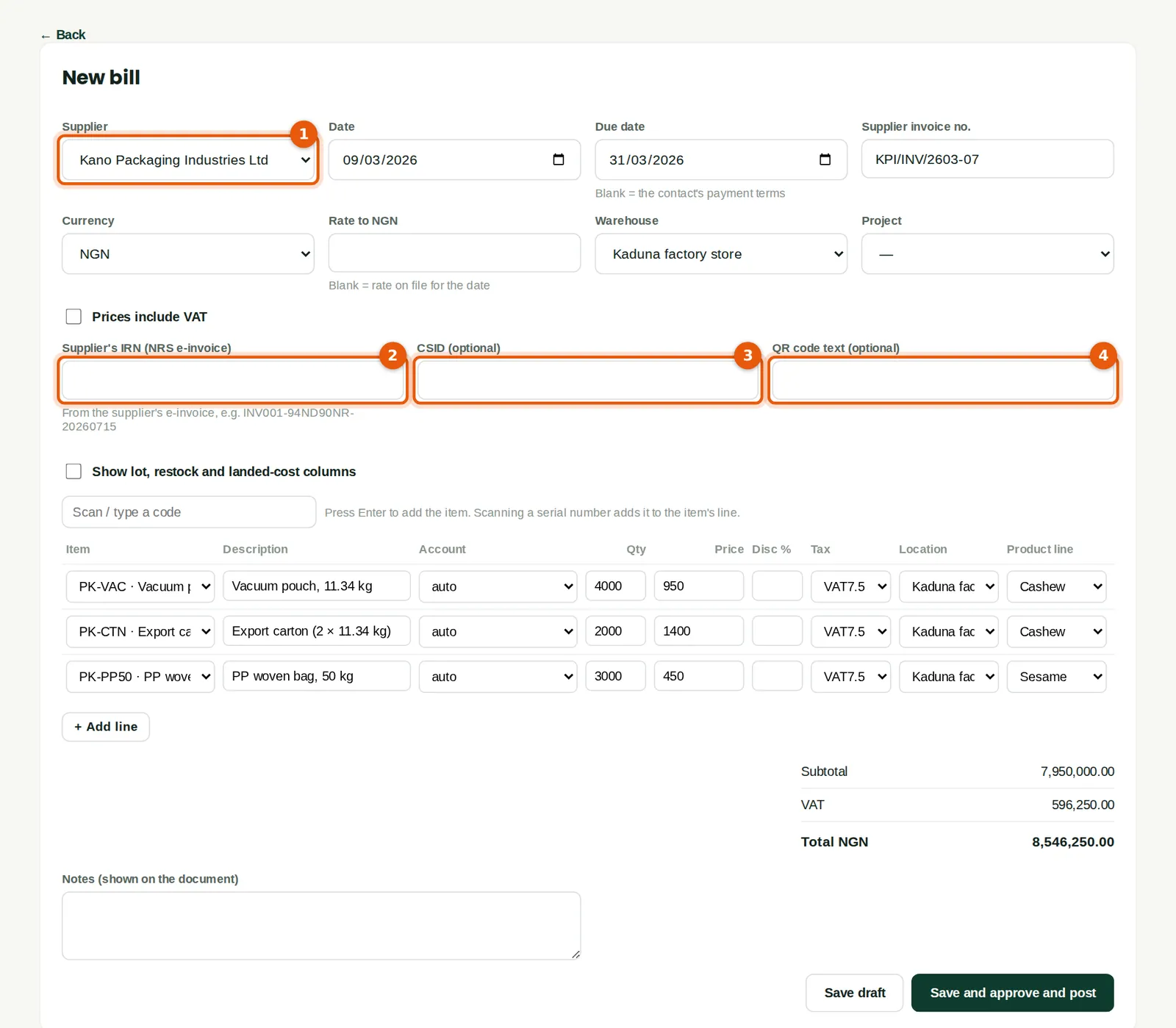
Bills and vendor credits have three fields for the supplier's e-invoice: the IRN (2), the CSID (3) and the QR code text (4). An IRN looks like KPI260307-KP7X2Q9M-20260309: the supplier's invoice number, its eight-character NRS service ID and the invoice date. BookTrove refuses anything else, including a date that does not exist. Kano Packaging's March invoice (1) arrived as an ordinary PDF without an IRN, so Funmilayo leaves the fields empty.
Who
Accountant or bookkeeper.
What to do
- Copy the IRN from the supplier's e-invoice into IRN (2). The CSID (3) and QR code text (4) are optional.
- Finish the bill as usual and click Save and post.
19.7 Input VAT held until the IRN arrives
Why
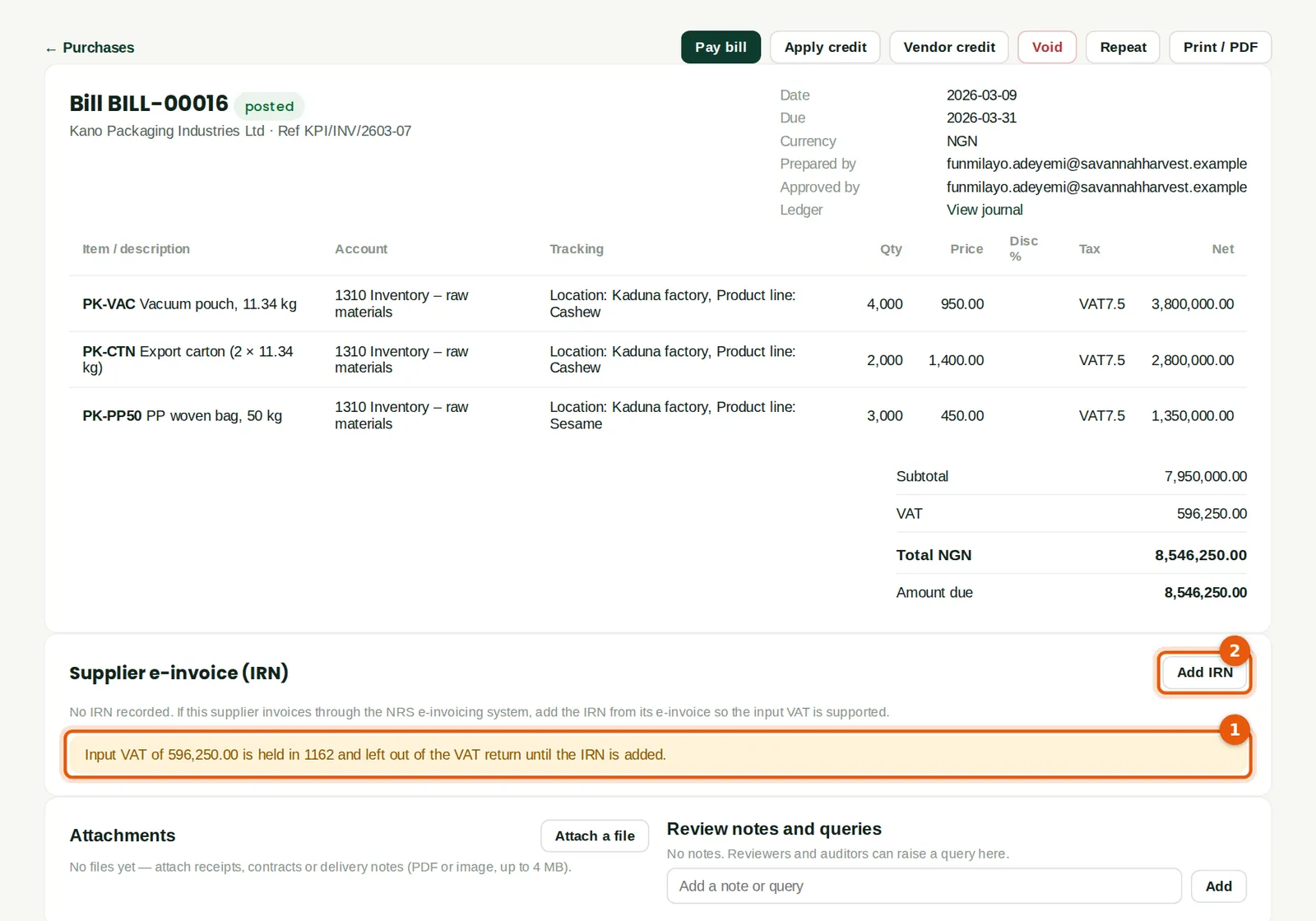
Because the supplier is marked and the rule is Block, the ₦596,250 of input VAT is posted to 1162 VAT input held — awaiting supplier e-invoice (IRN) instead of VAT input (1), and is left out of the VAT return until the IRN is added. With the Warn rule the VAT would have been claimed and the bill listed as at risk.
Who
Accountant.
What to do
- Ask the supplier for its e-invoice. When it arrives, click Add IRN (2) — step 19.9.
19.8 Input VAT and supplier e-invoices (IRN)
Why
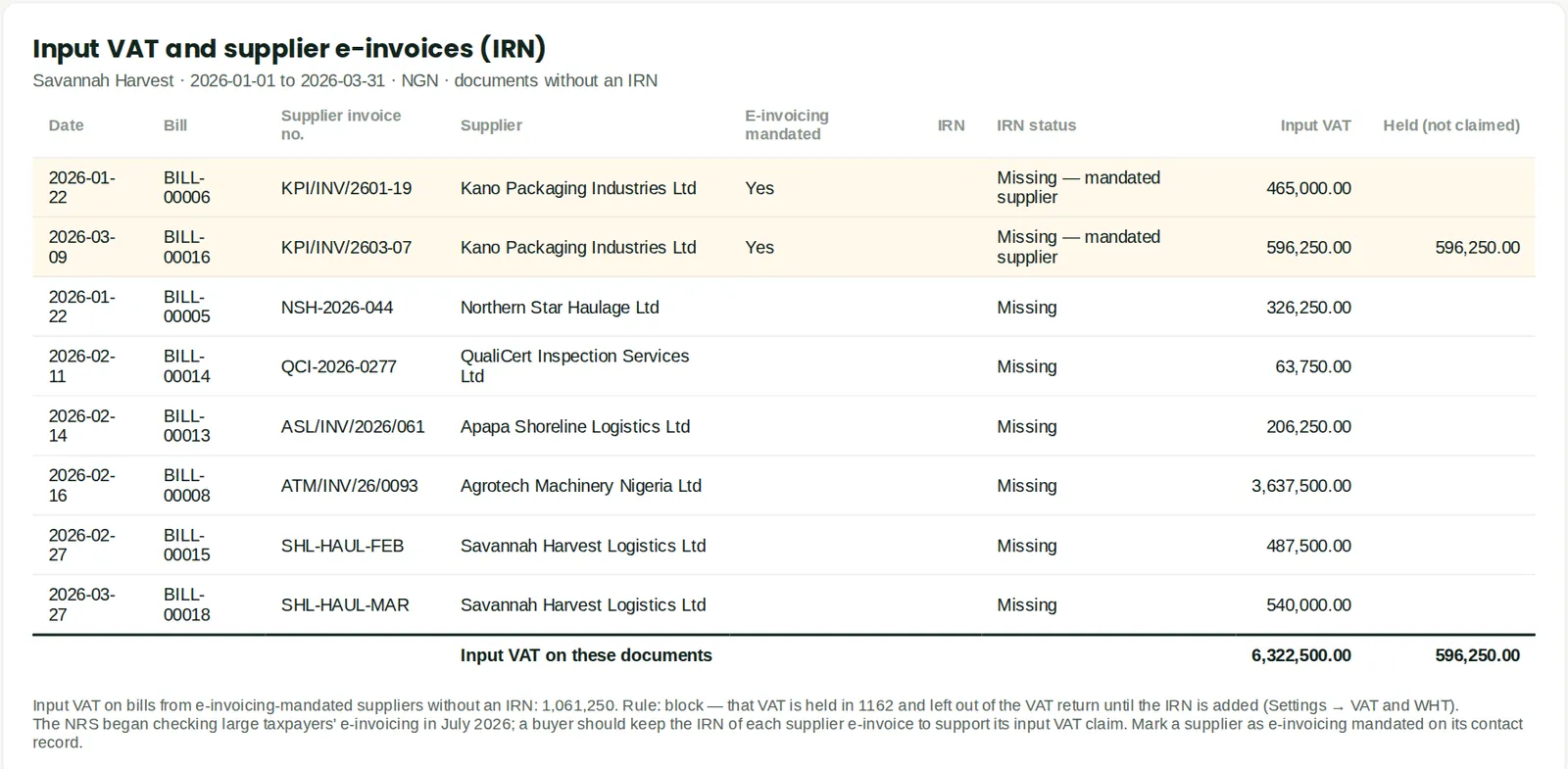
The report lists bills and vendor credits without an IRN — those from marked suppliers first, highlighted — with the input VAT at risk and the VAT held. The January packaging bill was entered before Kano Packaging was marked, so its VAT was claimed and is at risk; the March bill's VAT is held. Tick Include bills that have an IRN to see the status of every bill. The purchases VAT schedule has an IRN column as well.
Who
Accountant, before each VAT return.
What to do
- Run it before each VAT return and chase the missing e-invoices.
19.9 Add the IRN
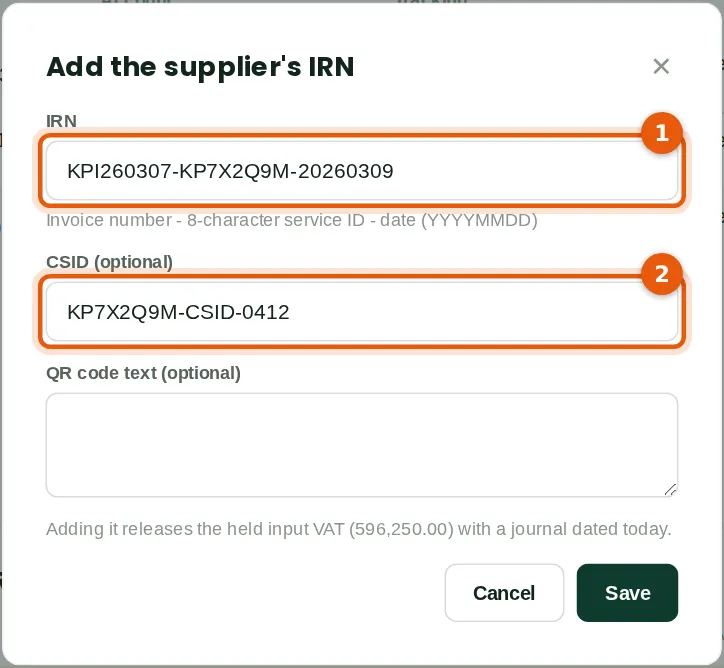
Why
Kano Packaging sent the e-invoice for KPI/INV/2603-07 on 27 March. Adding the IRN (1), with the CSID (2) if given, to the posted bill releases the held VAT by a journal dated today: debit VAT input with the bill's VAT code, credit 1162. The VAT is therefore claimed in the March return. If the bill is later voided, the release journal is reversed with it. Supplier credit notes follow the same rules.
Who
Accountant.
What to do
- Open the bill, click Add IRN, type the IRN (1) and click Save.
19.10 The IRN on the bill; verifying with the NRS
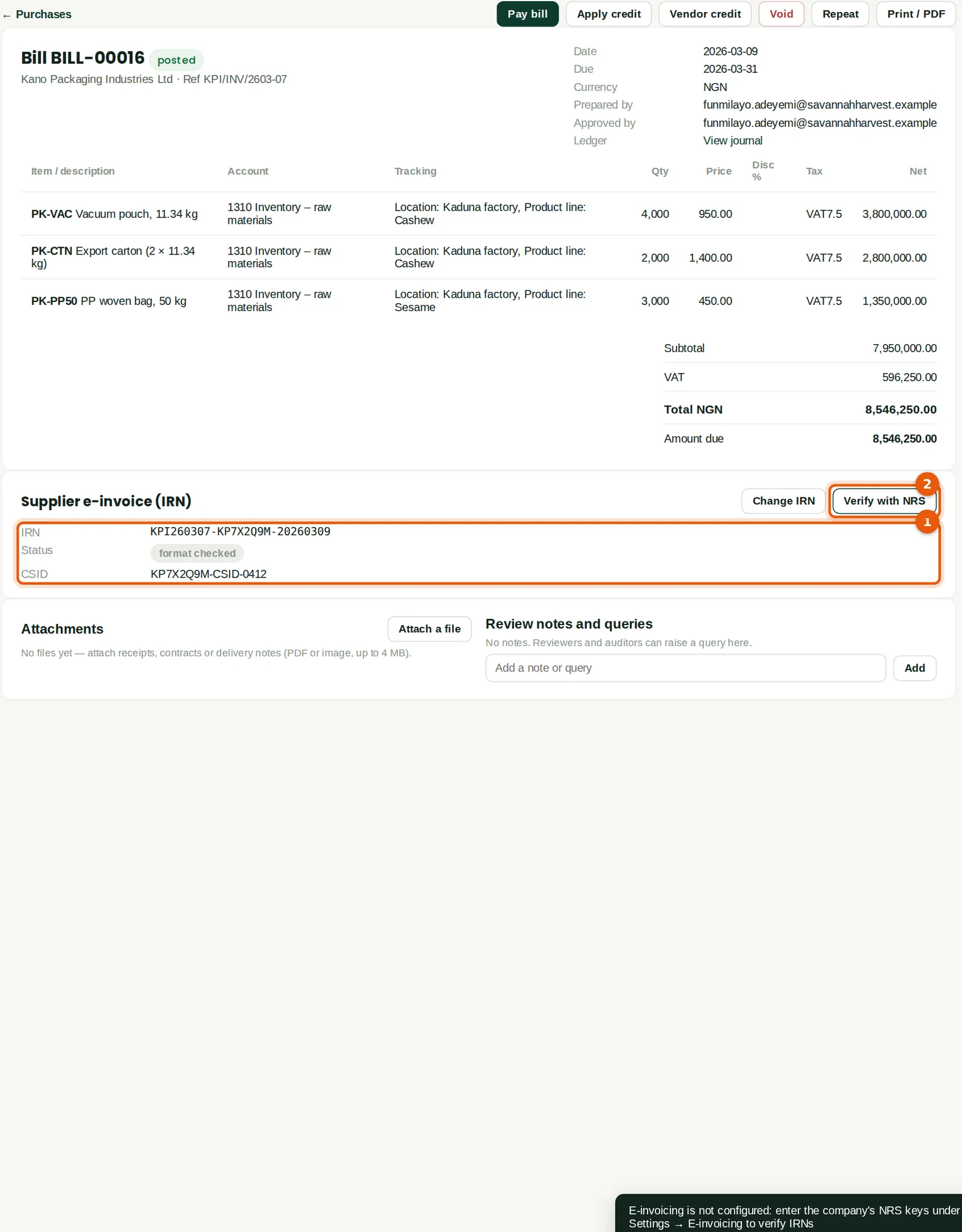
Why
The card shows the IRN, its status (format checked) and the CSID (1); journal JV-00124 released ₦596,250. Verify with NRS (2) asks the NRS e-invoicing service to confirm the IRN, using the company's own keys. Savannah Harvest has not entered its NRS keys, so the message says e-invoicing is not configured. Once the keys are set, the check also runs after posting and the status becomes verified by NRS, not found at NRS or not verified. Verification never stops a bill from posting.
Who
Accountant; the owner for the NRS keys.
What to do
- Click Verify with NRS (2) once the keys are set.
- Owner's set-up: enter the business ID, service ID, API key and secret under Settings → E-invoicing (chapter 18), starting in the sandbox. Confirm with the NRS or your access point provider that the service answers queries about suppliers' IRNs; if it does not, untick Verify IRNs with NRS (step 19.1) and rely on the format check.
19.11 Zero-rated and exempt items: map item categories
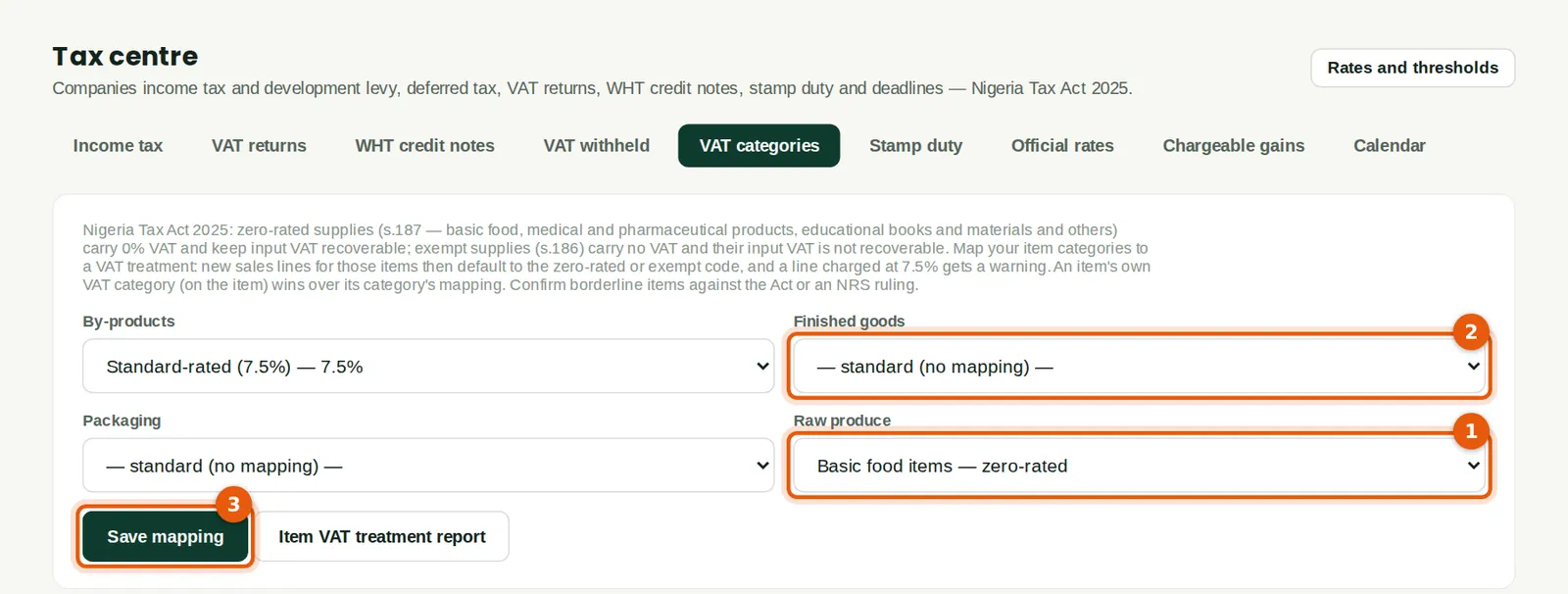
Why
The Nigeria Tax Act 2025 lists zero-rated supplies (section 187: basic food items, medical and pharmaceutical products, medical services and equipment, educational books and materials, tuition, fertiliser, agro-chemicals, livestock, seeds, grid electricity, electric vehicles and exports) and exempt supplies (section 186: baby products, sanitary products, land and buildings, money and securities and others). Zero-rated supplies carry 0% VAT and keep their input VAT recoverable; exempt supplies carry no VAT and their input VAT is not recoverable. Savannah Harvest maps Raw produce to Basic food items (1). Finished goods (2) are left unmapped because not all of them are food — shea butter, for example — so each food item is set on the item itself.
Who
Accountant or tax lead.
What to do
- Choose a VAT category for each item category and click Save mapping (3).
- Confirm borderline items against the Act or an NRS ruling.
19.12 An item's own VAT category
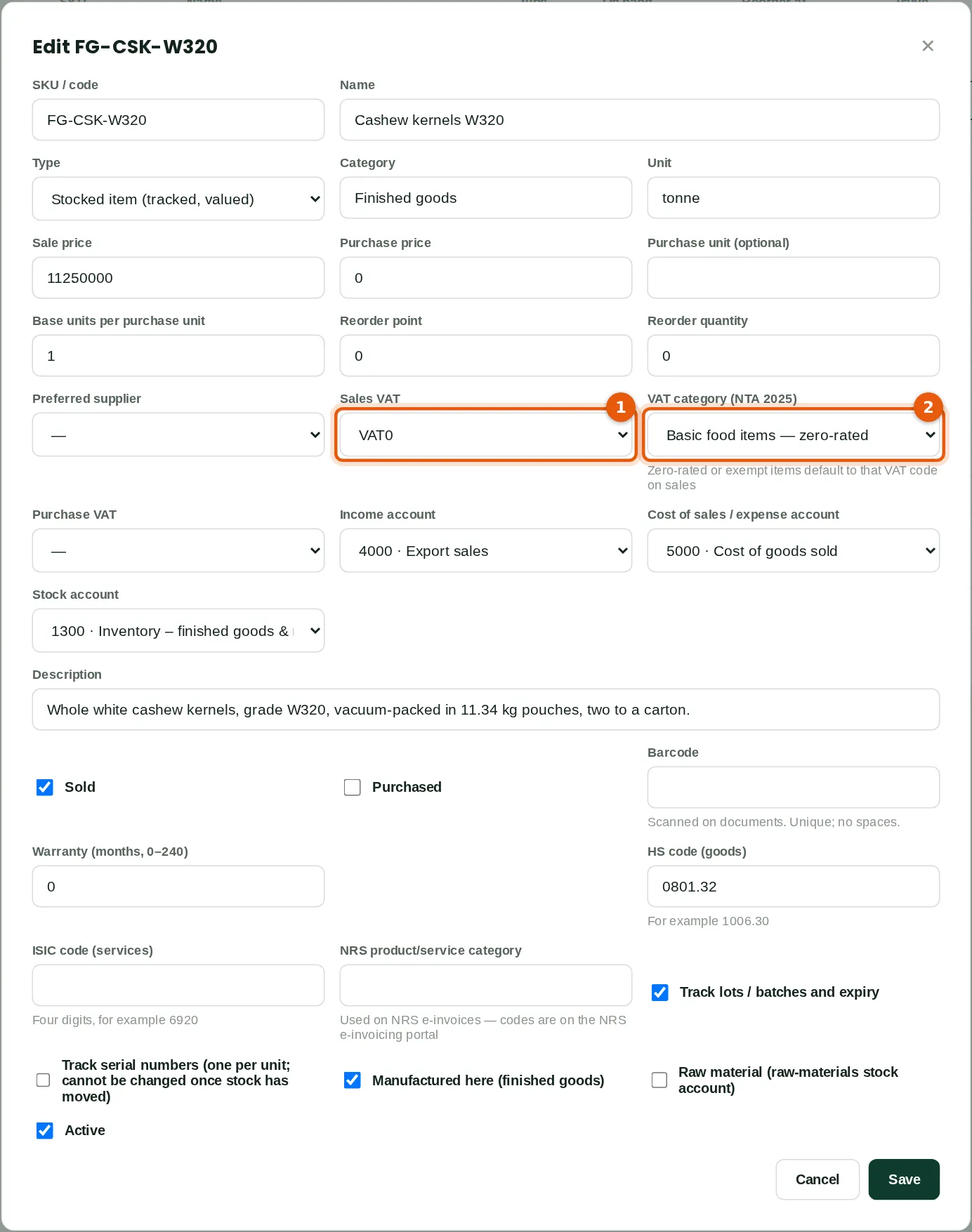
Why
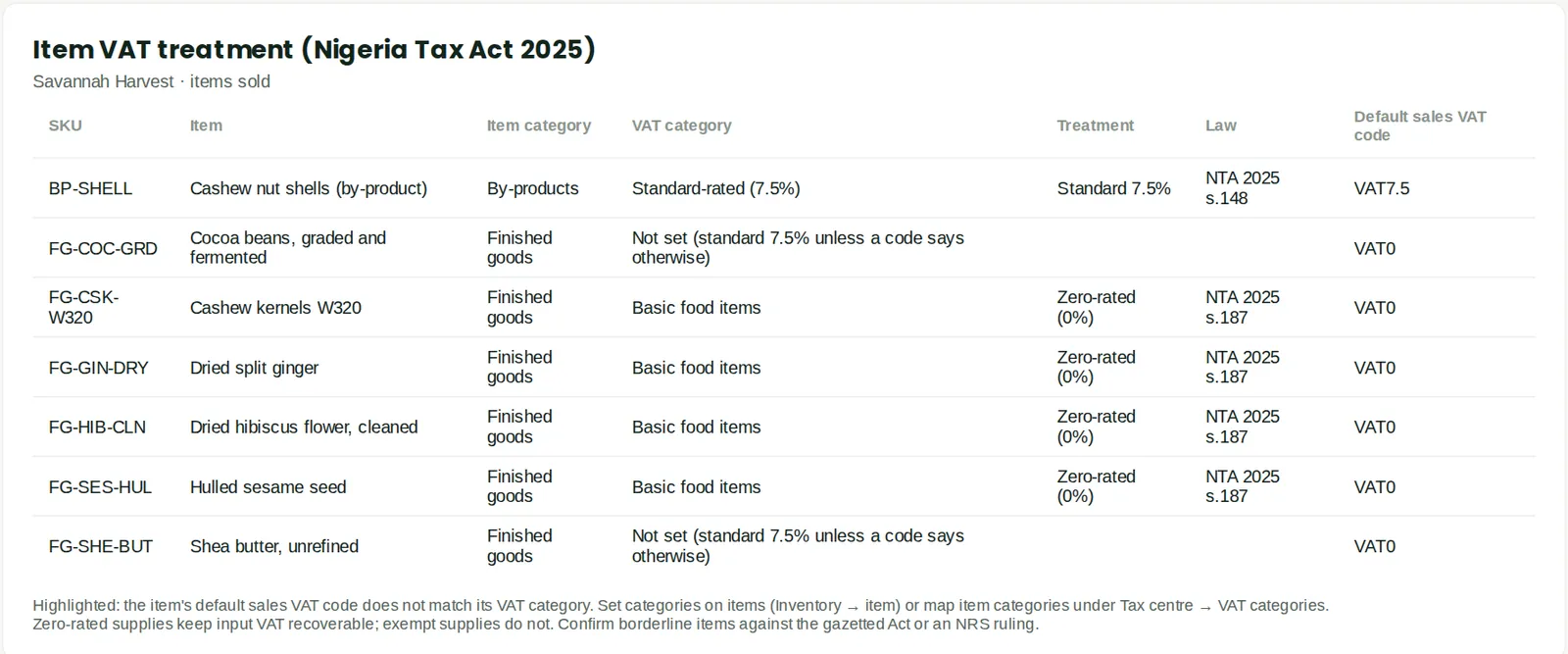
An item's own VAT category (2) wins over its category's mapping. Cashew kernels, hulled sesame, dried ginger and dried hibiscus are set to Basic food items. On a sales line the item's own sales VAT code (1) is used first; a zero-rated or exempt category supplies the code when the item has none, and a line that charges 7.5% on such an item is flagged.
Who
Inventory or accountant.
What to do
- Open the item, click Edit item, choose the VAT category (2) and save.
19.13 A zero-rated sale of basic food items
Why
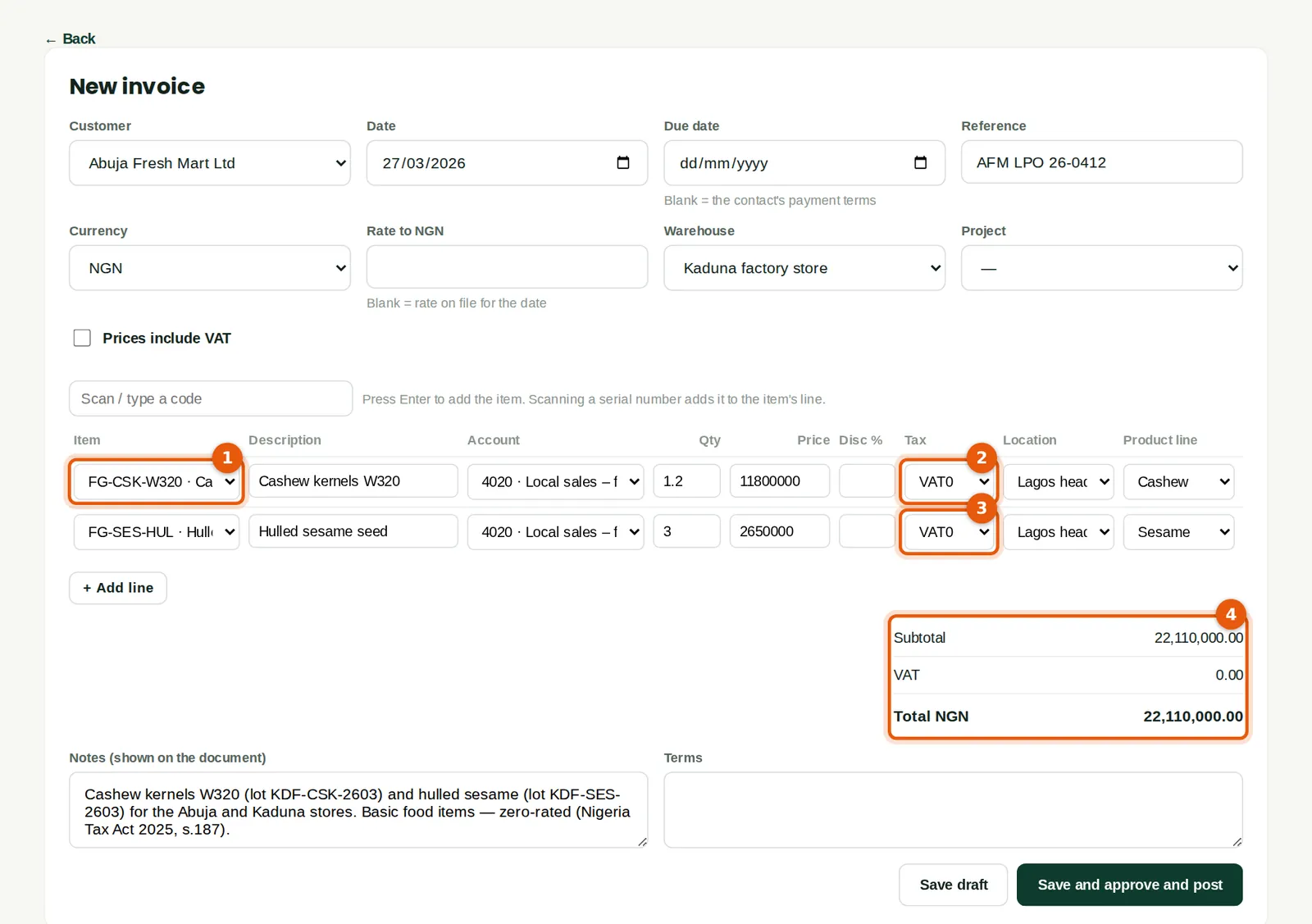
Abuja Fresh Mart Ltd, a supermarket chain whose Tax ID is its RC number, buys 1.2 tonnes of W320 kernels (1) and 3 tonnes of hulled sesame for its stores: ₦22,110,000. Both are basic food items, so both lines carry VAT0 (2) (3) and the invoice has no VAT (4). The sale goes to a new income account, 4020 Local sales – food products. In the VAT return it is a zero-rated supply, and input VAT on the costs that relate to it stays recoverable.
Who
Sales (Tobi Akinola).
What to do
- Choose the customer and the items and check that each line's VAT code is VAT0.
- Click Save and post.
19.14 Charging 7.5% on a zero-rated item
Why
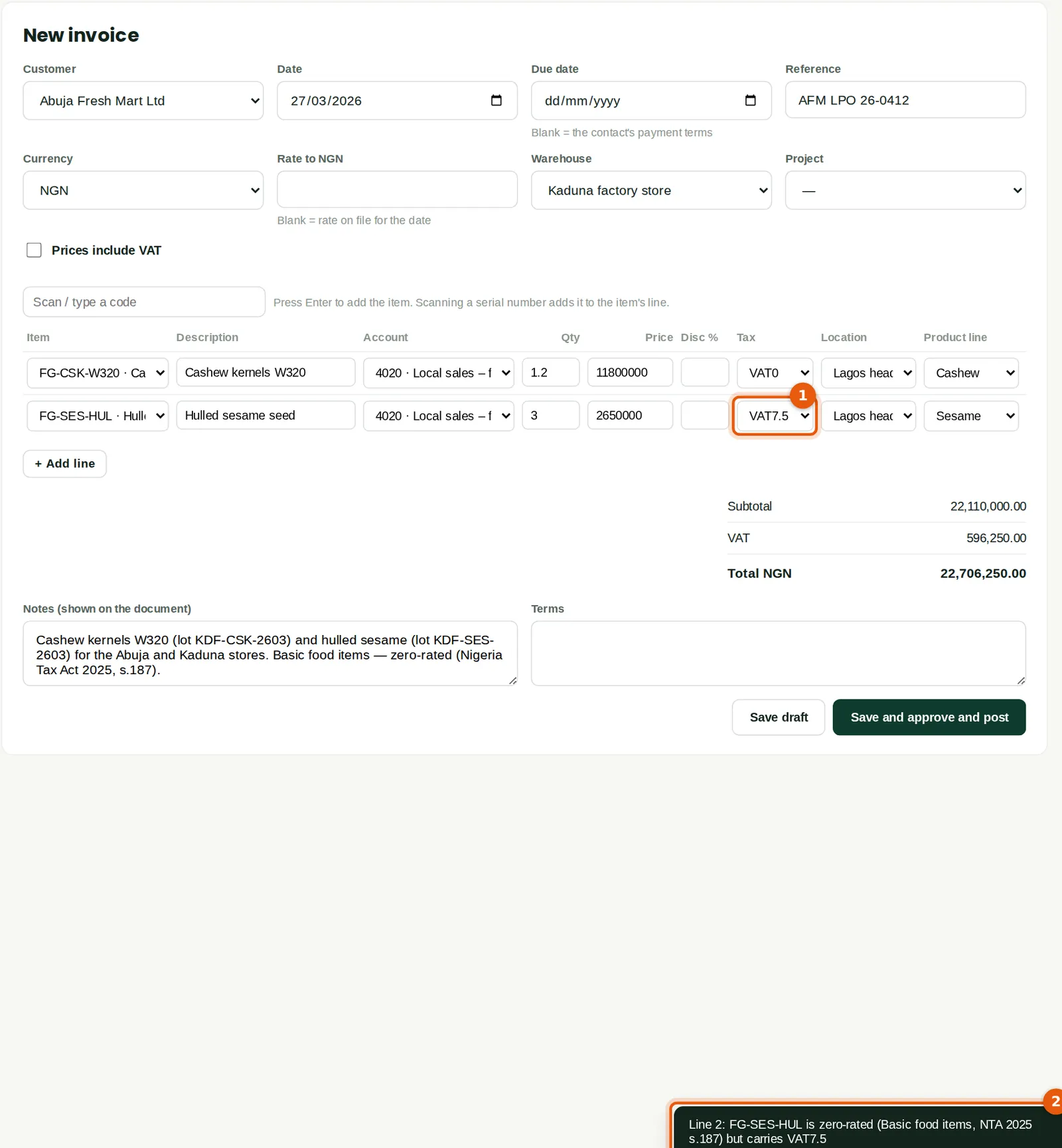
If a line for a zero-rated or exempt item is given the 7.5% code (1), BookTrove saves it but warns (2), naming the item, its category, the section of the Act and the code used: “Line 2: FG-SES-HUL is zero-rated (Basic food items, NTA 2025 s.187) but carries VAT7.5”. In the illustration the draft was corrected to VAT0 before it was posted.
Who
Sales.
What to do
- Change the code to VAT0 (or EXEMPT) and post. If the supply really is standard-rated, correct the item's VAT category instead.
19.15 Item VAT treatment
Why
Every item sold, with its item category, VAT category, treatment, the section of the Act and its default sales VAT code. An item whose default code does not match its category is highlighted.
Who
Accountant, tax lead.
19.16 VAT withheld by a customer
Why
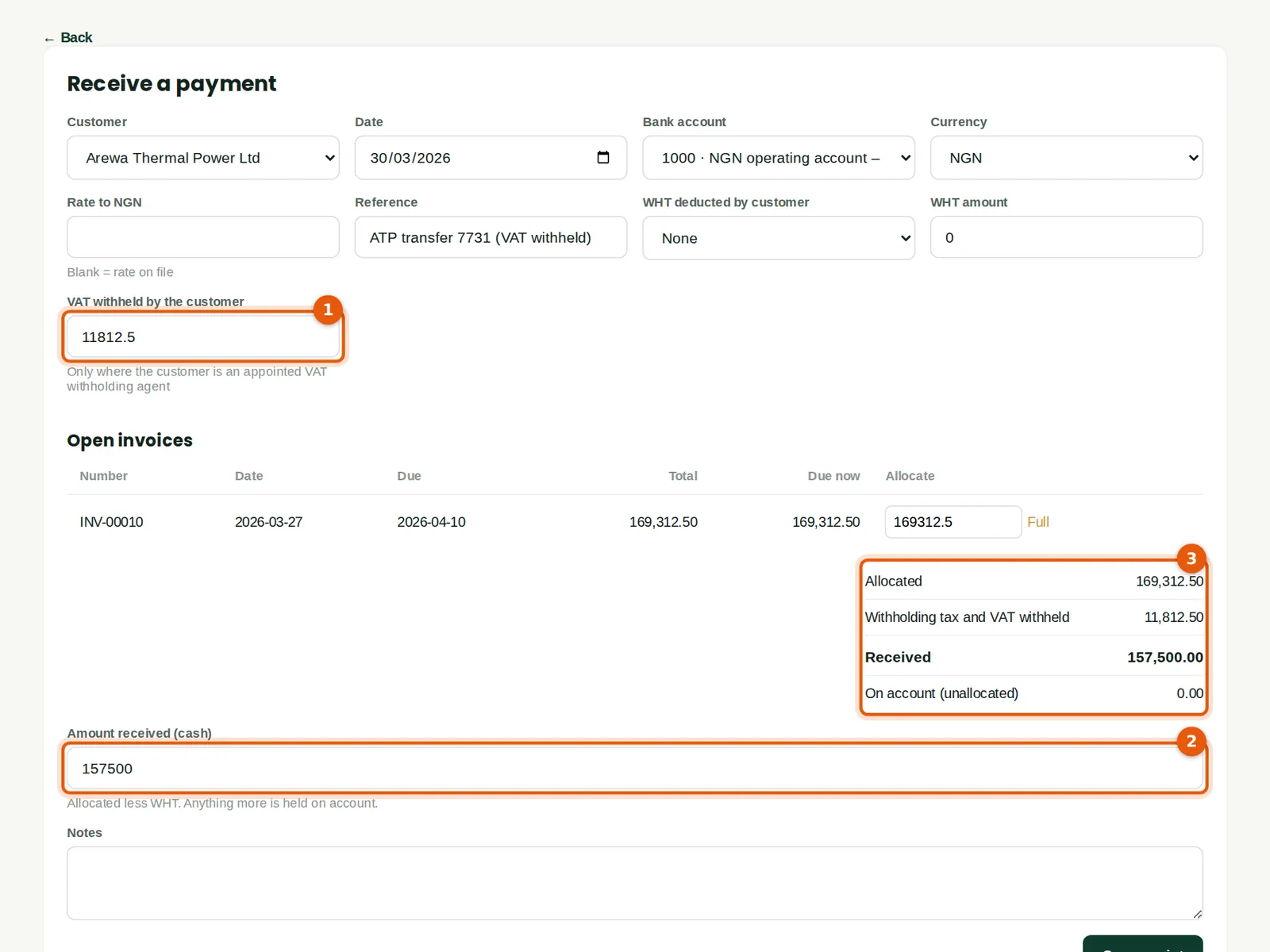
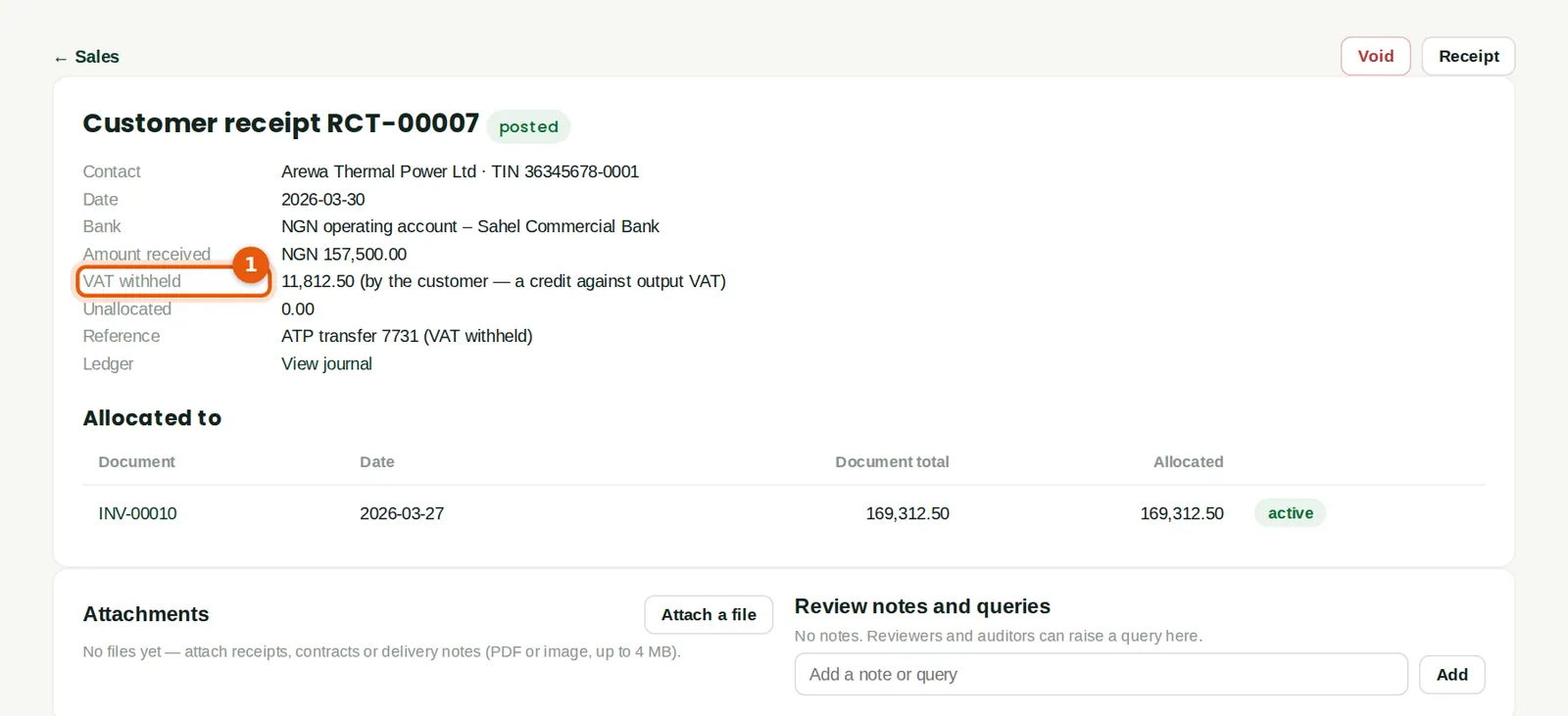
Some customers — government bodies and companies the NRS has appointed — withhold the VAT on what they buy and pay it to the NRS themselves. Arewa Thermal Power Ltd is flagged on its contact as withholding VAT at source, so when its invoice for 3.5 tonnes of cashew shells is allocated, BookTrove fills in the VAT withheld (1): ₦11,812.50. The customer pays the rest (2), and the breakdown (3) shows both. The VAT withheld is posted to 1165 VAT withheld at source by customers.
Who
Accountant.
What to do
- Record the receipt as usual and check the VAT withheld (1) against the customer's remittance advice.
- Keep the customer's evidence that it paid the VAT to the NRS: the credit in the VAT return depends on it.
19.17 The receipt with VAT withheld
Why
The receipt shows the VAT withheld by the customer (1), a credit against output VAT. The VAT return credits it in box 12b (step 19.21), and the report VAT withheld by customers lists every such receipt.
Who
Accountant.
19.18 When the NRS appoints you to withhold VAT
Why
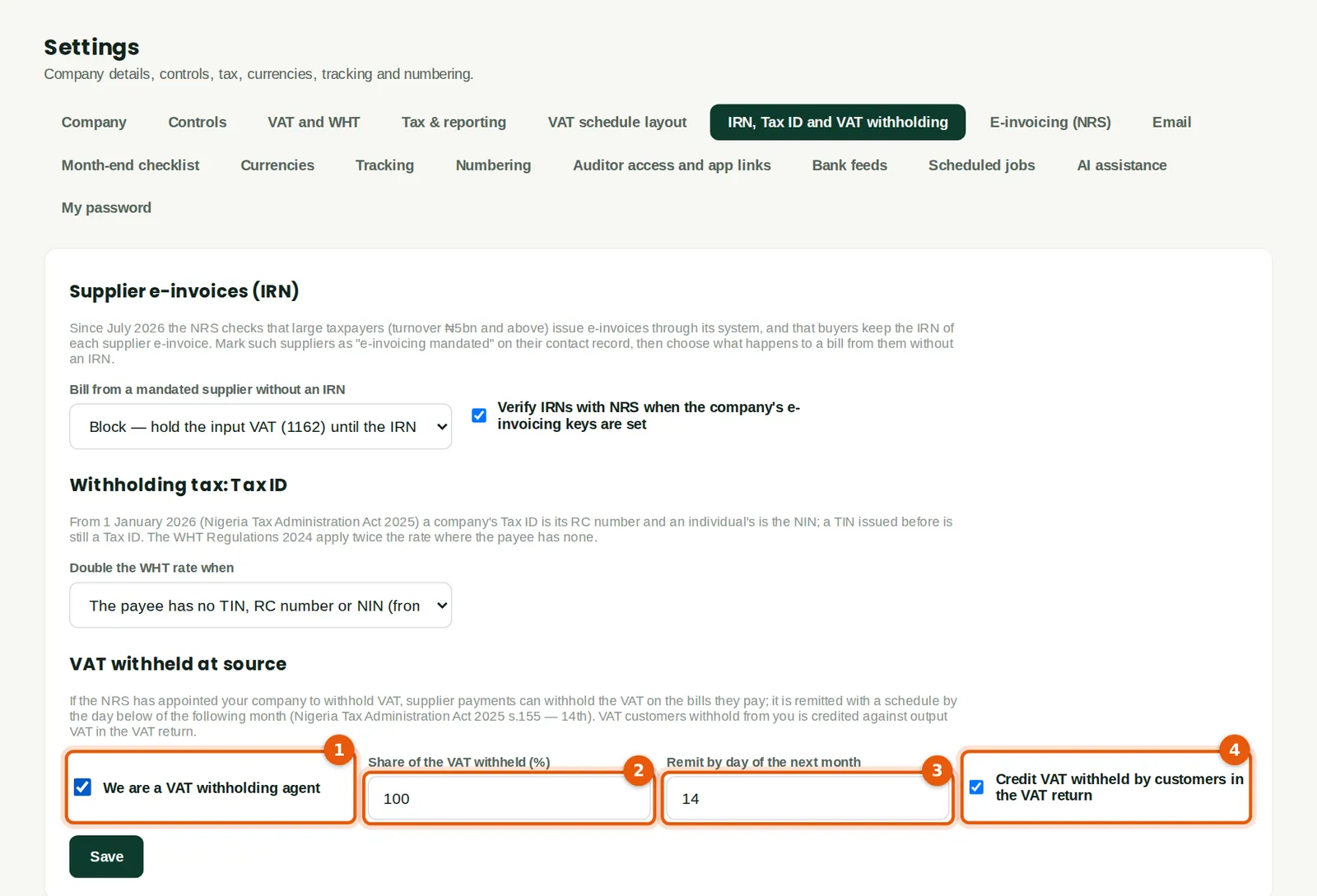
The NRS appointed Savannah Harvest a VAT withholding agent by a letter of 20 March 2026. Chukwudi ticks We are a VAT withholding agent (1). Supplier payments and payment batches then withhold the VAT on the bills they pay — 100% by default (2), never more than the VAT on the bills — and credit it to 2110 VAT withheld from suppliers (payable to the NRS). It is due by the 14th of the following month (3) (Nigeria Tax Administration Act 2025, s.155). Credit VAT withheld by customers in the VAT return (4) is on by default.
Who
An owner, an administrator or the tax lead.
What to do
- Tick (1) only if the NRS has appointed the company. Check the share (2) and the day (3), then click Save.
19.19 Tax centre → VAT withheld
Why
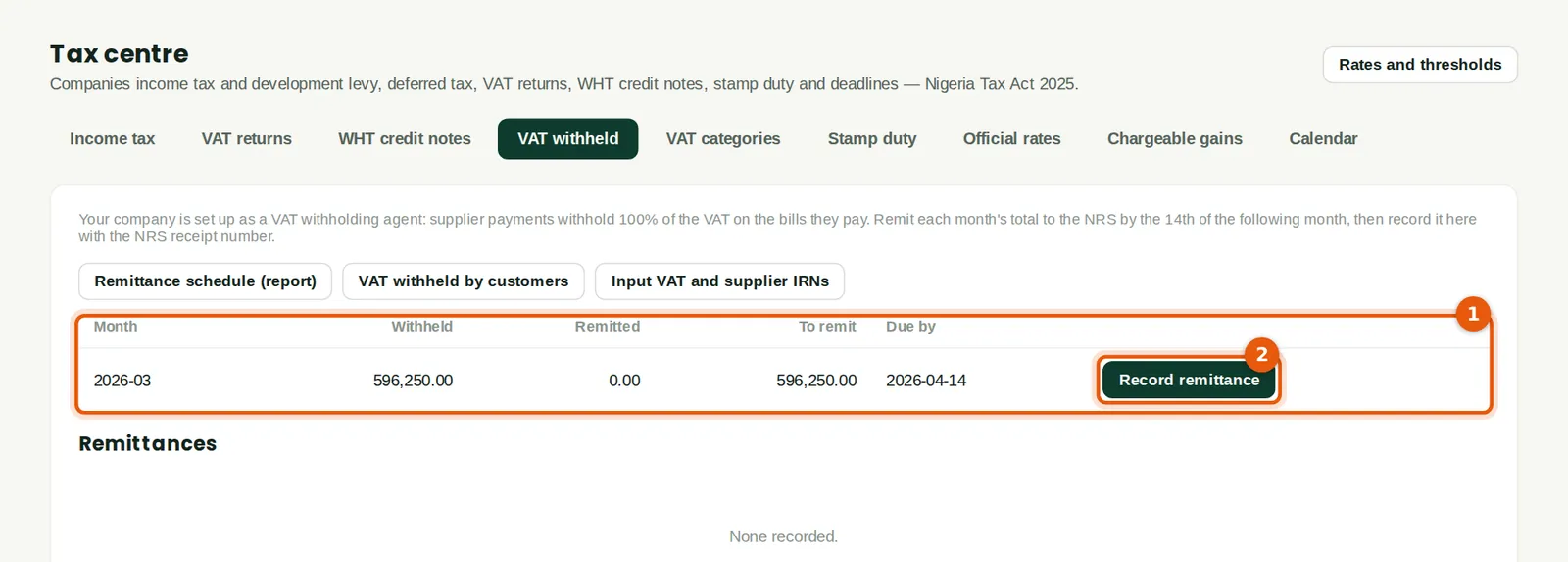
Each month's VAT withheld from suppliers, what has been remitted and what is still to pay, with the due date (1). In March Savannah Harvest withheld the VAT on the Kano Packaging bill paid in the batch of 31 March (chapter 21). The buttons at the top open the remittance schedule, VAT withheld by customers and the input VAT (IRN) report.
Who
Accountant, tax lead.
What to do
- Pay the NRS, then click Record remittance (2).
19.20 Record the remittance
Why
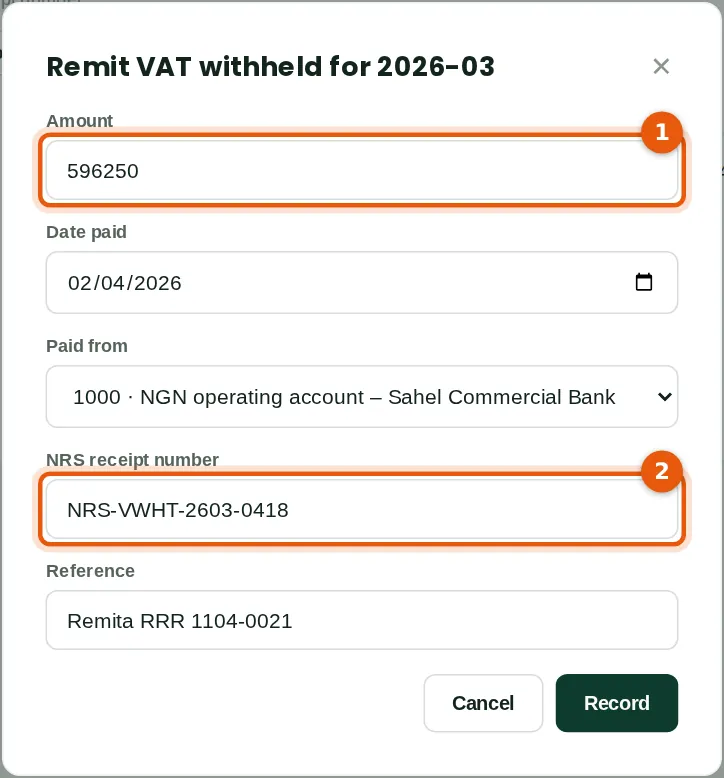
Recording the remittance posts debit 2110, credit the bank, with the NRS receipt number (2). The amount (1) defaults to what is outstanding. A remittance recorded in error can be removed; its journal is reversed.
Who
Accountant (tax Approve level).
What to do
- Check the amount (1), the date and the bank, type the NRS receipt number (2) and click Record.
19.21 Zero-rated sales and box 12b in the VAT return
Why
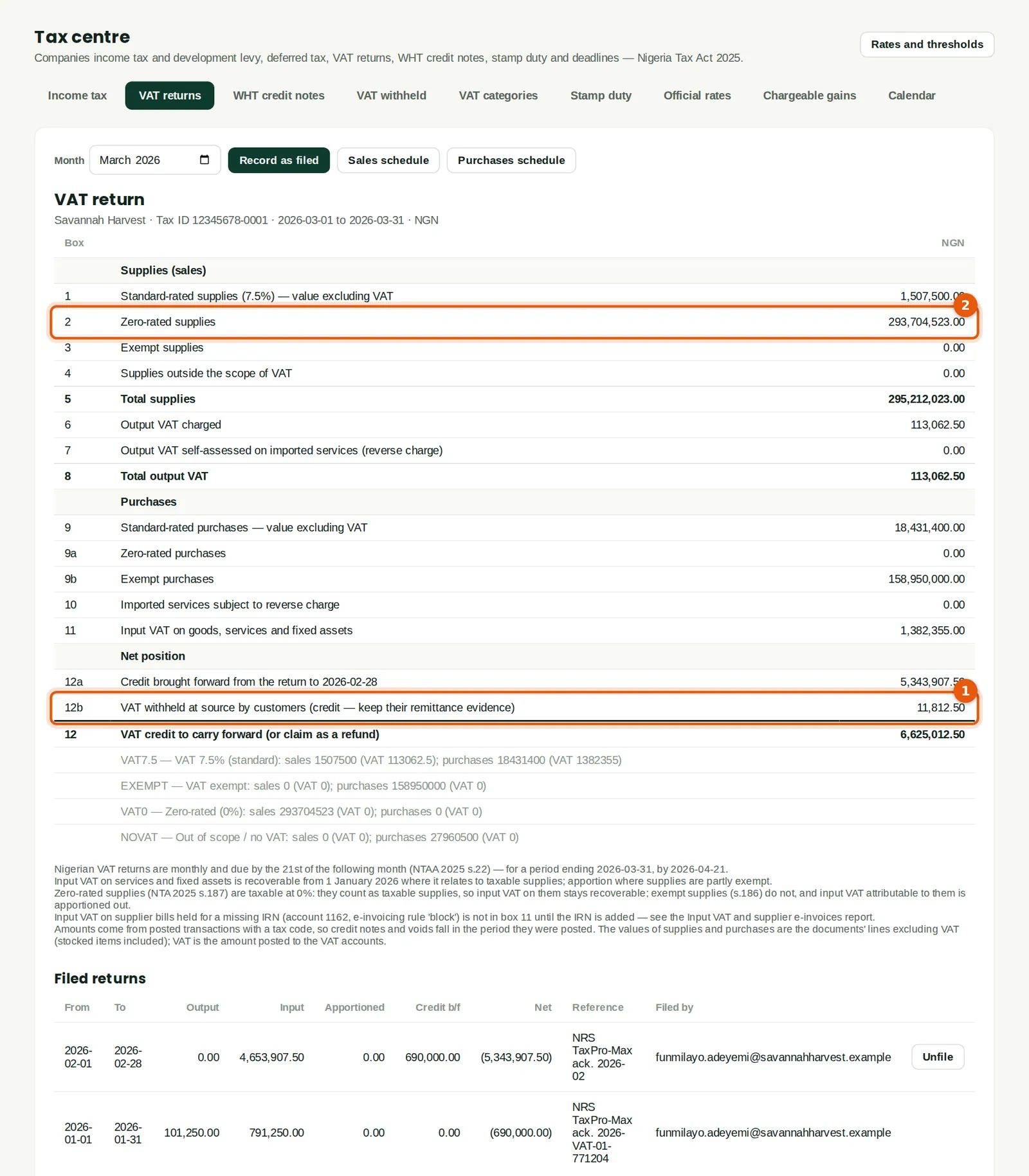
The March return shows the VAT withheld by Arewa Thermal Power in box 12b (1) — a credit that reduces the VAT payable or, as here, adds to the credit carried forward — and the sale to Abuja Fresh Mart among the zero-rated supplies (2). The notes explain any VAT held for missing IRNs. Zero-rated supplies count as taxable supplies when input VAT is apportioned, so input VAT on them stays recoverable.
Who
Accountant.
What to do
- Review the return and click Record as filed once it has been submitted on the NRS portal (chapter 11).