Steps in this chapter (12)
Keep the people register, CPD, competence and accreditations, capacity, appraisals, technology, methodology and templates, and service providers.
ISQM 1.32 covers human, technological and intellectual resources and resources from service providers. SQMTrove's registers hold the evidence: who is in the firm and their professional details, their CPD against the rules of their professional body, their accreditations for regulated sectors, their appraisals, the technology used on engagements (including AI tools), the methodology and templates, and the service providers with their due diligence.
Ifeoma Chukwu, Head of IT & Practice Resources, keeps these registers for Okafor Bello & Co.
6.1 The people register
Why
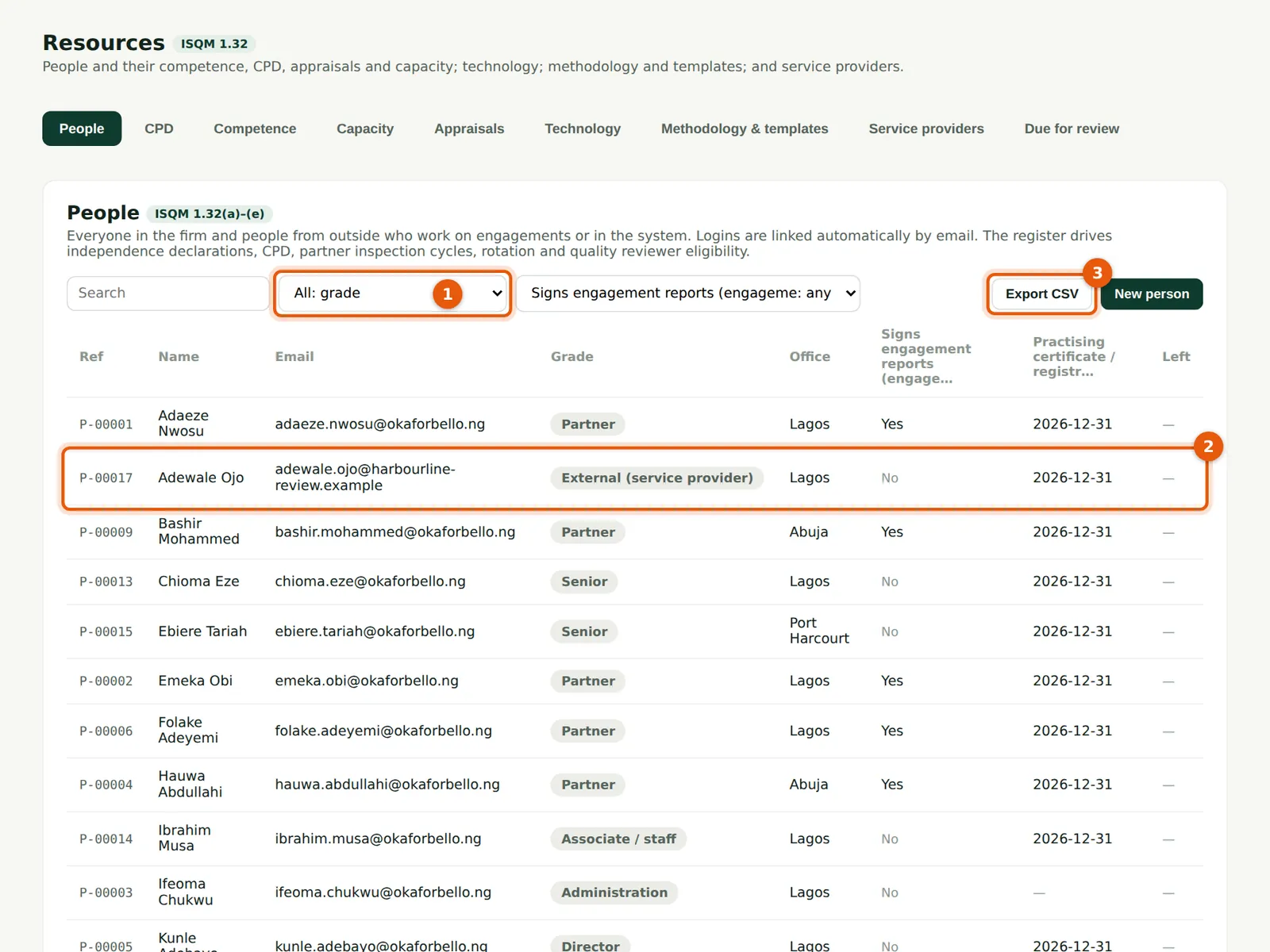
Everyone with a login is added automatically, and people without a login — such as Adewale Ojo, the external engagement quality reviewer (2) — are added by hand. The register drives independence declarations, CPD, the partner inspection cycle, rotation and reviewer eligibility. People are never deleted: record a leaving date instead.
Who
Firm administrator or quality lead.
What to do
- Filter by grade (1) or search by name.
- Choose New person for someone without a login; choose a row to edit.
- Choose Export CSV (3) to download the register.
6.2 A person's professional details
Why
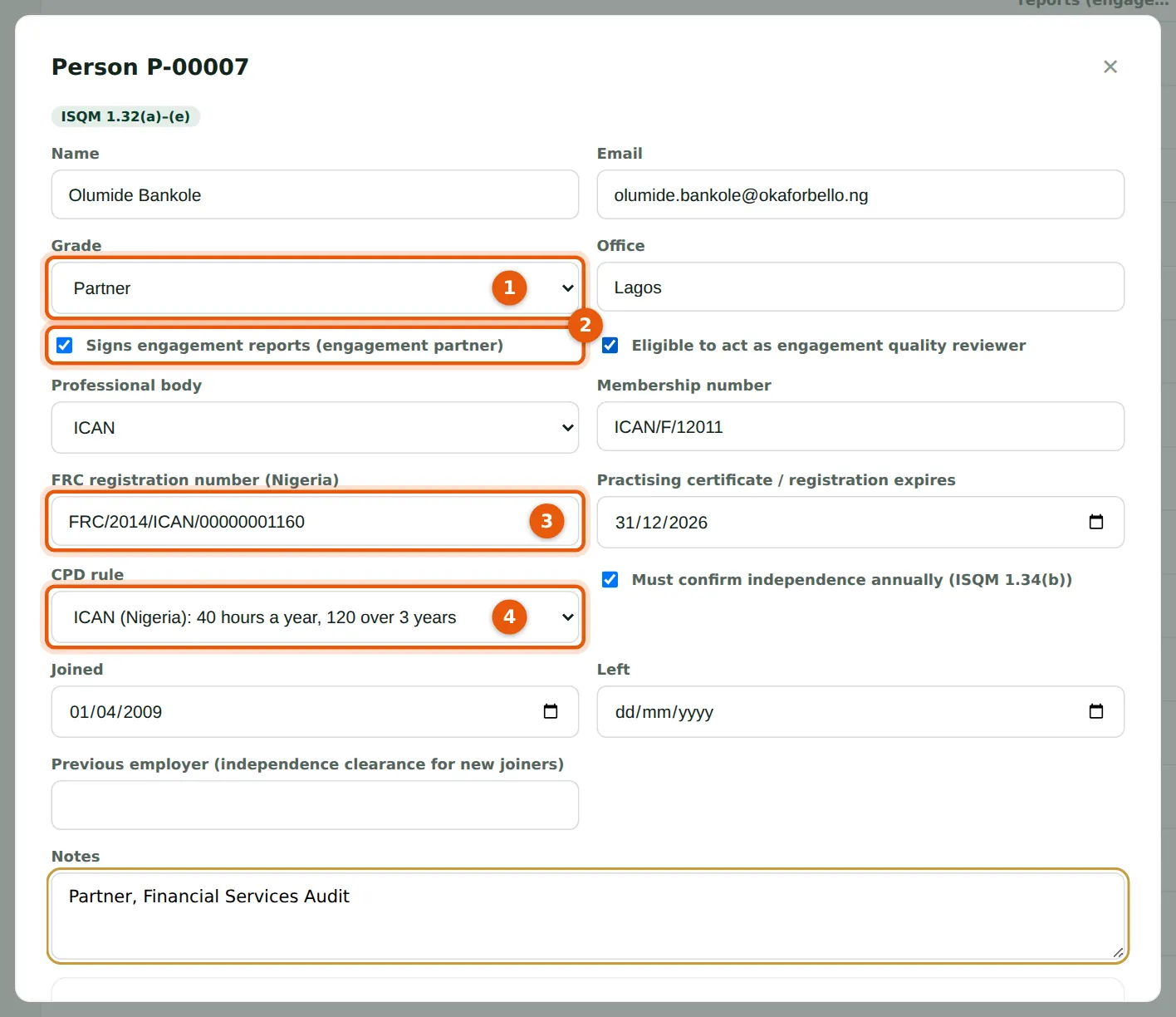
Grade (1), office, whether the person signs engagement reports (2) and may act as an engagement quality reviewer, their professional body and membership number, FRC registration number (3), practising certificate expiry, CPD rule (4), whether they must confirm independence each year, and joining and leaving dates.
Who
Firm administrator or quality lead.
What to do
- Choose the grade (1) and tick Signs engagement reports (2) for engagement partners.
- Enter the FRC number (3) and practising expiry; choose the CPD rule (4); choose Save.
6.3 Record your own CPD
Why
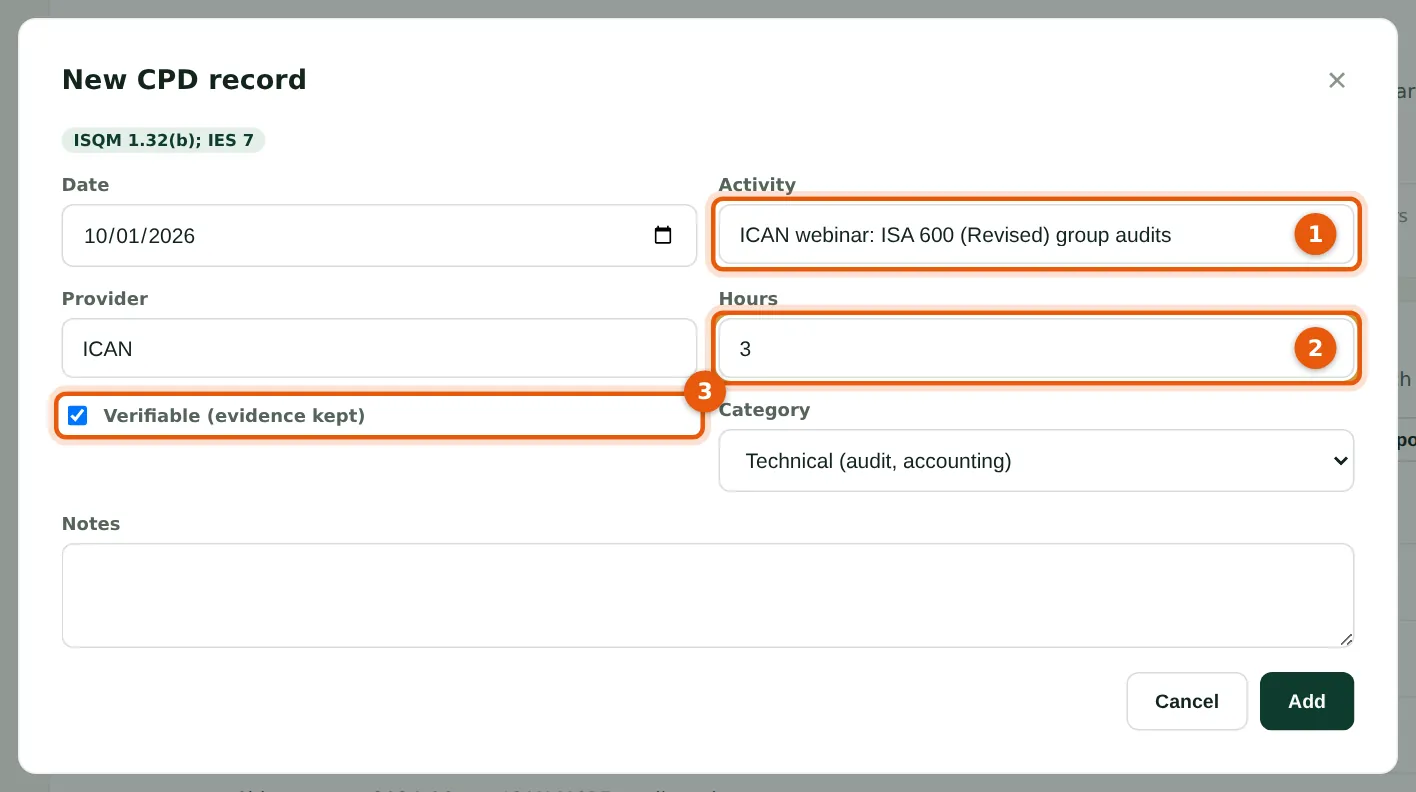
Everyone records their own CPD: the activity (1), provider, hours (2), whether it is verifiable with evidence (3) and the category. Attach the certificate to the record.
Who
Everyone (self-service); the resources lead for others.
What to do
- Open Resources → CPD and choose New CPD record.
- Enter the date, activity (1), provider and hours (2); tick Verifiable (3); choose Add, then attach the certificate.
6.4 CPD compliance
Why
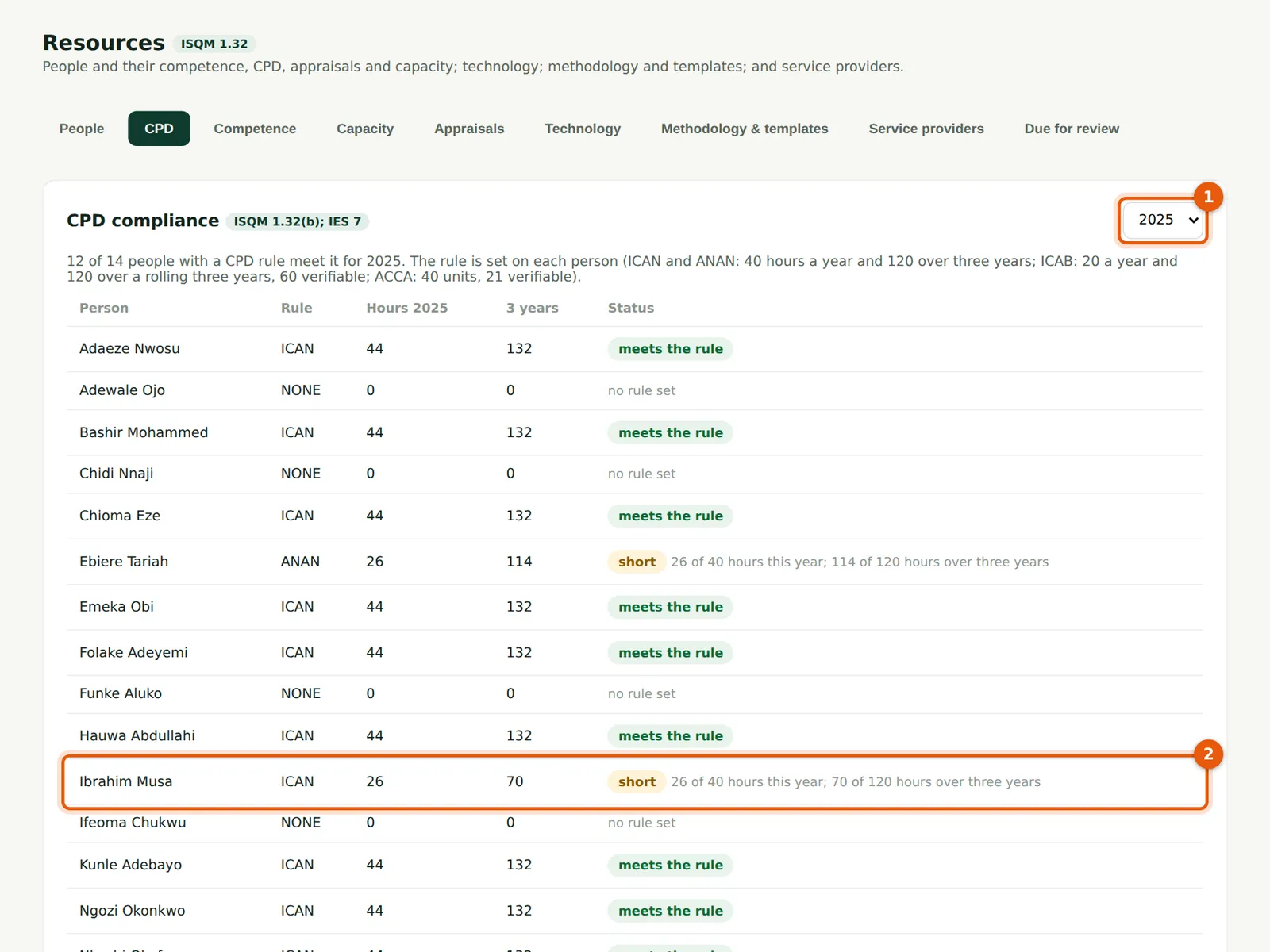
For the chosen year (1) each person is checked against their rule: ICAN and ANAN 40 hours a year and 120 over three years; ICAB 20 a year, 120 over a rolling three years with 60 verifiable; ACCA 40 units with 21 verifiable. Ibrahim Musa (2) and Ebiere Tariah were short in 2025 — the matter ICAN's reviewer raised in April 2026.
Who
Firm administrator; quality lead.
What to do
- Choose the year (1). Read the Status column; short shows what is missing (2).
- New CPD record (3) adds a record for someone else.
6.5 Competence and accreditations
Why
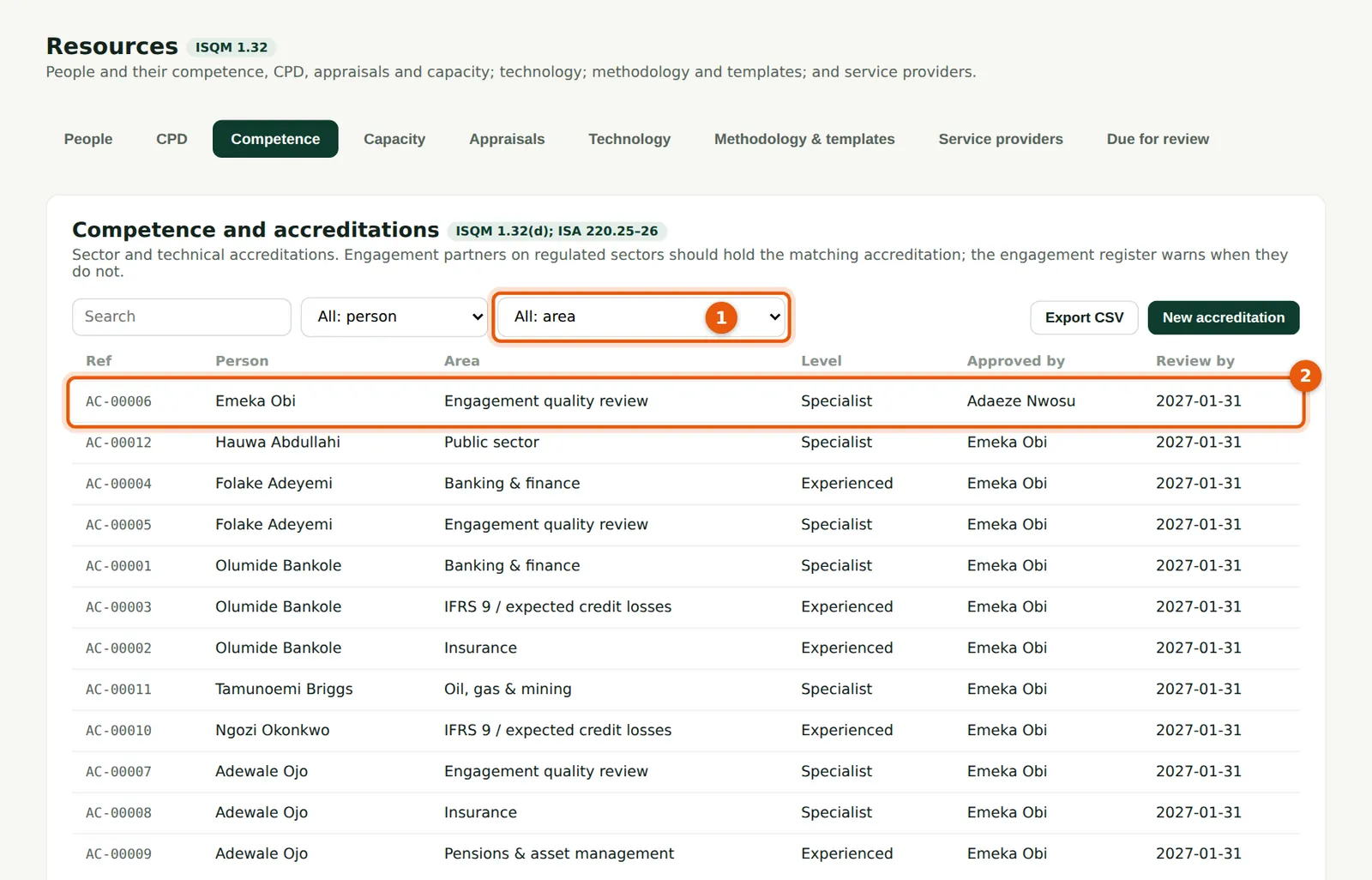
Accreditations record who is competent for regulated sectors and specialist areas (1): banking, insurance, pensions, IFRS 9, IFRS 17, group audits, and engagement quality review (2). The engagement register warns when an engagement partner on a regulated-sector client has no matching accreditation, and reviewer eligibility warns likewise.
Who
Quality lead approves; resources lead records.
What to do
- Choose New accreditation: the person, area, level, who approved it and when, and the review date.
6.6 Capacity of partners and reviewers
Why
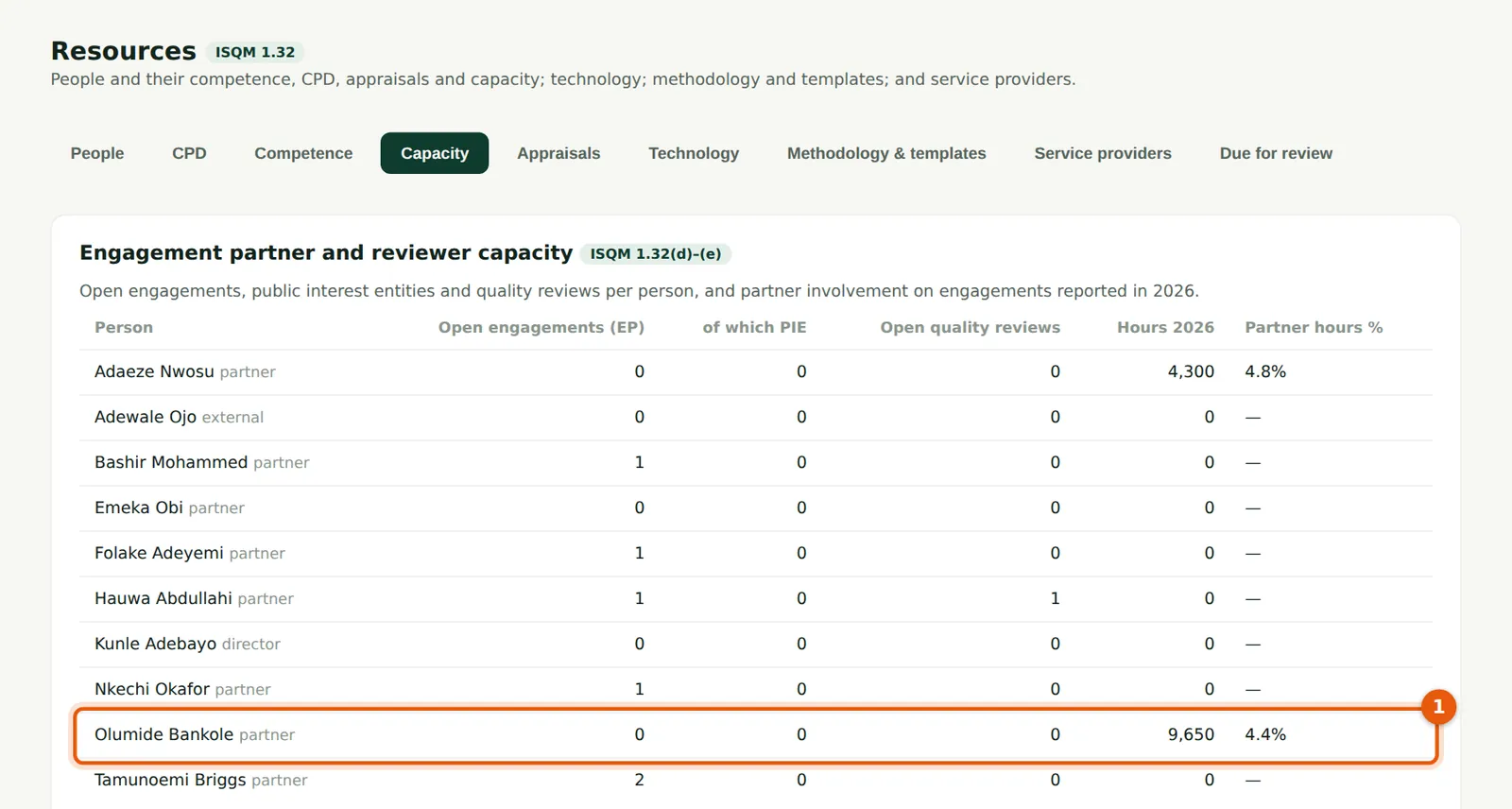
Open engagements, public interest entities and reviews per person, hours this year and partner hours as a percentage of engagement hours (ISQM 1.32(d)–(e)). Olumide Bankole's row (1) shows three public interest entity audits — the concentration behind the firm's severe deficiency (chapter 13).
Who
Firm administrator and leadership.
What to do
- Review the list when allocating partners and reviewers each year.
6.7 Record an appraisal
Why
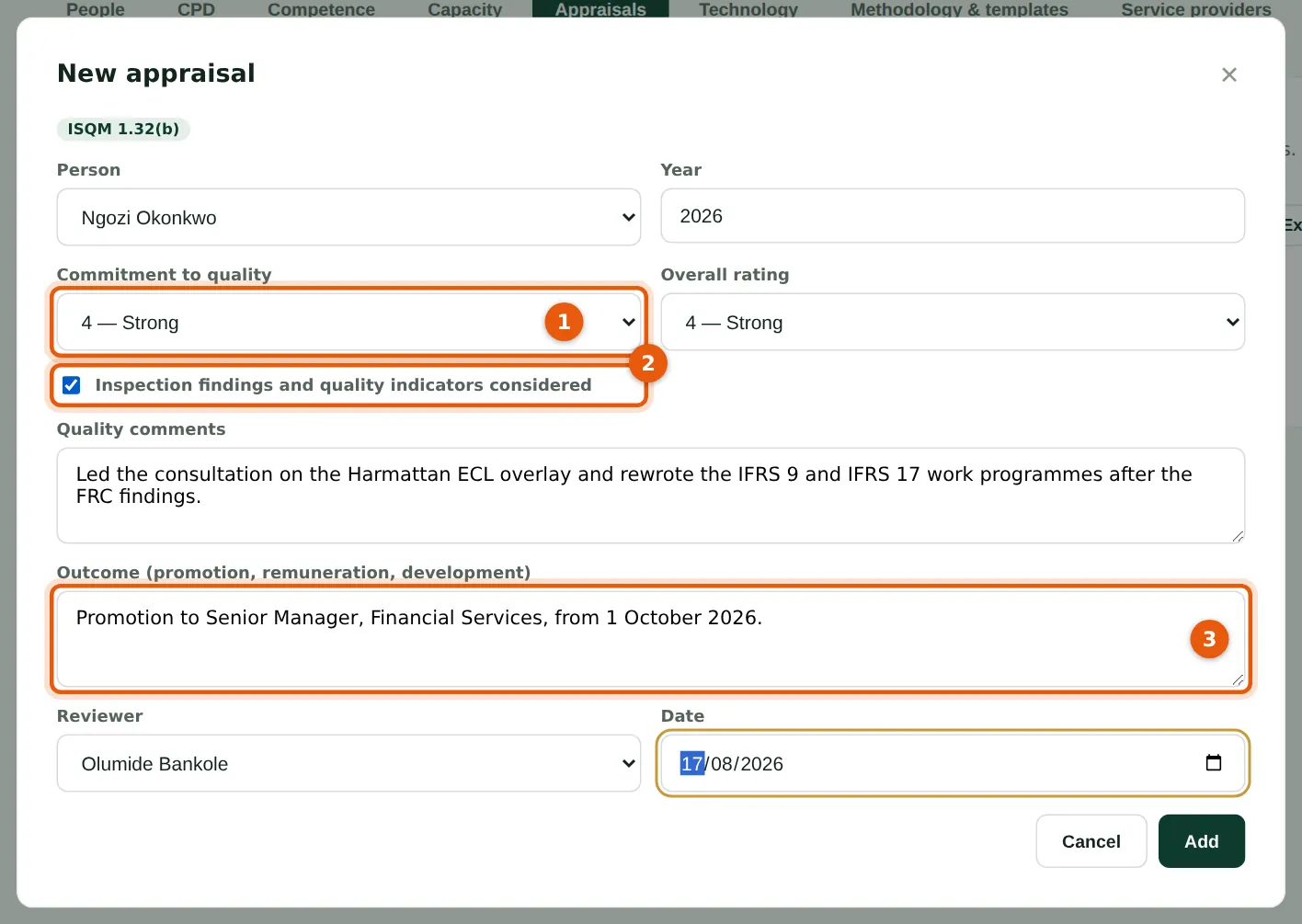
ISQM 1.32(b) requires timely evaluations that hold people accountable for quality and recognise it. Rate the commitment to quality (1), confirm that inspection findings and quality indicators were considered (2) and record the outcome (3): promotion, remuneration or development.
Who
Partners and managers (reviewers); people see their own appraisals.
What to do
- Choose New appraisal and complete the form, then choose Add.
6.8 The appraisals register
Why
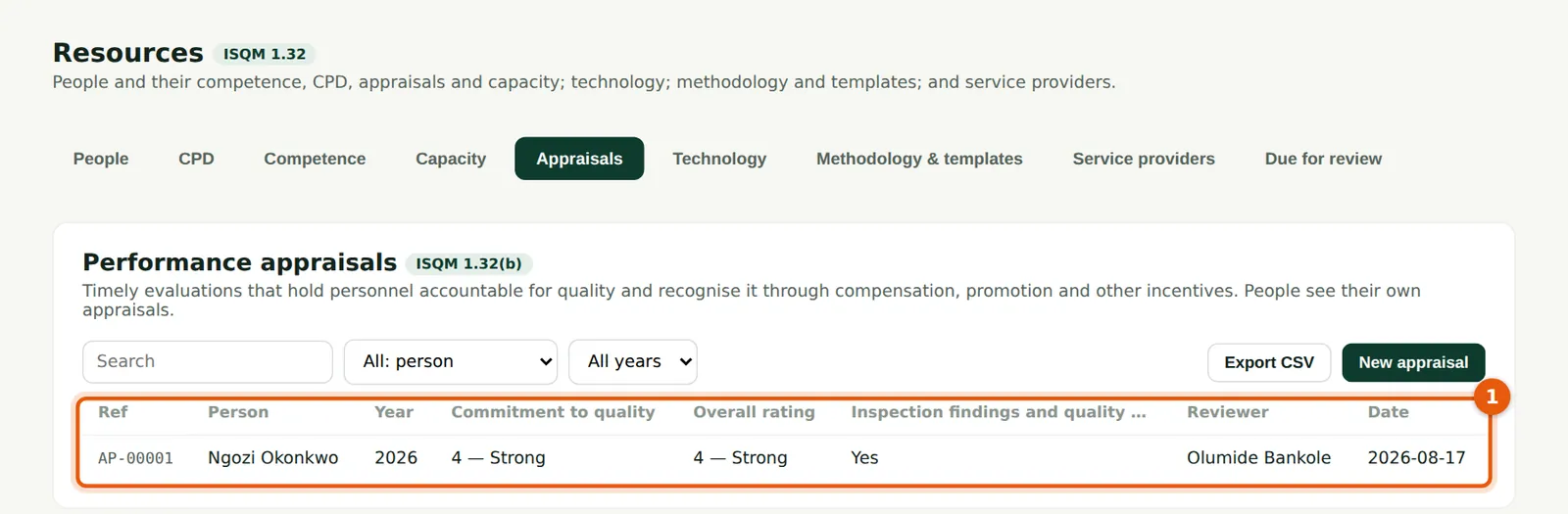
Only people who approve in resources see all appraisals (1); each person sees their own.
Who
Firm administrator (Head of IT & Practice Resources).
What to do
- Filter by year or person, or Export CSV.
6.9 Technological resources
Why
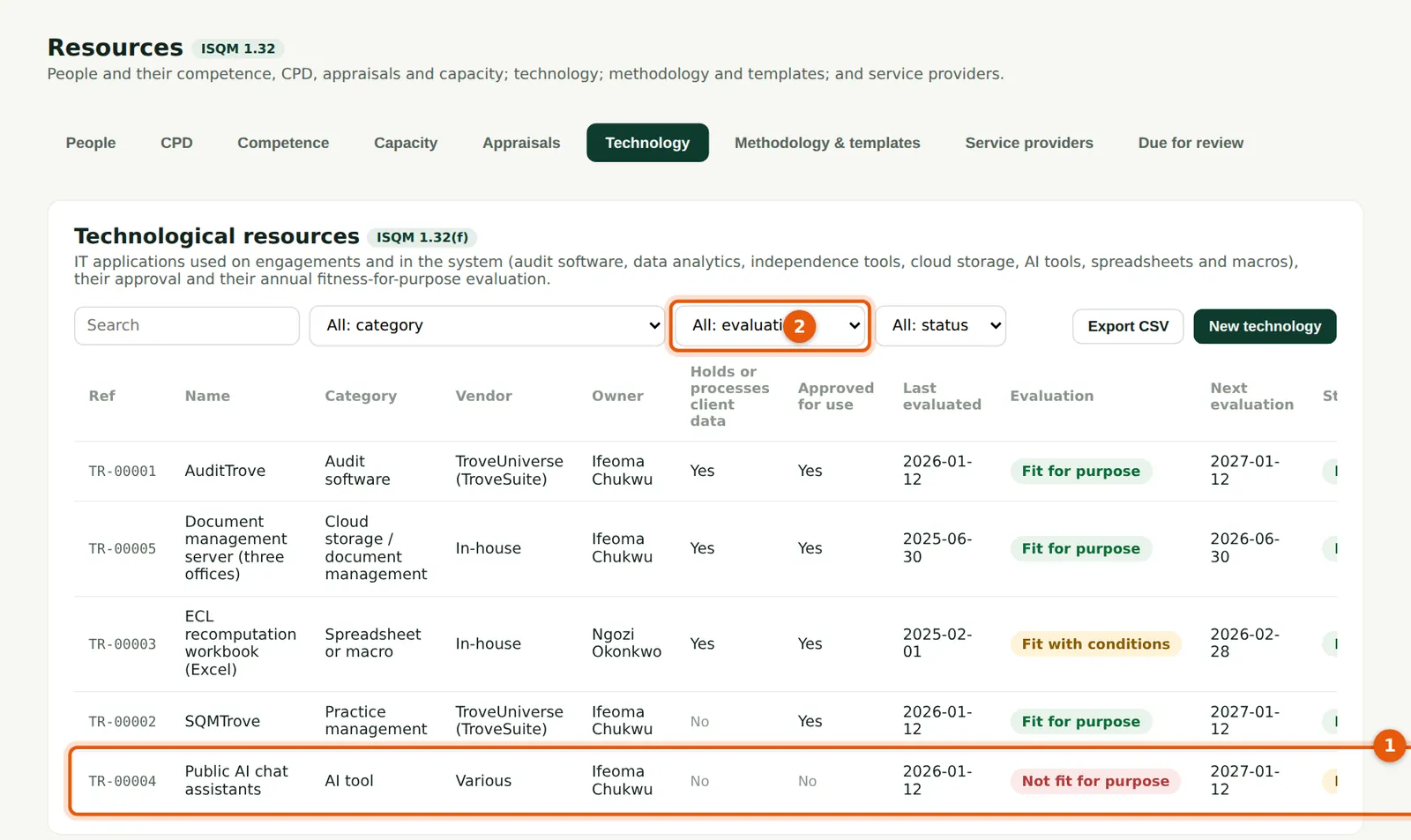
Every IT application used on engagements or in the system: audit software, analytics, spreadsheets and macros, cloud storage and AI tools, with its approval and annual fitness evaluation. Public AI chat assistants (1) are recorded as not approved, with the control (no client data). Filter by evaluation (2) to find what is due.
Who
Head of IT (resources lead).
What to do
- Choose New technology to record an application; evaluate it each year and record the controls.
6.10 Methodology and templates
Why
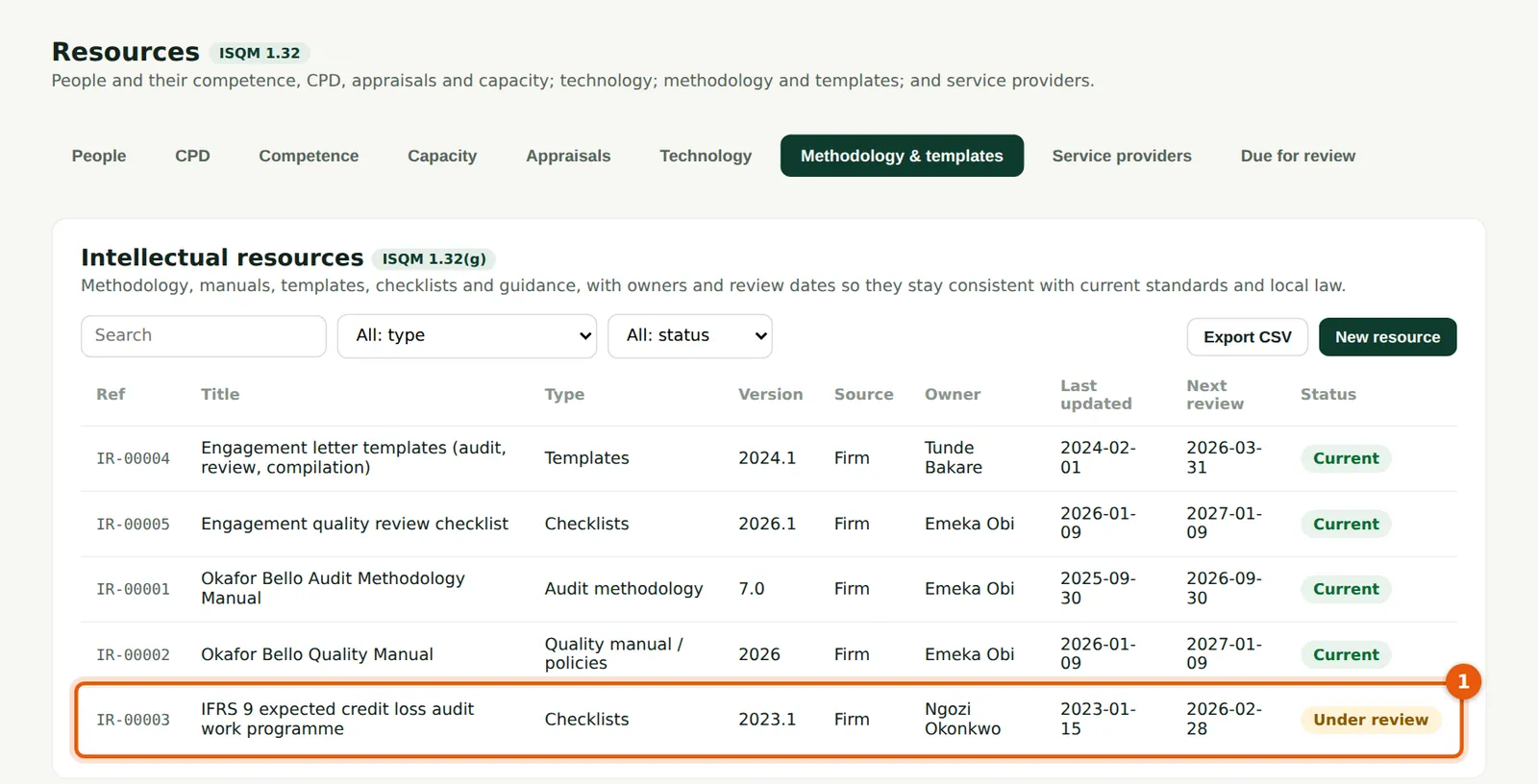
The audit methodology, quality manual, templates, checklists and guidance, with owners, the standards they reflect and review dates (ISQM 1.32(g)). The IFRS 9 work programme (1) was under review — one of the causes of the financial services deficiency.
Who
Quality lead (owner of the methodology).
What to do
- Keep the next review date current; change the status to Under review while a document is updated.
6.11 Service providers and due diligence
Why
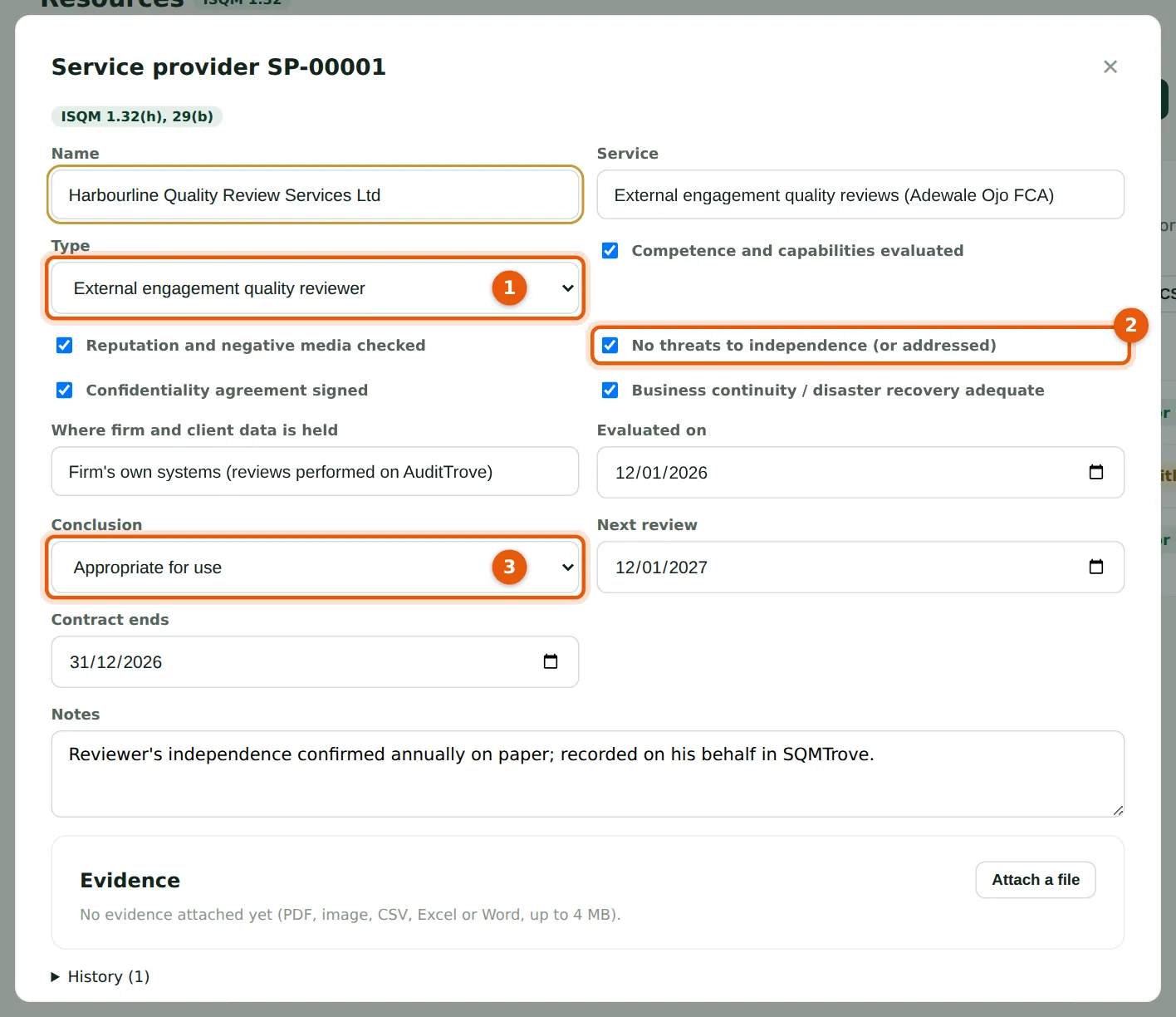
ISQM 1.32(h) requires the firm to determine that resources from service providers are appropriate. Record the type (1) and the due diligence: competence, reputation, independence (2), confidentiality, business continuity and where data is held, and the conclusion (3).
Who
Firm administrator and quality lead.
What to do
- Tick each check done, choose the conclusion (3) and the next review date, and choose Save.
6.12 Due for review
Why
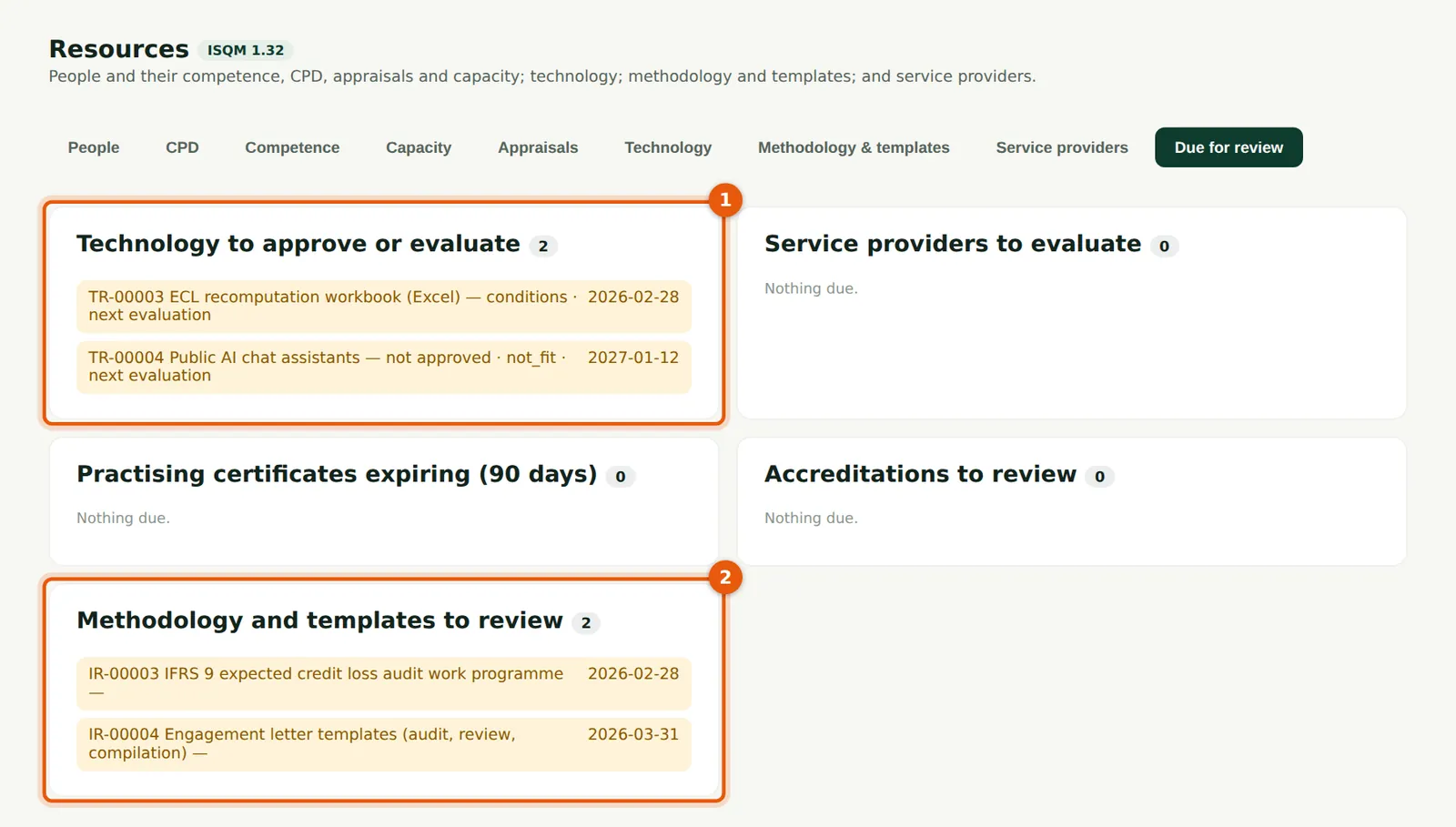
One page lists what needs attention: technology to approve or evaluate (1), service providers to evaluate, practising certificates expiring within 90 days, accreditations and methodology due for review (2).
Who
Firm administrator (Head of IT & Practice Resources).
What to do
- Work through each list; each line names the record to open.