Steps in this chapter (16)
Set the firm's home country to International, record the firm's own regulator, run the guided set-up with the neutral library, add the Nigerian rows only when the firm has Nigerian clients, and see how the checks follow each client's jurisdiction.
SQMTrove started with the rules of Nigeria: the FRC, ICAN and the FRC Audit Regulations 2020. Since October 2026 the firm's home country is either Nigeria or International. Nigeria is the default, and nothing changes for a Nigerian firm. International is for a firm based outside Nigeria. It gets neutral wording: the starter library follows ISQM 1 and 2, ISA 220 (Revised) and the IESBA Code, and the settings, the inspection pack and the transparency report name the firm's own regulator or professional body instead of the FRC, ICAN or ICAB.
The Nigerian and Barbadian rules still apply, but only to clients in those countries. Each client has a jurisdiction: Nigeria, Barbados or Other. The registration check (the FRC register for Nigerian clients) and the beneficial ownership threshold follow the client's jurisdiction, whatever the firm's home country. A client in another jurisdiction has no registration check, and its beneficial owners are checked against the firm's own threshold for other jurisdictions (25% unless the firm changes it).
Firms already set to Barbados keep that setting and work as before. Settings shows it as Barbados (existing setting). It cannot be chosen for a new firm, and an owner or firm administrator can move such a firm to International.
This chapter uses a second fictional firm, Harrow Lane & Partners, Chartered Accountants, of Port Meridian. It is not Okafor Bello & Co. Clara Whitfield is the managing partner (Owner), Daniel Reyes the quality lead, and Jonas Lindqvist and Priya Raman are partners. The firm is registered with the Meridian Accountancy Council. On 2 October 2026 it opens SQMTrove, sets its home country, runs the guided set-up and takes on its first Nigerian client, Lekki Harbour Foods Limited. All names, places, bodies and numbers in this chapter are invented.
29.1 Choose the home country
Why
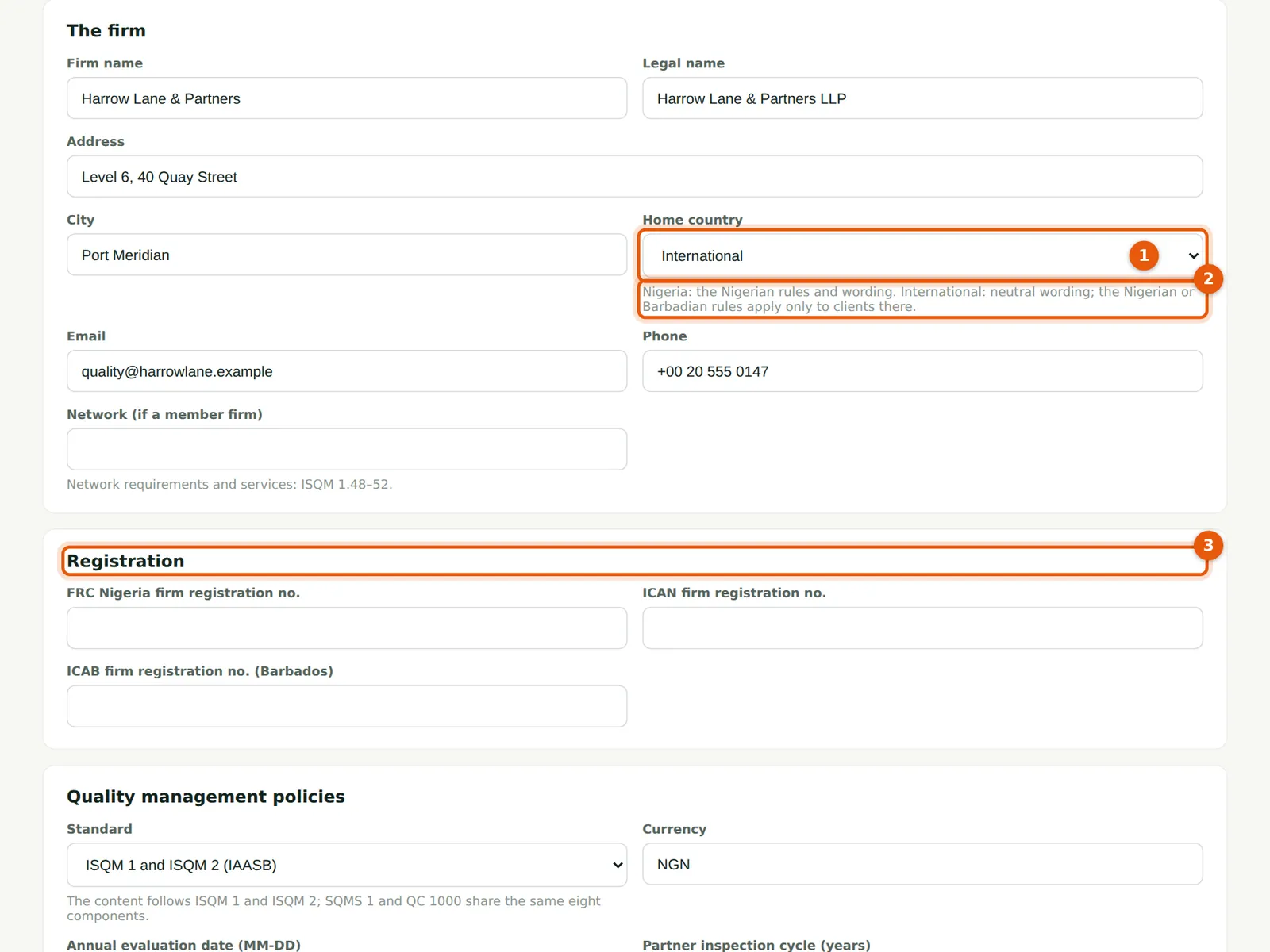
A new firm starts as Nigeria. The home country (1) offers two choices: Nigeria and International. The hint below it (2) says what each one does. Until the change is saved, the Registration section (3) still shows the FRC, ICAN and ICAB numbers.
Who
Owner or firm administrator.
What to do
- Open Settings and stay on the Firm tab.
- Enter the firm's details, then choose International in Home country (1).
- Choose Save firm settings at the bottom of the page.
29.2 Confirm the change
Why
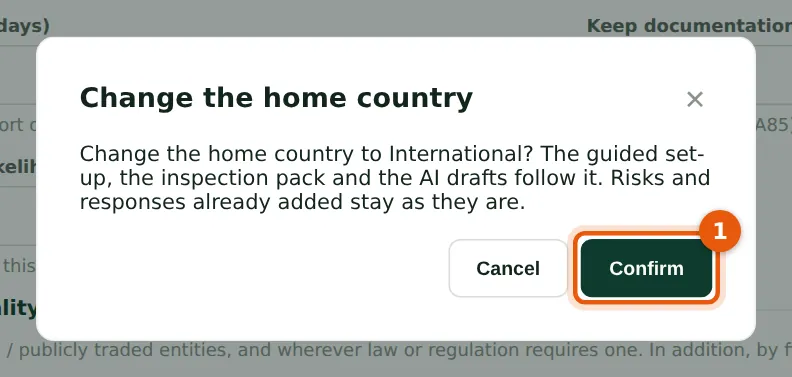
SQMTrove asks before it changes the home country. The guided set-up, the inspection pack and the AI drafts follow it. Risks and responses the firm has already added stay as they are: a firm that moves from Nigeria to International keeps its Nigerian wording until it edits the rows. The change is recorded in the audit trail with its own entry: “Home country changed from Nigeria to International by …”.
Who
Owner or firm administrator.
What to do
- Choose Confirm (1). The page reloads with the International settings.
29.3 Record the regulator and the registration number
Why
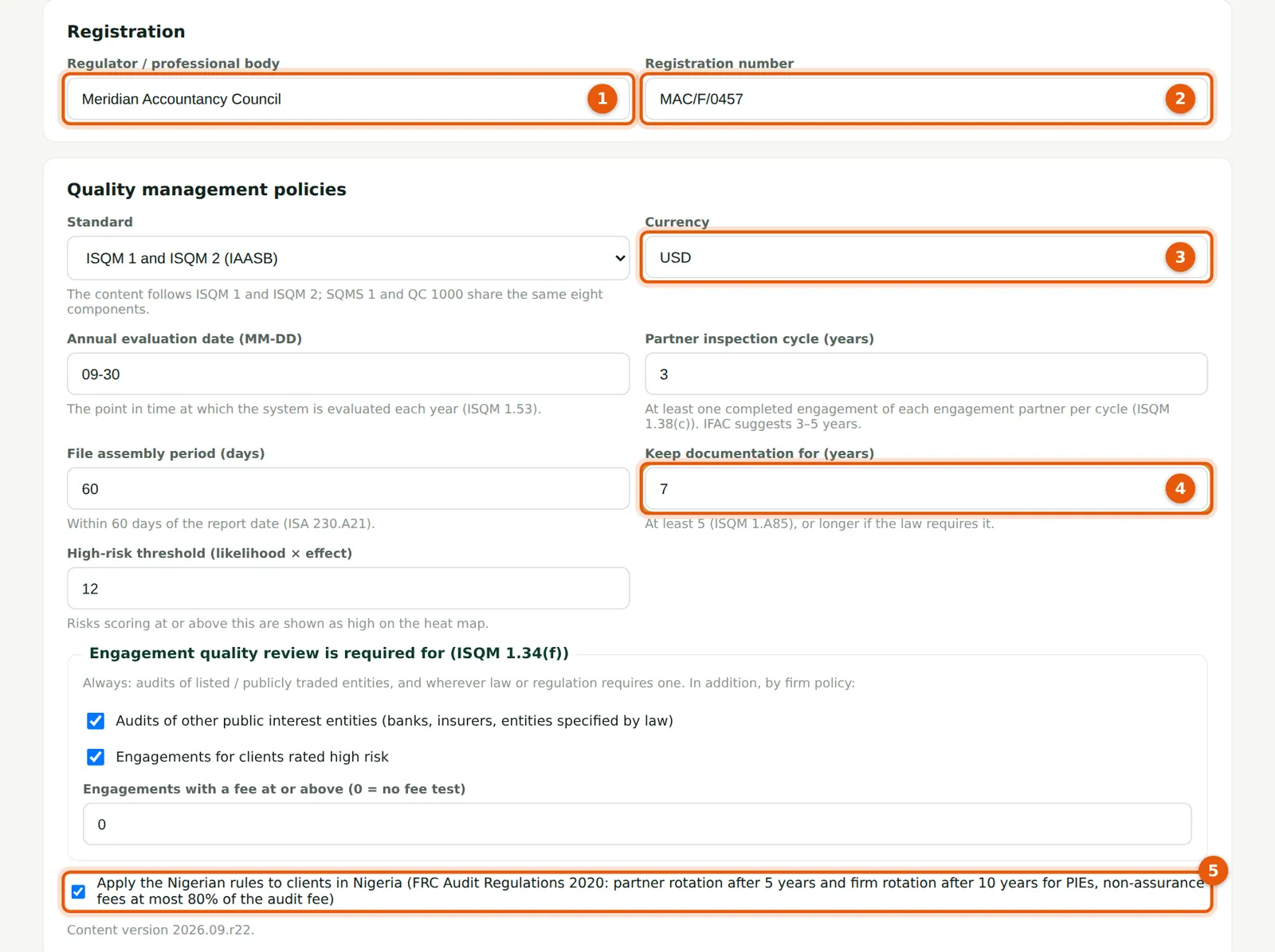
An International firm records its regulator or professional body (1) and its registration number (2). They replace the FRC, ICAN and ICAB numbers on this page, in the inspection pack and in the transparency report. Numbers recorded earlier stay stored. The currency (3) is not changed with the home country: it stays NGN until you change it. The retention hint (4) now reads “at least 5 (ISQM 1.A85), or longer if the law requires it”. The Nigerian rules box (5) now reads Apply the Nigerian rules to clients in Nigeria: keep it ticked if the firm may have Nigerian clients.
Who
Owner, firm administrator or quality lead.
What to do
- Enter the regulator or professional body (1) and the registration number (2). Harrow Lane & Partners enters Meridian Accountancy Council and MAC/F/0457 (both fictional).
- Enter the currency (3), for example USD, and check the evaluation date, inspection cycle, file assembly and retention periods (4).
- Choose Save firm settings.
29.4 Who can change the home country
Why
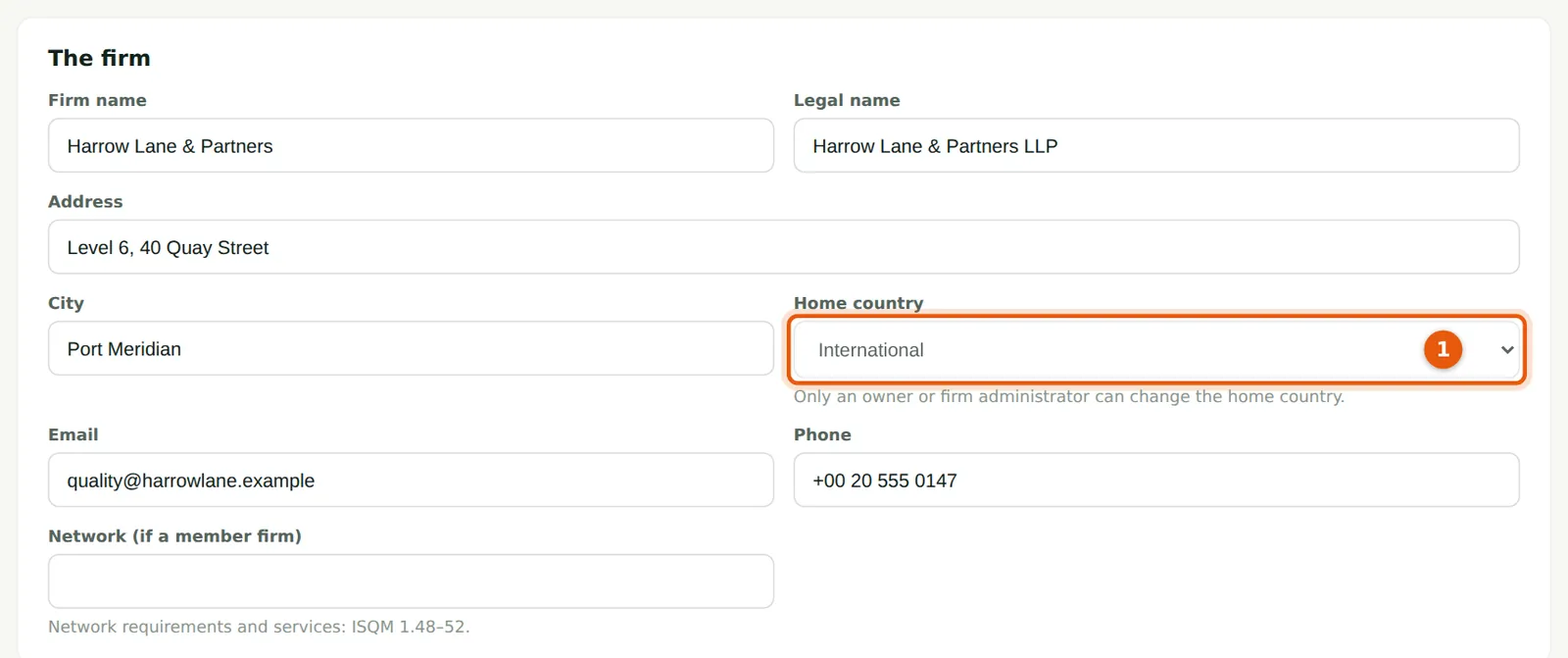
Only an owner or firm administrator can change the home country. The quality lead sees the field (1) but cannot change it, and SQMTrove refuses the change if it is sent another way. The quality lead can still change the other firm settings.
Who
Quality lead (view only for this field).
What to do
- Ask the owner or a firm administrator if the home country is wrong.
29.5 Run the guided set-up: the neutral library
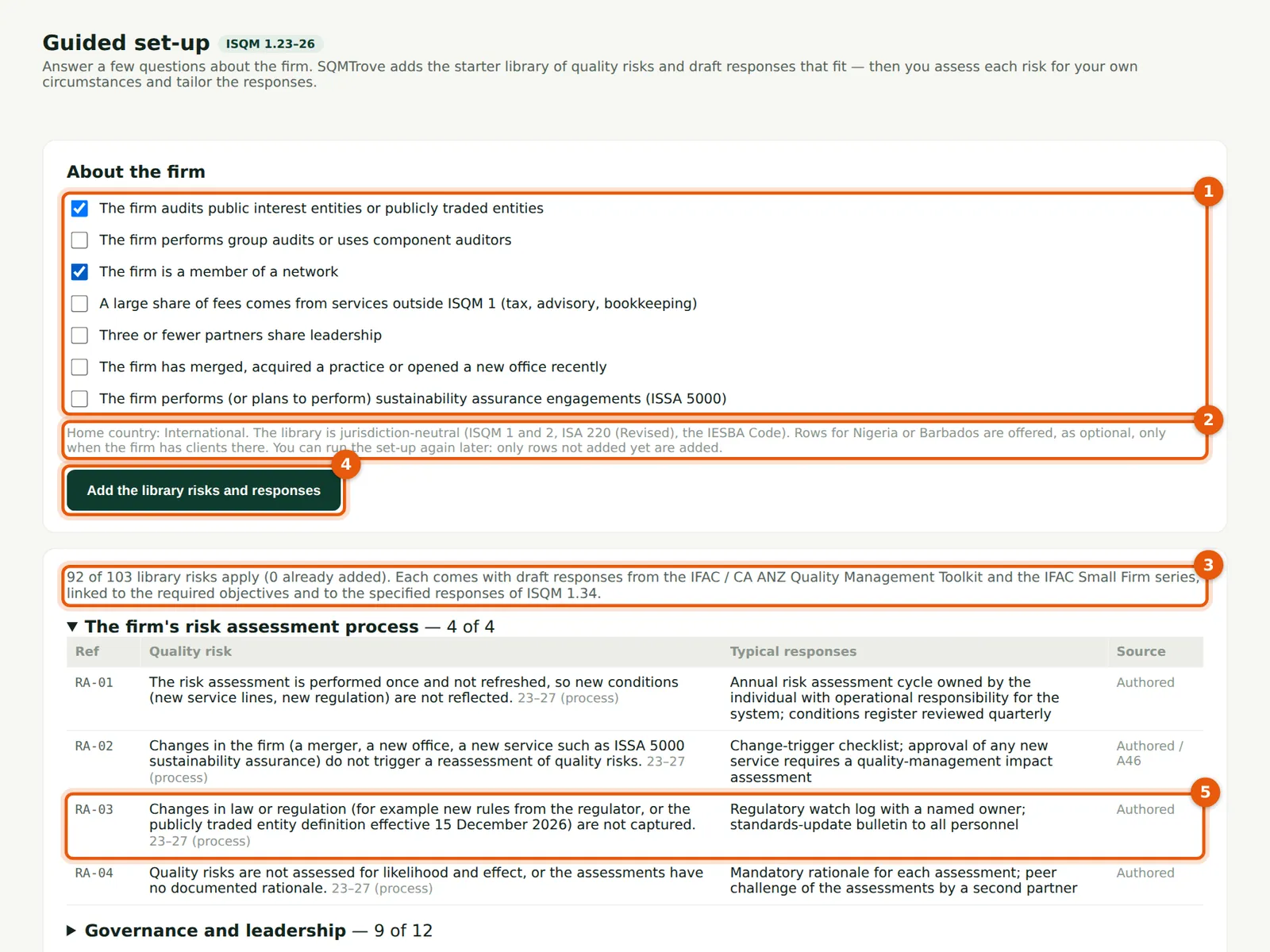
Why
The questions (1) are the same as for a Nigerian firm. The note (2) explains the International library: it is jurisdiction-neutral, and the rows for Nigeria or Barbados are offered only when the firm has clients there. Harrow Lane & Partners has no clients yet, so no such question appears. The count (3) shows that 92 of the 103 rows apply to its answers. Rows that name a Nigerian or Barbadian rule come in neutral wording: RA-03 (5) speaks of “new rules from the regulator” instead of the FRC.
Who
Quality lead or Owner.
What to do
- Open Risk assessment → Guided set-up.
- Tick the questions that apply (1). Harrow Lane & Partners audits public interest entities and is a member of a network.
- Choose Add the library risks and responses (4).
29.6 Neutral wording in the library
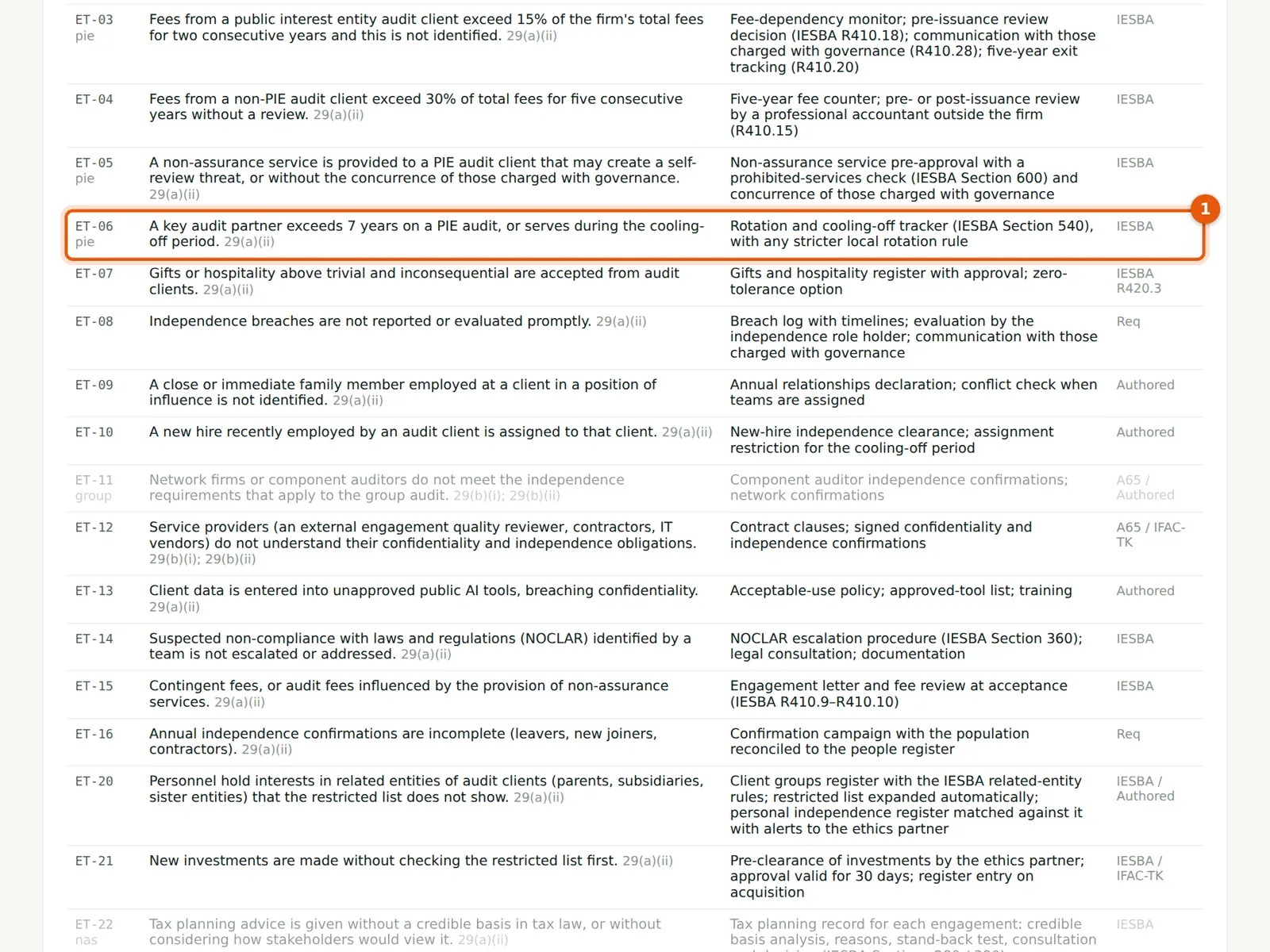
Why
Nine rows have a general requirement and get neutral wording in an International firm: RA-03, ET-06, EP-10, HR-03, IR-02, IC-07, MR-07, AC-20 and AC-21. For a Nigerian firm, ET-06 (1) names the Nigerian five-year rotation rule. Here it refers to IESBA Section 540 “with any stricter local rotation rule”. Two rows exist only in Nigerian law and are not offered at all: AC-08 (firm tenure of public interest entities) and EP-12 (signing reports).
Who
Quality lead.
What to do
- Open each component to read the rows before you run the set-up.
29.7 Record each client's jurisdiction
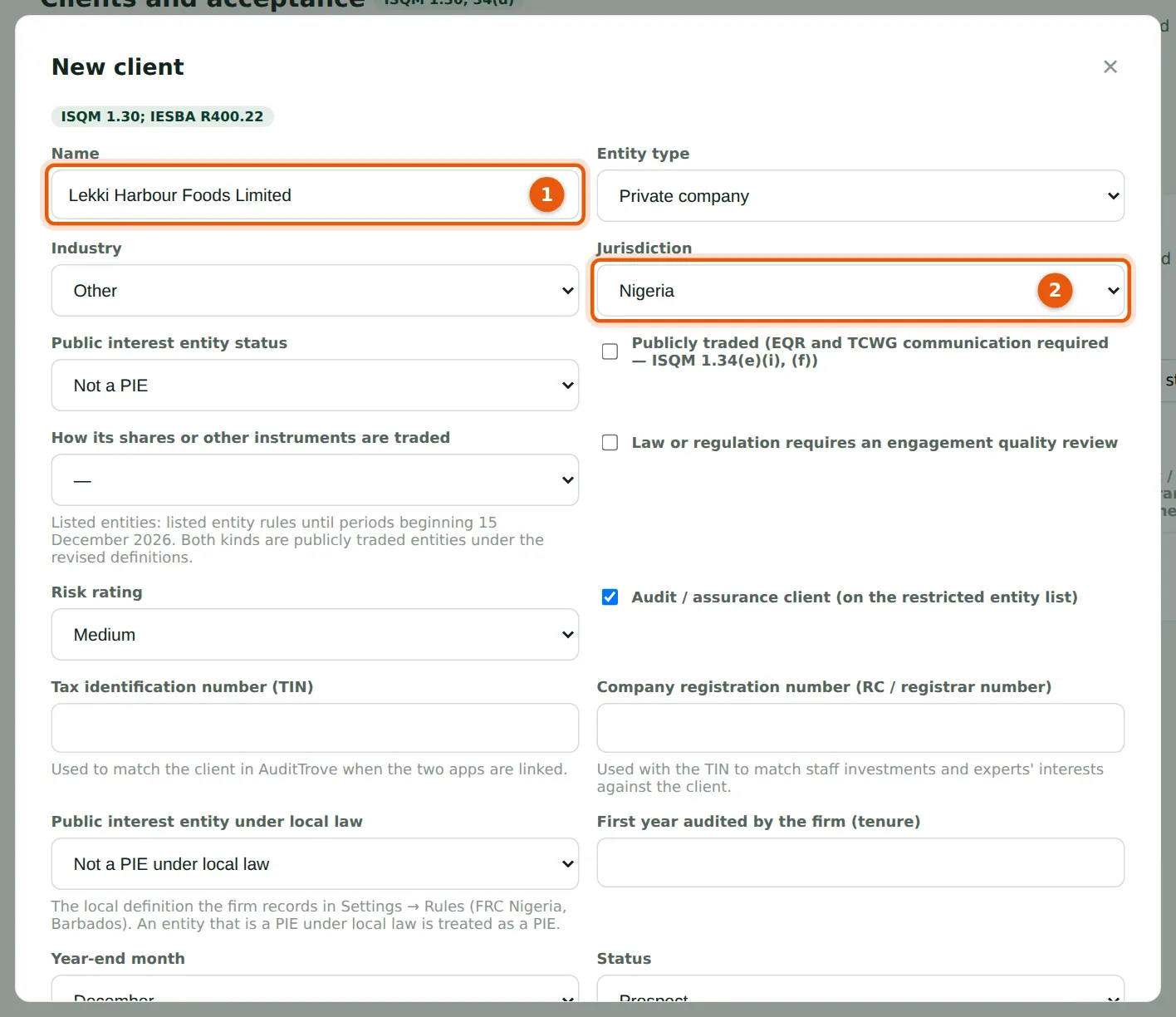
Why
In an International firm a new client starts with jurisdiction Other. A client in Nigeria or Barbados must be set to that country (2): the registration check, the beneficial ownership threshold, the Nigerian rules on rotation and fees, and the law applied in its due diligence all follow this field. Lekki Harbour Foods Limited (1) is the Nigerian subsidiary of a Port Meridian food group. Brightwater Logistics Limited, a client in Port Meridian, keeps Other.
Who
Partners; quality lead.
What to do
- Open Clients & acceptance → Clients and choose New client.
- Enter the name (1) and choose the jurisdiction (2): Nigeria, Barbados or Other.
- Fill in the other fields and choose Save.
29.8 Opt in to the Nigerian rows
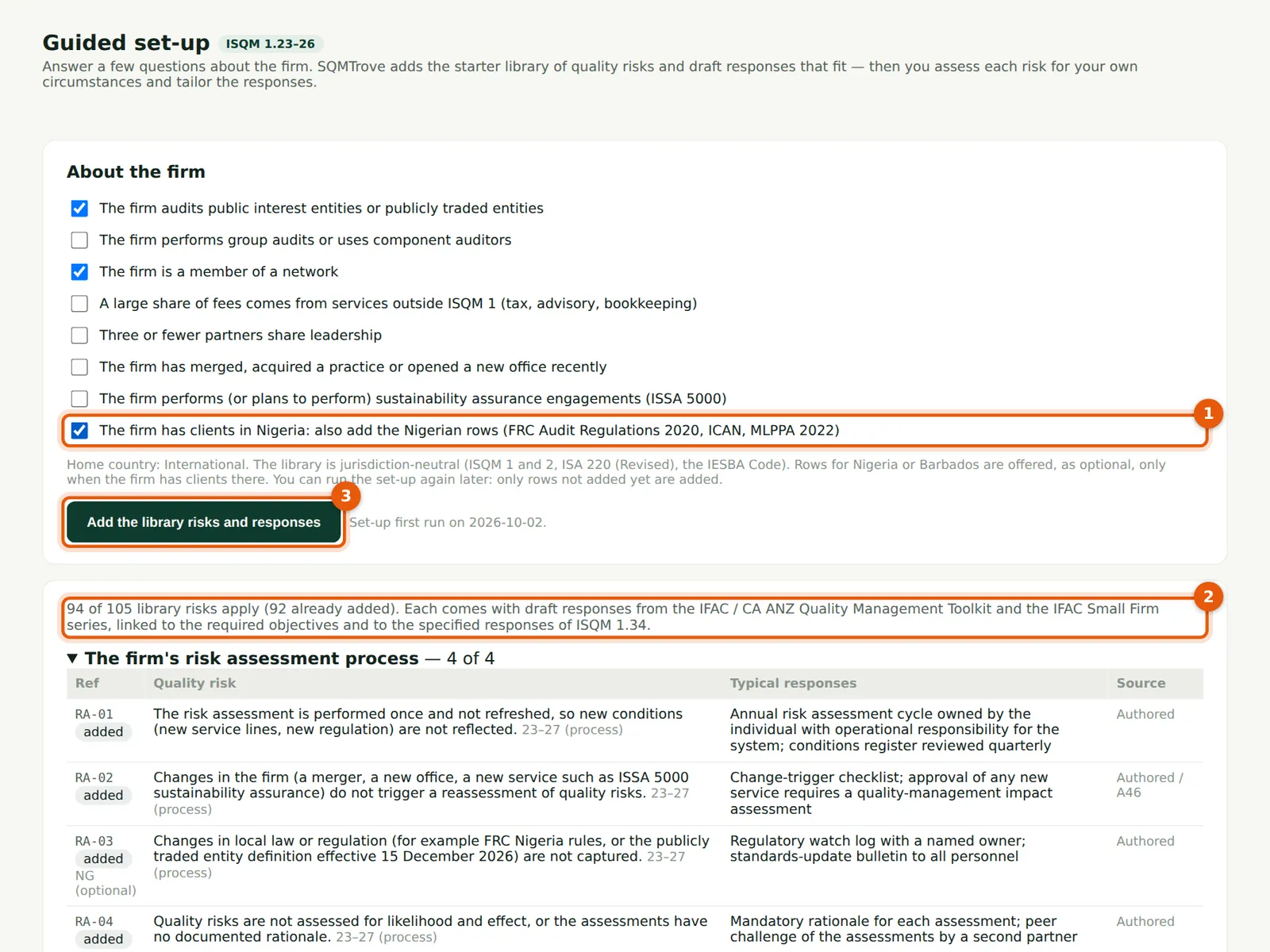
Why
When the firm has prospects or active clients in Nigeria, the set-up offers an optional question (1): “The firm has clients in Nigeria: also add the Nigerian rows”. A firm with Barbadian clients sees the same question for Barbados. The count (2) shows what the answer adds: 94 of 105 rows, of which 92 are already added. If the firm has no clients in that country, the question is not shown and is ignored.
Who
Quality lead or Owner.
What to do
- Open Guided set-up again.
- Tick the question for the country (1) and read the rows in the preview (step 29.9).
- Choose Add the library risks and responses (3). Only rows not added yet are added.
29.9 Which Nigerian rows are added
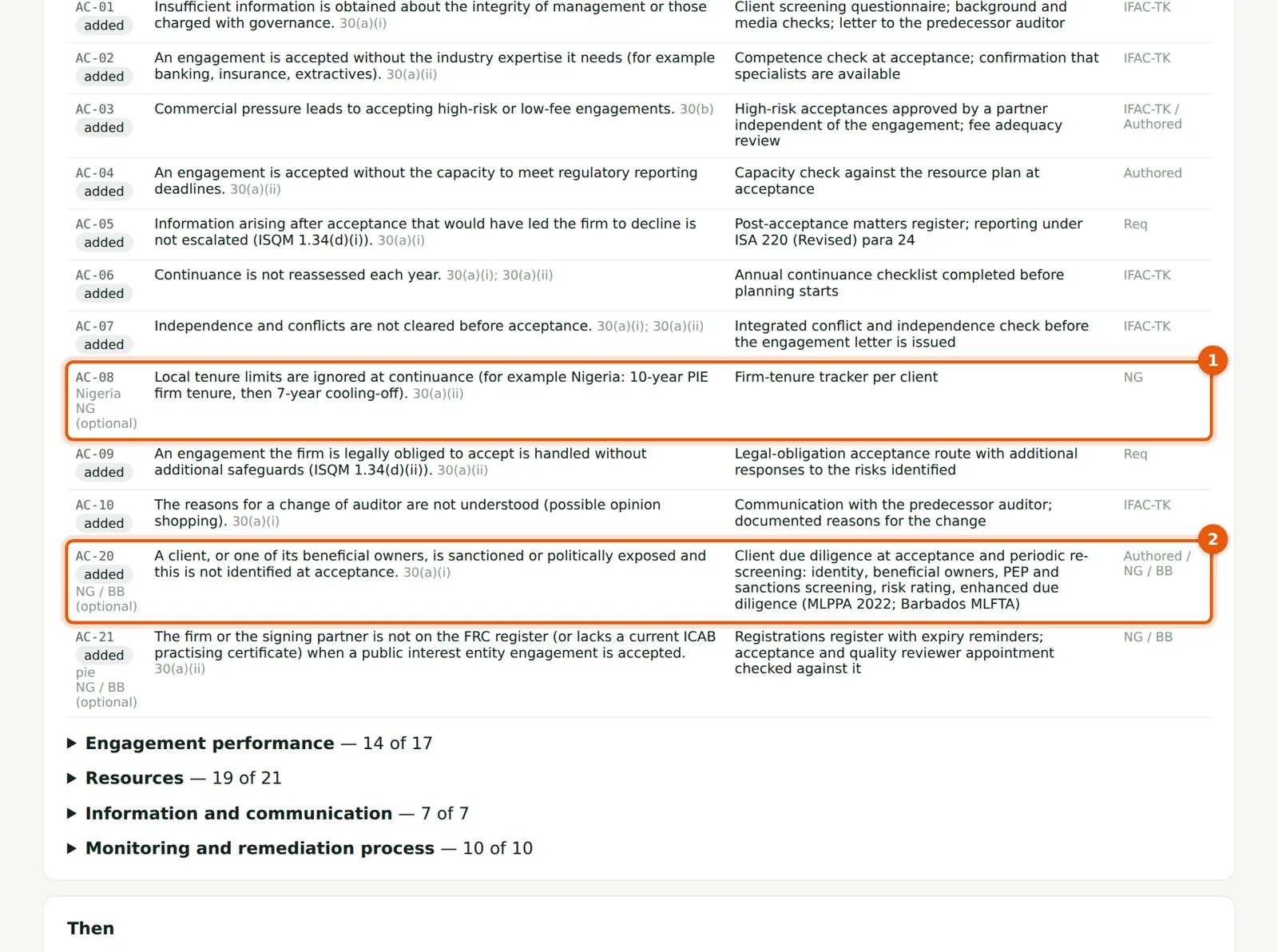
Why
AC-08 (1), a Nigeria-only row, is now offered and marked NG (optional). Rows already added stay as they are: AC-20 (2) shows the Nigerian wording in the preview, but the firm's own risk keeps the neutral wording it was added with. Harrow Lane & Partners' second run added two risks, AC-08 and EP-12, with three draft responses. Edit an existing risk if it should name the Nigerian rule.
Who
Quality lead.
What to do
- Check the rows marked NG (optional).
- After the run, assess the new risks like any other (chapter 5).
29.10 The inspection pack
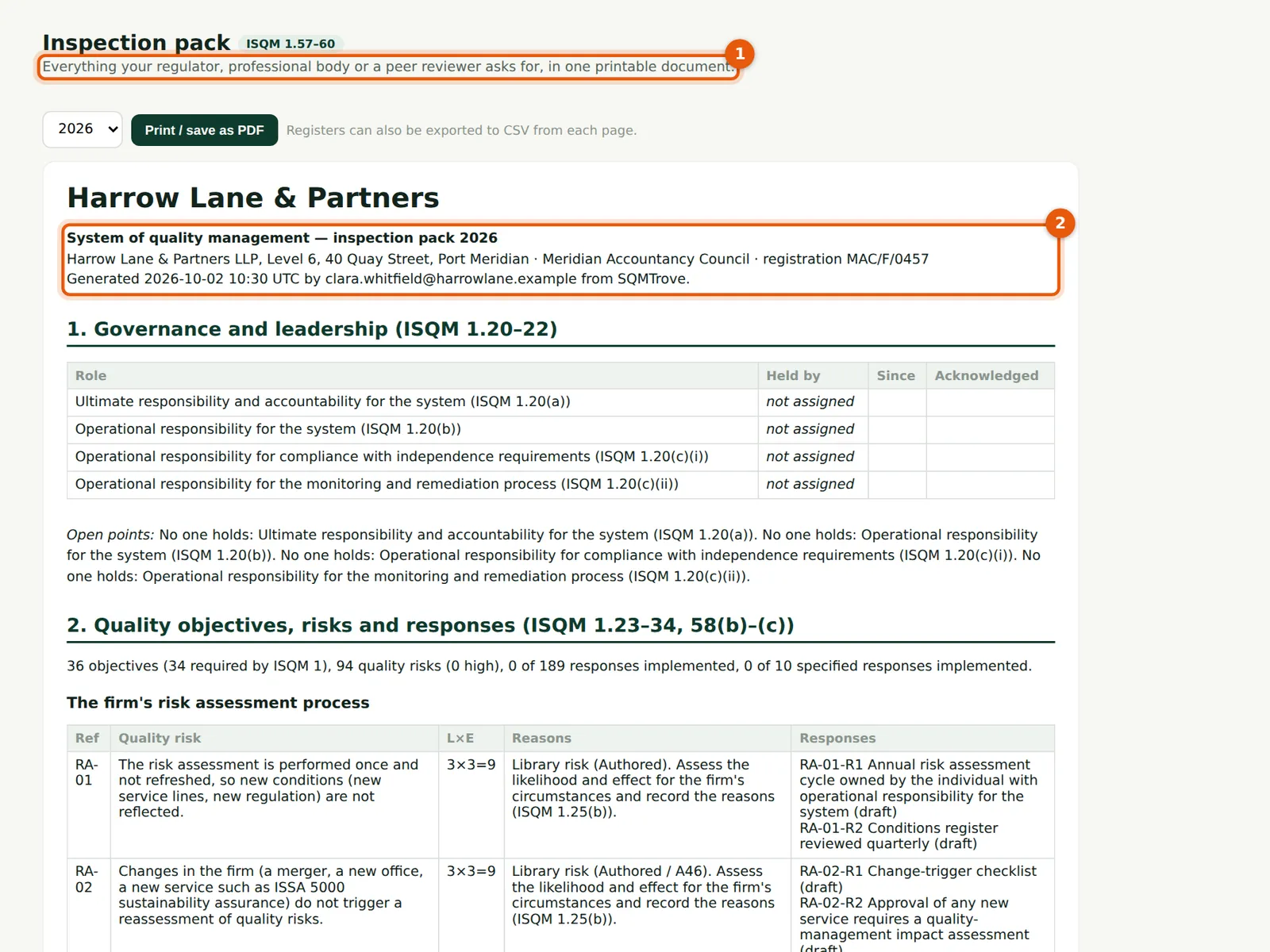
Why
For an International firm the pack is for “your regulator, professional body or a peer reviewer” (1). The first lines (2) give the firm's address, its regulator or professional body and its registration number, with no FRC, ICAN or ICAB numbers. The transparency report draft and the stored reports use the same fields. The rest of the pack is the same as for a Nigerian firm (chapter 16).
Who
Quality lead; Owner.
What to do
- Open Inspection pack, choose the year and choose Print / save as PDF.
29.11 Settings → Rules for an International firm
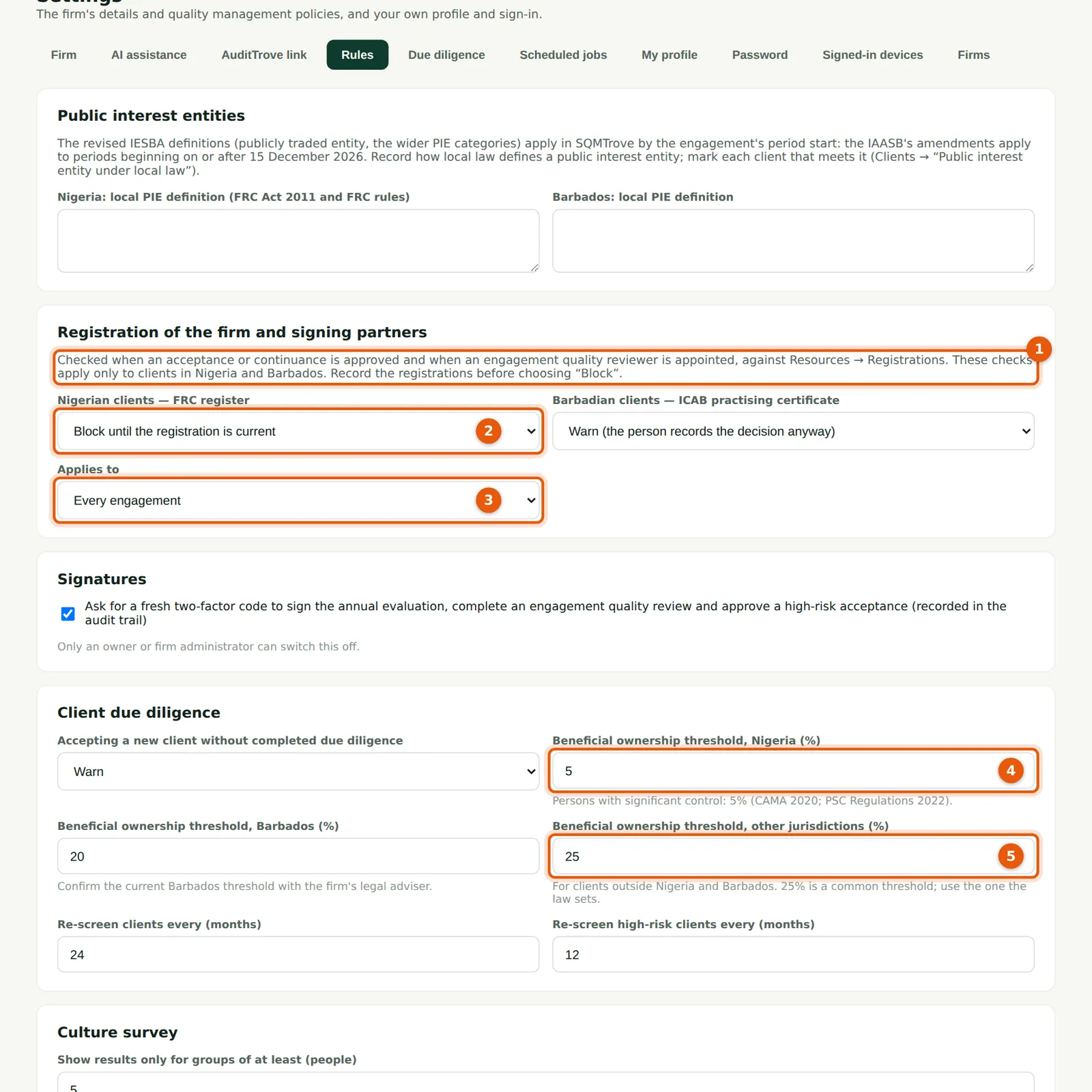
Why
The registration checks apply only to clients in Nigeria and Barbados (1): there is no register to check for other jurisdictions. Harrow Lane & Partners sets the check for Nigerian clients to Block (2) and applies it to every engagement (3), not only to public interest entities. The Nigerian threshold (4) stays at 5%. An International firm also has a threshold for other jurisdictions (5): 25% by default. Use the threshold the law of the client's country sets.
Who
Owner or firm administrator (to switch a check off or raise a threshold); quality lead (to make them stricter).
What to do
- Open Settings → Rules.
- Choose the checks for Nigerian and Barbadian clients (2, 3) and enter the thresholds (4, 5).
- Choose Save rules at the bottom of the page.
29.12 Raising a threshold needs an owner or firm administrator
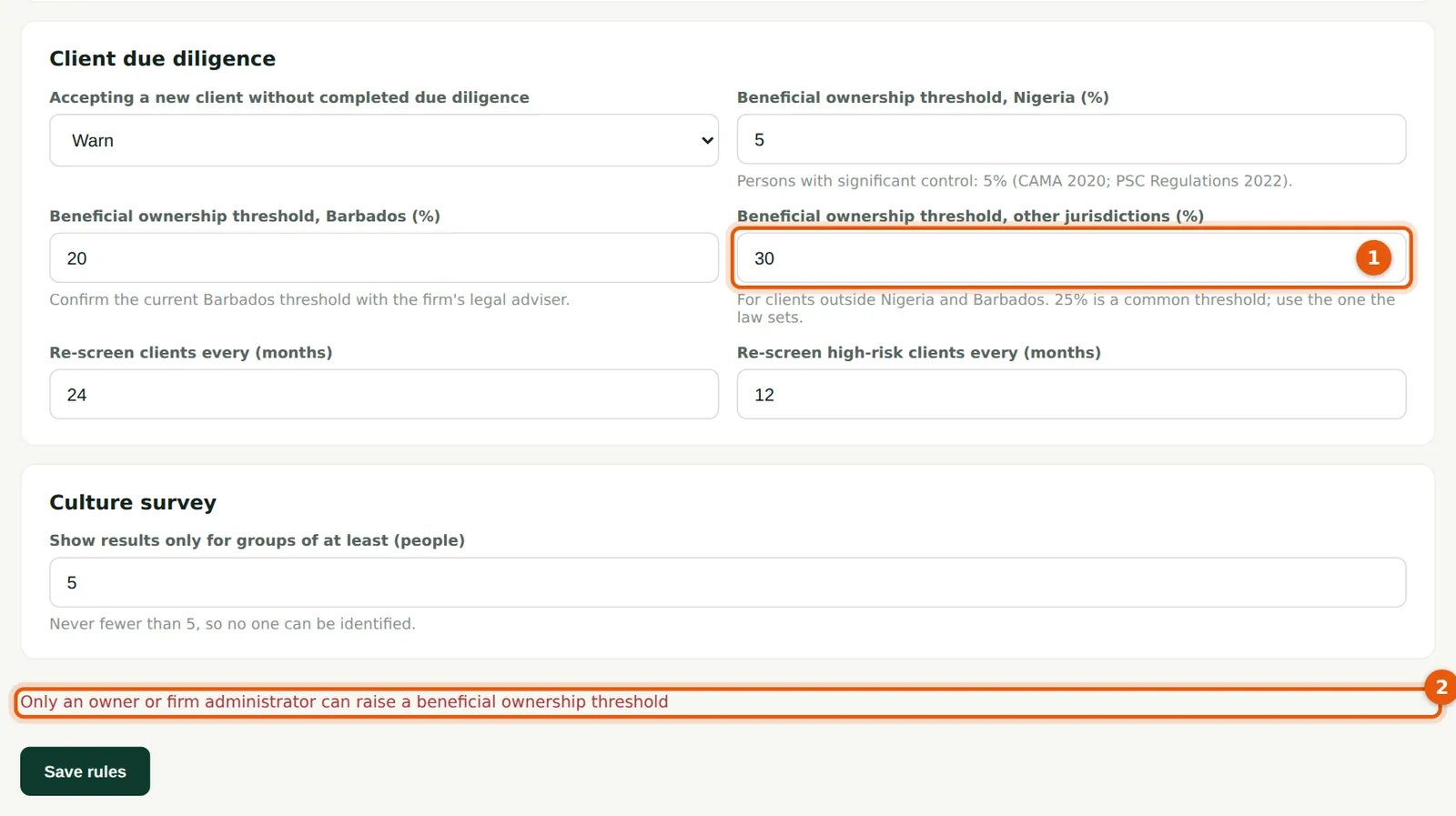
Why
A higher threshold means fewer owners are checked, so it weakens a safeguard. Since October 2026 only an owner or firm administrator can raise any of the three thresholds (Nigeria, Barbados and other jurisdictions). When Daniel Reyes enters 30% (1), SQMTrove refuses (2). The quality lead can still lower a threshold. A threshold left empty is refused; it used to be saved as 0%. This applies to Nigerian firms too.
Who
Owner or firm administrator.
What to do
- Ask the owner or a firm administrator to raise a threshold, with the legal basis.
29.13 Beneficial owners: the threshold follows the client's jurisdiction
Why
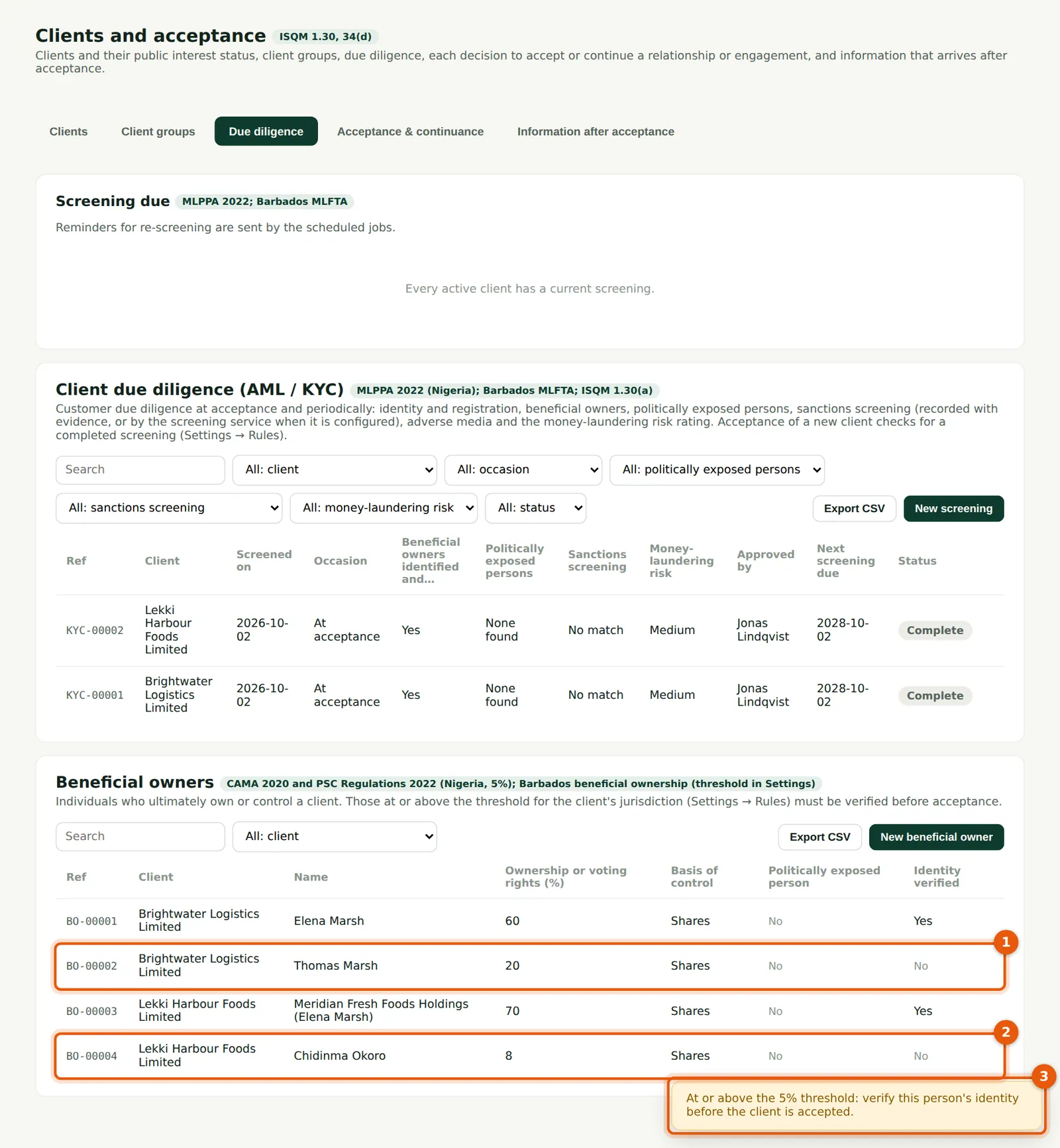
Thomas Marsh owns 20% of Brightwater Logistics Limited (1), a client in another jurisdiction. That is below the firm's 25% threshold, so he need not be verified before acceptance. Chidinma Okoro owns 8% of Lekki Harbour Foods Limited (2), a Nigerian client, where the threshold is 5%. When the owner is saved, SQMTrove warns (3): “At or above the 5% threshold: verify this person's identity before the client is accepted.” Brightwater's acceptance went through without a warning.
Who
Engagement partner; manager.
What to do
- Record each owner with the percentage (chapter 24).
- Verify every owner at or above the threshold for the client's jurisdiction before the acceptance.
29.14 Accepting a Nigerian client: the FRC check
Why
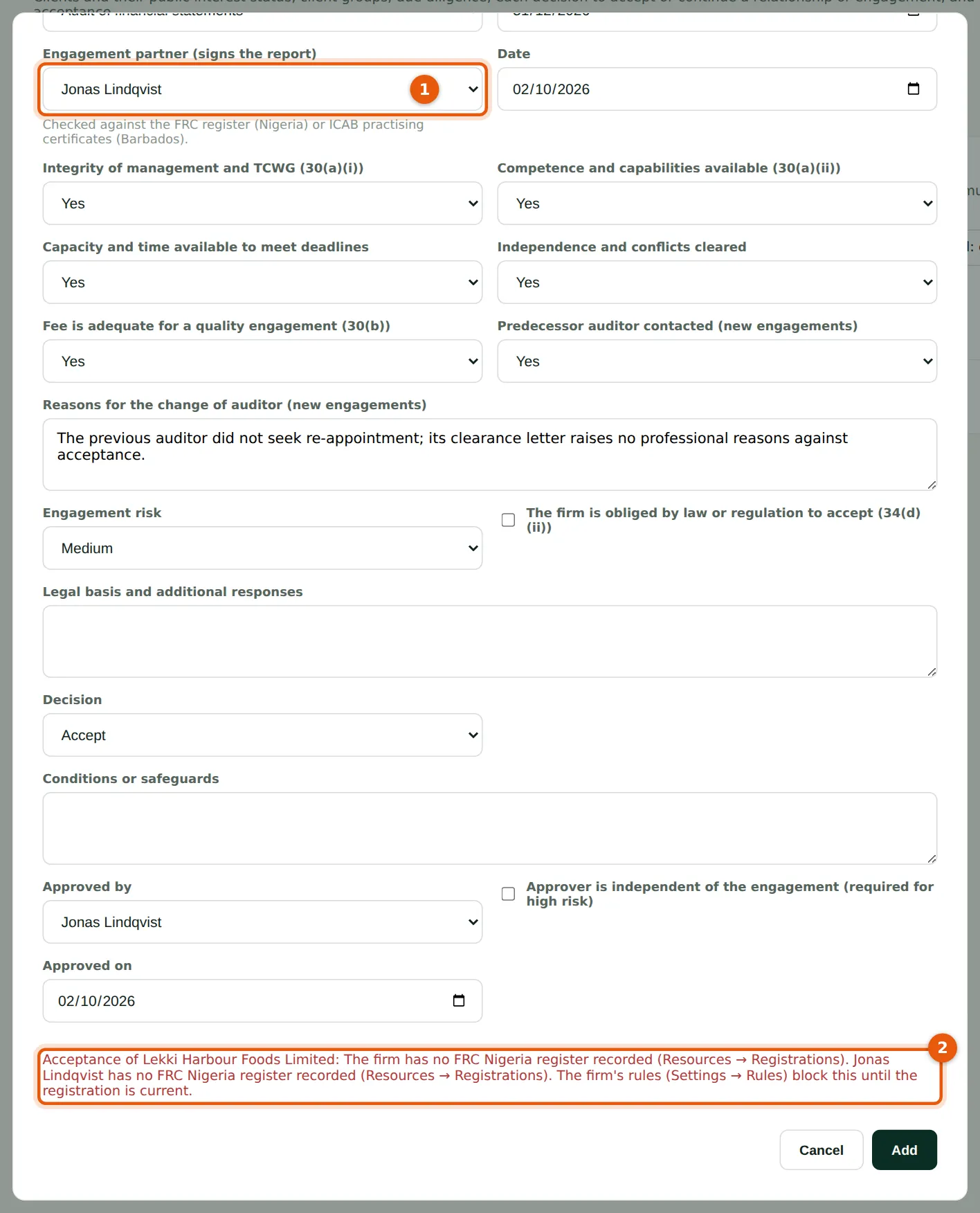
Lekki Harbour Foods is in Nigeria, so its acceptance is checked against the FRC register, as in a Nigerian firm. The firm and the signing partner (1) have no FRC registration recorded, and the check is on Block, so SQMTrove refuses the decision (2). With Warn, the decision is saved with two warnings: the missing FRC registrations, and the owner at 5% or more who is not verified. Brightwater Logistics, in another jurisdiction, has no registration check.
Who
Partners; quality lead.
What to do
- Record the FRC registrations of the firm and the signing partner in Resources → Registrations (step 24.5).
- Verify the owners at or above 5%, then record the acceptance again.
29.15 Import engagements with a jurisdiction column
Why
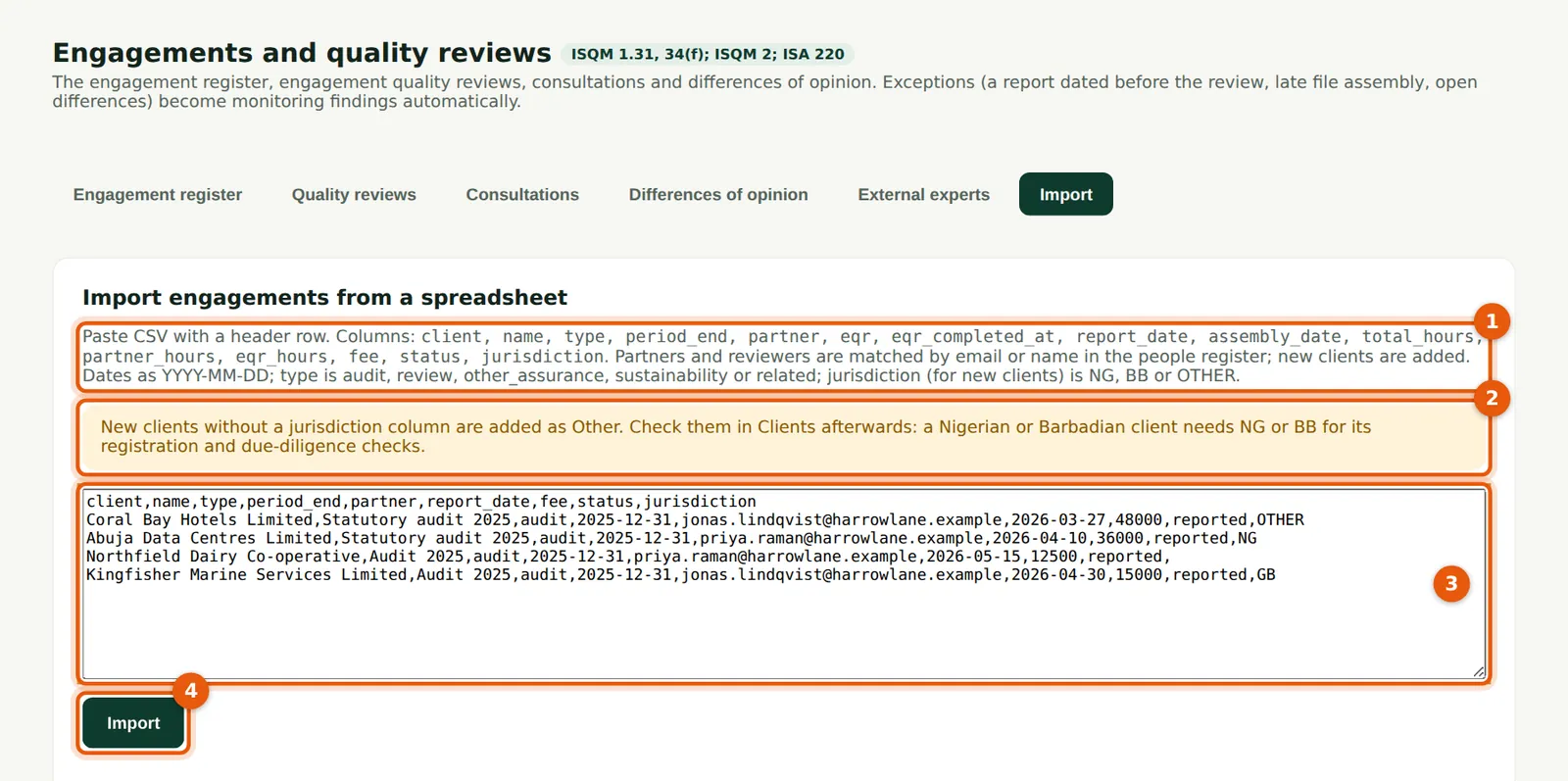
The import (1) takes an optional jurisdiction column: NG, BB or OTHER. It sets the jurisdiction of each client the import adds; clients already in the register keep theirs. In an International firm a new client without a jurisdiction is added as Other, and the banner (2) says so. Paste the rows (3) and choose Import (4).
Who
Quality lead.
What to do
- Add a jurisdiction column to the spreadsheet: NG for Nigeria, BB for Barbados, OTHER for any other country.
- Paste the CSV (3) and choose Import (4).
29.16 Check the import result
Why
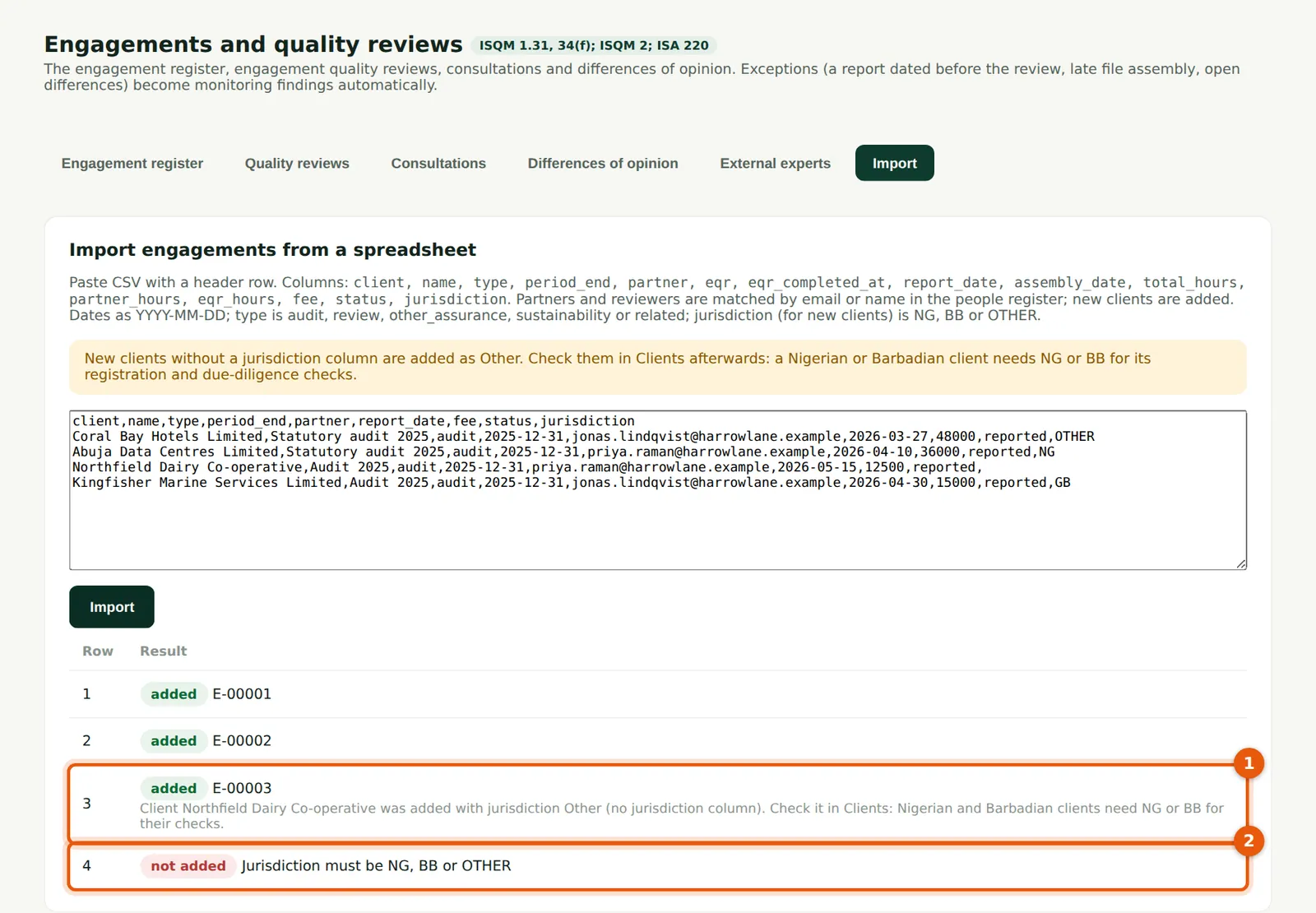
Northfield Dairy Co-operative had no jurisdiction, so it was added as Other, with a note (1) to check it in Clients. Until a Nigerian or Barbadian client recorded as Other is corrected, it skips the Nigerian or Barbadian checks. The row for Kingfisher Marine Services Limited had GB in the column and was not added (2): only NG, BB and OTHER are accepted. In a Nigerian firm a new client without a jurisdiction is added as Nigeria, with no note.
Who
Quality lead.
What to do
- Open Clients & acceptance → Clients and correct the jurisdiction of every client with a note.
- Fix the refused rows and import them again.